climate settings VOLVO XC90 TWIN ENGINE 2018 User Guide
[x] Cancel search | Manufacturer: VOLVO, Model Year: 2018, Model line: XC90 TWIN ENGINE, Model: VOLVO XC90 TWIN ENGINE 2018Pages: 686, PDF Size: 17 MB
Page 148 of 686
||DISPLAYS AND VOICE CONTROL
* Option/accessory.
146 Voice control is carried out as a dialog, with spo-
ken commands from the user and verbal respon-
ses from the system. The voice control system
uses the same microphone as devices connected
with Bluetooth, and the voice control system
responds through the vehicle's loudspeakers. In
certain cases, text messages will also be dis-
played in the instrument panel. The functions are
controlled using the right-side steering wheel
keypad and settings are made in the center dis-
play.
System updates
The voice control system is continuously
improved. For optimal functionality, always down-
load the latest update at support.volvocars.com.
Related information
•
Using voice commands (p. 146)
• Voice control for cellular phones (p. 147)
• Voice control for radio and media (p. 148)
• Climate control system voice commands
(p. 203)
• Voice control settings (p. 148) Using voice commands
15
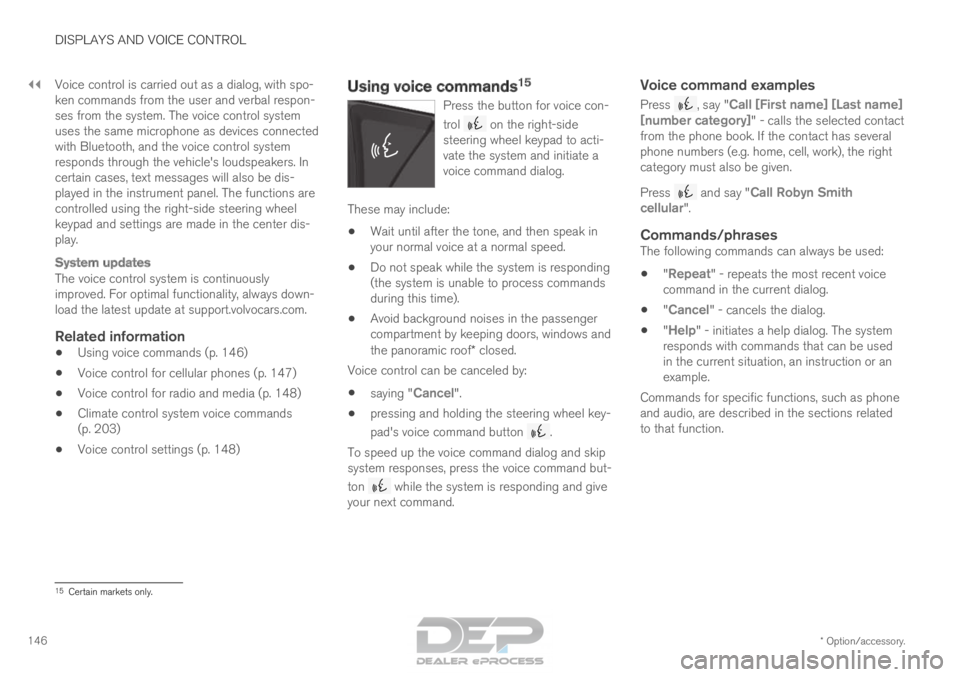
Press the button for voice con-
trol on the right-side
steering wheel keypad to acti-
vate the system and initiate a
voice command dialog. These may include:
• Wait until after the tone, and then speak in
your normal voice at a normal speed.
• Do not speak while the system is responding
(the system is unable to process commands
during this time).
• Avoid background noises in the passenger
compartment by keeping doors, windows and
the panoramic roof* closed.
Voice control can be canceled by:
• saying "Cancel".
• pressing and holding the steering wheel key-
pad's voice command button .
To speed up the voice command dialog and skip
system responses, press the voice command but-
ton while the system is responding and give
your next command.
Voice command examples
Press , say "Call [First name] [Last name]
[number category]" - calls the selected contact
from the phone book. If the contact has several
phone numbers (e.g. home, cell, work), the right
category must also be given.
Press and say "
Call Robyn Smith
cellular".
Commands/phrasesThe following commands can always be used:
• "Repeat" - repeats the most recent voice
command in the current dialog.
• "Cancel" - cancels the dialog.
• "
Help" - initiates a help dialog. The system
responds with commands that can be used
in the current situation, an instruction or an
example.
Commands for specific functions, such as phone
and audio, are described in the sections related
to that function. 15
Certain markets only.
Page 149 of 686
DISPLAYS AND VOICE CONTROL
* Option/accessory.147
Numbers
Number commands can be given in different
ways depending on the function to be controlled:
•Phone numbers and zip codes should be
given by stating each number individually, e.g.
zero three one two two four four three
(03122443).
• Addresses can be given by stating each
number individually or in a group, e.g. two two
or twenty-two (22). For English and Dutch
language settings, groups of numbers can
also be said in sequence, e.g. twenty-two
twenty-two (22 22). For English, double or
triple digits can also be used, e.g. double
zero (00). Numbers in the range 0-2300 can
be used.
• Frequencies can be given as ninety-eight
point eight (98.8), one hundred four point
two, or hundred four point two (104.2).
Related information
•Voice control (p. 145)
• Voice control for cellular phones (p. 147)
• Voice control for radio and media (p. 148)
• Climate control system voice commands
(p. 203)
• Voice control settings (p. 148) Voice control for cellular phones
16
Call a contact in the phone book, have a text
message read aloud or dictate short messages
using voice commands to a Bluetooth-con-
nected phone. To access a contact in the phone book, the voice
command must contain the contact information
entered in the phone book. If a contact, e.g.
Robyn Smith, has several phone numbers listed
in the phone book, a number category such as
home or cellular can also be specified, i.e. "Call
Robyn Smith cellular".
Tap and say one of the following commands:
• "Call [contact]" - call the selected contact
from the phone book.
• "
Call [phone number]" - call a phone num-
ber.
• "
Recent calls" - display the list of recent
calls.
• "Read message" - read a text message
aloud. If there are several messages, select
the message to read aloud.
• "
Message to [contact]" - the user is
prompted to dictate a short message. The
message will then be read aloud and the
user can choose to send 17
or re-dictate the
message. The vehicle must be connected to
the Internet to access this function.
Related information
• Voice control (p. 145)
• Using voice commands (p. 146)
• Voice control for radio and media (p. 148)
• Climate control system voice commands
(p. 203)
• Voice control settings (p. 148)
• Internet-connected vehicle* (p. 529) 16
Certain markets only.
17 Only certain phones can send messages via the vehicle. For additional in\
formation on compatibility, see support.volvocars.com.
Page 150 of 686
DISPLAYS AND VOICE CONTROL
* Option/accessory.
148 Voice control for radio and media
18
Voice commands for the radio and media play-
ers are shown below. Tap and say one of the following commands:
• "Media" - initiates a dialog for media and
radio and displays examples of commands.
• "
Play [artist]" - plays music by the selected
artist.
• "
Play [song title]" - plays the selected
song.
• "
Play [song title] from [album]" - plays
the selected song from the selected album.
• "
Play [radio station]" - starts the selected
radio station.
• "
Tune to [frequency]" - tunes to the
selected radio frequency in the currently
active waveband. If no radio source is active,
the FM band will be started as default.
• "Tune to [frequency] [waveband]" - tunes
to the selected radio frequency on the
selected waveband.
• "
Radio" - starts FM radio.
• "
Radio FM" - starts FM radio.
• "SiriusXM" - starts SiriusXM radio*
• "
CD" - starts playback from CD*.
• "USB" - starts playback from USB. •
"
iPod" - starts playback from iPod.
• "
Bluetooth" - starts playback from a Blue-
tooth-connected media source.
• "
Similar music" - plays music from a USB-
connected device with music similar to that
currently playing.
Related information
• Voice control (p. 145)
• Using voice commands (p. 146)
• Voice control for cellular phones (p. 147)
• Climate control system voice commands
(p. 203)
• Voice control settings (p. 148) Voice control settings
19
Settings for the voice control system are made
here.
Settings System Voice Control
Settings can be personalized in the following
areas:
• Repeat Voice Command
• Gender
• Speech Rate
Sound settingsSelect sound settings under:
Settings Sound System Volumes
Voice Control
Language settingsThe voice control system is not available for all
languages. The languages available for voice
commands are indicated by the
icon in the
list of languages.
Changing the language here will also change the
language in the menus, messages and help texts.
Settings System System Languages
and Units System Language
18
Certain markets only.
19 Certain markets only.
Page 151 of 686

DISPLAYS AND VOICE CONTROL
149
Related information
•Voice control (p. 145)
• Using voice commands (p. 146)
• Voice control for cellular phones (p. 147)
• Climate control system voice commands
(p. 203)
• Voice control for radio and media (p. 148)
• Sound settings (p. 486)
• Changing system language (p. 132)
Page 204 of 686
CLIMATE CONTROL
* Option/accessory.
202 Climate
The vehicle is equipped with electronic climate
control. The climate system cools, heats and
dehumidifies the air in the passenger compart-
ment. All of the climate system functions are controlled
from the center display and the buttons on the
center console.
Certain rear seat functions can also be controlled
from the climate controls* on the rear of the tun-
nel console.
Related information
• Climate zones (p. 202)
• Climate control sensors (p. 202)
• Perceived temperature (p. 203)
• Climate control system voice commands
(p. 203)
• Parking climate (p. 230)
• Air quality (p. 204)
• Air distribution (p. 207)
• Climate system controls (p. 213) Climate zones
The vehicle is divided into climate zones to make
it possible to set different temperatures for dif-
ferent parts of the passenger compartment.
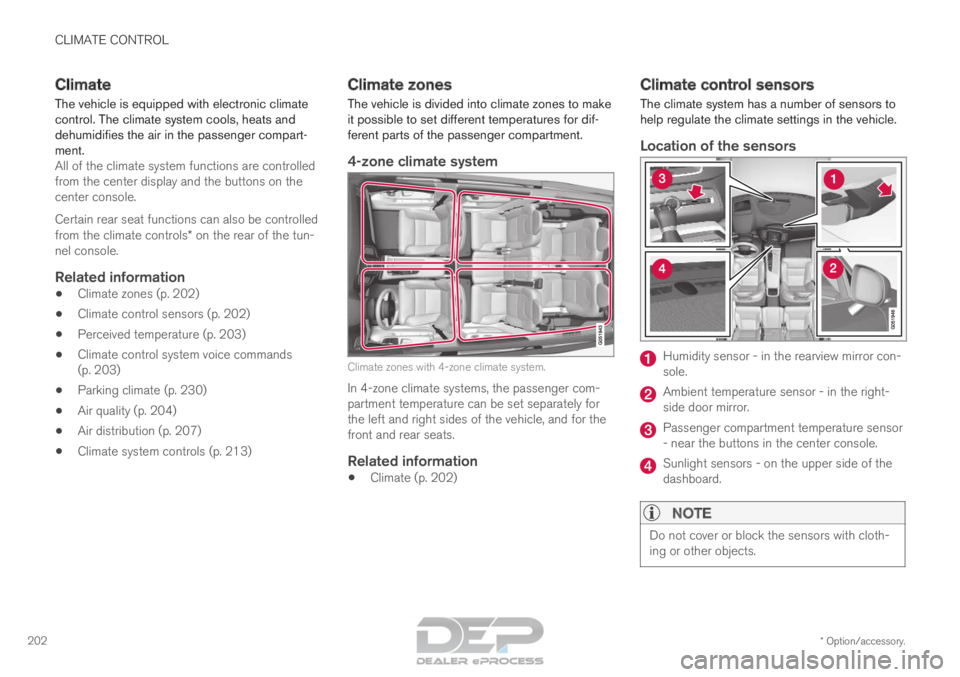
4-zone climate system Climate zones with 4-zone climate system.
In 4-zone climate systems, the passenger com-
partment temperature can be set separately for
the left and right sides of the vehicle, and for the
front and rear seats.
Related information
• Climate (p. 202) Climate control sensors
The climate system has a number of sensors to
help regulate the climate settings in the vehicle.
Location of the sensors Humidity sensor - in the rearview mirror con-
sole.
Ambient temperature sensor - in the right-
side door mirror.
Passenger compartment temperature sensor
- near the buttons in the center console.
Sunlight sensors - on the upper side of the
dashboard.
NOTE
Do not cover or block the sensors with cloth-
ing or other objects.
Page 206 of 686
||CLIMATE CONTROL
* Option/accessory.
204 •
"
Turn on auto" - activates automatic climate
control.
• "
Air condition on"/"Air condition off" -
activates/deactivates air conditioning.
• "
Recirculation on"/"Recirculation off " -
activates/deactivates air recirculation.
• "
Turn on defroster "/"Turn off defroster"
- activates/deactivates window and door mir-
ror defrosting.
• "
Turn on max defroster
"/"Turn off max
defroster " - activates/deactivates max
defroster.
• "
Turn on electric defroster"/"Turn off
electric defroster" - activates/deactivates
heated windshield*.
• "
Turn on rear defroster"/"Turn off rear
defroster" - Activates/deactivates heated rear window and door mirrors.
• "Turn steering wheel heat on"/"Turn
steering wheel heat off" - activates/deac-
tivates heated steering wheel *.
• "
Raise steering wheel heat "/"
Lower
steering wheel heat" - raises/lowers the
level of steering wheel heating*.
• "
Turn on seat heat"/"Turn off seat heat"
- activates/deactivates seat heating*.
• "
Raise seat heat"/"Lower seat heat" -
raises/lowers the level of seat heating*. •
"
Turn on seat ventilation"/"Turn off seat
ventilation" - activates/deactivates seat
ventilation*.
• "
Raise seat ventilation"/"Lower seat
ventilation" - raises/lowers the level of seat
ventilation*.
Related information
• Climate (p. 202)
• Voice control (p. 145)
• Using voice commands (p. 146)
• Voice control settings (p. 148) Air quality
The materials used in the passenger compart-
ment and air filtering system have been selected
to ensure a high level of air quality in the passen-
ger compartment.
Materials used in the passenger
compartment
The materials in the passenger compartment are
designed to be pleasant and comfortable, even
for people with asthma or allergies.
The materials have been developed and tested to
minimize dust in the passenger compartment and
make it easier to keep clean.
The mats in both the passenger compartment
and cargo compartment can be easily removed
for cleaning.
Use Volvo-recommended cleaning agents and
car care products to clean the interior.
Air filtering systemsIn addition to the passenger compartment filter,
the Clean Zone Interior Package* and Interior Air
Quality System* also help maintain high air qual-
ity in the passenger compartment.
Related information
• Climate (p. 202)
• Clean Zone* (p. 205)
• Clean Zone Interior Package* (p. 206)
Page 209 of 686
CLIMATE CONTROL
}}
* Option/accessory. 207
Activating and deactivating the air
quality sensor*
The air quality sensor is part of the fully automa-
ted Interior Air Quality System (IAQS).
The air quality sensor can be switched on or off.
1.
Tap Settings in the Top view in the center
display.
2. Tap Climate.
3. Select Air Quality Sensor to activate/deac-
tivate the air quality sensor.
Related information
• Interior Air Quality System* (p. 206) Passenger compartment air filter
All air entering the passenger compartment
through the climate control system intake is fil-
tered.
Replacing the passenger compartment
filter
To maintain the high performance of the climate
control system, the filter must be replaced regu-
larly. Follow Volvo's service schedule for recom-
mended replacement intervals. When driving in
areas with a lot of smog, dust, etc., the filter may
need to be changed more frequently.
NOTE There are two types of passenger compart-
ment filters. Make sure that the correct filter
is installed.
Related information
•
Air quality (p. 204)
• Clean Zone* (p. 205)
• Clean Zone Interior Package* (p. 206)
• Interior Air Quality System* (p. 206) Air distribution
The climate system distributes incoming air
through a number of vents in the passenger
compartment.
Automatic and manual air distributionWhen the auto-climate feature is on, air distribu-
tion is regulated automatically. Air distribution can
also be controlled manually.
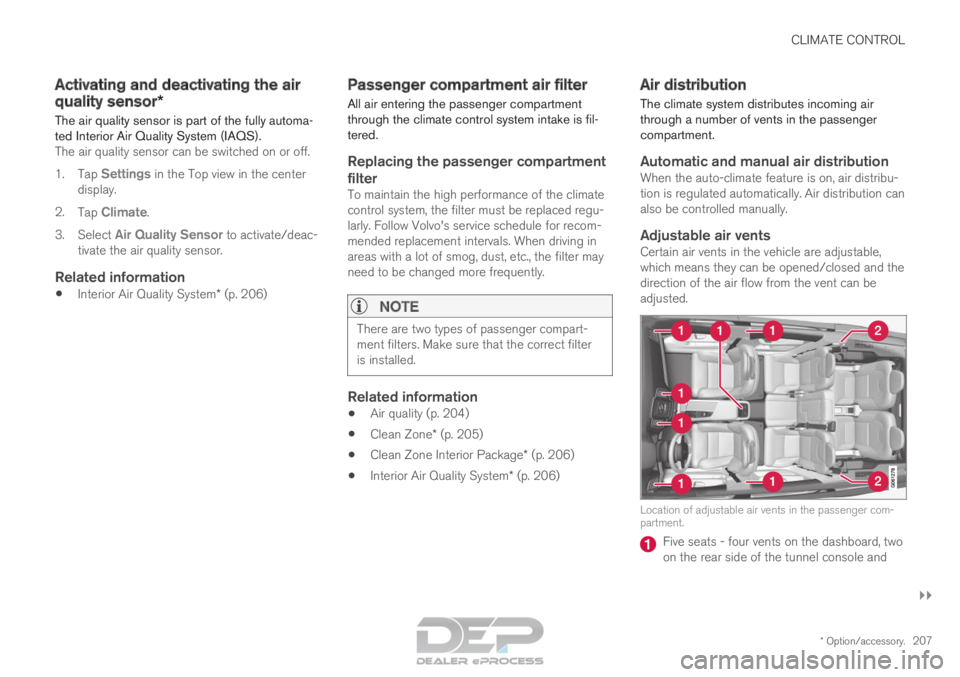
Adjustable air ventsCertain air vents in the vehicle are adjustable,
which means they can be opened/closed and the
direction of the air flow from the vent can be
adjusted. Location of adjustable air vents in the passenger com-
partment.
Five seats - four vents on the dashboard, two
on the rear side of the tunnel console and
Page 215 of 686

CLIMATE CONTROL
}}
* Option/accessory. 213
Climate system controls
The climate system functions are controlled from
physical buttons on the center console, the cen-
ter display, and the climate panel on the rear
side of the tunnel console.
Physical buttons in the center console Button for heated windshield* and max
defroster. Button for heated rear window and door mir-
rors.
Climate bar in the center displayThe most common climate system functions can
be controlled from the climate bar. Temperature control for the driver and pas-
senger sides.
Control for heated* and ventilated* driver and
passenger seats, and heated steering
wheel*. Button for opening Climate view. The graphic
in the button shows activated climate system
settings.
Climate view in the center displayTap the center button on the climate bar to open
Climate view. Climate view is divided into the fol-
lowing tabs:
• Main climate
• Rear climate
• Parking climate Toggle between the tabs by swiping the screen
to the left/right or by tapping the desired head-
ing.
Page 217 of 686
CLIMATE CONTROL
}}
* Option/accessory. 215
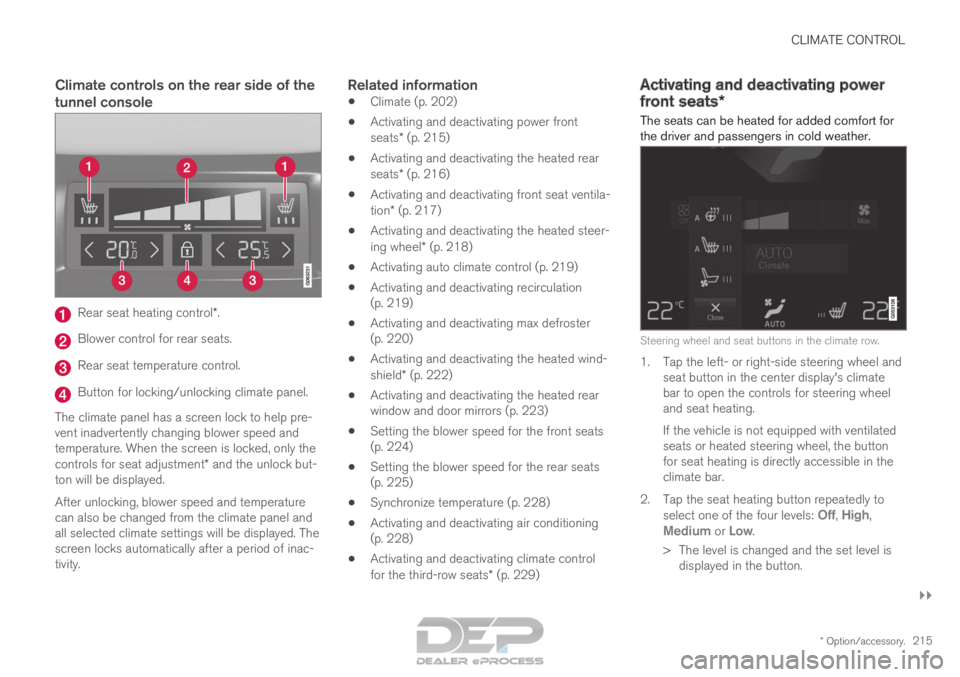
Climate controls on the rear side of the
tunnel consoleRear seat heating control*.
Blower control for rear seats.
Rear seat temperature control.
Button for locking/unlocking climate panel.
The climate panel has a screen lock to help pre-
vent inadvertently changing blower speed and
temperature. When the screen is locked, only the
controls for seat adjustment* and the unlock but-
ton will be displayed.
After unlocking, blower speed and temperature
can also be changed from the climate panel and
all selected climate settings will be displayed. The
screen locks automatically after a period of inac-
tivity.Related information
• Climate (p. 202)
• Activating and deactivating power front
seats* (p. 215)
• Activating and deactivating the heated rear
seats* (p. 216)
• Activating and deactivating front seat ventila-
tion* (p. 217)
• Activating and deactivating the heated steer-
ing wheel* (p. 218)
• Activating auto climate control (p. 219)
• Activating and deactivating recirculation
(p. 219)
• Activating and deactivating max defroster
(p. 220)
• Activating and deactivating the heated wind-
shield* (p. 222)
• Activating and deactivating the heated rear
window and door mirrors (p. 223)
• Setting the blower speed for the front seats
(p. 224)
• Setting the blower speed for the rear seats
(p. 225)
• Synchronize temperature (p. 228)
• Activating and deactivating air conditioning
(p. 228)
• Activating and deactivating climate control
for the third-row seats* (p. 229) Activating and deactivating power
front seats*
The seats can be heated for added comfort for
the driver and passengers in cold weather. Steering wheel and seat buttons in the climate row.
1. Tap the left- or right-side steering wheel and
seat button in the center display's climate
bar to open the controls for steering wheel
and seat heating.
If the vehicle is not equipped with ventilated
seats or heated steering wheel, the button
for seat heating is directly accessible in the
climate bar.
2.
Tap the seat heating button repeatedly to
select one of the four levels: Off,
High,
Medium or Low.
>
The level is changed and the set level is
displayed in the button.
Page 218 of 686

||CLIMATE CONTROL
* Option/accessory.
216
Related information
• Climate system controls (p. 213)
• Activating and deactivating the heated front
seat* (p. 216) Activating and deactivating the
heated front seat*
The seats can be heated for added comfort for
the driver and passengers in cold weather. Seat heating can be set to automatically activate
when the engine is started. When set to automat-
ically activate, heating will be turned on at low
ambient temperatures.
1. Tap Settings in the Top view in the center
display.
2. Tap Climate.
3. Select Auto Driver Seat Heating Level
and
Auto Passenger Seat Heating Level
to activate/deactivate automatic start of
heated driver's and passenger seat.
4. Select Low, Medium or High to select level
after the function has been activated.
Related information
• Climate system controls (p. 213)
• Activating and deactivating power front
seats* (p. 215) Activating and deactivating the
heated rear seats*
The seats can be heated for added comfort for
the driver and passengers in cold weather.
Activating and deactivating the heated
rear seats from the front seats Seat heating buttons in the Rear climate group in Cli-
mate view.
1. Open Climate view in the center display and select the Rear climate tab.
2.
Tap the seat heating button repeatedly to
select one of the four levels: Off, High,
Medium or Low.
>
The level is changed and the set level is
displayed in the button.