center console VOLVO XC90 TWIN ENGINE 2018 Owner's Manual
[x] Cancel search | Manufacturer: VOLVO, Model Year: 2018, Model line: XC90 TWIN ENGINE, Model: VOLVO XC90 TWIN ENGINE 2018Pages: 686, PDF Size: 17 MB
Page 457 of 686

STARTING AND DRIVING
}}
455
the hill is and without the brakes needing to be
applied. The brake lights will illuminate when the
function is activated.
The driver can brake to stop or slow the vehicle
at any time by depressing the brake pedal.
HDC is activated along with Low Speed Control
(LSC), which facilitates and improves traction and
control on rough and slippery surfaces. The sys-
tem is intended to be used at low speeds, up to
approximately 40 km/h (25 mph).
To keep in mind when using HDC
•
If the function is switched off while driving on
a steep downhill gradient, braking effect will
be gradually reduced.
• HDC can be used in gear positions D and R,
and in manual gears 1 or 2.
• It is not possible to manually shift to third
gear or higher when HDC is active.
NOTE When LSC with HDC is activated in the OFF
ROAD drive mode, the feel of the accelerator
pedal and engine response will change.
NOTE
This drive mode is not designed to be used
for normal street driving.
NOTE The function is deactivated when driving at
high speeds and must be reactivated at lower
speeds if so desired.
Related information
•
Activating and deactivating Hill Descent Con-
trol using the function button (p. 455)
• Changing drive mode (p. 449)
• Low Speed Control (p. 453)
• All Wheel Drive (AWD) (p. 443) Activating and deactivating Hill
Descent Control using the function
button
Vehicles that are not equipped with drive mode
controls in the tunnel console have a function
button for Hill Descent Control with Hill
Descent Control in the center display's Func-
tion view.
Selecting Hill Descent Control in the
center display's Function view
HDC only works at low speeds.
– Tap the
Hill Descent Control button to
activate or deactivate the function. > An indicator light in the button will illumi-
nate when the function is activated.
When the engine is switched off, the function will
be automatically deactivated.
NOTE The function is deactivated when driving at
high speeds and must be reactivated at lower
speeds if so desired.
Page 502 of 686
||AUDIO, MEDIA AND INTERNET
* Option/accessory.
500
iTunes taggingFrom the center display's Top view, tap SiriusXM
Settings. Tap the iTunes Tagging menu. Tap
the iTunes Tagging box to activate/deactivate
this function and tap
Close to return to Home
view. Tap Tags List to display a list of all tagged
songs.
If the function is activated, the iTunes tag button will be displayed in Home view. If a song is played
that you would like to buy in the iTunes store, tap
this button while the song is playing to tag it. If a
song with
iTunes Tagging information is availa-
ble, the button will be selectable. Tap the button
to tag the song. If you would like to buy a tagged
song via iTunes, Tap the iTunes tag button.
To buy a song in iTunes, begin by connecting an
iPhone/iPod/iPad to the USB port in the tunnel
console. The iTunes tagging list will automatically
be transferred to the device and removed from
the list in the vehicle. If the device is connected
when a song is tagged, the data will automatically
be saved in the device. To purchase the song,
consult the iTunes support page.
Related information
• SiriusXM ®
Satellite radio* (p. 498)
• Entering characters, letters and words by
hand in the center display (p. 129)
• Settings for SiriusXM ®
Satellite radio*
(p. 500) •
Settings for SiriusXM ®
Satellite radio*
(p. 500)
• Connecting a device via the USB port
(p. 514) Settings for SiriusXM
®
Satellite
radio*
There are numerous settings that can be made
to enhance your SiriusXM ®
Satellite radio listen-
ing experience.
Settings
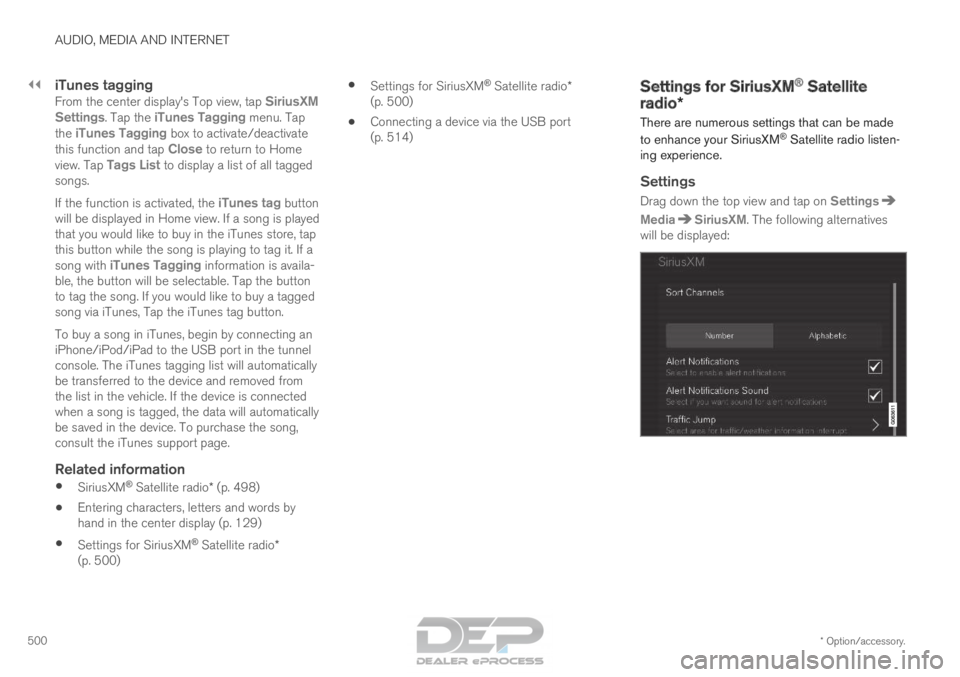
Drag down the top view and tap on Settings Media SiriusXM
. The following alternatives
will be displayed:
Page 582 of 686

LOADING, STORAGE AND PASSENGER COMPARTMENT
* Option/accessory.
580 Passenger compartment interior
Overview of the passenger compartment interior
and storage spaces.
Front seats Storage compartment in the door panel and near the
steering wheel, glove compartment and sun visors.
Storage compartments with cup holders, electrical out-
lets and USB ports in the tunnel console.
Rear seat
Second row of seats Storage compartment in the door panel, cup holders* in
the center seat's backrest, storage pocket* in the front
seat's backrest and electrical outlets in the tunnel con-
sole.Third row of seats* Storage compartment and cup holders in the side panel
and storage compartment between the seats.
WARNING
Store loose objects, such as cell phone, cam-
era, remote control for extra equipment, etc.,
in the glove compartment or another compart-
ment. Otherwise, these could injure people in
the vehicle in the event of hard braking or a
collision.
CAUTION
Keep in mind that glossy surfaces can be
easily scratched by e.g. metal objects. Do not
place keys, phones or similar items on sensi-
tive surfaces.
Page 583 of 686

LOADING, STORAGE AND PASSENGER COMPARTMENT
* Option/accessory.581
Related information
•Electrical outlets (p. 582)
• Using the glove compartment (p. 585)
• Sun visors (p. 586)
• Tunnel console (p. 581)
• Connecting a device via the USB port
(p. 514) Tunnel console
The tunnel console is located between the front
seats. Storage compartment with cover*. The cover
can be opened/closed by pressing the han-
dle. Storage compartment with a 12 V outlet and
cup holders for the driver and passenger.
Storage compartment and USB port under
the armrest.
Climate control panel for the rear seats* or
storage compartment.WARNING Store loose objects, such as cell phone, cam-
era, remote control for extra equipment, etc.,
in the glove compartment or another compart-
ment. Otherwise, these could injure people in
the vehicle in the event of hard braking or a
collision.
NOTE
One of the sensors for the alarm* is located
under the cup holder in the center console.
Avoid placing coins, keys and other metal
objects in the cup holder as this could trigger
the alarm.
CAUTION Keep in mind that glossy surfaces can be
easily scratched by e.g. metal objects. Do not
place keys, phones or similar items on sensi-
tive surfaces.
Related information
•
Passenger compartment interior (p. 580)
• Electrical outlets (p. 582)
• Climate system controls (p. 213)
Page 587 of 686

LOADING, STORAGE AND PASSENGER COMPARTMENT
585
WARNING•
Only use accessories that are not dam-
aged or malfunctioning. The accessories
must be designed for 120 V and 60 Hz,
with plugs intended for the outlet. The
accessories must be CE marked, UL
marked or have an equivalent safety
marking.
• New let outlets, plugs or accessories
come into contact with water or another
fluid. Do not touch or use the outlet if it
appears damaged or has been in contact
with water or another fluid.
• Do not connect power strips, adapters or
extension cords to the outlet has this
could cause the outlet's safety functions
to malfunction.
• The outlet is equipped with a pet guard.
Make sure that no one picks at or dam-
ages the outlet in such a way that the
guard is disabled. Children should not be
left unsupervised in the vehicle when the
outlet is active.
Failure to follow the above could lead to
severe or fatal electrical shocks.
Related information
• Electrical outlets (p. 582)
• Passenger compartment interior (p. 580) Using the glove compartment
The glove compartment is located on the pas-
senger side. The glove compartment can be
used to store the Owner's Manual, maps, etc.
There is also room for a pen and a card holder. Glove compartment and opening button on the center
console.
The glove compartment is opened by pressing
the opening button in the center console.
Locking and unlocking the glove box
The glove compartment can be locked ("private
locking") when the vehicle is left at a workshop,
hotel, etc. When private locking is activated, the
tailgate is also locked.
Using the glove box as a cooled area
The glove compartment can be used to cool e.g.
drinks or food. Cooling is possible when the cli-
mate system is active (i.e. when the ignition is in
mode II or when the engine is running). The illustration is generic – the design may vary.
Activate cooling
Deactivate cooling
– Activate or deactivate cooling by moving the
control as far as possible toward the passen-
ger compartment/glove compartment.
Related information
•
Passenger compartment interior (p. 580)
• Private Locking (p. 266)
Page 629 of 686
MAINTENANCE AND SERVICE
}}
* Option/accessory. 627
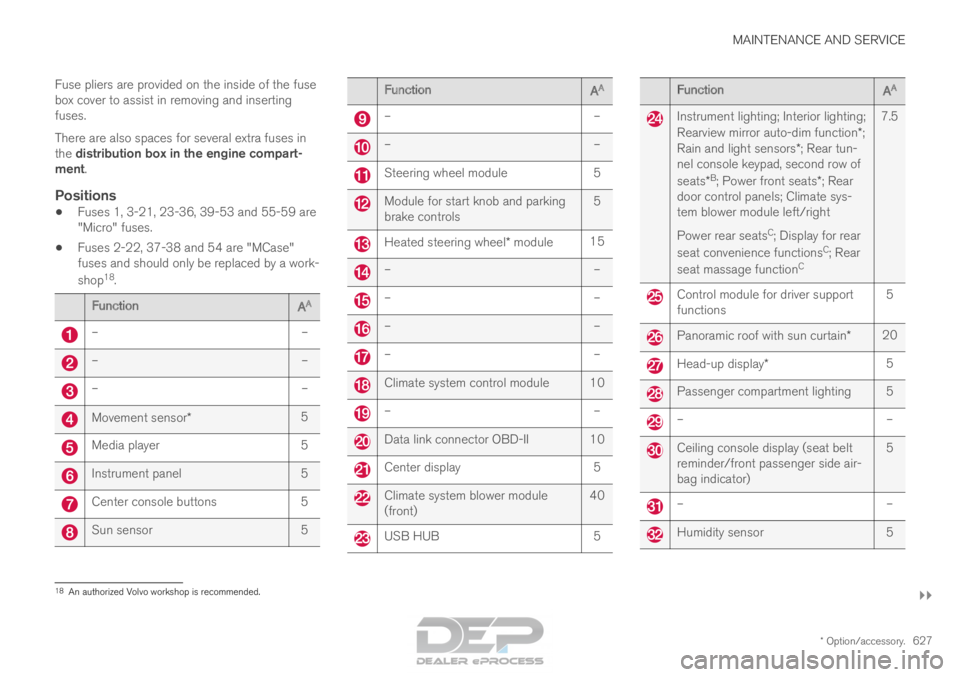
Fuse pliers are provided on the inside of the fuse
box cover to assist in removing and inserting
fuses.
There are also spaces for several extra fuses in
the distribution box in the engine compart-
ment.
Positions
•
Fuses 1, 3-21, 23-36, 39-53 and 55-59 are
"Micro" fuses.
• Fuses 2-22, 37-38 and 54 are "MCase"
fuses and should only be replaced by a work-
shop 18
. Function
AA –
––
––
–Movement sensor*
5Media player
5Instrument panel
5Center console buttons
5Sun sensor
5 Function
AA –
– –
– Steering wheel module
5 Module for start knob and parking
brake controls
5 Heated steering wheel* module
15 –
– –
– –
– –
– Climate system control module 10
–
– Data link connector OBD-II 10
Center display
5 Climate system blower module
(front)
40 USB HUB
5 Function
AA Instrument lighting; Interior lighting;
Rearview mirror auto-dim function*;
Rain and light sensors*; Rear tun-
nel console keypad, second row of
seats* B
; Power front seats*; Rear
door control panels; Climate sys-
tem blower module left/right
Power rear seats C
; Display for rear
seat convenience functions C
; Rear
seat massage function C7.5 Control module for driver support
functions
5 Panoramic roof with sun curtain*
20 Head-up display*
5 Passenger compartment lighting 5
–
– Ceiling console display (seat belt
reminder/front passenger side air-
bag indicator)
5 –
– Humidity sensor
518
An authorized Volvo workshop is recommended.
Page 643 of 686

MAINTENANCE AND SERVICE
641
Automatic car washes
The vehicle should be washed as soon as it
becomes dirty. This makes the vehicle easier to
clean because dirt does not attach as strongly. It
also reduces the risk of scratches and keeps the
vehicle looking new.
Automatic car washesAn automatic car wash is a fast and easy way to
keep your vehicle clean, but it does not reach all
areas of the vehicle. For best results, Volvo rec-
ommends hand washing your vehicle or supple-
menting automatic car washes with a hand wash.
NOTE
Volvo recommends not washing the vehicle in
an automatic car wash during the first few
months; the paintwork on new vehicles takes
some time to fully harden.
CAUTION
Before driving the vehicle into a car wash,
deactivate the Automatic Braking when Sta-
tionary and Automatic Parking Brake Applica-
tion functions. If the functions are not deacti-
vated, the brake system will seize when the
vehicle is stationary and the vehicle will not be
able to roll.
CAUTION For automatic car washes in which the vehicle
is pulled forward on rolling wheels:
1.
Before washing the vehicle, make sure
that the automatic rain sensor is deacti-
vated. If it is not deactivated and inadver-
tently starts, the wiper arms could be
damaged.
2. To help prevent damage from the auto- matic car wash machinery, make sure
that the door mirrors are folded in, anten-
nas retracted or removed, and any auxili-
ary lights secured.
3. Drive into the automatic car wash.
4. Turn off the "Automatic Braking when Stationary" function using the switch in
the tunnel console.
5. Turn off the "Automatic Parking Brake Application" function in the center dis-
play's Top view.
6. Turn off the engine by turning the start knob in the tunnel console clockwise.
Hold the knob in position for at least
2 seconds.
The vehicle is now ready for the automatic car
wash.
CAUTION The system will automatically change to P
mode if the above steps are not followed. In P
mode, the wheels are locked, which they
should not be when the vehicle is being
washed in a car wash.
Related information
•
Cleaning the exterior (p. 638)
• Polishing and waxing (p. 639)
• Hand washing (p. 639)
• High-pressure washing (p. 642)
• Cleaning the wiper blades (p. 642)
• Cleaning exterior plastic, rubber and trim
components (p. 643)
• Cleaning rims (p. 644)
• Corrosion protection (p. 644)
Page 670 of 686

INDEX
668B Backrest
front seat, adjusting
184, 185, 188,
189, 190
rear seat, adjusting 196, 197
rear seat, folding 192, 197, 198
Battery Hybrid 619
jump-start 469
Maintenance 615
start 615
symbols on the battery 620
warning symbols 620
BLIS 348, 349, 350, 351
Blower adjusting 224, 225
air distribution 208
air vents 209
Bluetooth connect 513
connecting vehicle to Internet 531
phone 520
settings 529
Book service and repair 603
Booster cushions 71
Brake assist after collision 437 Brake fluid
grade
663
Brake functions 429
Brake light 160
Brake position 439
Brakes 429
anti-lock brakes, ABS 429
automatic when stationary 436
Brake Assist System, BAS 431
brake lights 160
brake system 429
emergency brake lights 160
handbrake 432
Maintenance 432
on salted roads 431
on wet roads 431
brake system fluid 663
C Camera sensor
344
Camera unit
331
Capacity weight 578, 659
Cargo compartment 586 attachment points 589
cargo net 593 electrical outlet
582, 584
Lighting
163
Cargo compartment cover 589, 590
cargo net 593
Car wash 638, 639, 641, 642, 643, 644
Catalytic converter 467
recovery 476
CD player 511
Cell phone, see Phone 521
Center console 581
Center display change appearance 131
cleaning 633
climate controls 213
Function view 122
keyboard 126
messages 140, 141, 142
operation 112, 115, 119, 124
overview 109
settings 132, 133, 134
switch off and change volume 131
symbols in status bar 124
views 115
Central locking 257
Change of owner 134
Changing a wheel 564
Page 677 of 686
INDEX
675
Overheating 468, 472
Owner's information 16
OWNER'S MANUAL 21
environmental labeling 23
in cellular phone 20
in the center display 17, 18
P Paddle at steering wheel
199
Paint color code
646
paint damage and touch-up 645, 646
Panoramic roof opening and closing 173
pinch protection 166
sun shade 172, 175
ventilation position 174
PAP – Park Assist Pilot 395, 396, 399, 400, 402, 403
Park Assist Camera 386, 387, 388, 390, 391, 393, 394
settings 391
Park Assist Camera limitations 391
Park Assist Pilot 395, 396, 399, 400, 402, 403
function 395, 396, 400, 402, 403 limitations
400
operation
396, 399
Symbols and messages 403
Park Assist Pilot – PAP 395, 396, 399, 400, 402, 403
parking on hills 434
Parking Assist 381, 382, 383, 384, 385 function 381, 382, 383
Parking brake 432 activate and deactivate 433
automatic activation 434
Low battery charge level 435
Parking climate 230 Symbols and messages 236
Passenger compartment filter 207
Passenger compartment interior 580 center console 581
electrical outlet 582
glove compartment 585
sun visor 586
Passenger compartment lighting 162, 164 auto switch 162
Passing assistance 304, 305, 321
personal information (Privacy Policy) 34
Phone 520 changing to another 524 connect
521
connect automatically 523
connect manually 523
delete 525
disconnect 524
phone call 525, 527
text message 526
voice control 147
Pilot Assist 311, 314, 315, 316, 317, 319, 321, 322, 323, 324
pass 321
pinch protection 166
resetting 167
PIN code 533
Polishing 639
Position lights 154
Power 661
electric motor 661
Power folding door mirrors 171
Power panoramic roof 172
Power save mode 469
Power seats 185
Power tailgate 261
Power windows 167, 168
pinch protection 166
Page 680 of 686
INDEX
678Start battery 469, 615
overload 469
Start engine 424
Starting the engine after a collision 62
Start the vehicle 424
Steel cargo grid 592
Steering assistance at risk of colli-
sion 372, 373, 374, 375, 376, 377, 378, 380
Steering assistance at risk of rear-end col-
lision 377, 378
Steering power level, see Steering wheel
resistance 272
Steering resistance at risk of head-on colli-
sion 375, 376
Steering wheel 199 heating 218
keypad 199
paddle 199
steering wheel adjustment 199
Steering wheel keypad 199
Steering wheel paddles 441
Steering wheel resistance, speed-depend-
ent 272
Stone chips and scratches 645, 646
Storage compartments 580 center console 581 glove compartment
585
sun visor
586
Sunroof pinch protection 166
Sun shade panoramic roof 172, 175
pinch protection 166
rear door 169
Sun visor 586 mirror lighting 163
Symbols indicator symbols 94
Symbols and messages Adaptive Cruise Control 309
center display's status bar 124
Collision warner with auto-brake 346
hybrid-related 419
parking climate 236
Symbols and messages for Assistance at
risk of collision 380
system updates 601
T Tailgate
locking/unlocking
243, 256
open/close with foot movement 265 power
261
unlocking from inside
259
Technician certification 37
Temperature adjusting 226, 227, 228
perceived 203
Temperature monitoring 411
Temporary spare spare tire 569
Temporary tire sealing system execution, checking 573
Inflating tires 577
location 572
overview 572
sealing compound 572
Terms and conditions services 34
users 536
Tire dimensions 554, 564
Tire pressure decal 559
Tire pressure monitoring calibrating 561
Tires 550
direction of rotation 552
glossary of terms 553
inflation pressure table 665
mounting 568
pressure 665