heating VOLVO XC90 TWIN ENGINE 2018 Owner's Manual
[x] Cancel search | Manufacturer: VOLVO, Model Year: 2018, Model line: XC90 TWIN ENGINE, Model: VOLVO XC90 TWIN ENGINE 2018Pages: 686, PDF Size: 17 MB
Page 232 of 686

CLIMATE CONTROL
* Option/accessory.
230 Parking climate
The passenger compartment climate can be pre-
conditioned or maintained when the vehicle is
parked. For full functionality, the vehicle's charg-
ing cable must be plugged in. Preconditioning and the climate comfort retaining func-
tion are controlled from the Parking climate tab in the
center display's Climate view.
Related information
•
Climate (p. 202)
• Preconditioning (p. 230)
• Climate comfort retaining function (p. 234)
• Parking climate symbols and messages
(p. 236) Preconditioning
Preconditioning the vehicle before driving can
help reduce wear and reduce energy consump-
tion during a trip.
Preconditioning can be started immediately or
started at a preset time using a timer.
The function utilizes several of the vehicle's sys-
tems:
• In cold weather, the high-voltage coolant
heater (HVCH) heats the passenger com-
partment to a comfortable temperature.
• In warm weather, air conditioning cools the
passenger compartment to a comfortable
temperature.
• The electrically heated steering wheel* and
seats* can be activated.
• Heating for the windshield, rear window and
door mirrors are automatically activated as
needed.
During preconditioning in a hot climate, conden-
sation from the air conditions may drip under the
vehicle. This is normal.
Page 233 of 686
CLIMATE CONTROL
}}
231
NOTE Preconditioning is only available when the car
is connected to an electrical outlet. A charg-
ing post that is not always active, for example
because of a timer, can cause loss of function
for preconditioning.
If the car is not connected to an electrical
socket it is still possible in a warm climate to
achieve brief cooling of the passenger com-
partment by direct starting preconditioning.
NOTE
During preconditioning of the passenger
compartment, the vehicle works to reach a
comfortable temperature and not the tem-
perature set in the climate system.
Related information
•
Parking climate (p. 230)
• Starting and stopping preconditioning
(p. 231)
• Preconditioning timer settings (p. 232) Starting and stopping
preconditioning
Preconditioning heats or cools the passenger
compartment before driving. Preconditioning
can be started in the center display or from a
cellular phone.
Starting/stopping from the center
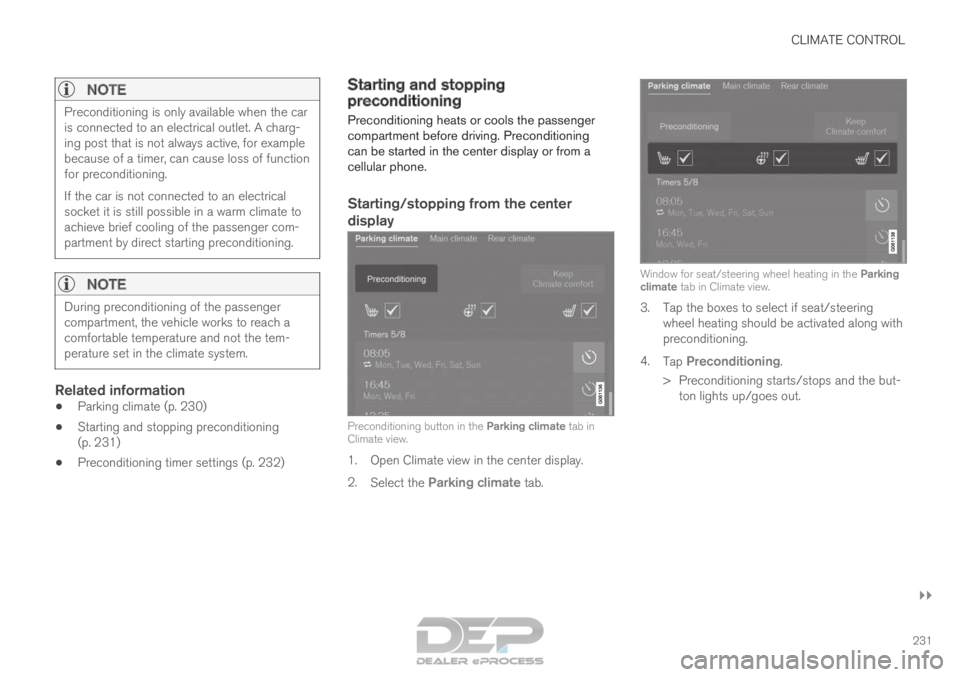
display Preconditioning button in the Parking climate tab in
Climate view.
1. Open Climate view in the center display.
2. Select the Parking climate tab. Window for seat/steering wheel heating in the Parking
climate tab in Climate view.
3. Tap the boxes to select if seat/steering
wheel heating should be activated along with
preconditioning.
4. Tap Preconditioning.
>
Preconditioning starts/stops and the but-
ton lights up/goes out.
Page 326 of 686
||DRIVER SUPPORT
* Option/accessory.
324 The driver is responsible for ensuring that
the vehicle maintains a suitable distance
from such obstacles.
• The camera and radar sensors do not
have the capacity to detect all oncoming
objects and obstacles in traffic environ-
ments, e.g. potholes, stationary obstacles
or objects that completely or partially
block the route.
• Pilot Assist does not "see" pedestrians,
animals, etc.
• The recommended steering input is lim-
ited in force, which means that it cannot
always help the driver to steer and keep
the vehicle within the lane.
• Pilot Assist is switched off if the power
steering is working with reduced power -
e.g. during cooling due to overheating
(see section "Speed-dependent steering
force").
The driver can always correct or adjust steering
assistance provided by Pilot Assist by turning the
steering wheel to the desired position.
Steep roads and/or heavy loadsPilot Assist is primarily intended to be driven on
flat roads. The function may not be able to main-
tain the correct time interval to the vehicle ahead
when driving down steep hills. The driver should be extra attentive and prepared to apply the
brakes.
• Do not use Pilot Assist if the vehicle is carry-
ing a heavy load or towing a trailer.
NOTE Pilot Assist cannot be activated if a trailer,
bike carrier or similar is connected to the
vehicle electrical system.
Other limitations
•
The
Off Road drive mode cannot be
selected when Pilot Assist is activated.
NOTE The function uses the vehicle's camera unit,
which has some general limitations – see the
section "Camera unit limitations".
NOTE
The function uses the vehicle's radar unit,
which has some general limitations – see the
section "Radar unit limitations".
Related information
•
Pilot Assist (p. 311)
• Speed-dependent steering wheel resistance
(p. 272) Pilot Assist* symbols and messages
A number of symbols and messages relating to
Pilot Assist may be displayed in the instrument
panel and/or the head-up display*.
Page 409 of 686
HYBRID INFORMATION
}}
407
Charging the hybrid battery
In addition to the conventional fuel tank, your
vehicle is also equipped with a rechargeable
lithium-ion hybrid battery.
The hybrid battery can be recharged using the
charging cable stored in a storage space in the
cargo compartment.
WARNING
The hybrid electrical system in your vehicle
uses high voltage electrical current. Any dam-
age to this system or to the hybrid battery
may result in the danger of overheating, fire,
or serious injury. If the vehicle is involved in a
collision or subjected to flooding, fire, etc.,
have it inspected by a trained and qualified
Volvo service technician. Prior to this inspec-
tion, the vehicle should be parked outdoors at
a safe distance from any building or poten-
tially flammable materials.
The hybrid battery's charging time depends on
the charging current used.
NOTE The capacity of the hybrid battery diminishes
somewhat with age and use, which could
result in increased use of the gasoline engine
and consequently, slightly higher fuel con-
sumption.
WARNING If the hybrid battery needs to be replaced, this
may only be done by Volvo retailer or author-
ized Volvo workshop.
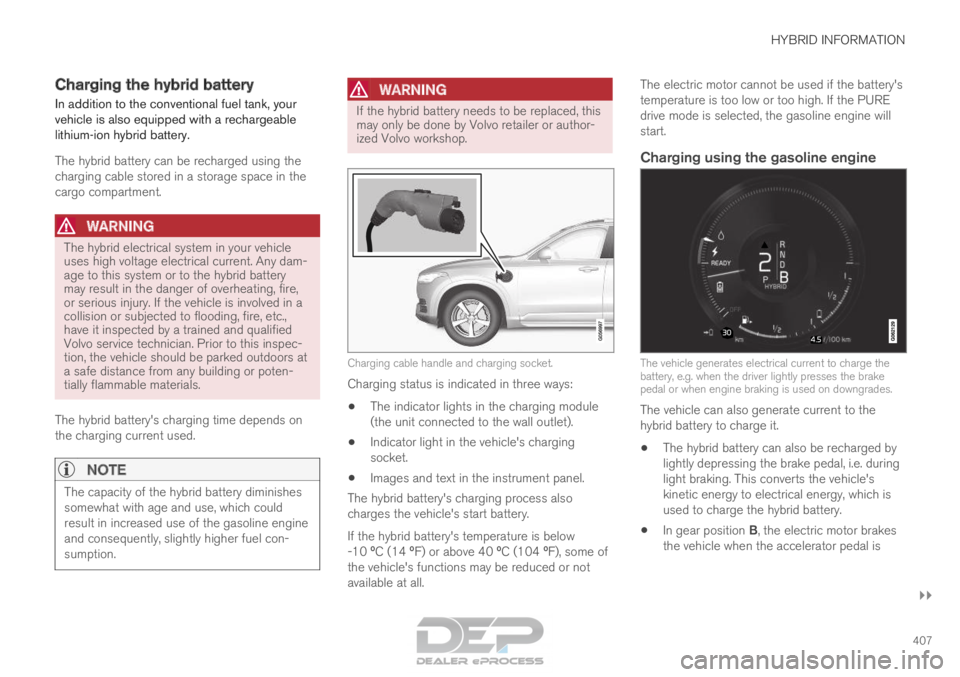
Charging cable handle and charging socket.
Charging status is indicated in three ways:
• The indicator lights in the charging module
(the unit connected to the wall outlet).
• Indicator light in the vehicle's charging
socket.
• Images and text in the instrument panel.
The hybrid battery's charging process also
charges the vehicle's start battery.
If the hybrid battery's temperature is below
-10 ºC (14 ºF) or above 40 ºC (104 ºF), some of
the vehicle's functions may be reduced or not
available at all. The electric motor cannot be used if the battery's
temperature is too low or too high. If the PURE
drive mode is selected, the gasoline engine will
start.
Charging using the gasoline engine
The vehicle generates electrical current to charge the
battery, e.g. when the driver lightly presses the brake
pedal or when engine braking is used on downgrades.
The vehicle can also generate current to the
hybrid battery to charge it.
• The hybrid battery can also be recharged by
lightly depressing the brake pedal, i.e. during
light braking. This converts the vehicle's
kinetic energy to electrical energy, which is
used to charge the hybrid battery.
• In gear position B, the electric motor brakes
the vehicle when the accelerator pedal is
Page 412 of 686
||HYBRID INFORMATION
410
CAUTION
Wipe the charging cable with a clean cloth
lightly moistened with water or a mild deter-
gent. Do not use chemicals or solvents. Do
not submerge the charging cable.
The charging cable and its components
should not be rinsed or immersed in water.
CAUTION
Avoid exposing the charging module and its
plug to direct sunlight. In such cases, the
overheating protection in the plug could
reduce or cut off charging of the hybrid bat-
tery.
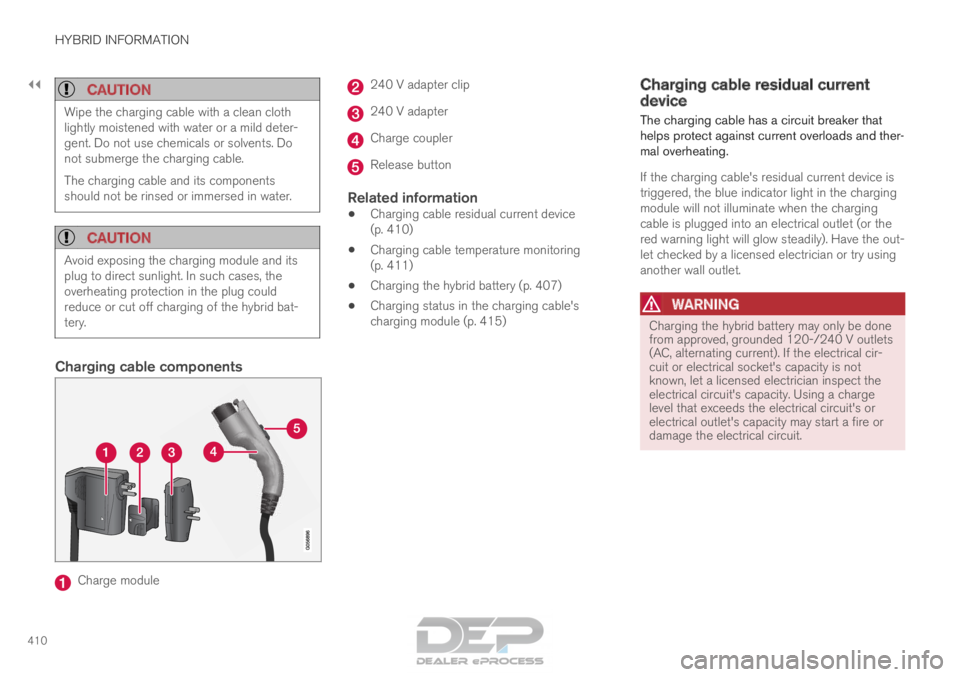
Charging cable components
Charge module 240 V adapter clip
240 V adapter
Charge coupler
Release button
Related information
•
Charging cable residual current device
(p. 410)
• Charging cable temperature monitoring
(p. 411)
• Charging the hybrid battery (p. 407)
• Charging status in the charging cable's
charging module (p. 415) Charging cable residual current
device
The charging cable has a circuit breaker that
helps protect against current overloads and ther-
mal overheating.
If the charging cable's residual current device is
triggered, the blue indicator light in the charging
module will not illuminate when the charging
cable is plugged into an electrical outlet (or the
red warning light will glow steadily). Have the out-
let checked by a licensed electrician or try using
another wall outlet.
WARNING Charging the hybrid battery may only be done
from approved, grounded 120-/240 V outlets
(AC, alternating current). If the electrical cir-
cuit or electrical socket's capacity is not
known, let a licensed electrician inspect the
electrical circuit's capacity. Using a charge
level that exceeds the electrical circuit's or
electrical outlet's capacity may start a fire or
damage the electrical circuit.
Page 426 of 686

STARTING AND DRIVING
* Option/accessory.
424 Starting the vehicle
The vehicle can be started using the start knob
in the tunnel console when the remote key is in
the passenger compartment. Start knob in the tunnel console.
WARNING
Before starting:
• Buckle your seat belt.
• Adjust the seat, steering wheel and mir-
rors.
• Make sure you can fully depress the
brake pedal. The remote key is not physically used to start the
ignition because the vehicle is equipped with the
keyless Passive Start system.
To start the vehicle:
1.
The remote key must be inside the vehicle.
For vehicles with Passive Start, the key must
be in the front section of the passenger
compartment. With the optional keyless lock-
ing/unlocking function*, the key can be any-
where in the vehicle.
2. Press and hold down the brake pedal 1
as far
as possible.
3. Turn the start knob clockwise and release. The control will automatically return to the
original position.
WARNING •
Never use more than one inlay mat at a
time on the driver's floor. If any other type
of floor mat is used, remove the original
mat from the driver's seat floor before
driving. All types of mats must be securely
anchored in the attachment points in the
floor. Make sure the floor mat does not
impede the movement of the brake pedal
or accelerator pedal in any way, as this
could be a serious safety hazard.
• Volvo's floor mats are specially manufac-
tured for your vehicle. They must be prop-
erly secured in the attachment points in
the floor to help ensure they cannot slide
and become trapped under the pedals.
The starter motor will crank until the engine
starts or until its overheating protection is trig-
gered.
During normal start conditions, the vehicle's elec-
tric motor will be prioritized and the gasoline
engine will remain off. This means that once the
start knob is turned clockwise, the electric motor
has been "started" and the vehicle is ready to be
driven. The warning and information symbols in
the instrument panel will go out and the selected
theme will be displayed to indicate that the elec-
tric motor is activated. 1
If the vehicle is moving, it is only necessary to turn the start knob cl\
ockwise to start the engine.
Page 428 of 686
||STARTING AND DRIVING
426
NOTE
With a cold start, idling speed may be consid-
erably higher than normal for certain engine
types. This is done to get the emissions sys-
tem up to normal operating temperature as
quickly as possible, which minimizes exhaust
emissions and protects the environment.
CAUTION
•
When starting in cold weather, the auto-
matic transmission may shift up at slightly
higher engine speeds than normal until
the automatic transmission fluid reaches
normal operating temperature.
• Do not race a cold engine immediately
after starting. This could prevent fluids
from properly lubricating vital compo-
nents in the engine before it has reached
the proper operating temperature.
• The engine should be idling when the
gear selector is moved. Never accelerate
until the gear is fully engaged. Accelerat-
ing rapidly before a gear is properly
engaged could lead to harder wear of
components.
• To help prevent the transmission oil from
overheating, select P or N when idling at
a standstill for prolonged periods of time.
Related information
• Switching off the vehicle (p. 426)
• Ignition modes (p. 427)
• Adjusting the steering wheel (p. 199)
• Jump starting using another battery (p. 469)
• Selecting ignition mode (p. 428) Switching off the vehicle
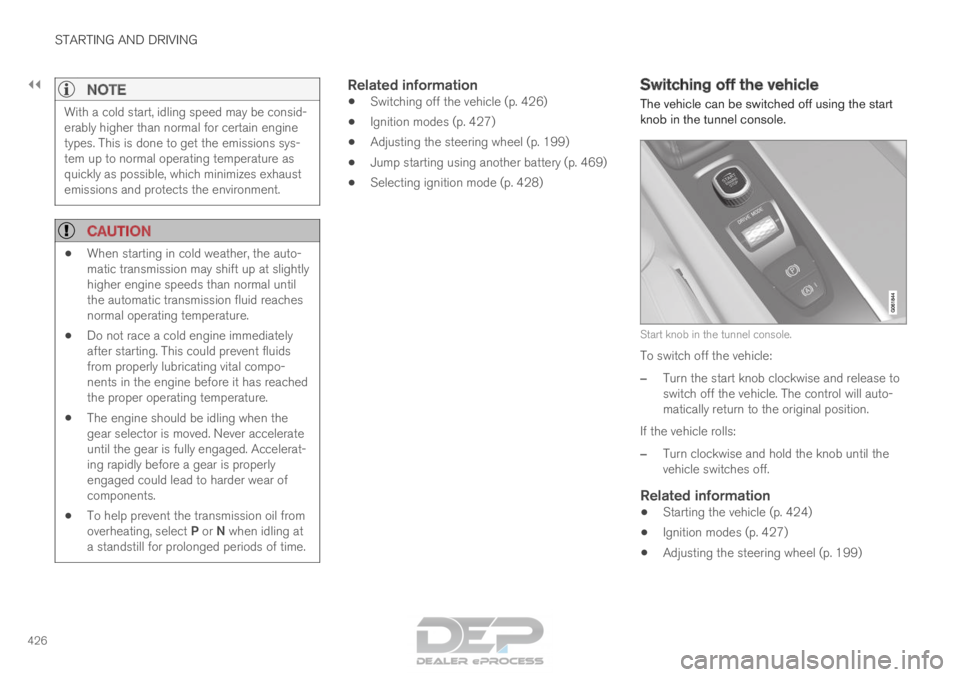
The vehicle can be switched off using the start
knob in the tunnel console. Start knob in the tunnel console.
To switch off the vehicle:
– Turn the start knob clockwise and release to
switch off the vehicle. The control will auto-
matically return to the original position.
If the vehicle rolls:
– Turn clockwise and hold the knob until the
vehicle switches off.
Related information
• Starting the vehicle (p. 424)
• Ignition modes (p. 427)
• Adjusting the steering wheel (p. 199)
Page 430 of 686
||STARTING AND DRIVING
428
Mode
Functions
II •The headlights illuminate.
• Warning/indicator lights illumi-
nate for 5 seconds.
• A number of other systems are
activated. However, seat and rear
window heating can only be acti-
vated when the engine is running.
This ignition mode uses a lot of
current from the battery and
should be avoided whenever pos-
sible! A
Also activated when the door is opened.
Related information
• Starting the vehicle (p. 424)
• Adjusting the steering wheel (p. 199)
• Jump starting using another battery (p. 469)
• Selecting ignition mode (p. 428) Selecting ignition mode
The vehicle's ignition can be put in various
modes (levels) to make different functions availa-
ble.
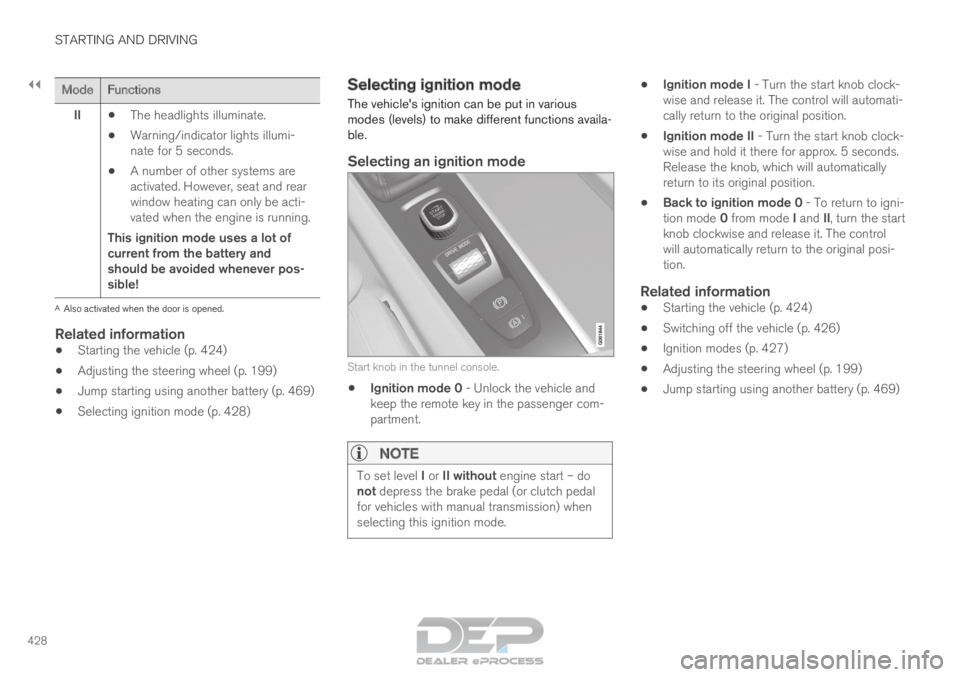
Selecting an ignition mode Start knob in the tunnel console.
•
Ignition mode 0 - Unlock the vehicle and
keep the remote key in the passenger com-
partment.
NOTE To set level I or II without engine start – do
not depress the brake pedal (or clutch pedal
for vehicles with manual transmission) when
selecting this ignition mode. •
Ignition mode I - Turn the start knob clock-
wise and release it. The control will automati-
cally return to the original position.
• Ignition mode II - Turn the start knob clock-
wise and hold it there for approx. 5 seconds.
Release the knob, which will automatically
return to its original position.
• Back to ignition mode 0 - To return to igni-
tion mode 0 from mode I and II, turn the start
knob clockwise and release it. The control
will automatically return to the original posi-
tion.
Related information
• Starting the vehicle (p. 424)
• Switching off the vehicle (p. 426)
• Ignition modes (p. 427)
• Adjusting the steering wheel (p. 199)
• Jump starting using another battery (p. 469)
Page 440 of 686
||STARTING AND DRIVING
* Option/accessory.
438
Related information
• Rear Collision Warning (p. 347)
• BLIS* (p. 348)
• Brake functions (p. 429) Transmission
The transmission is part of the vehicle's driveline
(power transmission) between the engine and
the drive wheels. The function of the transmis-
sion is to change gears depending on speed
and power needs.
The vehicle has an 8-speed automatic transmis-
sion and an electric motor for rear-wheel drive.
The number of gears allows the engine's torque
and power band to be effectively utilized. Two of
the gears are overdrive gears that save fuel when
driving at a constant engine speed. The steering
wheel paddles* can be used to shift up or down
manually. The instrument panel shows the gear
currently in use.
CAUTION Check the operating temperature of the
transmission to help avoid damage to any of
the drive system components. If there is a risk
of overheating, a warning symbol will appear
in the instrument panel and a text message
will be displayed. Follow the recommenda-
tions given.
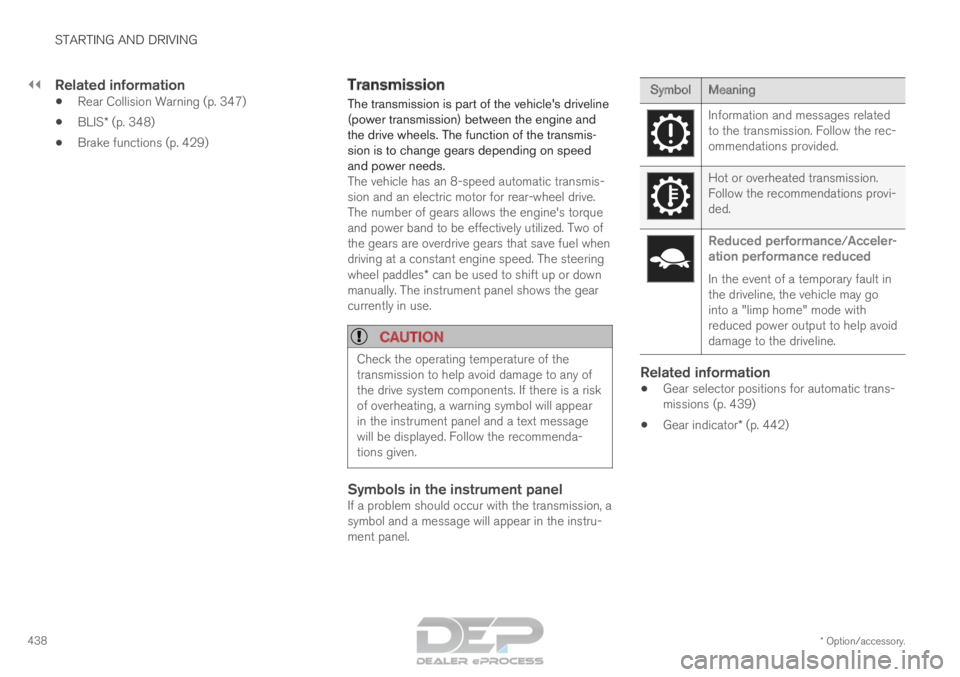
Symbols in the instrument panelIf a problem should occur with the transmission, a
symbol and a message will appear in the instru-
ment panel. Symbol
Meaning Information and messages related
to the transmission. Follow the rec-
ommendations provided.
Hot or overheated transmission.
Follow the recommendations provi-
ded.
Reduced performance/Acceler-
ation performance reduced
In the event of a temporary fault in
the driveline, the vehicle may go
into a "limp home" mode with
reduced power output to help avoid
damage to the driveline.
Related information
• Gear selector positions for automatic trans-
missions (p. 439)
• Gear indicator* (p. 442)
Page 444 of 686

STARTING AND DRIVING
* Option/accessory.
442 Shiftlock
The automatic transmission's shiftlock function
helps prevent inadvertently moving the gear
selector between different positions.
Automatic shiftlockThe automatic shiftlock has a separate safety
system.
From Park - P
To move the gear selector from the P position,
the brake pedal must be depressed and the igni-
tion in mode II.
From Neutral - N
If the gear selector is in N and the vehicle has
been stationary for at least 3 seconds (with or
without the engine running), the gear selector will
be locked in that position.
To move the gear selector from N to another
gear, the brake pedal must be depressed and the
ignition in mode II.
Messages in the instrument panelIf the gear selector is locked in position, a mes-
sage will appear in the instrument panel, e.g.
Gear lever Press brake pedal to activate
gear lever.
There is no mechanical shiftlock function.
Related information
• Gear selector positions for automatic trans-
missions (p. 439) The kickdown function
Kickdown is used when maximum acceleration is
needed, e.g. when passing. When the accelerator pedal is depressed all the
way to the floor (past the normal full accelerator
position), the transmission will automatically
engage kickdown, i.e. immediately shift down to a
lower gear.
If the accelerator pedal is released from the kick-
down position, the transmission will automatically
shift up again.
Safety function
The transmission control module is equipped with
a downshift protection feature to help prevent the
engine from overheating.
In some conditions, the transmission will prevent
downshifting/kickdown if this would lead to such
high engine speed (rpm) that the engine could
be damaged. If the driver still attempts downshift-
ing or kickdown at a high rpm, nothing will hap-
pen and the original gear will remain selected.
With kickdown, the vehicle can downshift one or
more steps at a time depending on the engine
speed. The vehicle upshifts when the engine rea-
ches its maximum rpm to prevent engine dam-
age.
Related information
• Gear selector positions for automatic trans-
missions (p. 439) Gear indicator*
The gear indicator in the instrument panel shows
the gear currently being used for manual shifting
and indicates when another gear should be
selected to optimize fuel economy. For eco-friendly driving when manually shifting, it
is important to use the correct gear and to shift
gears in good time.
The gear indicator in the instrument panel shows
the gear currently being used and indicates with
an upward-facing arrow if a higher gear should
be selected. The gear indicator is shown in gear
B. Gear indicator in instrument panel
2
.
Related information
• Gear selector positions for automatic trans-
missions (p. 439)