maintenance VOLVO XC90 TWIN ENGINE 2018 Owner's Manual
[x] Cancel search | Manufacturer: VOLVO, Model Year: 2018, Model line: XC90 TWIN ENGINE, Model: VOLVO XC90 TWIN ENGINE 2018Pages: 686, PDF Size: 17 MB
Page 333 of 686

DRIVER SUPPORT
* Option/accessory.331
Camera
The camera is used by several driver support
systems to e.g. detect lane marker lines or road
signs. Note: This illustration is general and details may vary
depending on model.
The camera is used by the following functions:
• Adaptive Cruise Control*
• Pilot Assist*
• Lane Keeping Aid*
• Steering assistance at risk of collision
• City Safety
• Driver Alert Control*
• Road Sign Information*
• Active high beams*
Related information
•Camera limitations (p. 332)
• Recommended maintenance for the camera/
radar sensor (p. 335)
Page 337 of 686

DRIVER SUPPORT
}}
335
Recommended maintenance for the
camera/radar sensor
In order for the camera/radar sensor to function
properly, the area of the windshield in front of the
unit must be kept free of dirt, ice, snow, etc. and
should be washed regularly with water and car
washing detergent.
NOTE
Dirt, ice and snow covering the camera and
radar unit reduce their function and can make
measurement impossible.
It could cause functions to be reduced, deac-
tivated completely or produce an incorrect
function response.
Related information
•
Camera (p. 331) City Safety™
City Safety can alert the driver with light, sound
and pulsations in the brake pedal to help the
driver detect pedestrians, cyclists, large animals
and vehicles that appear suddenly – the vehicle
will then attempt to automatically brake if the
driver does not act within a reasonable amount
of time. Location of the camera and radar sensor
75
.
City Safety can help prevent a collision or lower
the vehicle's speed at the point of impact.
City Safety is an aid intended to assist the driver
if a collision with a pedestrian, large animal,
cyclist or vehicle is imminent.
City Safety can help the driver avoid a collision
when e.g. driving in stop-and-go traffic, when changes in the traffic ahead and driver distraction
could lead to an incident.
The function assists the driver by automatically
applying the brakes if there is an imminent risk of
a collision and the driver does not react in time by
braking and/or steering away.
City Safety activates a brief, forceful braking in an
attempt to stop your vehicle immediately behind
the vehicle or object ahead.
City Safety is activated in situations in which the
driver should have applied the brakes much ear-
lier, which means that the system will not be able
to assist the driver in all situations.
City Safety is designed to be activated as late as
possible to help avoid unnecessary intervention.
Normally, the occupants of the vehicle will not be
aware of City Safety except when the system
intervenes when a collision is imminent.
75
Note: This illustration is general and details may vary depending on mod\
el.
Page 346 of 686

DRIVER SUPPORT
344City Safety limitations
City Safety functionality may be reduced in cer-
tain situations.
Surroundings
Low objects
Hanging objects, such as flags for overhanging
loads or accessories such as auxiliary lights or
front protective grids that extend beyond the
height of the hood, may limit City Safety function-
ality.
Slippery road conditions
The extended braking distance on slippery roads
may reduce City Safety's capacity to help avoid a
collision. In these types of situations, the Anti-
lock Braking System and Electronic Stability Con-
trol (ESC 77
) will help provide optimal braking
power with maintained stability.
Backlighting
The visual warning signal in the windshield may
be difficult to detect in bright sunlight, if there are
reflections, or if the driver is wearing sunglasses
or not looking straight ahead.
Heat
If the temperature in the passenger compartment
is high due to e.g. bright sunlight, the visual warn-
ing signal in the windshield may be temporarily
disabled.
Camera and radar sensor's field of vision
The camera's field of vision is limited and in cer-
tain situations, it may be unable to detect pedes-
trians, large animals, cyclists or vehicles, or it may
detect them later than expected.
Vehicles that are dirty may be detected later than
clean vehicles, and in dark conditions, motorcy-
cles may be detected late or not at all.
If a text message displayed in the instrument
panel indicates that the camera/radar sensor is
obstructed, it may be difficult for City Safety to
detect pedestrians, large animals, cyclists, vehi-
cles or lane markings in front of the vehicle. City
Safety functionality may therefore be reduced.
Text messages may not be displayed for all situa-
tions in which the windshield sensors are
blocked. The driver must therefore always keep
the windshield in front of the camera/radar sen-
sor clean.
CAUTION Maintenance and replacement of City Safety
components may only be performed by a
workshop – an authorized Volvo workshop is
recommended.
Driver intervention
Backing up
City Safety is temporarily deactivated when the
vehicle is backing up.
Low speed
City Safety is not activated at very low speeds
under 4 km/h (3 mph). The system will therefore
not intervene in situations in which your vehicle is
approaching another vehicle very slowly, such as
when parking.
Active driver
Action by the driver always has priority. City
Safety will therefore not react or will react at a
later stage with a warning or intervention in situa-
tions in which the driver is clearly steering and
operating the accelerator pedal, even if a collision
is unavoidable.
An active and aware driving style may therefore
delay collision warnings and intervention in order
to minimize unnecessary warnings.
77
Electronic Stability Control
Page 351 of 686
DRIVER SUPPORT
}}
349
given, the indicator light will become brighter and
begin flashing.
NOTE
The light illuminates on the side of the vehicle
where the system has detected the vehicle. If
the vehicle is passed on both sides simulta-
neously, both lights come on.
WARNING
•
The BLIS function is supplementary driver
support intended to facilitate driving and
help make it safer – it cannot handle all
situations in all traffic, weather and road
conditions.
• The responsibility for changing lanes
safely and using good judgment always
rests with the driver.
• BLIS is not a substitute for the driver's
attention and judgment. The driver is
always responsible for ensuring the vehi-
cle is driven in a safe manner, at the
appropriate speed, with an appropriate
distance to other vehicles, and in accord-
ance with current traffic rules and regula-
tions.
Related information
•Activating/deactivating BLIS (p. 349)
• BLIS limitations (p. 350) •
Recommended maintenance for BLIS
(p. 351)
• BLIS messages (p. 352) Activating/deactivating BLIS
The BLIS
80
function can be activated/deacti-
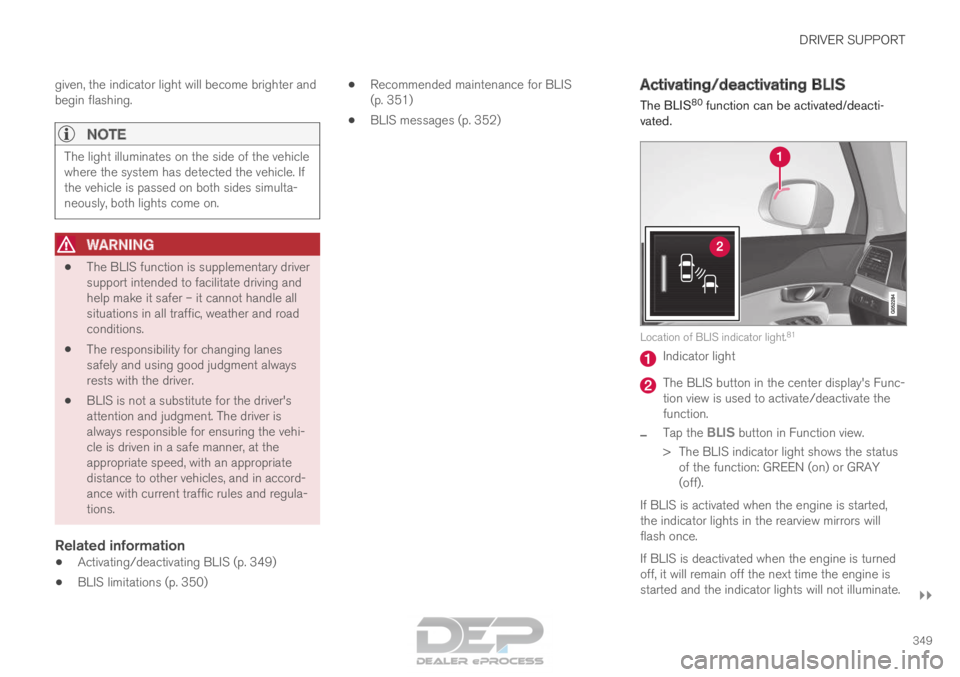
vated. Location of BLIS indicator light.
81 Indicator light
The BLIS button in the center display's Func-
tion view is used to activate/deactivate the
function.
– Tap the
BLIS button in Function view.
>
The BLIS indicator light shows the status
of the function: GREEN (on) or GRAY
(off).
If BLIS is activated when the engine is started,
the indicator lights in the rearview mirrors will
flash once.
If BLIS is deactivated when the engine is turned
off, it will remain off the next time the engine is
started and the indicator lights will not illuminate.
Page 353 of 686

DRIVER SUPPORT
* Option/accessory.351
Recommended maintenance for
BLIS
•
For optimal performance, it is important to
keep the areas in front of the sensors clean.
• Do not attach any objects, tape or decals to
the surface of the sensors. Keep this area clean (on both the left and right sides of
the vehicle)
84
.
The BLIS sensors are located on the inside of
each of the rear fenders/bumpers and are also
used by the Cross Traffic Alert (CTA) and Rear
Collision Warning functions.
CAUTION Repair of BLIS and CTA components or
repainting of the bumper may only be per-
formed by a workshop – an authorized Volvo
workshop is recommended.
Related information
•
BLIS* (p. 348)
• Cross Traffic Alert* (p. 353)
• Activating/deactivating Cross Traffic Alert
(p. 354)
• Cross Traffic Alert limitations (p. 354)
• Recommended maintenance for Cross
Traffic Alert (p. 355)
• Cross Traffic Alert messages (p. 356)
• Rear Collision Warning (p. 347) 84
Note: This illustration is general and details may vary depending on mod\
el.
Page 355 of 686
DRIVER SUPPORT
* Option/accessory.353
Cross Traffic Alert*
CTA 86
is a supplementary driver support system
to BLIS 87
that is intended to help the driver
detect vehicles crossing behind the vehicle
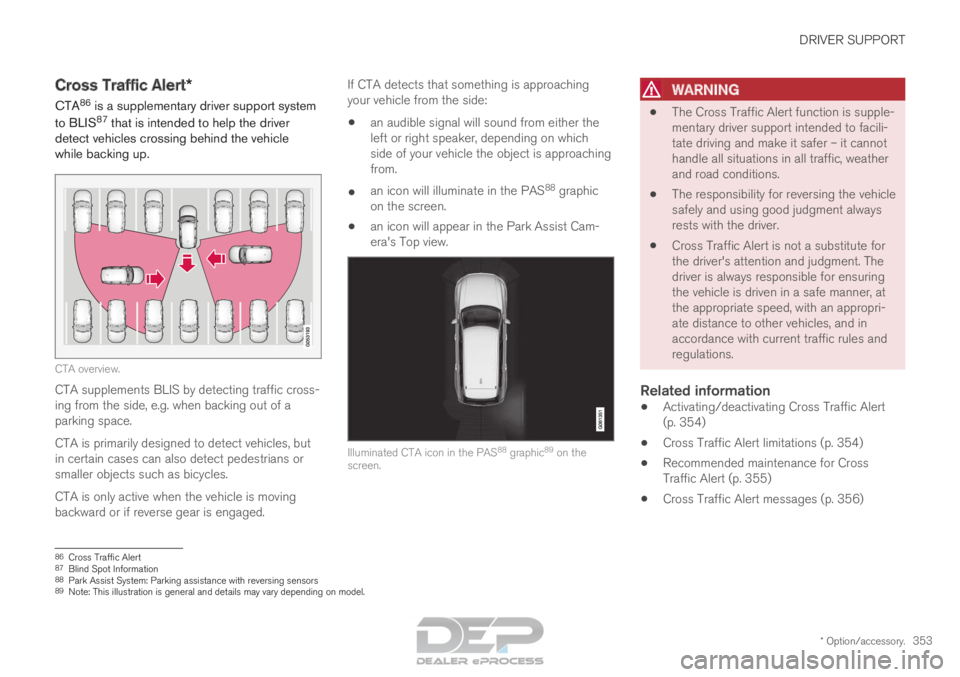
while backing up. CTA overview.
CTA supplements BLIS by detecting traffic cross-
ing from the side, e.g. when backing out of a
parking space.
CTA is primarily designed to detect vehicles, but
in certain cases can also detect pedestrians or
smaller objects such as bicycles.
CTA is only active when the vehicle is moving
backward or if reverse gear is engaged. If CTA detects that something is approaching
your vehicle from the side:
• an audible signal will sound from either the
left or right speaker, depending on which
side of your vehicle the object is approaching
from.
• an icon will illuminate in the PAS 88
graphic
on the screen.
• an icon will appear in the Park Assist Cam-
era's Top view. Illuminated CTA icon in the PAS
88
graphic 89
on the
screen.
WARNING •
The Cross Traffic Alert function is supple-
mentary driver support intended to facili-
tate driving and make it safer – it cannot
handle all situations in all traffic, weather
and road conditions.
• The responsibility for reversing the vehicle
safely and using good judgment always
rests with the driver.
• Cross Traffic Alert is not a substitute for
the driver's attention and judgment. The
driver is always responsible for ensuring
the vehicle is driven in a safe manner, at
the appropriate speed, with an appropri-
ate distance to other vehicles, and in
accordance with current traffic rules and
regulations.
Related information
• Activating/deactivating Cross Traffic Alert
(p. 354)
• Cross Traffic Alert limitations (p. 354)
• Recommended maintenance for Cross
Traffic Alert (p. 355)
• Cross Traffic Alert messages (p. 356) 86
Cross Traffic Alert
87 Blind Spot Information
88 Park Assist System: Parking assistance with reversing sensors
89 Note: This illustration is general and details may vary depending on mod\
el.
Page 357 of 686

DRIVER SUPPORT
* Option/accessory.355
Examples of further limitations
•Dirt, ice and snow covering the sensors may
reduce functionality and prevent the system
from providing warnings. For additional infor-
mation, see the section "Recommended
maintenance for Cross Traffic Alert".
• CTA is automatically deactivated if a trailer,
bicycle holder or similar is connected to the
vehicle's electrical system.
• For CTA to function optimally, bicycle hold-
ers, luggage racks or similar should not be
mounted on the vehicle's towbar.
Related information
•
Cross Traffic Alert* (p. 353) Recommended maintenance for
Cross Traffic Alert
•
For optimal performance, it is important to
keep the areas in front of the sensors clean.
• Do not attach any objects, tape or decals to
the surface of the sensors. Keep this area clean (on both the left and right sides of
the vehicle)
92
.
The CTA sensors are located on the inside of
each of the rear fenders/bumpers and are also
used by the BLIS 93
and Rear Collision Warning
functions.
CAUTION Repair of BLIS and CTA components or
repainting of the bumper may only be per-
formed by a workshop – an authorized Volvo
workshop is recommended.
Related information
•
Cross Traffic Alert* (p. 353)
• BLIS* (p. 348)
• Rear Collision Warning (p. 347) 92
Note: This illustration is general and details may vary depending on mod\
el.
93 Blind Spot Information
Page 383 of 686
DRIVER SUPPORT
* Option/accessory.381
Park Assist*
The Park Assist function can help the driver
when maneuvering in tight spaces by indicating
distances to obstacles using audible signals and
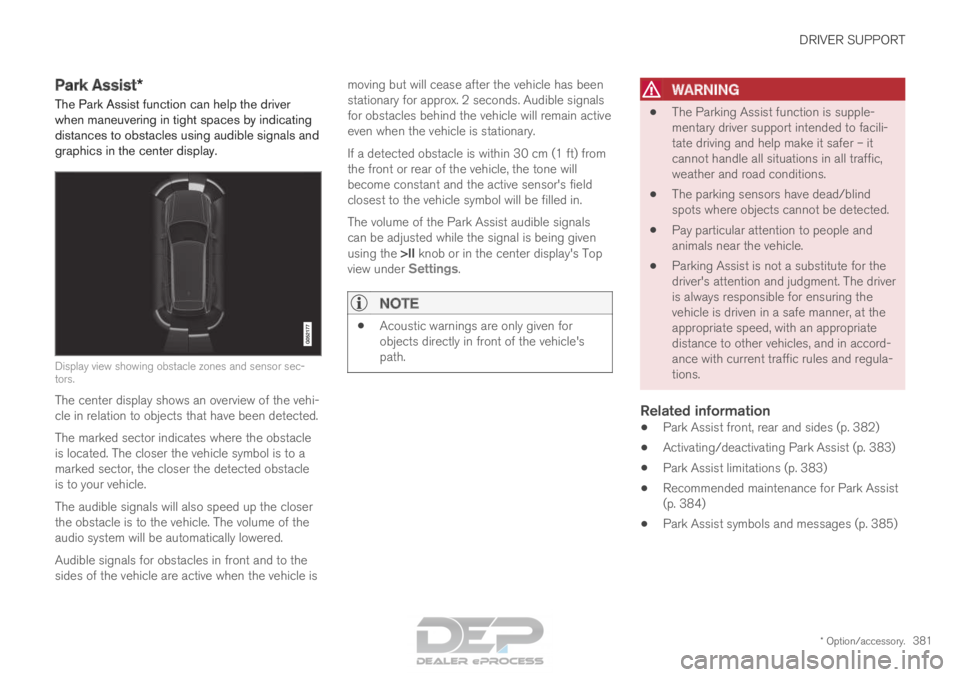
graphics in the center display. Display view showing obstacle zones and sensor sec-
tors.
The center display shows an overview of the vehi-
cle in relation to objects that have been detected.
The marked sector indicates where the obstacle
is located. The closer the vehicle symbol is to a
marked sector, the closer the detected obstacle
is to your vehicle.
The audible signals will also speed up the closer
the obstacle is to the vehicle. The volume of the
audio system will be automatically lowered.
Audible signals for obstacles in front and to the
sides of the vehicle are active when the vehicle is moving but will cease after the vehicle has been
stationary for approx. 2 seconds. Audible signals
for obstacles behind the vehicle will remain active
even when the vehicle is stationary.
If a detected obstacle is within 30 cm (1 ft) from
the front or rear of the vehicle, the tone will
become constant and the active sensor's field
closest to the vehicle symbol will be filled in.
The volume of the Park Assist audible signals
can be adjusted while the signal is being given
using the >II knob or in the center display's Top
view under Settings.
NOTE •
Acoustic warnings are only given for
objects directly in front of the vehicle's
path.
WARNING •
The Parking Assist function is supple-
mentary driver support intended to facili-
tate driving and help make it safer – it
cannot handle all situations in all traffic,
weather and road conditions.
• The parking sensors have dead/blind
spots where objects cannot be detected.
• Pay particular attention to people and
animals near the vehicle.
• Parking Assist is not a substitute for the
driver's attention and judgment. The driver
is always responsible for ensuring the
vehicle is driven in a safe manner, at the
appropriate speed, with an appropriate
distance to other vehicles, and in accord-
ance with current traffic rules and regula-
tions.
Related information
•Park Assist front, rear and sides (p. 382)
• Activating/deactivating Park Assist (p. 383)
• Park Assist limitations (p. 383)
• Recommended maintenance for Park Assist
(p. 384)
• Park Assist symbols and messages (p. 385)
Page 386 of 686
||DRIVER SUPPORT
* Option/accessory.
384
CAUTION Objects such as chains, thin and glossy poles
or low obstacles may end up in the "signal
shadow" and then go temporarily undetected
by the sensors – the pulsating tone may then
unexpectedly stop instead of becoming a
constant tone as expected.
The sensors cannot detect high objects, such
as protruding ramps.
• In such situations, pay extra attention and
maneuver/drive the vehicle very slowly or
stop the current parking maneuver –
there may be a high risk of damage to
the vehicle or other objects since infor-
mation from the sensors is not always
reliable in such situations.
CAUTION In some circumstances, the Park Assist Sys-
tem may produce false warnings due to exter-
nal sound sources with the same ultrasonic
frequencies as those the system works with.
Examples of such sources are horns, wet tires
on asphalt, pneumatic brakes, exhaust noise
from motorcycles, etc.
NOTE When a trailer hitch is configured with the
vehicle electrical system, the trailer hitch pro-
trusion is included when the function meas-
ures the distance to objects behind the vehi-
cle.
Related information
•
Park Assist* (p. 381) Recommended maintenance for
Park Assist
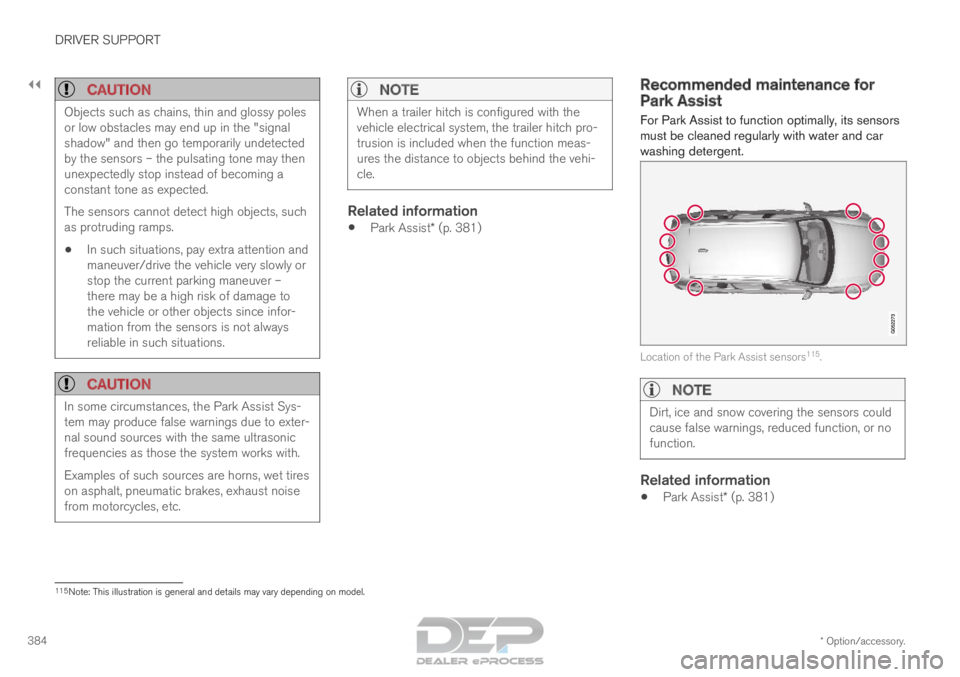
For Park Assist to function optimally, its sensors
must be cleaned regularly with water and car
washing detergent. Location of the Park Assist sensors
115
.
NOTE Dirt, ice and snow covering the sensors could
cause false warnings, reduced function, or no
function.
Related information
•
Park Assist* (p. 381) 115
Note: This illustration is general and details may vary depending on mod\
el.
Page 388 of 686

DRIVER SUPPORT
* Option/accessory.
386 Park Assist Camera*
The Park Assist Camera can help provide the
driver when maneuvering in tight spaces by alert-
ing the driver to obstacles using the camera
screen and graphics in the center display.
The Park Assist Camera is a support function
that is automatically activated when reverse gear
is engaged. It can also be started manually from
the center display.
Example camera view
116
. Zoom
117
- zoom in/out 360° view* - activate/deactivate all cameras
PAS* - activate/deactivate Parking Assist
Lines - activate/deactivate trajectory lines Towbar
* - activate/deactivate trajectory lines
for towbar* 118 CTA
* - activate/deactivate Cross Traffic Alert
WARNING
•
The Parking Camera function is supple-
mentary driver support intended to facili-
tate driving and help make it safer – it
cannot handle all situations in all traffic,
weather and road conditions.
• The parking cameras have dead/blind
spots where objects cannot be detected.
• Pay particular attention to people and
animals near the vehicle.
• Objects/obstacles may be closer to the
vehicle than they appear on the screen.
• The parking cameras are not a substitute
for the driver's attention and judgment.
The driver is always responsible for
ensuring the vehicle is driven in a safe
manner, at the appropriate speed, with an
appropriate distance to other vehicles,
and in accordance with current traffic
rules and regulations.
Related information
•Park Assist Camera views (p. 387)
• Park Assist Camera trajectory lines (p. 388)
• Sensor field from Park Assist for Park Assist
Camera (p. 390)
• Starting the Park Assist Camera (p. 391)
• Park Assist Camera limitations (p. 391)
• Recommended maintenance of the Park
Assist Camera (p. 393)
• Recommended maintenance of the Park
Assist Camera (p. 393)
• Park Assist Camera symbols and messages
(p. 394) 116
The illustration is generic - details may vary according to vehicle mode\
l.
117 The trajectory lines will not be displayed when zooming in.
118 Not available in all markets.