trailer VOLVO XC90 TWIN ENGINE 2018 Owner's Guide
[x] Cancel search | Manufacturer: VOLVO, Model Year: 2018, Model line: XC90 TWIN ENGINE, Model: VOLVO XC90 TWIN ENGINE 2018Pages: 686, PDF Size: 17 MB
Page 475 of 686

STARTING AND DRIVING
* Option/accessory.473
CAUTION•
Bumper-attached trailer hitches must not
be used on Volvos, nor should safety
chains be attached to the bumper.
• Trailer hitches attaching to the vehicle
rear axle must not be used.
• Never connect a trailer's hydraulic brake
system directly to the vehicle brake sys-
tem, nor a trailer's lighting system directly
to the vehicle lighting system. Consult
your nearest authorized Volvo retailer for
correct installation.
• When towing a trailer, the trailer's safety
chains or wire must be correctly fastened
to the attachment points provided in the
trailer hitch on the vehicle. The safety
chain or wire must never be fastened to
or wound around the towing ball.
NOTE The optional detachable trailer hitch may not
be available in all markets or on all models.
Consult your Volvo retailer.
NOTE
Extreme weather conditions, towing a trailer,
driving at high altitudes and fuel quality are
factors that significantly increase a vehicle's
fuel consumption.
Trailer weights
WARNING Please adhere to the recommendations provi-
ded for trailer weight. If the recommendations
are not followed, the vehicle and trailer may
be difficult to control during evasive maneu-
vers and braking.
NOTE
The specified maximum trailer weights are
those permitted by Volvo. National vehicle
regulations may set additional restrictions on
trailer weight and speed. The trailer hitches
may be certified for higher towing weights
than the vehicle is permitted to tow.
Self-leveling suspension*The vehicle's self-leveling system attempts to
keep the vehicle at a constant level, regardless of
load (up to the maximum permitted weight).
When the vehicle is stationary, the rear end of the
vehicle will be slightly lowered, which is normal.
Driving in hilly terrain or hot weatherIn certain conditions, there is a risk of overheat-
ing when driving with a trailer. If overheating of
the engine and drive system is detected, a warn-
ing symbol will illuminate in the instrument panel
along with a message.The automatic transmission selects the optimal
gear for the current load and engine speed.
Steep inclines
Do not lock the automatic transmission into a
higher gear than what the engine can handle ‒ it
is not always preferable to drive in high gears at
low rpm.
Parking on a hill
1. Depress the brake pedal.
2. Apply the parking brake.
3. Put the gear selector in P.
4. Release the brake pedal.
Put chocks behind the wheels when the vehicle
is parked on a hill with a trailer attached.
Starting on a hill
1. Depress the brake pedal.
2. Put the gear selector in D.
3. Release the parking brake.
4. Release the brake pedal and start driving.
Related information
• Trailer Stability Assist* (p. 474)
• Checking trailer lights (p. 475)
• Towing capacity and tongue weight (p. 660)
• Overheating of engine and transmission
(p. 468)
Page 476 of 686

STARTING AND DRIVING
* Option/accessory.
474 Trailer Stability Assist*
Trailer Stability Assist (TSA 8
) is a function
designed to help stabilize a vehicle that is tow-
ing a trailer when the vehicle and trailer have
begun to sway. The function is part of the Elec-
tronic Stability Control system ESC 9
.
Reasons for swayingA vehicle towing a trailer may begin to sway for
various reasons. Normally this only occurs at high
speeds. However, if the trailer is overloaded or
unevenly distributed, e.g. too far back, there is a
risk of swaying even at low speeds.
Swaying may be caused by factors such as:
• The vehicle and trailer are hit by a sudden,
strong crosswind.
• The vehicle and trailer are traveling on an
uneven road or over a bump.
• Sudden movements of the steering wheel.
Once swaying has begun, it can be difficult or
impossible to stop it. This makes the vehicle and
trailer difficult to control and there is a risk of
swerving into oncoming traffic or driving off the
road.
Trailer Stability Assist functionTrailer Stability Assist continuously monitors the
vehicle's movements, particularly lateral move- ments. If swaying is detected, the brakes are
applied individually on the front wheels, which has
a stabilizing effect on the vehicle and trailer. This
is often enough to enable the driver to regain
control of the vehicle.
If the Trailer Stability Assist function's first
attempt is not adequate to stop the swaying
motion, the brakes are applied on all wheels and
engine power is temporarily reduced. As the
swaying motion begins to decrease and the vehi-
cle and trailer have once again become stable,
TSA stops regulating the brakes/engine power
and the driver regains control of the vehicle.
NOTE
Trailer Stability Assist is deactivated if the
driver selects the sport mode by deactivating
ESC in the center display's menu system. Trailer Stability Assist may not intervene if the
driver tries to compensate for the swaying motion
by moving the steering wheel rapidly, because
the system will then not be able to determine if it
is the trailer or the driver causing the swaying. When Trailer Stability Assist is
activated, the ESC symbol is
displayed in the instrument
panel.
Related information
•
Driving with a trailer (p. 472)
• Electronic Stability Control (p. 274) 8
Trailer Stability Assist
9 Electronic Stability Control
Page 477 of 686

STARTING AND DRIVING
* Option/accessory.475
Checking trailer lights
When connecting a trailer, make sure that all of
the lights on the trailer are functioning before
starting to drive.
Trailer turn signals and brake lightsIf one or more of the turn signals or brake lights
on the trailer is not working, a symbol and mes-
sage will be displayed in the instrument panel.
The other lights on the trailer must be checked
manually by the driver before the vehicle is driven. Symbol
Message •
Trailer turn indicator Right
turn indicator malfunction
• Trailer turn indicator Left
turn indicator malfunction •
Trailer brake light Malfunc-
tion If any of the trailer's turn signal lights is not work-
ing, the turn signal symbol in the instrument
panel will also flash more quickly than normal.
Trailer rear fog lightWhen a trailer is connected, the vehicle's rear fog
light may not illuminate and rear fog light func-
tionality is instead transferred to the trailer. If this
is the case, check to see if the trailer is equipped
with a rear fog light before activating the vehicle's fog lights when driving with a trailer to help
ensure safe operation.
Checking trailer lights*
Automatic check
When the trailer has been connected to the vehi-
cle's electrical system, its lights can be checked
by automatically activating them. This function
helps the driver check that the trailer's lights are
functioning correctly before starting to drive.
In order to perform this check, the engine must
be turned off.
1. When a trailer is connected to the towbar, the message Automatic Trailer Lamp
Check will appear in the instrument panel.
2.
Acknowledge the message by pressing the
O button on the right-side steering wheel
keypad.
> The light check will begin.
3. Get out of the vehicle to perform the check. > All of the lights on the trailer will beginflashing, and then illuminate separately
one at a time.
4. Visually check that all of the trailer's lights are functioning correctly.
5. After a short time, all of the trailer's lights will start flashing again.
> The light check is completed.
Disabling the automatic check
The automatic light check can be disabled in the
center display.
1.Tap Settings in the Top view.
2.
Tap My Car Lights and Lighting
.
3. Deselect Automatic Trailer Lamp Check.
Manual check
If the automatic check has been disabled, the
check can be started manually.
1.
Tap Settings in the Top view.
2.
Tap My Car Lights and Lighting
.
3. Select Manual Trailer Lamp Check.
>
The light check will begin. Get out of the
vehicle to perform the check.
Related information
• Driving with a trailer (p. 472)
Page 580 of 686

WHEELS AND TIRES
578Determining the vehicle's permitted
weight
Properly loading your vehicle will provide maxi-
mum return of vehicle design performance.
Weight designationsBefore loading your vehicle, familiarize yourself
with the following terms for determining your
vehicle's weight ratings, with or without a trailer,
from the vehicle's Federal/Canadian Motor Vehi-
cle Safety Standards (FMVSS/CMVSS) label, and
the vehicle's tire information placard:
Curb weight
The weight of the vehicle including a full tank of
fuel and all standard equipment. It does not
include passengers, cargo, or optional equipment.
Capacity weight
All weight added to the curb weight, including
cargo and optional equipment. When towing, tow-
bar weight is also part of cargo weight.
Permissible axle weight
The maximum allowable weight that can be car-
ried by a single axle (front or rear). These num-
bers are shown on the Federal/Canadian Motor
Vehicle Safety Standards (FMVSS/CMVSS) label.
The total load on each axle must never exceed its
maximum permissible weight.
Gross vehicle weight (GVW)
The vehicle's curb weight + cargo + passengers.
Steps for Determining Correct Load
Limit
1. Locate the statement "the combined weight of occupants and cargo should never exceed
XXX kg or XXX lbs." on your vehicle's plac-
ard.
2. Determine the combined weight of the driver and passengers that will be riding in your
vehicle.
3. Subtract the combined weight of the driver and passengers from XXX kg or XXX lbs.
4. The resulting figure equals the available amount of cargo and luggage load capacity.
For example, if the "XXX" amount equals
1400 lbs. and there will be five 150 lb. pas-
sengers in your vehicle, the amount of availa-
ble cargo and luggage load capacity is 650
lbs. (1400 - 750 (5 × 150) = 650 lbs.)
5. Determine the combined weight of luggage and cargo being loaded on the vehicle. That
weight may not safely exceed the available
cargo and luggage load capacity calculated
in Step 4.
6. If your vehicle will be towing a trailer, load from your trailer will be transferred to your
vehicle. Consult this manual to determine
how this reduces the available cargo and lug-
gage load capacity of your vehicle.
WARNING •
Exceeding the permissible axle weight,
gross vehicle weight, or any other weight
rating limits can cause tire overheating
resulting in permanent deformation or
catastrophic failure.
• Do not use replacement tires with lower
load carrying capacities than the tires that
were original equipment on the vehicle
because this will lower the vehicle's GVW
rating. Use only tires with the correct load
carrying capacity. Consult your Volvo
retailer for information.
Related information
• Loading recommendations (p. 586)
Page 589 of 686
LOADING, STORAGE AND PASSENGER COMPARTMENT
* Option/accessory.587
WARNINGIn a head-on collision at a speed of 50 km/h
(30 mph), an unsecured object weighing 20
kg (44 pounds) can reach a projectile weight
equivalent to 1000 kg (2200 pounds).
WARNING
If objects are loaded higher than the upper
edge of the side windows, leave a 10 cm (4
in.) space between the objects and the win-
dow. Objects placed closer to this could
impede the function of the inflatable curtain
concealed inside the headlining.
WARNING
Always secure the load. Otherwise, it may shift
during heavy braking and injure people in the
vehicle.
Cover sharp edges and sharp corners with
something soft.
Turn off the engine and apply the parking
brake when loading/unloading long objects.
Otherwise, it is possible for the load to reach
the gear lever or gear selector and move it to
a drive position – which could cause the vehi-
cle to begin rolling.
Extra cargo space
The rear seat backrests can be folded down to
increase cargo compartment space and simplify
loading. If the rear seat backrests are folded down, make sure that no objects loaded into the
vehicle prevent the WHIPS system for the front
seats from functioning correctly.
Raising/lowering the rear end of the
vehicle*
The rear end of the vehicle can be lowered or
raised for easier loading or to facilitate attaching
a trailer*.
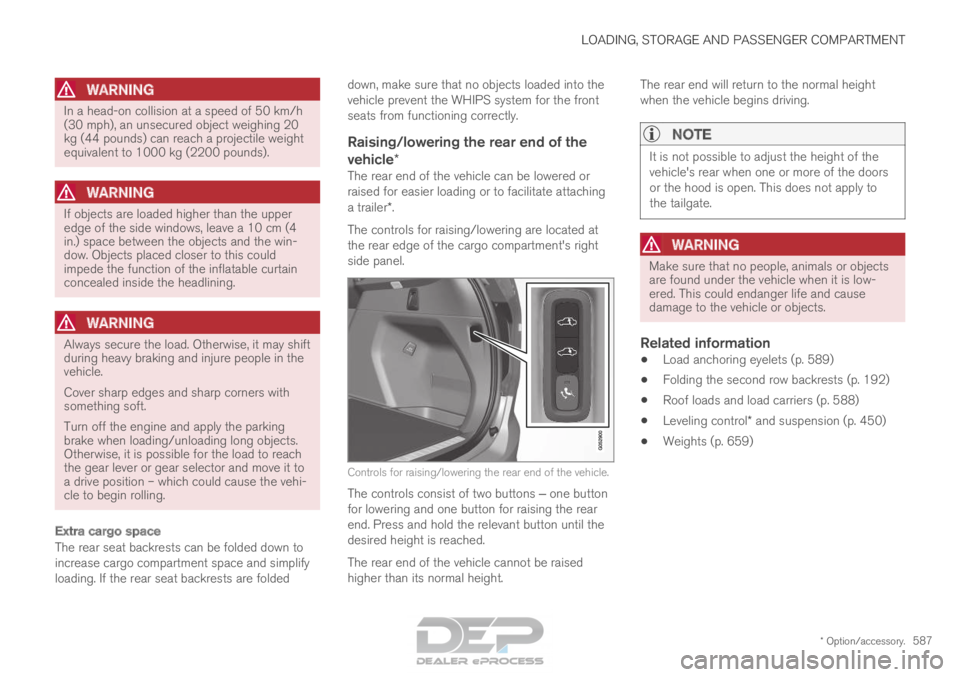
The controls for raising/lowering are located at
the rear edge of the cargo compartment's right
side panel. Controls for raising/lowering the rear end of the vehicle.
The controls consist of two buttons ‒ one button
for lowering and one button for raising the rear
end. Press and hold the relevant button until the
desired height is reached.
The rear end of the vehicle cannot be raised
higher than its normal height. The rear end will return to the normal height
when the vehicle begins driving.
NOTE It is not possible to adjust the height of the
vehicle's rear when one or more of the doors
or the hood is open. This does not apply to
the tailgate.
WARNING
Make sure that no people, animals or objects
are found under the vehicle when it is low-
ered. This could endanger life and cause
damage to the vehicle or objects.
Related information
•
Load anchoring eyelets (p. 589)
• Folding the second row backrests (p. 192)
• Roof loads and load carriers (p. 588)
• Leveling control* and suspension (p. 450)
• Weights (p. 659)
Page 662 of 686

SPECIFICATIONS
* Option/accessory.
660 Towing capacity and tongue weight
Towing capacity and tongue weight are shown
in the tables below.Category
USA
(lbs) Canada
(kg)
Max. trailer weights Without brakes:
1650
750
With brakes (AWD): 50002250
Max. tongue weight AWD:
500225
CAUTION•
The maximum trailer weights listed are
only applicable for altitudes up to 3280 ft
(1,000 m) above sea level. With increas-
ing altitude the engine power and there-
fore the car's climbing ability are impaired
because of the reduced air density, so
the maximum trailer weight has to be
reduced accordingly. The weight of the
car and trailer must be reduced by 10%
for every further 3280 ft (1,000 m) (or
part thereof).
Related information
•Type designations (p. 654)
• Weights (p. 659)
• Driving with a trailer (p. 472)
• Trailer Stability Assist* (p. 474)
Page 669 of 686
INDEX
667
1, 2, 3 ... 4WD
443
A ABS
anti-lock brakes
429
AC (Air conditioning) 228
ACC - Adaptive Cruise Control 295, 298, 299, 300, 301, 302, 304, 305, 306, 307, 309
Accessories and extra equipment 35 installation 36
Accessory installation warning 36
Active Bending Lights 159
Adapting driving characteristics 272, 445
Adaptive Cruise Control 295, 298, 299, 300, 301, 302, 304, 305, 306, 307, 309
change cruise control functionality 307
function 295
manage speed 299, 300
pass 304, 305
radar sensor 326
set time interval 301, 302
troubleshooting 307
Adjusting the steering wheel 199 Airbag
52
activation/deactivation
56
driver's side 53
passenger side 53, 56
Air bag, see Airbag 52
Air conditioning 228
Air conditioning, fluid volume and grade 664
Air distribution 207
air vents 207, 209
changing 208
defrosting 220
recirculation 219
table showing options 210
Air quality 204, 206
allergy and asthma 206
passenger compartment filter 207
Air recirculation 219
Alarm 268
deactivating 269
Allergy and asthma-inducing substances 206
All Wheel Drive, AWD 443
All Wheel Drive (AWD) 443
All Wheel Drive (four-wheel drive) 443
Android Auto 518, 520
Antenna location 257 Apple CarPlay
515, 517
Approach lighting 161
Apps 487
Assistance at risk of collision 372, 373, 374, 375, 376, 377, 378, 380
Audio and media 486
Audio system HD digital radio 497
SiriusXM® Satellite radio 498, 499, 500
Auto-climate 219
Auto hold 436
Auto-hold brakes 436
activate and deactivate 436
after collision 437
Automatic car wash 641
Automatic high beam 157
Automatic locking 261
Automatic relocking 241, 254
Automatic Speed Limiter 282, 284, 285
Automatic transmission 439
kickdown 442
oil 663
Trailer 472
INDEX
Page 672 of 686
INDEX
670Cooling system
overheating 468
Corner Traction Control 274
Corrosion protection 644
Covering cargo compartment 590
Crash, see Collision 42
Crash event data 33
Cross Traffic Alert – CTA 353, 354, 355, 356
Cruise control 286, 287 manage speed 287, 288
temporary deactivation 289, 290
turn off 290
CTA – Cross Traffic Alert 353, 354, 355, 356
Curb weight 659
CZIP (Clean Zone Interior Package) 206
D Data
recording
33
transferring between vehicle and work-
shop 600
Data sharing 536
Daytime running lights 154 Decals
location of
654
Defrosting 220
Detection of cyclist 339
Dimensions 657
Dipstick, electronic 611
Direction of rotation 552
Display lighting 164
Distance Alert 291, 292, 293
limitations 294
DivX ®
512
Door mirrors 169, 171
compass 481, 482
dimming 170
outer 169, 171
power folding 171
resetting 171
Driveline transmission 438
Drive mode 445
changing 449
Driver Alert Control 362
operation 363, 364
Driver Alert Control limitations 364
Driver performance 92 Driver profile
137
edit 139
select 138
Driver support system 272
Drive systems 443
Driving cooling system 468
with a trailer 472
Driving economy 456
Driving through standing water 462
driving with a trailer towball load 660
towing capacity 660
E Economical driving
456
Electrical outlet
582
use 584
Electrical system 615
Electric drive motor specifications 661
electric motor 443 Driving 457
Range 458
Electric parking brake 432
Page 675 of 686
INDEX
673
Inflation pressure table 665
Information display 84, 86
Infotainment (Audio and media) 486
Instrument cluster 84
settings 86
Instrument illumination 164
Instrument lighting 164
Instrument panel App menu 103, 104
hybrid-related symbols and messages 419
messages 105
Instruments and controls 82
Instruments overview left-hand drive vehicle 82
Integrated booster cushion 76 folding down 78
folding up 77
IntelliSafe driver support 28
Interior Air Quality System 206
Intermittent wiping 176
Internet, see Internet-connected vehicle 529
Internet-connected vehicle 529 book service and repair 603
No connection or poor connection 534
send car data 604
system updates 601 iPod®
, connecting
514
ISOFIX/LATCH anchors 74
J Jack
565
Jump-start
469
K Key
239
Keyboard
126, 129
change language 129
Keyless locking/unlocking 254
settings 256
touch-sensitive surfaces 253
Key tag 239
L Labels
location of
654
Laminated glass 166 Lamps
changing
613
specifications 614
Trailer 475
Lane Keeping Aid operation 367
Lane Keeping Aid (LKA) 364, 366, 367, 369, 371
Language 132
Leather upholstery, cleaning instructions 636
Leveling control 450 settings 453
License agreement 98, 539
Lifting tools 565
Light bulbs, specifications 614
Light control 152, 164
Lighting Active Bending Lights 159
approach lighting 161
automatic high beam 157
automatic lighting controls, passenger
compartment 162
brake lights 160
controls 152, 162, 164
daytime running lights 154
display lighting 164
emergency brake lights 160
Hazard warning flashers 161
Page 681 of 686
INDEX
679
removal 566
rotation 551
specifications 554, 665
storage 550
tire pressure monitoring 559
tire sealing 572
Tread depth 571
tread wear indicator 553
winter tires 571
Tire sealing system 573
Tire tread 553
Tools 564
Top tether anchors (child restraint sys-
tems) 72
Total airing function 239, 257
Towbar 471 removable, attaching, installing, mount-
ing 471
removable, removing, detaching 471
Towing 476
Towing capacity and towball load 660
Towing eyelet 476
TPMS - Tire Pressure Monitoring System 559
Traction control 274
Traffic information 493
Trailer 474 driving with a trailer 472 Lamps
475
swaying
474
Trailer Stability Assist 474
trailer 474
Trailer stabilizer 274
Trailer towing trailer hitch 471
Transmission 438
automatic 439
Transmission fluid grade 663
Travel Link 502
Fuel 505
Notifications 504
Sports 506
weather 503
Tread depth 553, 571
Tread wear indicator 553
Trip computer 89, 90
Trip odometer 89
Trip odometer resetting 91
Trip statistics 92
Troubleshooting Adaptive Cruise Control 307
Troubleshooting the camera sensor 332
TSA - Trailer Stability Assist 274, 474 Tunnel detection
155
Turn off engine 426
Turn signals 158
Twin Engine general 406
Type approval radar system 330
U Uniform Tire Quality Grading
556
Units
132
Unknown vehicle component 270
Unlocking settings 242
with key blade 251
USB socket for connecting media 514
V Vehicle care 638, 639, 641, 642, 643, 644
leather upholstery
636
Vehicle Event Data 33
Vehicle functions in the center display 122