radio VOLVO XC90 TWIN ENGINE 2018 Owners Manual
[x] Cancel search | Manufacturer: VOLVO, Model Year: 2018, Model line: XC90 TWIN ENGINE, Model: VOLVO XC90 TWIN ENGINE 2018Pages: 686, PDF Size: 17 MB
Page 6 of 686
4
Resetting user data when the vehiclechanges owners134
Resetting center display settings135
Setting types in the center display135
Table of settings in the center display136
Driver profiles137
Selecting a driver profile138
Changing a driver profile's name139
Resetting driver profile settings139
Linking a remote key to a driver profile139
Messages in the center display140
Handling messages in the center display141
Handling messages saved from thecenter display142
Head-up display*142
Activating and deactivating the head-up display*144
Head-up display settings*144
Voice control145
Using voice commands146
Voice control for cellular phones147
Voice control for radio and media148
Voice control settings148
LIGHTING
Lighting panel and controls152
Adjusting light functions via the cen-ter display153
Parking lights154
Daytime running lights154
Low beams155
Using high beam156
Active high beam157
Using turn signals158
Active Bending Lights*159
Rear fog light159
Brake lights160
Emergency brake lights160
Hazard warning flashers161
Using home safe lighting161
Welcome Light161
Interior Lighting162
Adjusting interior lighting164
WINDOWS, GLASS AND MIRRORS
Windows, glass and mirrors166
Pinch protection for windows andsun curtains166
Reset procedure for pinch protection167
Power windows167
Operating the power windows168
Using sun curtains*169
Rearview/door mirrors169
Adjusting the rearview mirror dim-ming function170
Adjusting the door mirrors171
Panoramic roof*172
Operating the panoramic roof*173
Auto closing the panoramic roof* suncurtain175
Using the windshield wipers176
Heated windshield washer nozzles*177
Using the rain sensor177
Using the rain sensor's memory function178
Using the windshield and headlightwashers179
Using the rear window wiper/washer180
Using automatic rear window wipingwhen backing up181
Page 13 of 686
11
AUDIO, MEDIA AND INTERNET
Audio, media and Internet486
Sound settings486
Apps487
Download apps488
Updating apps489
Deleting apps490
Radio490
Starting the radio491
Changing waveband and radio station491
Searching for a radio station492
Storing radio favorites493
Radio settings493
RBDS494
HD Radio™494
Activating and deactivating the HDRadio™496
HD Radio™ sub-channels496
HD Radio™ limitations497
SiriusXM® Satellite radio*498
Using SiriusXM® Satellite radio*499
Settings for SiriusXM® Satellite radio*500
SiriusXM Travel Link®*502
SiriusXM Travel Link®* - Weather503
SiriusXM Travel Link®* - Notifications504
SiriusXM Travel Link®* - Fuel505
SiriusXM Travel Link®* - Sports506
Media player507
Playing media508
Controlling and changing media509
Media searches510
Gracenote®511
CD player*511
Video512
Playing video512
Playing DivX® 512
Video settings513
Streaming media via Bluetooth®513
Connecting a device via Bluetooth®513
Playing media via the USB port514
Connecting a device via the USB port514
Apple® CarPlay®*515
Using Apple® CarPlay®*515
Settings for Apple® CarPlay®*516
Tips for using Apple® CarPlay®*517
Android Auto*518
Using Android Auto*518
Settings for Android Auto*519
Tips for using Android Auto*520
Phone520
Connecting a phone to the car viaBluetooth for the first time521
Connecting a phone to the car viaBluetooth automatically523
Connecting a phone to the car viaBluetooth manually523
Disconnecting a Bluetooth-con-nected phone524
Switch between phones connectedvia Bluetooth524
Removing a Bluetooth-connected phone525
Handling phone calls525
Handling text messages526
Text message settings527
Managing the phone book527
Phone settings528
Settings for Bluetooth devices529
Internet-connected vehicle*529
Connecting the car to the Internetvia a mobile device (Bluetooth)531
Connecting the car to the Internetvia a mobile device (Wi-Fi)531
Connect the car to the Internet viacar modem (SIM card)532
Vehicle modem settings533
Page 41 of 686
YOUR VOLVO
39
Driver distraction
A driver has a responsibility to do everythingpossible to ensure his or her own safety and thesafety of passengers in the vehicle and otherssharing the roadway. Part of this responsibility isavoiding distractions, including performing activi-ties that are not directly related to controlling thevehicle in the driving environment.
Your new Volvo is, or can be, equipped with fea-ture-rich entertainment and communication sys-tems. These include hands-free cellular tele-phones, navigation systems, and multipurposeaudio systems. You may also own other portableelectronic devices for your own convenience.When used properly and safely, they enrich thedriving experience. Improperly used, any of thesecould cause a distraction.
For all of these systems, we want to provide thefollowing warning that reflects the strong Volvoconcern for your safety. Never use these devicesor any feature of your vehicle in a way that dis-tracts you from the task of driving safely. Distrac-tion can lead to a serious accident. In addition tothis general warning, we offer the following guid-ance regarding specific new features that may befound in your vehicle:
WARNING
•Never use a hand-held cellular telephonewhile driving. Some jurisdictions prohibitcellular telephone use by a driver whilethe vehicle is moving.
•If your vehicle is equipped with a naviga-tion system, set and make changes toyour travel itinerary only with the vehicleparked.
•Never program your audio system whilethe vehicle is moving. Program radio pre-sets with the vehicle parked, and use yourprogrammed presets to make radio usequicker and simpler.
•Never use portable computers or per-sonal digital assistants while the vehicleis moving.
Related information
•Audio, media and Internet (p. 486)
Page 113 of 686
DISPLAYS AND VOICE CONTROL
* Option/accessory.111
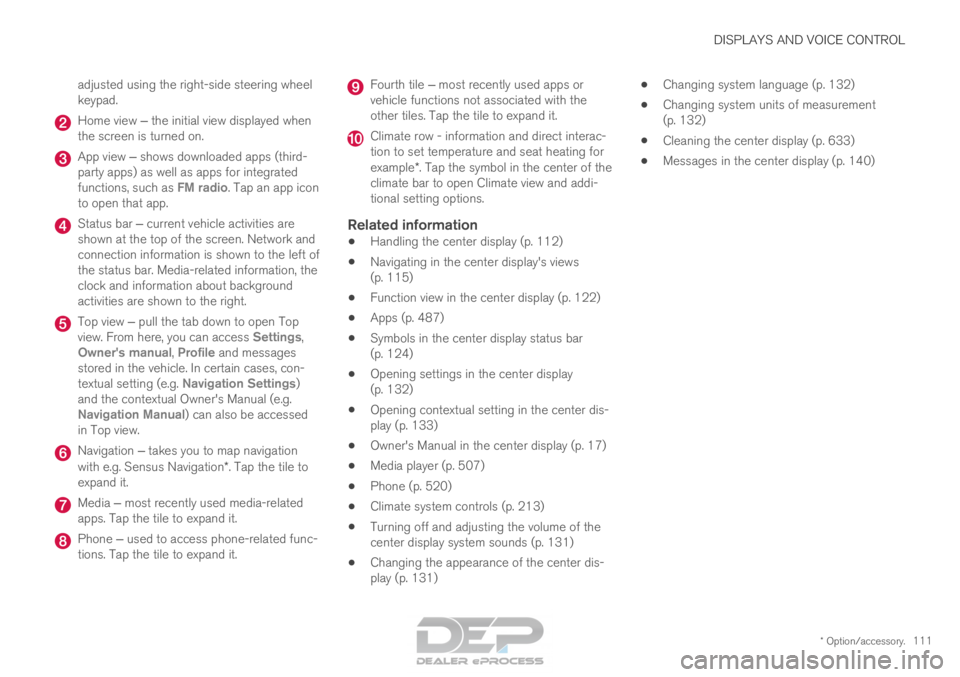
adjusted using the right-side steering wheel
keypad.
Home view ‒ the initial view displayed when
the screen is turned on. App view ‒ shows downloaded apps (third-
party apps) as well as apps for integrated
functions, such as FM radio
. Tap an app icon
to open that app. Status bar ‒ current vehicle activities are
shown at the top of the screen. Network and
connection information is shown to the left of
the status bar. Media-related information, the
clock and information about background
activities are shown to the right. Top view ‒ pull the tab down to open Top
view. From here, you can access Settings
,
Owner's manual, Profile and messages
stored in the vehicle. In certain cases, con-
textual setting (e.g. Navigation Settings
)
and the contextual Owner's Manual (e.g.
Navigation Manual) can also be accessed
in Top view. Navigation ‒ takes you to map navigation
with e.g. Sensus Navigation*. Tap the tile to
expand it. Media ‒ most recently used media-related
apps. Tap the tile to expand it. Phone ‒ used to access phone-related func-
tions. Tap the tile to expand it. Fourth tile ‒ most recently used apps or
vehicle functions not associated with the
other tiles. Tap the tile to expand it. Climate row - information and direct interac-
tion to set temperature and seat heating for
example*. Tap the symbol in the center of the
climate bar to open Climate view and addi-
tional setting options.
Related information
• Handling the center display (p. 112)
• Navigating in the center display's views
(p. 115)
• Function view in the center display (p. 122)
• Apps (p. 487)
• Symbols in the center display status bar
(p. 124)
• Opening settings in the center display
(p. 132)
• Opening contextual setting in the center dis-
play (p. 133)
• Owner's Manual in the center display (p. 17)
• Media player (p. 507)
• Phone (p. 520)
• Climate system controls (p. 213)
• Turning off and adjusting the volume of the
center display system sounds (p. 131)
• Changing the appearance of the center dis-
play (p. 131) •
Changing system language (p. 132)
• Changing system units of measurement
(p. 132)
• Cleaning the center display (p. 633)
• Messages in the center display (p. 140)
Page 117 of 686
DISPLAYS AND VOICE CONTROL
}}
* Option/accessory. 115
Activating and deactivating the
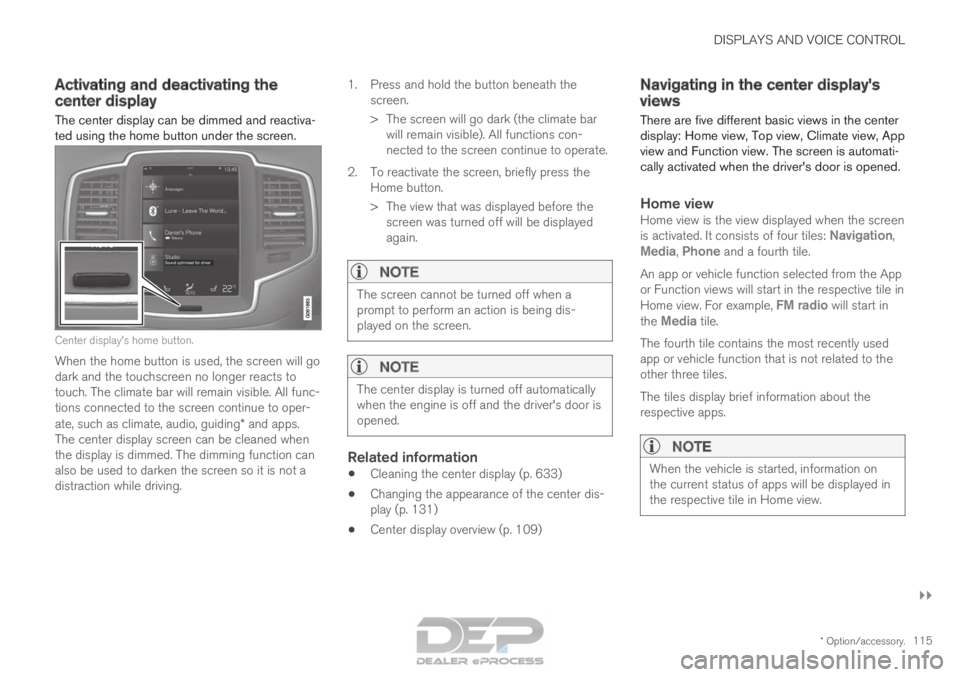
center display
The center display can be dimmed and reactiva-
ted using the home button under the screen. Center display's home button.
When the home button is used, the screen will go
dark and the touchscreen no longer reacts to
touch. The climate bar will remain visible. All func-
tions connected to the screen continue to oper-
ate, such as climate, audio, guiding* and apps.
The center display screen can be cleaned when
the display is dimmed. The dimming function can
also be used to darken the screen so it is not a
distraction while driving. 1.
Press and hold the button beneath the
screen.
> The screen will go dark (the climate bar will remain visible). All functions con-
nected to the screen continue to operate.
2. To reactivate the screen, briefly press the Home button.
> The view that was displayed before thescreen was turned off will be displayed
again.
NOTE The screen cannot be turned off when a
prompt to perform an action is being dis-
played on the screen.
NOTE
The center display is turned off automatically
when the engine is off and the driver's door is
opened.
Related information
•
Cleaning the center display (p. 633)
• Changing the appearance of the center dis-
play (p. 131)
• Center display overview (p. 109) Navigating in the center display's
views
There are five different basic views in the center
display: Home view, Top view, Climate view, App
view and Function view. The screen is automati-
cally activated when the driver's door is opened.
Home viewHome view is the view displayed when the screen
is activated. It consists of four tiles: Navigation,
Media, Phone and a fourth tile.
An app or vehicle function selected from the App
or Function views will start in the respective tile in
Home view. For example, FM radio will start in
the
Media tile.
The fourth tile contains the most recently used
app or vehicle function that is not related to the
other three tiles.
The tiles display brief information about the
respective apps.
NOTE When the vehicle is started, information on
the current status of apps will be displayed in
the respective tile in Home view.
Page 119 of 686

DISPLAYS AND VOICE CONTROL
}}
* Option/accessory. 117
App viewApp view showing the vehicle's apps.
Swipe the screen from right to left 5
to access
App view from Home view. This view displays
downloaded apps (third-party apps) as well as
apps for integrated functions, such as FM radio.
Brief information will be displayed directly in App
view for certain apps, such as unread text mes-
sages for Messages. Tap an app to open it. It will then be opened in its
associated tile, e.g.
Media.
Depending on the number of apps, it is possible
to scroll down in the App view. This is done by
sweeping/dragging from the bottom upwards.
To return to Home view, swipe the screen from
left to right 5
or press the Home button.Function view Function view with buttons for various vehicle functions.
Swipe the screen from left to right 5
to access
Function view from Home view. From Function
view, you can activate or deactivate various vehi-
cle functions such as BLIS*, Lane Keeping Aid*
and Park Assist*. 5
Applies for left-hand drive vehicles. For right-hand drive vehicles, swi\
pe in the other direction.
Page 127 of 686

DISPLAYS AND VOICE CONTROL
125Symbol
Meaning Tethering activated (Wi-Fi hotspot).
This means that the vehicle shares
an available Internet connection.
Vehicle modem activated.
USB sharing active.
Action in progress.
Timer for preconditioning active.
AAudio source being played.
Audio source paused.
Phone call in progress.
Audio source muted.
News broadcasts from current radio
station.
B Traffic information being received.
BClock.
A
Only hybrid models.
B Not available in all markets.
Related information
• Navigating in the center display's views
(p. 115)
• Messages in the center display (p. 140)
Page 135 of 686
DISPLAYS AND VOICE CONTROL
133
Related information
•Center display overview (p. 109)
• Changing settings in the center display
(p. 134)
• Setting types in the center display (p. 135)
• Table of settings in the center display
(p. 136) Opening contextual setting in the
center display
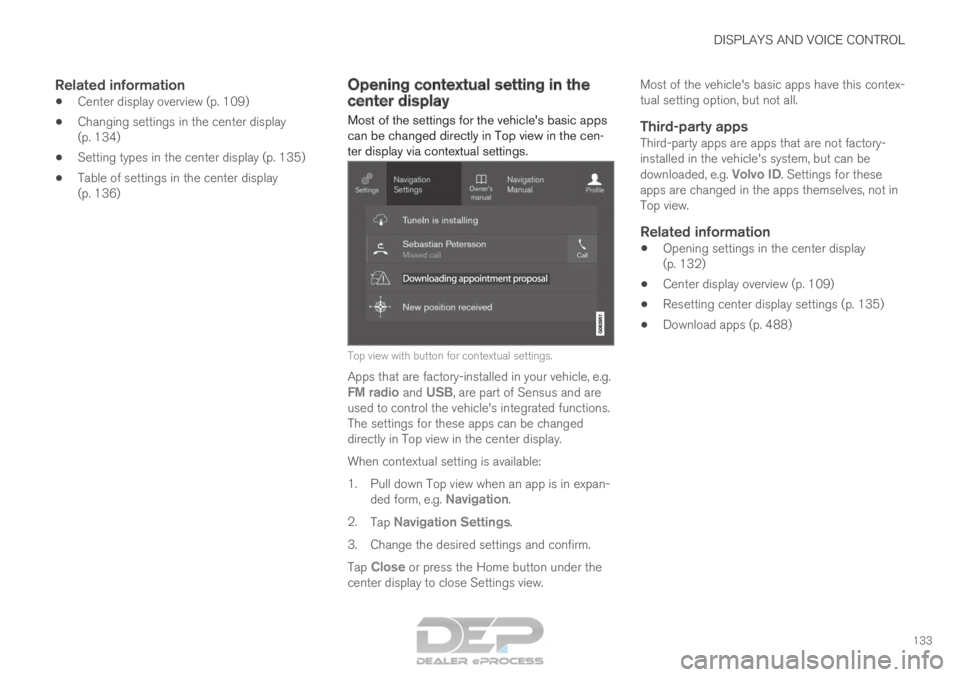
Most of the settings for the vehicle's basic apps
can be changed directly in Top view in the cen-
ter display via contextual settings. Top view with button for contextual settings.
Apps that are factory-installed in your vehicle, e.g. FM radio and USB, are part of Sensus and areused to control the vehicle's integrated functions.
The settings for these apps can be changed
directly in Top view in the center display.
When contextual setting is available:
1.
Pull down Top view when an app is in expan-
ded form, e.g. Navigation.
2. Tap Navigation Settings.
3.
Change the desired settings and confirm.
Tap Close or press the Home button under the
center display to close Settings view. Most of the vehicle's basic apps have this contex-
tual setting option, but not all.
Third-party appsThird-party apps are apps that are not factory-
installed in the vehicle's system, but can be
downloaded, e.g.
Volvo ID. Settings for these
apps are changed in the apps themselves, not in
Top view.
Related information
• Opening settings in the center display
(p. 132)
• Center display overview (p. 109)
• Resetting center display settings (p. 135)
• Download apps (p. 488)
Page 136 of 686
DISPLAYS AND VOICE CONTROL
134Changing settings in the center
display
You can change
Settings and information for
many of the vehicle's functions via the center
display. 1. Open Top view by tapping the tab or by drag-
ging/swiping from the top of the screen
downward.
2. Tap Settings to open the Settings menu.
3.
Tap one of the categories and sub-catego-
ries to navigate to the desired setting.
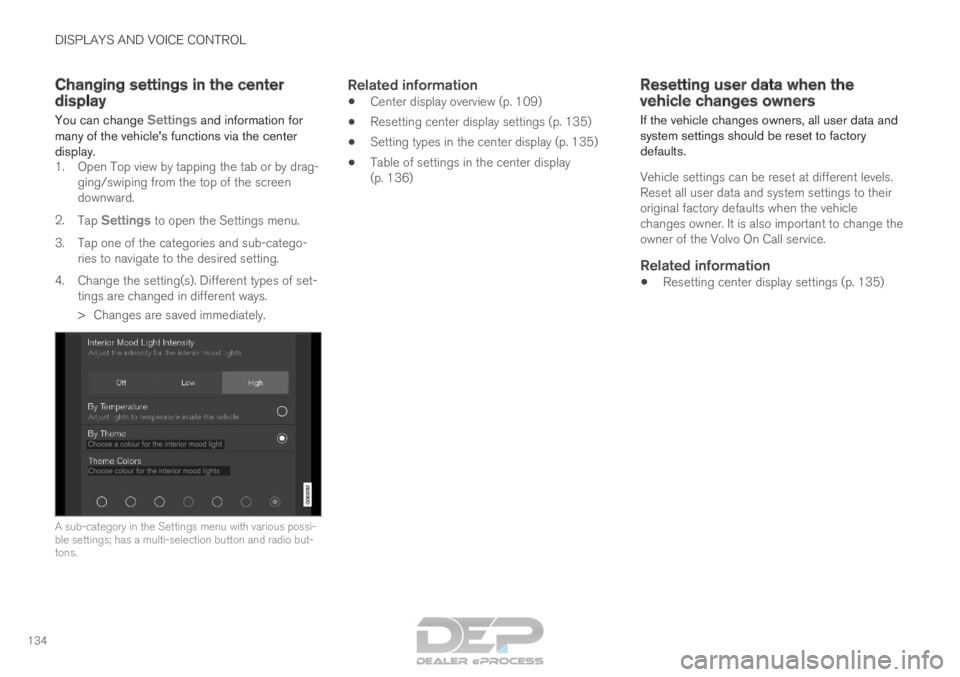
4. Change the setting(s). Different types of set- tings are changed in different ways.
> Changes are saved immediately. A sub-category in the Settings menu with various possi-
ble settings; has a multi-selection button and radio but-
tons.
Related information
•
Center display overview (p. 109)
• Resetting center display settings (p. 135)
• Setting types in the center display (p. 135)
• Table of settings in the center display
(p. 136) Resetting user data when the
vehicle changes owners
If the vehicle changes owners, all user data and
system settings should be reset to factory
defaults.
Vehicle settings can be reset at different levels.
Reset all user data and system settings to their
original factory defaults when the vehicle
changes owner. It is also important to change the
owner of the Volvo On Call service.
Related information
• Resetting center display settings (p. 135)
Page 137 of 686
DISPLAYS AND VOICE CONTROL
}}
135
Resetting center display settings
All settings made in the center display's Settings
menu can be reset to default values.
Two types of resetThere are two ways to reset the settings in the
Settings menu:
• Factory Reset- erases all data and files and
resets all settings to factory default.
• Reset Personal Settings- erases personal
data and resets personalized settings to fac-
tory default.
Resetting settingsFollow these instructions to reset the settings.
NOTE Factory Reset is only possible when the
vehicle is stationary. 1.
Tap Settings in the Top view in the center
display.
2.
Proceed to System Factory Reset
.
3. Select the type of reset you would like to do. > A pop-up window will appear. 4.
Tap OK to confirm the reset.
For Reset Personal Settings, confirm the reset by tapping
Reset for the active
profile or Reset for all profiles.
>
The selected settings will be reset.
Related information
• Center display overview (p. 109)
• Opening settings in the center display
(p. 132)
• Changing settings in the center display
(p. 134)
• Table of settings in the center display
(p. 136) Setting types in the center display
Different types of settings are changed in differ-
ent ways. Refer to the table below for a descrip-
tion of the different types of settings.
Types of settings Type of
setting
Description
Trigger
function Starts an app or a separate view
for more advanced settings. Tap
the text to e.g. connect a
Bluetooth
®
device.
Radio but-
ton Select one of the possible set-
tings by tapping the desired radio
button to e.g. change the system
language.
Multi-
selection
button Select a level for a particular set-
ting by pressing the desired part
of the button, e.g. to select sensi-
tivity level for City Safety.
Checkbox
Tap the checkbox to activate/
deactivate a function, e.g. to
select automatic start for heated
seats.