turn signal VOLVO XC90 TWIN ENGINE 2018 Owners Manual
[x] Cancel search | Manufacturer: VOLVO, Model Year: 2018, Model line: XC90 TWIN ENGINE, Model: VOLVO XC90 TWIN ENGINE 2018Pages: 686, PDF Size: 17 MB
Page 6 of 686
4
Resetting user data when the vehiclechanges owners134
Resetting center display settings135
Setting types in the center display135
Table of settings in the center display136
Driver profiles137
Selecting a driver profile138
Changing a driver profile's name139
Resetting driver profile settings139
Linking a remote key to a driver profile139
Messages in the center display140
Handling messages in the center display141
Handling messages saved from thecenter display142
Head-up display*142
Activating and deactivating the head-up display*144
Head-up display settings*144
Voice control145
Using voice commands146
Voice control for cellular phones147
Voice control for radio and media148
Voice control settings148
LIGHTING
Lighting panel and controls152
Adjusting light functions via the cen-ter display153
Parking lights154
Daytime running lights154
Low beams155
Using high beam156
Active high beam157
Using turn signals158
Active Bending Lights*159
Rear fog light159
Brake lights160
Emergency brake lights160
Hazard warning flashers161
Using home safe lighting161
Welcome Light161
Interior Lighting162
Adjusting interior lighting164
WINDOWS, GLASS AND MIRRORS
Windows, glass and mirrors166
Pinch protection for windows andsun curtains166
Reset procedure for pinch protection167
Power windows167
Operating the power windows168
Using sun curtains*169
Rearview/door mirrors169
Adjusting the rearview mirror dim-ming function170
Adjusting the door mirrors171
Panoramic roof*172
Operating the panoramic roof*173
Auto closing the panoramic roof* suncurtain175
Using the windshield wipers176
Heated windshield washer nozzles*177
Using the rain sensor177
Using the rain sensor's memory function178
Using the windshield and headlightwashers179
Using the rear window wiper/washer180
Using automatic rear window wipingwhen backing up181
Page 84 of 686
DISPLAYS AND VOICE CONTROL
* Option/accessory.
82 Instruments and controls in left-
hand drive vehicles
The overviews show the location of the vehicle's
displays and controls.
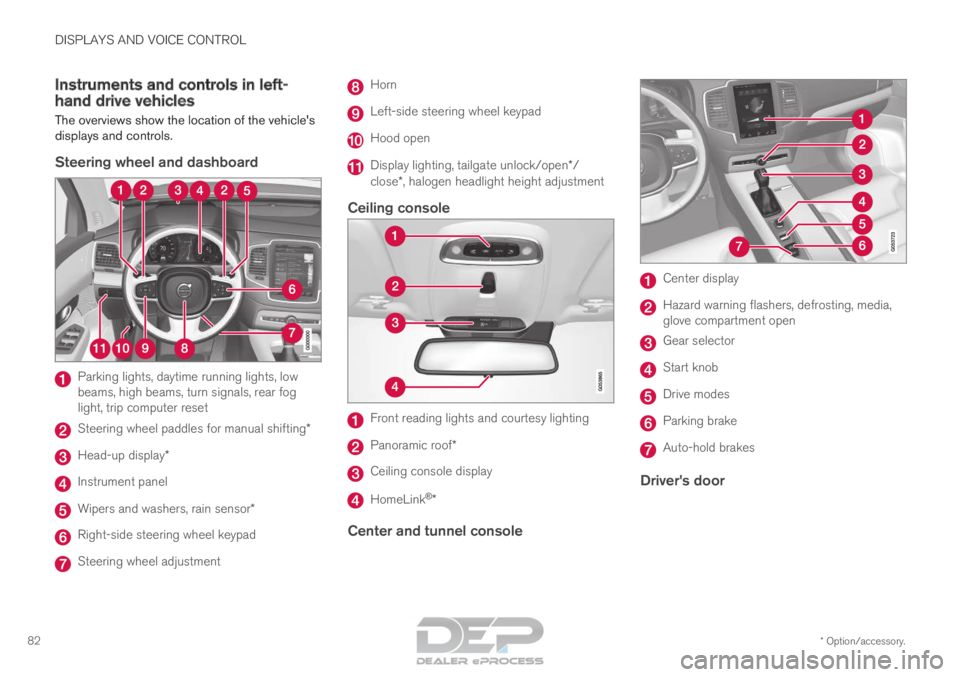
Steering wheel and dashboard Parking lights, daytime running lights, low
beams, high beams, turn signals, rear fog
light, trip computer reset
Steering wheel paddles for manual shifting*
Head-up display*
Instrument panel
Wipers and washers, rain sensor*
Right-side steering wheel keypad
Steering wheel adjustment Horn
Left-side steering wheel keypad
Hood open
Display lighting, tailgate unlock/open*/
close*, halogen headlight height adjustment
Ceiling console Front reading lights and courtesy lighting
Panoramic roof*
Ceiling console display
HomeLink
®
*
Center and tunnel console Center display
Hazard warning flashers, defrosting, media,
glove compartment open
Gear selector
Start knob
Drive modes
Parking brake
Auto-hold brakes
Driver's door
Page 97 of 686
DISPLAYS AND VOICE CONTROL
}}95 Symbol
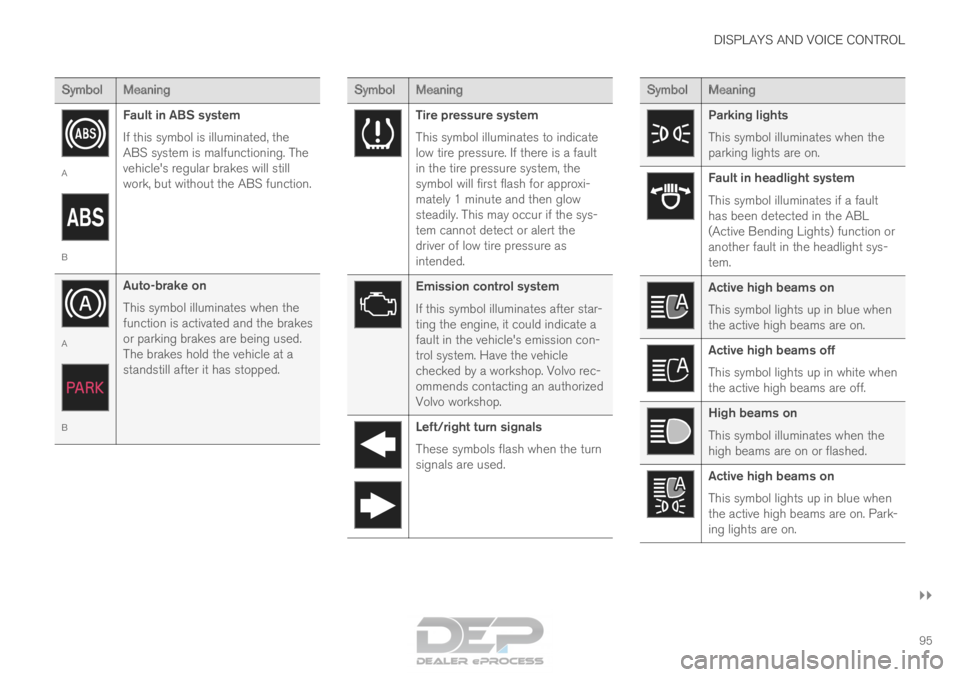
Meaning A
B
Fault in ABS system
If this symbol is illuminated, the
ABS system is malfunctioning. The
vehicle's regular brakes will still
work, but without the ABS function. A
B
Auto-brake on
This symbol illuminates when the
function is activated and the brakes
or parking brakes are being used.
The brakes hold the vehicle at a
standstill after it has stopped. Symbol
Meaning Tire pressure system
This symbol illuminates to indicate
low tire pressure. If there is a fault
in the tire pressure system, the
symbol will first flash for approxi-
mately 1 minute and then glow
steadily. This may occur if the sys-
tem cannot detect or alert the
driver of low tire pressure as
intended.
Emission control system
If this symbol illuminates after star-
ting the engine, it could indicate a
fault in the vehicle's emission con-
trol system. Have the vehicle
checked by a workshop. Volvo rec-
ommends contacting an authorized
Volvo workshop.
Left/right turn signals
These symbols flash when the turn
signals are used. Symbol
Meaning Parking lights
This symbol illuminates when the
parking lights are on.
Fault in headlight system
This symbol illuminates if a fault
has been detected in the ABL
(Active Bending Lights) function or
another fault in the headlight sys-
tem.
Active high beams on
This symbol lights up in blue when
the active high beams are on.
Active high beams off
This symbol lights up in white when
the active high beams are off.
High beams on
This symbol illuminates when the
high beams are on or flashed.
Active high beams on
This symbol lights up in blue when
the active high beams are on. Park-
ing lights are on.
Page 155 of 686
LIGHTING
* Option/accessory.153
WARNINGThe vehicle lighting system cannot in all situa-
tions determine when the daylight is too weak
or not strong enough, e.g. when there is fog
or rain.
The driver is always responsible for driving the
vehicle with lighting that is safe for the traffic
conditions and as specified by applicable traf-
fic regulations.
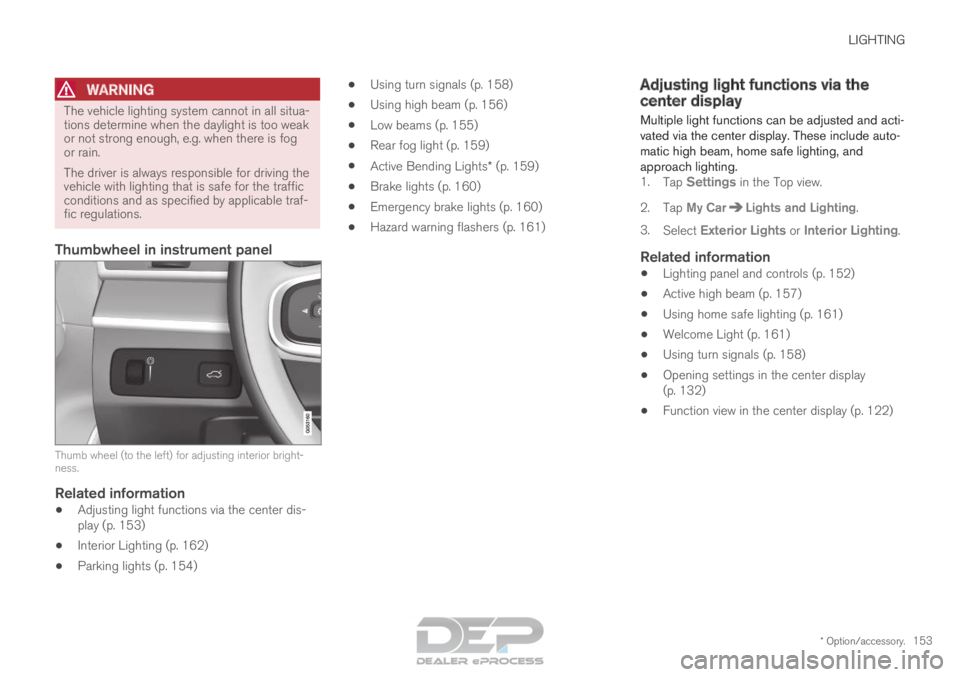
Thumbwheel in instrument panel
Thumb wheel (to the left) for adjusting interior bright-
ness.
Related information
•
Adjusting light functions via the center dis-
play (p. 153)
• Interior Lighting (p. 162)
• Parking lights (p. 154) •
Using turn signals (p. 158)
• Using high beam (p. 156)
• Low beams (p. 155)
• Rear fog light (p. 159)
• Active Bending Lights* (p. 159)
• Brake lights (p. 160)
• Emergency brake lights (p. 160)
• Hazard warning flashers (p. 161) Adjusting light functions via the
center display
Multiple light functions can be adjusted and acti-
vated via the center display. These include auto-
matic high beam, home safe lighting, and
approach lighting. 1. Tap Settings in the Top view.
2.
Tap My Car Lights and Lighting
.
3. Select Exterior Lights or Interior Lighting.
Related information
• Lighting panel and controls (p. 152)
• Active high beam (p. 157)
• Using home safe lighting (p. 161)
• Welcome Light (p. 161)
• Using turn signals (p. 158)
• Opening settings in the center display
(p. 132)
• Function view in the center display (p. 122)
Page 160 of 686
||LIGHTING
158
Related information
•
Lighting panel and controls (p. 152)
• Using high beam (p. 156)
• Camera limitations (p. 332) Using turn signals
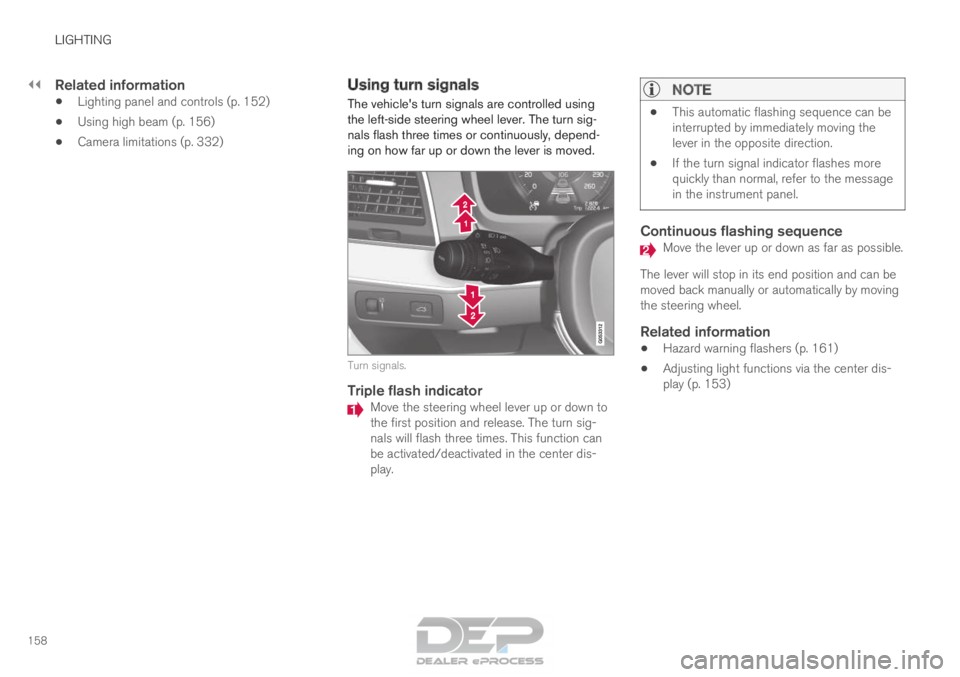
The vehicle's turn signals are controlled using
the left-side steering wheel lever. The turn sig-
nals flash three times or continuously, depend-
ing on how far up or down the lever is moved. Turn signals.
Triple flash indicator
Move the steering wheel lever up or down to
the first position and release. The turn sig-
nals will flash three times. This function can
be activated/deactivated in the center dis-
play.
NOTE •
This automatic flashing sequence can be
interrupted by immediately moving the
lever in the opposite direction.
• If the turn signal indicator flashes more
quickly than normal, refer to the message
in the instrument panel.
Continuous flashing sequence Move the lever up or down as far as possible.
The lever will stop in its end position and can be
moved back manually or automatically by moving
the steering wheel.
Related information
• Hazard warning flashers (p. 161)
• Adjusting light functions via the center dis-
play (p. 153)
Page 163 of 686
LIGHTING
* Option/accessory.161
Hazard warning flashers
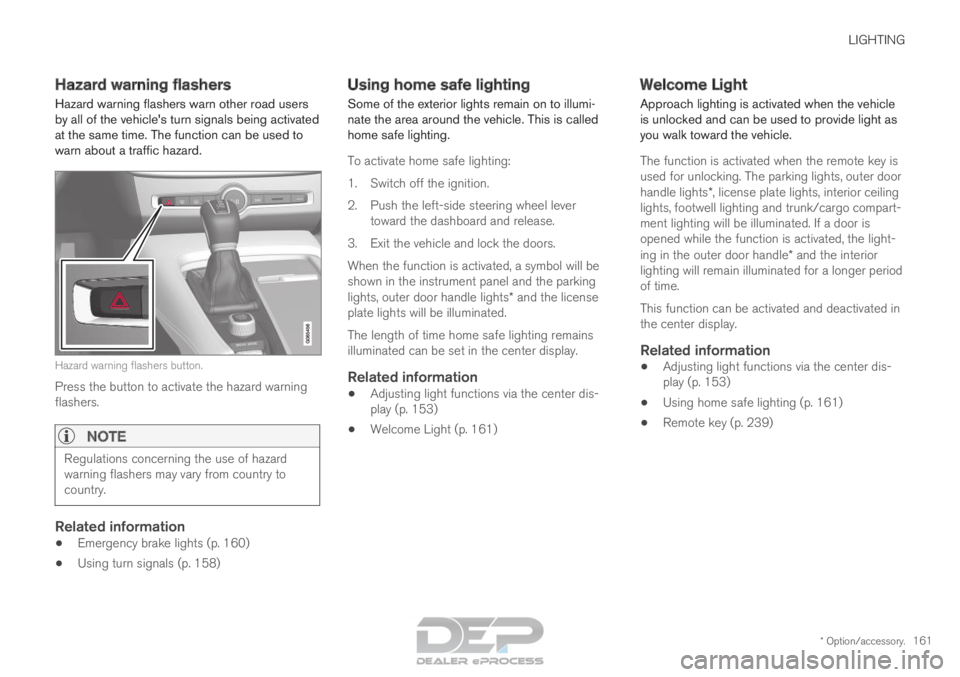
Hazard warning flashers warn other road users
by all of the vehicle's turn signals being activated
at the same time. The function can be used to
warn about a traffic hazard. Hazard warning flashers button.
Press the button to activate the hazard warning
flashers.
NOTE Regulations concerning the use of hazard
warning flashers may vary from country to
country.
Related information
•
Emergency brake lights (p. 160)
• Using turn signals (p. 158) Using home safe lighting
Some of the exterior lights remain on to illumi-
nate the area around the vehicle. This is called
home safe lighting.
To activate home safe lighting:
1.
Switch off the ignition.
2. Push the left-side steering wheel lever toward the dashboard and release.
3. Exit the vehicle and lock the doors.
When the function is activated, a symbol will be
shown in the instrument panel and the parking
lights, outer door handle lights* and the license
plate lights will be illuminated.
The length of time home safe lighting remains
illuminated can be set in the center display.
Related information
• Adjusting light functions via the center dis-
play (p. 153)
• Welcome Light (p. 161) Welcome Light
Approach lighting is activated when the vehicle
is unlocked and can be used to provide light as
you walk toward the vehicle.
The function is activated when the remote key is
used for unlocking. The parking lights, outer door
handle lights*, license plate lights, interior ceiling
lights, footwell lighting and trunk/cargo compart-
ment lighting will be illuminated. If a door is
opened while the function is activated, the light-
ing in the outer door handle* and the interior
lighting will remain illuminated for a longer period
of time.
This function can be activated and deactivated in
the center display.
Related information
• Adjusting light functions via the center dis-
play (p. 153)
• Using home safe lighting (p. 161)
• Remote key (p. 239)
Page 240 of 686
KEY, LOCKS AND ALARM
* Option/accessory.
238 Lock indication
When the vehicle is locked or unlocked, the turn
signals will flash to indicate that the vehicle has
been locked or unlocked correctly.
Exterior confirmationLocking
• The turn signals will flash once and the door
mirrors will fold in 1
to confirm the vehicle is
locked.
Unlocking
• The turn signals will flash twice and the door
mirrors will fold out 1
to confirm the vehicle is
unlocked.
All doors, tailgate and hood must be closed for
confirmation to be given. If only the driver's door
is closed when the vehicle is locked 2
, the vehicle
will be locked but the turn signals will only flash
to indicate locking when all doors and the hood
and tailgate have been closed.
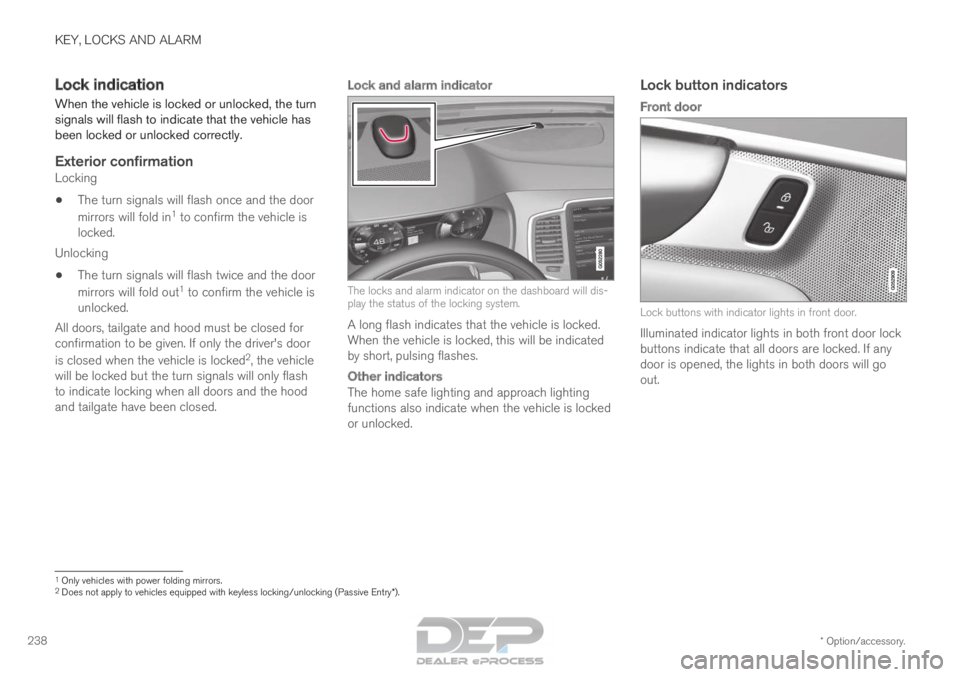
Lock and alarm indicator The locks and alarm indicator on the dashboard will dis-
play the status of the locking system.
A long flash indicates that the vehicle is locked.
When the vehicle is locked, this will be indicated
by short, pulsing flashes.
Other indicators
The home safe lighting and approach lighting
functions also indicate when the vehicle is locked
or unlocked.
Lock button indicators
Front door Lock buttons with indicator lights in front door.
Illuminated indicator lights in both front door lock
buttons indicate that all doors are locked. If any
door is opened, the lights in both doors will go
out. 1
Only vehicles with power folding mirrors.
2 Does not apply to vehicles equipped with keyless locking/unlocking (Pas\
sive Entry*).
Page 242 of 686
||KEY, LOCKS AND ALARM
* Option/accessory.
240 The keyless system for locking/unlocking the
doors and tailgate (Passive Entry*) is available as
an option. This system has a range in a semicircle
with a radius of approximately 1.5 meter (5 feet)
out from the driver's door and approx. 1 meter
(3 feet) out from the tailgate.
With keyless start in combination with keyless
locking and unlocking, the remote key can be
located anywhere in the passenger compartment
or cargo compartment in order to start the
engine.
Each remote key supplied with the vehicle can be
linked to a driver profile with unique settings for
the vehicle. When a key with a specific profile is
used, the vehicle settings are adjusted according
to that profile.
Buttonless key, Key TagFor vehicles equipped with keyless locking and
unlocking*, a smaller, lighter and button-less key
(Key Tag 3
) is also provided. It works the same
way as the regular remote key as regard keyless
start and keyless locking and unlocking 4
. It does
not have a detachable key blade and its battery
cannot be replaced.
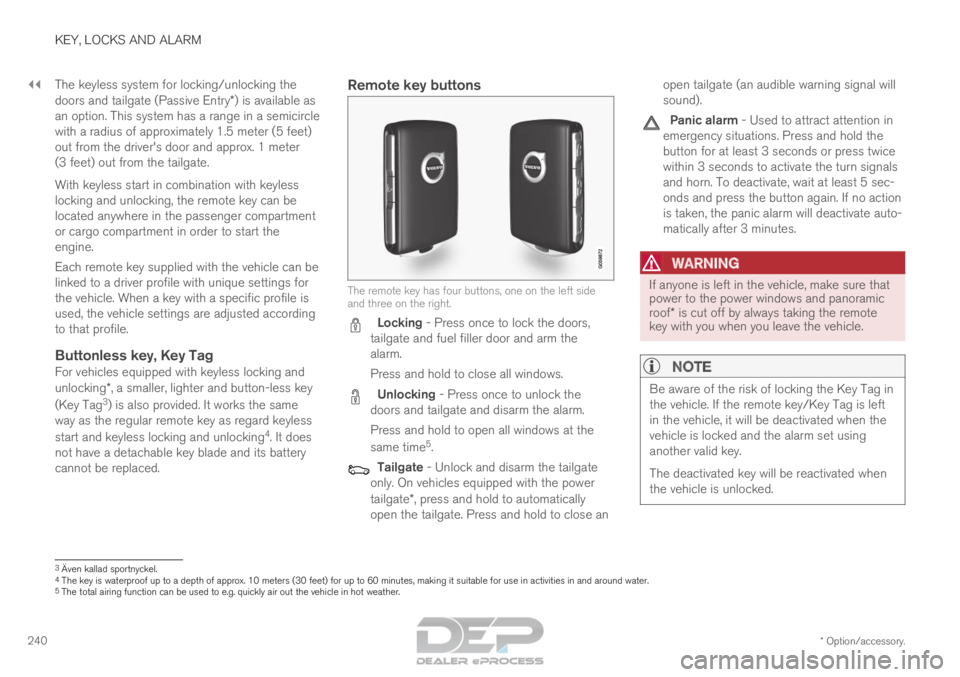
Remote key buttons The remote key has four buttons, one on the left side
and three on the right.
Locking - Press once to lock the doors,
tailgate and fuel filler door and arm the
alarm.
Press and hold to close all windows. Unlocking - Press once to unlock the
doors and tailgate and disarm the alarm.
Press and hold to open all windows at the
same time 5
. Tailgate - Unlock and disarm the tailgate
only. On vehicles equipped with the power
tailgate*, press and hold to automatically
open the tailgate. Press and hold to close an open tailgate (an audible warning signal will
sound). Panic alarm - Used to attract attention in
emergency situations. Press and hold the
button for at least 3 seconds or press twice
within 3 seconds to activate the turn signals
and horn. To deactivate, wait at least 5 sec-
onds and press the button again. If no action
is taken, the panic alarm will deactivate auto-
matically after 3 minutes.
WARNING If anyone is left in the vehicle, make sure that
power to the power windows and panoramic
roof* is cut off by always taking the remote
key with you when you leave the vehicle.
NOTE Be aware of the risk of locking the Key Tag in
the vehicle. If the remote key/Key Tag is left
in the vehicle, it will be deactivated when the
vehicle is locked and the alarm set using
another valid key.
The deactivated key will be reactivated when
the vehicle is unlocked.
3
Även kallad sportnyckel.
4 The key is waterproof up to a depth of approx. 10 meters (30 feet) for\
up to 60 minutes, making it suitable for use in activities in and aroun\
d water.
5 The total airing function can be used to e.g. quickly air out the vehicl\
e in hot weather.
Page 246 of 686
||KEY, LOCKS AND ALARM
* Option/accessory.
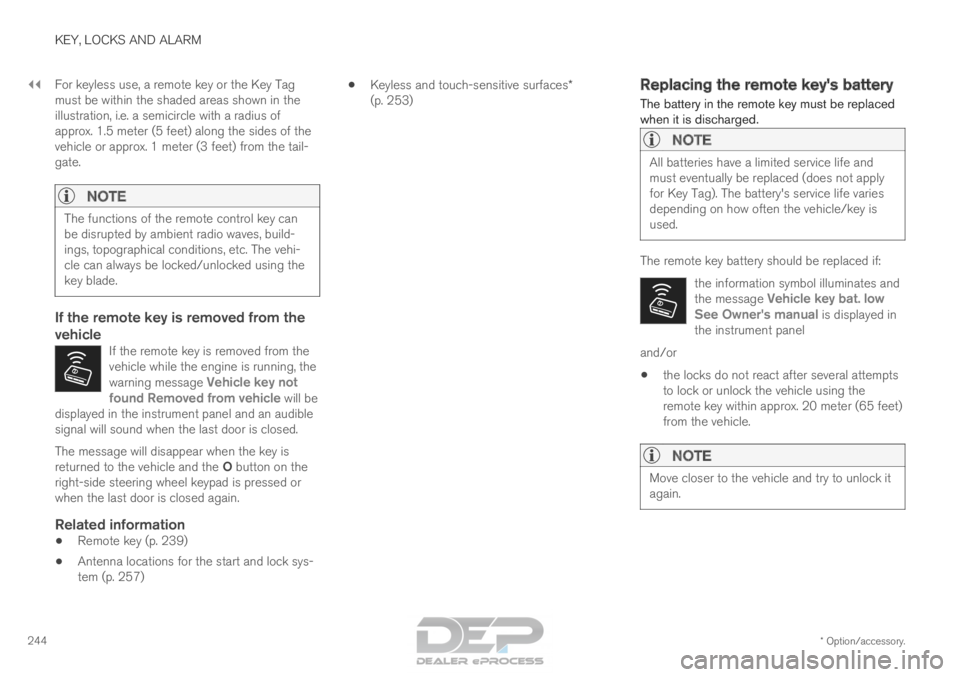
244 For keyless use, a remote key or the Key Tag
must be within the shaded areas shown in the
illustration, i.e. a semicircle with a radius of
approx. 1.5 meter (5 feet) along the sides of the
vehicle or approx. 1 meter (3 feet) from the tail-
gate.
NOTE
The functions of the remote control key can
be disrupted by ambient radio waves, build-
ings, topographical conditions, etc. The vehi-
cle can always be locked/unlocked using the
key blade.
If the remote key is removed from the
vehicle
If the remote key is removed from the
vehicle while the engine is running, the
warning message
Vehicle key not
found Removed from vehicle will be
displayed in the instrument panel and an audible
signal will sound when the last door is closed. The message will disappear when the key is
returned to the vehicle and the O button on the
right-side steering wheel keypad is pressed or
when the last door is closed again.
Related information
• Remote key (p. 239)
• Antenna locations for the start and lock sys-
tem (p. 257) •
Keyless and touch-sensitive surfaces*
(p. 253) Replacing the remote key's battery
The battery in the remote key must be replaced
when it is discharged.
NOTE All batteries have a limited service life and
must eventually be replaced (does not apply
for Key Tag). The battery's service life varies
depending on how often the vehicle/key is
used.
The remote key battery should be replaced if:
the information symbol illuminates and
the message Vehicle key bat. low
See Owner's manual is displayed in
the instrument panel and/or
• the locks do not react after several attempts
to lock or unlock the vehicle using the
remote key within approx. 20 meter (65 feet)
from the vehicle.
NOTE Move closer to the vehicle and try to unlock it
again.
Page 253 of 686
KEY, LOCKS AND ALARM
}}
251
Locking and unlocking with
detachable key blade
The detachable key blade can be used to unlock
the vehicle from the outside, e.g. if the battery in
the remote key is discharged.
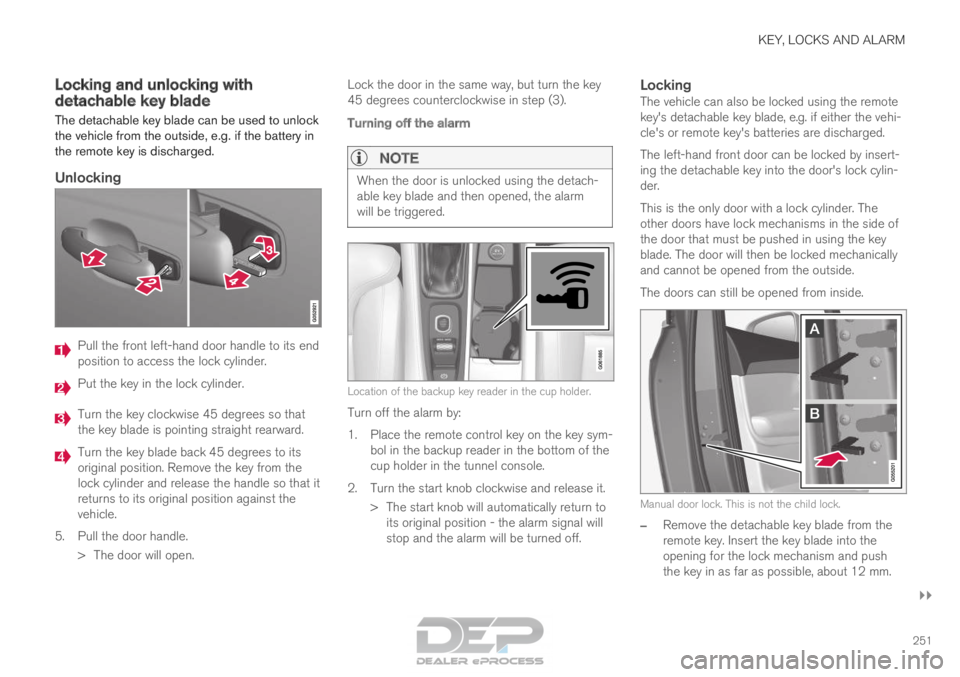
Unlocking Pull the front left-hand door handle to its end
position to access the lock cylinder.
Put the key in the lock cylinder.
Turn the key clockwise 45 degrees so that
the key blade is pointing straight rearward.
Turn the key blade back 45 degrees to its
original position. Remove the key from the
lock cylinder and release the handle so that it
returns to its original position against the
vehicle.
5.
Pull the door handle.
> The door will open. Lock the door in the same way, but turn the key
45 degrees counterclockwise in step (3).
Turning off the alarm
NOTE When the door is unlocked using the detach-
able key blade and then opened, the alarm
will be triggered.
Location of the backup key reader in the cup holder.
Turn off the alarm by:
1.
Place the remote control key on the key sym-
bol in the backup reader in the bottom of the
cup holder in the tunnel console.
2. Turn the start knob clockwise and release it. > The start knob will automatically return toits original position - the alarm signal will
stop and the alarm will be turned off.
LockingThe vehicle can also be locked using the remote
key's detachable key blade, e.g. if either the vehi-
cle's or remote key's batteries are discharged.
The left-hand front door can be locked by insert-
ing the detachable key into the door's lock cylin-
der.
This is the only door with a lock cylinder. The
other doors have lock mechanisms in the side of
the door that must be pushed in using the key
blade. The door will then be locked mechanically
and cannot be opened from the outside.
The doors can still be opened from inside. Manual door lock. This is not the child lock.
–
Remove the detachable key blade from the
remote key. Insert the key blade into the
opening for the lock mechanism and push
the key in as far as possible, about 12 mm.