ECO mode VOLVO XC90 TWIN ENGINE 2019 User Guide
[x] Cancel search | Manufacturer: VOLVO, Model Year: 2019, Model line: XC90 TWIN ENGINE, Model: VOLVO XC90 TWIN ENGINE 2019Pages: 697, PDF Size: 10.33 MB
Page 86 of 697
DISPLAYS AND VOICE CONTROL
* Option/accessory.
84 Instrument panel
The instrument panel displays information rela-
ted to the vehicle and driving.
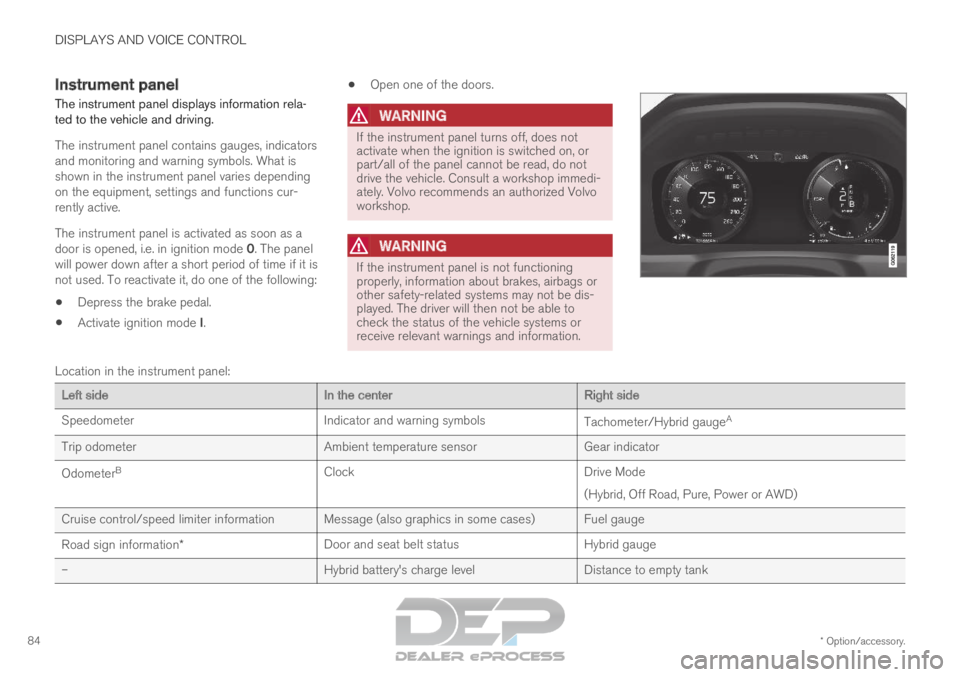
The instrument panel contains gauges, indicators
and monitoring and warning symbols. What is
shown in the instrument panel varies depending
on the equipment, settings and functions cur-
rently active.
The instrument panel is activated as soon as a
door is opened, i.e. in ignition mode 0. The panel
will power down after a short period of time if it is
not used. To reactivate it, do one of the following:
Depress the brake pedal.
Activate ignition mode I.
Open one of the doors.
WARNING If the instrument panel turns off, does not
activate when the ignition is switched on, or
part/all of the panel cannot be read, do not
drive the vehicle. Consult a workshop immedi-
ately. Volvo recommends an authorized Volvo
workshop.
WARNING
If the instrument panel is not functioning
properly, information about brakes, airbags or
other safety-related systems may not be dis-
played. The driver will then not be able to
check the status of the vehicle systems or
receive relevant warnings and information.
Location in the instrument panel:
Left side
In the centerRight side
Speedometer
Indicator and warning symbols Tachometer/Hybrid gaugeA
Trip odometer Ambient temperature sensorGear indicator
Odometer B
Clock Drive Mode
(Hybrid, Off Road, Pure, Power or AWD)
Cruise control/speed limiter information Message (also graphics in some cases) Fuel gauge
Road sign information* Door and seat belt status
Hybrid gauge
– Hybrid battery's charge levelDistance to empty tank
Page 89 of 697
DISPLAYS AND VOICE CONTROL
}}87
Fuel gauge
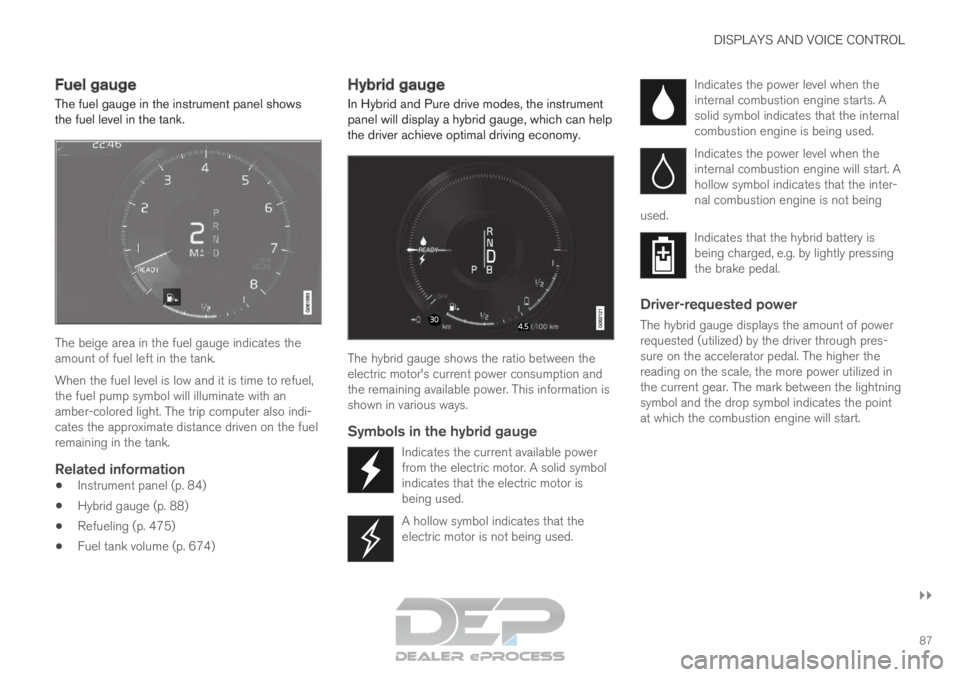
The fuel gauge in the instrument panel shows
the fuel level in the tank. The beige area in the fuel gauge indicates the
amount of fuel left in the tank.
When the fuel level is low and it is time to refuel,
the fuel pump symbol will illuminate with an
amber-colored light. The trip computer also indi-
cates the approximate distance driven on the fuel
remaining in the tank.
Related information
Instrument panel (p. 84)
Hybrid gauge (p. 88)
Refueling (p. 475)
Fuel tank volume (p. 674) Hybrid gauge
In Hybrid and Pure drive modes, the instrument panel will display a hybrid gauge, which can help
the driver achieve optimal driving economy. The hybrid gauge shows the ratio between the
electric motor's current power consumption and
the remaining available power. This information is
shown in various ways.
Symbols in the hybrid gauge
Indicates the current available power
from the electric motor. A solid symbol
indicates that the electric motor is
being used.
A hollow symbol indicates that the
electric motor is not being used. Indicates the power level when the
internal combustion engine starts. A
solid symbol indicates that the internal
combustion engine is being used.
Indicates the power level when the
internal combustion engine will start. A
hollow symbol indicates that the inter-
nal combustion engine is not being
used. Indicates that the hybrid battery is
being charged, e.g. by lightly pressing
the brake pedal.
Driver-requested power
The hybrid gauge displays the amount of power
requested (utilized) by the driver through pres-
sure on the accelerator pedal. The higher the
reading on the scale, the more power utilized in
the current gear. The mark between the lightning
symbol and the drop symbol indicates the point
at which the combustion engine will start.
Page 91 of 697
DISPLAYS AND VOICE CONTROL
}}89
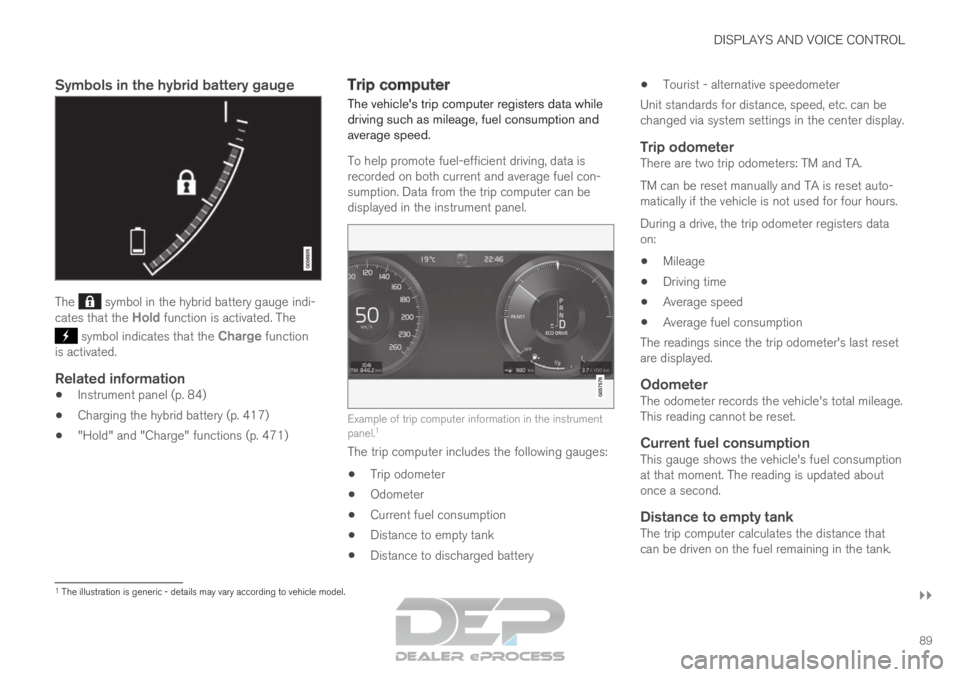
Symbols in the hybrid battery gauge The symbol in the hybrid battery gauge indi-
cates that the Hold function is activated. The symbol indicates that the Charge function
is activated.
Related information
Instrument panel (p. 84)
Charging the hybrid battery (p. 417)
"Hold" and "Charge" functions (p. 471) Trip computer
The vehicle's trip computer registers data while
driving such as mileage, fuel consumption and
average speed.
To help promote fuel-efficient driving, data is
recorded on both current and average fuel con-
sumption. Data from the trip computer can be
displayed in the instrument panel.
Example of trip computer information in the instrument
panel.
1
The trip computer includes the following gauges:
Trip odometer
Odometer
Current fuel consumption
Distance to empty tank
Distance to discharged battery
Tourist - alternative speedometer
Unit standards for distance, speed, etc. can be
changed via system settings in the center display.
Trip odometerThere are two trip odometers: TM and TA.
TM can be reset manually and TA is reset auto-
matically if the vehicle is not used for four hours.
During a drive, the trip odometer registers data
on:
Mileage
Driving time
Average speed
Average fuel consumption
The readings since the trip odometer's last reset
are displayed.
OdometerThe odometer records the vehicle's total mileage.
This reading cannot be reset.
Current fuel consumptionThis gauge shows the vehicle's fuel consumption
at that moment. The reading is updated about
once a second.
Distance to empty tankThe trip computer calculates the distance that
can be driven on the fuel remaining in the tank. 1
The illustration is generic - details may vary according to vehicle mode\
l.
Page 92 of 697
||DISPLAYS AND VOICE CONTROL
90
This calculation is based on average fuel con-
sumption during the last 30 km (20 miles) and
the amount of fuel remaining in the tank.
When the gauge displays "----", there is not
enough fuel remaining to calculate the remaining
mileage. Refuel as soon as possible.
NOTE
This may vary if your driving style changes.
An economical driving style will generally
increase how far you can drive on a certain
amount of fuel.
Distance to discharged batteryThe gauge shows the approximate dis-
tance that can be driven with the
remaining current in the hybrid battery.
When the gauge displays "----", there is little
charge remaining in the battery and distance
cannot be reliably calculated.
This calculation is based on average consump-
tion with a normally loaded vehicle in normal driv-
ing conditions, and takes into account whether
the air conditioning is on or off. Changing drive
modes from
Hybrid to Pure may increase the
calculated distance because Pure mode has
reduced climate control settings (ECO Climate).
NOTE This may vary if your driving style changes.
An economical driving style will generally
increase how far you can drive on a certain
amount of fuel.
Starting values for fully charged hybrid
battery
Because it is difficult to predict driving style and
other factors that affect the range of electric
motors, Volvo uses a starting value when the
vehicle is fully charged. This starting value pro-
vides an "up to" amount instead of a prediction
on the range of the electric current in the motor.
The difference in starting value between
Hybrid
and
Pure is because the vehicle is permitted to
use more current from the hybrid battery in Pure
mode, and because the vehicle switches to ECO
Climate.
Mileage when using electric motor
To achieve the longest possible mileage when
using the electric motor, the driver of an electric
vehicle also needs to think about conserving
electricity. The more electricity consumers
(stereo, heated windows/mirrors/seats, very cold
air from climate control system, etc.) that are
active, the shorter the potential mileage.
NOTE In addition to high electrical consumption in
the passenger compartment, rapid accelera-
tion, sudden braking, high speeds, heavy
loads, low ambient temperatures and driving
up hills can reduce possible driving distance.
Tourist - alternative speedometerThe alternative digital speedometer makes it eas-
ier to drive in countries where speed limit signs
are shown in a different measurement unit than
the one shown in the vehicle's gauges.
When used, the digital speed is displayed in the
opposite unit to that shown in the analog speed-
ometer. If mph is used in the analog speedome-
ter, the equivalent speed in km/h will be shown
in the digital speedometer.
Related information
Displaying trip data in the instrument panel
(p. 91)
Resetting the trip odometer (p. 92)
Displaying trip statistics in the center display
(p. 92)
Instrument panel (p. 84)
Changing system units of measurement
(p. 132)
Page 93 of 697
DISPLAYS AND VOICE CONTROL
91
Displaying trip data in the
instrument panel
Data recorded and calculated by the trip com-
puter can be displayed on the instrument panel.
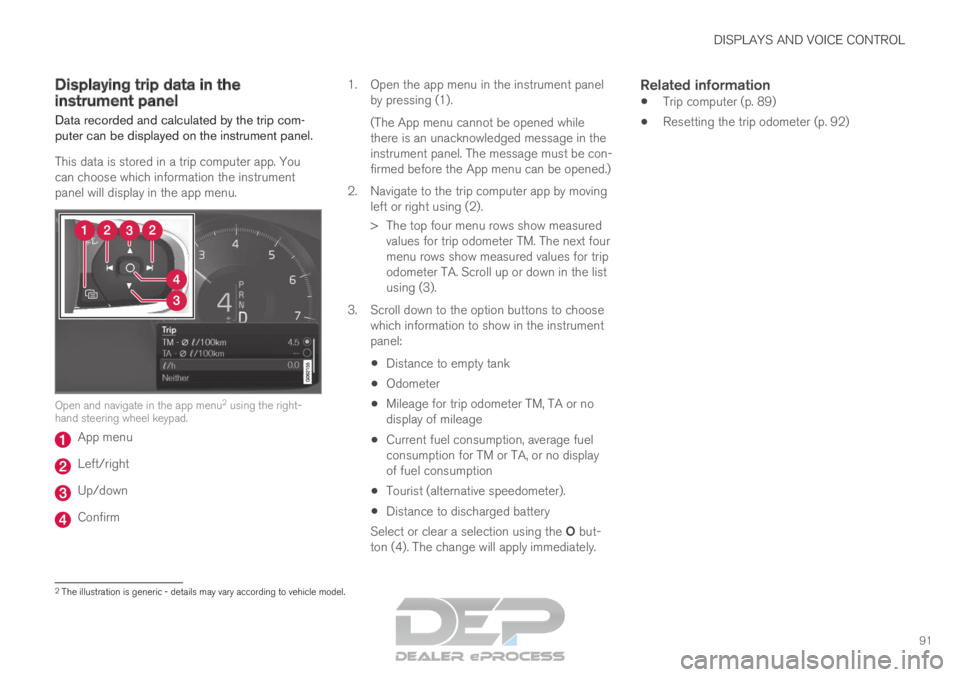
This data is stored in a trip computer app. You
can choose which information the instrument
panel will display in the app menu. Open and navigate in the app menu
2
using the right-
hand steering wheel keypad. App menu
Left/right
Up/down
Confirm 1.
Open the app menu in the instrument panel
by pressing (1).
(The App menu cannot be opened while
there is an unacknowledged message in the
instrument panel. The message must be con-
firmed before the App menu can be opened.)
2. Navigate to the trip computer app by moving left or right using (2).
> The top four menu rows show measuredvalues for trip odometer TM. The next four
menu rows show measured values for trip
odometer TA. Scroll up or down in the list
using (3).
3. Scroll down to the option buttons to choose which information to show in the instrument
panel:
Distance to empty tank
Odometer
Mileage for trip odometer TM, TA or no
display of mileage
Current fuel consumption, average fuel
consumption for TM or TA, or no display
of fuel consumption
Tourist (alternative speedometer).
Distance to discharged battery
Select or clear a selection using the O but-
ton (4). The change will apply immediately.
Related information
Trip computer (p. 89)
Resetting the trip odometer (p. 92) 2
The illustration is generic - details may vary according to vehicle mode\
l.
Page 98 of 697
||DISPLAYS AND VOICE CONTROL
96
Symbol
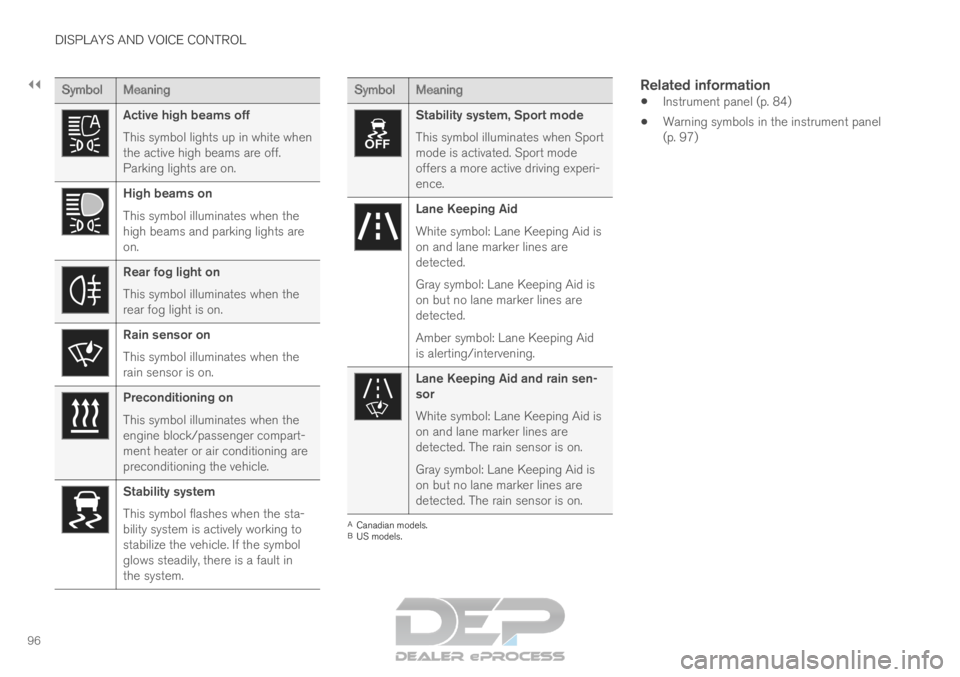
Meaning Active high beams off
This symbol lights up in white when
the active high beams are off.
Parking lights are on.
High beams on
This symbol illuminates when the
high beams and parking lights are
on.
Rear fog light on
This symbol illuminates when the
rear fog light is on.
Rain sensor on
This symbol illuminates when the
rain sensor is on.
Preconditioning on
This symbol illuminates when the
engine block/passenger compart-
ment heater or air conditioning are
preconditioning the vehicle.
Stability system
This symbol flashes when the sta-
bility system is actively working to
stabilize the vehicle. If the symbol
glows steadily, there is a fault in
the system. Symbol
Meaning Stability system, Sport mode
This symbol illuminates when Sport
mode is activated. Sport mode
offers a more active driving experi-
ence.
Lane Keeping Aid
White symbol: Lane Keeping Aid is
on and lane marker lines are
detected.
Gray symbol: Lane Keeping Aid is
on but no lane marker lines are
detected.
Amber symbol: Lane Keeping Aid
is alerting/intervening.
Lane Keeping Aid and rain sen-
sor
White symbol: Lane Keeping Aid is
on and lane marker lines are
detected. The rain sensor is on.
Gray symbol: Lane Keeping Aid is
on but no lane marker lines are
detected. The rain sensor is on.
A
Canadian models.
B US models.
Related information
Instrument panel (p. 84)
Warning symbols in the instrument panel
(p. 97)
Page 99 of 697
DISPLAYS AND VOICE CONTROL
97
Warning symbols in the instrument
panel
The warning symbols alert the driver that an
important function is activated or that a serious
fault or error has occurred. Symbol
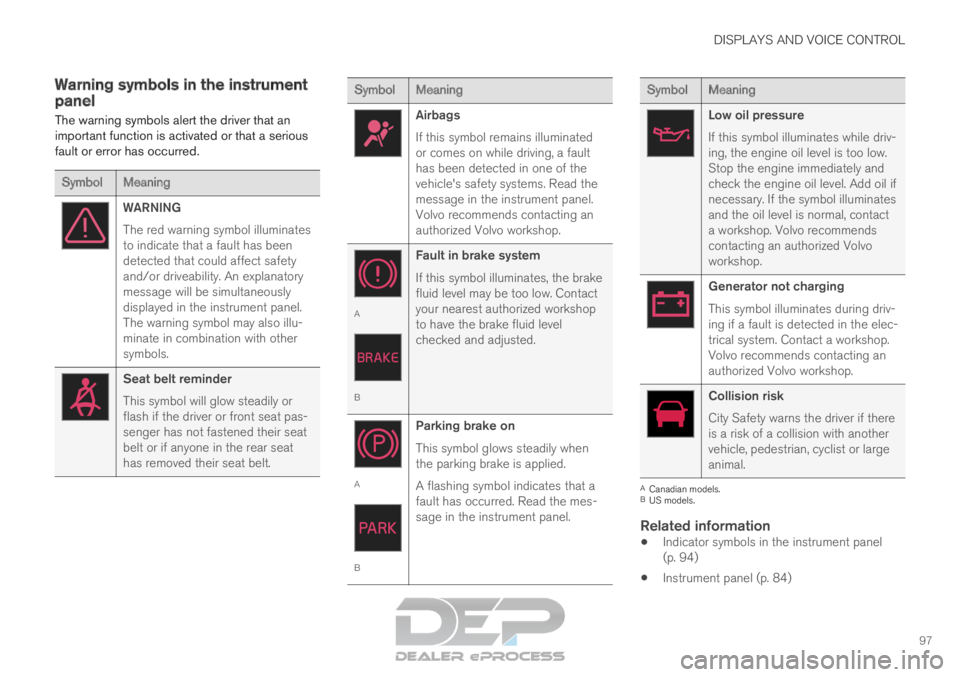
Meaning WARNING
The red warning symbol illuminates
to indicate that a fault has been
detected that could affect safety
and/or driveability. An explanatory
message will be simultaneously
displayed in the instrument panel.
The warning symbol may also illu-
minate in combination with other
symbols.
Seat belt reminder
This symbol will glow steadily or
flash if the driver or front seat pas-
senger has not fastened their seat
belt or if anyone in the rear seat
has removed their seat belt. Symbol
Meaning Airbags
If this symbol remains illuminated
or comes on while driving, a fault
has been detected in one of the
vehicle's safety systems. Read the
message in the instrument panel.
Volvo recommends contacting an
authorized Volvo workshop.
A
B
Fault in brake system
If this symbol illuminates, the brake
fluid level may be too low. Contact
your nearest authorized workshop
to have the brake fluid level
checked and adjusted. A
BParking brake on
This symbol glows steadily when
the parking brake is applied.
A flashing symbol indicates that a
fault has occurred. Read the mes-
sage in the instrument panel. Symbol
Meaning Low oil pressure
If this symbol illuminates while driv-
ing, the engine oil level is too low.
Stop the engine immediately and
check the engine oil level. Add oil if
necessary. If the symbol illuminates
and the oil level is normal, contact
a workshop. Volvo recommends
contacting an authorized Volvo
workshop.
Generator not charging
This symbol illuminates during driv-
ing if a fault is detected in the elec-
trical system. Contact a workshop.
Volvo recommends contacting an
authorized Volvo workshop.
Collision risk
City Safety warns the driver if there
is a risk of a collision with another
vehicle, pedestrian, cyclist or large
animal.
A
Canadian models.
B US models.
Related information
Indicator symbols in the instrument panel
(p. 94)
Instrument panel (p. 84)
Page 118 of 697
||DISPLAYS AND VOICE CONTROL
* Option/accessory.
116
NOTE In Home view's standard mode – short press
on the Home button. An animation describing
access to the various views is shown on the
screen.
NOTE
When the vehicle is moving:
Certain functions (e.g. using the center
display's keyboard) may be deactivated.
Certain texts (e.g. those generated by
apps) will be shortened to three rows.
Tap the
Read out button to have the
entire message read aloud.
The message will be shortened to one
row. Tap the
Read out button to have
the entire message read aloud.
Status barCurrent vehicle activities are shown at the top of
the screen in the status bar. Network and con-
nection information is shown to the left of the
status bar. Media-related information, the clock
and information about background activities are
shown to the right.
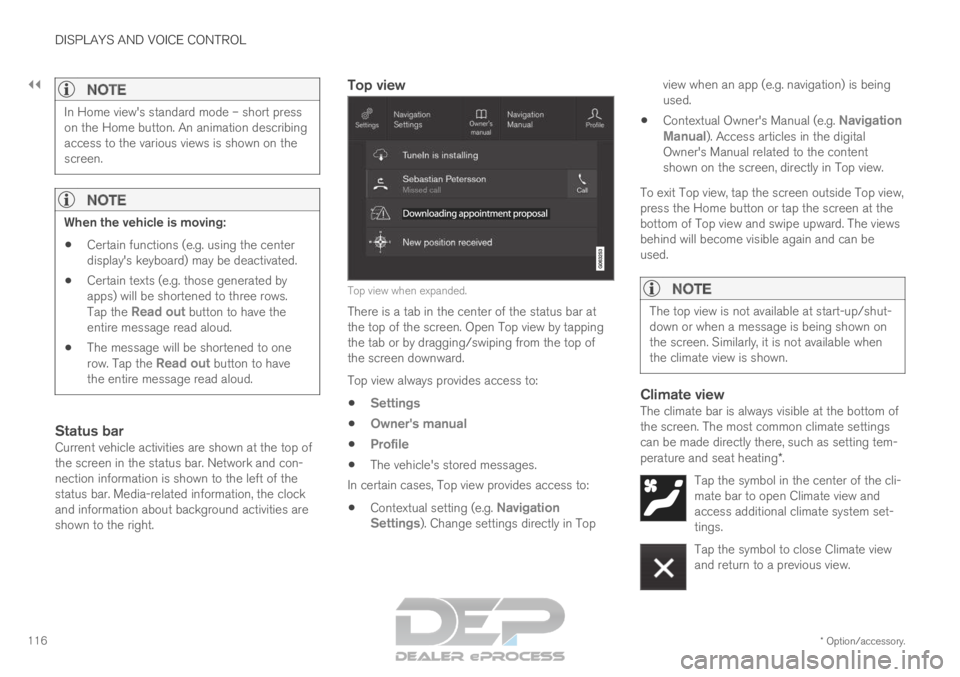
Top view Top view when expanded.
There is a tab in the center of the status bar at
the top of the screen. Open Top view by tapping
the tab or by dragging/swiping from the top of
the screen downward.
Top view always provides access to:
Settings
Owner's manual
Profile
The vehicle's stored messages.
In certain cases, Top view provides access to:
Contextual setting (e.g. Navigation
Settings ). Change settings directly in Top view when an app (e.g. navigation) is being
used.
Contextual Owner's Manual (e.g.
Navigation
Manual). Access articles in the digital
Owner's Manual related to the content
shown on the screen, directly in Top view.
To exit Top view, tap the screen outside Top view,
press the Home button or tap the screen at the
bottom of Top view and swipe upward. The views
behind will become visible again and can be
used.
NOTE The top view is not available at start-up/shut-
down or when a message is being shown on
the screen. Similarly, it is not available when
the climate view is shown.
Climate viewThe climate bar is always visible at the bottom of
the screen. The most common climate settings
can be made directly there, such as setting tem-
perature and seat heating*.
Tap the symbol in the center of the cli-
mate bar to open Climate view and
access additional climate system set-
tings. Tap the symbol to close Climate view
and return to a previous view.
Page 125 of 697
DISPLAYS AND VOICE CONTROL
123
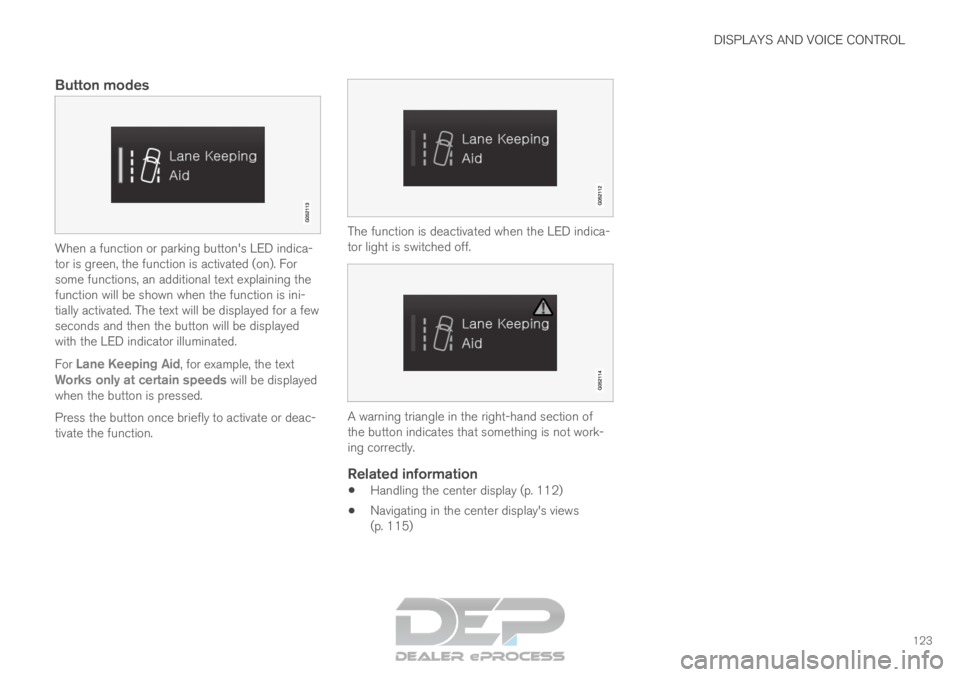
Button modes
When a function or parking button's LED indica-
tor is green, the function is activated (on). For
some functions, an additional text explaining the
function will be shown when the function is ini-
tially activated. The text will be displayed for a few
seconds and then the button will be displayed
with the LED indicator illuminated.
For Lane Keeping Aid, for example, the text
Works only at certain speeds will be displayed when the button is pressed.
Press the button once briefly to activate or deac-
tivate the function. The function is deactivated when the LED indica-
tor light is switched off.
A warning triangle in the right-hand section of
the button indicates that something is not work-
ing correctly.
Related information
Handling the center display (p. 112)
Navigating in the center display's views
(p. 115)
Page 127 of 697
DISPLAYS AND VOICE CONTROL
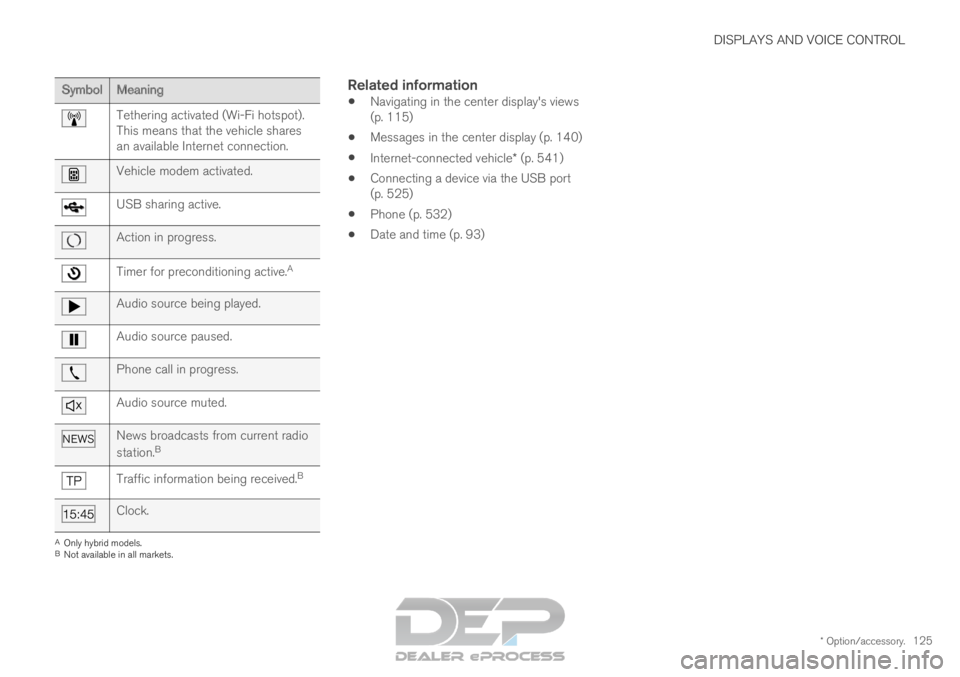
* Option/accessory.125Symbol
Meaning Tethering activated (Wi-Fi hotspot).
This means that the vehicle shares
an available Internet connection.
Vehicle modem activated.
USB sharing active.
Action in progress.
Timer for preconditioning active.
AAudio source being played.
Audio source paused.
Phone call in progress.
Audio source muted.
News broadcasts from current radio
station.
B Traffic information being received.
BClock.
A
Only hybrid models.
B Not available in all markets.
Related information
Navigating in the center display's views
(p. 115)
Messages in the center display (p. 140)
Internet-connected vehicle* (p. 541)
Connecting a device via the USB port
(p. 525)
Phone (p. 532)
Date and time (p. 93)