child lock VOLVO XC90 TWIN ENGINE 2019 Owner's Manual
[x] Cancel search | Manufacturer: VOLVO, Model Year: 2019, Model line: XC90 TWIN ENGINE, Model: VOLVO XC90 TWIN ENGINE 2019Pages: 697, PDF Size: 10.33 MB
Page 258 of 697
||KEY, LOCKS AND ALARM
256
LockingThe vehicle can also be locked using the remote
key's detachable key blade, e.g. if either the vehi-
cle's or remote key's batteries are discharged.
The left-hand front door can be locked by insert-
ing the detachable key into the door's lock cylin-
der.
This is the only door with a lock cylinder. The
other doors have lock mechanisms in the side of
the door that must be pushed in using the key
blade. The door will then be locked mechanically
and cannot be opened from the outside.
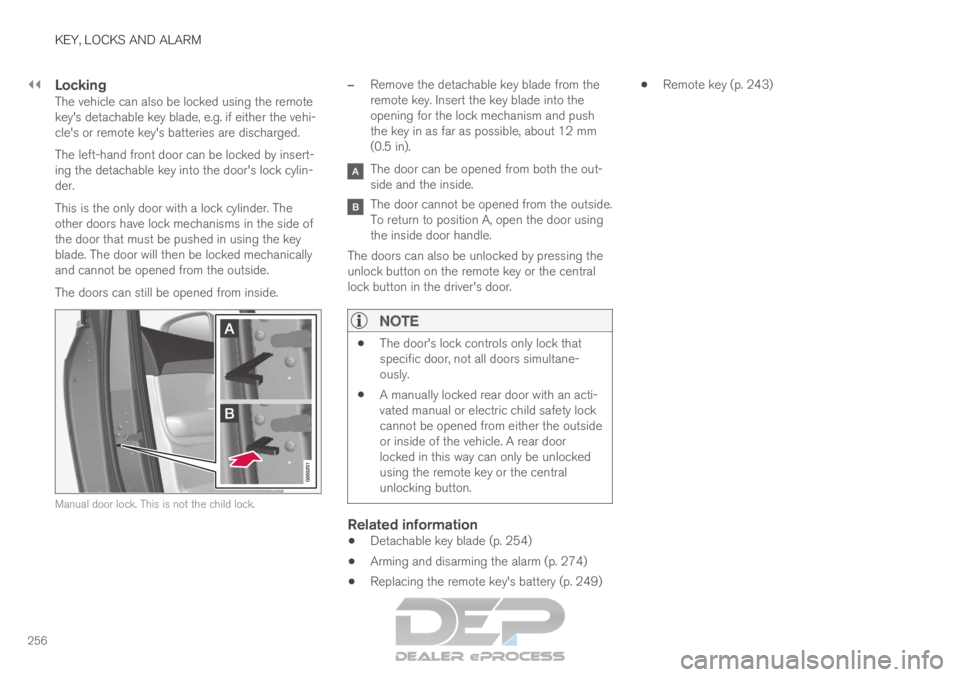
The doors can still be opened from inside.
Manual door lock. This is not the child lock. –
Remove the detachable key blade from the
remote key. Insert the key blade into the
opening for the lock mechanism and push
the key in as far as possible, about 12 mm
(0.5 in). The door can be opened from both the out-
side and the inside.
The door cannot be opened from the outside.
To return to position A, open the door using
the inside door handle.
The doors can also be unlocked by pressing the
unlock button on the remote key or the central
lock button in the driver's door.
NOTE
The door's lock controls only lock that
specific door, not all doors simultane-
ously.
A manually locked rear door with an acti-
vated manual or electric child safety lock
cannot be opened from either the outside
or inside of the vehicle. A rear door
locked in this way can only be unlocked
using the remote key or the central
unlocking button.
Related information
Detachable key blade (p. 254)
Arming and disarming the alarm (p. 274)
Replacing the remote key's battery (p. 249)
Remote key (p. 243)
Page 265 of 697

KEY, LOCKS AND ALARM
* Option/accessory.263
Alternative unlocking methodAlternative unlocking method using side door opening
handle
15
.
– Pull either of the side door inside opening
handles and release.
>
Depending on the remote key settings,
either all doors will be unlocked or just the
selected door will be unlocked and
opened.
To change this setting, tap SettingsMy Car Locking Remote and
Interior Unlock in the Top view of the
center display.
Locking using the front door buttons
– Press the button (both front doors must
be closed).
>
All doors and the tailgate will lock.
Locking using the rear door button* Button with indicator light for locking/unlocking in rear
door.
The lock buttons in the rear doors only lock/
unlock that particular door.
Unlocking the rear door1. Pull the opening handle to unlock the rear door.
2. Pull the opening handle again to open the rear door 16
.
Related information
Settings for remote and inside door unlock
(p. 247)
Unlocking the tailgate from inside the vehicle
(p. 264)
Activating and deactivating child safety locks
(p. 264) 15
The illustration is generic - details may vary according to vehicle mode\
l.
16 Provided the child safety lock is not activated.
Page 266 of 697
KEY, LOCKS AND ALARM
* Option/accessory.
264 Unlocking the tailgate from inside
the vehicle
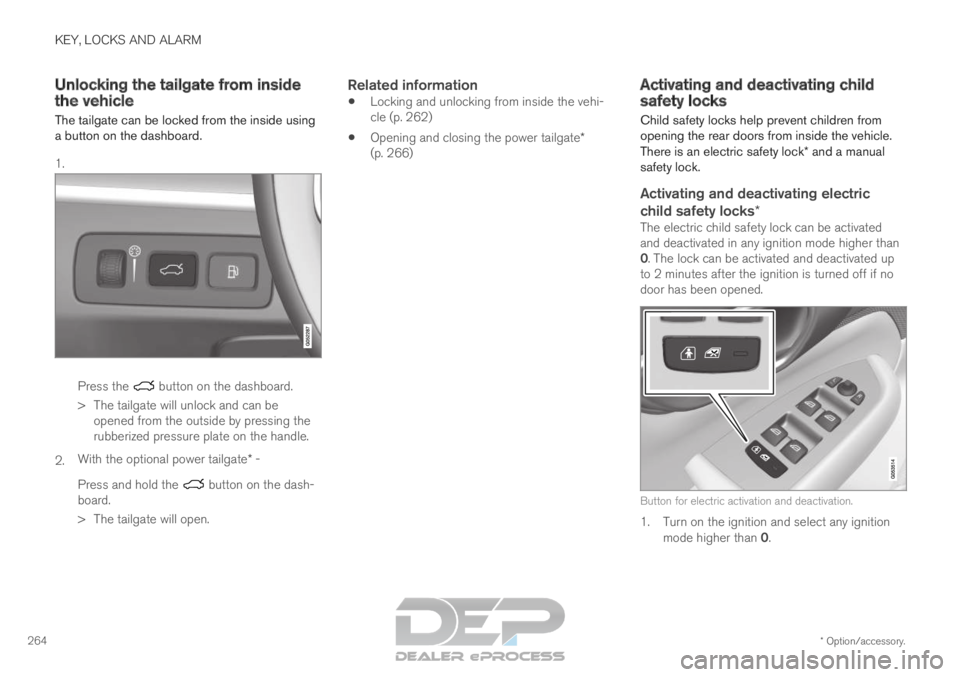
The tailgate can be locked from the inside using
a button on the dashboard.
1. Press the button on the dashboard.
>
The tailgate will unlock and can be
opened from the outside by pressing the
rubberized pressure plate on the handle.
2. With the optional power tailgate* -
Press and hold the button on the dash-
board.
>
The tailgate will open.
Related information
Locking and unlocking from inside the vehi-
cle (p. 262)
Opening and closing the power tailgate*
(p. 266) Activating and deactivating child
safety locks
Child safety locks help prevent children from
opening the rear doors from inside the vehicle.
There is an electric safety lock* and a manual
safety lock.
Activating and deactivating electric
child safety locks*
The electric child safety lock can be activated
and deactivated in any ignition mode higher than
0. The lock can be activated and deactivated up
to 2 minutes after the ignition is turned off if no
door has been opened. Button for electric activation and deactivation.
1. Turn on the ignition and select any ignition
mode higher than 0.
Page 267 of 697
KEY, LOCKS AND ALARM
265
2. Press the button on the driver's door control
panel.
>The message Rear child lock Activated
will be shown in the instrument panel and
the indicator light will illuminate to show
that the child safety locks are activated.
When the electric child safety locks are activated:
the rear windows can only be opened using
the driver's door control panel
the rear doors cannot be opened from the
inside.
To deactivate the child safety locks:
– Press the button on the driver's door control
panel.
>
The message Rear child lock
Deactivated will be shown in the instru-
ment panel and the indicator light will go
out to show that the child safety locks are
deactivated.
When the ignition is switched off, the current set-
ting will be saved. If the child safety locks were
activated when the ignition was switched off, they
will remain activated the next time the ignition is
started. Symbol
Message Meaning Rear child
lock Acti-
vated The child safety
locks are acti-
vated. Rear child
lock Deacti-
vated The child safety
locks are deacti-
vated.
Activating and deactivating manual
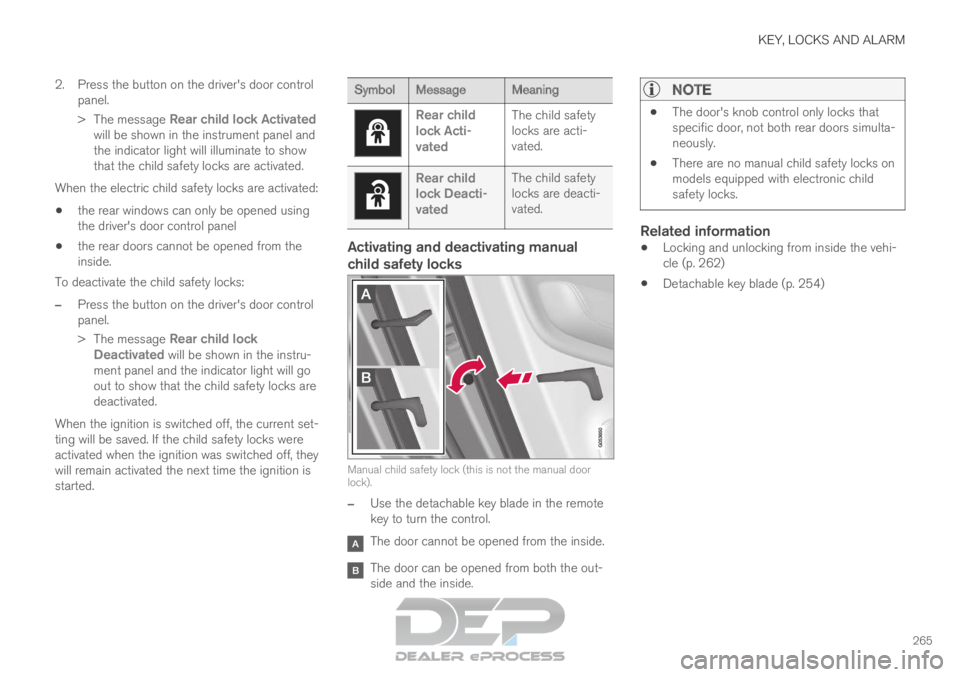
child safety locks Manual child safety lock (this is not the manual door
lock).
–
Use the detachable key blade in the remote
key to turn the control. The door cannot be opened from the inside.
The door can be opened from both the out-
side and the inside.
NOTE
The door's knob control only locks that
specific door, not both rear doors simulta-
neously.
There are no manual child safety locks on
models equipped with electronic child
safety locks.
Related information
Locking and unlocking from inside the vehi-
cle (p. 262)
Detachable key blade (p. 254)
Page 599 of 697

LOADING, STORAGE AND PASSENGER COMPARTMENT
597
WARNING
Only use accessories that are not dam-
aged or malfunctioning. The accessories
must be designed for 120 V and 60 Hz,
with plugs intended for the outlet. The
accessories must be CE marked, UL
marked or have an equivalent safety
marking.
New let outlets, plugs or accessories
come into contact with water or another
fluid. Do not touch or use the outlet if it
appears damaged or has been in contact
with water or another fluid.
Do not connect power strips, adapters or
extension cords to the outlet has this
could cause the outlet's safety functions
to malfunction.
The outlet is equipped with a pet guard.
Make sure that no one picks at or dam-
ages the outlet in such a way that the
guard is disabled. Children should not be
left unsupervised in the vehicle when the
outlet is active.
Failure to follow the above could lead to
severe or fatal electrical shocks.
Related information
Electrical outlets (p. 594)
Passenger compartment interior (p. 592) Using the glove compartment
The glove compartment is located on the pas-
senger side. The glove compartment can be
used to store the Owner's Manual, maps, etc.
There is also room for a pen and a card holder. Glove compartment and opening button on the center
console.
The glove compartment is opened by pressing
the opening button in the center console.
Locking and unlocking the glove box
The glove compartment can be locked ("private
locking") when the vehicle is left at a workshop,
hotel, etc. When private locking is activated, the
tailgate is also locked.
Using the glove box as a cooled area
The glove compartment can be used to cool e.g.
drinks or food. Cooling is possible when the cli-mate system is active (i.e. when the ignition is in
mode II or when the engine is running).
The illustration is generic – the design may vary.
Activate cooling
Deactivate cooling
– Activate or deactivate cooling by moving the
control as far as possible toward the passen-
ger compartment/glove compartment.
Related information
Passenger compartment interior (p. 592)
Private Locking (p. 271)
Page 681 of 697
INDEX
679
Charge
vehicle function 471
Charge level vehicle function 471
Charging hybrid battery 417
opening and closing the charging
door 422
start charging 423
Status 425, 427
stop charging 429
Charging cable 419
Charging current 419
Checking engine oil level 624
Child restraints 63, 65 booster cushions 71
convertible seats 69
infant seats 67
integrated booster cushion 76
ISOFIX/LATCH anchors 74
lower attachment points 74
recalls and registration 65
top tether anchors 72
Child safety 63
Child safety locks 264
Circuit breaker 421
City Safety 341, 342, 344, 345, 351, 353 City Safety braking for oncoming vehicles 350
City Safety in crossing traffic
347, 348
City Safety when evasive maneuver preven-
ted 349
Cleaning 647, 649, 650
automatic car wash 653
car wash 650, 651, 653, 654, 655, 656
center display 645
Seat belts 647
textile upholstery 645, 647, 648
upholstery 645, 647, 648, 649, 650
wheels 656
Cleaning wheels 656
Cleaning wiper blades 654
Clean Zone 207
Clean Zone Interior Package 208
Climate 204
auto-regulation 220
blower control 226
parking 231
perceived temperature 205
Sensors 204
temperature control 228, 229
voice control 205
zones 204
Climate controls 215
center display 215
rear seat 215 Climate system
204, 215
Refrigerant 674
repairs 621
Clock, setting 93
Collision 42, 47, 52, 61
Collision warner detection of pedestrians 345
radar sensor 332
Collision warning 341, 354
Color code, paintwork 658
Color codes 658
Compass 493 calibration 493
Condensation in headlights 651, 653, 654, 655
Connecting vehicle to Internet No connection or poor connection 546
via a mobile device (WiFi) 543
via cellular phone (Bluetooth) 543
via vehicle's modem 544
Connect phone 533
Contact information 26
Convertible seats 69
coolant 673
Coolant, filling 625
Page 689 of 697
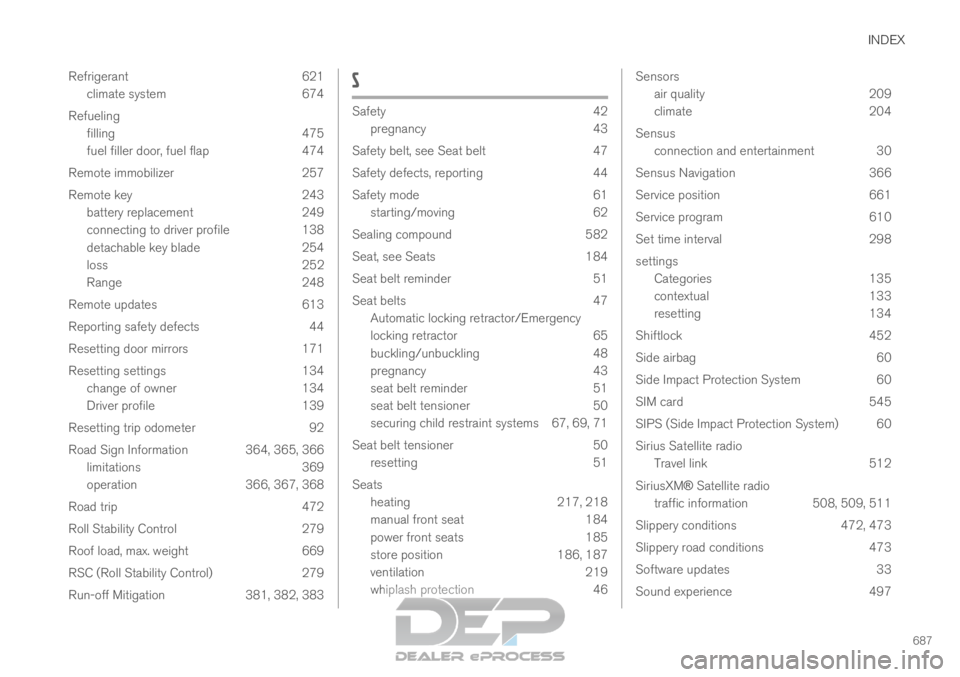
INDEX
687
Refrigerant 621
climate system 674
Refueling filling 475
fuel filler door, fuel flap 474
Remote immobilizer 257
Remote key 243 battery replacement 249
connecting to driver profile 138
detachable key blade 254
loss 252
Range 248
Remote updates 613
Reporting safety defects 44
Resetting door mirrors 171
Resetting settings 134 change of owner 134
Driver profile 139
Resetting trip odometer 92
Road Sign Information 364, 365, 366 limitations 369
operation 366, 367, 368
Road trip 472
Roll Stability Control 279
Roof load, max. weight 669
RSC (Roll Stability Control) 279
Run-off Mitigation 381, 382, 383 S
Safety
42
pregnancy
43
Safety belt, see Seat belt 47
Safety defects, reporting 44
Safety mode 61 starting/moving 62
Sealing compound 582
Seat, see Seats 184
Seat belt reminder 51
Seat belts 47 Automatic locking retractor/Emergency
locking retractor 65
buckling/unbuckling 48
pregnancy 43
seat belt reminder 51
seat belt tensioner 50
securing child restraint systems 67, 69, 71
Seat belt tensioner 50 resetting 51
Seats heating 217, 218
manual front seat 184
power front seats 185
store position 186, 187
ventilation 219
whiplash protection 46 Sensors
air quality
209
climate 204
Sensus connection and entertainment 30
Sensus Navigation 366
Service position 661
Service program 610
Set time interval 298
settings Categories 135
contextual 133
resetting 134
Shiftlock 452
Side airbag 60
Side Impact Protection System 60
SIM card 545
SIPS (Side Impact Protection System) 60
Sirius Satellite radio Travel link 512
SiriusXM® Satellite radio traffic information 508, 509, 511
Slippery conditions 472, 473
Slippery road conditions 473
Software updates 33
Sound experience 497