heating VOLVO XC90 TWIN ENGINE 2019 Owner's Guide
[x] Cancel search | Manufacturer: VOLVO, Model Year: 2019, Model line: XC90 TWIN ENGINE, Model: VOLVO XC90 TWIN ENGINE 2019Pages: 697, PDF Size: 10.33 MB
Page 439 of 697
STARTING AND DRIVING
* Option/accessory.437
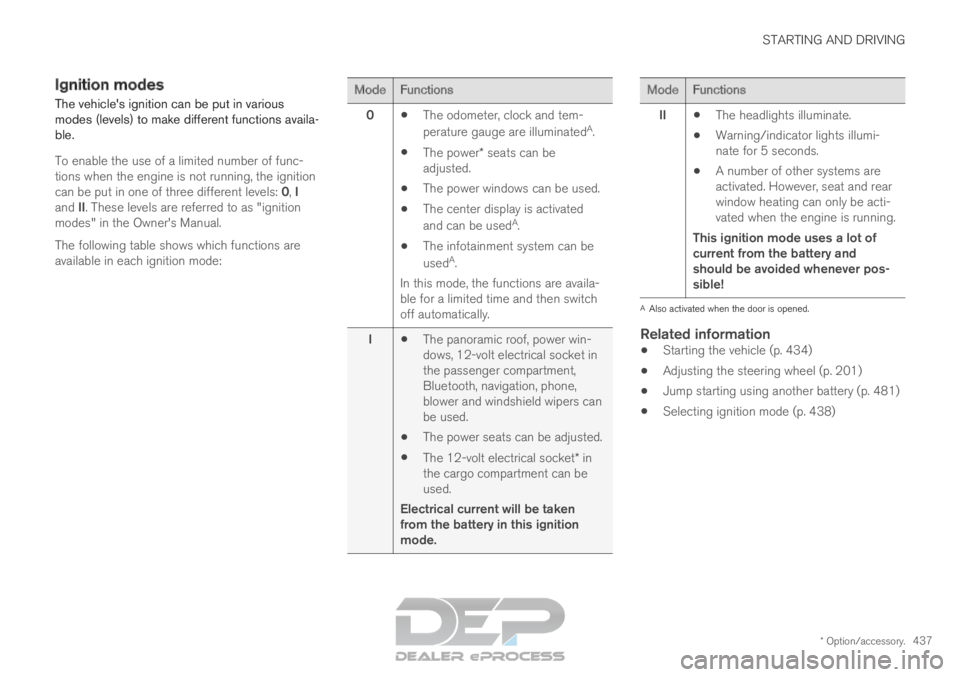
Ignition modes
The vehicle's ignition can be put in various
modes (levels) to make different functions availa-
ble.
To enable the use of a limited number of func-
tions when the engine is not running, the ignition
can be put in one of three different levels: 0, I
and II. These levels are referred to as "ignition
modes" in the Owner's Manual.
The following table shows which functions are
available in each ignition mode: Mode
Functions
0 The odometer, clock and tem-
perature gauge are illuminated A
.
The power* seats can be
adjusted.
The power windows can be used.
The center display is activated
and can be used A
.
The infotainment system can be
used A
.
In this mode, the functions are availa-
ble for a limited time and then switch
off automatically.
I The panoramic roof, power win-
dows, 12-volt electrical socket in
the passenger compartment,
Bluetooth, navigation, phone,
blower and windshield wipers can
be used.
The power seats can be adjusted.
The 12-volt electrical socket* in
the cargo compartment can be
used.
Electrical current will be taken
from the battery in this ignition
mode. Mode
Functions
II The headlights illuminate.
Warning/indicator lights illumi-
nate for 5 seconds.
A number of other systems are
activated. However, seat and rear
window heating can only be acti-
vated when the engine is running.
This ignition mode uses a lot of
current from the battery and
should be avoided whenever pos-
sible! A
Also activated when the door is opened.
Related information
Starting the vehicle (p. 434)
Adjusting the steering wheel (p. 201)
Jump starting using another battery (p. 481)
Selecting ignition mode (p. 438)
Page 450 of 697
||STARTING AND DRIVING
* Option/accessory.
448
Related information
Rear Collision Warning (p. 354)
BLIS* (p. 355)
Brake functions (p. 438) Transmission
The transmission is part of the vehicle's driveline
(power transmission) between the engine and
the drive wheels. The function of the transmis-
sion is to change gears depending on speed
and power needs.
The vehicle has an 8-speed automatic transmis-
sion and an electric motor for rear-wheel drive.
The number of gears allows the engine's torque
and power band to be effectively utilized. Two of
the gears are overdrive gears that save fuel when
driving at a constant engine speed. The steering
wheel paddles* can be used to shift up or down
manually. The instrument panel shows the gear
currently in use.
CAUTION Check the operating temperature of the
transmission to help avoid damage to any of
the drive system components. If there is a risk
of overheating, a warning symbol will appear
in the instrument panel and a text message
will be displayed. Follow the recommenda-
tions given.
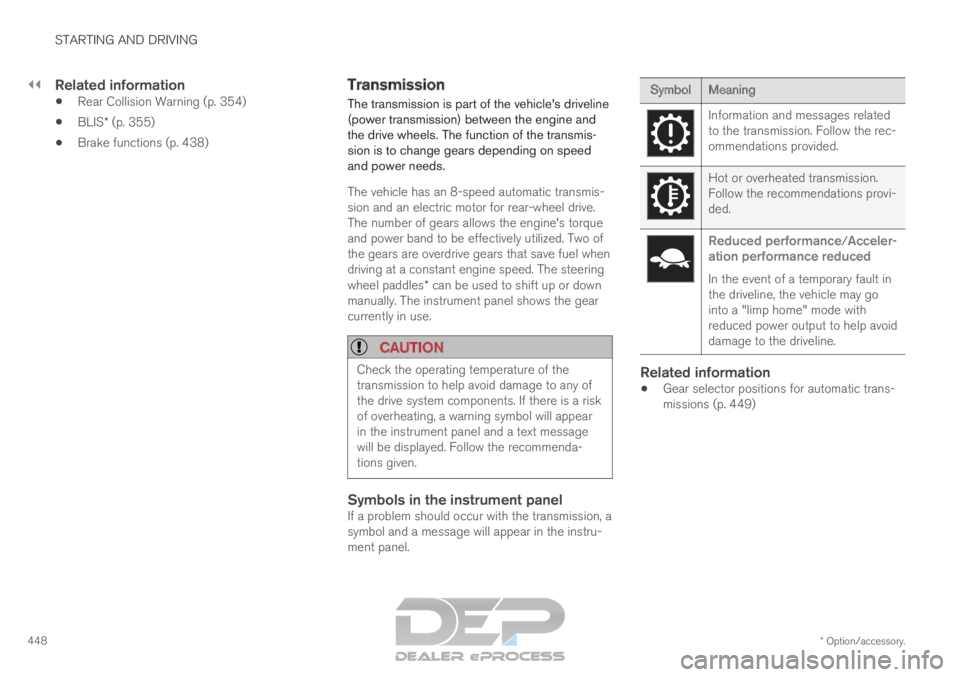
Symbols in the instrument panelIf a problem should occur with the transmission, a
symbol and a message will appear in the instru-
ment panel. Symbol
Meaning Information and messages related
to the transmission. Follow the rec-
ommendations provided.
Hot or overheated transmission.
Follow the recommendations provi-
ded.
Reduced performance/Acceler-
ation performance reduced
In the event of a temporary fault in
the driveline, the vehicle may go
into a "limp home" mode with
reduced power output to help avoid
damage to the driveline.
Related information
Gear selector positions for automatic trans-
missions (p. 449)
Page 454 of 697
STARTING AND DRIVING
452Shiftlock
The automatic transmission's shiftlock function
helps prevent inadvertently moving the gear
selector between different positions.
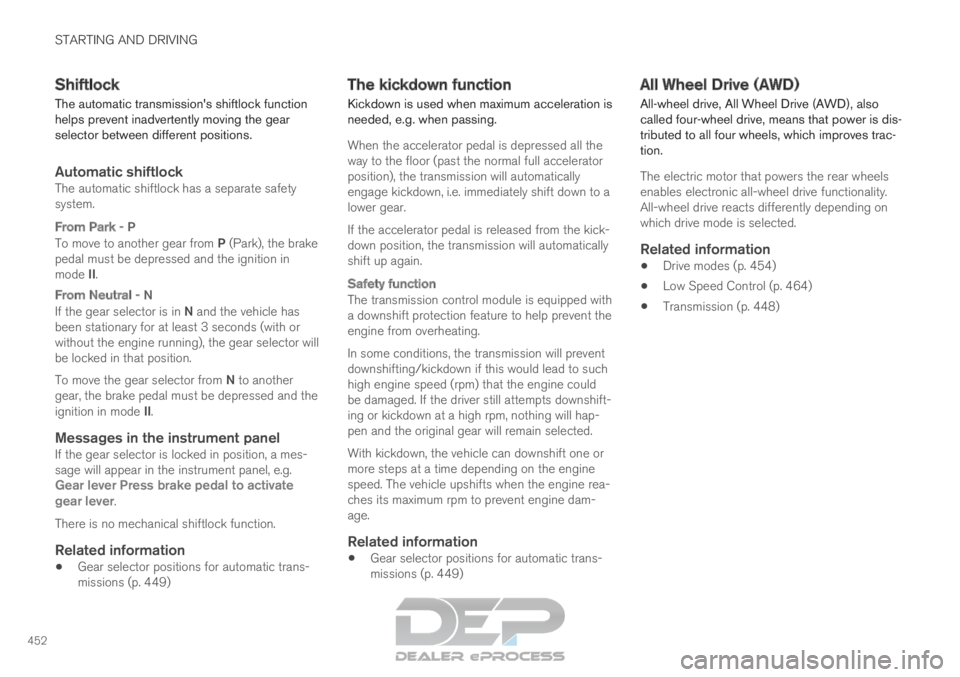
Automatic shiftlockThe automatic shiftlock has a separate safety
system.
From Park - P
To move to another gear from P (Park), the brake
pedal must be depressed and the ignition in
mode II.
From Neutral - N
If the gear selector is in N and the vehicle has
been stationary for at least 3 seconds (with or
without the engine running), the gear selector will
be locked in that position.
To move the gear selector from N to another
gear, the brake pedal must be depressed and the
ignition in mode II.
Messages in the instrument panelIf the gear selector is locked in position, a mes-
sage will appear in the instrument panel, e.g.
Gear lever Press brake pedal to activate
gear lever.
There is no mechanical shiftlock function.
Related information
Gear selector positions for automatic trans-
missions (p. 449) The kickdown function
Kickdown is used when maximum acceleration is
needed, e.g. when passing.
When the accelerator pedal is depressed all the
way to the floor (past the normal full accelerator
position), the transmission will automatically
engage kickdown, i.e. immediately shift down to a
lower gear.
If the accelerator pedal is released from the kick-
down position, the transmission will automatically
shift up again.
Safety function
The transmission control module is equipped with
a downshift protection feature to help prevent the
engine from overheating.
In some conditions, the transmission will prevent
downshifting/kickdown if this would lead to such
high engine speed (rpm) that the engine could
be damaged. If the driver still attempts downshift-
ing or kickdown at a high rpm, nothing will hap-
pen and the original gear will remain selected.
With kickdown, the vehicle can downshift one or
more steps at a time depending on the engine
speed. The vehicle upshifts when the engine rea-
ches its maximum rpm to prevent engine dam-
age.
Related information
Gear selector positions for automatic trans-
missions (p. 449) All Wheel Drive (AWD)
All-wheel drive, All Wheel Drive (AWD), also
called four-wheel drive, means that power is dis-
tributed to all four wheels, which improves trac-
tion.
The electric motor that powers the rear wheels
enables electronic all-wheel drive functionality.
All-wheel drive reacts differently depending on
which drive mode is selected.
Related information
Drive modes (p. 454)
Low Speed Control (p. 464)
Transmission (p. 448)
Page 470 of 697
||STARTING AND DRIVING
* Option/accessory.
468
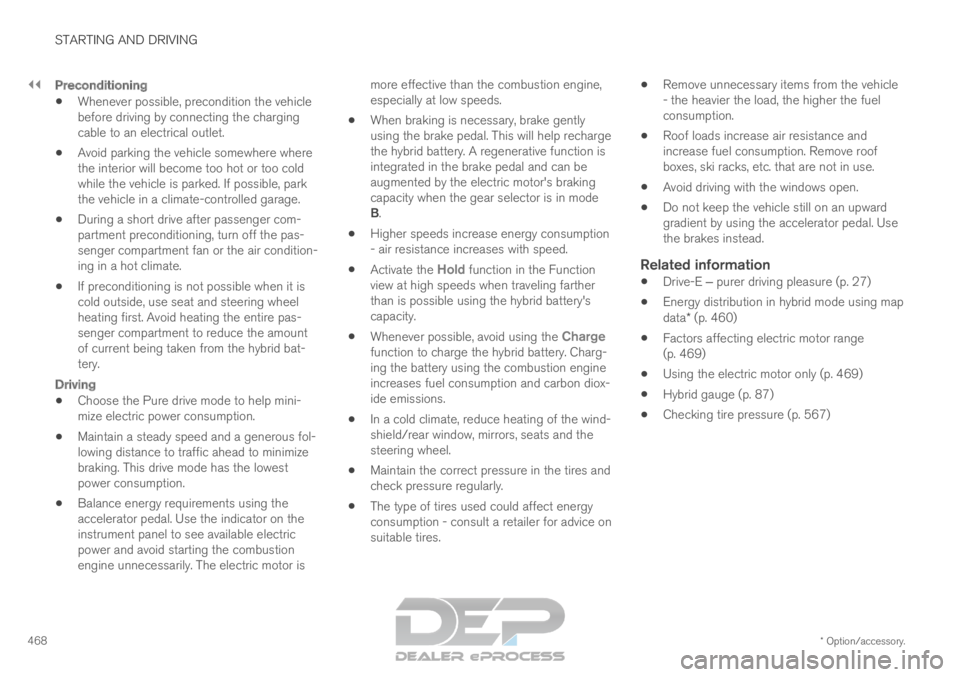
Preconditioning
Whenever possible, precondition the vehicle
before driving by connecting the charging
cable to an electrical outlet.
Avoid parking the vehicle somewhere where
the interior will become too hot or too cold
while the vehicle is parked. If possible, park
the vehicle in a climate-controlled garage.
During a short drive after passenger com-
partment preconditioning, turn off the pas-
senger compartment fan or the air condition-
ing in a hot climate.
If preconditioning is not possible when it is
cold outside, use seat and steering wheel
heating first. Avoid heating the entire pas-
senger compartment to reduce the amount
of current being taken from the hybrid bat-
tery.
Driving
Choose the Pure drive mode to help mini-
mize electric power consumption.
Maintain a steady speed and a generous fol-
lowing distance to traffic ahead to minimize
braking. This drive mode has the lowest
power consumption.
Balance energy requirements using the
accelerator pedal. Use the indicator on the
instrument panel to see available electric
power and avoid starting the combustion
engine unnecessarily. The electric motor is more effective than the combustion engine,
especially at low speeds.
When braking is necessary, brake gently
using the brake pedal. This will help recharge
the hybrid battery. A regenerative function is
integrated in the brake pedal and can be
augmented by the electric motor's braking
capacity when the gear selector is in mode
B.
Higher speeds increase energy consumption
- air resistance increases with speed.
Activate the Hold function in the Function
view at high speeds when traveling farther
than is possible using the hybrid battery's
capacity.
Whenever possible, avoid using the Charge
function to charge the hybrid battery. Charg-
ing the battery using the combustion engine
increases fuel consumption and carbon diox-
ide emissions.
In a cold climate, reduce heating of the wind-
shield/rear window, mirrors, seats and the
steering wheel.
Maintain the correct pressure in the tires and
check pressure regularly.
The type of tires used could affect energy
consumption - consult a retailer for advice on
suitable tires.
Remove unnecessary items from the vehicle
- the heavier the load, the higher the fuel
consumption.
Roof loads increase air resistance and
increase fuel consumption. Remove roof
boxes, ski racks, etc. that are not in use.
Avoid driving with the windows open.
Do not keep the vehicle still on an upward
gradient by using the accelerator pedal. Use
the brakes instead.
Related information
Drive-E ‒ purer driving pleasure (p. 27)
Energy distribution in hybrid mode using map
data* (p. 460)
Factors affecting electric motor range
(p. 469)
Using the electric motor only (p. 469)
Hybrid gauge (p. 87)
Checking tire pressure (p. 567)
Page 471 of 697
STARTING AND DRIVING
}}
469
Using the electric motor only
When using the electric motor, Volvo Twin
Engine provides a combination of good fuel
economy, low emissions and high performance.
For energy-efficient driving:
Select the Pure drive mode to help maximize
driving range using only the electric motor.
Balance energy requirements using the
accelerator pedal. Use the indicator on the
instrument panel's hybrid gauge to see avail-
able electric power and avoid starting the
combustion engine unnecessarily.
When braking is necessary, brake gently
using the brake pedal. This will recharge the
hybrid battery.
Activate the
Hold function in the Function
view at high speeds when traveling farther
than is possible using the hybrid battery's
capacity.
Reduce current consumption in the passen-
ger compartment by reducing e.g. fan speed,
electric heating, or air conditioning use.
Also follow the general economical driving advice
regarding speed, tires and load to maximize
range.
Related information
General information about Twin Engine
(p. 416)
Economical driving (p. 467)
Hybrid gauge (p. 87)
Factors affecting electric motor range
(p. 469)
Starting and stopping the combustion engine
in Twin Engine vehicles (p. 454)
"Hold" and "Charge" functions (p. 471) Factors affecting electric motor
range
A number of factors affect the electric motor's
driving range. The ability to achieve a long driv-
ing range varies according to the outside condi-
tions and to how the vehicle is driven.
The certified value for the distance that can be
driven using the electric motor should not be
considered an expected driving range. The actual
range is dependent on a number of factors.
Factors affecting driving rangeThe driver can influence some factors affecting
driving range, but not all.
The longest range is achieved under very favora-
ble conditions when all factors positively influ-
ence range.
Page 481 of 697
STARTING AND DRIVING
}}
479
Emission controls
Three-way catalytic converter
Keep your engine properly tuned. Certain
engine malfunctions, particularly involving the
electrical, fuel or distributor ignition systems,
may cause unusually high three-way catalytic
converter temperatures. Do not continue to
operate your vehicle if you detect engine
misfire, noticeable loss of power or other
unusual operating conditions, such as engine
overheating or backfiring. A properly tuned
engine will help avoid malfunctions that
could damage the three-way catalytic con-
verter.
Do not park your vehicle over combustible
materials, such as grass or leaves, which can
come into contact with the hot exhaust sys-
tem and cause such materials to ignite under
certain wind and weather conditions.
Excessive starter cranking (in excess of one
minute), or an intermittently firing or flooded
engine can cause three-way catalytic con-
verter or exhaust system overheating.
Remember that tampering or unauthorized
modifications to the engine, the Engine Con-
trol Module, or the vehicle may be illegal and
can cause three-way catalytic converter or
exhaust system overheating. This includes:
altering fuel injection settings or compo-
nents, altering emission system components or location or removing components, and/or
repeated use of leaded fuel.NOTE Unleaded fuel is required for vehicles with
three-way catalytic converters.
Heated oxygen sensorsThe heated oxygen sensors monitor the oxygen
content of the exhaust gases. Readings are fed
into a control module that continuously monitors
engine functions and controls fuel injection. The
ratio of fuel to air into the engine is continuously
adjusted for efficient combustion to help reduce
harmful emissions.
Related information
Octane rating (p. 477)
Fuel (p. 476) Overheating of engine and
transmission
In demanding driving conditions, such as driving
in mountainous areas or hot weather, there is a
risk of the engine or transmission overheating,
especially when carrying heavy loads.
Engine power may be temporarily limited.
Remove any auxiliary lights mounted in front
of the grille when driving in hot weather.
If the temperature in the engine's cooling
system becomes too high, a warning symbol
will appear in the instrument panel along with
the message Engine temperature High
temperature Stop safely. Pull over to a safe location and let the engine idle for a few
minutes to cool down.
If the message
Engine temperature High
temperature Turn off engine or Engine
coolant Level low, turn off engine is dis- played, stop the vehicle and turn off the
engine.
If the transmission begins to overheat, an
alternative gear shifting program will be
selected. An integrated protective function
will also be activated, the warning symbol will
illuminate and the message Transmission
warm
Reduce speed to lower
temperature or Transmission hot Stop
safely, wait for cooling will be displayed in the instrument panel. Follow the recommen-
dations given by reducing speed or stopping
Page 486 of 697
||STARTING AND DRIVING
* Option/accessory.
484
Follow applicable regulations regarding per-
mitted speed and weight.
Drive slowly when towing a trailer up a long
and steep incline.
The maximum trailer weights given only apply
to altitudes up to 1000 meters (3280 feet)
above sea level. At higher altitudes, engine
power (and thus the vehicle's climbing ability)
is decreased due to the reduced air density,
and the maximum trailer weight must there-
fore be reduced. The weight of the vehicle
and trailer must be decreased by 10% for
each additional 1000 m (3280 feet) or part
thereof.
Avoid driving with a trailer on inclines of more
than 12%.
Avoid overloading and other incorrect use.
The trailer's brakes must be balanced with
the vehicle's brakes to help ensure safe
stops (follow applicable local regulations).
NOTE To facilitate towing a trailer in a vehicle equip-
ped with pneumatic suspension*, select: the
Suspension Control
Dynamic
setting in
Individual drive mode.
CAUTION
Bumper-attached trailer hitches must not
be used on Volvos, nor should safety
chains be attached to the bumper.
Trailer hitches attaching to the vehicle
rear axle must not be used.
Never connect a trailer's hydraulic brake
system directly to the vehicle brake sys-
tem, nor a trailer's lighting system directly
to the vehicle lighting system. Consult
your nearest authorized Volvo retailer for
correct installation.
When towing a trailer, the trailer's safety
chains or wire must be correctly fastened
to the attachment points provided in the
trailer hitch on the vehicle. The safety
chain or wire must never be fastened to
or wound around the towing ball.
NOTE The optional detachable trailer hitch may not
be available in all markets or on all models.
Consult your Volvo retailer.
NOTE
Extreme weather conditions, towing a trailer,
driving at high altitudes and fuel quality are
factors that significantly increase a vehicle's
fuel consumption.
Trailer weights
WARNING Please adhere to the recommendations provi-
ded for trailer weight. If the recommendations
are not followed, the vehicle and trailer may
be difficult to control during evasive maneu-
vers and braking.
NOTE
The specified maximum trailer weights are
those permitted by Volvo. National vehicle
regulations may set additional restrictions on
trailer weight and speed. The trailer hitches
may be certified for higher towing weights
than the vehicle is permitted to tow.
Self-leveling suspension*The vehicle's self-leveling system attempts to
keep the vehicle at a constant level, regardless of
load (up to the maximum permitted weight).
When the vehicle is stationary, the rear end of the
vehicle will be slightly lowered, which is normal.
Driving in hilly terrain or hot weatherIn certain conditions, there is a risk of overheat-
ing when driving with a trailer. If overheating of
the engine and drive system is detected, a warn-
ing symbol will illuminate in the instrument panel
along with a message.
Page 487 of 697
STARTING AND DRIVING
}}
* Option/accessory. 485
The automatic transmission selects the optimal
gear for the current load and engine speed.
Steep inclines
Do not lock the automatic transmission into a
higher gear than what the engine can handle ‒ it
is not always preferable to drive in high gears at
low rpm.
Parking on a hill
1. Depress the brake pedal.
2. Apply the parking brake.
3. Put the gear selector in P.
4. Release the brake pedal.
Put chocks behind the wheels when the vehicle
is parked on a hill with a trailer attached.
Starting on a hill
1. Depress the brake pedal.
2. Put the gear selector in D.
3. Release the parking brake.
4. Release the brake pedal and start driving.
Related information
Trailer Stability Assist* (p. 485)
Checking trailer lights (p. 486)
Towing capacity and tongue weight (p. 670)
Overheating of engine and transmission
(p. 479) Trailer Stability Assist*
Trailer Stability Assist (TSA 8
) is a function
designed to help stabilize a vehicle that is tow-
ing a trailer when the vehicle and trailer have
begun to sway. The function is part of the Elec-
tronic Stability Control system ESC 9
.
Reasons for swayingA vehicle towing a trailer may begin to sway for
various reasons. Normally this only occurs at high
speeds. However, if the trailer is overloaded or
unevenly distributed, e.g. too far back, there is a
risk of swaying even at low speeds.
Swaying may be caused by factors such as:
The vehicle and trailer are hit by a sudden,
strong crosswind.
The vehicle and trailer are traveling on an
uneven road or over a bump.
Sudden movements of the steering wheel.
Once swaying has begun, it can be difficult or
impossible to stop it. This makes the vehicle and
trailer difficult to control and there is a risk of
swerving into oncoming traffic or driving off the
road.
Trailer Stability Assist functionTrailer Stability Assist continuously monitors the
vehicle's movements, particularly lateral move- ments. If swaying is detected, the brakes are
applied individually on the front wheels, which has
a stabilizing effect on the vehicle and trailer. This
is often enough to enable the driver to regain
control of the vehicle.
If the Trailer Stability Assist function's first
attempt is not adequate to stop the swaying
motion, the brakes are applied on all wheels and
engine power is temporarily reduced. As the
swaying motion begins to decrease and the vehi-
cle and trailer have once again become stable,
TSA stops regulating the brakes/engine power
and the driver regains control of the vehicle.
NOTE
Trailer Stability Assist is deactivated if the
driver selects the sport mode by deactivating
ESC in the center display's menu system. Trailer Stability Assist may not intervene if the
driver tries to compensate for the swaying motion
by moving the steering wheel rapidly, because
the system will then not be able to determine if it
is the trailer or the driver causing the swaying.
8
Trailer Stability Assist
9 Electronic Stability Control
Page 496 of 697
||STARTING AND DRIVING
* Option/accessory.
494 15
14
13
12
11
9
8
7
6
5
4
3
2
1
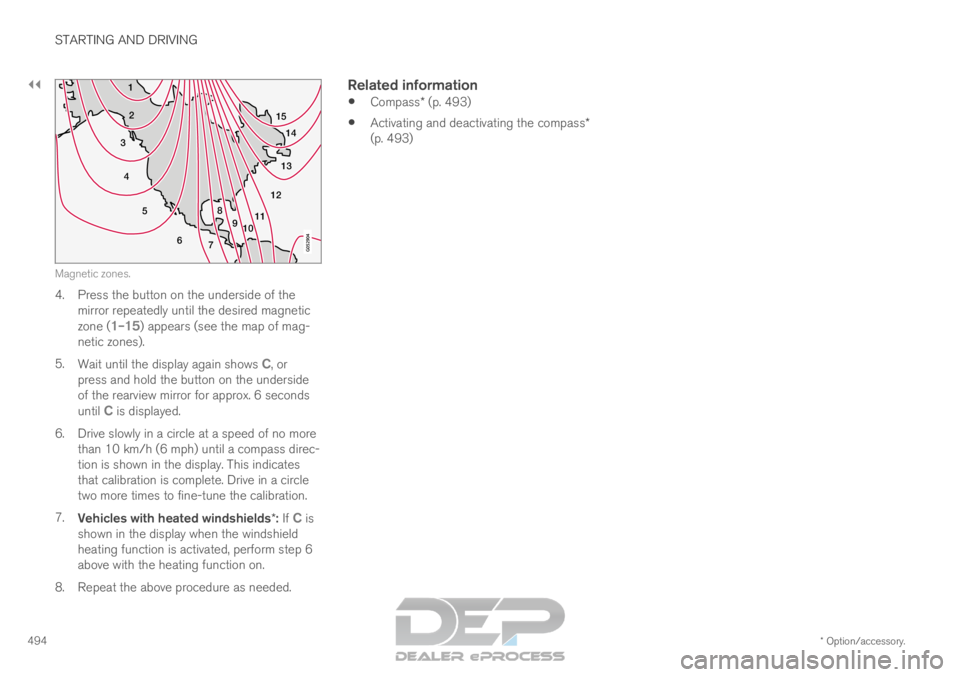
10Magnetic zones.
4. Press the button on the underside of the
mirror repeatedly until the desired magnetic
zone ( 1–15) appears (see the map of mag-
netic zones).
5. Wait until the display again shows C, or
press and hold the button on the underside
of the rearview mirror for approx. 6 seconds
until
C is displayed.
6.
Drive slowly in a circle at a speed of no more
than 10 km/h (6 mph) until a compass direc-
tion is shown in the display. This indicates
that calibration is complete. Drive in a circle
two more times to fine-tune the calibration.
7. Vehicles with heated windshields*: If C is
shown in the display when the windshield
heating function is activated, perform step 6
above with the heating function on.
8.
Repeat the above procedure as needed.
Related information
Compass* (p. 493)
Activating and deactivating the compass*
(p. 493)
Page 587 of 697
WHEELS AND TIRES
}}
585
3.
Make sure the switch is in the 0 (Off) posi-
tion and take out the electric cable and the
hose.
4.
Unscrew the orange cover on the compres-
sor and unscrew the cap on the sealing com-
pound bottle.
5. Screw the bottle onto the bottle holder as far as possible.
The bottle and the bottle holder are equip-
ped with catches to help prevent the sealing
compound from leaking. Once the bottle is
screwed into place into the bottle holder, it
cannot be unscrewed. The bottle can only be
removed by a workshop. Volvo recommends
an authorized Volvo workshop.
WARNING Do not unscrew the bottle. It is equipped with
a catch to prevent leakage.
6.
Unscrew the tire's valve cap and screw the
hose's valve connector as far as possible
onto the valve.
Be sure the air release valve on the com-
pressor's hose is completely closed. 7. Connect the electrical cable to the nearest
12 V outlet and start the vehicle.
NOTE Make sure that none of the vehicle's other
12 V sockets are used while the compressor
is running.
WARNING
Never leave children unattended in the vehicle
while the engine is running.
WARNING
Inhaling exhaust fumes could lead to serious
injury. Never leave the engine running in an
enclosed space or a space without sufficient
ventilation.
8.
Start the compressor by moving the switch to
the I (On) position.
WARNING Never stand next to a tire being inflated with
the compressor. If cracks, bulges, etc. form on
the tire, switch off the compressor immedi-
ately. The vehicle should not be driven. Call
roadside assistance to have the vehicle towed
to a workshop for inspection/replacement of
the tire. Volvo recommends an authorized
workshop.
NOTE
When the compressor first starts, air pressure
may temporarily increase up to 6 bar (88 psi)
but should decrease again after approxi-
mately 30 seconds.
9. Inflate the tire for 7 minutes.
CAUTION
To help avoid overheating, the compressor
should never be used for more than
10 minutes at a time.