battery location VOLVO XC90 TWIN ENGINE 2019 Owners Manual
[x] Cancel search | Manufacturer: VOLVO, Model Year: 2019, Model line: XC90 TWIN ENGINE, Model: VOLVO XC90 TWIN ENGINE 2019Pages: 697, PDF Size: 10.33 MB
Page 8 of 697

6
Activating and deactivating climatecontrol for the third-row seats*231
Parking climate231
Preconditioning232
Starting and stopping preconditioning233
Preconditioning timer234
Adding and editing timer settings forpreconditioning234
Activating and deactivating precondi-tioning timer235
Deleting preconditioning timer settings236
Climate comfort retaining function237
Starting and switching off the cli-mate retaining function when parking237
Parking climate symbols and messages238
Heater239
Parking heater239
Additional heater239
Activating and deactivating the auxili-ary heater240
KEY, LOCKS AND ALARM
Lock indication242
Lock confirmation settings243
Remote key243
Locking and unlocking using theremote key246
Settings for remote and inside doorunlock247
Unlocking the tailgate using theremote key247
Remote key range248
Replacing the remote key's battery249
Ordering additional remote keys252
Red Key - restricted remote key*253
Red Key* settings253
Detachable key blade254
Locking and unlocking with detacha-ble key blade255
Electronic immobilizer257
Start and lock system type designations257
Keyless and touch-sensitive surfaces*258
Keyless locking and unlocking*259
Keyless unlock settings*261
Keyless tailgate unlock*261
Antenna locations for the start andlock system262
Locking and unlocking from insidethe vehicle262
Unlocking the tailgate from insidethe vehicle264
Activating and deactivating childsafety locks264
Automatic locking when driving266
Opening and closing the power tailgate*266
Setting a maximum height for thepower tailgate*269
Foot movement tailgate operation*270
Private Locking271
Activating and deactivating privatelocking272
Alarm273
Arming and disarming the alarm274
Page 86 of 697
DISPLAYS AND VOICE CONTROL
* Option/accessory.
84 Instrument panel
The instrument panel displays information rela-
ted to the vehicle and driving.
The instrument panel contains gauges, indicators
and monitoring and warning symbols. What is
shown in the instrument panel varies depending
on the equipment, settings and functions cur-
rently active.
The instrument panel is activated as soon as a
door is opened, i.e. in ignition mode 0. The panel
will power down after a short period of time if it is
not used. To reactivate it, do one of the following:
Depress the brake pedal.
Activate ignition mode I.
Open one of the doors.
WARNING If the instrument panel turns off, does not
activate when the ignition is switched on, or
part/all of the panel cannot be read, do not
drive the vehicle. Consult a workshop immedi-
ately. Volvo recommends an authorized Volvo
workshop.
WARNING
If the instrument panel is not functioning
properly, information about brakes, airbags or
other safety-related systems may not be dis-
played. The driver will then not be able to
check the status of the vehicle systems or
receive relevant warnings and information.
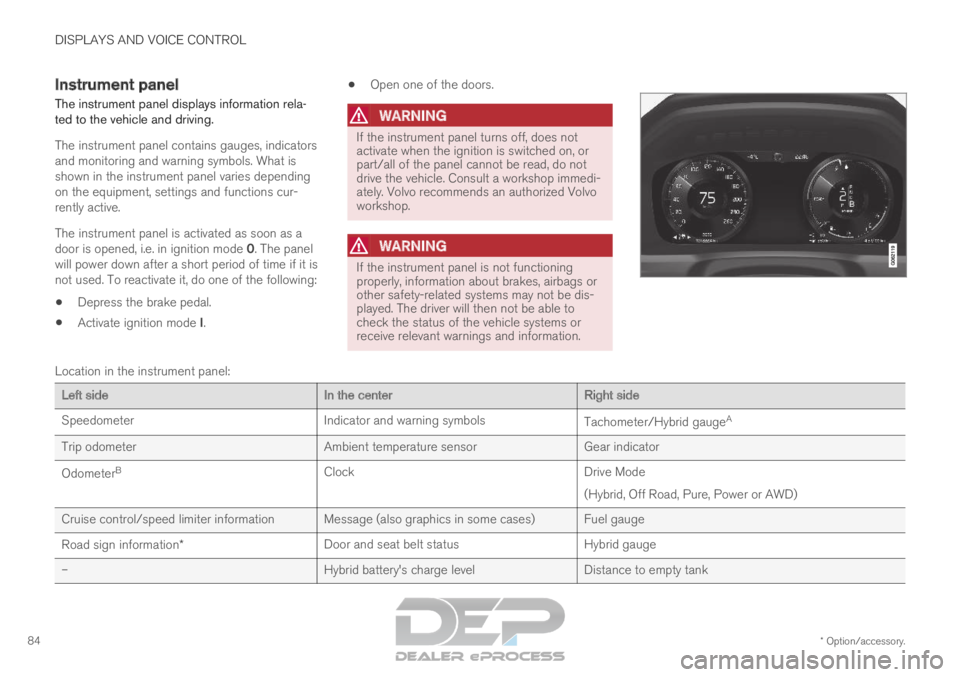
Location in the instrument panel:
Left side
In the centerRight side
Speedometer
Indicator and warning symbols Tachometer/Hybrid gaugeA
Trip odometer Ambient temperature sensorGear indicator
Odometer B
Clock Drive Mode
(Hybrid, Off Road, Pure, Power or AWD)
Cruise control/speed limiter information Message (also graphics in some cases) Fuel gauge
Road sign information* Door and seat belt status
Hybrid gauge
– Hybrid battery's charge levelDistance to empty tank
Page 87 of 697
DISPLAYS AND VOICE CONTROL
85Left side
In the centerRight side
– Media player
Distance to discharged battery
– Navigation system mapCurrent fuel consumption
– PhoneApp menu (activated using steering wheel keypad)
– Voice Control–
– CompassA
–A
Depends on selected drive mode.
B Total distance.
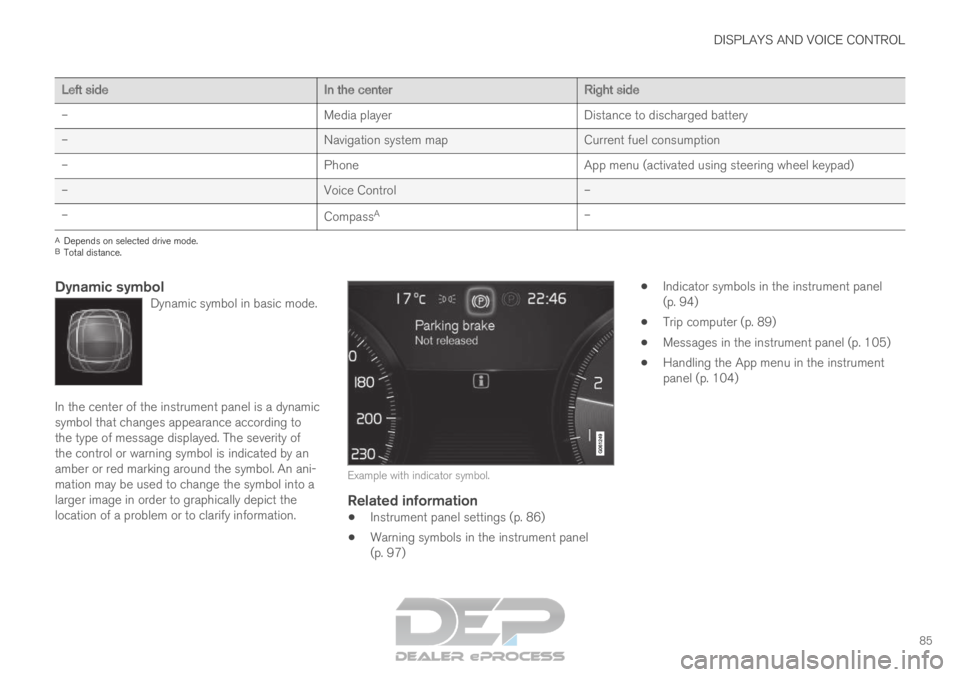
Dynamic symbolDynamic symbol in basic mode. In the center of the instrument panel is a dynamic
symbol that changes appearance according to
the type of message displayed. The severity of
the control or warning symbol is indicated by an
amber or red marking around the symbol. An ani-
mation may be used to change the symbol into a
larger image in order to graphically depict the
location of a problem or to clarify information.
Example with indicator symbol.
Related information
Instrument panel settings (p. 86)
Warning symbols in the instrument panel
(p. 97)
Indicator symbols in the instrument panel
(p. 94)
Trip computer (p. 89)
Messages in the instrument panel (p. 105)
Handling the App menu in the instrument
panel (p. 104)
Page 251 of 697
KEY, LOCKS AND ALARM
}}
* Option/accessory. 249
Related information
Remote key (p. 243)
Antenna locations for the start and lock sys-
tem (p. 262)
Keyless and touch-sensitive surfaces*
(p. 258) Replacing the remote key's battery
The battery in the remote key must be replaced
when it is discharged.
NOTE All batteries have a limited service life and
must eventually be replaced (does not apply
for Key Tag). The battery's service life varies
depending on how often the vehicle/key is
used.
The remote key battery should be replaced if:
the information symbol illuminates and
the message Vehicle key bat. low
See Owner's manual is displayed in
the instrument panel and/or
the locks do not react after several attempts
to lock or unlock the vehicle using the
remote key within approx. 20 meter (65 feet)
from the vehicle.
NOTE Move closer to the vehicle and try to unlock it
again. The battery in the smaller key without buttons
9
(the Key Tag) cannot be replaced. A new key can
be ordered from an authorized Volvo workshop.
CAUTION An end-of-life Key Tag must be turned in to
an authorized Volvo workshop. The key must
be deleted from the vehicle because it can
still be used to start the vehicle via backup
start.
9
This key is provided with vehicles equipped with keyless locking/unlocki\
ng (Passive Entry*).
Page 257 of 697
KEY, LOCKS AND ALARM
}}
255 Put the key blade back into its designated
spot in the remote key after use.
Replace the cover by pressing it down
until it clicks into place. Slide the cover back.
>
An additional click indicates that the cover
is correctly in place.
Related information
Locking and unlocking with detachable key
blade (p. 255)
Remote key (p. 243) Locking and unlocking with
detachable key blade
The detachable key blade can be used to unlock
the vehicle from the outside, e.g. if the battery in
the remote key is discharged.
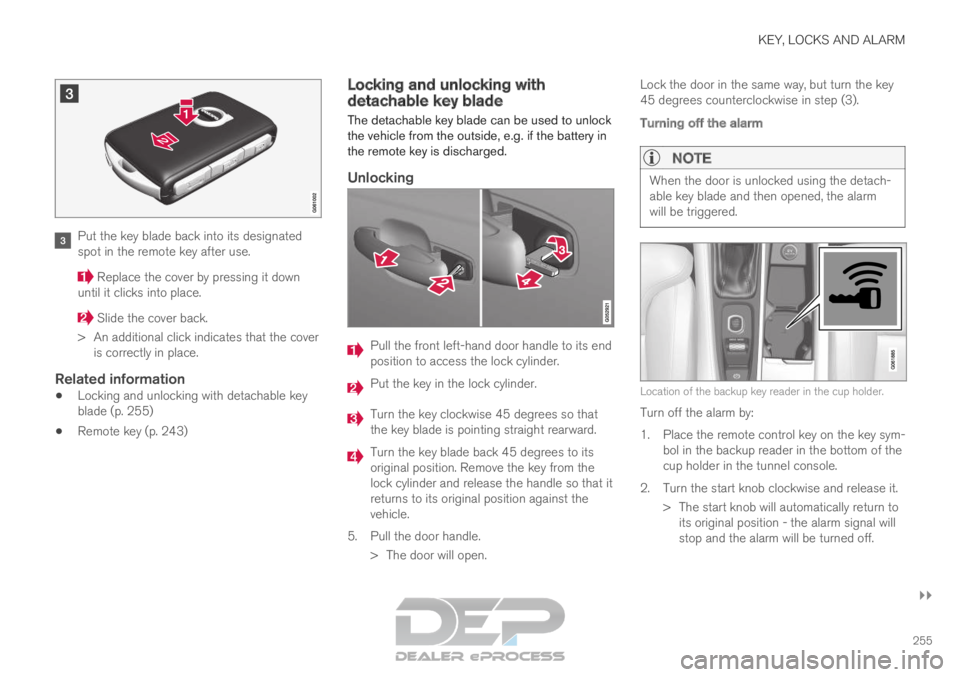
Unlocking Pull the front left-hand door handle to its end
position to access the lock cylinder.
Put the key in the lock cylinder.
Turn the key clockwise 45 degrees so that
the key blade is pointing straight rearward.
Turn the key blade back 45 degrees to its
original position. Remove the key from the
lock cylinder and release the handle so that it
returns to its original position against the
vehicle.
5.
Pull the door handle.
> The door will open. Lock the door in the same way, but turn the key
45 degrees counterclockwise in step (3).
Turning off the alarm
NOTE When the door is unlocked using the detach-
able key blade and then opened, the alarm
will be triggered.
Location of the backup key reader in the cup holder.
Turn off the alarm by:
1.
Place the remote control key on the key sym-
bol in the backup reader in the bottom of the
cup holder in the tunnel console.
2. Turn the start knob clockwise and release it. > The start knob will automatically return toits original position - the alarm signal will
stop and the alarm will be turned off.
Page 277 of 697
KEY, LOCKS AND ALARM
275
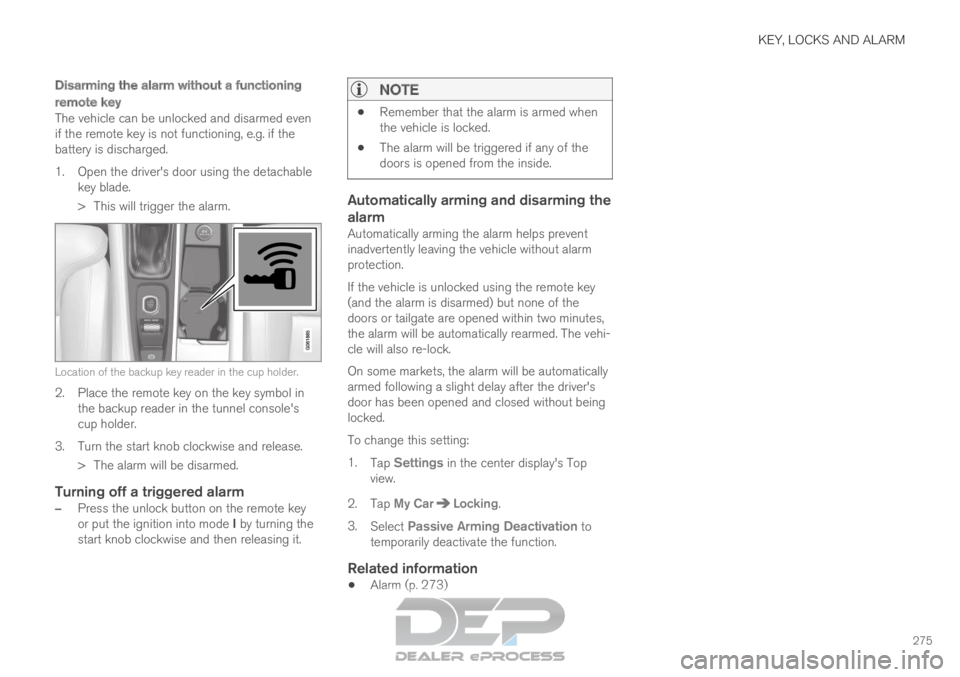
Disarming the alarm without a functioning
remote key
The vehicle can be unlocked and disarmed even
if the remote key is not functioning, e.g. if the
battery is discharged.
1. Open the driver's door using the detachablekey blade.
> This will trigger the alarm. Location of the backup key reader in the cup holder.
2. Place the remote key on the key symbol in
the backup reader in the tunnel console's
cup holder.
3.
Turn the start knob clockwise and release.
> The alarm will be disarmed.
Turning off a triggered alarm
– Press the unlock button on the remote key
or put the ignition into mode I by turning the
start knob clockwise and then releasing it.
NOTE
Remember that the alarm is armed when
the vehicle is locked.
The alarm will be triggered if any of the
doors is opened from the inside.
Automatically arming and disarming the
alarm
Automatically arming the alarm helps prevent
inadvertently leaving the vehicle without alarm
protection.
If the vehicle is unlocked using the remote key
(and the alarm is disarmed) but none of the
doors or tailgate are opened within two minutes,
the alarm will be automatically rearmed. The vehi-
cle will also re-lock.
On some markets, the alarm will be automatically
armed following a slight delay after the driver's
door has been opened and closed without being
locked.
To change this setting:
1.
Tap Settings in the center display's Top
view.
2.
Tap My Car Locking
.
3. Select Passive Arming Deactivation to
temporarily deactivate the function.
Related information
Alarm (p. 273)
Page 427 of 697

HYBRID INFORMATION
}}
425
Charging status in the vehicle's
charging socket
The charging status is indicated by an LED light
in the charging socket. Location of the LED indicator light in the vehicle's
charging socket.
The LED indicator light shows the current charge
status during charging. If the LED indicator light
is not illuminated, check to make sure the cable
is securely connected in the wall outlet and in the
outlet in the vehicle. A white, red or yellow light
illuminates when the passenger compartment
lighting is activated and will remain illuminated for
a short time after the passenger compartment
lighting has gone out. LED indicator
light's color
Meaning
White
Courtesy light.
Yellow Wait modeA
– waiting for
charging to start.
Flashing green Charging is in progress B
.
Green Charging completed C
.
Red Malfunction. A
E.g. after a door has been opened or if the charging cable han-
dle is not locked in place.
B The more slowly the light flashes, the closer the battery is to
being fully charged.
C The light will go out after a short time.
Related information
Charging the hybrid battery (p. 417)
Charging status in the instrument panel
(p. 427)
Charging status in the charging cable's
charging module (p. 425)
Stopping hybrid battery charging (p. 429) Charging status in the charging
cable's charging module
The red and blue lights in the charging module
indicate the status of ongoing and completed
charging. Charge module: 1. Red warning light, 2. Blue status indi-
cator
When the charge module is initially plugged into
a wall outlet, the red warning light will flash once
to indicate that a startup safety check has been
performed. When the safety check has been
completed, the blue status indicator will glow
steadily and the red warning light will be off. The
charger is now ready to be used. If the red warn-
ing light continues to flash or glows steadily, a
fault has been detected and the charger will not
deliver power to the vehicle. Contact a Volvo
retailer or a certified Volvo service technician.
Page 434 of 697

HYBRID INFORMATION
432Long-term storage of vehicles with
hybrid batteries
To help minimize degradation of the hybrid bat-
tery if the vehicle is not driven for a prolonged
period (longer than 1 month) the hybrid battery
charge level should be kept at approx. 25%
according to the gauge in the instrument panel.
Do as follows:
1. If the hybrid battery charge level is high, drive
the vehicle until the charge level is approxi-
mately 25%. If the charge level is low, charge
the battery until the level reaches approxi-
mately 25%. 2.
If the vehicle is not driven for more than 6
months or the hybrid battery's charge level is
noticeably below the 25% mark, charge the
battery to about 25% to help compensate for
the natural battery discharge that occurs in
long-term storage. Regularly check the
charge level using the gauge in the instru-
ment display.
NOTE Store the vehicle in as cool a location as pos-
sible to minimize battery aging during long-
term storage. In the summer, park the vehicle
indoors or in a shady location, whichever is
cooler.
Related information
Initiating hybrid battery charging (p. 423)
Hybrid gauge (p. 88)
Charging the hybrid battery (p. 417)
Page 437 of 697

STARTING AND DRIVING
}}
435
In some situations, such as in cold weather or if
the hybrid battery's charge level is too low, the
gasoline engine will start instead.
The vehicle should not be started with the charg-
ing cable connected. However, if the cable can-
not be pulled out or if the vehicle incorrectly
detects a cable that is not connected, the vehicle
can be started using an override procedure:
1.
Press the brake pedal and turn the start
knob clockwise.
2. Charge cable Remove before start will
appear in the instrument panel.
3.
Turn the start knob clockwise again.
4. Removed? Turn and hold start knob 7s
will appear. Turn the knob clockwise and hold
it for 7 seconds to start the vehicle. Location of the backup reader in the tunnel console. If the
Vehicle key not found message is shown
in the instrument panel at start, place the remote
key at the backup reader and then make a new
start attempt.
NOTE When the remote key is placed in the backup
reader, make sure that no other vehicle keys,
metal objects or electronic devices (e.g. cellu-
lar phones, tablets, laptops or chargers) are in
the backup reader. Multiple vehicle keys close
to each other in the backup reader can dis-
rupt their functionality.
If Vehicle start System check, wait is dis-
played in the instrument panel while attempting
to start the vehicle, wait until the message disap-
pears and try again to start the vehicle.
CAUTION If the engine has not responded after 3
attempts – wait for 3 minutes before starting
a new attempt. Starting capability increases if
the starter battery is given time to recover.
NOTE
The vehicle cannot be started if the hybrid
battery is discharged.
WARNING Never remove the remote control key from
the vehicle while driving.
WARNING
Always remove the remote key from the
passenger compartment when you leave
the vehicle and make sure the ignition is
in mode 0.
Always put the gear selector in P and
apply the parking brake before leaving
the vehicle. Never leave the vehicle unsu-
pervised while the engine is running.
Always open the garage door fully and
make sure that ventilation is very good
before starting the engine in a garage.
The exhaust fumes produced by the vehi-
cle contain carbon monoxide, which is
invisible and odorless but very toxic.
NOTE With a cold start, idling speed may be consid-
erably higher than normal for certain engine
types. This is done to get the emissions sys-
tem up to normal operating temperature as
quickly as possible, which minimizes exhaust
emissions and protects the environment.
Page 631 of 697
MAINTENANCE AND SERVICE
}}
629
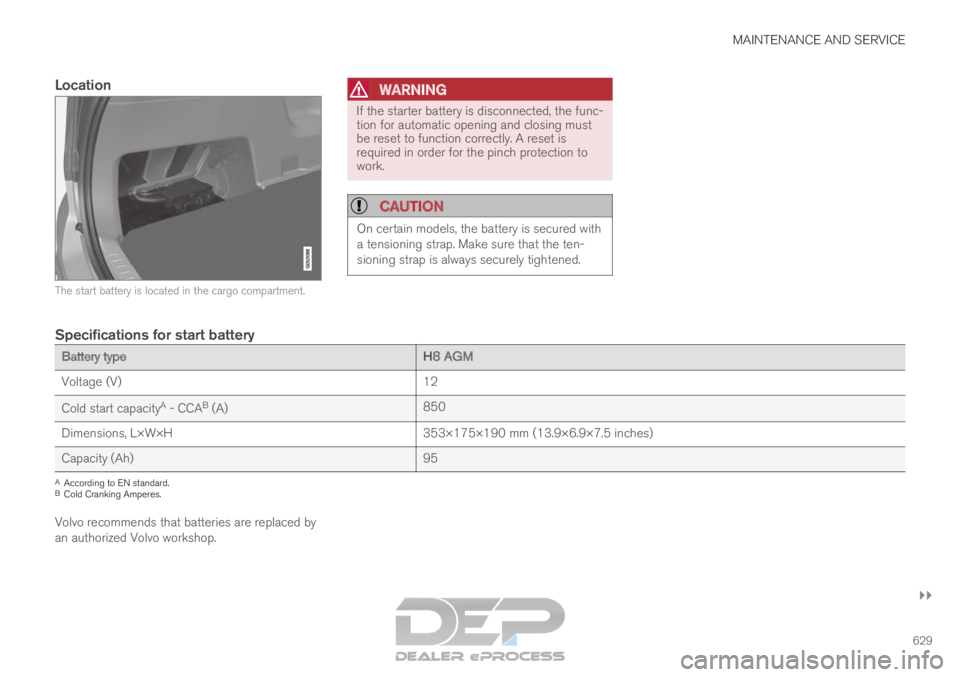
Location The start battery is located in the cargo compartment.WARNING If the starter battery is disconnected, the func-
tion for automatic opening and closing must
be reset to function correctly. A reset is
required in order for the pinch protection to
work.
CAUTION
On certain models, the battery is secured with
a tensioning strap. Make sure that the ten-
sioning strap is always securely tightened.
Specifications for start battery
Battery type
H8 AGM
Voltage (V) 12
Cold start capacity A
- CCA B
(A) 850
Dimensions, L×W×H 353×175×190 mm (13.9×6.9×7.5 inches)
Capacity (Ah) 95A
According to EN standard.
B Cold Cranking Amperes.
Volvo recommends that batteries are replaced by
an authorized Volvo workshop.