engine oil VOLVO XC90 TWIN ENGINE 2019 Owners Manual
[x] Cancel search | Manufacturer: VOLVO, Model Year: 2019, Model line: XC90 TWIN ENGINE, Model: VOLVO XC90 TWIN ENGINE 2019Pages: 697, PDF Size: 10.33 MB
Page 15 of 697
13
LOADING, STORAGE AND
PASSENGER COMPARTMENT
Passenger compartment interior592
Tunnel console593
Electrical outlets594
Using the electrical outlets596
Using the glove compartment597
Sun visors598
Cargo compartment598
Loading recommendations598
Roof loads and load carriers600
Grocery bag holders600
Load anchoring eyelets601
Installing and removing the cargocompartment cover*601
Operating the cargo compartment cover*602
Installing and removing the steelcargo grid*604
Installing and removing the cargo net*606
MAINTENANCE AND SERVICE
Volvo's service program610
Data transfer between vehicle andworkshop over Wi-Fi612
Download Center613
Handling system updates via Down-load Center613
Vehicle status614
Scheduling service and repairs615
Sending vehicle information to theworkshop616
Hoisting the vehicle618
Opening and closing the hood620
Climate control system service621
Replacing a windshield with head-updisplay*621
Engine compartment overview622
Engine oil623
Checking and filling engine oil624
Refilling coolant625
Replacing bulbs626
Start battery627
Hybrid battery631
Battery symbols632
Fuses and fuseboxes632
Replacing fuses633
Fuses in the engine compartment634
Fuses under the glove compartment638
Fuses in the cargo compartment641
Cleaning the interior645
Cleaning the center display645
Cleaning the head-up display*646
Cleaning fabric upholstery and ceil-ing liner647
Cleaning the seat belt647
Cleaning floor mats and inlay mats647
Cleaning leather upholstery648
Cleaning the leather steering wheel649
Cleaning interior plastic, metal andwood surfaces650
Cleaning the exterior650
Polishing and waxing651
Hand washing651
Automatic car washes653
High-pressure washing654
Cleaning the wiper blades654
Cleaning exterior plastic, rubber andtrim components655
Cleaning rims656
Corrosion protection656
Paintwork657
Touching up minor paint damage657
Page 16 of 697
14
Color codes658
Changing rear window wipers659
Replacing windshield wiper blades660
Windshield wipers in the service position661
Filling washer fluid662
SPECIFICATIONS
Type designations664
Dimensions667
Weights669
Towing capacity and tongue weight670
Engine specifications671
Engine oil specifications672
Coolant specifications673
Transmission fluid specifications673
Brake fluid specifications673
Fuel tank volume674
Air conditioning specifications674
Approved tire pressure675
INDEX
Index677
Page 25 of 697
OWNER'S INFORMATION
23
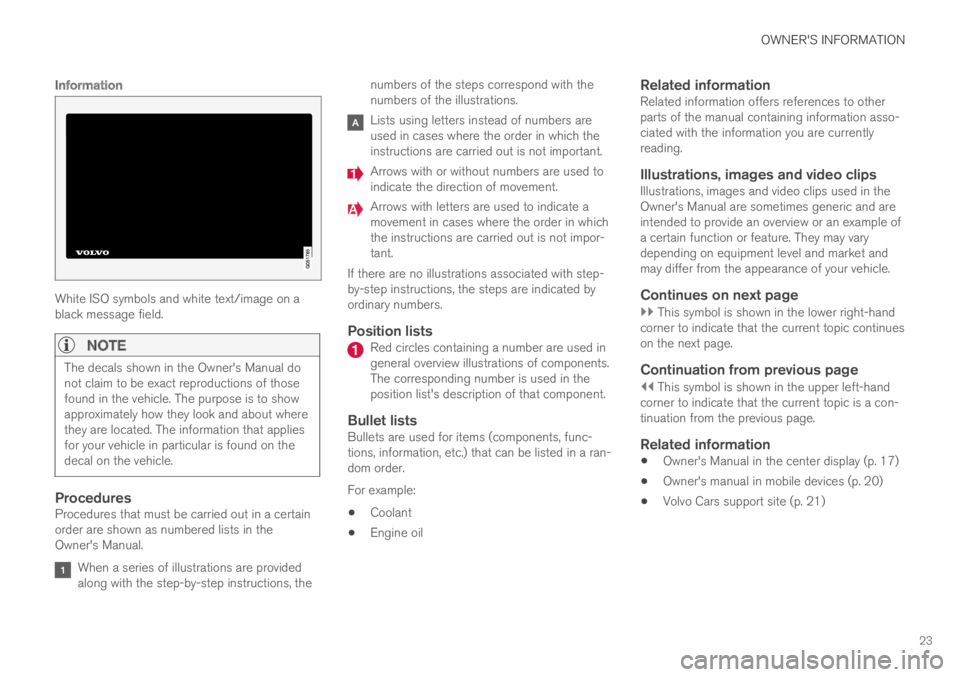
Information
White ISO symbols and white text/image on ablack message field.
NOTE
The decals shown in the Owner's Manual donot claim to be exact reproductions of thosefound in the vehicle. The purpose is to showapproximately how they look and about wherethey are located. The information that appliesfor your vehicle in particular is found on thedecal on the vehicle.
Procedures
Procedures that must be carried out in a certainorder are shown as numbered lists in theOwner's Manual.
When a series of illustrations are providedalong with the step-by-step instructions, the
numbers of the steps correspond with thenumbers of the illustrations.
Lists using letters instead of numbers areused in cases where the order in which theinstructions are carried out is not important.
Arrows with or without numbers are used toindicate the direction of movement.
Arrows with letters are used to indicate amovement in cases where the order in whichthe instructions are carried out is not impor-tant.
If there are no illustrations associated with step-by-step instructions, the steps are indicated byordinary numbers.
Position lists
Red circles containing a number are used ingeneral overview illustrations of components.The corresponding number is used in theposition list's description of that component.
Bullet lists
Bullets are used for items (components, func-tions, information, etc.) that can be listed in a ran-dom order.
For example:
Coolant
Engine oil
Related information
Related information offers references to otherparts of the manual containing information asso-ciated with the information you are currentlyreading.
Illustrations, images and video clips
Illustrations, images and video clips used in theOwner's Manual are sometimes generic and areintended to provide an overview or an example ofa certain function or feature. They may varydepending on equipment level and market andmay differ from the appearance of your vehicle.
Continues on next page
}} This symbol is shown in the lower right-handcorner to indicate that the current topic continueson the next page.
Continuation from previous page
|| This symbol is shown in the upper left-handcorner to indicate that the current topic is a con-tinuation from the previous page.
Related information
Owner's Manual in the center display (p. 17)
Owner's manual in mobile devices (p. 20)
Volvo Cars support site (p. 21)
Page 30 of 697
||
YOUR VOLVO
* Option/accessory.28
goal. In addition to continuous environmentalrefinement of conventional gasoline-poweredinternal combustion engines, Volvo is activelylooking at advanced technology alternative-fuelvehicles.
When you drive a Volvo, you become our partnerin the work to lessen the vehicle's impact on theenvironment. To reduce your vehicle's environ-mental impact, you can:
Maintain proper air pressure in your tires.Tests have shown decreased fuel economywith improperly inflated tires.
Follow the recommended maintenanceschedule in your Warranty and ServiceRecords Information booklet.
Drive at a constant speed whenever possible.
See a trained and qualified Volvo servicetechnician as soon as possible for inspectionif the check engine (malfunction indicator)light illuminates, or stays on after the vehiclehas started.
Properly dispose of any vehicle-related wastesuch as used motor oil, used batteries, brakepads, etc.
When cleaning your vehicle, please use gen-uine Volvo car care products. All Volvo carcare products are formulated to be environ-mentally friendly.
Twin Engine vehicles
If possible, precondition the vehicle with thecharging cable before driving.
If preconditioning is not possible in coldweather, use the seat and steering wheelheating primarily. Avoid heating the entirepassenger compartment, which reduces thehybrid battery's charge level.
Choose the Pure drive mode to help mini-mize electric power consumption.
In hilly terrain, put the gear selector in modeB to utilize the electric motor's braking func-tion when the accelerator pedal is released.This helps charge the hybrid battery.
Related information
Economical driving (p. 467)
Starting and stopping preconditioning(p. 233)
The Owner's Manual and the environment(p. 24)
Air quality (p. 206)
IntelliSafe - driver support
IntelliSafe is Volvo Cars' philosophy regardingvehicle safety. IntelliSafe consists of a number ofsystems, both standard and optional, that aredesigned to help make driving safer, preventaccidents and protect passengers and otherroad users.
Support
IntelliSafe includes driver support functions suchas Adaptive cruise control* which helps the driverto maintain an even speed combined with a pre-selected time interval to the vehicle ahead.
Pilot Assist2 helps the driver keep the vehicle inthe current traffic lane by providing steeringassistance and maintaining an even speed and aset time interval to the vehicle ahead.
Park Assist Pilot* helps the driver pull into andout of parking spaces.
Other examples of systems that can help thedriver are the Active main beam, Cross TrafficAlert (CTA)* and Blind Spot Information (BLIS)*systems.
Prevention
City Safety is a function intended to help preventaccidents. The function can help prevent or miti-gate a collision with pedestrians, cyclists, largeanimals or other vehicles. Light, sound and pulsa-tions in the brake pedal are provided to alert of a
2Depending on market, this function can be either standard or optional.
Page 99 of 697
DISPLAYS AND VOICE CONTROL
97
Warning symbols in the instrument
panel
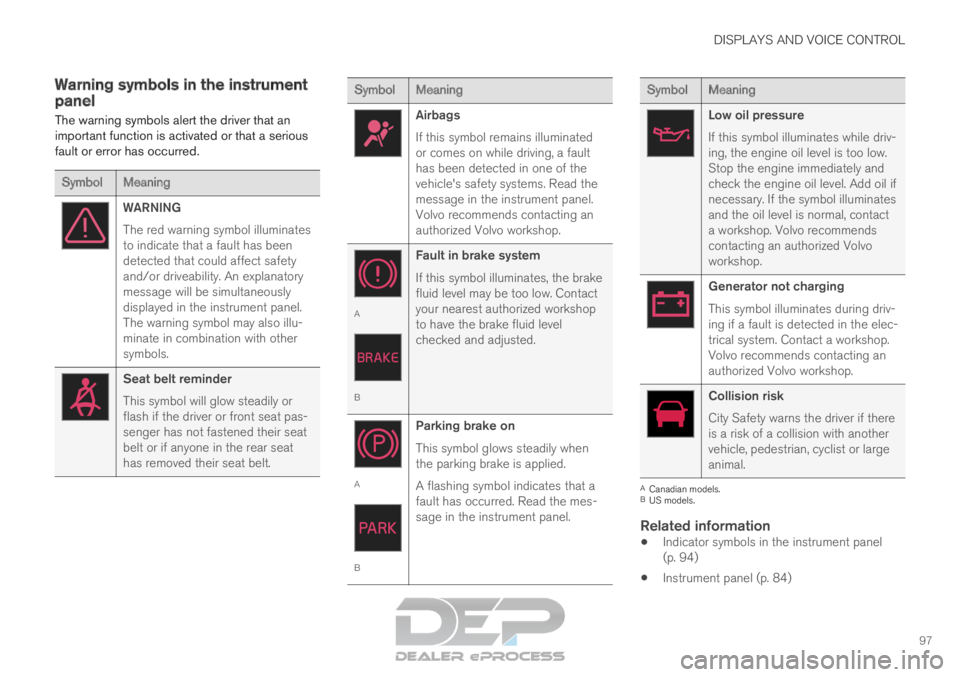
The warning symbols alert the driver that an
important function is activated or that a serious
fault or error has occurred. Symbol
Meaning WARNING
The red warning symbol illuminates
to indicate that a fault has been
detected that could affect safety
and/or driveability. An explanatory
message will be simultaneously
displayed in the instrument panel.
The warning symbol may also illu-
minate in combination with other
symbols.
Seat belt reminder
This symbol will glow steadily or
flash if the driver or front seat pas-
senger has not fastened their seat
belt or if anyone in the rear seat
has removed their seat belt. Symbol
Meaning Airbags
If this symbol remains illuminated
or comes on while driving, a fault
has been detected in one of the
vehicle's safety systems. Read the
message in the instrument panel.
Volvo recommends contacting an
authorized Volvo workshop.
A
B
Fault in brake system
If this symbol illuminates, the brake
fluid level may be too low. Contact
your nearest authorized workshop
to have the brake fluid level
checked and adjusted. A
BParking brake on
This symbol glows steadily when
the parking brake is applied.
A flashing symbol indicates that a
fault has occurred. Read the mes-
sage in the instrument panel. Symbol
Meaning Low oil pressure
If this symbol illuminates while driv-
ing, the engine oil level is too low.
Stop the engine immediately and
check the engine oil level. Add oil if
necessary. If the symbol illuminates
and the oil level is normal, contact
a workshop. Volvo recommends
contacting an authorized Volvo
workshop.
Generator not charging
This symbol illuminates during driv-
ing if a fault is detected in the elec-
trical system. Contact a workshop.
Volvo recommends contacting an
authorized Volvo workshop.
Collision risk
City Safety warns the driver if there
is a risk of a collision with another
vehicle, pedestrian, cyclist or large
animal.
A
Canadian models.
B US models.
Related information
Indicator symbols in the instrument panel
(p. 94)
Instrument panel (p. 84)
Page 438 of 697
||STARTING AND DRIVING
436
CAUTION
When starting in cold weather, the auto-
matic transmission may shift up at slightly
higher engine speeds than normal until
the automatic transmission fluid reaches
normal operating temperature.
Do not race a cold engine immediately
after starting. This could prevent fluids
from properly lubricating vital compo-
nents in the engine before it has reached
the proper operating temperature.
The engine should be idling when the
gear selector is moved. Never accelerate
until the gear is fully engaged. Accelerat-
ing rapidly before a gear is properly
engaged could lead to harder wear of
components.
To help prevent the transmission oil from
overheating, select P or N when idling at
a standstill for prolonged periods of time.
Related information
Switching off the vehicle (p. 436)
Ignition modes (p. 437)
Adjusting the steering wheel (p. 201)
Jump starting using another battery (p. 481)
Selecting ignition mode (p. 438) Switching off the vehicle
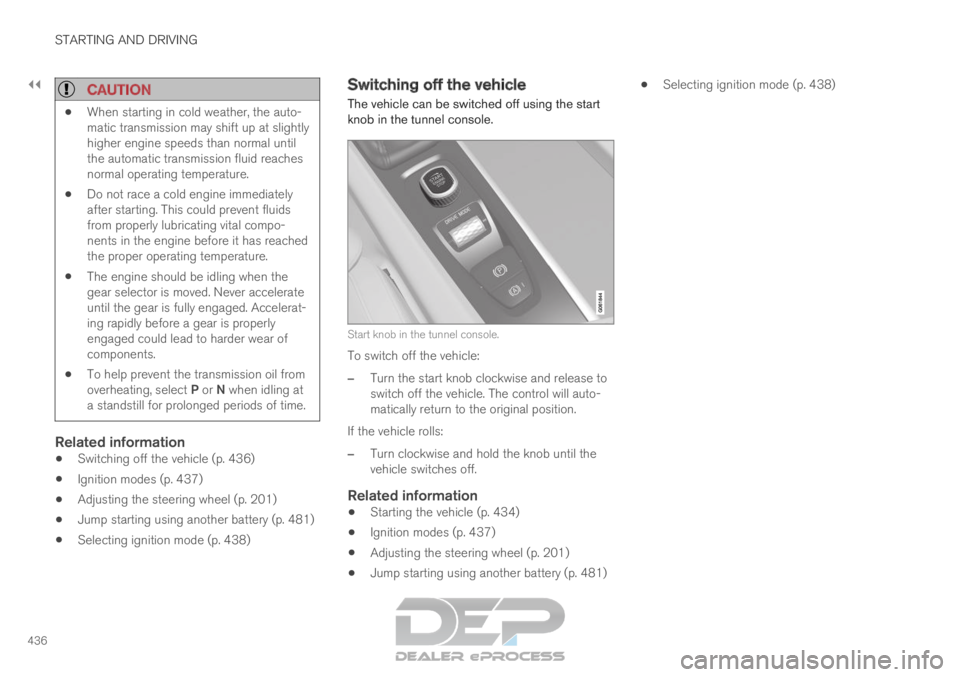
The vehicle can be switched off using the start
knob in the tunnel console.
Start knob in the tunnel console.
To switch off the vehicle:
– Turn the start knob clockwise and release to
switch off the vehicle. The control will auto-
matically return to the original position.
If the vehicle rolls:
– Turn clockwise and hold the knob until the
vehicle switches off.
Related information
Starting the vehicle (p. 434)
Ignition modes (p. 437)
Adjusting the steering wheel (p. 201)
Jump starting using another battery (p. 481)
Selecting ignition mode (p. 438)
Page 474 of 697
STARTING AND DRIVING
472Preparing for a long trip
It is important to have the vehicle's systems and
equipment checked carefully before driving long
distances.
Check that:
the engine is running properly and that fuel
consumption is normal
there are no leaks (fuel, oil or other fluid)
the brake pedal is functioning optimally
all lights are working ‒ adjust the headlight
height if the vehicle is carrying a heavy load
tire tread depth and air pressure are at cor-
rect levels. Change to snow tires when driv-
ing in areas where there is a risk of snowy or
icy roads
the start battery is sufficiently charged
the wiper blades are in good condition
Related information
Checking tire pressure (p. 567)
Filling washer fluid (p. 662)
Winter driving (p. 472)
Economical driving (p. 467)
Vehicle modem settings (p. 545)
Loading recommendations (p. 598)
Driving with a trailer (p. 483)
Pilot Assist (p. 316)
Speed limiter (p. 283)
Tire sealing system (p. 582) Winter driving
It is important to check the vehicle before driving
in cold/snowy conditions to make sure it can be
driven safely.
Before the cold season arrives: Make sure the engine coolant contains 50%
antifreeze. This mixture helps protect the
engine from frost erosion down to
approx. -35 °C (-31 °F). Do not mix different
types of antifreeze as this could pose a
health risk.
Keep the fuel tank well filled to prevent con-
densation from forming.
Check the viscosity of the engine oil. Oil with
low viscosity (thinner oil) improves cold-
weather starting and reduces fuel consump-
tion when driving with a cold engine.
CAUTION Low-viscosity oil should not be used with hard
driving or in hot weather.
Check the condition and charge level of the
start battery. Cold weather places greater
demands on the start battery and reduces its
capacity.
Use washer fluid containing antifreeze to
help prevent ice from forming in the washer
fluid reservoir.
Page 475 of 697
STARTING AND DRIVING
473
Slippery driving conditionsFor optimal traction and roadholding, Volvo rec-
ommends using snow tires on all wheels when-
ever there is a risk of snow or ice on the road.
NOTECertain countries require use of winter tires
by law. Not all countries permit the use of
studded tires.
Practice driving on slippery surfaces under con-
trolled conditions to learn how the vehicle reacts.
Related information
Snow tires (p. 581)
Snow chains (p. 581)
Braking on salted roads (p. 441)
Braking on wet roads (p. 441)
Filling washer fluid (p. 662)
Start battery (p. 627)
Replacing windshield wiper blades (p. 660)
Changing rear window wipers (p. 659)
Refilling coolant (p. 625) Driving through standing water
Driving the vehicle through a deep pool of stand-
ing water on a water-covered roadway is called
fording. This must be done with great caution.
To prevent damage to the vehicle when driving
through water (e.g. on flooded roads):
Do not drive in water higher than the floor of
the vehicle. If possible, check the depth of
the water at its deepest point before driving
through it. Be particularly careful when driv-
ing through flowing water.
Always select the
Off Road drive mode
before driving in water to ensure the gasoline
engine is running.
Do not drive faster than walking speed.
Do not stop the vehicle in the water. Drive
carefully forward or back the vehicle out of
the water.
Remember that waves created by passing
vehicles could cause the water level to rise
above the vehicle's floor level.
Avoid driving through salt water to help avoid
the risk of corrosion.
CAUTION Parts of the vehicle (e.g. engine, transmission,
driveline, electrical components, etc.) can be
damaged if the vehicle is driven through water
higher than its floor level. Damage to any
components caused by flooding, vapor lock or
insufficient oil is not covered under warranty.
If the engine stalls while the vehicle is in
water, do not attempt to restart it. Have the
vehicle towed on the bed of a tow truck to a
workshop - an authorized Volvo workshop is
recommended.
CAUTION
Because it can be difficult to determine the
water depth, avoid driving through standing or
running water.
When you have passed the water, press lightly on
the brake pedal and check that the brakes are
functioning properly. Water, mud, slush, etc. can
make the brake linings slippery, resulting in
delayed braking effect.
If the vehicle is equipped with a trailer coupling
contact, clean the contact after driving in water or
mud.
Related information
Recovery (p. 489)
Low Speed Control (p. 464)
Page 613 of 697
MAINTENANCE AND SERVICE
}}
611
Periodic maintenance helps minimize
emissions
NOTE
Refer to your Service and Warranty Book-
let for a comprehensive service and main-
tenance schedule up to 240,000 km
(150,000 miles). This program contains
inspections and services necessary for
the proper function of your vehicle and
includes components that affect vehicle
emissions.
The Warranty and Service Records Infor-
mation booklet also contains detailed
information concerning the warranties
that apply to your vehicle.
On-board Diagnostic SystemOBD II is part of your vehicle's computerized
engine management system. It stores diagnostic
information about your vehicle's emission con-
trols. It can light the Check Engine light (MIL) if it
detects an emission control "fault." A "fault" is a
component or system that is not performing
within an expected range. A fault may be perma-
nent or temporary. OBD II will store a message
about any fault.
Emission inspection readiness
How do states use OBD II for emission
inspections?
Many states connect a computer directly to a
vehicle's OBD II system. The inspector can then
read "faults." In some states, this type of inspec-
tion has replaced the tailpipe emission test.
How can my vehicle fail OBD II emission
inspection?
Your vehicle can fail OBD II emission inspection
for any of the following reasons:
If your Check Engine (MIL) light is lit, your
vehicle may fail inspection.
If your vehicle's Check Engine light was lit,
but went out without any action on your part,
OBD II will still have a recorded fault. Your
vehicle may pass or fail, depending on the
inspection practices in your area.
If you had recent service that required dis-
connecting the battery, OBD II diagnostic
information may be incomplete and "not
ready" for inspection. A vehicle that is not
ready may fail inspection.
How can I prepare for my next
OBD II
emission inspection?
If your Check Engine (MIL) light is lit or was
lit but went out without service, have your vehicle diagnosed and, if necessary, serviced
by a qualified Volvo technician.
If you recently had service for a lit Check
Engine light, or if you had service that
required disconnecting the battery, a period
of driving is necessary to bring the OBD II
system to "ready" for inspection. Two half-
hour trips of mixed stop-and-go/highway
driving are typically needed to allow OBD II to
reach readiness. Your Volvo retailer can pro-
vide you with more information on planning a
trip.
Maintain your vehicle in accordance with your
vehicle's maintenance schedule.
Owner maintenancePeriodic maintenance requirements and intervals
are described in your vehicle's Warranty and
Service Records Information booklet.
The following points can be carried out between
the normally scheduled maintenance services.
Each time the car is refueled:
Check the engine oil level.
Clean the windshield, windshield wipers,
headlights, and taillights.
Page 617 of 697
MAINTENANCE AND SERVICE
}}
* Option/accessory. 615
Messages - status messages
Status – checking engine oil level and
AdBlue level 4
TPMS - tire inflation pressure check
Appointments - appointment information
and vehicle information 3
.
Related information
Handling messages saved from the instru-
ment panel (p. 107)
Checking and filling engine oil (p. 624)
Tire pressure monitoring system* (p. 569)
Scheduling service and repairs (p. 615)
Sending vehicle information to the workshop
(p. 616)
Navigating in the center display's views
(p. 115) Scheduling service and repairs
5
This service offers a convenient way to schedule
service and workshop appoints directly from the
vehicle.
When it is time for service, and in certain cases if
the vehicle requires repairs, a message will be
displayed in the instrument panel and at the top
of the center display. The time for service is
determined by how much time has elapsed, the
number of hours the engine has run, or the dis-
tance driven since the last service.
To use the service
Create a Volvo ID and register it to the vehi-
cle.
To select a Volvo retailer you would like to
contact, go to www.volvocars.com and log in.
To send and receive appointment informa-
tion, the vehicle must be connected to the
Internet 6
.
Book serviceBook a service request when desired or when a
message is displayed indicating that service or
repairs are needed. 1.
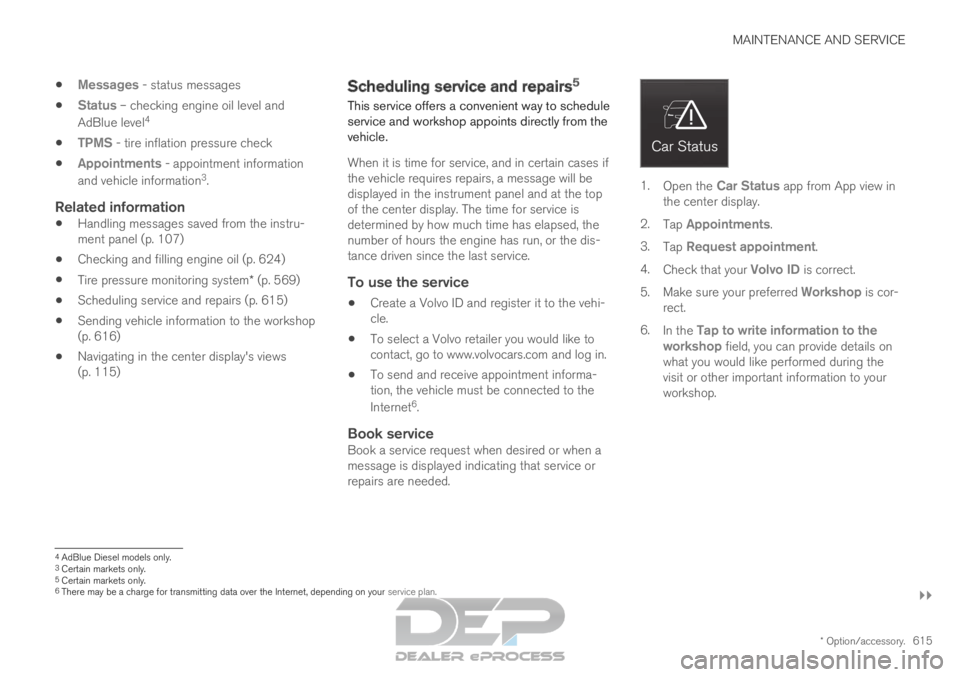
Open the Car Status app from App view in
the center display.
2. Tap Appointments.
3. Tap Request appointment.
4. Check that your Volvo ID is correct.
5. Make sure your preferred Workshop is cor-
rect.
6. In the Tap to write information to the
workshop field, you can provide details on what you would like performed during the
visit or other important information to your
workshop. 4
AdBlue Diesel models only.
3 Certain markets only.
5 Certain markets only.
6 There may be a charge for transmitting data over the Internet, depending\
on your service plan.