reset VOLVO XC90 TWIN ENGINE 2020 Owner's Manual
[x] Cancel search | Manufacturer: VOLVO, Model Year: 2020, Model line: XC90 TWIN ENGINE, Model: VOLVO XC90 TWIN ENGINE 2020Pages: 693, PDF Size: 13.34 MB
Page 175 of 693

WINDOWS, GLASS AND MIRRORS
* Option/accessory.173
WARNING
Make sure that no child or other passenger comes into contact with the windows as they are closing with keyless closing *.
NOTE
One way to reduce the pulsating wind noise heard when the rear windows areopen is to also open the front windowsslightly.
NOTE
The windows cannot be opened at speeds over approx. 180 km/h (ca112 mph), butthey can be closed. The driver is always responsible for follow- ing applicable traffic regulations.
NOTE
It may not be possible to operate the win- dows in low temperatures.
Related information
Power windows (p. 171)
Pinch protection for windows and sun cur- tains (p. 170)
Reset procedure for pinch protection(p. 171)
Keyless locking and unlocking
* (p. 262)
Locking and unlocking using the remotekey (p. 248)
Using sun curtains
*
There are integrated sun curtains in each rear door.
Rear door – manually operated
The illustration is generic – the design may vary.
Hook with locking mechanism
–Pull up the sun curtain and hook it to the upper section of the door frame.
The window can be opened and closed whenthe sun curtain is being used.
Related information
Pinch protection for windows and sun cur-tains (p. 170)
Reset procedure for pinch protection(p. 171)
Power windows (p. 171)
Page 177 of 693
WINDOWS, GLASS AND MIRRORS
}}
* Option/accessory.175
The rearview mirror instead has two sensors - one pointing forward and one pointing rear-ward - which work together to identify andeliminate glare. The forward-pointing sensormonitors ambient light, while the rearward-pointing sensor monitors light from the head-lights of following vehicles. For the door mirrors to be equipped with auto- dim, the rearview mirror must also be equip-ped with auto-dim.
NOTE
If the sensors are obstructed by e.g. a parking permit, transponder, sunshade orobjects on the seats or in the cargo com-partment in a way that prevents light fromreaching the sensors, the auto-dim func-tion in the door and rearview mirrors willbe reduced.
Related information
Rearview/door mirrors (p. 174)
Adjusting the door mirrors (p. 175)
Adjusting the door mirrors
To improve visibility to the rear, the door mir- rors need to be adjusted to the driver's heightand seating position. There are several auto-matic settings that can also be connected tothe memory function buttons for the power seat *.
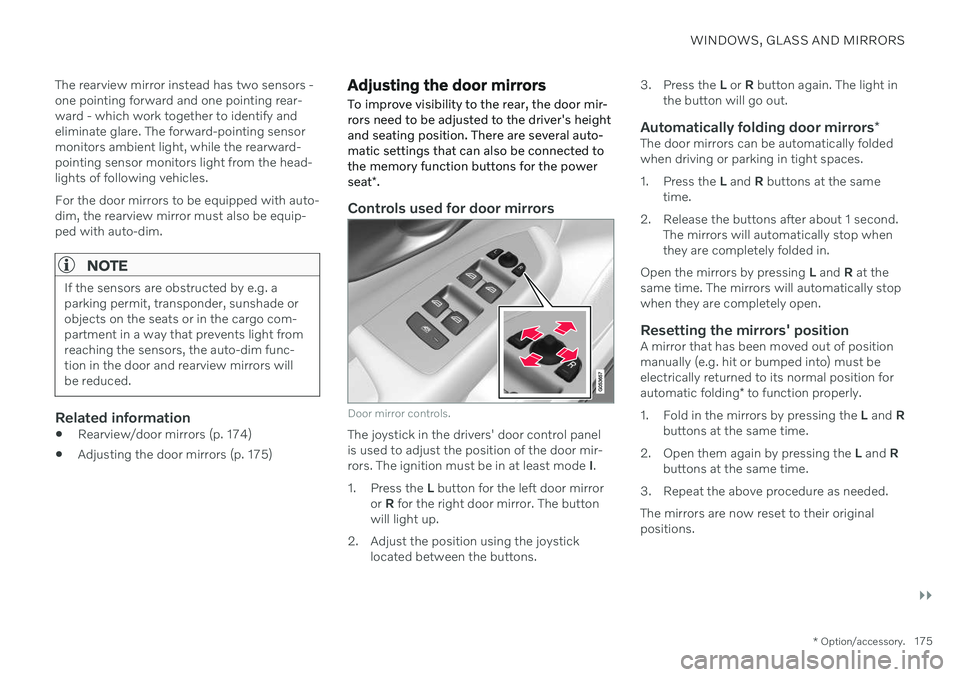
Controls used for door mirrors
Door mirror controls.
The joystick in the drivers' door control panel is used to adjust the position of the door mir-rors. The ignition must be in at least mode I.
1. Press the L button for the left door mirror
or R for the right door mirror. The button
will light up.
2. Adjust the position using the joystick located between the buttons. 3. Press the
L or R button again. The light in
the button will go out.
Automatically folding door mirrors *The door mirrors can be automatically foldedwhen driving or parking in tight spaces.
1. Press the L and R buttons at the same
time.
2. Release the buttons after about 1 second. The mirrors will automatically stop when they are completely folded in.
Open the mirrors by pressing L and R at the
same time. The mirrors will automatically stopwhen they are completely open.
Resetting the mirrors' positionA mirror that has been moved out of positionmanually (e.g. hit or bumped into) must beelectrically returned to its normal position for automatic folding * to function properly.
1. Fold in the mirrors by pressing the L and R
buttons at the same time.
2. Open them again by pressing the L and R
buttons at the same time.
3. Repeat the above procedure as needed. The mirrors are now reset to their original positions.
Page 178 of 693
||
WINDOWS, GLASS AND MIRRORS
* Option/accessory.
176
Tilting when parking 3The door mirrors can be tilted down to help give the driver a better view along the sides ofthe vehicle, e.g. of the curb when parking.
–Select reverse gear and press the
L or R
mirror button.
Please note that the button may need to be pressed twice depending on settings. Whenthe door mirror is tilted down, the light in thebutton will flash. When reverse gear isengaged, the door mirrors will automaticallystart to move after 3 seconds and will reachtheir original position after about 8 seconds.
Automatically tilting when parking 3With this setting, the door mirrors will auto-matically tilt down when reverse gear isengaged. The folded position is preset andcannot be adjusted. 1.
Tap
Settings in the center display's Top
view.
2. Tap
My CarMirrors and Convenience.
3. Under
Exterior Mirror Tilt at Reverse,
select Off, Driver, Passenger or Both to
activate/deactivate and to select which mirror to tilt.
To immediately return the door mirrors to theiroriginal position, press the L or R button
twice.
Automatic folding when the vehicle is locked *
The door mirrors can automatically fold in when the vehicle is locked and open when thevehicle is unlocked using the remote key. Ifthe mirrors have been folded in manually, theymust be folded out manually as well. 1.
Tap
Settings in the center display's Top
view.
2. Tap
My CarMirrors and Convenience.
3. Select
Fold Mirror When Locked to acti-
vate/deactivate.
Related information
Rearview/door mirrors (p. 174)
Adjusting the rearview mirror dimming function (p. 174)
Storing positions for seats, mirrors and head-up display
* (p. 190)
Activating and deactivating the heated rear window and door mirrors (p. 226)
Panoramic roof
*
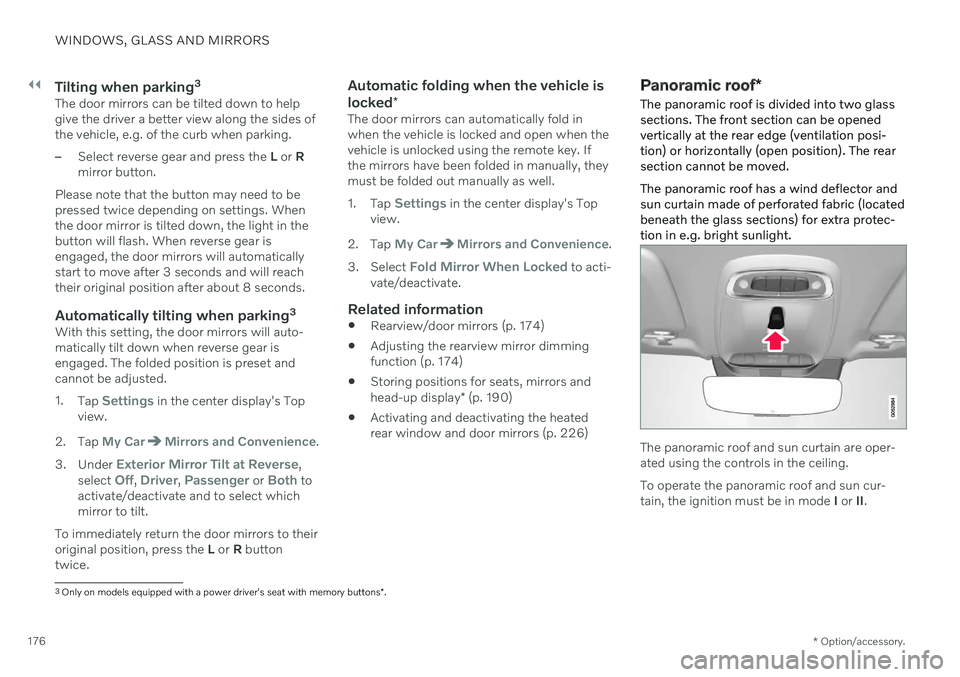
The panoramic roof is divided into two glass sections. The front section can be openedvertically at the rear edge (ventilation posi-tion) or horizontally (open position). The rearsection cannot be moved. The panoramic roof has a wind deflector and sun curtain made of perforated fabric (locatedbeneath the glass sections) for extra protec-tion in e.g. bright sunlight.
The panoramic roof and sun curtain are oper- ated using the controls in the ceiling. To operate the panoramic roof and sun cur- tain, the ignition must be in mode I or II.
3
Only on models equipped with a power driver's seat with memory buttons *.
Page 194 of 693
||
SEATS AND STEERING WHEEL
* Option/accessory.
192
Front door closed
–Press and hold one of the memory buttons ( 1 -3 ) until the seat, door mirrors and head-
up display stop in the positions stored inthat memory button.
If the memory button is released, the seat,door mirrors and head-up display will stopmoving.
WARNING
This list point needs to be translated exactly to: "Because the driver's seatcan be adjusted with the ignition off,children should never be left unatten-ded in the vehicle.
Movement of the seat can be STOP-PED at any time by pressing any but-ton on the power seat control panel.
Do not adjust the seat while driving.
The seat should be adjusted so that thebrake pedal can be depressed fully. Inaddition, position the seat as far rear-ward as comfort and control allow.
The seat rails on the floor must not beobstructed in any way when the seat isin motion.
Related information
Manual front seats (p. 188)
Power
* front seats (p. 189)
Adjusting the power
* front seats (p. 189)
Storing positions for seats, mirrors and head-up display
* (p. 190)
Adjusting front seat massage settings
*
(p. 193)
Adjusting
* front seat cushion length
(p. 194)
Front seat massage
* settings (p. 192)
Adjusting front seat side bolster settings
*
(p. 195)
Adjusting front seat lumbar support
*
(p. 195)
Adjusting the passenger seat from thedriver's seat
* (p. 197)
Adjusting the door mirrors (p. 175)
Head-up display settings
* (p. 147)
Front seat massage * settings
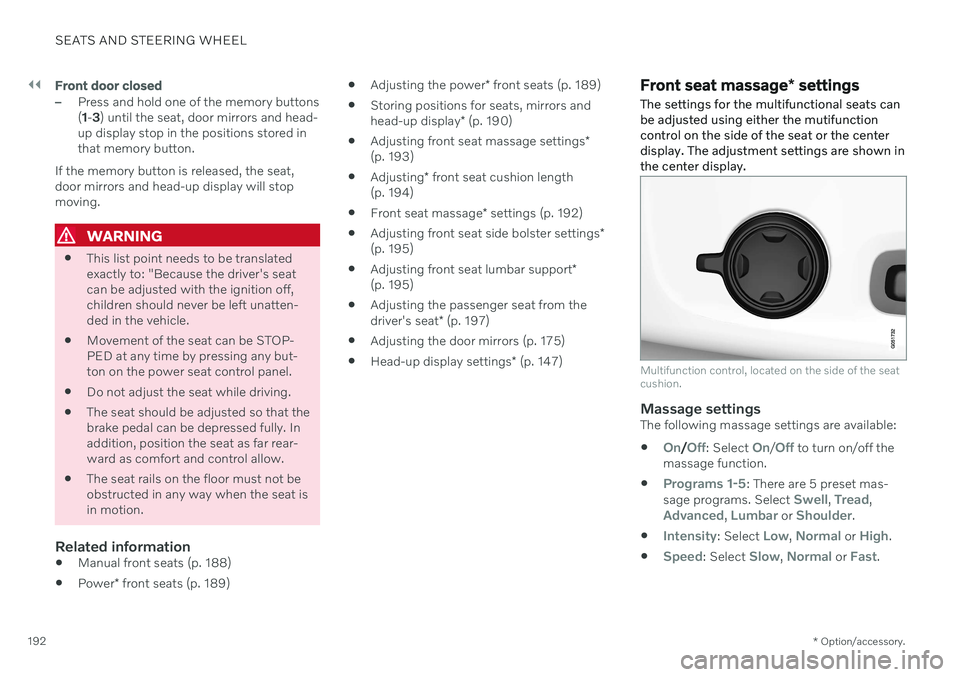
The settings for the multifunctional seats can be adjusted using either the mutifunctioncontrol on the side of the seat or the centerdisplay. The adjustment settings are shown inthe center display.
Multifunction control, located on the side of the seat cushion.
Massage settingsThe following massage settings are available:
On/Off: Select On/Off to turn on/off the
massage function.
Programs 1-5: There are 5 preset mas-
sage programs. Select Swell, Tread,Advanced, Lumbar or Shoulder.
Intensity: Select Low, Normal or High.
Speed: Select Slow, Normal or Fast.
Page 235 of 693

CLIMATE CONTROL
}}
* Option/accessory.233
Activating and deactivating climate control for the third-row seats *
The third row of seats has separate air condi- tioning that cools and dehumidifies incomingair as needed.
1. Tap the symbol in the center of the climate bar to open Climate view in the center dis- play.
2. Select the
Rear climate tab.
3. Tap
3rd row climate.
> The air conditioning is activated/deacti- vated and the button lights up/goes out.
NOTE
The air conditioning for the third row of seats is automatically activated if any ofthe third row seat belts are buckled. It is not possible to manually activate air conditioning for the third row of seats if themain air conditioning system is deactivatedor the climate system for the second rowof seats is deactivated.
Related information
Climate system controls (p. 219)
Parking climate
Parking climate is an umbrella term for vari- ous functions that improve the passengercompartment climate when the vehicle isparked, e.g. preconditioning.
Parking climate functions are con- trolled from the Parking climate tab
in the center display's Climate view. Tap the symbol in the center of the
climate bar to open Climate view.
Related information
Climate (p. 208)
Preconditioning (p. 233)
Climate comfort retaining function (p. 238)
Parking climate symbols and messages(p. 239)
Preconditioning
Preconditioning is a climate function that, if possible, attempts to achieve a comfortabletemperature in the passenger compartmentbefore driving.
Preconditioning can be started immediately or started at a preset time using a timer. The function utilizes several of the vehicle's systems:
In cold weather, the parking heater heatsthe passenger compartment to a comfort-able temperature.
In warm weather, air conditioning coolsthe passenger compartment to a comfort-able temperature.
The electrically heated steering wheel
*
and seats * can be activated.
Heating for the windshield, rear windowand door mirrors are automatically acti-vated as needed.
During preconditioning in a hot climate, con-densation from the air conditions may dripunder the vehicle. This is normal.
Page 237 of 693

CLIMATE CONTROL
}}
235
Related information
Parking climate (p. 233)
Preconditioning (p. 233)
Preconditioning timer (p. 235)
Preconditioning timer
The timer can be set to finish preconditioning at a predetermined time.
The timer can store up to 8 preset times for: A time on a particular date
A time on one or more days of the week, with or without the repeat function.
NOTE
Preconditioning is only available when the car is connected to an electrical outlet. Acharging post that is not always active, forexample because of a timer, can cause lossof function for preconditioning. If the vehicle is not connected to an electri- cal socket it is still possible in a warm cli-mate to achieve brief cooling of the pas-senger compartment by direct starting pre-conditioning.
Related information
Preconditioning (p. 233)
Adding and editing timer settings for pre- conditioning (p. 235)
Activating and deactivating precondition-ing timer (p. 236)
Deleting preconditioning timer settings(p. 237)
Adding and editing timer settings for preconditioning
The preconditioning timer can store up to 8 preset timer settings.
Adding a timer setting
Button for adding a timer setting in the Parking
climate tab in Climate view.
1. Open Climate view in the center display. 2.
Select the
Parking climate tab.
3. Tap
Add timer.
> A pop-up window will appear.
NOTE
It is not possible to add a time setting if there are already 8 settings for the timer.Delete a time setting to be able to add anew one.
Page 274 of 693
KEY, LOCKS AND ALARM
* Option/accessory.
272
Setting a maximum height for the power tailgate *
The tailgate can be set to stop opening at a certain height, for example if the tailgateneeds to be opened in a garage with a lowceiling.
Setting maximum opening height:
1. Open the tailgate to the desired opening height.
NOTE
It is not possible to program an opening position lower than half-open tailgate.
2.Press the button on the lower edge of
the tailgate and hold for at least 3 seconds.
> Two brief audio signals will sound to indicate that the position has been stored.
Resetting to maximum opening position:
–Move the tailgate manually to its highest possible position and press the
but-
ton on the tailgate for at least 3 seconds.
> Two audio signals will sound to indicate that the stored position has been erased. The tailgate can then beopened to its maximum position.
NOTE
If the system has been working contin- uously for a prolonged period of time, itwill be switched off to avoid overload.It can be used again after approxi-mately 2 minutes.
Related information
Opening and closing the power tailgate
*
(p. 269)
Foot movement tailgate operation *
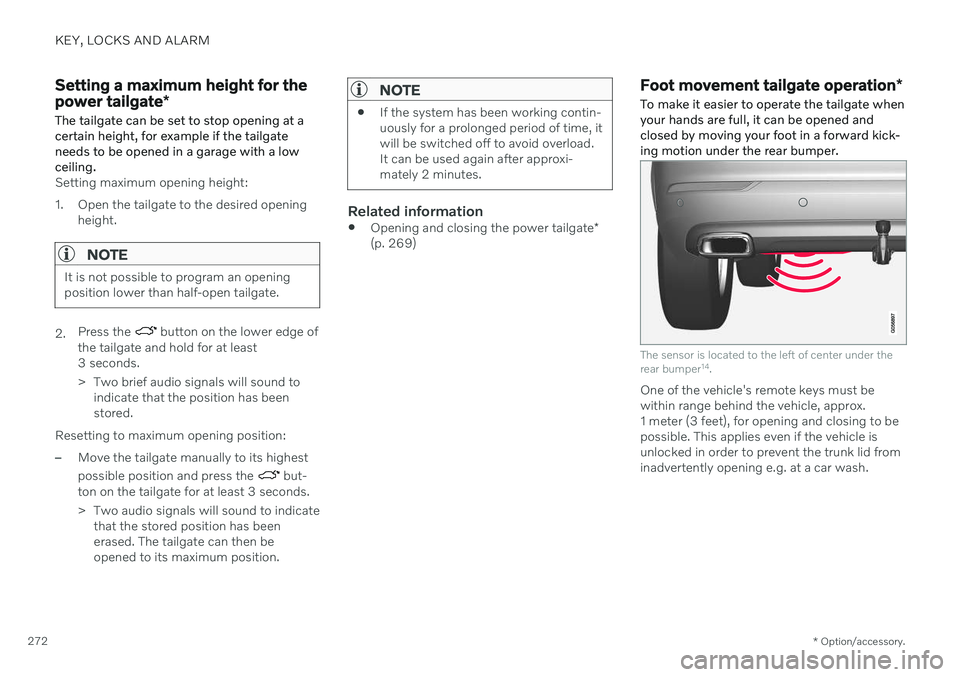
To make it easier to operate the tailgate when your hands are full, it can be opened andclosed by moving your foot in a forward kick-ing motion under the rear bumper.
The sensor is located to the left of center under the rear bumper 14
.
One of the vehicle's remote keys must be within range behind the vehicle, approx.1 meter (3 feet), for opening and closing to bepossible. This applies even if the vehicle isunlocked in order to prevent the trunk lid frominadvertently opening e.g. at a car wash.
Page 288 of 693
||
DRIVER SUPPORT
* Option/accessory.
286
NOTE
Visual warnings on the windshield may be difficult to notice in cases of strong sun-light, reflections, extreme light contrasts,or if the driver is wearing sunglasses or isnot looking straight ahead.
NOTE
Distance Alert is deactivated while Adap- tive Cruise Control * or Pilot Assist * is
active.
WARNING
Distance Alert only reacts of the time inter- val to the vehicle ahead is shorter than thepreset value – vehicle speed is not affec-ted.
WARNING
The function is supplementary driver support intended to facilitate drivingand help make it safer – it cannot han-dle all situations in all traffic, weatherand road conditions.
The driver is advised to read all sec-tions in the Owner's Manual about thisfunction to learn of its limitations,which the driver must be aware ofbefore using the function.
Driver support functions are not a sub-stitute for the driver's attention andjudgment. The driver is always respon-sible for ensuring the vehicle is drivenin a safe manner, at the appropriatespeed, with an appropriate distance toother vehicles, and in accordance withcurrent traffic rules and regulations.
Related information
Activating or deactivating Distance Alert(p. 286)
Distance Alert limitations (p. 287)
Setting time interval to the vehicle ahead(p. 312)
Collision risk warning from driver support(p. 309)
Head-up display
* (p. 145)
Activating or deactivating Distance Alert 12
Distance Alert can be turned off. The function is only available in vehicles that can displayinformation on the windshield with a head-up display *.
Activate or deactivate the function using this button inthe center display's Functionview.
GREEN button indicator light – the func- tion is activated.
GRAY button indicator light – the functionis deactivated.
Distance Alert is automatically activated eachtime the engine is started.
Related information
Distance Alert
* (p. 285)
Distance Alert limitations (p. 287)
Page 314 of 693
||
DRIVER SUPPORT
* Option/accessory.
312
Automatic transmission
The driver support functions can follow another vehicle at speeds from a standstill upto 200 km/h (125 mph). Pilot Assist can provide steering assistance from near-stationary speeds up to 140 km/h(87 mph). The lowest speed that can be set is 30 km/h (20 mph). When following another vehicle,ACC can monitor that vehicle's speed andslow your own vehicle down to a standstill,but it is not possible to set speeds lower than30 km/h (20 mph).
Related information
Driver support systems (p. 280)
Cruise control (p. 287)
Adaptive Cruise Control
* (p. 290)
Pilot Assist
* (p. 300)
Setting time interval to the vehicle ahead The time interval to the vehicle ahead can be set for the functions Adaptive Cruise Control *,
Pilot Assist * and Distance Alert *.
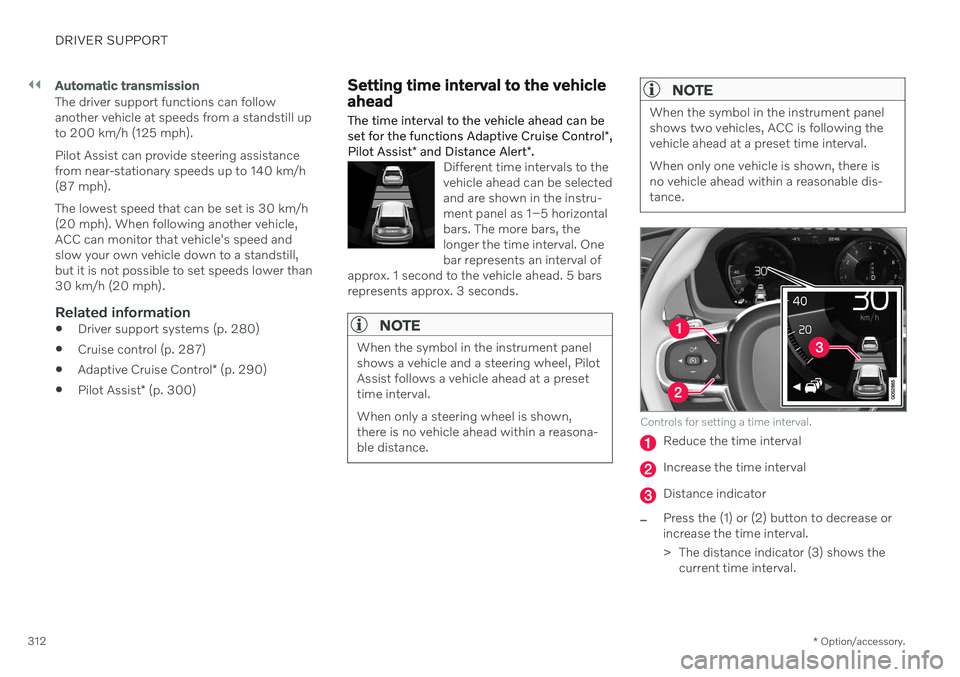
Different time intervals to the vehicle ahead can be selectedand are shown in the instru-ment panel as 1–5 horizontalbars. The more bars, thelonger the time interval. Onebar represents an interval of
approx. 1 second to the vehicle ahead. 5 barsrepresents approx. 3 seconds.
NOTE
When the symbol in the instrument panel shows a vehicle and a steering wheel, PilotAssist follows a vehicle ahead at a presettime interval. When only a steering wheel is shown, there is no vehicle ahead within a reasona-ble distance.
NOTE
When the symbol in the instrument panel shows two vehicles, ACC is following thevehicle ahead at a preset time interval. When only one vehicle is shown, there is no vehicle ahead within a reasonable dis-tance.
Controls for setting a time interval.
Reduce the time interval
Increase the time interval
Distance indicator
–Press the (1) or (2) button to decrease or increase the time interval.
> The distance indicator (3) shows the current time interval.
Page 317 of 693
DRIVER SUPPORT
* Option/accessory.315
Curve Speed Assist (CSA) *48
Curve Speed Assist can help the driver
reduce speed before sharp turns if the preset speed for the driver support function Adap- tive Cruise Control * or Pilot Assist * is deter-
mined to be too high.
This assessment is performed using informa- tion from map data in the vehicle's navigation system, Sensus Navigation *. After the turn,
the vehicle will resume the previously set speed.
As the function reduces thevehicle's speed, this symbolwill be displayed in the instru-ment panel.
The driver can cancel the function at any time by braking or using the accelerator pedal.
WARNING
The function is supplementary driver support intended to facilitate drivingand help make it safer – it cannot han-dle all situations in all traffic, weatherand road conditions.
The driver is advised to read all sec-tions in the Owner's Manual about thisfunction to learn of its limitations,which the driver must be aware ofbefore using the function.
Driver support functions are not a sub-stitute for the driver's attention andjudgment. The driver is always respon-sible for ensuring the vehicle is drivenin a safe manner, at the appropriatespeed, with an appropriate distance toother vehicles, and in accordance withcurrent traffic rules and regulations.
Drive modes
Cornering assistance varies depending on the selected drive mode. If drive mode cannot be selected, the function will use the
Comfortoption. In Dynamic mode, cornering will be
sporty, with slightly more powerful accelera- tion coming out of curves.
Related information
Driver support systems (p. 280)
Adaptive Cruise Control
* (p. 290)
Pilot Assist
* (p. 300)
Drive modes (p. 433)
48
This function is only available on some markets.