change wheel VOLVO XC90 TWIN ENGINE 2020 Service Manual
[x] Cancel search | Manufacturer: VOLVO, Model Year: 2020, Model line: XC90 TWIN ENGINE, Model: VOLVO XC90 TWIN ENGINE 2020Pages: 693, PDF Size: 13.34 MB
Page 564 of 693
WHEELS AND TIRES
* Option/accessory.
562
Removing a wheel Wheel changes must always be carried out correctly. The following instructions showhow to remove a wheel and what is impor-tant to keep in mind.
CAUTION
When not in use, the jack
* should be
kept in its storage compartment under the cargo compartment floor.
The jack provided with your vehicle isintended to be used only in temporarysituations such as changing wheels inthe event of a flat tire. Only the jackthat came with your particular modelshould be used to lift the vehicle. If thevehicle needs to be lifted more fre-quently or for a prolonged period, usinga garage jack or hoist is recommended.Always follow this device's instructionsfor use.
WARNING
Apply the parking brake and put the gear selector in the Park (
P) position.
Block the wheels standing on theground, use rigid wooden blocks orlarge stones.
Check that the jack is not damaged,the threads are properly lubricated andit is free from dirt.
Be sure the jack is on a firm, level, non-slippery surface and that it is uprightand not leaning.
The jack must correctly engage in thejack attachment.
No objects should be placed betweenthe base of the jack and the ground, orbetween the jack and the attachmentbar on the vehicle.
Never let anyone remain in the vehiclewhen it is raised on a jack.
If a tire must be changed near passingtraffic, make sure all passengers moveto a safe location.
Use a jack intended for the vehiclewhen changing a tire. For any otherjob, use stands to support the vehicle.
Never crawl under or allow any part ofyour body to be extended under a vehi-cle supported by a jack. 1. Turn on the vehicle's hazard warning
flashers if a wheel change must be per-formed in an area with traffic.
2. Apply the parking brake and put the gear selector in P, or first gear if the vehicle has
a manual transmission. For vehicles with
Leveling Control* : If the
vehicle is equipped with pneumatic sus- pension, this must be switched off before the vehicle is lifted with the jack *.
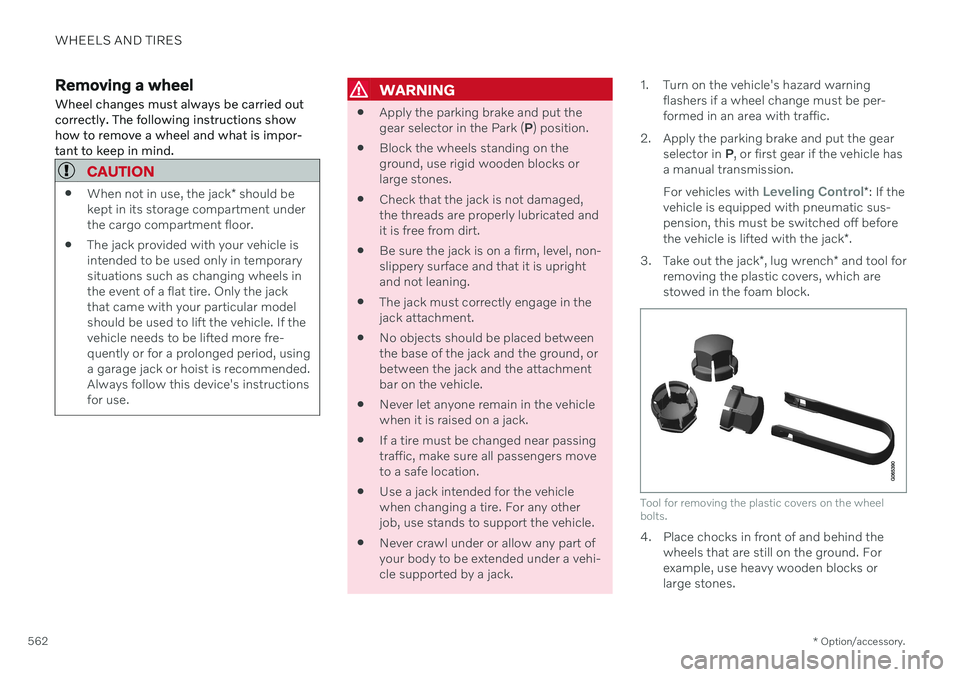
3. Take out the jack *, lug wrench * and tool for
removing the plastic covers, which are stowed in the foam block.
Tool for removing the plastic covers on the wheel bolts.
4. Place chocks in front of and behind the wheels that are still on the ground. For example, use heavy wooden blocks orlarge stones.
Page 565 of 693
WHEELS AND TIRES
* Option/accessory.563
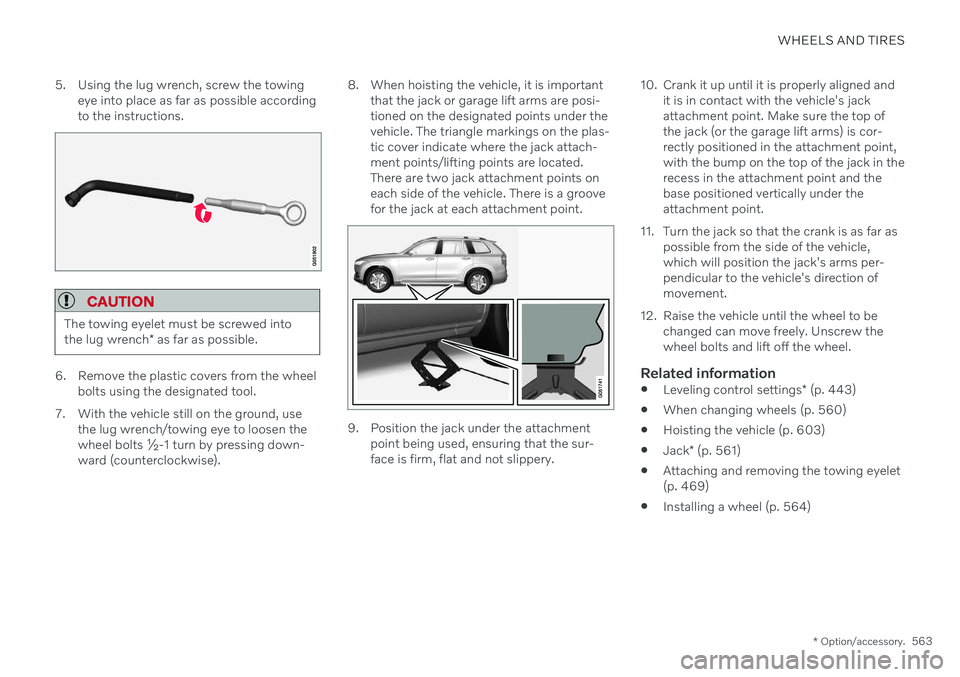
5. Using the lug wrench, screw the towing
eye into place as far as possible according to the instructions.
CAUTION
The towing eyelet must be screwed into the lug wrench * as far as possible.
6. Remove the plastic covers from the wheel
bolts using the designated tool.
7. With the vehicle still on the ground, use the lug wrench/towing eye to loosen the wheel bolts ½-1 turn by pressing down-ward (counterclockwise). 8. When hoisting the vehicle, it is important
that the jack or garage lift arms are posi-tioned on the designated points under thevehicle. The triangle markings on the plas-tic cover indicate where the jack attach-ment points/lifting points are located.There are two jack attachment points oneach side of the vehicle. There is a groovefor the jack at each attachment point.
9. Position the jack under the attachmentpoint being used, ensuring that the sur- face is firm, flat and not slippery. 10. Crank it up until it is properly aligned and
it is in contact with the vehicle's jackattachment point. Make sure the top ofthe jack (or the garage lift arms) is cor-rectly positioned in the attachment point,with the bump on the top of the jack in therecess in the attachment point and thebase positioned vertically under theattachment point.
11. Turn the jack so that the crank is as far as possible from the side of the vehicle,which will position the jack's arms per-pendicular to the vehicle's direction ofmovement.
12. Raise the vehicle until the wheel to be changed can move freely. Unscrew thewheel bolts and lift off the wheel.
Related information
Leveling control settings
* (p. 443)
When changing wheels (p. 560)
Hoisting the vehicle (p. 603)
Jack
* (p. 561)
Attaching and removing the towing eyelet(p. 469)
Installing a wheel (p. 564)
Page 566 of 693
WHEELS AND TIRES
* Option/accessory.
564
Installing a wheel Wheel changes must always be carried out correctly. The following instructions showhow to install a wheel and what is importantto keep in mind.
CAUTION
When not in use, the jack
* should be
kept in its storage compartment under the cargo compartment floor.
The jack provided with your vehicle isintended to be used only in temporarysituations such as changing wheels inthe event of a flat tire. Only the jackthat came with your particular modelshould be used to lift the vehicle. If thevehicle needs to be lifted more fre-quently or for a prolonged period, usinga garage jack or hoist is recommended.Always follow this device's instructionsfor use.
WARNING
Apply the parking brake and put the gear selector in the Park (
P) position.
Block the wheels standing on theground, use rigid wooden blocks orlarge stones.
Check that the jack is not damaged,the threads are properly lubricated andit is free from dirt.
Be sure the jack is on a firm, level, non-slippery surface and that it is uprightand not leaning.
The jack must correctly engage in thejack attachment.
No objects should be placed betweenthe base of the jack and the ground, orbetween the jack and the attachmentbar on the vehicle.
Never let anyone remain in the vehiclewhen it is raised on a jack.
If a tire must be changed near passingtraffic, make sure all passengers moveto a safe location.
Use a jack intended for the vehiclewhen changing a tire. For any otherjob, use stands to support the vehicle.
Never crawl under or allow any part of your body to be extended under a vehi-cle supported by a jack.
The vehicle must be raised high enough sothat the wheel you are removing can turnfreely.
1. Clean the contact surfaces between the wheel and the wheel hub.
2. Lift the wheel into place. Tighten the wheel bolts securely.Do not grease the wheel bolt threads.
3. Lower the vehicle so that the wheel can- not rotate.
Page 567 of 693
WHEELS AND TIRES
}}
* Option/accessory.565
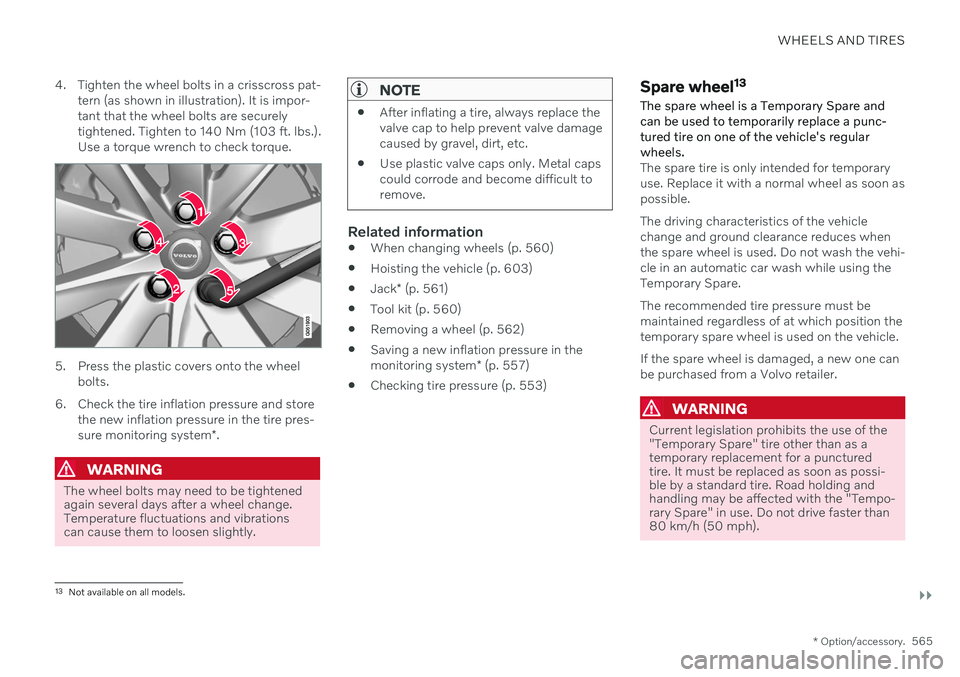
4. Tighten the wheel bolts in a crisscross pat-
tern (as shown in illustration). It is impor- tant that the wheel bolts are securelytightened. Tighten to 140 Nm (103 ft. lbs.).Use a torque wrench to check torque.
5. Press the plastic covers onto the wheel bolts.
6. Check the tire inflation pressure and store the new inflation pressure in the tire pres- sure monitoring system *.
WARNING
The wheel bolts may need to be tightened again several days after a wheel change.Temperature fluctuations and vibrationscan cause them to loosen slightly.
NOTE
After inflating a tire, always replace the valve cap to help prevent valve damagecaused by gravel, dirt, etc.
Use plastic valve caps only. Metal capscould corrode and become difficult toremove.
Related information
When changing wheels (p. 560)
Hoisting the vehicle (p. 603)
Jack
* (p. 561)
Tool kit (p. 560)
Removing a wheel (p. 562)
Saving a new inflation pressure in the monitoring system
* (p. 557)
Checking tire pressure (p. 553)
Spare wheel 13
The spare wheel is a Temporary Spare and can be used to temporarily replace a punc- tured tire on one of the vehicle's regularwheels.
The spare tire is only intended for temporary use. Replace it with a normal wheel as soon aspossible. The driving characteristics of the vehicle change and ground clearance reduces whenthe spare wheel is used. Do not wash the vehi-cle in an automatic car wash while using theTemporary Spare. The recommended tire pressure must be maintained regardless of at which position thetemporary spare wheel is used on the vehicle. If the spare wheel is damaged, a new one can be purchased from a Volvo retailer.
WARNING
Current legislation prohibits the use of the "Temporary Spare" tire other than as atemporary replacement for a puncturedtire. It must be replaced as soon as possi-ble by a standard tire. Road holding andhandling may be affected with the "Tempo-rary Spare" in use. Do not drive faster than80 km/h (50 mph).
13 Not available on all models.
Page 605 of 693
MAINTENANCE AND SERVICE
}}
* Option/accessory.603
Hoisting the vehicle
When hoisting the vehicle, it is important that the jack is positioned on the designatedpoints under the vehicle.
For vehicles with Leveling Control* : If the
vehicle is equipped with pneumatic suspen- sion, this feature must be turned off before thevehicle is lifted onto a tow truck.
WARNING
If the vehicle is lifted on a garage jack, the jack must be placed under one of the fourlifting points. Make sure that the vehicle iscorrectly positioned on the jack and that itcannot slide off. Make sure the jack platehas a rubber pad to help keep the vehiclestable and prevent damage. Always useaxle stands or similar.
NOTE
Volvo recommends only using the jack intended for your specific vehicle model. Ifa jack other than that recommended byVolvo is used, follow the instructionsincluded with the equipment. The vehicle's ordinary jack is only intended to be used in temporary situations for shortperiods of time, such as when changingwheels in the event of a flat tire. If the vehi-cle needs to be lifted more frequently, orfor a longer period of time than for a wheelchange, a garage jack or hoist is recom-mended. Always follow the instructions foruse provided with the equipment.
Page 643 of 693
MAINTENANCE AND SERVICE
}}
* Option/accessory.641
Cleaning fabric upholstery and ceiling liner
Only use cleaning agents and car care prod- ucts recommended by Volvo. Clean regularlyand treat stains immediately. It is importantto vacuum before using a cleaning agent.
Never scrape or rub a stain, as this could dam- age the upholstery or ceiling liner. Never usestrong stain removers, as this could changethe color of the upholstery or ceiling liner. Use soapy water or a similar detergent. For more difficult stains caused by oil, ice cream,shoe polish, etc., use a stain remover. Consultwith your Volvo retailer.
Related information
Cleaning the interior (p. 639)
Cleaning the center display (p. 639)
Cleaning the seat belt (p. 641)
Cleaning floor mats and inlay mats(p. 641)
Cleaning leather upholstery
* (p. 642)
Cleaning the leather steering wheel(p. 643)
Cleaning interior plastic, metal and woodsurfaces (p. 643)
Cleaning the seat belt
Only use cleaning agents and car care prod- ucts recommended by Volvo. Clean regularlyand treat stains immediately. It is importantto vacuum before using a cleaning agent.
Use water and a synthetic soap solution. Spe- cially designed textile cleaning agents areavailable for purchase at Volvo retailers. Makesure the belt is dry before it is retracted.
Related information
Cleaning the interior (p. 639)
Cleaning the center display (p. 639)
Cleaning fabric upholstery and ceiling liner(p. 641)
Cleaning floor mats and inlay mats(p. 641)
Cleaning leather upholstery
* (p. 642)
Cleaning the leather steering wheel(p. 643)
Cleaning interior plastic, metal and woodsurfaces (p. 643)
Cleaning floor mats and inlay mats
Only use cleaning agents and car care prod- ucts recommended by Volvo. Clean regularlyand treat stains immediately. It is importantto vacuum before using a cleaning agent.
Remove the inlay mats to clean the floor mats and inlay mats separately. Each inlay mat issecured into place with pins.
1. Remove the inlay mat by grasping the inlay mat at each pin and lifting the mat straight up.
2. Use a vacuum to remove dust and dirt.
NOTE
Do not swing or strike the inlay mats vio- lently against another object to remove dirtas this could damage the mats.
3. After vacuuming, a specially designed tex- tile cleaning agent should be used to remove stains on floor mats. Floor matsshould be cleaned with products recom-mended by Volvo retailers.
4. After cleaning, put the inlay mat back into place by pressing it in at each pin.
Page 644 of 693

||
MAINTENANCE AND SERVICE
* Option/accessory.
642
WARNING
Never use more than one inlay mat at a time on the driver's floor. If any othertype of floor mat is used, remove theoriginal mat from the driver's seat floorbefore driving. All types of mats mustbe securely anchored in the attach-ment points in the floor. Make sure thefloor mat does not impede the move-ment of the brake pedal or acceleratorpedal in any way, as this could be aserious safety hazard.
Volvo's floor mats are specially manu-factured for your vehicle. They must beproperly secured in the attachmentpoints in the floor to help ensure theycannot slide and become trappedunder the pedals.
Related information
Cleaning the interior (p. 639)
Cleaning the center display (p. 639)
Cleaning fabric upholstery and ceiling liner(p. 641)
Cleaning the seat belt (p. 641)
Cleaning leather upholstery
* (p. 642)
Cleaning the leather steering wheel(p. 643)
Cleaning interior plastic, metal and woodsurfaces (p. 643)
Cleaning leather upholstery
*
Only use cleaning agents and car care prod- ucts recommended by Volvo. Clean regularlyand treat stains immediately. It is importantto vacuum before using a cleaning agent.
Volvo's leather upholstery * is treated to pro-
tect its original appearance. Over time, sun- light, grease, dirt, etc. could break down theprotective layer. This could result in scratchesand cracking. Leather upholstery * is a natural product that
changes and acquires a beautiful patina over time. Regular cleaning and treatments arerequired to preserve the qualities and color ofthe leather. Volvo offers a comprehensiveproduct, Volvo Leather Care KitWipes, forcleaning and treating leather upholstery.When used as directed, it helps preserve theleather's protective coating. For optimal results, Volvo recommends clean- ing and applying protective cream one to fourtimes a year (or more often as needed). VolvoLeather Care Kit 951 0251 and Volvo LeatherSoftener 943 7429 are available for purchaseat Volvo retailers.
Cleaning the leather upholstery1. Apply the leather cleaner to a damp sponge and squeeze it until the cleanerfoams. 2. Move the sponge in circular motions to
apply the foam to the stain.
3. Dampen the stain thoroughly with the sponge. Let the sponge absorb the stainand do not rub.
4. Dry the stain using a soft towel and let the leather dry completely.
Protecting the leather upholstery1. Apply a small amount of leather protectorto a cloth and then apply the protector tothe leather using light circular movements.
2. Let it dry for approximately 20 minutes. > Protecting the leather upholsterymakes it better able to withstand sun-light's harmful UV rays.
Related information
Cleaning the interior (p. 639)
Cleaning the center display (p. 639)
Cleaning fabric upholstery and ceiling liner(p. 641)
Cleaning the seat belt (p. 641)
Cleaning floor mats and inlay mats(p. 641)
Cleaning the leather steering wheel(p. 643)
Cleaning interior plastic, metal and wood surfaces (p. 643)
Page 649 of 693
MAINTENANCE AND SERVICE
}}
* Option/accessory.647
Automatic car washes
The vehicle should be washed as soon as it becomes dirty. The longer the dirt remains,the more difficult it will be to keep the vehicleclean. It could also lead to paint damage.
Washing your vehicle in an automatic car wash is a fast and easy way to keep your vehi-cle clean, but it does not reach all areas of thevehicle. Volvo recommends washing yourvehicle by hand or supplementing automaticcar washes with a hand wash.
NOTE
Volvo recommends not washing the vehi- cle in an automatic car wash during thefirst few months; the paintwork on newvehicles takes some time to fully harden.
CAUTION
Before driving the vehicle into a car wash, deactivate the Automatic Braking whenStationary and Automatic Parking BrakeApplication functions. If the functions arenot deactivated, the brake system willseize when the vehicle is stationary and thevehicle will not be able to roll.
CAUTION
For automatic car washes in which the vehicle is pulled forward on rolling wheels:
1. Before washing the vehicle, make sure that the automatic rain sensor is deac- tivated. If it is not deactivated andinadvertently starts, the wiper armscould be damaged.
2. To help prevent damage from the auto- matic car wash machinery, make surethat the door mirrors are folded in,antennas retracted or removed, andany auxiliary lights secured.
3. Drive into the automatic car wash.
4. Turn off the "Automatic Braking when Stationary" function using the
but-
ton in the tunnel console.
5. Turn off the "Automatic Parking Brake Application" function in the center dis- play's Top view.
6. Turn off the engine by turning the start knob in the tunnel console clockwise.Hold the knob in position for at least2 seconds.
The vehicle is now ready for the automaticcar wash.
CAUTION
The system will automatically change to P
mode if the above steps are not followed. In P mode, the wheels are locked, which
they should not be when the vehicle isbeing washed in a car wash.
NOTE
Keep in mind that if the vehicle is equipped with the keyless locking and unlocking function *, the doors and tailgate/trunk lid
may open when washing the vehicle if the remote key is within range.
Related information
Cleaning the exterior (p. 644)
Polishing and waxing (p. 644)
Hand washing (p. 645)
High-pressure washing (p. 648)
Cleaning the wiper blades (p. 648)
Cleaning exterior plastic, rubber and trim components (p. 649)
Cleaning rims (p. 650)
Corrosion protection (p. 650)
Auto-hold brakes (p. 424)
Page 675 of 693
INDEX
673
1, 2, 3 ...
4WD 431
A
ABSanti-lock brakes 417
AC (Air conditioning) 232
Accessories and extra equipment 37 installation 38
Accessory installation warning 38, 39
Active Bending Lights 162
Adapting driving characteristics 433
Adaptive Cruise Control 290 activating 293
auto-brake 313
change cruise control functionality 297
limitations 296
manage speed 311
passing 317
set time interval 312
standby mode 295
switching target vehicles 310
Symbols and messages 298
troubleshooting 296
turn off 294
WARNING 309
Adjusting the steering wheel 206
Airbag 55
activation/deactivation 59
driver's side 55
passenger side 55, 59
Air bag, see Airbag 55
Air conditioning 232Air conditioning, fluid volume and grade 671
Air distribution 213 air vents 213, 215
changing 214
defrosting 225
recirculation 224
table showing options 216
Air quality 210, 212 allergy and asthma 212
passenger compartment filter 213
Air recirculation 224
Alarm 276 deactivating 277
Allergy and asthma-inducing sub-
stances 212
All Wheel Drive, AWD 431
All Wheel Drive (AWD) 431
All Wheel Drive (four-wheel drive) 431
Android Auto 512, 513, 514Antenna location 264
Apple CarPlay 508, 509, 511
Approach lighting 165
Apps 480
Assistance at risk of collision 364 activating/deactivating 365
at risk of run-off 365
during collision risks from behind 367during collision risks from oncoming
traffic 366
limitations 368
Symbols and messages 369
Audio and media 478 Audio system HD digital radio 489 SiriusXM ®
Satellite radio 490, 491,
492
Auto-climate 224
Auto hold 424
Auto-hold brakes 424 activating/deactivating 425
after collision 426
driver support 280
Automatic car wash 647
Automatic high beam 161
Automatic locking 268
INDEX
Page 677 of 693
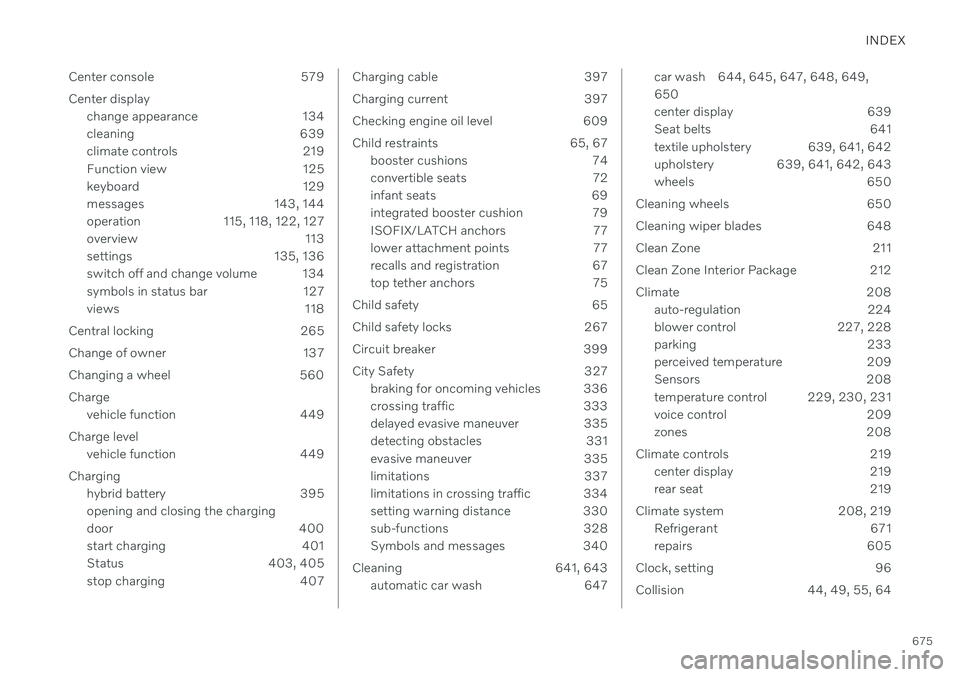
INDEX
675
Center console 579
Center display change appearance 134
cleaning 639
climate controls 219
Function view 125
keyboard 129
messages 143, 144
operation 115, 118, 122, 127
overview 113
settings 135, 136
switch off and change volume 134
symbols in status bar 127
views 118
Central locking 265
Change of owner 137
Changing a wheel 560 Charge vehicle function 449
Charge level vehicle function 449
Charging hybrid battery 395 opening and closing the charging
door 400
start charging 401
Status 403, 405
stop charging 407
Charging cable 397
Charging current 397
Checking engine oil level 609
Child restraints 65, 67booster cushions 74
convertible seats 72
infant seats 69
integrated booster cushion 79
ISOFIX/LATCH anchors 77
lower attachment points 77
recalls and registration 67
top tether anchors 75
Child safety 65
Child safety locks 267
Circuit breaker 399
City Safety 327 braking for oncoming vehicles 336
crossing traffic 333
delayed evasive maneuver 335
detecting obstacles 331
evasive maneuver 335
limitations 337
limitations in crossing traffic 334
setting warning distance 330
sub-functions 328
Symbols and messages 340
Cleaning 641, 643 automatic car wash 647car wash 644, 645, 647, 648, 649, 650
center display 639
Seat belts 641
textile upholstery 639, 641, 642
upholstery 639, 641, 642, 643
wheels 650
Cleaning wheels 650
Cleaning wiper blades 648
Clean Zone 211
Clean Zone Interior Package 212
Climate 208 auto-regulation 224
blower control 227, 228
parking 233
perceived temperature 209
Sensors 208
temperature control 229, 230, 231
voice control 209
zones 208
Climate controls 219 center display 219
rear seat 219
Climate system 208, 219 Refrigerant 671
repairs 605
Clock, setting 96
Collision 44, 49, 55, 64