lights VOLVO XC90 TWIN ENGINE 2020 Service Manual
[x] Cancel search | Manufacturer: VOLVO, Model Year: 2020, Model line: XC90 TWIN ENGINE, Model: VOLVO XC90 TWIN ENGINE 2020Pages: 693, PDF Size: 13.34 MB
Page 340 of 693

||
DRIVER SUPPORT
338
Other limitations
WARNING
The driver support system only issues a warning for obstacles detected by its radarsensor – thus, a warning may come after adelay or not at all. Never wait for a warning or assistance. Apply the brakes when necessary.
WARNING
Warnings and brake interventions can be triggered late or not at all if the traf-fic situation or external influences pre-vent the camera and radar unit fromproperly detecting pedestrians,cyclists, large animals or vehiclesahead of the vehicle.
To be able to detect vehicles at night,its front and rear lights must work andilluminate clearly.
The camera and radar unit have a lim-ited range for pedestrians and cyclists– the system can provide effectivewarnings and brake interventions if therelative speed is lower than 50 km/h(30 mph). For stationary or slow-mov-ing vehicles, warnings and brake inter-ventions are effective at vehicle speedsof up to 70 km/h (43 mph). Speedreduction for large animals is less than15 km/h (9 mph) and can be achievedat vehicle speeds over 70 km/h(43 mph). At lower speeds, the warn-ing and brake intervention for large ani-mals is less effective.
Warnings for stationary or slow-mov-ing vehicles and large animals can bedisengaged due to darkness or poorvisibility.
Warnings and brake interventions for pedestrians and cyclists are disen-gaged at vehicle speeds over 80 km/h(50 mph).
Do not place, affix or mount anythingon the inside or outside of the wind-shield, or in front of or around the cam-era and radar unit – this could disruptcamera-based functions.
Objects, snow, ice or dirt in the area ofthe camera sensor can reduce thefunction, disengage it completely orgive an improper function response.
Page 345 of 693

DRIVER SUPPORT
* Option/accessory.343
If a passing vehicle's speed is more than 15 km/h (9 mph) faster than your vehicle, BLISwill not react.
NOTE
The light illuminates on the side of the vehicle where the system has detected thevehicle. If the vehicle is passed on bothsides simultaneously, both lights come on.
WARNING
The function is supplementary driver support intended to facilitate drivingand help make it safer – it cannot han-dle all situations in all traffic, weatherand road conditions.
The driver is advised to read all sec-tions in the Owner's Manual about thisfunction to learn of its limitations,which the driver must be aware ofbefore using the function.
Driver support functions are not a sub-stitute for the driver's attention andjudgment. The driver is always respon-sible for ensuring the vehicle is drivenin a safe manner, at the appropriatespeed, with an appropriate distance toother vehicles, and in accordance withcurrent traffic rules and regulations.
Related information
Driver support systems (p. 280)
Activating or deactivating BLIS (p. 343)
BLIS limitations (p. 344)
BLIS messages (p. 345)
Activating or deactivating BLIS
The BLIS 67
function can be activated or deac-
tivated.
Activate or deactivate the function using this button inthe center display's Functionview.
GREEN button indicator light – the func- tion is activated.
GRAY button indicator light – the functionis deactivated.
If BLIS is activated when the engine is started,the indicator lights in the rearview mirrors willflash once. If BLIS is deactivated when the engine is turned off, it will remain off the next time theengine is started and the indicator lights willnot illuminate.
Related information
BLIS
* (p. 342)
BLIS limitations (p. 344)
67
Blind Spot Information
Page 369 of 693

DRIVER SUPPORT
* Option/accessory.367
The function is active at speeds between
60-140 km/h (37-87 mph) on roads with clearly visible traffic lane markings/lines. If your vehicle is starting to veer from your own lane and a vehicle is approaching fromthe opposite direction, this function can helpthe driver steer the vehicle back into its ownlane. However, the function will not provide steer-
ing assistance if the turn signal is used. The function will also not be activated if it detectsthat the driver is actively operating the vehicle.
Related information
Steering assistance at risk of collision(p. 364)
Collision risk warning from driver support(p. 309)
Steering assistance during collision riskslimitations (p. 368)
Steering assistance during collision risks from behind
*
Steering assistance has several sub-func- tions. If you become distracted and do notnotice your vehicle starting to veer out of thelane while another vehicle is approachingfrom behind or is in your vehicle's blind spot,Steering assistance during collision risksfrom behind can help provide assistance.
The function provides assistance by steering your vehicle back into your own lane.
Another vehicle in blind spot zone
Own vehicle
If your vehicle is beginning to veer out of your lane while another vehicle is in your blind spotor another vehicle is rapidly approaching in the next lane, this function can help the driversteer the vehicle back into its own lane. Even if the driver intentionally changes lanes using a turn signal without noticing anothervehicle approaching, the function can provideassistance. The function is active at speeds between 60-140 km/h (37-87 mph) on roads withclearly visible traffic lane markings/lines. The lights in the door mirrors will flash while steering assistance is being provided, whether or not the BLIS
96
function is activated.
Related information
Steering assistance at risk of collision (p. 364)
BLIS
* (p. 342)
Steering assistance during collision riskslimitations (p. 368)
96
Blind Spot Information
Page 373 of 693
DRIVER SUPPORT
}}
* Option/accessory.371
Park Assist front, rear and sides *
Park Assist behaves differently depending on which part of the vehicle is approaching anobstacle.
Front camera
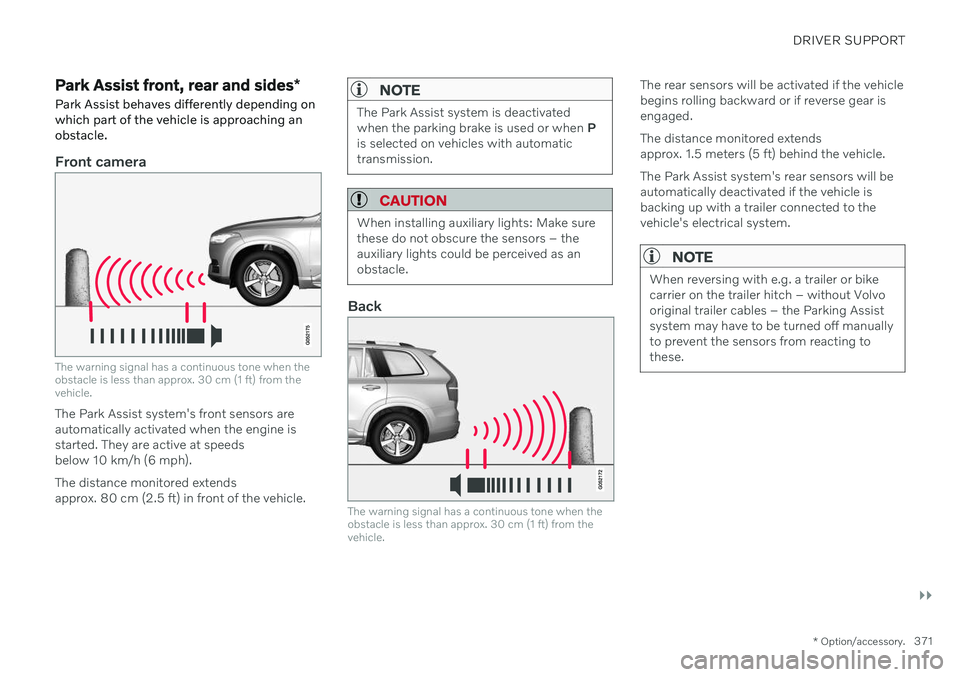
The warning signal has a continuous tone when the obstacle is less than approx. 30 cm (1 ft) from thevehicle.
The Park Assist system's front sensors are automatically activated when the engine isstarted. They are active at speedsbelow 10 km/h (6 mph). The distance monitored extends approx. 80 cm (2.5 ft) in front of the vehicle.
NOTE
The Park Assist system is deactivated when the parking brake is used or when P
is selected on vehicles with automatictransmission.
CAUTION
When installing auxiliary lights: Make sure these do not obscure the sensors – theauxiliary lights could be perceived as anobstacle.
Back
The warning signal has a continuous tone when the obstacle is less than approx. 30 cm (1 ft) from thevehicle.
The rear sensors will be activated if the vehicle begins rolling backward or if reverse gear isengaged. The distance monitored extends approx. 1.5 meters (5 ft) behind the vehicle. The Park Assist system's rear sensors will be automatically deactivated if the vehicle isbacking up with a trailer connected to thevehicle's electrical system.
NOTE
When reversing with e.g. a trailer or bike carrier on the trailer hitch – without Volvooriginal trailer cables – the Parking Assistsystem may have to be turned off manuallyto prevent the sensors from reacting tothese.
Page 398 of 693
||
HYBRID INFORMATION
396
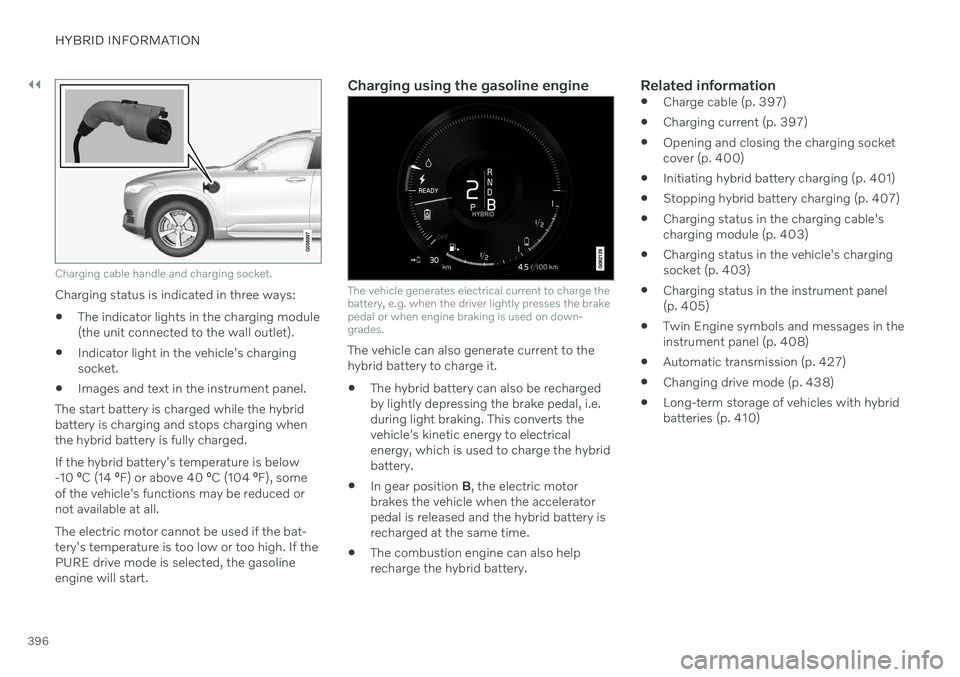
Charging cable handle and charging socket.
Charging status is indicated in three ways:
The indicator lights in the charging module (the unit connected to the wall outlet).
Indicator light in the vehicle's chargingsocket.
Images and text in the instrument panel.
The start battery is charged while the hybridbattery is charging and stops charging whenthe hybrid battery is fully charged. If the hybrid battery's temperature is below -10 ºC (14 ºF) or above 40 ºC (104 ºF), some
of the vehicle's functions may be reduced ornot available at all. The electric motor cannot be used if the bat- tery's temperature is too low or too high. If thePURE drive mode is selected, the gasolineengine will start.
Charging using the gasoline engine
The vehicle generates electrical current to charge the battery, e.g. when the driver lightly presses the brakepedal or when engine braking is used on down-grades.
The vehicle can also generate current to the hybrid battery to charge it. The hybrid battery can also be recharged by lightly depressing the brake pedal, i.e.during light braking. This converts thevehicle's kinetic energy to electricalenergy, which is used to charge the hybridbattery.
In gear position
B, the electric motor
brakes the vehicle when the acceleratorpedal is released and the hybrid battery isrecharged at the same time.
The combustion engine can also helprecharge the hybrid battery.
Related information
Charge cable (p. 397)
Charging current (p. 397)
Opening and closing the charging socketcover (p. 400)
Initiating hybrid battery charging (p. 401)
Stopping hybrid battery charging (p. 407)
Charging status in the charging cable'scharging module (p. 403)
Charging status in the vehicle's chargingsocket (p. 403)
Charging status in the instrument panel(p. 405)
Twin Engine symbols and messages in theinstrument panel (p. 408)
Automatic transmission (p. 427)
Changing drive mode (p. 438)
Long-term storage of vehicles with hybridbatteries (p. 410)
Page 405 of 693
HYBRID INFORMATION
}}
403
Charging status in the vehicle's charging socket
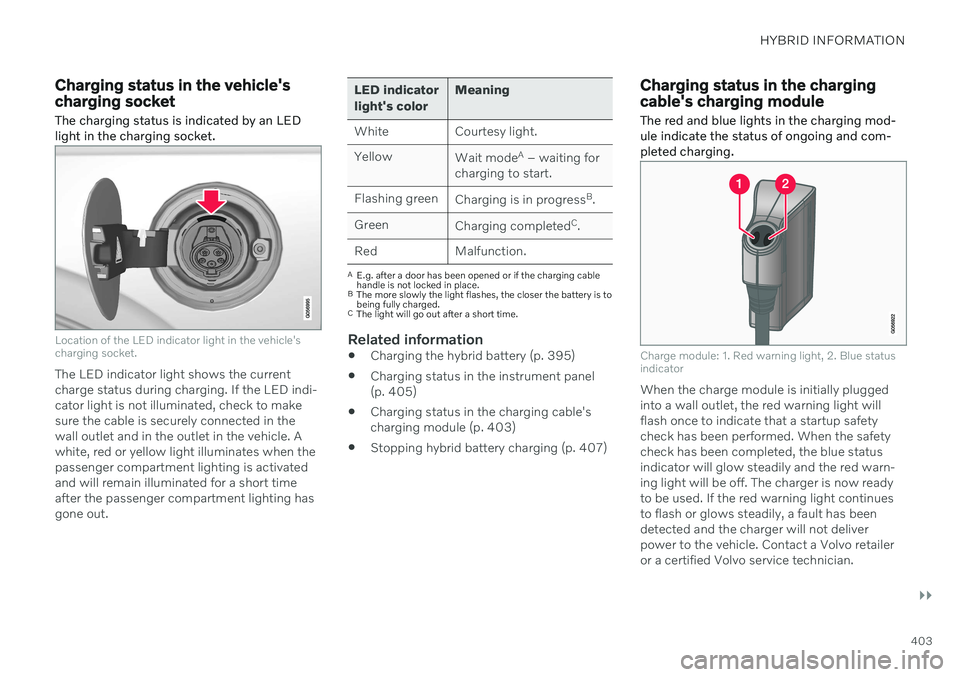
The charging status is indicated by an LED light in the charging socket.
Location of the LED indicator light in the vehicle's charging socket.
The LED indicator light shows the current charge status during charging. If the LED indi-cator light is not illuminated, check to makesure the cable is securely connected in thewall outlet and in the outlet in the vehicle. Awhite, red or yellow light illuminates when thepassenger compartment lighting is activatedand will remain illuminated for a short timeafter the passenger compartment lighting hasgone out.
LED indicator light's color Meaning
White Courtesy light. Yellow Wait modeA
– waiting for
charging to start.
Flashing green Charging is in progress B
.
Green Charging completed C
.
Red Malfunction.
A E.g. after a door has been opened or if the charging cable handle is not locked in place.
B The more slowly the light flashes, the closer the battery is tobeing fully charged.
C The light will go out after a short time.
Related information
Charging the hybrid battery (p. 395)
Charging status in the instrument panel (p. 405)
Charging status in the charging cable'scharging module (p. 403)
Stopping hybrid battery charging (p. 407)
Charging status in the charging cable's charging module
The red and blue lights in the charging mod- ule indicate the status of ongoing and com-pleted charging.
Charge module: 1. Red warning light, 2. Blue status indicator
When the charge module is initially plugged into a wall outlet, the red warning light willflash once to indicate that a startup safetycheck has been performed. When the safetycheck has been completed, the blue statusindicator will glow steadily and the red warn-ing light will be off. The charger is now readyto be used. If the red warning light continuesto flash or glows steadily, a fault has beendetected and the charger will not deliverpower to the vehicle. Contact a Volvo retaileror a certified Volvo service technician.
Page 418 of 693
||
STARTING AND DRIVING
* Option/accessory.
416
Mode Functions
I The panoramic roof, power windows, 12-volt electricalsocket in the passenger com-partment, Bluetooth, naviga-tion, phone, blower and wind-shield wipers can be used.
The power seats can beadjusted.
The 12-volt electrical socket
* in
the cargo compartment can beused.
Electrical current will be taken
from the battery in this ignitionmode.
II The headlights illuminate.
Warning/indicator lights illumi-nate for 5 seconds.
A number of other systems areactivated. However, seat andrear window heating can onlybe activated when the engineis running.
This ignition mode uses a lot of
current from the battery andshould be avoided wheneverpossible!
A Also activated when the door is opened.
Related information
Starting the vehicle (p. 412)
Adjusting the steering wheel (p. 206)
Jump starting using another battery (p. 459)
Selecting ignition mode (p. 416)
Selecting ignition mode
The vehicle's ignition can be put in various modes (levels) to make different functionsavailable.
Selecting an ignition mode
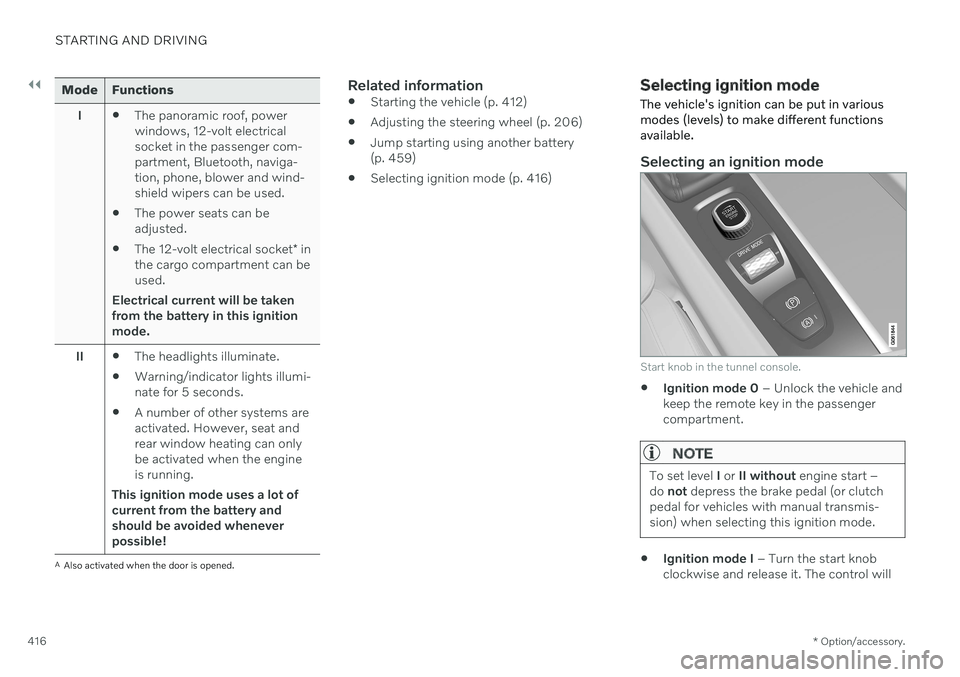
Start knob in the tunnel console.
Ignition mode 0
– Unlock the vehicle and
keep the remote key in the passenger compartment.
NOTE
To set level I or II without engine start –
do not depress the brake pedal (or clutch
pedal for vehicles with manual transmis- sion) when selecting this ignition mode.
Ignition mode I
– Turn the start knob
clockwise and release it. The control will
Page 421 of 693

STARTING AND DRIVING
419
Symbol Meaning
A
BSteady glow for 2 seconds after the engine is started: Automaticfunction check. Steady glow for more than 2 seconds: Fault in the ABS sys-tem. The vehicle's regular brakesystem is still working, but with-out the ABS function.
If the message Brake pedal
Characteristics changed Serv- ice required
is displayed, the
"Brake-by-wire" system is not functioning properly. Greaterpressure will be required to brakethe vehicle.
A In Canada.
B In the US.
WARNING
If the warning symbols for both brake fault and ABS fault are lit simultaneously, theremay be a fault in the brake system.
If the brake fluid reservoir level is nor- mal when this occurs, drive carefully tothe nearest workshop to have thebrake system checked - an authorizedVolvo workshop is recommended.
If the brake fluid has fallen below theMIN
level in the brake fluid reservoir,
the vehicle should not be driven untilthe brake fluid has been filled. The rea-son for the brake fluid loss must bechecked.
Related information
Brake Assist System (p. 419)
Auto-hold brakes (p. 424)
Hill Start Assist (p. 426)
Braking on wet roads (p. 420)
Braking on salted roads (p. 420)
Maintenance of the brake system (p. 420)
Brake lights (p. 164)
Brake Assist System The brake enhancing system, (BAS 3
), helps
increase braking force and can thereby reduce braking distance.
The system monitors the driver's braking hab- its and increases braking force when neces-sary. Braking force can be increased up to thepoint at which the ABS intervenes. The func-tion is deactivated when pressure on the brakepedal is decreased.
Related information
Brakes (p. 417)
3
Brake Assist System
Page 447 of 693

STARTING AND DRIVING
445
Hill Descent Control
The function for assisting when driving down- hill (HDC 12
) is a low-speed function with
increased engine braking. The function makes it possible to increase or decrease thevehicle's speed on steep downhill gradientsby only using the accelerator pedal, withoutapplying the brakes. The function is included in the
Off Road drive
mode.
HDC is designed for driving on rough roads at low speeds and downhill gradients with slip-pery or otherwise difficult road surfaces. Thedriver does not need to use the brake pedalbut can instead focus on steering.
WARNING
HDC is only intended to be a supplemen- tary braking aid and it does not function inall situations. The driver is always ultimately responsible for operating the vehicle in a safe manner.
FunctionHill Descent Control allows the vehicle to move forward or backward at very low speedsassisted by the brake system. The driver canincrease the speed by pressing the acceleratorpedal. When the accelerator pedal is released, the vehicle will return to very low speedregardless of how steep the hill is and withoutthe brakes needing to be applied. The brakelights will illuminate when the function is acti-vated. The driver can brake to stop or slow the vehi- cle at any time by depressing the brake pedal. HDC is activated along with Low Speed Con- trol (LSC
13
), which facilitates and improves
traction and control on rough and slippery sur- faces. The system is intended to be used atlow speeds, up to approximately 40 km/h (25mph).
To keep in mind when using HDC
If the function is switched off while drivingon a steep downhill gradient, brakingeffect will be gradually reduced.
HDC can be used in gear positions
D and
R , and in manual gears 1 or 2.
It is not possible to manually shift to thirdgear or higher when HDC is active.
NOTE
When LSC with HDC is activated in theOff Road drive mode, the feel of the accel-
erator pedal and engine response will change.
NOTE
This drive mode is not designed to be used for normal street driving.
NOTE
The function is deactivated when driving at high speeds and must be reactivated atlower speeds if so desired.
Related information
Activating and deactivating Hill Descent Control using the function button (p. 446)
Changing drive mode (p. 438)
Low Speed Control (p. 443)
All Wheel Drive (AWD) (p. 431)
12
Hill Descent Control
13 Low Speed Control
Page 452 of 693
STARTING AND DRIVING
* Option/accessory.
450
Preparing for a long trip
It is important to have the vehicle's systems and equipment checked carefully before driv-ing long distances.
Check that
the engine is running properly and that fuel consumption is normal
there are no leaks (fuel, oil or other fluid)
the brake pedal is functioning properly
all lights are working
‒ adjust the head-
light height if the vehicle is carrying aheavy load
tire tread depth and air pressure are atcorrect levels. Change to snow tires whendriving in areas where there is a risk ofsnowy or icy roads
the start battery is sufficiently charged
the wiper blades are in good condition
Related information
Checking tire pressure (p. 553)
Filling washer fluid (p. 656)
Winter driving (p. 450)
Economical driving (p. 446)
Vehicle modem settings (p. 527)
Loading recommendations (p. 585)
Driving with a trailer (p. 465)
Pilot Assist
* (p. 300)
Tire sealing system (p. 568)
Winter driving
It is important to check the vehicle before driving in cold/snowy conditions to makesure it can be driven safely.
Before the cold season arrives: Make sure the engine coolant contains 50% antifreeze. This mixture helps pro-tect the engine from frost erosion down toapprox. –35 °C (–31 °F). Do not mix dif-ferent types of antifreeze as this couldpose a health risk.
Keep the fuel tank well filled to preventcondensation from forming.
Check the viscosity of the engine oil. Oilwith low viscosity (thinner oil) improvescold-weather starting and reduces fuelconsumption when driving with a coldengine.
CAUTION
Low-viscosity oil should not be used with hard driving or in hot weather.
Check the condition and charge level of the start battery. Cold weather placesgreater demands on the start battery andreduces its capacity.
Use washer fluid containing antifreeze tohelp prevent ice from forming in thewasher fluid reservoir.