key VOLVO XC90 TWIN ENGINE 2020 Manual PDF
[x] Cancel search | Manufacturer: VOLVO, Model Year: 2020, Model line: XC90 TWIN ENGINE, Model: VOLVO XC90 TWIN ENGINE 2020Pages: 693, PDF Size: 13.34 MB
Page 277 of 693

KEY, LOCKS AND ALARM
275
To create a security code:
1. Tap the button for private locking in Func-
tion view.
> A pop-up window will appear.
2. Enter the desired security code and press
Confirm.
> The security code is saved. The private locking function is now ready for activa- tion.
Activating private locking1. Tap the button for private locking in Func- tion view.
> A pop-up window will appear. 2. Enter the code you would like to use to
unlock the glove compartment and the tailgate and tap
Confirm.
> The glove compartment and tailgate will lock. A green indicator light will illu- minate next to the button in Functionview to confirm locked status.
Deactivating private locking1. Tap the button for private locking in Func- tion view.
> A pop-up window will appear.
2. Enter the code used for locking and tap
Confirm.
> The glove compartment and tailgate will unlock. The green indicator light next to the button in Function view willgo out to confirm unlocked status.
Forgotten PIN codeIf you have forgotten your PIN code or enteredit incorrectly more than three times, the secur-ity code can be used to deactivate privatelocking. If the vehicle is unlocked using Volvo On Callor the Volvo On Call app, private locking willbe automatically deactivated.
Forgotten security code
If you have forgotten your security code, con- tact an authorized Volvo retailer for assistancedeactivating private locking.
Related information
Private Locking (p. 274)
Page 278 of 693
KEY, LOCKS AND ALARM
276
Alarm The alarm emits sound and light signals if anyone without a valid remote key attemptsto break into the vehicle or interferes with thestart battery or alarm siren.
When armed, the alarm will be triggered if:
the hood, tailgate or any door is opened.
a battery cable is disconnected.
the alarm siren is disconnected.
Alarm signalsThe following occurs if the alarm is triggered:
A siren will sound for 30 seconds or until the alarm is turned off.
The hazard warning flashers will flash for5 minutes or until the alarm is turned off.
If the reason the alarm was triggered is notrectified, the alarm cycle will repeat up to 10 times 15
.
Alarm indicator
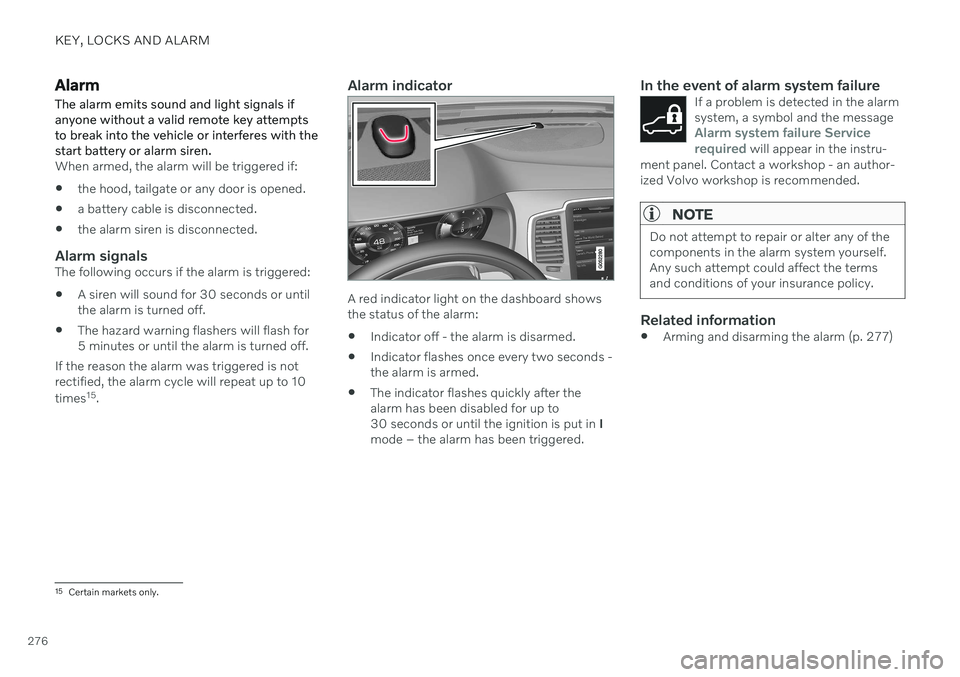
A red indicator light on the dashboard shows the status of the alarm:
Indicator off - the alarm is disarmed.
Indicator flashes once every two seconds -the alarm is armed.
The indicator flashes quickly after thealarm has been disabled for up to30 seconds or until the ignition is put in
I
mode – the alarm has been triggered.
In the event of alarm system failureIf a problem is detected in the alarmsystem, a symbol and the message
Alarm system failure Service
required will appear in the instru-
ment panel. Contact a workshop - an author- ized Volvo workshop is recommended.
NOTE
Do not attempt to repair or alter any of the components in the alarm system yourself.Any such attempt could affect the termsand conditions of your insurance policy.
Related information
Arming and disarming the alarm (p. 277)
15
Certain markets only.
Page 279 of 693
KEY, LOCKS AND ALARM
}}
* Option/accessory.277
Arming and disarming the alarm
The alarm is armed when the vehicle is locked.
Arming the alarmLock and arm the vehicle by
pressing the lock button on the remote key
.
touch the marked surface on the outside of the door handle or the rubberized pres- sure plate on the tailgate 16
.
If the vehicle is equipped with both keyless locking/unlocking * and power tailgate *, the
button
on the lower edge of the tailgate
can also be used to lock and arm the vehicle.
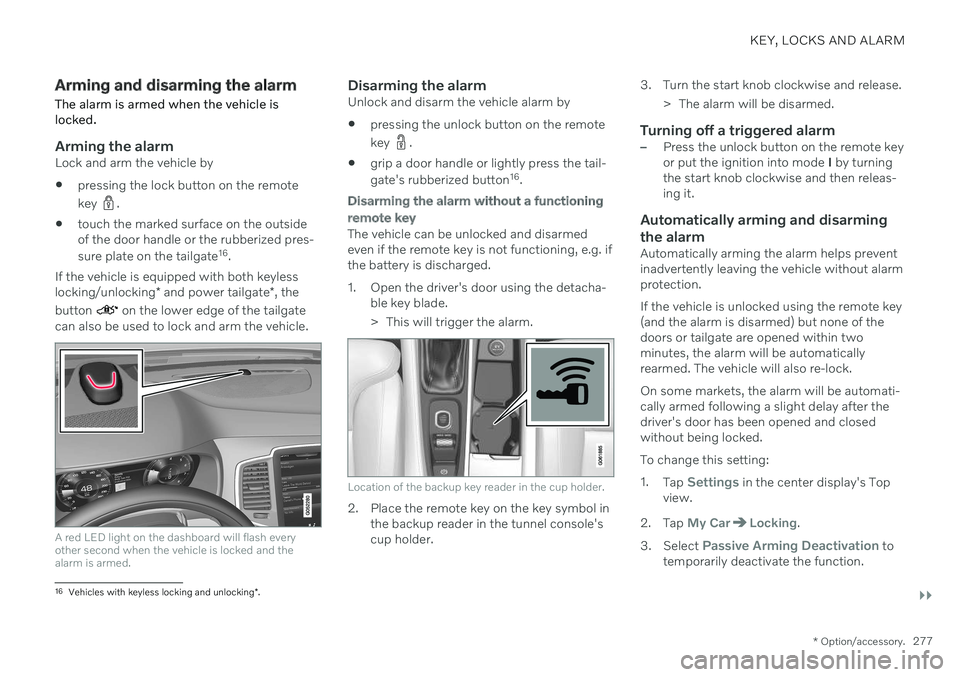
A red LED light on the dashboard will flash every other second when the vehicle is locked and thealarm is armed.
Disarming the alarmUnlock and disarm the vehicle alarm by
pressing the unlock button on the remote key
.
grip a door handle or lightly press the tail- gate's rubberized button 16
.
Disarming the alarm without a functioning
remote key
The vehicle can be unlocked and disarmed even if the remote key is not functioning, e.g. ifthe battery is discharged.
1. Open the driver's door using the detacha- ble key blade.
> This will trigger the alarm.
Location of the backup key reader in the cup holder.
2. Place the remote key on the key symbol inthe backup reader in the tunnel console's cup holder. 3. Turn the start knob clockwise and release.
> The alarm will be disarmed.
Turning off a triggered alarm–Press the unlock button on the remote key or put the ignition into mode I by turning
the start knob clockwise and then releas-ing it.
Automatically arming and disarming the alarm
Automatically arming the alarm helps prevent inadvertently leaving the vehicle without alarmprotection. If the vehicle is unlocked using the remote key (and the alarm is disarmed) but none of thedoors or tailgate are opened within twominutes, the alarm will be automaticallyrearmed. The vehicle will also re-lock. On some markets, the alarm will be automati- cally armed following a slight delay after thedriver's door has been opened and closedwithout being locked. To change this setting:1. Tap
Settings in the center display's Top
view.
2. Tap
My CarLocking.
3. Select
Passive Arming Deactivation to
temporarily deactivate the function.
16 Vehicles with keyless locking and unlocking *.
Page 280 of 693

||
KEY, LOCKS AND ALARM
278
Related information
Alarm (p. 276)
Page 286 of 693
DRIVER SUPPORT
284
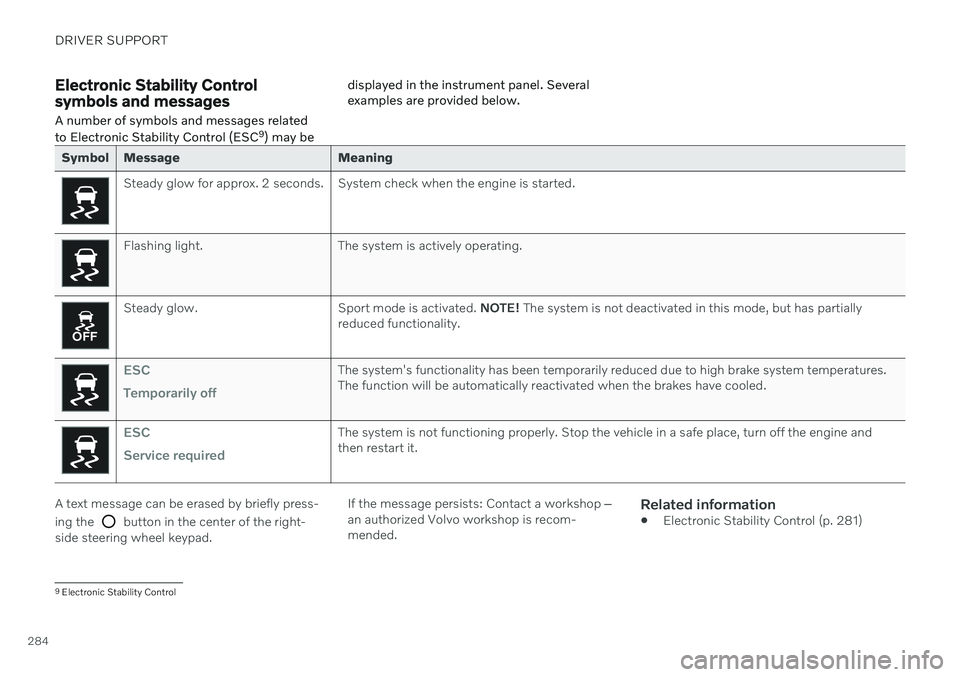
Electronic Stability Control symbols and messagesA number of symbols and messages related to Electronic Stability Control (ESC 9
) may be displayed in the instrument panel. Several examples are provided below.
Symbol Message Meaning
Steady glow for approx. 2 seconds. System check when the engine is started.
Flashing light. The system is actively operating.
Steady glow. Sport mode is activated.
NOTE! The system is not deactivated in this mode, but has partially
reduced functionality.
ESC Temporarily offThe system's functionality has been temporarily reduced due to high brake system temperatures. The function will be automatically reactivated when the brakes have cooled.
ESC Service requiredThe system is not functioning properly. Stop the vehicle in a safe place, turn off the engine and then restart it.
A text message can be erased by briefly press- ing the
button in the center of the right-
side steering wheel keypad. If the message persists: Contact a workshop
‒
an authorized Volvo workshop is recom- mended.
Related information
Electronic Stability Control (p. 281)
9
Electronic Stability Control
Page 290 of 693
||
DRIVER SUPPORT
* Option/accessory.
288
WARNING
The function is supplementary driver support intended to facilitate drivingand help make it safer – it cannot han-dle all situations in all traffic, weatherand road conditions.
The driver is advised to read all sec-tions in the Owner's Manual about thisfunction to learn of its limitations,which the driver must be aware ofbefore using the function.
Driver support functions are not a sub-stitute for the driver's attention andjudgment. The driver is always respon-sible for ensuring the vehicle is drivenin a safe manner, at the appropriatespeed, with an appropriate distance toother vehicles, and in accordance withcurrent traffic rules and regulations.
Using engine braking instead of applying the brakes
Cruise Control regulates speed by lightly applying the brakes. On downgrades, it cansometimes be desirable to roll a bit faster andlet speed be reduced instead by engine brak-ing alone. The driver can temporarily disen-gage the Cruise Control braking function. To disengage CC:
–Press the accelerator pedal about halfway down and then release it.
> Cruise Control will automatically disen-
gage the automatic brake function and speed will only be reduced using theengine braking function.
Related information
Driver support systems (p. 280)
Selecting and activating cruise control(p. 288)
Deactivating cruise control (p. 289)
Cruise control standby mode (p. 290)
Adjusting set speed for driver support(p. 311)
Switching between cruise control and Adaptive Cruise Control
* in the center dis-
play (p. 297)
Selecting and activating cruise control The Cruise Control (CC 16
) function must be
selected and activated in order to regulate speed.
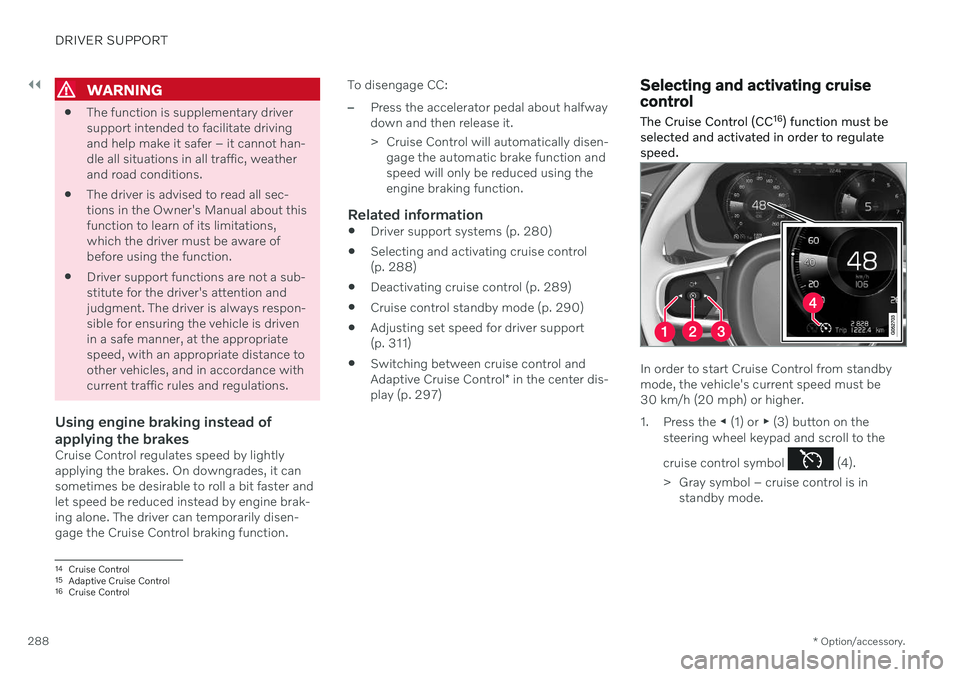
In order to start Cruise Control from standby mode, the vehicle's current speed must be30 km/h (20 mph) or higher.
1. Press the ◀ (1) or ▶ (3) button on the
steering wheel keypad and scroll to the cruise control symbol
(4).
> Gray symbol – cruise control is in standby mode.
14Cruise Control
15 Adaptive Cruise Control
16 Cruise Control
Page 291 of 693

DRIVER SUPPORT
* Option/accessory.289
2.
When cruise control is selected, press
(2) on the steering wheel keypad to acti- vate.
> White symbol – cruise control starts
and the current speed is stored as the maximum speed. The lowest speedthat can be set is 30 km/h (20 mph).
Reactivating cruise control to the last stored speed
–When cruise control is selected, press on the steering wheel keypad to activate.
> The Cruise Control marking in theinstrument panel will change from GRAY to WHITE and the vehicle willthen return to the most recently setspeed.
WARNING
A noticeable increase in speed may follow when the speed is resumed with the
steering wheel button.
Related information
Cruise control (p. 287)
Deactivating cruise control (p. 289)
Cruise control standby mode (p. 290)
Deactivating cruise control
Cruise control (CC 17
) can be deactivated and
switched off.
1. Press the button on the steering
wheel (2).
> The symbol and markings turn gray – cruise control goes into standby mode.
2. Press the ◀ (1) or ▶ (3) buttons on the
steering wheel to select another function.
> The cruise control symbol and marking (4) in the instrument panel will go out and the stored maximum speed will beerased.
Related information
Cruise control (p. 287)
Switching between cruise control and Adaptive Cruise Control
* in the center dis-
play (p. 297)
Selecting and activating cruise control (p. 288)
Cruise control standby mode (p. 290)
17
Cruise Control
Page 294 of 693
DRIVER SUPPORT
* Option/accessory.
292
Adaptive Cruise Control *21
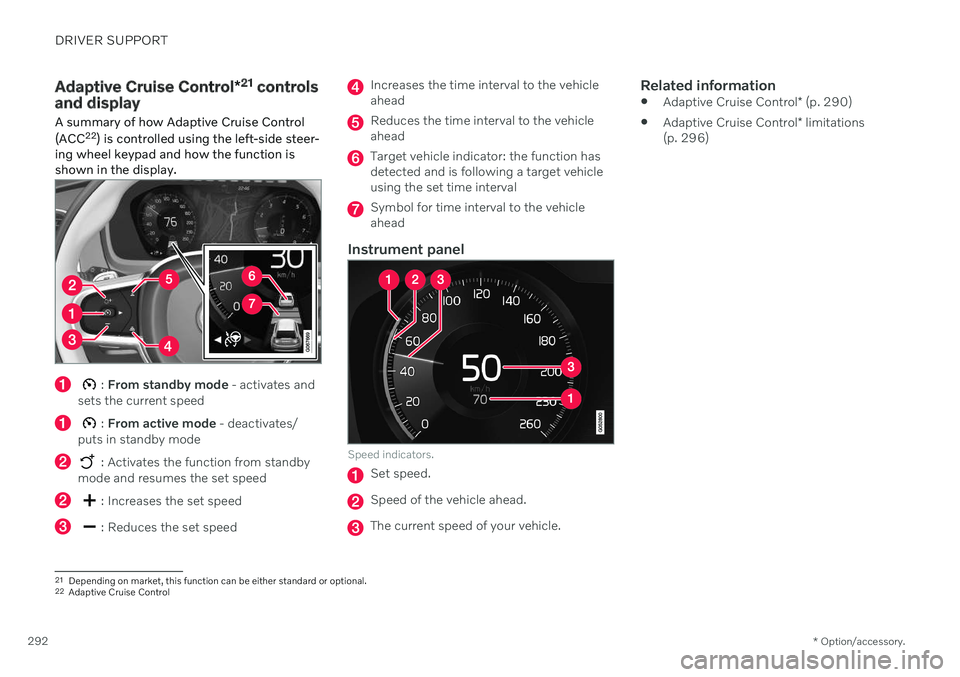
controls
and display
A summary of how Adaptive Cruise Control (ACC 22
) is controlled using the left-side steer-
ing wheel keypad and how the function is shown in the display.
: From standby mode - activates and
sets the current speed
: From active mode - deactivates/
puts in standby mode
: Activates the function from standby
mode and resumes the set speed
: Increases the set speed
: Reduces the set speed
Increases the time interval to the vehicle ahead
Reduces the time interval to the vehicle ahead
Target vehicle indicator: the function has detected and is following a target vehicleusing the set time interval
Symbol for time interval to the vehicle ahead
Instrument panel
Speed indicators.
Set speed.
Speed of the vehicle ahead.
The current speed of your vehicle.
Related information
Adaptive Cruise Control
* (p. 290)
Adaptive Cruise Control
* limitations
(p. 296)
21 Depending on market, this function can be either standard or optional.
22 Adaptive Cruise Control
Page 295 of 693

DRIVER SUPPORT
}}
* Option/accessory.293
Selecting and activating Adaptive Cruise Control *23
Adaptive Cruise Control (ACC 24
) must first be
selected and then activated before it can reg- ulate speed and distance.
To start the function:
The driver's seat belt must be buckled and the driver's door must be closed.
There must be a vehicle ahead (targetvehicle) within a reasonable distance or your vehicle's current speed must be atleast 15 km/h (9 mph).
1. Press the ◀ (2) or ▶ (3) button on the
steering wheel keypad and scroll to the Adaptive Cruise Control symbol
(4).
> Gray symbol – Adaptive Cruise Control is in standby mode.
2. When Speed Limiter is selected, press
(1) on the steering wheel keypad to
activate.
> White symbol – Speed Limiter starts and the current speed is stored as the maximum speed.
Reactivating Adaptive Cruise Control to the last stored speed
–When Adaptive Cruise Control is selected, press
on the steering wheel keypad to
activate.
> The Cruise Control marking in the instrument panel will change from GRAY to WHITE and the vehicle willthen return to the most recently setspeed.
WARNING
A noticeable increase in speed may follow when the speed is resumed with the
steering wheel button.
Additional markings in the instrument panel
ACC will only regulate the time interval to the vehicleahead when the distancesymbol shows two vehicles.
A speed interval will be marked at the same time. The higher speed is the stored speed for your vehicleand the lower speed is thespeed of the vehicle ahead
(target vehicle).
Related information
Adaptive Cruise Control
* (p. 290)
Deactivating Adaptive Cruise Control
*
(p. 294)
23 Depending on market, this function can be either standard or optional.
24 Adaptive Cruise Control
Page 301 of 693

DRIVER SUPPORT
* Option/accessory.299
Symbol Message Meaning
The symbol is WHITE. The vehicle is maintaining the stored speed.
Adaptive Cruise Contr. Unavailable
The symbol is GRAY. Adaptive Cruise Control is in standby mode.
Adaptive Cruise Contr. Service required
The symbol is GRAY.The system is not functioning as intended. Contact a workshop
‒ an authorized Volvo work-
shop is recommended.
Windscreen sensor Sensor blocked, see Owner's manualClean the windshield in front of the camera and radar sensors.
A text message can be erased by briefly press- ing the
button in the center of the right-
side steering wheel keypad. If the message persists: Contact a workshop ‒
an authorized Volvo workshop is recom- mended.
Related information
Adaptive Cruise Control
* (p. 290)