turn signal VOLVO XC90 TWIN ENGINE HYBRID 2017 User Guide
[x] Cancel search | Manufacturer: VOLVO, Model Year: 2017, Model line: XC90 TWIN ENGINE HYBRID, Model: VOLVO XC90 TWIN ENGINE HYBRID 2017Pages: 584, PDF Size: 14.2 MB
Page 254 of 584

||
LOCKS AND ALARM
* Option/accessory, for more information, see Introduction.252
–Press the button14 on the lower edge ofthe tailgate.
>The tailgate will close automatically butwill not be locked.
–Press the button14 on the lower edge ofthe tailgate.
>The tailgate will close automatically. Thetailgate and doors will also be locked andthe alarm will be armed.
If the remote key is not close enough to the tail-gate, automatic locking/unlocking/opening/clos-ing will not be possible. Three short audible sig-nals will sound.
Interrupting opening/closing
–This can be done in five ways:
•Press the button on the lighting panel
•Press the button on the remote key
•Press either of the buttons on the loweredge of the tailgate
•Press lightly on the rubber-covered buttonunder the tailgate's outside handle
•Move your foot under a sensor beneaththe rear bumper*
>The tailgate will stop moving
Programming the tailgate's maximum
opening angle
The tailgate's maximum opening angle can beprogrammed, for example, if the tailgate has to beopened in a garage with a low ceiling.
Programming the opening angle:
–Open the tailgate manually to the desiredangle and press and hold the closing buttonon the tailgate's lower edge for at least 3seconds. Release the tailgate.
>Two audible signals will sound to indicatethat the selected opening angle has beenstored.
Erasing tailgate programming
–Open the tailgate manually to its highestposition and press and hold the closing but-ton on the tailgate's lower edge for at least 3seconds. Release the tailgate.
>Two audible signals will sound to indicatethat the programmed opening angle hasbeen erased.
NOTE
If the tailgate has been opened and closedcontinuously too long, the automatic functionwill be deactivated to avoid overloading theelectrical system. The automatic function canbe used again after approximately 2 minutes.
If the vehicle's battery has been discharged ordisconnected, or if the tailgate has been openfor more than 24 hours, the tailgate must beopened and closed once manually to resetthe system.
Pinch protection
If the tailgate is obstructed when being opened/closed, a pinch protection mechanism is acti-vated.
•While opening: the tailgate will stop movingand an audible signal will sound.
•While closing: the tailgate will stop andreturn to the currently programmed maximumopening position. An audible signal willsound.
WARNING
Pay attention to the risk of injury when open-ing/ closing the tailgate. Before opening/closing: Make sure that no one is in the pathof the tailgate as an injury could occur.
14Models equipped with the optional Passive Entry system have a button to close the tailgate and a button to close and lock the tailgate.
Page 258 of 584
LOCKS AND ALARM
* Option/accessory, for more information, see Introduction.256
Alarm
The alarm system provides a warning if anattempt is made to break into the vehicle.
The following conditions will trigger the alarm:
•a door/hood/tailgate are opened
•the battery is disconnected
•the alarm siren is disconnected
If a problem is detected in the alarmsystem, this symbol and Alarmsystem failure Service required willbe displayed in the instrument panel.Do not attempt to repair any of the componentsin the alarm system yourself; this could affect theinsurance policy on the vehicle. Contact a trainedand qualified Volvo service technician.
NOTE
One of the alarm sensors, which is sensitiveto metallic objects, is located under the tunnelconsole cup holders. Avoid leaving coins,keys, etc., in the cup holders because theymay inadvertently trigger the alarm.
Arming the alarm
–Lock the vehicle by pressing the remotekey's lock button. On models with theoptional Passive Entry system, the vehiclecan also be locked by pressing the outerindentation for locking on one of the doorhandles or by pressing the tailgate's rubber-ized pressure plate.
If the vehicle is equipped with a power tail-gate*, the button on the lower edge of thetailgate can also be used to lock the vehicleand arm the alarm.
Disarming the alarm
The alarm can be disarmed by:
•Unlock the vehicle by pressing the remotekey's unlock button
•Pressing the pressure-sensitive area on theinside of one of the door handles on modelswith the optional Passive Entry system.
•Pressing the tailgate's rubberized pressureplate on models with the optional PassiveEntry system.
Turning off a triggered (sounding)
alarm
–Press the remote key's unlock button or putthe ignition in mode I by turning the startknob to START and releasing it.
Alarm signals
The following occurs if the alarm has been trig-gered:
•A siren will sound for 30 seconds or until thealarm is turned off
•All turn signals flash for 5 minutes or untilthe alarm is turned off
If the door that triggered the alarm is left open,the alarm cycle will be repeated 10 times.
Alarm indicator
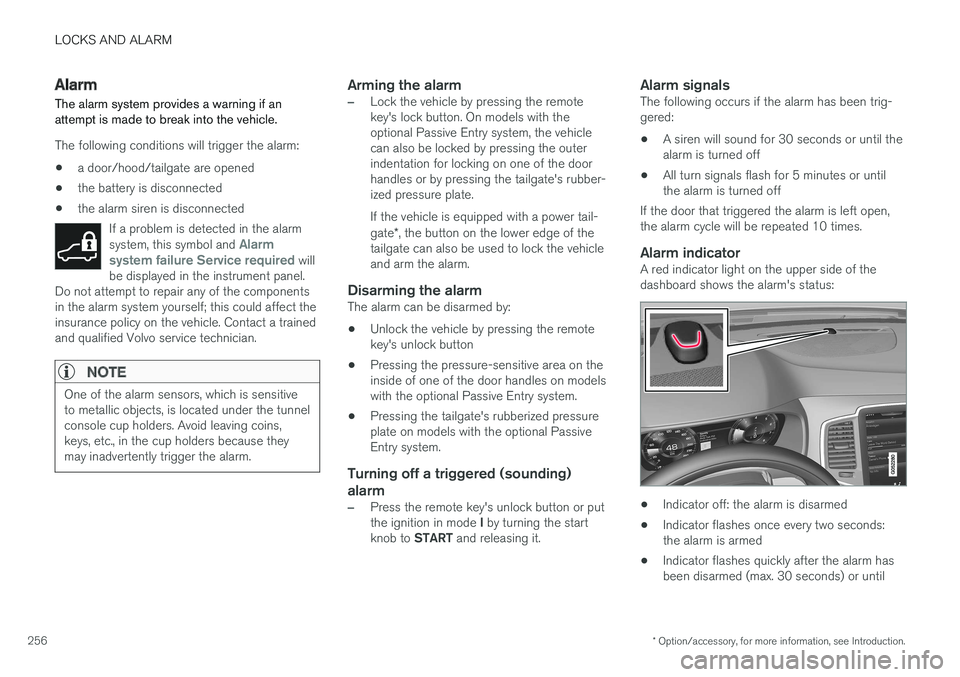
A red indicator light on the upper side of thedashboard shows the alarm's status:
•Indicator off: the alarm is disarmed
•Indicator flashes once every two seconds:the alarm is armed
•Indicator flashes quickly after the alarm hasbeen disarmed (max. 30 seconds) or until
Page 288 of 584
||
DRIVER SUPPORT
* Option/accessory, for more information, see Introduction.286
WARNING
When ACC is in standby mode, the driver hasto control the vehicle's speed and distance toa vehicle ahead.
When ACC is in standby mode, the driver willbe alerted if the distance to the vehicle aheadis too short by the Distance Alert function.See the article "Distance Alert" for additionalinformation.
Standby mode due to action by the driver
ACC is temporarily deactivated and put instandby mode if:
•the brakes are applied
•The gear selector is moved to N
•the vehicle is driven faster than the setspeed for more than 1 minute.
In these cases, the driver will have to regulate thevehicle's speed.
A temporary increase in speed, such as whenpassing another vehicle, does not affect the ACCset speed. The vehicle will return to the set speedwhen the accelerator pedal is released.
Automatic standby mode
ACC interacts with other systems, such asElectronic Stability Control. If any of these othersystems are not functioning properly, ACC willturn off automatically.
WARNING
If this happens, the driver will be alerted by anaudible signal and a message in the instru-ment panel. The driver will have to adapt thevehicle's speed, apply the brakes when nec-essary and keep a safe distance to the vehicleahead.
ACC switches automatically to standby mode if:
•the vehicle's speed goes below approx.3 mph (5 km/h) and ACC cannot determineif the vehicle ahead is stationary or is anobject such as a speed bump, etc
•the vehicle's speed goes below approx.3 mph (5 km/h) and the vehicle aheadchanges lanes or turns so that ACC nolonger has a target vehicle to follow
•the driver opens the door
•the driver unbuckles the seat belt
•the engine speed (rpm) is too high/low
•the wheels lose traction
•the brake temperature is too high
•the parking brake is applied
•the stability system's ESC Sport Mode isactivated
•the Off Road drive mode is selected
•The radar sensor is covered by e.g., wet snowor if heavy rain interferes with radar waves
Reactivating ACC from standby mode
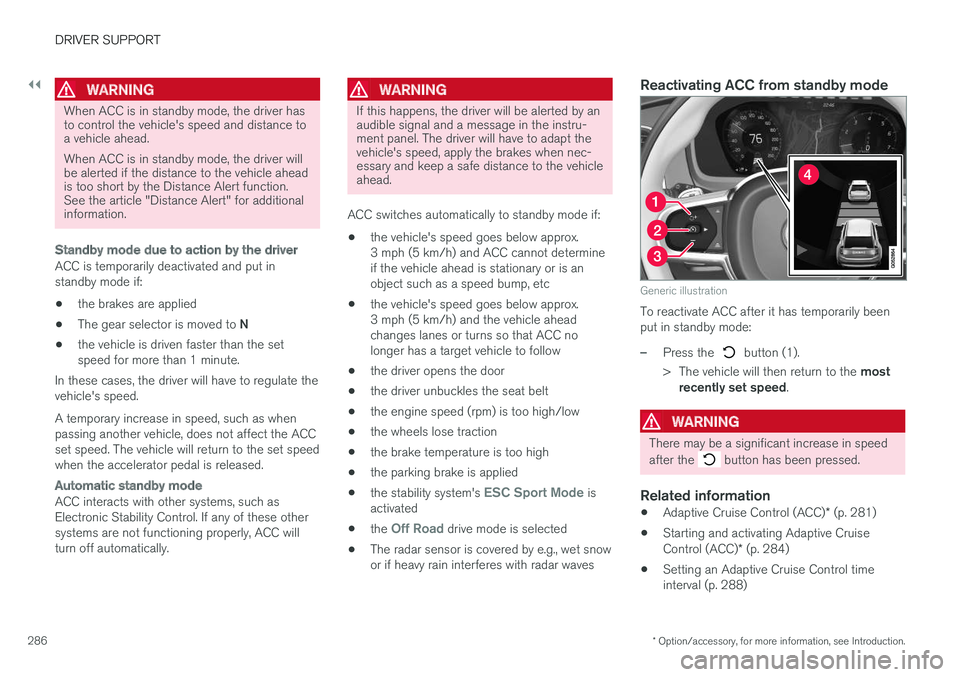
Generic illustration
To reactivate ACC after it has temporarily beenput in standby mode:
–Press the button (1).
>The vehicle will then return to the mostrecently set speed.
WARNING
There may be a significant increase in speed
after the button has been pressed.
Related information
•Adaptive Cruise Control (ACC)* (p. 281)
•Starting and activating Adaptive CruiseControl (ACC)* (p. 284)
•Setting an Adaptive Cruise Control timeinterval (p. 288)
Page 291 of 584
DRIVER SUPPORT
}}
* Option/accessory, for more information, see Introduction.289
Passing Assistance with AdaptiveCruise Control or Pilot Assist-2
ACC or Pilot Assist can assist the driver whenpassing other vehicles.
How passing assistance works
When ACC or Pilot Assist is following anothervehicle and the driver indicates that he/she isabout to pass that vehicle by using the left turnsignal, ACC or Pilot Assist will begin acceleratingtoward the vehicle ahead before your vehicle hasmoved into the passing lane.
The function will then delay a speed reduction toavoid early braking as your vehicle approachesthe slower-moving vehicle.
The function is active until your vehicle haspassed the other vehicle.
WARNING
Be aware that this function may be activatedin situations other than when passing a vehi-cle, such as if the turn signal is used to indi-cate a lane change or to indicate a turn. Thevehicle will accelerate briefly.
Using passing assistance
To activate passing assistance:
•Your vehicle (ACC or Pilot Assist) must befollowing another vehicle (the target vehicle).
•Current speed must be at least approx.45 mph (70 km/h ).
•The speed set for ACC or Pilot Assist mustbe high enough to safely pass the vehicleahead.
Starting passing assistance
To start a passing assistance sequence:
•Activate the left turn signal.
Passing assistance limitations
WARNING
The driver should be prepared for suddenchanges when passing assistance is used. Incertain cases, there may be undesired accel-eration.
Certain situations should be avoided, such as:
•If the vehicle is approaching an exit to theleft or a left turn.
•If the vehicle ahead slows down beforeyour vehicle has moved into the passinglane.
•Traffic in the passing lane slows down.
Passing assistance in these situations can bedeactivated by putting ACC or Pilot Assist instandby mode.
Related information
•Pilot Assist* (p. 295)
•Pilot Assist-2* (p. 305)
•Adaptive Cruise Control (ACC)* (p. 281)
Changing target vehicles andautomatic braking with AdaptiveCruise Control (ACC)
At certain speeds, Adaptive Cruise Control canchange target vehicles and automatically applythe brakes.
Changing target vehicles
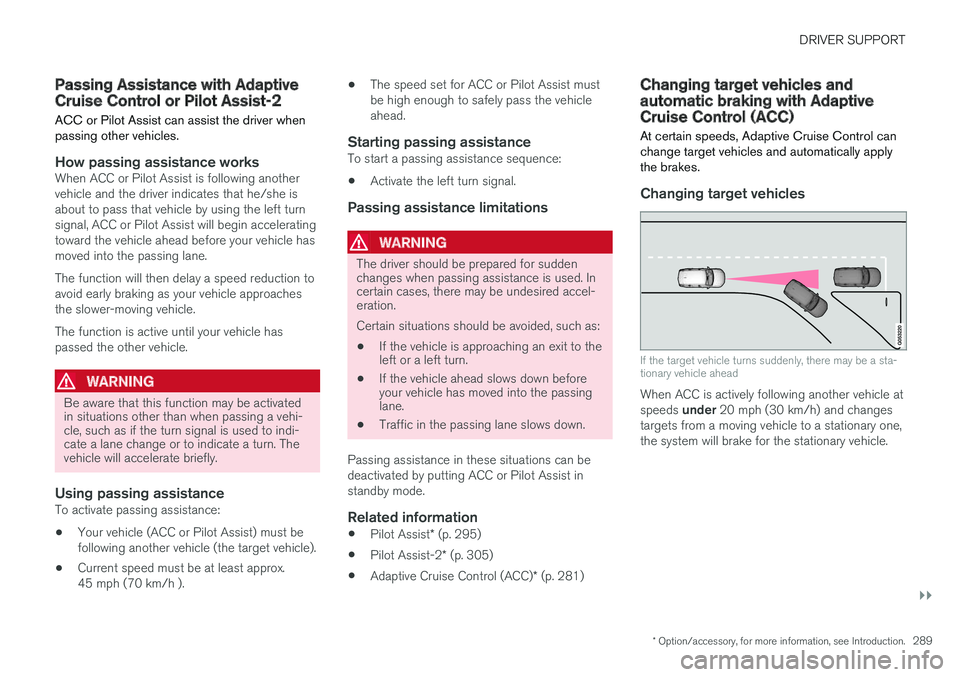
If the target vehicle turns suddenly, there may be a sta-tionary vehicle ahead
When ACC is actively following another vehicle atspeeds under 20 mph (30 km/h) and changestargets from a moving vehicle to a stationary one,the system will brake for the stationary vehicle.
Page 301 of 584
DRIVER SUPPORT
}}
299
Prerequisites
The prerequisites for activating Pilot Assist are:
•The vehicle ahead must be within a reasona-ble (detectable) distance
•The camera must be able to clearly detectthe traffic lane's side marker lines
•The vehicle's speed must be under approx.30 mph (50 km/h).
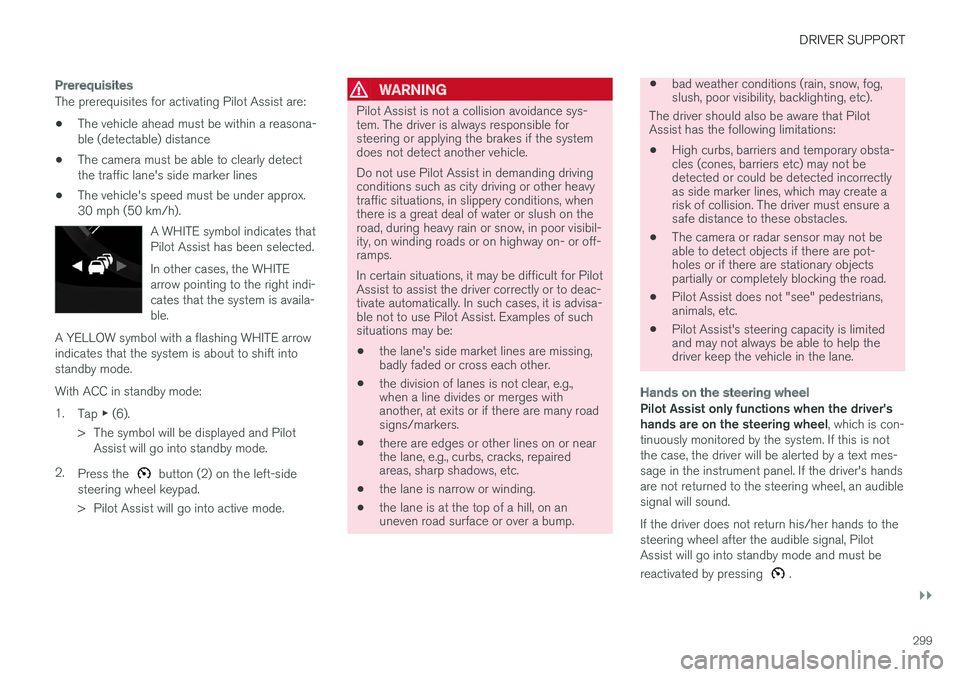
A WHITE symbol indicates thatPilot Assist has been selected.
In other cases, the WHITEarrow pointing to the right indi-cates that the system is availa-ble.
A YELLOW symbol with a flashing WHITE arrowindicates that the system is about to shift intostandby mode.
With ACC in standby mode:
1.Tap ▶ (6).
>The symbol will be displayed and PilotAssist will go into standby mode.
2.Press the button (2) on the left-sidesteering wheel keypad.
>Pilot Assist will go into active mode.
WARNING
Pilot Assist is not a collision avoidance sys-tem. The driver is always responsible forsteering or applying the brakes if the systemdoes not detect another vehicle.
Do not use Pilot Assist in demanding drivingconditions such as city driving or other heavytraffic situations, in slippery conditions, whenthere is a great deal of water or slush on theroad, during heavy rain or snow, in poor visibil-ity, on winding roads or on highway on- or off-ramps.
In certain situations, it may be difficult for PilotAssist to assist the driver correctly or to deac-tivate automatically. In such cases, it is advisa-ble not to use Pilot Assist. Examples of suchsituations may be:
•the lane's side market lines are missing,badly faded or cross each other.
•the division of lanes is not clear, e.g.,when a line divides or merges withanother, at exits or if there are many roadsigns/markers.
•there are edges or other lines on or nearthe lane, e.g., curbs, cracks, repairedareas, sharp shadows, etc.
•the lane is narrow or winding.
•the lane is at the top of a hill, on anuneven road surface or over a bump.
•bad weather conditions (rain, snow, fog,slush, poor visibility, backlighting, etc).
The driver should also be aware that PilotAssist has the following limitations:
•High curbs, barriers and temporary obsta-cles (cones, barriers etc) may not bedetected or could be detected incorrectlyas side marker lines, which may create arisk of collision. The driver must ensure asafe distance to these obstacles.
•The camera or radar sensor may not beable to detect objects if there are pot-holes or if there are stationary objectspartially or completely blocking the road.
•Pilot Assist does not "see" pedestrians,animals, etc.
•Pilot Assist's steering capacity is limitedand may not always be able to help thedriver keep the vehicle in the lane.
Hands on the steering wheel
Pilot Assist only functions when the driver'shands are on the steering wheel, which is con-tinuously monitored by the system. If this is notthe case, the driver will be alerted by a text mes-sage in the instrument panel. If the driver's handsare not returned to the steering wheel, an audiblesignal will sound.
If the driver does not return his/her hands to thesteering wheel after the audible signal, PilotAssist will go into standby mode and must be
reactivated by pressing .
Page 303 of 584

DRIVER SUPPORT
}}
* Option/accessory, for more information, see Introduction.301
WARNING
•Only use a time interval that is suitable incurrent traffic conditions.
•A short time interval gives the driver lim-ited reaction time if an unexpected situa-tion occurs in traffic.
Related information
•Pilot Assist* (p. 295)
•Pilot Assist-1* (p. 295)
•Starting and activating Pilot Assist-1*(p. 298)
•Deactivating/resuming Pilot Assist-1(p. 301)
•Automatic braking with Pilot Assist-1(p. 303)
•Pilot Assist-1 limitations (p. 304)
Deactivating/resuming PilotAssist-1
Pilot Assist can be temporarily deactivated, putin standby mode and then reactivated.
Putting Pilot Assist in standby mode
Function buttons and symbols (generic illustration)
1.Press the button (2).
>Pilot Assist will go into standby mode andsymbol (8) in the instrument panel willchange from WHITE to GRAY.
2.Press the ◀ button (3).
> Pilot Assist will be turned off and shift toACC in standby mode.
or
–Press the ◀ button (3).
>Pilot Assist will be turned off and switchto ACC in active mode.
Standby mode due to driver action
If a turn signal is used or if the accelerator pedalis pressed, Pilot Assist will temporarily go intostandby mode. When the turn signal is switchedoff or the accelerator pedal is released, PilotAssist will reactivate automatically.
Automatic reactivation from standby mode can bedone within 1 minute. After 1 minute haselapsed, Pilot Assist must be reactivated man-
ually by pressing the button.
Pilot Assist will temporarily go into standby modeif:
•the brakes are applied
•the gear selector is moved to the N position.
The driver will then have to regulate speed anddistance to the vehicle ahead, or reactivate Pilot
Assist manually by pressing the button onthe left-side steering wheel keypad.
Page 312 of 584
||
DRIVER SUPPORT
* Option/accessory, for more information, see Introduction.310
•the lane is at the top of a hill, on anuneven road surface or over a bump.
•bad weather conditions (rain, snow, fog,slush, poor visibility, backlighting, etc).
The driver should also be aware that PilotAssist has the following limitations:
•High curbs, barriers and temporary obsta-cles (cones, barriers etc) may not bedetected or could be detected incorrectlyas side marker lines, which may create arisk of collision. The driver must ensure asafe distance to these obstacles.
•The camera or radar sensor may not beable to detect objects if there are pot-holes or if there are stationary objectspartially or completely blocking the road.
•Pilot Assist does not "see" pedestrians,animals, etc.
•Pilot Assist's steering capacity is limitedand may not always be able to help thedriver keep the vehicle in the lane.
Hands on the steering wheel
Pilot Assist only functions when the driver'shands are on the steering wheel, which is con-tinuously monitored by the system. If this is notthe case, the driver will be alerted by a text mes-sage in the instrument panel. If the driver's handsare not returned to the steering wheel, an audiblesignal will sound.
If the driver does not return his/her hands to thesteering wheel after the audible signal, Pilot
Assist will go into standby mode and must be
reactivated by pressing .
Related information
•Pilot Assist* (p. 295)
•Pilot Assist-2* (p. 305)
•Changing Pilot Assist-2 speed (p. 310)
•Setting a Pilot Assist-2 time interval (p. 311)
•Changing target vehicles and automaticbraking with Pilot Assist-2 (p. 314)
•Deactivating/resuming Pilot Assist (p. 312)
•Passing Assistance with Adaptive CruiseControl or Pilot Assist-2 (p. 289)
•Pilot Assist-2 limitations (p. 315)
•Pilot Assist-2 symbols and messages(p. 317)
Changing Pilot Assist-2 speed
Different speeds can be set for Pilot Assist.
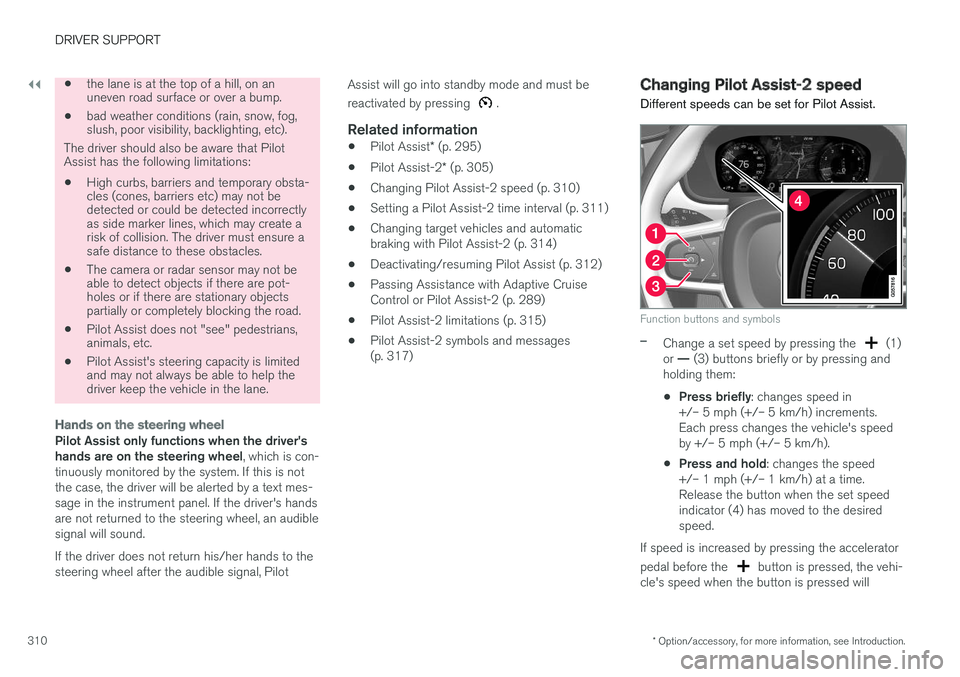
Function buttons and symbols
–Change a set speed by pressing the (1)or — (3) buttons briefly or by pressing andholding them:
•Press briefly: changes speed in+/– 5 mph (+/– 5 km/h) increments.Each press changes the vehicle's speedby +/– 5 mph (+/– 5 km/h).
•Press and hold: changes the speed+/– 1 mph (+/– 1 km/h) at a time.Release the button when the set speedindicator (4) has moved to the desiredspeed.
If speed is increased by pressing the accelerator
pedal before the button is pressed, the vehi-cle's speed when the button is pressed will
Page 315 of 584

DRIVER SUPPORT
}}
* Option/accessory, for more information, see Introduction.313
In standby mode, the driver will have to regulatethe vehicle's speed and the distance to the vehi-cle ahead.
When Pilot Assist is in standby mode and yourvehicle comes too close to another vehicle, thedriver will be alerted by the Distance Alert func-tion.
Standby mode due to action by the driver
Pilot Assist is temporarily deactivated and put instandby mode if:
•the brakes are applied
•The gear selector is moved to N
•the turn signals are used for more than1 minute
•the vehicle is driven faster than the setspeed for more than 1 minute.
A temporary increase in speed, such as whenpassing another vehicle, does not affect the PilotAssist set speed. The vehicle will return to the setspeed when the accelerator pedal is released.
When the turn signals are used, Pilot Assist'ssteering function will be temporarily deactivated.When this is no longer the case, the steeringfunction will reactivate if the traffic lane's sidemarker lines can still be detected.
Automatic standby mode
Pilot Assist interacts with other systems, such asElectronic Stability Control. If any of these other
systems are not functioning properly, Pilot Assistwill automatically be deactivated.
WARNING
If this happens, the driver will be alerted by anaudible signal and a message in the instru-ment panel. The driver will have to adapt thevehicle's speed, apply the brakes when nec-essary and keep a safe distance to the vehicleahead.
Pilot Assist switches automatically to standbymode if:
•the vehicle's speed is below approx. 3 mph(5 km/h) and Pilot Assist cannot determine ifa vehicle ahead is a stationary vehicle or anobject.
•the vehicle's speed is below approx. 3 mph(5 km/h) and the vehicle ahead turns so thatPilot Assist no longer has a vehicle to follow(target vehicle).
•the driver's hands are not on the steeringwheel
•the driver's door is opened
•the driver unbuckles the seat belt
•engine speed (rpm) is too high/low
•the wheels lose traction
•brake temperature is too high
•the parking brake is set
•The camera lens/radar sensor is covered bye.g., wet snow or if heavy rain interferes withradar waves
Reactivating Pilot Assist from standby
mode
Generic illustration
–Press the button (1).
>The most recently set speed will be used.
WARNING
There may be a significant increase in speed
after the button has been pressed.
Related information
•Pilot Assist* (p. 295)
•Pilot Assist-2* (p. 305)
•Starting and activating Pilot Assist-2 (p. 308)
Page 330 of 584
||
DRIVER SUPPORT
328
takes action. If the vehicle has slowed to avoidcolliding with the vehicle ahead, your speed willbe reduced to that vehicle's speed.
When auto-brake is triggered, the seat belt pre-tensioners may also be activated, see the article"Seat belts" for additional information.
Auto-braking can be cancelled if the driverpresses hard on the accelerator pedal.
When City Safety applies the brakes, the brakelights will illuminate.
When City Safety is triggered and applies thebrakes, a text message will be displayed in theinstrument panel.
Related information
•City Safety™ troubleshooting (p. 332)
•City Safety in crossing traffic (p. 331)
•City Safety limitations (p. 334)
•City Safety symbols and messages (p. 337)
•Detecting obstructions with City Safety(p. 329)
•Rear Collision Warning (RCW) (p. 338)
•City Safety warning level settings (p. 328)
•City Safety in crossing traffic (p. 331)
•Seat belts (p. 66)
•City Safety when evasive action is not possi-ble (p. 332)
City Safety warning level settings
City Safety is always activated but the function'swarning distance can be adjusted.
NOTE
City Safety cannot be turned off and activatesautomatically each time the engine/electricmotor is started.
Setting a warning level (distance)
The distance set for warnings determines thesystem's responsiveness and sets the distance atwhich visual, audible and tangible (haptic) warn-ings will be triggered.
To do so:
1.Tap Settings in the center display's Topview.
2.Tap My CarIntelliSafeCity Safety.
3.Choose among Earlier, Normal or Later.
Begin by choosing Earlier. If too many warningsare given, change to Normal.
If the driver feels that warnings are given toooften, the warning level can be lowered. Thismeans that warnings will be provided later, result-ing in fewer warnings being given.
The setting Later should only used in exceptionalcircumstances, e.g., for a more dynamic drivingstyle.
WARNING
•No automatic system can be guaranteedto function 100% correctly in all situa-tions. For that reason, never test CitySafety by driving toward a person orobject. This could result in serious injuryor death.
•Even if the setting Earlier has beenselected, warnings may be perceived asbeing given late, e.g., if the difference inspeed is great or if the vehicle aheadbrakes suddenly.
•City Safety can provide a warning for apotential collision but it can never shortenthe driver's reaction time.
•To help make City Safety as effective aspossible, always using the setting Earlieris recommended.
NOTE
•Due to local traffic regulations in certainmarkets, RCW will not activate the rearturn signals. That part of the function willbe deactivated.
•The use of the rear turn signals will alsobe deactivated if the City Safety warninglevel is set at Later. See also the section"Setting a warning level (distance)" in thearticle "City Safety settings."
•If RCW detects a vehicle approachingfrom behind, the seat belt pretensioners
Page 340 of 584
DRIVER SUPPORT
338
Rear Collision Warning (RCW)
The Rear Collision Warning with braking atstandstill (RCW) function can help the driveravoid rear-end collisions.
RCW is activated automatically each time theengine is started.
RCW can warn the driver of a vehicle approach-ing yours from behind by rapidly flashing yourturn signals.
RCW is only activated when a vehicle is rapidlyapproaching your vehicle from behind.
At speeds below 20 mph (30 km/h), if RCWdetermines that your vehicle is at risk of a rear-end collision, the front seat belt pretensionersand the Whiplash Protection System are acti-vated.
Just prior to the collision, the brakes are alsoapplied to help reduce your vehicle's forwardmovement if and when the collision occurs. How-ever, this can only happen if your vehicle is sta-tionary.
The brakes will be released immediately if theaccelerator pedal is pressed.
NOTE
•Due to local traffic regulations in certainmarkets, RCW will not activate the rearturn signals. That part of the function willbe deactivated.
•The use of the rear turn signals will alsobe deactivated if the City Safety warninglevel is set at Later. See also the section"Setting a warning level (distance)" in thearticle "City Safety settings."
•If RCW detects a vehicle approachingfrom behind, the seat belt pretensionersand Whiplash Protection System will beactivated.
Limitations
In some circumstances, it may be difficult forRCW to help the driver if there is a risk of a colli-sion, such as:
•If the vehicle approaching from the rear isdetected at a late stage
•If the vehicle approaching from the rearchanges lanes at a late stage
•If the vehicle approaching from the rear ismoving at a speed above approx. 50 mph(80 km/h)
Related information
•City Safety™ (p. 326)
•Whiplash protection system (p. 65)
•Seat belts (p. 66)
•City Safety warning level settings (p. 328)