windshield wipers VOLVO XC90 TWIN ENGINE HYBRID 2017 User Guide
[x] Cancel search | Manufacturer: VOLVO, Model Year: 2017, Model line: XC90 TWIN ENGINE HYBRID, Model: VOLVO XC90 TWIN ENGINE HYBRID 2017Pages: 584, PDF Size: 14.2 MB
Page 335 of 584

DRIVER SUPPORT
}}
* Option/accessory, for more information, see Introduction.333
The following table shows some of the situationsthat can cause the message to be displayed andsuggested actions.
CauseAction
The area of the wind-shield in front of thecamera/radar sensor isdirty or covered by ice orsnow.
Clean the wind-shield or removethe ice/ snow.
Thick fog or heavy rain/snow blocks reduces thecamera/radar sensor'srange of visibility.
No action. Thedriver should beextra alert in condi-tions of this type.
There is dirt betweenthe inside of the wind-shield and the camera/radar sensor.
Have the area ofthe windshieldcleaned by atrained and quali-fied Volvo servicetechnician.
CAUTION
•Service and maintenance on City Safetymay only be carried out by a trained andqualified Volvo service technician.
•If a crack, scratch or stone chip shouldoccur in the section of the windshield infront the camera/radar sensor, contact atrained and qualified Volvo service techni-cian to repair or replace the windshield.Failing to do so may result in reducedCity Safety functionality.
•This can also result in certain functionsbeing reduced or disabled, or they mayrespond incorrectly.
To help avoid the risk of incorrect, reduced ordisabled functionality for driver support sys-tems using the camera or radar sensors:
•Volvo recommends that cracks, scratchesor stone chips on the windshield in frontof the camera/radar sensor should notbe repaired; in such cases, the entirewindshield should be replaced.
•Before the windshield is replaced, con-tact a Volvo retailer to ensure that thecorrect windshield is ordered and instal-led. If the wrong type of windshield isused, this may cause City Safety to func-tion improperly or not at all.
•Volvo recommends the use of only Genu-ine Volvo Replacement Windshields.
•When replacing windshield wipers, usethe same type or ones approved by Volvo.
After the windshield has been replaced, thecamera/radar sensor will have to be recalibra-ted by a trained and qualified Volvo servicetechnician to help ensure proper function ofall of the vehicle's camera-/radar-based sys-tems.
Maintenance
In order for City Safety to function properly, thearea of the windshield must be kept free of dirt,ice, snow, etc.
Other vehicle functions
If a message is displayed in the instrument panel,this means that the other systems using the cam-era/radar sensor (see the list below) will not havefull functionality or may not function at all.
The camera and radar sensor is used by the fol-lowing functions:
•Distance Alert*
•Driver Alert Control*
•Adaptive Cruise Control*
•Pilot Assist*
•Run-off Mitigation
•Road Sign Information*
•Active High Beams*
•Lane Keeping Aid*
Page 390 of 584
||
STARTING AND DRIVING
388
•The air conditioning may be switched offtemporarily.
•After a prolonged period of driving, do notturn off the engine immediately after stop-ping.
•The engine cooling fan commonly continuesto run for several minutes after the enginehas been turned off.
WARNING
The cooling fan (located at the front of theengine compartment, behind the radiator) maystart or continue to operate (for up to6 minutes) after the engine has beenswitched off.
Related information
•Driving with a trailer (p. 397)
•Before a long distance trip (p. 385)
Winter driving
Check your vehicle before the approach of coldweather.
The following advice is worth noting:
•Make sure that the engine coolant contains50 percent antifreeze. Any other mixture willreduce freeze protection. This gives protec-tion against freezing down to –31 °F(–35 °C). The use of "recycled" antifreeze isnot approved by Volvo. Different types ofantifreeze must not be mixed.
•Volvo recommends using only genuine Volvoantifreeze in your vehicle's radiator.
•Try to keep the fuel tank well filled – thishelps prevent the formation of condensationin the tank. In addition, in extremely coldweather conditions it is worthwhile to addfuel line de-icer before refueling.
•The viscosity of the engine oil is important.Oil with low viscosity (thinner oil) improvescold-weather starting as well as decreasingfuel consumption while the engine is warm-ing up. Full synthetic 0W-30 oil is recom-mended for driving in areas with sustainedlow temperatures.
•The load placed on the battery is greater dur-ing the winter since the windshield wipers,lighting, etc., are used more often. Moreover,the capacity of the battery decreases as thetemperature drops. In very cold weather, apoorly charged battery can freeze and be
damaged. It is therefore advisable to checkthe state of charge more frequently andspray an anti-rust oil on the battery posts.
•Volvo recommends the use of snow tires onall four wheels for winter driving.
•To prevent the washer fluid reservoir fromfreezing, add washer solvents containingantifreeze. This is important since dirt is oftensplashed on the windshield during winterdriving, requiring the frequent use of thewashers and wipers. Volvo Washer Solventshould be diluted as follows: Down to 14 °F(–10 °C): 1 part washer solvent and 4 partswater Down to 5 °F (–15 °C): 1 part washersolvent and 3 parts water Down to 0 °F(–18 °C): 1 part washer solvent and 2 partswater Down to –18 °F (–28 °C): 1 partwasher solvent and 1 part water.
•Use Volvo Teflon Lock Spray in the locks.
•Avoid using de-icing sprays as they cancause damage to the locks.
Related information
•Snow tires and chains (p. 485)
Page 403 of 584
STARTING AND DRIVING
* Option/accessory, for more information, see Introduction.401
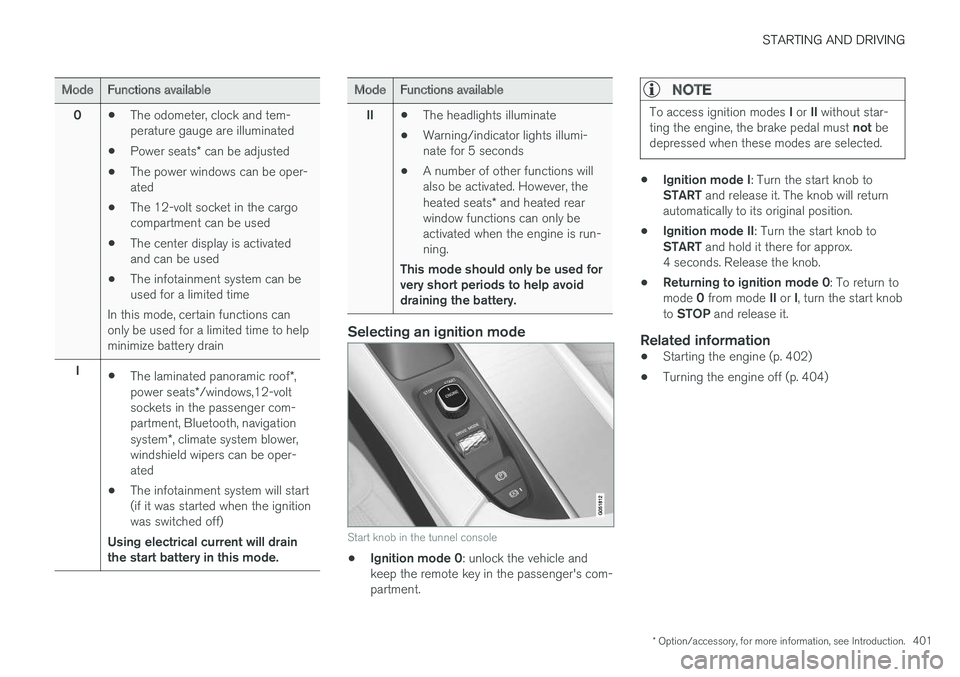
ModeFunctions available
0•The odometer, clock and tem-perature gauge are illuminated
•Power seats* can be adjusted
•The power windows can be oper-ated
•The 12-volt socket in the cargocompartment can be used
•The center display is activatedand can be used
•The infotainment system can beused for a limited time
In this mode, certain functions canonly be used for a limited time to helpminimize battery drain
I•The laminated panoramic roof*,power seats*/windows,12-voltsockets in the passenger com-partment, Bluetooth, navigationsystem*, climate system blower,windshield wipers can be oper-ated
•The infotainment system will start(if it was started when the ignitionwas switched off)
Using electrical current will drainthe start battery in this mode.
ModeFunctions available
II•The headlights illuminate
•Warning/indicator lights illumi-nate for 5 seconds
•A number of other functions willalso be activated. However, theheated seats* and heated rearwindow functions can only beactivated when the engine is run-ning.
This mode should only be used forvery short periods to help avoiddraining the battery.
Selecting an ignition mode
Start knob in the tunnel console
•Ignition mode 0: unlock the vehicle andkeep the remote key in the passenger's com-partment.
NOTE
To access ignition modes I or II without star-ting the engine, the brake pedal must not bedepressed when these modes are selected.
•Ignition mode I: Turn the start knob toSTART and release it. The knob will returnautomatically to its original position.
•Ignition mode II: Turn the start knob toSTART and hold it there for approx.4 seconds. Release the knob.
•Returning to ignition mode 0: To return tomode 0 from mode II or I, turn the start knobto STOP and release it.
Related information
•Starting the engine (p. 402)
•Turning the engine off (p. 404)
Page 507 of 584
MAINTENANCE AND SERVICING
}}
505
Emission inspection readiness
How do states use OBD II for emission
inspections?
Many states connect a computer directly to avehicle's OBD II system. The inspector can thenread "faults." In some states, this type of inspec-tion has replaced the tailpipe emission test.
How can my vehicle fail OBD II emission
inspection?
Your vehicle can fail OBD II emission inspectionfor any of the following reasons.
•If your Check Engine (MIL) light is lit, yourvehicle may fail inspection.
•If your vehicle's Check Engine light was lit,but went out without any action on your part,OBD II will still have a recorded fault. Yourvehicle may pass or fail, depending on theinspection practices in your area.
•If you had recent service that required dis-connecting the battery, OBD II diagnosticinformation may be incomplete and "notready" for inspection. A vehicle that is notready may fail inspection.
How can I prepare for my next OBD II
emission inspection?
•If your Check Engine (MIL) light is lit – or waslit but went out without service, have your
vehicle diagnosed and, if necessary, servicedby a qualified Volvo technician.
•If you recently had service for a lit CheckEngine light, or if you had service thatrequired disconnecting the battery, a periodof driving is necessary to bring the OBD IIsystem to "ready" for inspection. Two half-hour trips of mixed stop-and-go/highwaydriving are typically needed to allow OBD II toreach readiness. Your Volvo retailer can pro-vide you with more information on planning atrip.
•Maintain your vehicle in accordance with yourvehicle's maintenance schedule.
Owner maintenance
Periodic maintenance requirements and intervalsare described in your vehicle's Warranty andService Records Information booklet.
The following points can be carried out betweenthe normally scheduled maintenance services.
Each time the car is refueled:
•Check the engine oil level.
•Clean the windshield, windshield wipers,headlights, and taillights.
Monthly:
•Check cold tire pressure in all tires. Inspectthe tires for wear.
•Check that engine coolant and other fluidlevels are between the indicated "min" and"max" markings.
•Clean interior glass surfaces with a glasscleaner and soft paper towels.
•Wipe driver information displays with a softcloth.
•Visually inspect battery terminals for corro-sion. Corrosion may indicate a loose terminalconnector, or a battery near the end of itsuseful service life. Consult your Volvo retailerfor additional information.
As needed:
Wash the car, including the undercarriage, toreduce wear that can be caused by a buildup ofdirt, and corrosion that can be caused by salt res-idues.
Clean leaves and twigs from air intake vents atthe base of the windshield, and from other placeswhere they may collect.
NOTE
Complete service information for qualifiedtechnicians is available online for purchase orsubscription at www.volvotechinfo.com.
Page 523 of 584
![VOLVO XC90 TWIN ENGINE HYBRID 2017 User Guide MAINTENANCE AND SERVICING
}}
* Option/accessory, for more information, see Introduction.521
Function[A]
Horn20
Alarm siren*5
Brake system control module(valves, parking brake)40
Windshield wipers30
Ta](/img/45/59300/w960_59300-522.png "VOLVO XC90 TWIN ENGINE HYBRID 2017 User Guide MAINTENANCE AND SERVICING
}}
* Option/accessory, for more information, see Introduction.521
Function[A]
Horn20
Alarm siren*5
Brake system control module(valves, parking brake)40
Windshield wipers30
Ta")
MAINTENANCE AND SERVICING
}}
* Option/accessory, for more information, see Introduction.521
Function[A]
Horn20
Alarm siren*5
Brake system control module(valves, parking brake)40
Windshield wipers30
Tailgate window washer25
Heated windshield*, passengerside40
––
Brake system control module(ABS pump)40
––
Heated windshield*, passengersideShunt
Feed when ignition is switchedon to: engine control module,transmission components, elec-trical power steering, centralelectrical module
5
Exterior vehicle sound (certainmarkets)5
Passenger side headlight7,5
Function[A]
––
––
––
Air bags; Occupant Weight Sen-sor (OWS)5
Driver side headlight7.5
Accelerator pedal sensor5
Transmission control module;Gear selector control module15
Engine control module5
––
––
––
––
Engine control module; Actuator;Turbo-charger valve20
Solenoids; Valves; Engine cool-ing system thermostat10
Vacuum regulators; Valve7.5
Function[A]
Spoiler shutter control module;Radiator shutter control module;Fuel leakage detection
5
––
Heated oxygen sensors (frontand rear)15
Oil pump solenoid; A/C mag-netic coupling; heated oxygensensor (center)
15
––
Engine control module20
Ignition coils; Spark plugs15
––
––
Transmission oil pump controlmodule30
Vacuum pump control module40
Transmission actuator25
––
Page 545 of 584
MAINTENANCE AND SERVICING
}}
543
NOTE
•The system cannot detect changes in theoil level immediately. The vehicle must bedriven approximately 20 miles (30 km) orhave been parked on level ground withthe engine off for 5 minutes before theoil level reading will be correct.
•If the necessary conditions are not metfor checking the oil level electronically(time interval after the engine wasswitched off, if the vehicle is parked onan incline, etc.), No values available willbe displayed. This does not indicate aproblem with the oil level sensor.
Related information
•Engine oil (p. 541)
•Ignition modes (p. 400)
Windshield wipers in the serviceposition
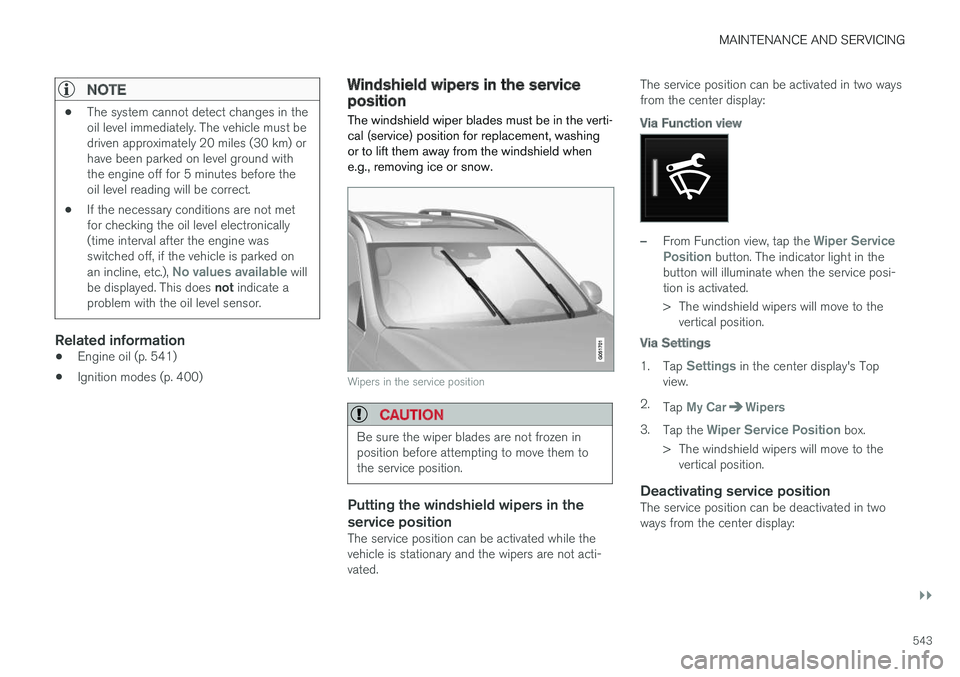
The windshield wiper blades must be in the verti-cal (service) position for replacement, washingor to lift them away from the windshield whene.g., removing ice or snow.
Wipers in the service position
CAUTION
Be sure the wiper blades are not frozen inposition before attempting to move them tothe service position.
Putting the windshield wipers in the
service position
The service position can be activated while thevehicle is stationary and the wipers are not acti-vated.
The service position can be activated in two waysfrom the center display:
Via Function view
–From Function view, tap the Wiper ServicePosition button. The indicator light in thebutton will illuminate when the service posi-tion is activated.
>The windshield wipers will move to thevertical position.
Via Settings
1.Tap Settings in the center display's Topview.
2.Tap My CarWipers
3.Tap the Wiper Service Position box.
>The windshield wipers will move to thevertical position.
Deactivating service position
The service position can be deactivated in twoways from the center display:
Page 546 of 584
||
MAINTENANCE AND SERVICING
544
Via Function view
–From Function view, tap the Wiper ServicePosition button. The indicator light in thebutton will go out when the service positionis deactivated.
Via Settings
1.Tap Settings in the center display's Topview.
2.My CarWipers
3.Tap the Wiper Service Position to deselectthe box.
The wipers will also leave the service position if:
•The wipers are activated.
•The windshield washers are activated.
•The rain sensor is activated.
CAUTION
If the wiper arms have been folded out fromthe windshield while in the service position,fold them back against the windshield beforereturning the wipers to the normal position tohelp avoid scratching the paint on the hood.
Related information
•Replacing wiper blades (p. 544)
•Using the windshield wipers (p. 161)
Replacing wiper blades
The wiper blades should be replaced regularlyfor best effect.
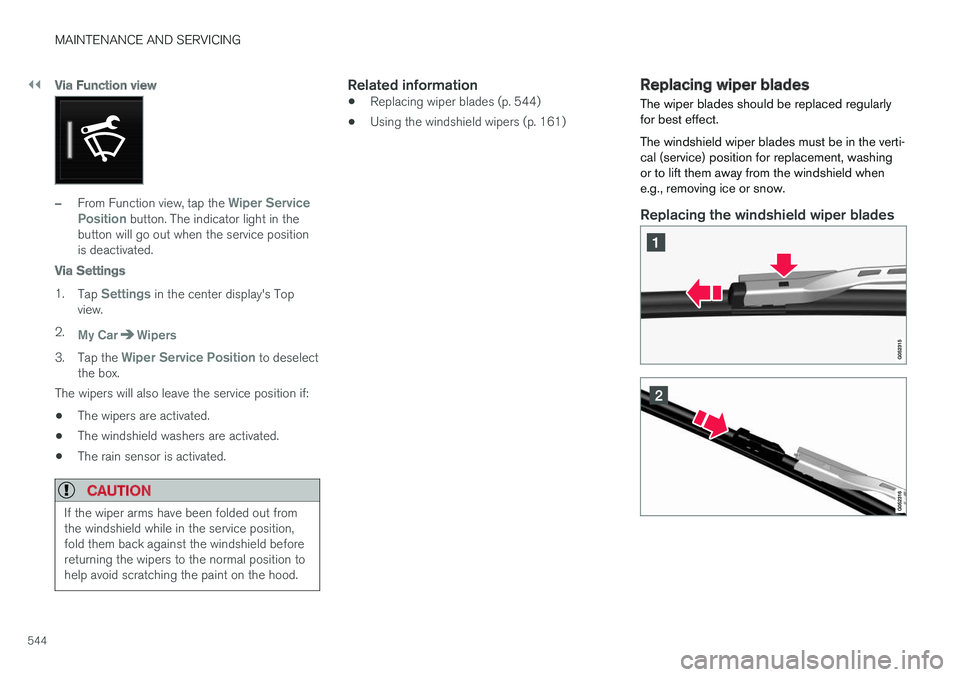
The windshield wiper blades must be in the verti-cal (service) position for replacement, washingor to lift them away from the windshield whene.g., removing ice or snow.
Replacing the windshield wiper blades
Page 547 of 584
MAINTENANCE AND SERVICING
545
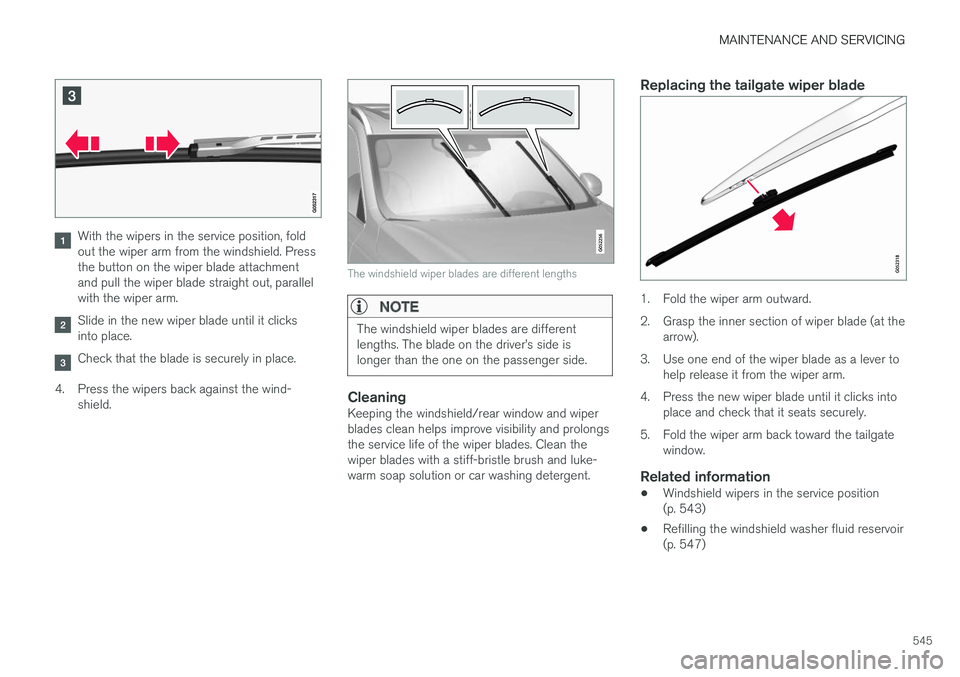
With the wipers in the service position, foldout the wiper arm from the windshield. Pressthe button on the wiper blade attachmentand pull the wiper blade straight out, parallelwith the wiper arm.
Slide in the new wiper blade until it clicksinto place.
Check that the blade is securely in place.
4.Press the wipers back against the wind-shield.
The windshield wiper blades are different lengths
NOTE
The windshield wiper blades are differentlengths. The blade on the driver
Page 551 of 584

MAINTENANCE AND SERVICING
549
CAUTION
When using an automatic car wash in whichthe vehicle has to be able to roll freely, theauto-hold brake function must be deactivated.If this is not done, the brakes will automati-cally be applied when the vehicle is stationary.
To deactivate this function:
1.Drive the vehicle into the car wash
2. Turn off the auto-hold function using thecontrol on the center console
3. Turn off the parking brake's automaticfunction in the center display's Top view
(tap Settings, tap My CarElectricParking Brake and deselect AutoActivate Parking Brake)
4.Put the gear selector in N
5.Switch off the ignition by turning the startknob to STOP and holding it in this posi-tion for at least 4 seconds
The vehicle will then be able to roll freely.
CAUTION
•Before driving into an automatic carwash, turn off the optional rain sensor toavoid damaging the windshield wipers.
•Make sure that side view mirrors, auxiliarylamps, etc, are secure, and that anyantenna(s) are retracted or removed. Oth-erwise there is risk of the machine dis-lodging them.
•Chromed wheels: Clean chrome-platedwheels using the same detergents usedfor the body of the vehicle. Aggressivewheel-cleaning agents can permanentlystain chrome-plated wheels.
WARNING
•When the vehicle is driven immediatelyafter being washed, apply the brakes,including the parking brake, several timesin order to remove any moisture from thebrake linings.
•Engine cleaning agents should not beused when the engine is warm. This con-stitutes a fire risk.
Exterior components
Volvo recommends the use of special cleaningproducts, available at your Volvo retailer, forcleaning colored plastic, rubber, or ornamentalcomponents such as chromed strips on the exte-
rior of your vehicle. The instructions for usingthese products should be followed carefully. Sol-vents or stain removers should not be used.
CAUTION
•Avoid waxing or polishing plastic or rub-ber components
•Polishing chromed strips can wear awayor damage the surface
•Polishes containing abrasive substancesshould not be used
Related information
•Paint damage (p. 553)
•Corrosion protection (p. 552)
•Polishing and waxing (p. 554)
•Windshield wipers in the service position(p. 543)
Page 582 of 584
INDEX
580
Tread wear indicator 483
Trip computer 101, 102, 104
reset 102
Trip odometers 101
Trips, long distance 385
Trip statistics 104
Turn signals 151
changing bulbs 535
U
Uniform Tire Quality Grading485
Unlocking the tailgate249
Unlocking the vehicle 244, 246
USB/AUX connection 455, 462
User profile 181
V
Vehicle Event Data31
Vehicle information14
Vehicle loading 218, 484
Vehicle maintenance 504
performed by the owner 504
Vehicle status 507
Vehicle weights563
Voice control
cell phones126
giving commands125
introduction125
multimedia devices127
radio127
settings130
Volvo and the environment20
Volvo ID32
Volvo maintenance504
Volvo On Call Roadside Assistance 14
Volvo programs14
W
Warning flashers, hazard151
Warning lights141
Warning system, collision 327
Warranties 504
Washer fluid 547
Washers
headlight 163
windshield 161
Water, driving through 387
Waxing 554
Weights
trailer397
Wheels
changing 487, 489
storing 479
Whiplash Protection System 65
Wi-Fi 470, 471
Windows
laminated glass 59
power 113
sun shade 113
Windshield
rain sensor 162
washers 163
wipers/washers 161
Windshield washer fluid reservoir 547
Windshield wiper blades 544
Windshield wipers
service position 543
Wiper blades
replacing 543, 544
replacing tailgate wiper 544
WMA files 464
Workshop
Wi-Fi connection 510