belt VOLVO XC90 TWIN ENGINE HYBRID 2017 Owner's Guide
[x] Cancel search | Manufacturer: VOLVO, Model Year: 2017, Model line: XC90 TWIN ENGINE HYBRID, Model: VOLVO XC90 TWIN ENGINE HYBRID 2017Pages: 584, PDF Size: 14.2 MB
Page 92 of 584
SAFETY
90
ISOFIX/LATCH lower anchors
Lower anchors for ISOFIX/LATCH-equippedchild seats are located in the second row, out-board seats, hidden below the backrest cush-ions.
Lower anchors for ISOFIX/LATCH-equippedchild seats are located in the rear, outboardseats, hidden below the backrest cushions.
Using the ISOFIX/LATCH lower child
seat anchors
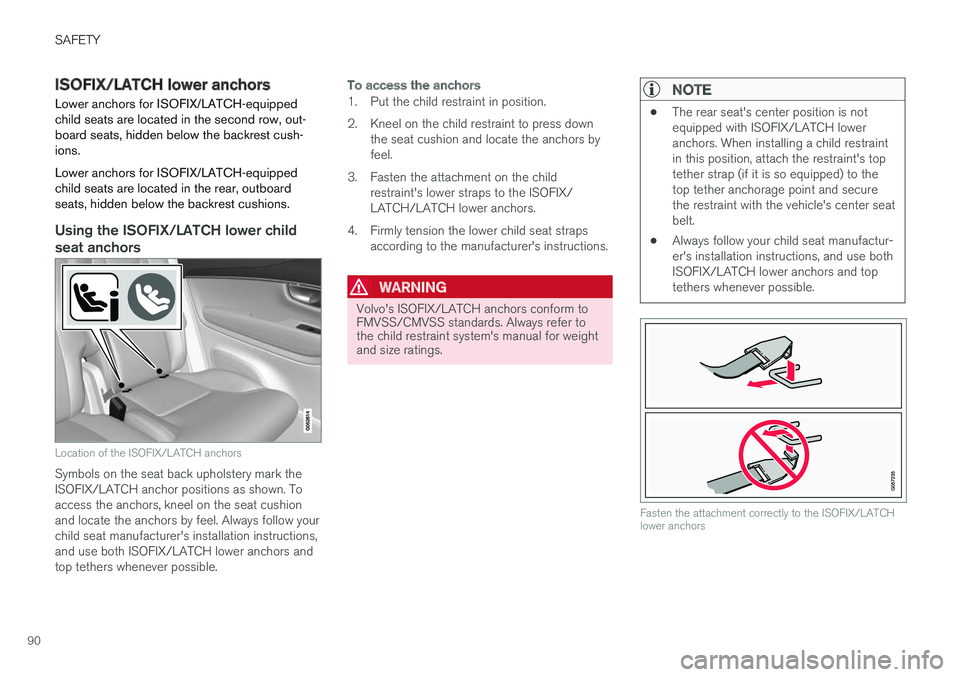
Location of the ISOFIX/LATCH anchors
Symbols on the seat back upholstery mark theISOFIX/LATCH anchor positions as shown. Toaccess the anchors, kneel on the seat cushionand locate the anchors by feel. Always follow yourchild seat manufacturer's installation instructions,and use both ISOFIX/LATCH lower anchors andtop tethers whenever possible.
To access the anchors
1. Put the child restraint in position.
2. Kneel on the child restraint to press downthe seat cushion and locate the anchors byfeel.
3. Fasten the attachment on the childrestraint's lower straps to the ISOFIX/LATCH/LATCH lower anchors.
4. Firmly tension the lower child seat strapsaccording to the manufacturer's instructions.
WARNING
Volvo's ISOFIX/LATCH anchors conform toFMVSS/CMVSS standards. Always refer tothe child restraint system's manual for weightand size ratings.
NOTE
•The rear seat's center position is notequipped with ISOFIX/LATCH loweranchors. When installing a child restraintin this position, attach the restraint's toptether strap (if it is so equipped) to thetop tether anchorage point and securethe restraint with the vehicle's center seatbelt.
•Always follow your child seat manufactur-er's installation instructions, and use bothISOFIX/LATCH lower anchors and toptethers whenever possible.
Fasten the attachment correctly to the ISOFIX/LATCHlower anchors
Page 93 of 584
SAFETY
}}
91
WARNING
•Be sure to fasten the attachment cor-rectly to the anchor (see the illustration).If the attachment is not correctly fas-tened, the child restraint may not beproperly secured in the event of a colli-sion.
•The ISOFIX/LATCH lower child restraintanchors are only intended for use withchild seats positioned in the outboardseating positions. These anchors are notcertified for use with any child restraintthat is positioned in the center seatingposition. When securing a child restraintin the center seating position, use onlythe vehicle's center seat belt.
Related information
•Top tether anchors (p. 92)
Lower child seat attachment points1
The vehicle is equipped with lower attachmentpoints for child seats in the second row of seats.
The lower attachment points are intended for usewith rear-facing child restraints.
Always follow the child restraint manufacturer'sinstallation instructions when attaching a childrestraint to these attachment points.
Location
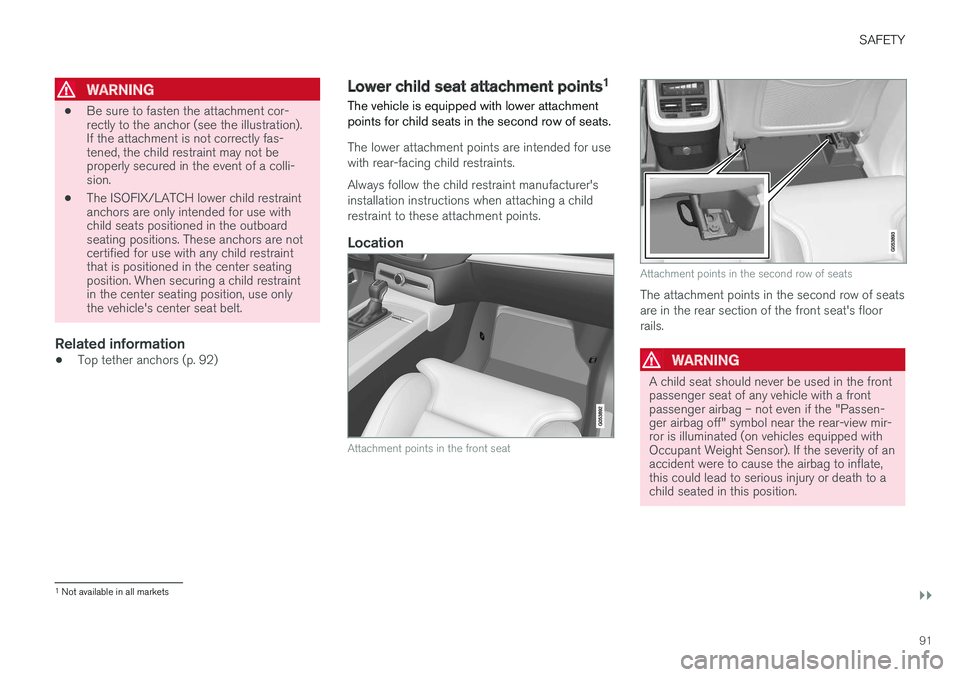
Attachment points in the front seat
Attachment points in the second row of seats
The attachment points in the second row of seatsare in the rear section of the front seat's floorrails.
WARNING
A child seat should never be used in the frontpassenger seat of any vehicle with a frontpassenger airbag – not even if the "Passen-ger airbag off" symbol near the rear-view mir-ror is illuminated (on vehicles equipped withOccupant Weight Sensor). If the severity of anaccident were to cause the airbag to inflate,this could lead to serious injury or death to achild seated in this position.
1Not available in all markets
Page 94 of 584
||
SAFETY
92
Related information
•Child restraints (p. 83)
•ISOFIX/LATCH lower anchors (p. 90)
•Occupant weight sensor (p. 74)
Top tether anchors
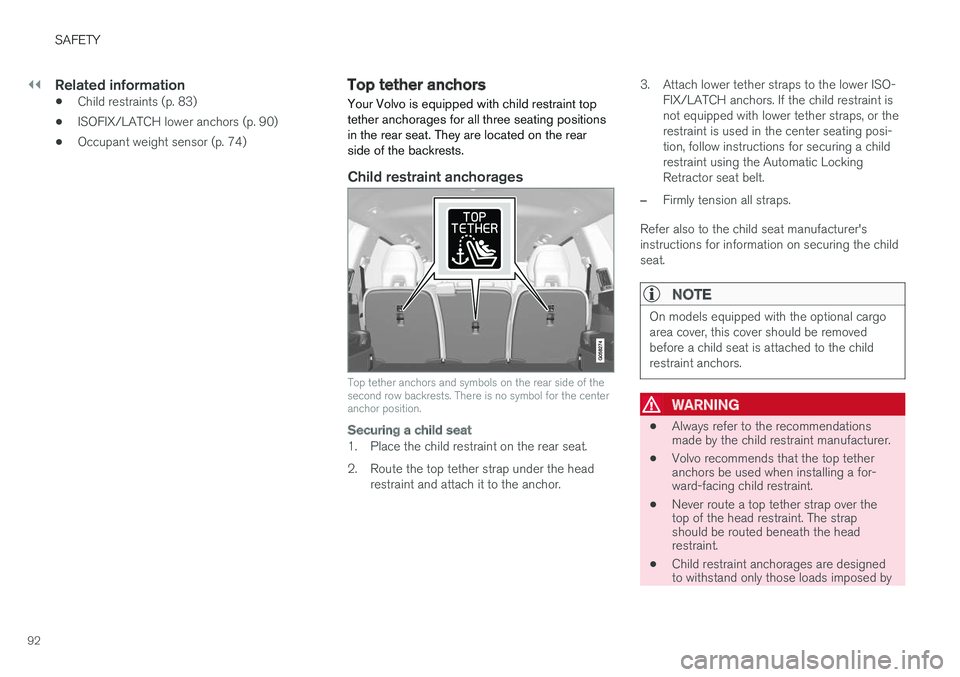
Your Volvo is equipped with child restraint toptether anchorages for all three seating positionsin the rear seat. They are located on the rearside of the backrests.
Child restraint anchorages
Top tether anchors and symbols on the rear side of thesecond row backrests. There is no symbol for the centeranchor position.
Securing a child seat
1. Place the child restraint on the rear seat.
2. Route the top tether strap under the headrestraint and attach it to the anchor.
3. Attach lower tether straps to the lower ISO-FIX/LATCH anchors. If the child restraint isnot equipped with lower tether straps, or therestraint is used in the center seating posi-tion, follow instructions for securing a childrestraint using the Automatic LockingRetractor seat belt.
–Firmly tension all straps.
Refer also to the child seat manufacturer'sinstructions for information on securing the childseat.
NOTE
On models equipped with the optional cargoarea cover, this cover should be removedbefore a child seat is attached to the childrestraint anchors.
WARNING
•Always refer to the recommendationsmade by the child restraint manufacturer.
•Volvo recommends that the top tetheranchors be used when installing a for-ward-facing child restraint.
•Never route a top tether strap over thetop of the head restraint. The strapshould be routed beneath the headrestraint.
•Child restraint anchorages are designedto withstand only those loads imposed by
Page 95 of 584
SAFETY
}}
* Option/accessory, for more information, see Introduction.93
correctly fitted child restraints. Under nocircumstances are they to be used foradult seat belts or harnesses. The ancho-rages are not able to withstand excessiveforces on them in the event of collision iffull harness seat belts or adult seat beltsare installed to them. An adult who uses abelt anchored in a child restraint anchor-age runs a great risk of suffering severeinjuries should a collision occur.
•Do not install rear speakers that requirethe removal of the top tether anchors orinterfere with the proper use of the toptether strap.
Related information
•Child safety (p. 81)
•Child restraints (p. 83)
Integrated booster cushion*
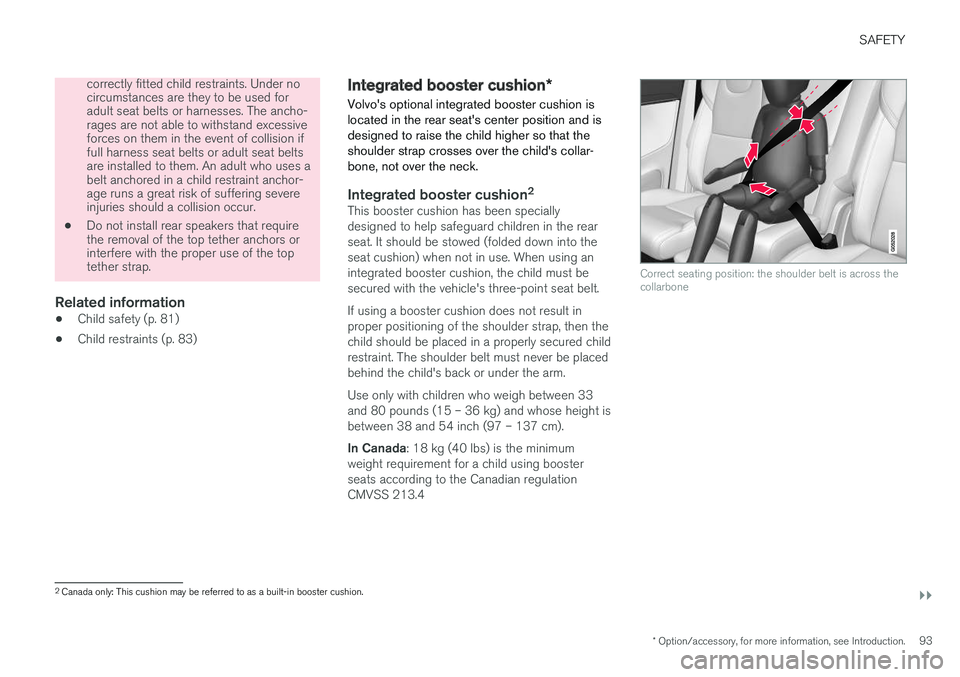
Volvo's optional integrated booster cushion islocated in the rear seat's center position and isdesigned to raise the child higher so that theshoulder strap crosses over the child's collar-bone, not over the neck.
Integrated booster cushion 2
This booster cushion has been speciallydesigned to help safeguard children in the rearseat. It should be stowed (folded down into theseat cushion) when not in use. When using anintegrated booster cushion, the child must besecured with the vehicle's three-point seat belt.
If using a booster cushion does not result inproper positioning of the shoulder strap, then thechild should be placed in a properly secured childrestraint. The shoulder belt must never be placedbehind the child's back or under the arm.
Use only with children who weigh between 33and 80 pounds (15 – 36 kg) and whose height isbetween 38 and 54 inch (97 – 137 cm).
In Canada: 18 kg (40 lbs) is the minimumweight requirement for a child using boosterseats according to the Canadian regulationCMVSS 213.4
Correct seating position: the shoulder belt is across thecollarbone
2
Canada only: This cushion may be referred to as a built-in booster cushion.
Page 134 of 584

||
INSTRUMENTS AND CONTROLS
132
SymbolExplanation
Lane keeping aid
White symbol: lane keeping aid onand marker lines detected.
Gray symbol: lane keeping aid onand no marker lines detected.
Yellow symbol: lane keeping aidactive
Lane keeping aid and rain sen-sor
White symbol: lane keeping aid onand marker lines detected. Rainsensor on.
Gray symbol: lane keeping aid onand no marker lines detected.Rain sensor on.
AUS modelsBCanadian modelsCXC90 T8 Twin Engine Plug-in Hybrid only.
Door/hood/tailgate/fuel filler door
reminder
If a door or the hood/tailgate/fuel filler door arenot closed properly, the information or warningsymbol will illuminate and a graphic will be dis-played in instrument panel. Stop the vehicle in asafe place as soon as possible and close thedoor, etc.
Related information
•Instrument panel (p. 132)
•Warning symbols in the instrument panel(p. 141)
•Door and seat belt reminders (p. 70)
Instrument panel
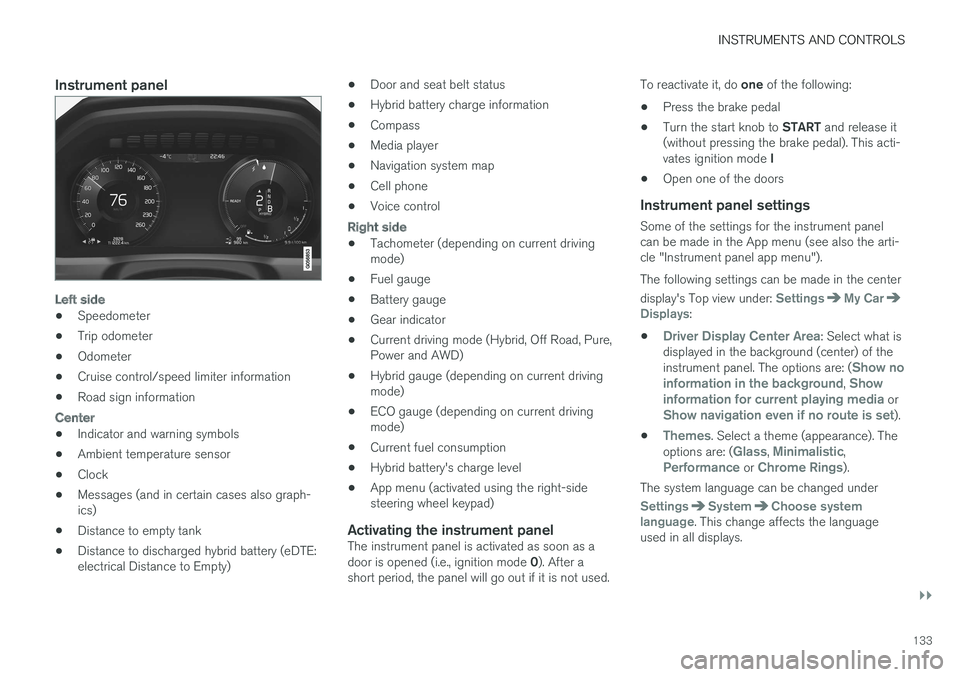
The instrument panel displays vehicle- and driv-ing-related information.
The gauges, indicators, symbols and functionsdisplayed in the instrument panel depend on theequipment/systems installed in the vehicle andwhich functions are currently activated.
Some of the functions listed below are optional.
WARNING
•If the instrument panel is not functioningproperly, information about e.g., brakes,airbags or other safety-related messagescannot be displayed and the driver cannotbe alerted to possible problems.
•If the instrument panel turns off, does notactivate when the ignition is switched onor is completely/partially not possible toread, do not drive the vehicle. Contact atrained and qualified Volvo service techni-cian.
Page 135 of 584
INSTRUMENTS AND CONTROLS
}}
133
Instrument panel
Left side
•Speedometer
•Trip odometer
•Odometer
•Cruise control/speed limiter information
•Road sign information
Center
•Indicator and warning symbols
•Ambient temperature sensor
•Clock
•Messages (and in certain cases also graph-ics)
•Distance to empty tank
•Distance to discharged hybrid battery (eDTE:electrical Distance to Empty)
•Door and seat belt status
•Hybrid battery charge information
•Compass
•Media player
•Navigation system map
•Cell phone
•Voice control
Right side
•Tachometer (depending on current drivingmode)
•Fuel gauge
•Battery gauge
•Gear indicator
•Current driving mode (Hybrid, Off Road, Pure,Power and AWD)
•Hybrid gauge (depending on current drivingmode)
•ECO gauge (depending on current drivingmode)
•Current fuel consumption
•Hybrid battery's charge level
•App menu (activated using the right-sidesteering wheel keypad)
Activating the instrument panel
The instrument panel is activated as soon as adoor is opened (i.e., ignition mode 0). After ashort period, the panel will go out if it is not used.
To reactivate it, do one of the following:
•Press the brake pedal
•Turn the start knob to START and release it(without pressing the brake pedal). This acti-vates ignition mode I
•Open one of the doors
Instrument panel settings
Some of the settings for the instrument panelcan be made in the App menu (see also the arti-cle "Instrument panel app menu").
The following settings can be made in the center
display's Top view under: SettingsMy CarDisplays:
•Driver Display Center Area: Select what isdisplayed in the background (center) of theinstrument panel. The options are: (Show noinformation in the background, Showinformation for current playing media orShow navigation even if no route is set).
•Themes. Select a theme (appearance). Theoptions are: (Glass, Minimalistic,Performance or Chrome Rings).
The system language can be changed under
SettingsSystemChoose systemlanguage. This change affects the languageused in all displays.
Page 143 of 584
INSTRUMENTS AND CONTROLS
}}
141
CLAIM, DAMAGES OR OTHER LIABILITY,WHETHER IN AN ACTION OF CONTRACT,TORT OR OTHERWISE, ARISING FROM, OUTOF OR IN CONNECTION WITH THE SOFTWAREOR THE USE OR OTHER DEALINGS IN THESOFTWARE.
Except as contained in this notice, the name ofSilicon Graphics, Inc. shall not be used inadvertising or otherwise to promote the sale, useor other dealings in this Software without priorwritten authorization from Silicon Graphics, Inc.
Related information
•Instrument panel (p. 132)
Warning symbols in the instrumentpanel
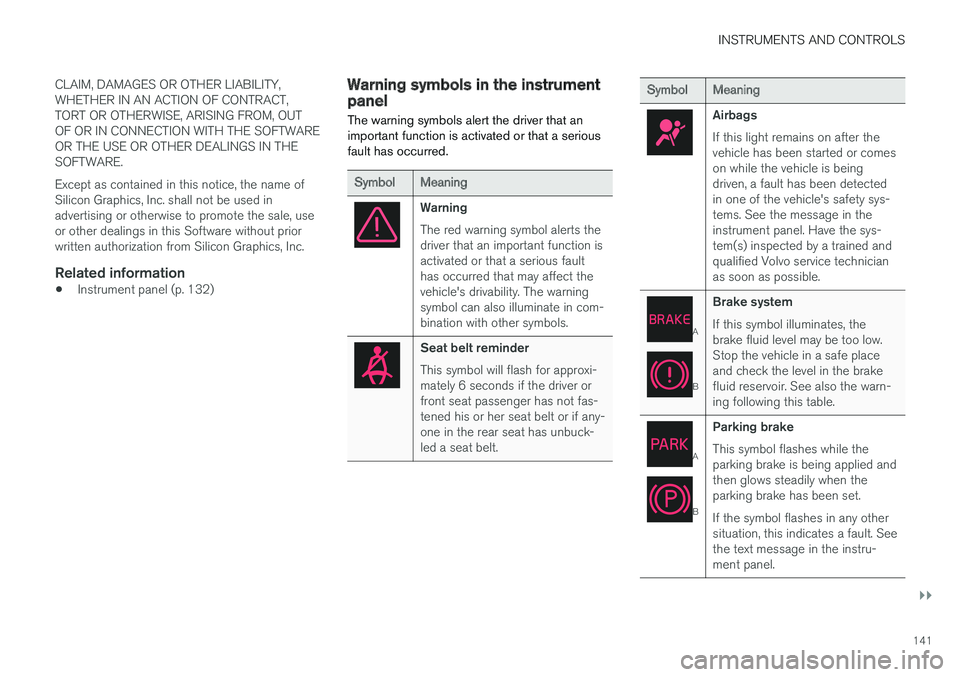
The warning symbols alert the driver that animportant function is activated or that a seriousfault has occurred.
SymbolMeaning
Warning
The red warning symbol alerts thedriver that an important function isactivated or that a serious faulthas occurred that may affect thevehicle's drivability. The warningsymbol can also illuminate in com-bination with other symbols.
Seat belt reminder
This symbol will flash for approxi-mately 6 seconds if the driver orfront seat passenger has not fas-tened his or her seat belt or if any-one in the rear seat has unbuck-led a seat belt.
SymbolMeaning
Airbags
If this light remains on after thevehicle has been started or comeson while the vehicle is beingdriven, a fault has been detectedin one of the vehicle's safety sys-tems. See the message in theinstrument panel. Have the sys-tem(s) inspected by a trained andqualified Volvo service technicianas soon as possible.
A
B
Brake system
If this symbol illuminates, thebrake fluid level may be too low.Stop the vehicle in a safe placeand check the level in the brakefluid reservoir. See also the warn-ing following this table.
A
B
Parking brake
This symbol flashes while theparking brake is being applied andthen glows steadily when theparking brake has been set.
If the symbol flashes in any othersituation, this indicates a fault. Seethe text message in the instru-ment panel.
Page 169 of 584

INSTRUMENTS AND CONTROLS
* Option/accessory, for more information, see Introduction.167
•Moving the second row seats forward/rear-ward (p. 176)
•Adjusting the second row backrest tilt(p. 177)
Manually operated front seats
The front seats can be adjusted in a number ofways to help provide the most comfortable seat-ing position.
Raise/lower the front edge of seat cushionby pumping up/down
Move the seat forward/rearward by pullingthe bar upward and moving the seat.
Change lumbar support by pressing the but-ton*
Raise/lower the seat by moving the controlup/down
Change backrest tilt by turning the wheel
WARNING
•Do not adjust the seat while driving. Theseat should be adjusted so that the brakepedal can be depressed fully. In addition,position the seat as far rearward as com-fort and control allow.
•Check that the seat is securely lockedinto position after adjusting.
Related information
•Turning seat heating* on and off (p. 210)
•Power front seats* (p. 168)
•Multifunctional front seats* (p. 170)
•Seat belts (p. 66)
Page 170 of 584
INSTRUMENTS AND CONTROLS
* Option/accessory, for more information, see Introduction.168
Power front seats*
The power front seats offer a number of adjust-ment possibilities to help maximize comfort andergonomics.
The power seats have an overload protector thatactivates if a seat is blocked by any object. If thisoccurs, put the ignition in mode I or 0 and waitfor a short period before operating the seatagain.
The power seat(s) can be adjusted for a shortperiod after unlocking the door with the remotekey without switching the ignition on. Seat adjust-ment can always be made when the engine isrunning.
Related information
•Multifunctional front seats* (p. 170)
•Adjusting power front seats* (p. 168)
•Using the power seat memory function*(p. 169)
•Manually operated front seats (p. 167)
•Turning seat heating* on and off (p. 210)
•Turning front seat ventilation* on and off(p. 211)
•Easy access to and from the driver seat(p. 174)
Adjusting power front seats*
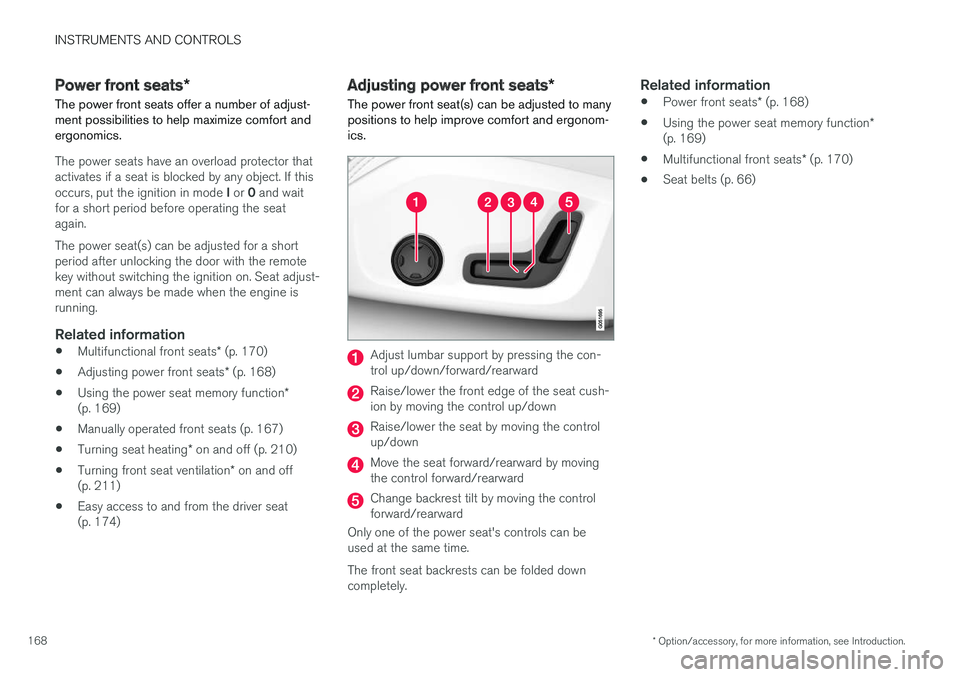
The power front seat(s) can be adjusted to manypositions to help improve comfort and ergonom-ics.
Adjust lumbar support by pressing the con-trol up/down/forward/rearward
Raise/lower the front edge of the seat cush-ion by moving the control up/down
Raise/lower the seat by moving the controlup/down
Move the seat forward/rearward by movingthe control forward/rearward
Change backrest tilt by moving the controlforward/rearward
Only one of the power seat's controls can beused at the same time.
The front seat backrests can be folded downcompletely.
Related information
•Power front seats* (p. 168)
•Using the power seat memory function*(p. 169)
•Multifunctional front seats* (p. 170)
•Seat belts (p. 66)
Page 171 of 584
INSTRUMENTS AND CONTROLS
}}
* Option/accessory, for more information, see Introduction.169
Adjusting the passenger's seat from
the driver's seat*
Using the controls on the side of the driver'sseat, the driver can adjust the position of thefront passenger's seat.
Activating the function in the center
display
From the center display, the function can be acti-vated in two ways.
After activating the function, adjust the passeng-er's seat within 10 seconds. If no adjustmentsare made in that time span, the function deacti-vates automatically.
Activating from Function view
1. Go to the center display's Function view.
2.Activate the function by tapping Adjustpassenger seat.
Activating from Settings
–In the center display, select SettingsMy
CarSeatsAdjust Passenger SeatFrom Driver Position.
Power seat controls
Move the passenger's seat forward/rearwardby moving the control forward/rearward.
Change the passenger seat's backrest tilt bymoving the control forward/rearward.
Related information
•Power front seats* (p. 168)
•Adjusting power front seats* (p. 168)
•Seat belts (p. 66)
Using the power seat memory
function*
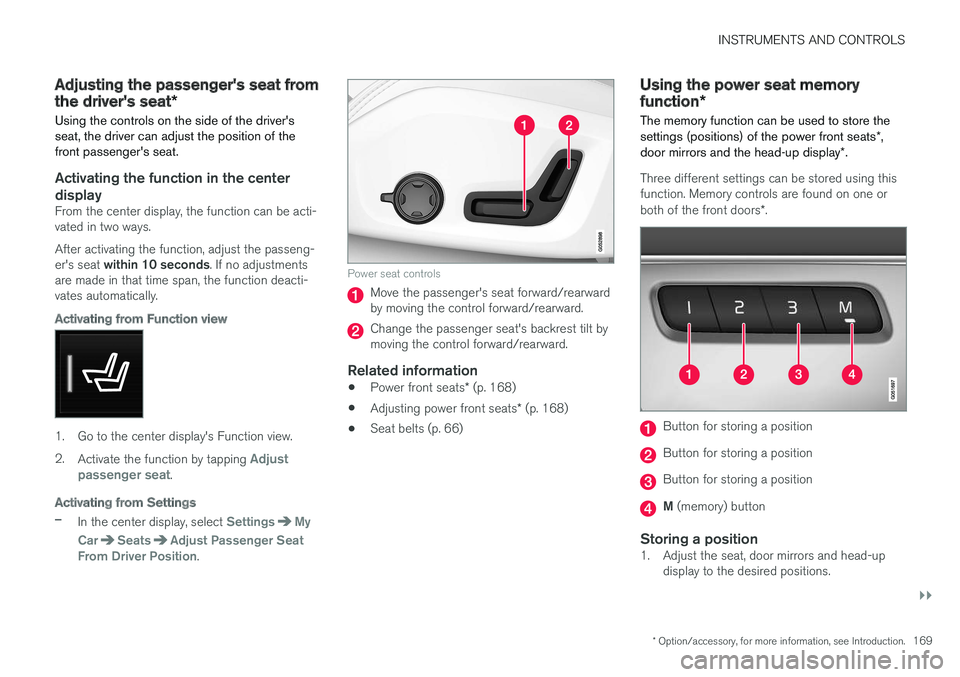
The memory function can be used to store thesettings (positions) of the power front seats*,door mirrors and the head-up display*.
Three different settings can be stored using thisfunction. Memory controls are found on one orboth of the front doors*.
Button for storing a position
Button for storing a position
Button for storing a position
M (memory) button
Storing a position
1. Adjust the seat, door mirrors and head-updisplay to the desired positions.