lights VOLVO XC90 TWIN ENGINE HYBRID 2017 Service Manual
[x] Cancel search | Manufacturer: VOLVO, Model Year: 2017, Model line: XC90 TWIN ENGINE HYBRID, Model: VOLVO XC90 TWIN ENGINE HYBRID 2017Pages: 584, PDF Size: 14.2 MB
Page 380 of 584
||
STARTING AND DRIVING
* Option/accessory, for more information, see Introduction.378
Instrument panel symbols
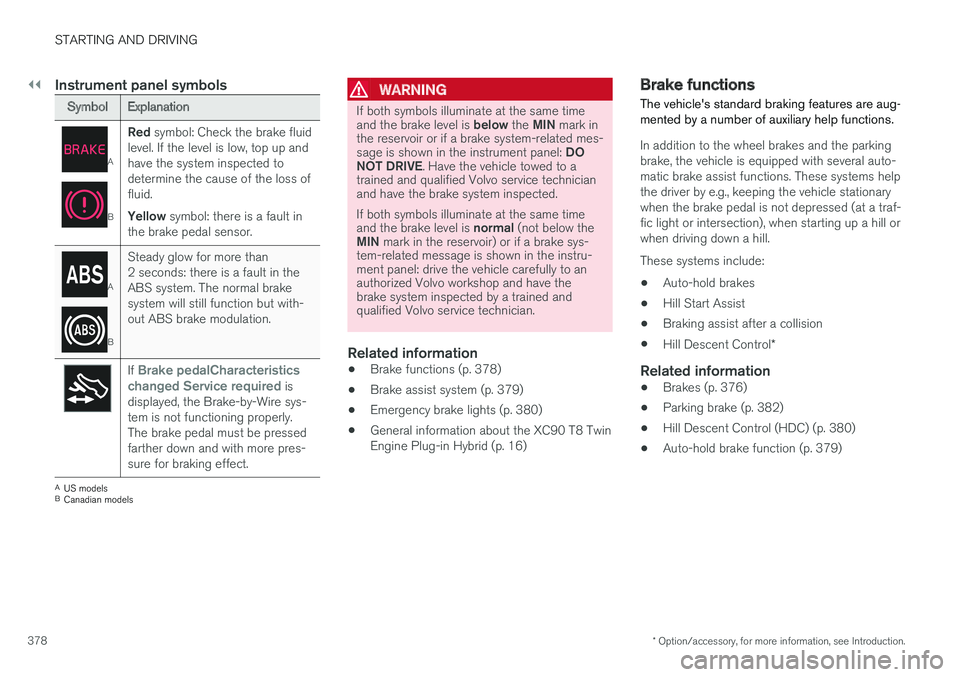
SymbolExplanation
A
B
Red symbol: Check the brake fluidlevel. If the level is low, top up andhave the system inspected todetermine the cause of the loss offluid.
Yellow symbol: there is a fault inthe brake pedal sensor.
A
B
Steady glow for more than2 seconds: there is a fault in theABS system. The normal brakesystem will still function but with-out ABS brake modulation.
If Brake pedalCharacteristicschanged Service required isdisplayed, the Brake-by-Wire sys-tem is not functioning properly.The brake pedal must be pressedfarther down and with more pres-sure for braking effect.
AUS modelsBCanadian models
WARNING
If both symbols illuminate at the same timeand the brake level is below the MIN mark inthe reservoir or if a brake system-related mes-sage is shown in the instrument panel: DONOT DRIVE. Have the vehicle towed to atrained and qualified Volvo service technicianand have the brake system inspected.
If both symbols illuminate at the same timeand the brake level is normal (not below theMIN mark in the reservoir) or if a brake sys-tem-related message is shown in the instru-ment panel: drive the vehicle carefully to anauthorized Volvo workshop and have thebrake system inspected by a trained andqualified Volvo service technician.
Related information
•Brake functions (p. 378)
•Brake assist system (p. 379)
•Emergency brake lights (p. 380)
•General information about the XC90 T8 TwinEngine Plug-in Hybrid (p. 16)
Brake functions
The vehicle's standard braking features are aug-mented by a number of auxiliary help functions.
In addition to the wheel brakes and the parkingbrake, the vehicle is equipped with several auto-matic brake assist functions. These systems helpthe driver by e.g., keeping the vehicle stationarywhen the brake pedal is not depressed (at a traf-fic light or intersection), when starting up a hill orwhen driving down a hill.
These systems include:
•Auto-hold brakes
•Hill Start Assist
•Braking assist after a collision
•Hill Descent Control*
Related information
•Brakes (p. 376)
•Parking brake (p. 382)
•Hill Descent Control (HDC) (p. 380)
•Auto-hold brake function (p. 379)
Page 382 of 584
STARTING AND DRIVING
380
Braking effect after a collision
In certain types of collisions, the vehicle's brakesare applied to help prevent or mitigate a secon-dary collision.
Maintaining control of the vehicle after a collisionmay be difficult. To help avoid or mitigate theeffect of a secondary collision, the brakes areapplied automatically to help bring the vehicle toa stop.
The brake lights and hazard warning flashers willbe activated and the flashers will remain on afterthe vehicle has come to a standstill. The parkingbrake will then be applied automatically.
In a situation where stopping the vehicle may notbe desirable, the driver can override this systemby pressing the accelerator pedal.
This feature can only function if the brake systemis intact after the collision.
Related information
•Brake functions (p. 378)
•Airbag system (p. 71)
•Rear Collision Warning (RCW) (p. 338)
Emergency brake lights
The emergency brake lights activate in the eventof hard braking/rapid deceleration at most nor-mal driving speeds or if the ABS system is acti-vated. This function causes an additional taillighton each side of the vehicle to illuminate to helpalert vehicles traveling behind.
Once the emergency brake lights have been acti-vated, if the driver releases the brake pedal, thebrake lights will return to their normal function.
Related information
•Brakes (p. 376)
•Hazard warning flashers (p. 151)
•Brake lights (p. 151)
Hill Descent Control (HDC)
HDC is a type of low-speed automatic enginebrake and makes it possible to increase ordecrease the vehicle's speed on steep downhillgradients using only the accelerator pedal, with-out applying the brakes.
HDC is integrated into the Off Road drivemode.
HDC is particularly useful when driving downsteep hills with rough surfaces, and where theroad may have slippery patches.
WARNING
HDC does not function in all situations, and isa supplementary braking aid. The driver hasfull responsibility for driving in a safe manner.
Function
HDC allows the vehicle to roll forward or inreverse at very low speed with enhanced enginebraking. However, speed can be adjusted withthe accelerator pedal. When the acceleratorpedal is released, the vehicle will return to verylow speed.
The driver can use the brakes to slow or stop thevehicle at any time.
HDC is activated along with Low Speed Control(LSC), which together make driving on slipperysurfaces at low speeds easier.
Page 387 of 584
STARTING AND DRIVING
}}
385
Before a long distance trip
It is always worthwhile to have your vehiclechecked by a trained and qualified Volvo servicetechnician before driving long distances. Yourretailer will also be able to supply you with bulbs,fuses, spark plugs and wiper blades for your usein the event that problems occur.
As a minimum, the following items should bechecked before any long trip:
•Check that engine runs smoothly and thatfuel consumption and the oil level are normal.
•Before leaving on a trip, fill the fuel tank andmake sure the hybrid battery is fully charged.During the trip, make a habit of refueling reg-ularly.
•Check for fuel, oil, and fluid leakage.
•Check condition of drive belts.
•Check state of the battery's charge.
•Examine tires carefully and replace thosethat are worn. Also, check tire inflation pres-sure.
•The brakes, front wheel alignment, and steer-ing gear should be checked by a trained andqualified Volvo service technician only.
•Check all lights, including high beams.
•Reflective warning triangles are legallyrequired in some states/provinces.
•Have a word with a trained and qualifiedVolvo service technician if you intend to drive
in countries where it may be difficult toobtain the correct fuel.
•Consider your destination. If you will be driv-ing through an area where snow or ice arelikely to occur, consider using snow tires.
Driving economically
Better driving economy can be obtained bythinking ahead, avoiding rapid starts and stopsand adjusting the speed of your vehicle to imme-diate traffic conditions.
Driving economically with the XC90 T8
Twin Engine Plug-in Hybrid
Plan your driving in order to utilize the electricmotor as much as possible.
An energy-conserving driving style lowers currentconsumption from the hybrid battery and helpsincrease electric driving range.
Charging
•Charge the hybrid battery regularly using thecharging cable. Whenever possible, begin adrive with a fully charged battery.
•Check the location of charging points.
•Where possible, choose parking spaces withcharging points.
Page 389 of 584
STARTING AND DRIVING
}}
387
Driving through standing water
The vehicle should be driven with extreme cau-tion if it is necessary to drive through standingwater.
The vehicle can be driven through water up to adepth approximately level with the floor at walk-ing speed to help prevent water from enteringthe differential and/or the transmission or dam-aging electrical components.
•If possible, check the depth of the waterbefore driving through it. Take particular carewhen driving through flowing water.
•Before driving through water, always selectthe Off Road drive mode to ensure that thegasoline engine is running and to maximizeground clearance.
•After driving through water, apply the brakesand check that they are functioning correctly.
•Clean the electrical connections for trailerwiring after driving in mud or water.
•When driving through water, maintain lowspeed and do not stop in the water.
CAUTION
•Damage may occur to the engine, trans-mission, electrical components, etc. if thevehicle is driven through water higherthan its floor level. Be aware that wavescreated by other vehicles could cause thelevel to temporarily be above the vehicle'sfloor level.
•Damage to any components due to waterabove the floor level, vapor lock or insuffi-cient oil is not covered under warranty.
•If the engine has been stopped while thevehicle is in water, do not attempt torestart it. Have the vehicle towed out ofthe water and inspected by a trained andqualified Volvo service technician.
WARNING
•Avoid driving through standing or rushingwater. Doing so can be dangerous and itmay also be difficult to determine theactual depth of the water.
•If water cannot be avoided, after drivingthrough the water, press lightly on thebrake pedal to ensure that the brakes arefunctioning normally. Water or mud canmake the brake linings slippery, resultingin delayed braking effect.
Related information
•Towing recommendations (p. 389)
Overheating the engine andtransmission
In demanding driving conditions, such as whentransporting heavy loads, driving in mountainousareas or in very hot weather there is a risk ofoverheating the engine or transmission.
•The engine's output may be slightly limited ifthere is a risk of overheating.
•Remove e.g., auxiliary lights mounted in frontof the grille in hot weather.
•If the temperature of the engine coolantbecomes too high, the warning symbol willilluminate and the message Enginetemperature/Stop safely will be displayed.Stop the vehicle as soon as possible in asafe place and let the engine idle for severalminutes.
•If the message Engine temperature/Hightemperature Turn off engine or Enginecoolant/Stop safely is displayed, stopsafely and turn off the engine.
•If the transmission begins to overheat, analternative gear shifting program will beselected. An integrated protective functionwill also by activated, the warning symbol willilluminate and the message TransmissionwarmHigh temperature Reduce speedor Transmission warmStop safely, waitfor cooling will be displayed in the instru-ment panel.
Page 403 of 584
STARTING AND DRIVING
* Option/accessory, for more information, see Introduction.401
ModeFunctions available
0•The odometer, clock and tem-perature gauge are illuminated
•Power seats* can be adjusted
•The power windows can be oper-ated
•The 12-volt socket in the cargocompartment can be used
•The center display is activatedand can be used
•The infotainment system can beused for a limited time
In this mode, certain functions canonly be used for a limited time to helpminimize battery drain
I•The laminated panoramic roof*,power seats*/windows,12-voltsockets in the passenger com-partment, Bluetooth, navigationsystem*, climate system blower,windshield wipers can be oper-ated
•The infotainment system will start(if it was started when the ignitionwas switched off)
Using electrical current will drainthe start battery in this mode.
ModeFunctions available
II•The headlights illuminate
•Warning/indicator lights illumi-nate for 5 seconds
•A number of other functions willalso be activated. However, theheated seats* and heated rearwindow functions can only beactivated when the engine is run-ning.
This mode should only be used forvery short periods to help avoiddraining the battery.
Selecting an ignition mode
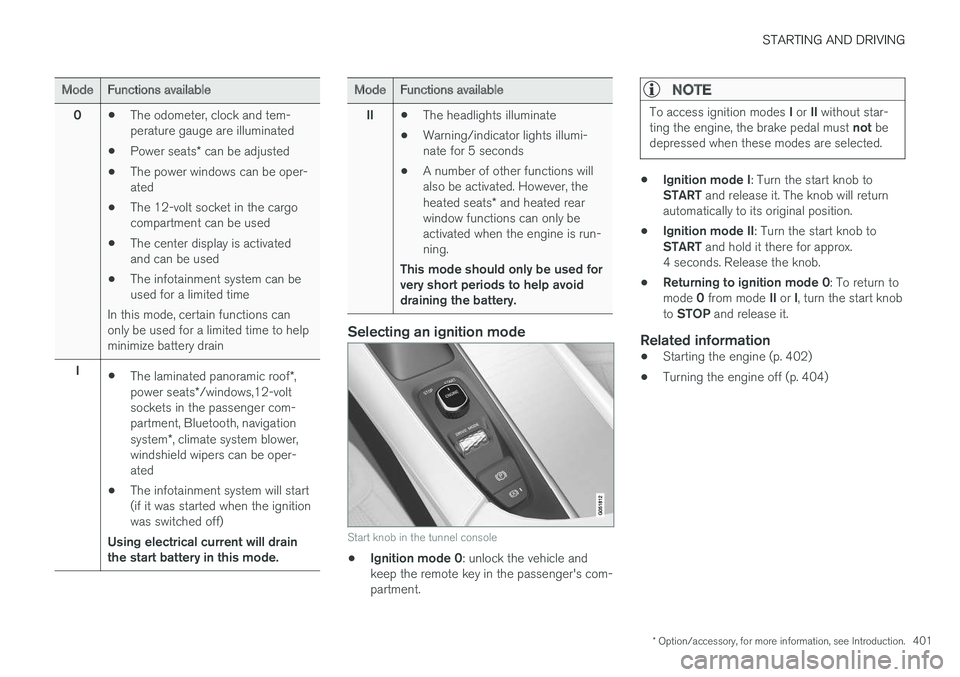
Start knob in the tunnel console
•Ignition mode 0: unlock the vehicle andkeep the remote key in the passenger's com-partment.
NOTE
To access ignition modes I or II without star-ting the engine, the brake pedal must not bedepressed when these modes are selected.
•Ignition mode I: Turn the start knob toSTART and release it. The knob will returnautomatically to its original position.
•Ignition mode II: Turn the start knob toSTART and hold it there for approx.4 seconds. Release the knob.
•Returning to ignition mode 0: To return tomode 0 from mode II or I, turn the start knobto STOP and release it.
Related information
•Starting the engine (p. 402)
•Turning the engine off (p. 404)
Page 404 of 584
STARTING AND DRIVING
402
Battery drain
Your vehicle's electrical functions drain the bat-tery to varying extents.
Avoid using ignition mode II as much as posssi-ble, or electrical functions that require a greatdeal of electrical current when the engine is notrunning.
Using ignition mode I whenever possible con-sumes less electrical current.
Functions that require a great deal of electricalcurrent include:
•the climate system blower
•headlights
•wipers
•infotainment system (especially at high vol-ume).
If the battery's charge level is low, a text messagewill appear in the instrument panel. The vehicle'senergy-saving function will then turn off orreduce certain functions that are currently con-suming electrical current.
If the battery needs to be recharged, start theengine and let it idle for at least 15 minutes ordrive the vehicle (driving charges the batteryfaster than letting the engine idle).
Related information
•Ignition modes (p. 400)
Starting the engine
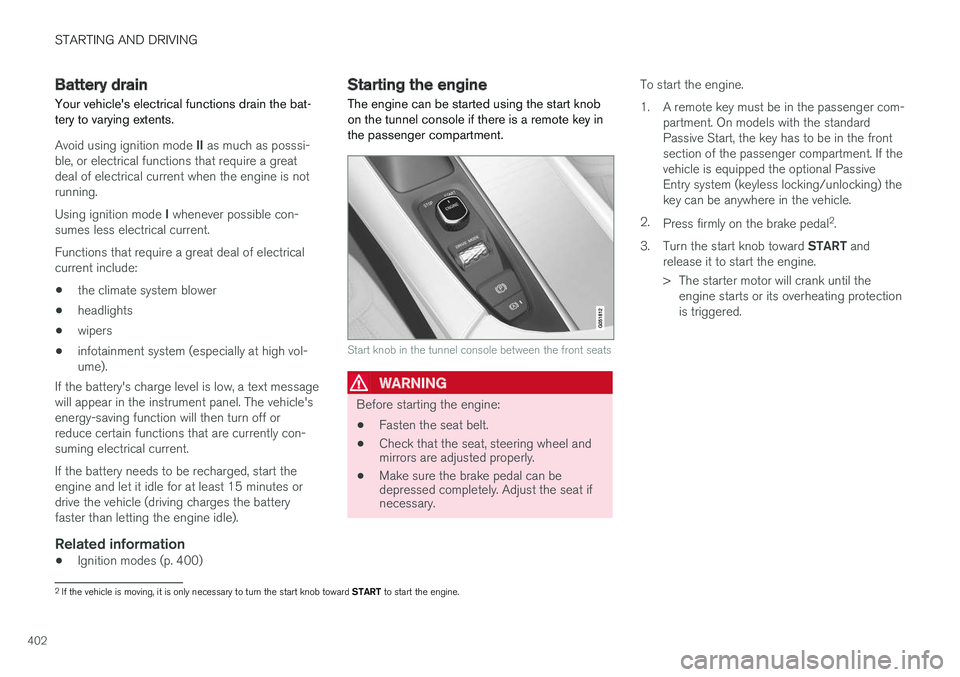
The engine can be started using the start knobon the tunnel console if there is a remote key inthe passenger compartment.
Start knob in the tunnel console between the front seats
WARNING
Before starting the engine:
•Fasten the seat belt.
•Check that the seat, steering wheel andmirrors are adjusted properly.
•Make sure the brake pedal can bedepressed completely. Adjust the seat ifnecessary.
To start the engine.
1.A remote key must be in the passenger com-partment. On models with the standardPassive Start, the key has to be in the frontsection of the passenger compartment. If thevehicle is equipped the optional PassiveEntry system (keyless locking/unlocking) thekey can be anywhere in the vehicle.
2.Press firmly on the brake pedal2.
3.Turn the start knob toward START andrelease it to start the engine.
> The starter motor will crank until theengine starts or its overheating protectionis triggered.
2If the vehicle is moving, it is only necessary to turn the start knob toward START to start the engine.
Page 417 of 584

STARTING AND DRIVING
}}
415
Hybrid battery charge status
The hybrid battery's charge status (level) is indi-cated by an LED light in the vehicle's chargingsocket and in the instrument panel.
Indicator LED in the vehicle's charging
socket
LED indicator light in the charging socket
The LED indicator light shows the current chargestatus while charging is underway. White, red, yel-low or yellow lights are activated when the pas-senger compartment lighting illuminates andremain on for a short time after the passengercompartment lighting has gone out.
LEDindica-tor light'scolor
Explanation
WhiteCourtesy light
YellowStandby mode (e.g., after a doorhas been opened or if thecharger coupling is not lockedin position in the chargingsocket): waiting for charging tobegin
FlashinggreenCharging is in progress (theslower the light flashes, thecloser the battery is to beingfully charged)
GreenCharging completed (the lightwill go out after a short time)
RedA fault has occurred
Charge status in the instrument panel
Charging status is indicated in the instrumentpanel using graphics and text. This information isdisplayed for as long as the instrument panel isactive.
If the instrument panel is not used for a shortperiod, it will switch off to help save electrical cur-rent and can be reactivated by:
•Pressing the brake pedal
•Opening one of the doors
•Turning the start knob to ignition mode I
Page 419 of 584
STARTING AND DRIVING
}}
417
Charger status indicators
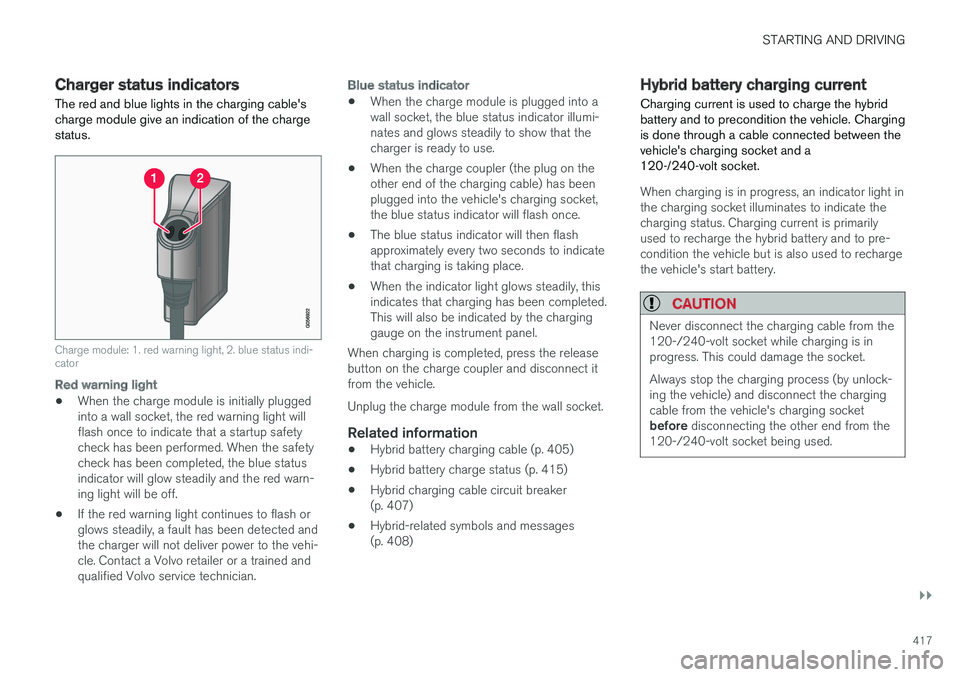
The red and blue lights in the charging cable'scharge module give an indication of the chargestatus.
Charge module: 1. red warning light, 2. blue status indi-cator
Red warning light
•When the charge module is initially pluggedinto a wall socket, the red warning light willflash once to indicate that a startup safetycheck has been performed. When the safetycheck has been completed, the blue statusindicator will glow steadily and the red warn-ing light will be off.
•If the red warning light continues to flash orglows steadily, a fault has been detected andthe charger will not deliver power to the vehi-cle. Contact a Volvo retailer or a trained andqualified Volvo service technician.
Blue status indicator
•When the charge module is plugged into awall socket, the blue status indicator illumi-nates and glows steadily to show that thecharger is ready to use.
•When the charge coupler (the plug on theother end of the charging cable) has beenplugged into the vehicle's charging socket,the blue status indicator will flash once.
•The blue status indicator will then flashapproximately every two seconds to indicatethat charging is taking place.
•When the indicator light glows steadily, thisindicates that charging has been completed.This will also be indicated by the charginggauge on the instrument panel.
When charging is completed, press the releasebutton on the charge coupler and disconnect itfrom the vehicle.
Unplug the charge module from the wall socket.
Related information
•Hybrid battery charging cable (p. 405)
•Hybrid battery charge status (p. 415)
•Hybrid charging cable circuit breaker(p. 407)
•Hybrid-related symbols and messages(p. 408)
Hybrid battery charging current
Charging current is used to charge the hybridbattery and to precondition the vehicle. Chargingis done through a cable connected between thevehicle's charging socket and a120-/240-volt socket.
When charging is in progress, an indicator light inthe charging socket illuminates to indicate thecharging status. Charging current is primarilyused to recharge the hybrid battery and to pre-condition the vehicle but is also used to rechargethe vehicle's start battery.
CAUTION
Never disconnect the charging cable from the120-/240-volt socket while charging is inprogress. This could damage the socket.
Always stop the charging process (by unlock-ing the vehicle) and disconnect the chargingcable from the vehicle's charging socketbefore disconnecting the other end from the120-/240-volt socket being used.
Page 507 of 584
MAINTENANCE AND SERVICING
}}
505
Emission inspection readiness
How do states use OBD II for emission
inspections?
Many states connect a computer directly to avehicle's OBD II system. The inspector can thenread "faults." In some states, this type of inspec-tion has replaced the tailpipe emission test.
How can my vehicle fail OBD II emission
inspection?
Your vehicle can fail OBD II emission inspectionfor any of the following reasons.
•If your Check Engine (MIL) light is lit, yourvehicle may fail inspection.
•If your vehicle's Check Engine light was lit,but went out without any action on your part,OBD II will still have a recorded fault. Yourvehicle may pass or fail, depending on theinspection practices in your area.
•If you had recent service that required dis-connecting the battery, OBD II diagnosticinformation may be incomplete and "notready" for inspection. A vehicle that is notready may fail inspection.
How can I prepare for my next OBD II
emission inspection?
•If your Check Engine (MIL) light is lit – or waslit but went out without service, have your
vehicle diagnosed and, if necessary, servicedby a qualified Volvo technician.
•If you recently had service for a lit CheckEngine light, or if you had service thatrequired disconnecting the battery, a periodof driving is necessary to bring the OBD IIsystem to "ready" for inspection. Two half-hour trips of mixed stop-and-go/highwaydriving are typically needed to allow OBD II toreach readiness. Your Volvo retailer can pro-vide you with more information on planning atrip.
•Maintain your vehicle in accordance with yourvehicle's maintenance schedule.
Owner maintenance
Periodic maintenance requirements and intervalsare described in your vehicle's Warranty andService Records Information booklet.
The following points can be carried out betweenthe normally scheduled maintenance services.
Each time the car is refueled:
•Check the engine oil level.
•Clean the windshield, windshield wipers,headlights, and taillights.
Monthly:
•Check cold tire pressure in all tires. Inspectthe tires for wear.
•Check that engine coolant and other fluidlevels are between the indicated "min" and"max" markings.
•Clean interior glass surfaces with a glasscleaner and soft paper towels.
•Wipe driver information displays with a softcloth.
•Visually inspect battery terminals for corro-sion. Corrosion may indicate a loose terminalconnector, or a battery near the end of itsuseful service life. Consult your Volvo retailerfor additional information.
As needed:
Wash the car, including the undercarriage, toreduce wear that can be caused by a buildup ofdirt, and corrosion that can be caused by salt res-idues.
Clean leaves and twigs from air intake vents atthe base of the windshield, and from other placeswhere they may collect.
NOTE
Complete service information for qualifiedtechnicians is available online for purchase orsubscription at www.volvotechinfo.com.
Page 532 of 584

MAINTENANCE AND SERVICING
530
Replacing bulbs
The halogen headlight bulbs3 can be replacedby the owner.
Before the halogen headlight bulbs can bereplaced, that plastic covering over the headlighthousing has to be removed.
NOTE
Halogen headlights are not available on allmodels or in all markets.
Consult your Volvo retailer if you are uncertainabout the type of headlights in your vehicle.
To do so:
Lift the rubber strip by pressing in toward theengine compartment.
Release the pins in the plastic covering'sfour clips by pressing them down with ascrewdriver or similar object and remove thecovering.
The turn signal, high/low beam, Daytime RunningLight and parking light bulbs will be accessiblewhen the plastic covering has been removed.
Put the covering back in place in the reverseorder.
NOTE
The pins in the clips have to be pressed backcompletely before the clips are placed in theplastic covering.
When the covering is put back in place, thepins must be pressed so that their upper sur-face is flush with the surface of the clip.
3Halogen headlights are not available on all models.