warning YAMAHA AEROX50 2014 Owners Manual
[x] Cancel search | Manufacturer: YAMAHA, Model Year: 2014, Model line: AEROX50, Model: YAMAHA AEROX50 2014Pages: 78, PDF Size: 4.05 MB
Page 3 of 78
INTRODUCTION
EAU10114
Welcome to the Yamaha world of motorcycling!
As the owner of the NS50F, you are benefiting from Yamaha’s vast experience and newest technology regarding the design
and manufacture of high-quality products, which have earned Yamaha a reputation for dependability.
Please take the time to read this manual thoroughly, so as to enjoy all advantages of your NS50F. The Owner’s Manual does
not only instruct you in how to operate, inspect and maintain your scooter, but also in how to safeguard yourself and others
from trouble and injury.
In addition, the many tips given in this manual will help keep your scooter in the best possible condition. If you have any
further questions, do not hesitate to contact your Yamaha dealer.
The Yamaha team wishes you many safe and pleasant rides. So, remember to put safety first!
Yamaha continually seeks advancements in product design and quality. Therefore, while this manual contains the most cur-
rent product information available at the time of printing, there may be minor discrepancies between your scooter and this
manual. If there is any question concerning this manual, please consult a Yamaha dealer.
WARNING
EWA12412
Please read this manual carefully and completely before operating this scooter.
U1GBE0E0.book Page 1 Wednesday, June 26, 2013 4:04 PM
Page 4 of 78
IMPORTANT MANUAL INFORMATION
EAU10134
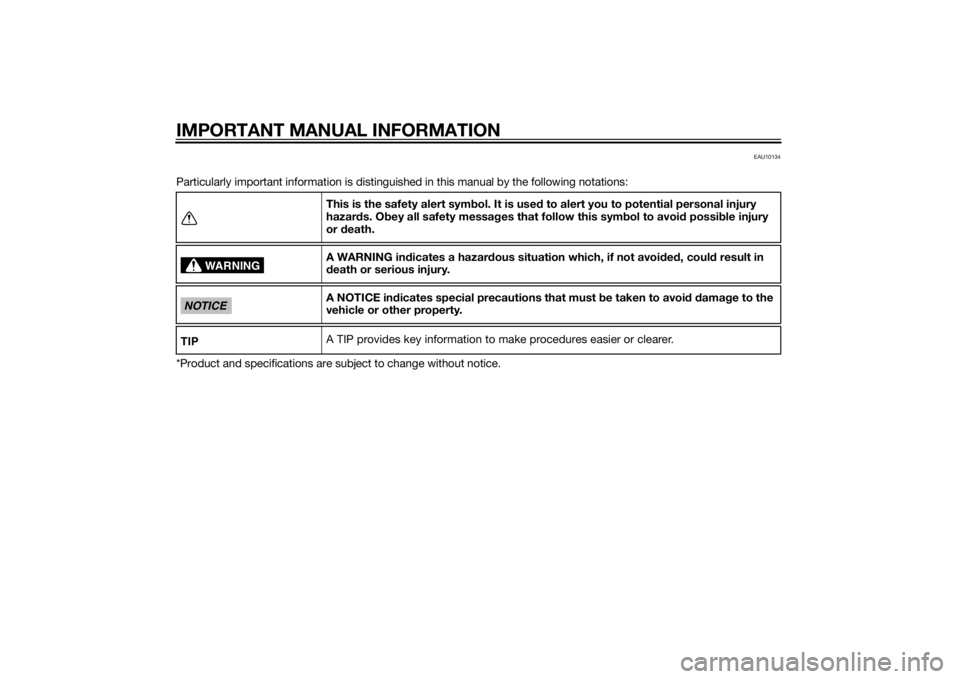
Particularly important information is distinguished in this manual by the following notations:
*Product and specifications are subject to change without notice.This is the safety alert symbol. It is used to alert you to potential personal injury
hazards. Obey all safety messages that follow this symbol to avoid possible injury
or death.
A WARNING indicates a hazardous situation which, if not avoided, could result in
death or serious injury.
A NOTICE indicates special precautions that must be taken to avoid damage to the
vehicle or other property.
A TIP provides key information to make procedures easier or clearer.
WARNING
NOTICETIP
U1GBE0E0.book Page 1 Wednesday, June 26, 2013 4:04 PM
Page 6 of 78

TABLE OF CONTENTSSAFETY INFORMATION.................. 1-1
Further safe-riding points ............... 1-5
DESCRIPTION.................................. 2-1
Left view ......................................... 2-1
Right view ....................................... 2-2
Controls and instruments ............... 2-3
INSTRUMENT AND CONTROL
FUNCTIONS...................................... 3-1
Main switch/steering lock............... 3-1
Indicator lights and warning
lights............................................ 3-2
Multi-function display ..................... 3-3
Handlebar switches ........................ 3-6
Front brake lever ............................ 3-7
Rear brake lever ............................. 3-7
Fuel tank cap .................................. 3-8
Fuel ................................................. 3-8
Catalytic converter ....................... 3-10
Kickstarter .................................... 3-10
Seats ............................................ 3-11
Storage compartment .................. 3-12
FOR YOUR SAFETY –
PRE-OPERATION CHECKS............. 4-1
OPERATION AND IMPORTANT
RIDING POINTS................................ 5-1
Starting a cold engine .................... 5-1
Starting off ...................................... 5-2Acceleration and deceleration ........ 5-2
Braking ............................................ 5-3
Tips for reducing fuel
consumption ................................ 5-3
Engine break-in ............................... 5-4
Parking ............................................ 5-4
PERIODIC MAINTENANCE AND
ADJUSTMENT................................... 6-1
Periodic maintenance chart for the
emission control system .............. 6-2
General maintenance and
lubrication chart ........................... 6-3
Removing and installing the
cowling and panel........................ 6-6
Checking the spark plug ................. 6-7
Engine oil and oil strainer ................ 6-9
Final transmission oil..................... 6-11
Coolant.......................................... 6-12
Replacing the air filter element
and cleaning the check hose..... 6-13
Checking the throttle grip free
play ............................................ 6-14
Valve clearance ............................. 6-14
Tires .............................................. 6-15
Cast wheels................................... 6-17
Checking the front and rear brake
lever free play ............................ 6-17
Checking the front and rear brake
pads ........................................... 6-18
Checking the brake fluid level ....... 6-18Changing the brake fluid .............. 6-20
Checking and lubricating the
cables ........................................ 6-20
Checking and lubricating the
throttle grip and cable ............... 6-20
Lubricating the front and rear
brake levers ............................... 6-21
Checking and lubricating the
centerstand ............................... 6-21
Checking the front fork ................. 6-22
Checking the steering................... 6-23
Checking the wheel bearings ....... 6-23
Battery .......................................... 6-23
Replacing the fuse ........................ 6-25
Replacing the headlight bulb ........ 6-26
Replacing the tail/brake light
bulb ........................................... 6-27
Replacing a turn signal light
bulb ........................................... 6-27
License plate light......................... 6-28
Replacing the auxiliary light bulb
(for CHE) .................................... 6-28
Troubleshooting............................ 6-29
Troubleshooting charts................. 6-30
SCOOTER CARE AND STORAGE... 7-1
Matte color caution......................... 7-1
Care ................................................ 7-1
Storage ........................................... 7-4U1GBE0E0.book Page 1 Wednesday, June 26, 2013 4:04 PM
Page 8 of 78

1-1
1
SAFETY INFORMATION
EAUT1019
Be a Responsible Owner
As the vehicle’s owner, you are re-
sponsible for the safe and proper oper-
ation of your scooter.
Scooters are single-track vehicles.
Their safe use and operation are de-
pendent upon the use of proper riding
techniques as well as the expertise of
the operator. Every operator should
know the following requirements be-
fore riding this scooter.
He or she should:
Obtain thorough instructions from
a competent source on all aspects
of scooter operation.
Observe the warnings and mainte-
nance requirements in this Own-
er’s Manual.
Obtain qualified training in safe
and proper riding techniques.
Obtain professional technical ser-
vice as indicated in this Owner’s
Manual and/or when made neces-
sary by mechanical conditions.Never operate a scooter without
proper training or instruction. Take
a training course. Beginners
should receive training from a cer-
tified instructor. Contact an autho-
rized scooter dealer to find out
about the training courses nearest
you.
Safe Riding
Perform the pre-operation checks
each time you use the vehicle to make
sure it is in safe operating condition.
Failure to inspect or maintain the vehi-
cle properly increases the possibility of
an accident or equipment damage.
See page 4-1 for a list of pre-operation
checks.
This scooter is designed to carry
the operator and a passenger.
TIPAlthough this scooter is designed to
carry a passenger, always comply with
the local regulations.The failure of motorists to detect
and recognize scooters in traffic is
the predominating cause of auto-
mobile/scooter accidents. Manyaccidents have been caused by
an automobile driver who did not
see the scooter. Making yourself
conspicuous appears to be very
effective in reducing the chance of
this type of accident.
Therefore:
• Wear a brightly colored jacket.
• Use extra caution when you are
approaching and passing
through intersections, since in-
tersections are the most likely
places for scooter accidents to
occur.
• Ride where other motorists can
see you. Avoid riding in another
motorist’s blind spot.
• Never maintain a scooter with-
out proper knowledge. Contact
an authorized scooter dealer to
inform you on basic scooter
maintenance. Certain mainte-
nance can only be carried out
by certified staff.
U1GBE0E0.book Page 1 Wednesday, June 26, 2013 4:04 PM
Page 17 of 78
INSTRUMENT AND CONTROL FUNCTIONS
3-1
3
EAU10462
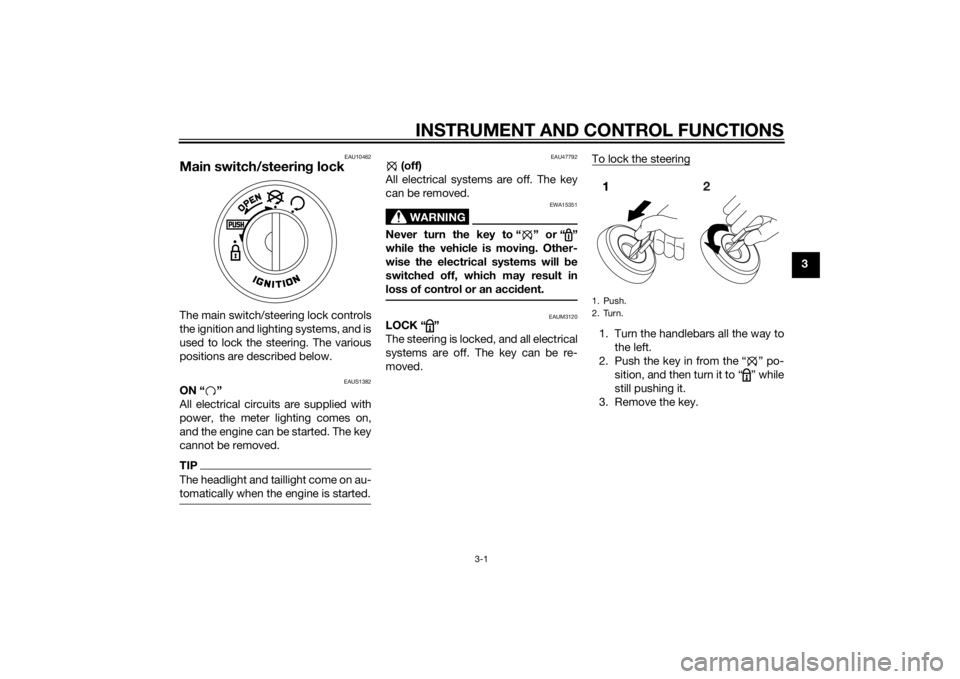
Main switch/steering lockThe main switch/steering lock controls
the ignition and lighting systems, and is
used to lock the steering. The various
positions are described below.
EAUS1382
ON “ ”
All electrical circuits are supplied with
power, the meter lighting comes on,
and the engine can be started. The key
cannot be removed.TIPThe headlight and taillight come on au-
tomatically when the engine is started.
EAU47792
(off)
All electrical systems are off. The key
can be removed.
WARNING
EWA15351
Never turn the key to “ ” or “ ”
while the vehicle is moving. Other-
wise the electrical systems will be
switched off, which may result in
loss of control or an accident.
EAUM3120
LOCK “ ”
The steering is locked, and all electrical
systems are off. The key can be re-
moved.To lock the steering
1. Turn the handlebars all the way to
the left.
2. Push the key in from the “ ” po-
sition, and then turn it to “ ” while
still pushing it.
3. Remove the key.1. Push.
2. Turn.
U1GBE0E0.book Page 1 Wednesday, June 26, 2013 4:04 PM
Page 18 of 78
INSTRUMENT AND CONTROL FUNCTIONS
3-2
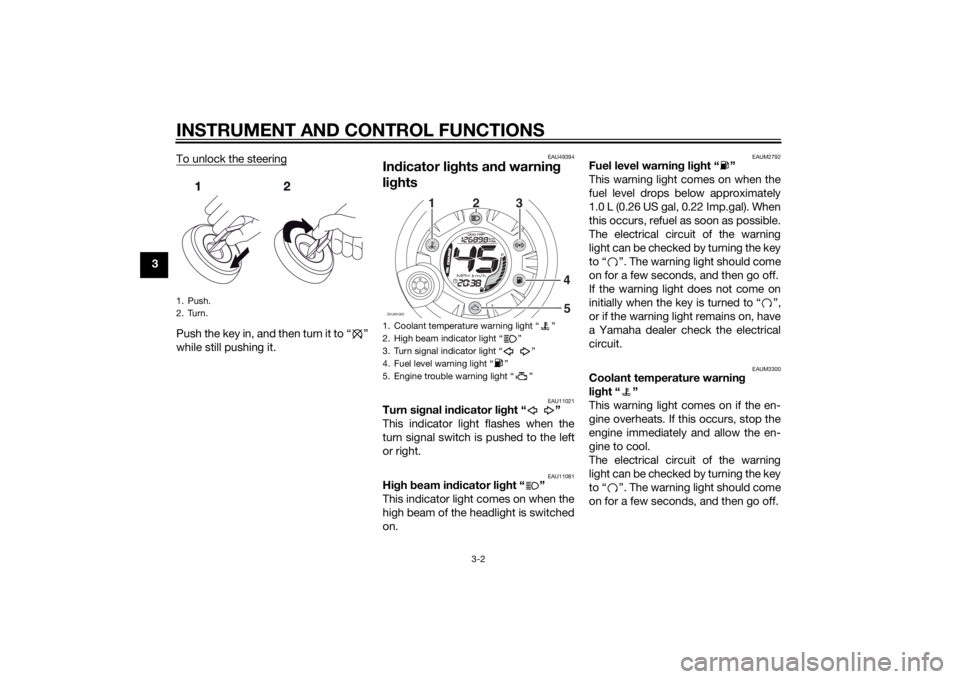
3To unlock the steering
Push the key in, and then turn it to “ ”
while still pushing it.
EAU49394
Indicator lights and warning
lights
EAU11021
Turn signal indicator light “ ”
This indicator light flashes when the
turn signal switch is pushed to the left
or right.
EAU11081
High beam indicator light “ ”
This indicator light comes on when the
high beam of the headlight is switched
on.
EAUM2792
Fuel level warning light “ ”
This warning light comes on when the
fuel level drops below approximately
1.0 L (0.26 US gal, 0.22 Imp.gal). When
this occurs, refuel as soon as possible.
The electrical circuit of the warning
light can be checked by turning the key
to “ ”. The warning light should come
on for a few seconds, and then go off.
If the warning light does not come on
initially when the key is turned to “ ”,
or if the warning light remains on, have
a Yamaha dealer check the electrical
circuit.
EAUM3300
Coolant temperature warning
light “ ”
This warning light comes on if the en-
gine overheats. If this occurs, stop the
engine immediately and allow the en-
gine to cool.
The electrical circuit of the warning
light can be checked by turning the key
to “ ”. The warning light should come
on for a few seconds, and then go off.
1. Push.
2. Turn.
1. Coolant temperature warning light “ ”
2. High beam indicator light “ ”
3. Turn signal indicator light “ ”
4. Fuel level warning light “ ”
5. Engine trouble warning light “ ”ZAUM1062
O
IL CHA
NGE
12
3
4
5
U1GBE0E0.book Page 2 Wednesday, June 26, 2013 4:04 PM
Page 19 of 78
INSTRUMENT AND CONTROL FUNCTIONS
3-3
3 If the warning light does not come on
initially when the key is turned to “ ”,
or if the warning light remains on, have
a Yamaha dealer check the electrical
circuit.
NOTICE
ECA10022
Do not continue to operate the en-
gine if it is overheating.TIPIf the engine overheats, see page 6-31
for further instructions.
EAU54432
Engine trouble warning light “ ”
This warning light flashes or stays on if
an electrical circuit monitoring the en-
gine is not working correctly. If this oc-
curs, have a Yamaha dealer check the
self-diagnosis system.
The electrical circuit of the warning
light can be checked by turning the key
to “ ”. The warning light should come
on for a few seconds, and then go off.If the warning light does not come on
initially when the key is turned to “ ”,
or if the warning light remains on, have
a Yamaha dealer check the electrical
circuit.
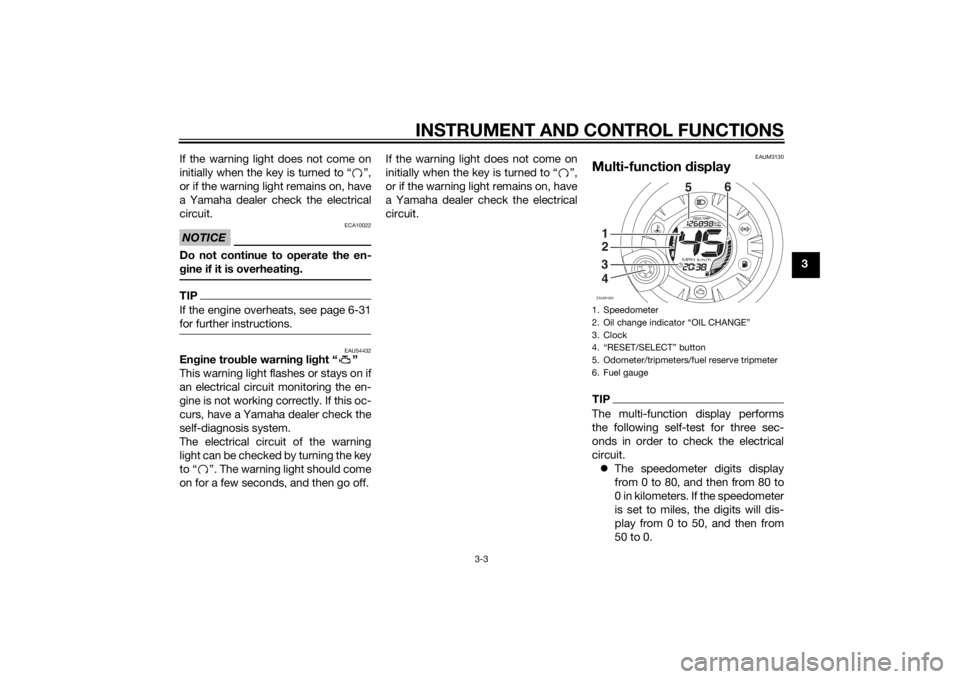
EAUM3130
Multi-function displayTIPThe multi-function display performs
the following self-test for three sec-
onds in order to check the electrical
circuit.
The speedometer digits display
from 0 to 80, and then from 80 to
0 in kilometers. If the speedometer
is set to miles, the digits will dis-
play from 0 to 50, and then from
50 to 0.1. Speedometer
2. Oil change indicator “OIL CHANGE”
3. Clock
4. “RESET/SELECT” button
5. Odometer/tripmeters/fuel reserve tripmeter
6. Fuel gaugeZAUM1063
O
I
L CHA
NGE56
1
3
42
U1GBE0E0.book Page 3 Wednesday, June 26, 2013 4:04 PM
Page 20 of 78
INSTRUMENT AND CONTROL FUNCTIONS
3-4
3All LCD segments and warning
lights come on and then go off.
WARNING
EWA12313
Be sure to stop the vehicle before
making any setting changes to the
multi-function display. Changing
settings while riding can distract the
operator and increase the risk of an
accident.The multi-function display is equipped
with the following:
a digital clock
a digital speedometer (which
shows riding speed)
an odometer (which shows the to-
tal distance traveled)
a tripmeter (which shows the dis-
tance traveled since it was last set
to zero)
a fuel reserve tripmeter (which
shows the distance traveled on
the fuel reserve)
an oil change indicator (which
shows when the engine oil should
be changed)
a fuel gauge
a self-diagnosis device
TIPBe sure to turn the key to “ ” be-
fore using the “RESET/SELECT”
button.
For the U.K. only: To switch the
speedometer and odometer/trip-
meter displays between kilome-
ters and miles, when the main
switch is turned to “ ”, press the
“RESET/SELECT” button for at
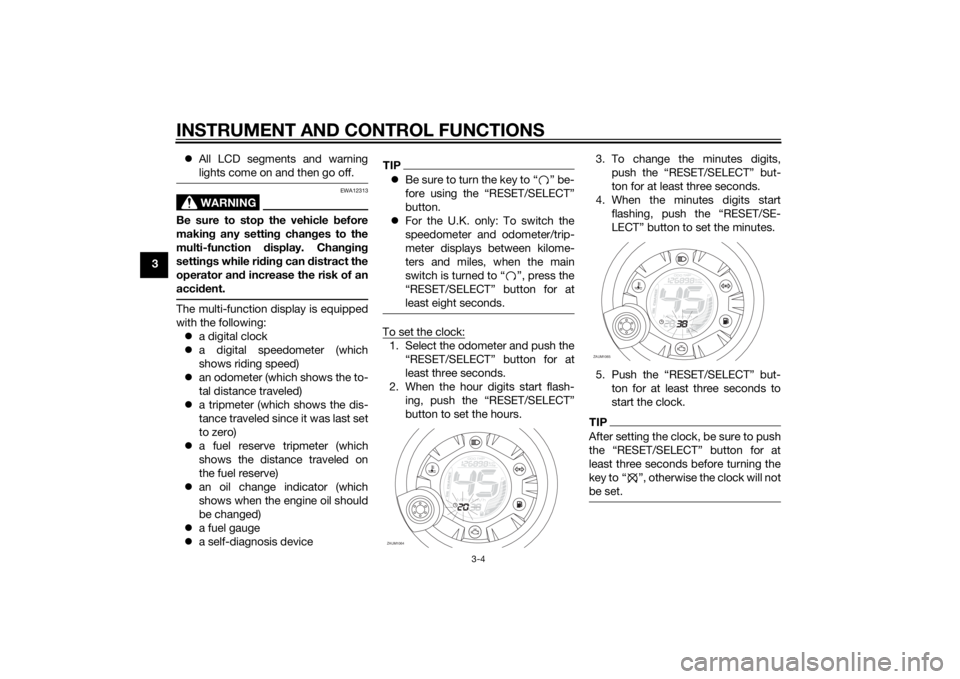
least eight seconds.To set the clock:1. Select the odometer and push the
“RESET/SELECT” button for at
least three seconds.
2. When the hour digits start flash-
ing, push the “RESET/SELECT”
button to set the hours.3. To change the minutes digits,
push the “RESET/SELECT” but-
ton for at least three seconds.
4. When the minutes digits start
flashing, push the “RESET/SE-
LECT” button to set the minutes.
5. Push the “RESET/SELECT” but-
ton for at least three seconds to
start the clock.
TIPAfter setting the clock, be sure to push
least three seconds before turning the
key to Ž, otherwise the clock will not
be set.
ZAUM1064
O
IL CHA
NGE
ZAUM1065
O
IL
CHAN
GE
U1GBE0E0.book Page 4 Wednesday, June 26, 2013 4:04 PM
Page 21 of 78
INSTRUMENT AND CONTROL FUNCTIONS
3-5
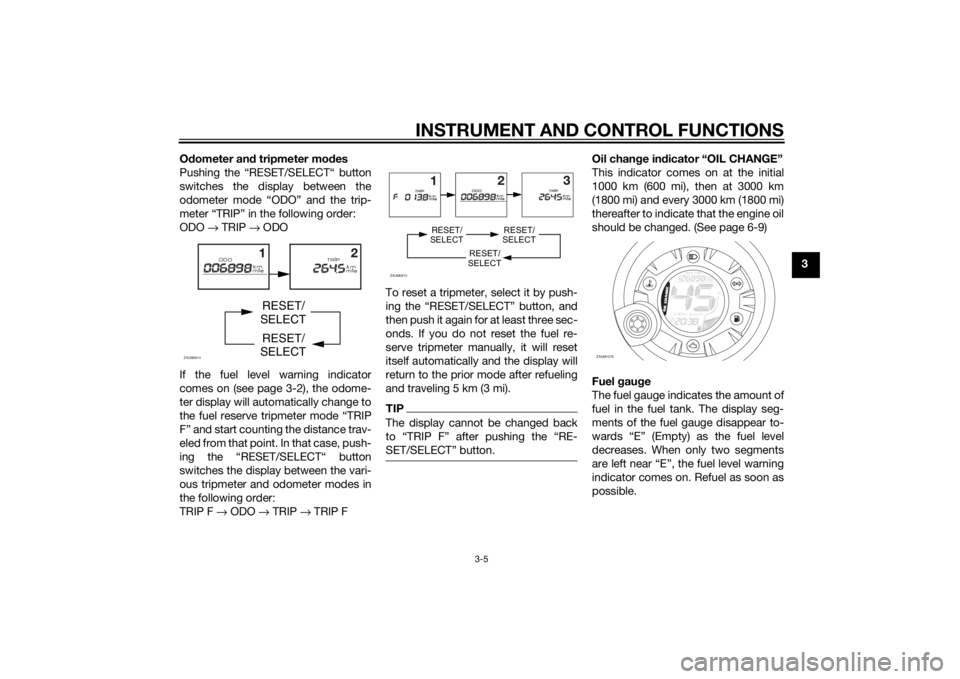
3 Odometer and tripmeter modes
Pushing the “RESET/SELECT“ button
switches the display between the
odometer mode “ODO” and the trip-
meter “TRIP” in the following order:
ODO → TRIP → ODO
If the fuel level warning indicator
comes on (see page 3-2), the odome-
ter display will automatically change to
the fuel reserve tripmeter mode “TRIP
F” and start counting the distance trav-
eled from that point. In that case, push-
ing the “RESET/SELECT“ button
switches the display between the vari-
ous tripmeter and odometer modes in
the following order:
TRIP F → ODO → TRIP → TRIP FTo reset a tripmeter, select it by push-
ing the “RESET/SELECT” button, and
then push it again for at least three sec-
onds. If you do not reset the fuel re-
serve tripmeter manually, it will reset
itself automatically and the display will
return to the prior mode after refueling
and traveling 5 km (3 mi).
TIPThe display cannot be changed back
SET/SELECTŽ button.
Oil change indicator “OIL CHANGE”
This indicator comes on at the initial
1000 km (600 mi), then at 3000 km
(1800 mi) and every 3000 km (1800 mi)
thereafter to indicate that the engine oil
should be changed. (See page 6-9)
Fuel gauge
The fuel gauge indicates the amount of
fuel in the fuel tank. The display seg-
ments of the fuel gauge disappear to-
wards “E” (Empty) as the fuel level
decreases. When only two segments
are left near “E”, the fuel level warning
indicator comes on. Refuel as soon as
possible.
ZAUM0914
RESET/
SELECT
RESET/
SELECT
ZAUM0915
RESET/
SELECT
RESET/
SELECT
RESET/
SELECT
ZAUM1078
O
IL
CHAN
GE
U1GBE0E0.book Page 5 Wednesday, June 26, 2013 4:04 PM
Page 22 of 78
INSTRUMENT AND CONTROL FUNCTIONS
3-6
3
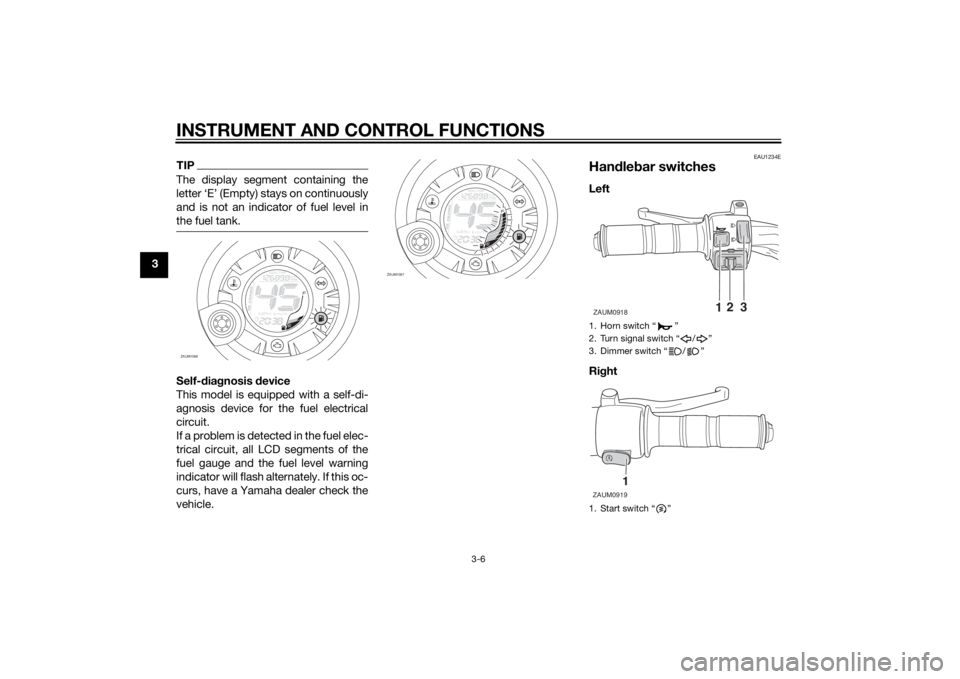
TIPThe display segment containing the
letter ‘E’ (Empty) stays on continuously
and is not an indicator of fuel level in
the fuel tank.Self-diagnosis device
This model is equipped with a self-di-
agnosis device for the fuel electrical
circuit.
If a problem is detected in the fuel elec-
trical circuit, all LCD segments of the
fuel gauge and the fuel level warning
indicator will flash alternately. If this oc-
curs, have a Yamaha dealer check the
vehicle.
EAU1234E
Handlebar switchesLeft
Right
ZAUM1066
O
IL
CHAN
GE
ZAUM1067
O
IL
CHAN
GE
1. Horn switch “ ”
2. Turn signal switch “ / ”
3. Dimmer switch “ / ”
1. Start switch “ ”ZAUM0918
12
3
1
ZAUM0919
U1GBE0E0.book Page 6 Wednesday, June 26, 2013 4:04 PM