light YAMAHA FJR1300A 2014 User Guide
[x] Cancel search | Manufacturer: YAMAHA, Model Year: 2014, Model line: FJR1300A, Model: YAMAHA FJR1300A 2014Pages: 118, PDF Size: 3.29 MB
Page 21 of 118
INSTRUMENT AND CONTROL FUNCTIONS
3-6
3
Try to reset the traction control system
and the lights by following the proce-
dures under “Resetting” on page 3-29.
EAU54681
Immo bilizer system in dicator
lig ht “ ”
The electrical circuit of the indicator
light can be checked by turning the key
to “ON”. The indicator light should
come on for a few seconds, and then
go off.
If the indicator light does not come on
initially when the key is turned to “ON”,
or if the indicator light remains on, have
a Yamaha dealer check the electrical
circuit. When the key is turned to “OFF” and
30 seconds have passed, the indicator
light will start flashing indicating the im-
mobilizer system is enabled. After 24
hours have passed, the indicator light
will stop flashing, however the immobi-
lizer system is still enabled.
The self-diagnosis device also detects
problems in the immobilizer system
circuits. (See page 3-22 for an expla-
nation of the self-diagnosis device.)
EAU54191
Cruise control systemThis model is equipped with a cruise
control system designed to maintain a
set cruising speed.
The cruise control system operates
only when riding in 3rd gear at speeds
between about 50 km/h (31 mi/h) and
160 km/h (100 mi/h), or 4th or 5th gear
at speeds between about 50 km/h (31
mi/h) and 180 km/h (112 mi/h).
WARNING
EWA16341
Improper use of the cruise con-
trol system may result in loss of
control, which coul d lea d to an
acci dent. Do not activate the
cruise control system in heavy
traffic, poor weather con ditions,
or amon g win din g, slippery,
hilly, rou gh or g ravel roa ds.
When travelin g uphill or d own-
hill, the cruise control system
may not be ab le to maintain the
set cruising speed.
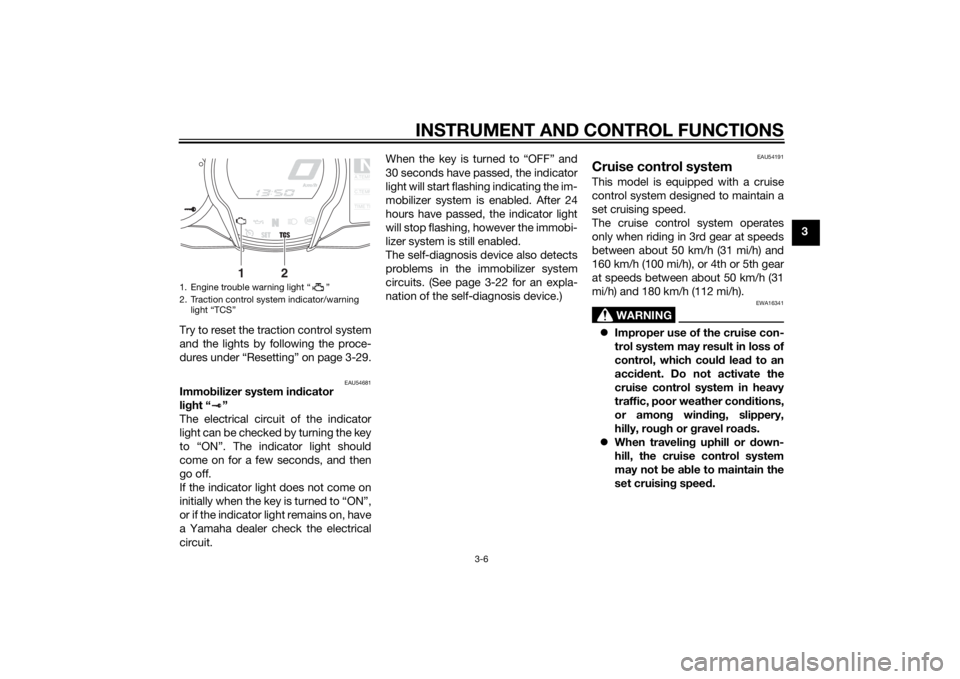
1. Engine trouble warning light “ ”
2. Traction control system indicator/warning
light “TCS”
NA.TEM
P
C.TEM
P
TIME T
R
2
1
U1MCE1E0.book Page 6 Thursday, August 8, 2013 9:03 AM
Page 22 of 118
INSTRUMENT AND CONTROL FUNCTIONS
3-7
3
To prevent acci dentally activat-
in g the cruise control system,
turn it off when not in use. Make
sure that the cruise control sys-
tem ind icator light “ ” is off.
Activatin g an d settin g the cruise
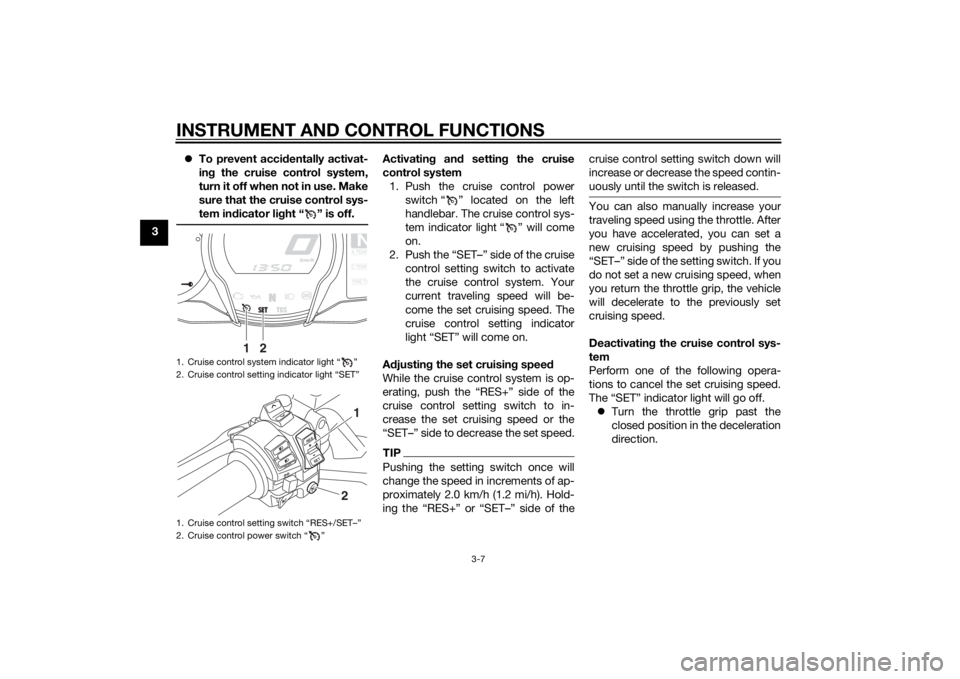
control system 1. Push the cruise control power switch “ ” located on the left
handlebar. The cruise control sys-
tem indicator light “ ” will come
on.
2. Push the “SET–” side of the cruise control setting switch to activate
the cruise control system. Your
current traveling speed will be-
come the set cruising speed. The
cruise control setting indicator
light “SET” will come on.
A djustin g the set cruisin g speed
While the cruise control system is op-
erating, push the “RES+” side of the
cruise control setting switch to in-
crease the set cruising speed or the
“SET–” side to decrease the set speed.TIPPushing the setting switch once will
change the speed in increments of ap-
proximately 2.0 km/h (1.2 mi/h). Hold-
ing the “RES+” or “SET–” side of the cruise control setting switch down will
increase or decrease the speed contin-
uously until the switch is released.
You can also manually increase your
traveling speed using the throttle. After
you have accelerated, you can set a
new cruising speed by pushing the
“SET–” side of the setting switch. If you
do not set a new cruising speed, when
you return the throttle grip, the vehicle
will decelerate to the previously set
cruising speed.
Deactivatin
g the cruise control sys-
tem
Perform one of the following opera-
tions to cancel the set cruising speed.
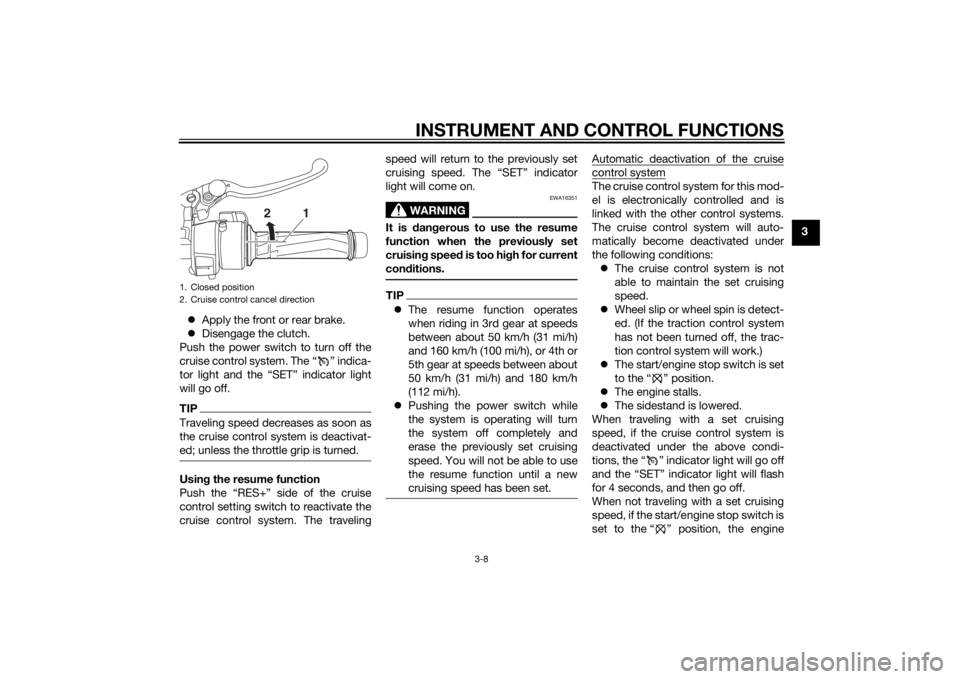
The “SET” indicator light will go off. Turn the throttle grip past the
closed position in the deceleration
direction.
1. Cruise control system indicator light “ ”
2. Cruise control setting indicator light “SET”
1. Cruise control setting switch “RES+/SET–”
2. Cruise control power switch “ ”
NA.TEM
P
C.TEM
P
TIME T
R
2
1
RESSET
PA S S
1
2
U1MCE1E0.book Page 7 Thursday, August 8, 2013 9:03 AM
Page 23 of 118
INSTRUMENT AND CONTROL FUNCTIONS
3-8
3
Apply the front or rear brake.
Disengage the clutch.
Push the power switch to turn off the
cruise control system. The “ ” indica-
tor light and the “SET” indicator light
will go off.
TIPTraveling speed decreases as soon as
the cruise control system is deactivat-
ed; unless the throttle grip is turned.Usin g the resume function
Push the “RES+” side of the cruise
control setting switch to reactivate the
cruise control system. The traveling speed will return to the previously set
cruising speed. The “SET” indicator
light will come on.
WARNING
EWA16351
It is d
angerous to use the resume
function when the previously set
cruisin g speed is too hi gh for current
con ditions.TIP The resume function operates
when riding in 3rd gear at speeds
between about 50 km/h (31 mi/h)
and 160 km/h (100 mi/h), or 4th or
5th gear at speeds between about
50 km/h (31 mi/h) and 180 km/h
(112 mi/h).
Pushing the power switch while
the system is operating will turn
the system off completely and
erase the previously set cruising
speed. You will not be able to use
the resume function until a new
cruising speed has been set.
Automatic deactivation of the cruisecontrol systemThe cruise control system for this mod-
el is electronically controlled and is
linked with the other control systems.
The cruise control system will auto-
matically become deactivated under
the following conditions:
The cruise control system is not
able to maintain the set cruising
speed.
Wheel slip or wheel spin is detect-
ed. (If the traction control system
has not been turned off, the trac-
tion control system will work.)
The start/engine stop switch is set
to the “ ” position.
The engine stalls.
The sidestand is lowered.
When traveling with a set cruising
speed, if the cruise control system is
deactivated under the above condi-
tions, the “ ” indicator light will go off
and the “SET” indicator light will flash
for 4 seconds, and then go off.
When not traveling with a set cruising
speed, if the start/engine stop switch is
set to the “ ” position, the engine
1. Closed position
2. Cruise control cancel direction
2
1
U1MCE1E0.book Page 8 Thursday, August 8, 2013 9:03 AM
Page 24 of 118
INSTRUMENT AND CONTROL FUNCTIONS
3-9
3stalls, or the sidestand is lowered, then
the “ ” indicator light will go off (the
“SET” indicator light will not flash).
If the cruise control system is automat-
ically deactivated, please stop and
confirm that your vehicle is in good op-
erating condition.
Before using the cruise control system
again, activate it using the power
switch.
TIPIn some cases, the cruise control sys-
tem may not be able to maintain the set
cruising speed when the vehicle is
traveling uphill or downhill.
When the vehicle is traveling up-
hill, the actual traveling speed may
become lower than the set cruis-
ing speed. If this occurs, acceler-
ate to the desired traveling speed
using the throttle.
When the vehicle is traveling
downhill, the actual traveling
speed may become higher than
the set cruising speed. If this oc-
curs, the setting switch cannot be
used to adjust the set cruising
speed. To reduce the traveling speed, apply the brakes. When
the brakes are applied, the cruise
control system will become deac-
tivated.
Self-
dia gnosis device
The cruise control system will also be-
come deactivated when an irregularity
with any of the vehicle systems is de-
tected. The “SET” indicator light will go
off and the “ ” indicator light will
flash. You will not be able to use the
cruise control system while the engine trouble warning light is on, or while the
cruise control system is malfunction-
ing.
WARNING
EWA16361
If the cruise control system is not
workin
g correctly, the “ ” in dicator
li g ht will flash. If this occurs, turn the
cruise control system off an d have a
Yamaha dealer check it.NOTICE
ECA11591
If the display in dicates an error co-
d e, the vehicle shoul d b e checked as
soon as possi ble in or der to avoi d
en gine damag e.
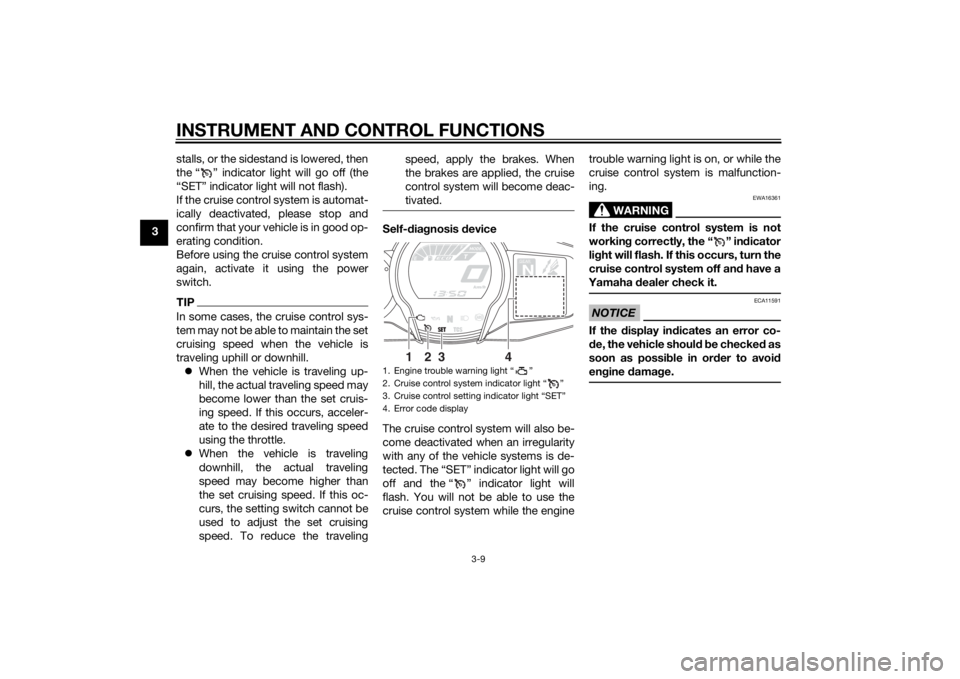
1. Engine trouble warning light “ ”
2. Cruise control system indicator light “ ”
3. Cruise control setting indicator light “SET”
4. Error code display
GEARN
25
A.TEMP ˚C
Lo
C.TEMP˚C
0:06
TIME TRIP
1
2
3
4
U1MCE1E0.book Page 9 Thursday, August 8, 2013 9:03 AM
Page 27 of 118
INSTRUMENT AND CONTROL FUNCTIONS
3-12
3
Select the transmission gear that
is appropriate for the vehicle
speed.
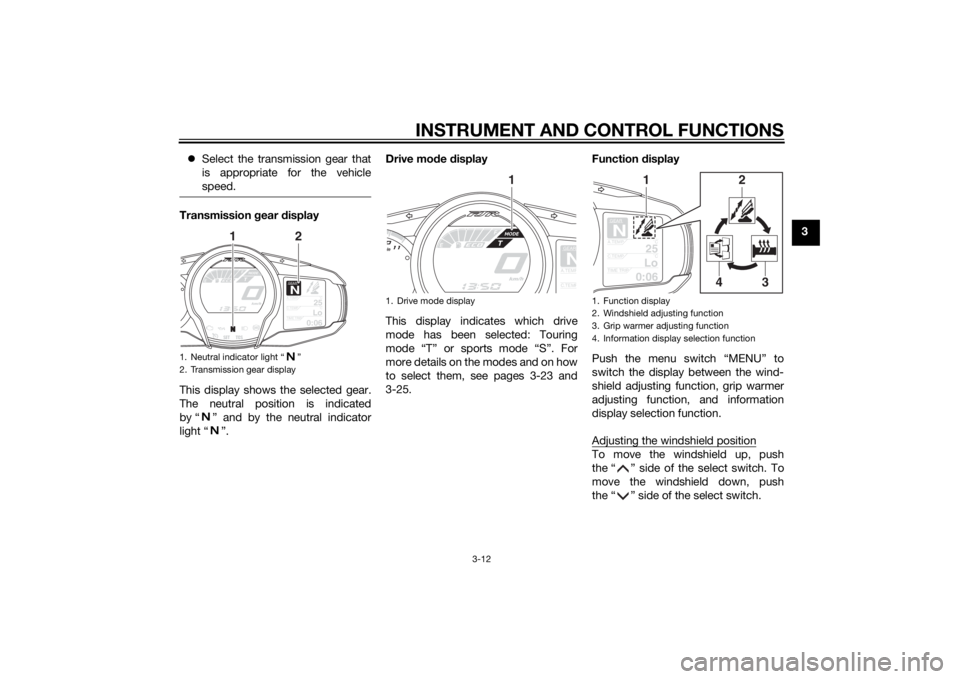
Transmission gear display
This display shows the selected gear.
The neutral position is indicated
by “ ” and by the neutral indicator
light “ ”. Drive mo
de display
This display indicates which drive
mode has been selected: Touring
mode “T” or sports mode “S”. For
more details on the modes and on how
to select them, see pages 3-23 and
3-25. Function
display
Push the menu switch “MENU” to
switch the display between the wind-
shield adjusting function, grip warmer
adjusting function, and information
display selection function.
Adjusting the windshield position
To move the windshield up, push
the “ ” side of the select switch. To
move the windshield down, push
the “ ” side of the select switch.
1. Neutral indicator light “ ”
2. Transmission gear display
GEARN
25
A.TEMP ˚C
Lo
C.TEMP˚C
0:06
TIME TRIP
1
2
1. Drive mode display
GEARNA.TEM
P
C.TEM
P
1
1. Function display
2. Windshield adjusting function
3. Grip warmer adjusting function
4. Information display selection function
GEARN
25
A.TEMP˚C
Lo
C.TEMP˚C
0:06
TIME TRIP
1
2
3
4
U1MCE1E0.book Page 12 Thursday, August 8, 2013 9:03 AM
Page 32 of 118
INSTRUMENT AND CONTROL FUNCTIONS
3-17
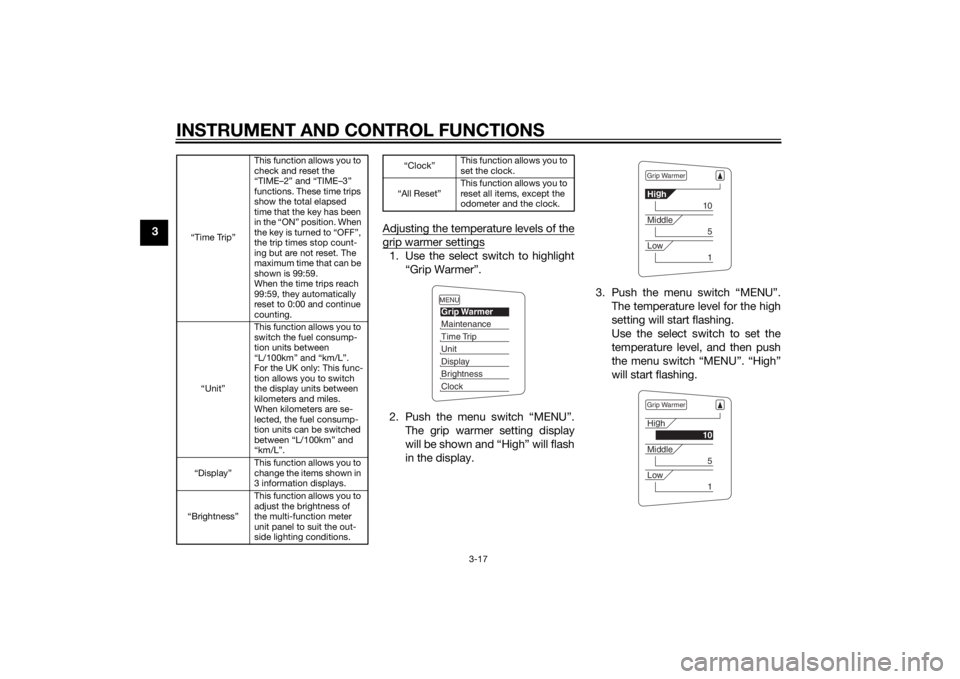
3Adjusting the temperature levels of the
grip warmer settings1. Use the select switch to highlight
“Grip Warmer”.
2. Push the menu switch “MENU”. The grip warmer setting display
will be shown and “High” will flash
in the display. 3. Push the menu switch “MENU”.
The temperature level for the high
setting will start flashing.
Use the select switch to set the
temperature level, and then push
the menu switch “MENU”. “High”
will start flashing.
“Time Trip” This function allows you to
check and reset the
“TIME–2” and “TIME–3”
functions. These time trips
show the total elapsed
time that the key has been
in the “ON” position. When
the key is turned to “OFF”,
the trip times stop count-
ing but are not reset. The
maximum time that can be
shown is 99:59.
When the time trips reach
99:59, they automatically
reset to 0:00 and continue
counting.
“Unit” This function allows you to
switch the fuel consump-
tion units between
“L/100km” and “km/L”.
For the UK only: This func-
tion allows you to switch
the display units between
kilometers and miles.
When kilometers are se-
lected, the fuel consump-
tion units can be switched
between “L/100km” and
“km/L”.
“Display” This function allows you to
change the items shown in
3 information displays.
“Brightness” This function allows you to
adjust the brightness of
the multi-function meter
unit panel to suit the out-
side lighting conditions.
“Clock”
This function allows you to
set the clock.
“All Reset” This function allows you to
reset all items, except the
odometer and the clock.
MENUGrip WarmerMaintenanceTime TripUnitDisplayBrightnessClock
Grip WarmerHi
g
h
10
Middle
5
Low
1
Grip WarmerHi g
h
10
Middle
5
Low
1
U1MCE1E0.book Page 17 Thursday, August 8, 2013 9:03 AM
Page 33 of 118
INSTRUMENT AND CONTROL FUNCTIONS
3-18
3
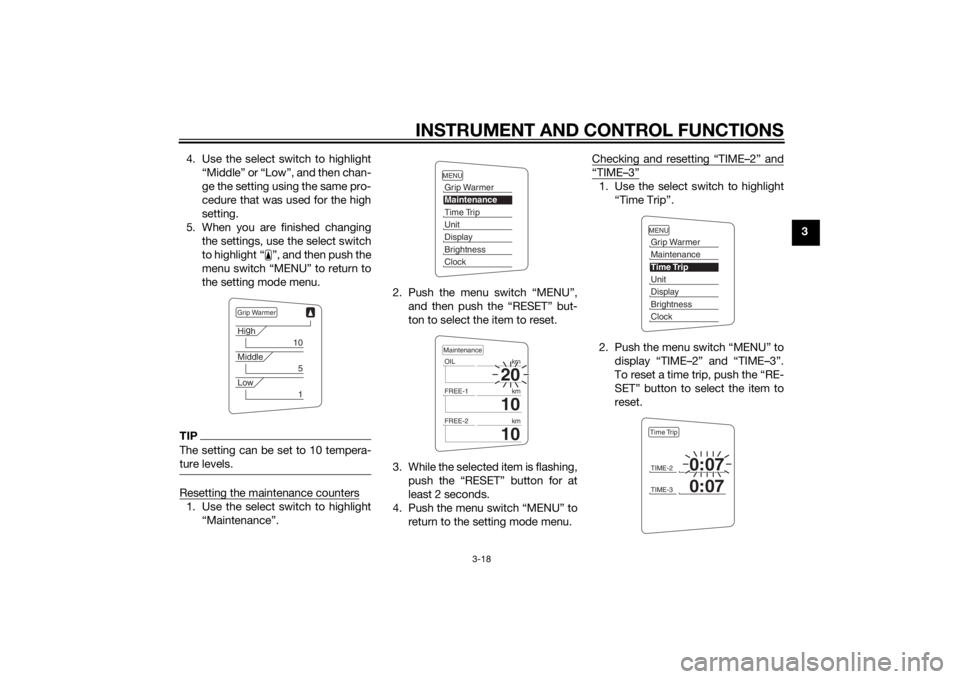
4. Use the select switch to highlight
“Middle” or “Low”, and then chan-
ge the setting using the same pro-
cedure that was used for the high
setting.
5. When you are finished changing the settings, use the select switch
to highlight “ ”, and then push the
menu switch “MENU” to return to
the setting mode menu.
TIPThe setting can be set to 10 tempera-
ture levels.Resetting the maintenance counters1. Use the select switch to highlight“Maintenance”. 2. Push the menu switch “MENU”,
and then push the “RESET” but-
ton to select the item to reset.
3. While the selected item is flashing, push the “RESET” button for at
least 2 seconds.
4. Push the menu switch “MENU” to return to the setting mode menu. Checking and resetting “TIME–2” and
“TIME–3”1. Use the select switch to highlight
“Time Trip”.
2. Push the menu switch “MENU” to display “TIME–2” and “TIME–3”.
To reset a time trip, push the “RE-
SET” button to select the item to
reset.
Grip WarmerHig
h
10
Middle
5
Low
1
MENUGrip WarmerMaintenanceTime TripUnitDisplayBrightnessClock
20
OIL km
10
FREE-1km
10
FREE-2kmMaintenance
MENUGrip WarmerMaintenanceTime TripUnitDisplayBrightnessClockTIME-2
0:07
TIME-3
0:07
Time Trip
U1MCE1E0.book Page 18 Thursday, August 8, 2013 9:03 AM
Page 34 of 118
INSTRUMENT AND CONTROL FUNCTIONS
3-19
33. While the selected item is flashing,
push the “RESET” button for at
least 2 seconds.
4. Push the menu switch “MENU” to return to the setting mode menu.
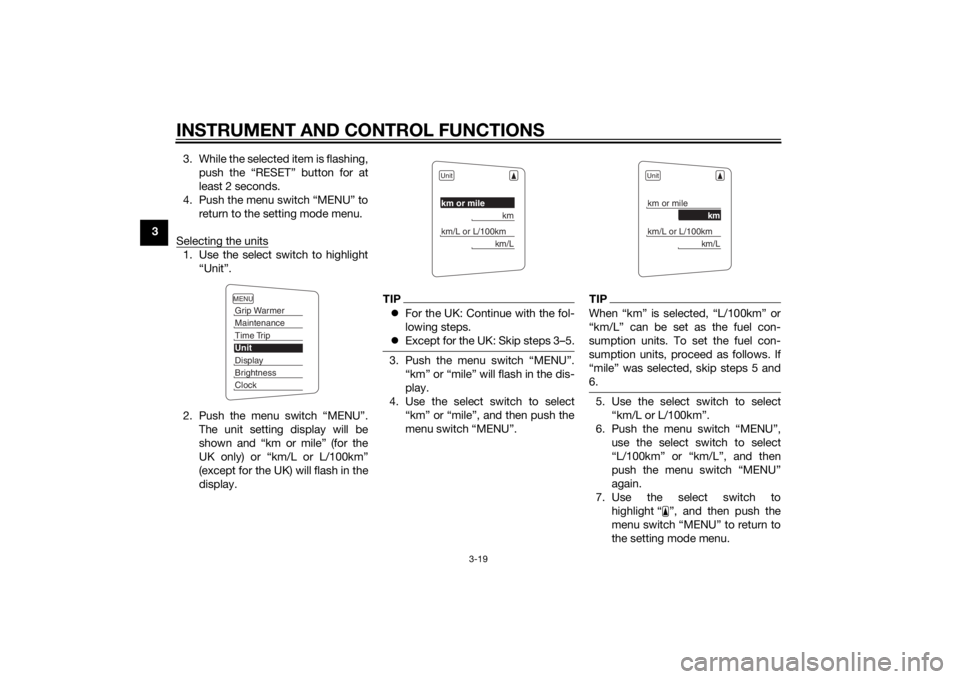
Selecting the units
1. Use the select switch to highlight “Unit”.
2. Push the menu switch “MENU”. The unit setting display will be
shown and “km or mile” (for the
UK only) or “km/L or L/100km”
(except for the UK) will flash in the
display.
TIPFor the UK: Continue with the fol-
lowing steps.
Except for the UK: Skip steps 3–5.3. Push the menu switch “MENU”.
“km” or “mile” will flash in the dis-
play.
4. Use the select switch to select “km” or “mile”, and then push the
menu switch “MENU”.
TIPWhen “km” is selected, “L/100km” or
“km/L” can be set as the fuel con-
sumption units. To set the fuel con-
sumption units, proceed as follows. If
“mile” was selected, skip steps 5 and
6.5. Use the select switch to select“km/L or L/100km”.
6. Push the menu switch “MENU”, use the select switch to select
“L/100km” or “km/L”, and then
push the menu switch “MENU”
again.
7. Use the select switch to highlight “ ”, and then push the
menu switch “MENU” to return to
the setting mode menu.
MENUGrip WarmerMaintenanceTime TripUnitDisplayBrightnessClock
Unitkm or mile
km
km/L or L/100km
km/L
Unitkm or mile
km
km/L or L/100km
km/L
U1MCE1E0.book Page 19 Thursday, August 8, 2013 9:03 AM
Page 35 of 118
INSTRUMENT AND CONTROL FUNCTIONS
3-20
3
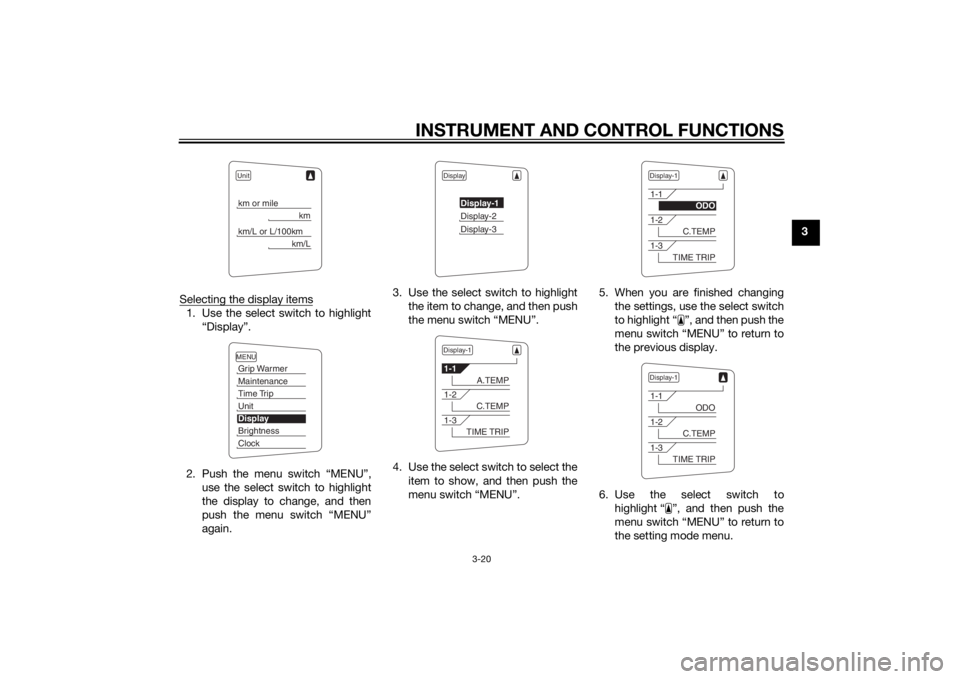
Selecting the display items
1. Use the select switch to highlight “Display”.
2. Push the menu switch “MENU”, use the select switch to highlight
the display to change, and then
push the menu switch “MENU”
again. 3. Use the select switch to highlight
the item to change, and then push
the menu switch “MENU”.
4. Use the select switch to select the item to show, and then push the
menu switch “MENU”. 5. When you are finished changing
the settings, use the select switch
to highlight “ ”, and then push the
menu switch “MENU” to return to
the previous display.
6. Use the select switch to highlight “ ”, and then push the
menu switch “MENU” to return to
the setting mode menu.
Unitkm or mile
km
km/L or L/100km
km/L
MENUGrip WarmerMaintenanceTime TripUnitDisplayBrightnessClock
Display
Display-1Display-2Display-3
Display-11-1
A.TEMP
1-2
C.TEMP
1-3
TIME TRIP
Display-11-1
ODO
1-2
C.TEMP
1-3
TIME TRIP
Display-11-1
ODO
1-2
C.TEMP
1-3
TIME TRIP
U1MCE1E0.book Page 20 Thursday, August 8, 2013 9:03 AM
Page 36 of 118
INSTRUMENT AND CONTROL FUNCTIONS
3-21
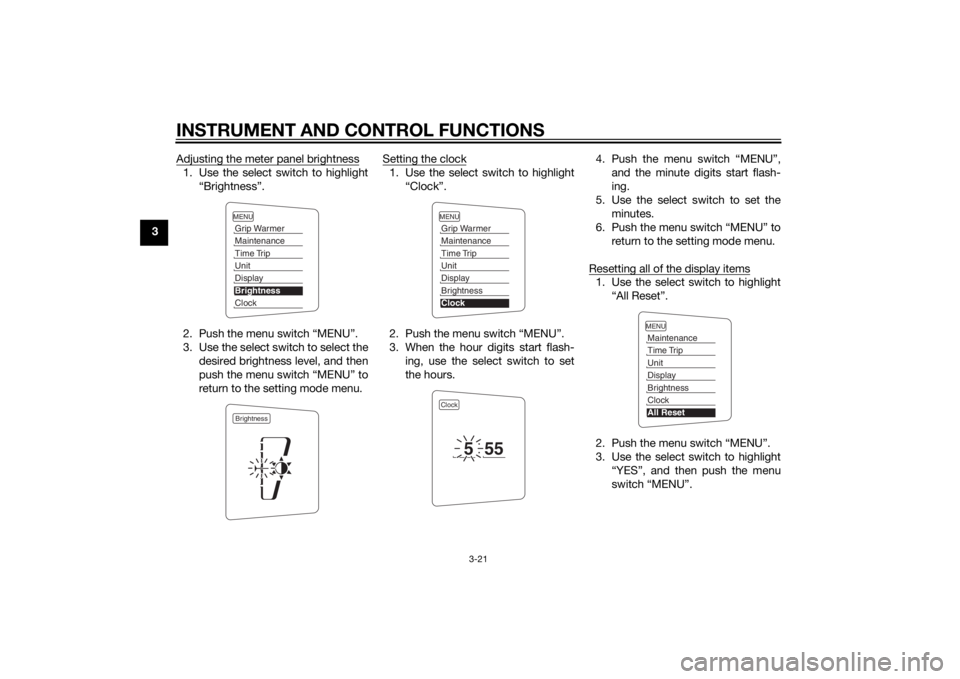
3Adjusting the meter panel brightness
1. Use the select switch to highlight
“Brightness”.
2. Push the menu switch “MENU”.
3. Use the select switch to select the desired brightness level, and then
push the menu switch “MENU” to
return to the setting mode menu. Setting the clock
1. Use the select switch to highlight
“Clock”.
2. Push the menu switch “MENU”.
3. When the hour digits start flash- ing, use the select switch to set
the hours. 4. Push the menu switch “MENU”,
and the minute digits start flash-
ing.
5. Use the select switch to set the minutes.
6. Push the menu switch “MENU” to return to the setting mode menu.
Resetting all of the display items
1. Use the select switch to highlight “All Reset”.
2. Push the menu switch “MENU”.
3. Use the select switch to highlight “YES”, and then push the menu
switch “MENU”.
MENUGrip WarmerMaintenanceTime TripUnitDisplayBrightnessClockBrightness
MENUGrip WarmerMaintenanceTime TripUnitDisplayBrightnessClockClock
5
55
MENUMaintenanceTime TripUnitDisplayBrightnessClockAll Reset
U1MCE1E0.book Page 21 Thursday, August 8, 2013 9:03 AM