warning light YAMAHA FJR1300AE 2016 Owners Manual
[x] Cancel search | Manufacturer: YAMAHA, Model Year: 2016, Model line: FJR1300AE, Model: YAMAHA FJR1300AE 2016Pages: 122, PDF Size: 3.4 MB
Page 5 of 122

Table of contents
Safety information ............................1-1
Description ........................................2-1
Left view ..........................................2-1
Right view........................................2-2
Controls and instruments ................2-3
Instrument an d control functions ....3-1
Immobilizer system .........................3-1
Main switch/steering lock ...............3-2
Indicator lights and warning lights ............................................3-4
Cruise control system .....................3-7
Multi-function meter unit ...............3-10
D-mode (drive mode) ....................3-22
Handlebar switches.......................3-23
Clutch lever ...................................3-24
Shift pedal .....................................3-25
Brake lever ....................................3-25
Brake pedal ...................................3-26
ABS ...............................................3-26
Traction control system.................3-27
Fuel tank cap.................................3-29
Fuel................................................3-29
Fuel tank overflow hose ................3-31
Catalytic converters .....................3-31
Seats .............................................3-32
Adjusting the rider seat height ......3-33
Storage compartments .................3-35
Accessory box...............................3-36
Adjusting the headlight beams......3-37
Handlebar position ........................3-38
Opening and closing the cowling vents ..........................................3-38
Rear view mirrors ..........................3-40
Adjusting the front and rear
suspension.................................3-40
Sidestand ......................................3-45
Ignition circuit cut-off system........3-45
Auxiliary DC jack ...........................3-47
Cornering lights .............................3-48 For your safety – pre-operation
checks
............................................... 4-1
Operation an d important ri din g
points ................................................. 5-1
Starting the engine.......................... 5-2
Shifting ............................................ 5-3
Tips for reducing fuel consumption................................ 5-4
Engine break-in ............................... 5-5
Parking ............................................ 5-6
Perio dic maintenance an d
a d justment ........................................ 6-1
Owner’s tool kit ............................... 6-2
Periodic maintenance chart for the emission control system.............. 6-3
General maintenance and lubrication chart........................... 6-4
Removing and installing panels ...... 6-7
Checking the spark plugs ............. 6-10
Canister......................................... 6-11
Engine oil and oil filter cartridge ... 6-11
Final gear oil.................................. 6-14
Coolant ......................................... 6-15
Cleaning the air filter element ....... 6-17
Checking the engine idling
speed......................................... 6-18
Checking the throttle grip free
play ............................................ 6-19
Valve clearance ............................. 6-19
Tires .............................................. 6-20
Cast wheels .................................. 6-22
Clutch lever ................................... 6-23
Checking the brake lever free play ............................................ 6-23
Brake light switches ...................... 6-24
Checking the front and rear brake pads................................. 6-24
Checking the brake and clutch fluid levels .................................. 6-25
Changing the brake and clutch fluids .......................................... 6-27
Checking and lubricating the cables ........................................ 6-27
UB96E0E0.book Page 1 Wednesday, November 4, 2015 5:01 PM
Page 17 of 122
Instrument and control functions
3-3
3
WARNING
EWA10062
Never turn the key to “OFF” or
“LOCK” while the vehicle is movin g.
Otherwise the electrical systems will
b e switche d off, which may result in
loss of control or an acci dent.
EAU10694LOCK
The steering is locked and all electrical
systems are off. The key can be re-
moved.
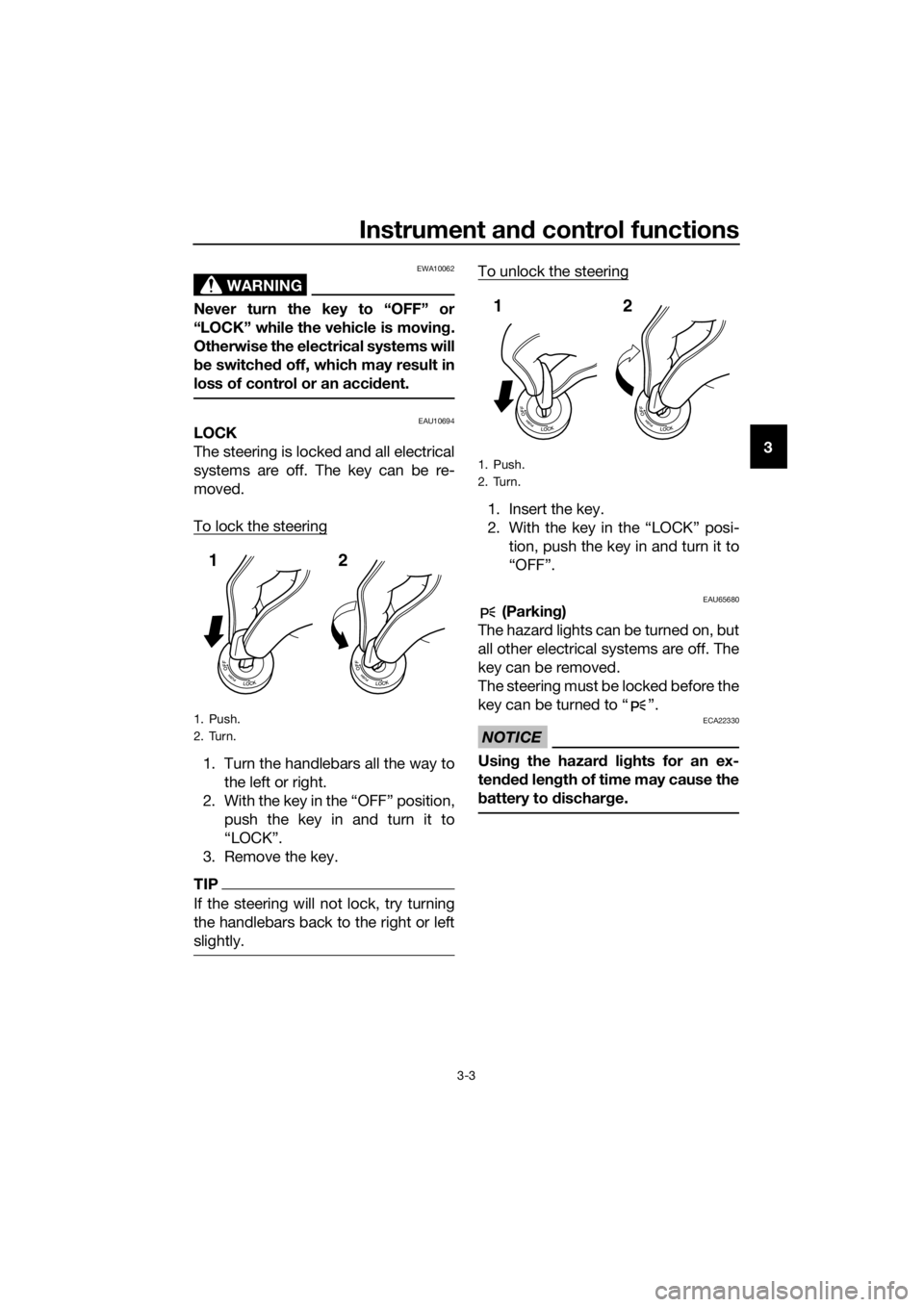
To lock the steering
1. Turn the handlebars all the way to
the left or right.
2. With the key in the “OFF” position, push the key in and turn it to
“LOCK”.
3. Remove the key.
TIP
If the steering will not lock, try turning
the handlebars back to the right or left
slightly.
To unlock the steering
1. Insert the key.
2. With the key in the “LOCK” posi- tion, push the key in and turn it to
“OFF”.
EAU65680 (Parkin g)
The hazard lights can be turned on, but
all other electrical systems are off. The
key can be removed.
The steering must be locked before the
key can be turned to “ ”.
NOTICE
ECA22330
Usin g the hazar d lig hts for an ex-
ten ded len gth of time may cause the
b attery to d ischarge.
1. Push.
2. Turn.
12
1. Push.
2. Turn.
12
UB96E0E0.book Page 3 Wednesday, November 4, 2015 5:01 PM
Page 18 of 122
Instrument and control functions
3-4
3
EAU49398
In dicator li ghts and warning
li g hts
EAU11032Turn si gnal in dicator li ghts “ ”
an d“”
Each indicator light will flash when its
corresponding turn signal lights are
flashing.
EAU11061Neutral in dicator li ght “ ”
This indicator light comes on when the
transmission is in the neutral position.
EAU11081Hi gh beam in dicator li ght “ ”
This indicator light comes on when the
high beam of the headlight is switched
on.
EAU11124Oil level warnin g li ght “ ”
This warning light comes on if the en-
gine oil level is low.
The electrical circuit of the warning
light can be checked by turning the key
to “ON”. The warning light should
come on for a few seconds, and then
go off.
If the warning light does not come on
initially when the key is turned to “ON”,
or if the warning light remains on, have
a Yamaha dealer check the electrical
circuit.
TIP
Even if the oil level is sufficient, the
warning light may flicker when riding
on a slope or during sudden accelera-
tion or deceleration, but this is not a
malfunction.
EAU58400Cruise control in dicator li ghts
These indicator lights come on when
the cruise control system is activated.
See page 3-7 for a detailed explanation
of the function of these indicator lights.
The electrical circuit of these indicator
lights can be checked by turning the
key to “ON”. These indicator lights
should come on for a few seconds, and
then go off.
If an indicator light does not come on
initially when the key is turned to “ON”,
or if an indicator light remains on, have
a Yamaha dealer check the electrical
circuit.
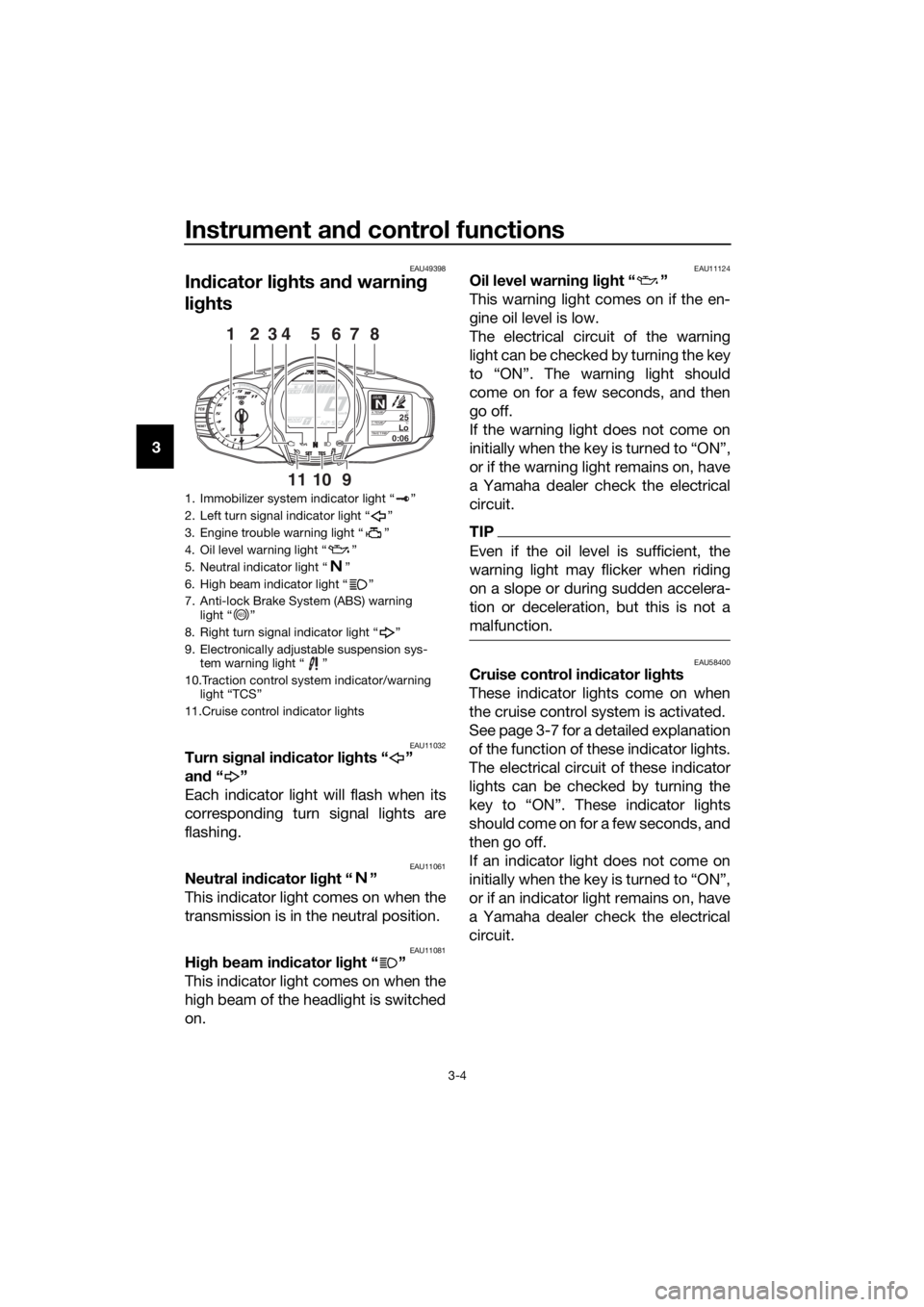
1. Immobilizer system indicator light “ ”
2. Left turn signal indicator light “ ”
3. Engine trouble warning light “ ”
4. Oil level warning light “ ”
5. Neutral indicator light “ ”
6. High beam indicator light “ ”
7. Anti-lock Brake System (ABS) warning light “ ”
8. Right turn signal indicator light “ ”
9. Electronically adjustable suspension sys- tem warning light “ ”
10.Traction control system indicator/warning light “TCS”
11.Cruise control indicator lights
GEARN25A.TEMP ˚C
LoC.TEMP˚C
0:06TIME TRIP
128374
1011
65
9
ABS
UB96E0E0.book Page 4 Wednesday, November 4, 2015 5:01 PM
Page 19 of 122
Instrument and control functions
3-5
3
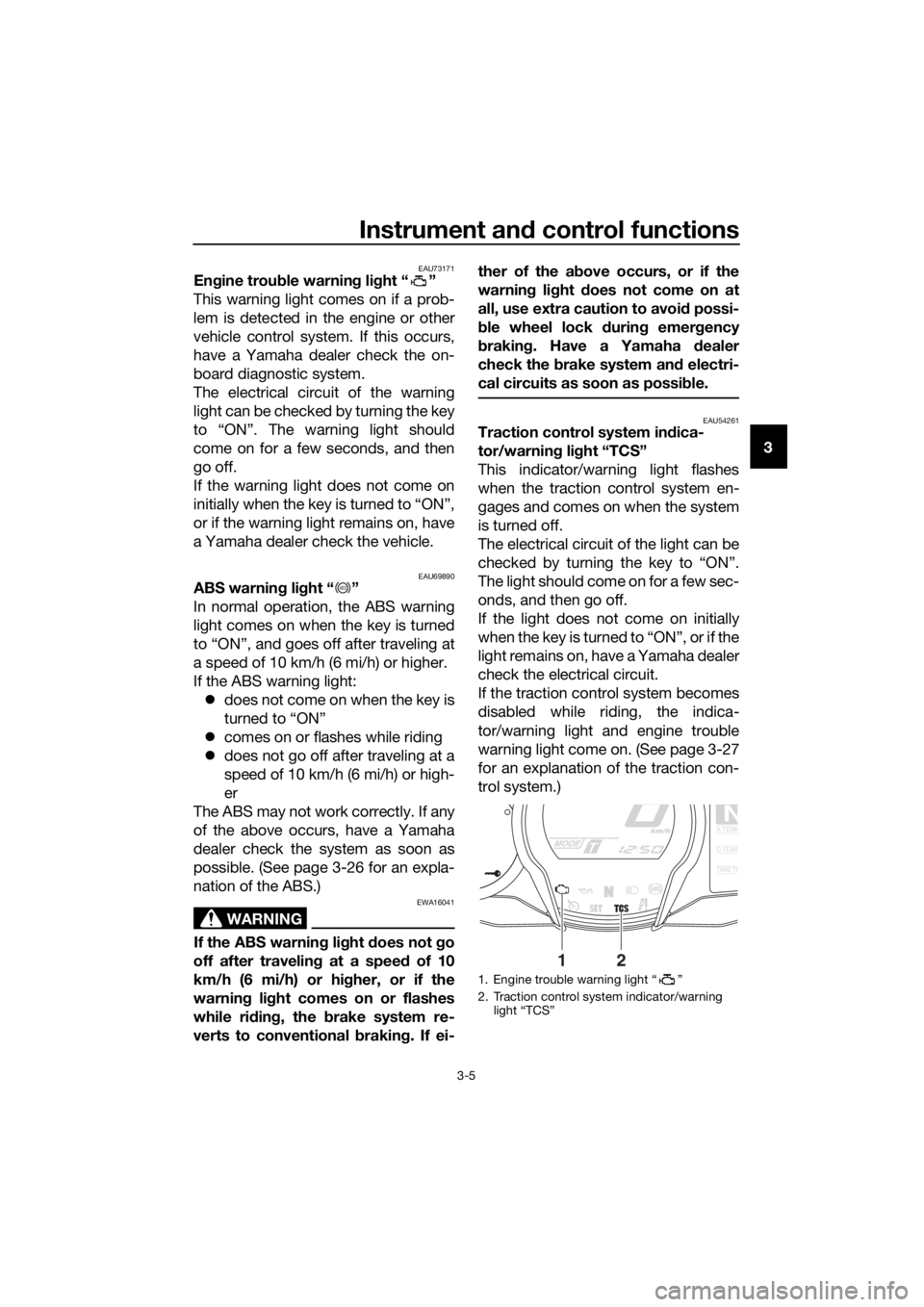
EAU73171En gine trou ble warnin g lig ht “ ”
This warning light comes on if a prob-
lem is detected in the engine or other
vehicle control system. If this occurs,
have a Yamaha dealer check the on-
board diagnostic system.
The electrical circuit of the warning
light can be checked by turning the key
to “ON”. The warning light should
come on for a few seconds, and then
go off.
If the warning light does not come on
initially when the key is turned to “ON”,
or if the warning light remains on, have
a Yamaha dealer check the vehicle.
EAU69890ABS warnin g li ght “ ”
In normal operation, the ABS warning
light comes on when the key is turned
to “ON”, and goes off after traveling at
a speed of 10 km/h (6 mi/h) or higher.
If the ABS warning light: does not come on when the key is
turned to “ON”
comes on or flashes while riding
does not go off after traveling at a
speed of 10 km/h (6 mi/h) or high-
er
The ABS may not work correctly. If any
of the above occurs, have a Yamaha
dealer check the system as soon as
possible. (See page 3-26 for an expla-
nation of the ABS.)
WARNING
EWA16041
If the ABS warnin g li ght does not go
off after travelin g at a speed of 10
km/h (6 mi/h) or hi gher, or if the
warnin g li ght comes on or flashes
while ri din g, the b rake system re-
verts to conventional brakin g. If ei- ther of the a
bove occurs, or if the
warnin g lig ht does not come on at
all, use extra caution to avoi d possi-
b le wheel lock durin g emer gency
b rakin g. Have a Yamaha d ealer
check the brake system an d electri-
cal circuits as soon as possi ble.
EAU54261Traction control system in dica-
tor/warnin g li ght “TCS”
This indicator/warning light flashes
when the traction control system en-
gages and comes on when the system
is turned off.
The electrical circuit of the light can be
checked by turning the key to “ON”.
The light should come on for a few sec-
onds, and then go off.
If the light does not come on initially
when the key is turned to “ON”, or if the
light remains on, have a Yamaha dealer
check the electrical circuit.
If the traction control system becomes
disabled while riding, the indica-
tor/warning light and engine trouble
warning light come on. (See page 3-27
for an explanation of the traction con-
trol system.)
ABS
1. Engine trouble warning light “ ”
2. Traction control system indicator/warning light “TCS”
NA.TEMP
C.TEMP
TIME TR
21
UB96E0E0.book Page 5 Wednesday, November 4, 2015 5:01 PM
Page 20 of 122

Instrument and control functions
3-6
3 Try to reset the traction control system
and the lights by following the proce-
dures under “Resetting” on page 3-28.
EAU55392Electronically a
djusta ble suspen-
sion system warnin g lig ht “ ”
This warning light comes on if a prob-
lem is detected in the electronically ad-
justable suspension system.
The electrical circuit of the warning
light can be checked by turning the key
to “ON”. The warning light should
come on for a few seconds, and then
go off.
If the warning light does not come on
initially when the key is turned to “ON”,
or if the warning light remains on, have
a Yamaha dealer check the electrical
circuit.
EAU73120Immo bilizer system in dicator
li g ht “ ”
When the key is turned to “OFF” and
30 seconds have passed, the indicator
light will flash steadily to indicate the
immobilizer system is enabled. After 24
hours have passed, the indicator light
will stop flashing, however the immobi-
lizer system is still enabled.
The electrical circuit of the indicator
light can be checked by turning the key
to “ON”. The indicator light should
come on for a few seconds, and then
go off.
If the indicator light does not come on
initially when the key is turned to “ON”,
if the indicator light remains on, or if the
indicator light flashes in a pattern (if a
problem is detected in the immobilizer system, the immobilizer system indica-
tor light will flash in a pattern), have a
Yamaha dealer check the vehicle.
TIP
If the immobilizer system indicator light
flashes in the pattern, slowly 5 times
then quickly 2 times, this could be
caused by transponder interference. If
this occurs, try the following.
1. Make sure there are no other im- mobilizer keys close to the main
switch. Other immobilizer system
keys may cause signal interfer-
ence and prevent the engine from
starting.
2. Use the code re-registering key to start the engine.
3. If the engine starts, turn it off, and try starting the engine with the
standard keys.
4. If one or both of the standard keys do not start the engine, take the
vehicle and all 3 keys to a Yamaha
dealer to have the standard keys
re-registered.
UB96E0E0.book Page 6 Wednesday, November 4, 2015 5:01 PM
Page 21 of 122
Instrument and control functions
3-7
3
EAU54192
Cruise control system
This model is equipped with a cruise
control system designed to maintain a
set cruising speed.
The cruise control system operates
only when riding in 3rd gear at speeds
between about 50 km/h (31 mi/h) and
160 km/h (100 mi/h), 4th or 5th gear at
speeds between about 50 km/h (31
mi/h) and 180 km/h (112 mi/h), or 6th
gear at speeds between about 55 km/h
(34 mi/h) and 180 km/h (112 mi/h).
WARNING
EWA16341
Improper use of the cruise con-
trol system may result in loss of
control, which coul d lea d to an
acci dent. Do not activate the
cruise control system in heavy
traffic, poor weather con ditions,
or amon g win din g, slippery,
hilly, rou gh or g ravel roa ds.
When travelin g uphill or d own-
hill, the cruise control system
may not be ab le to maintain the
set cruisin g speed .
To prevent acci dentally activat-
in g the cruise control system,
turn it off when not in use. Make
sure that the cruise control sys-
tem ind icator light “ ” is off.
Activatin g an d settin g the cruise
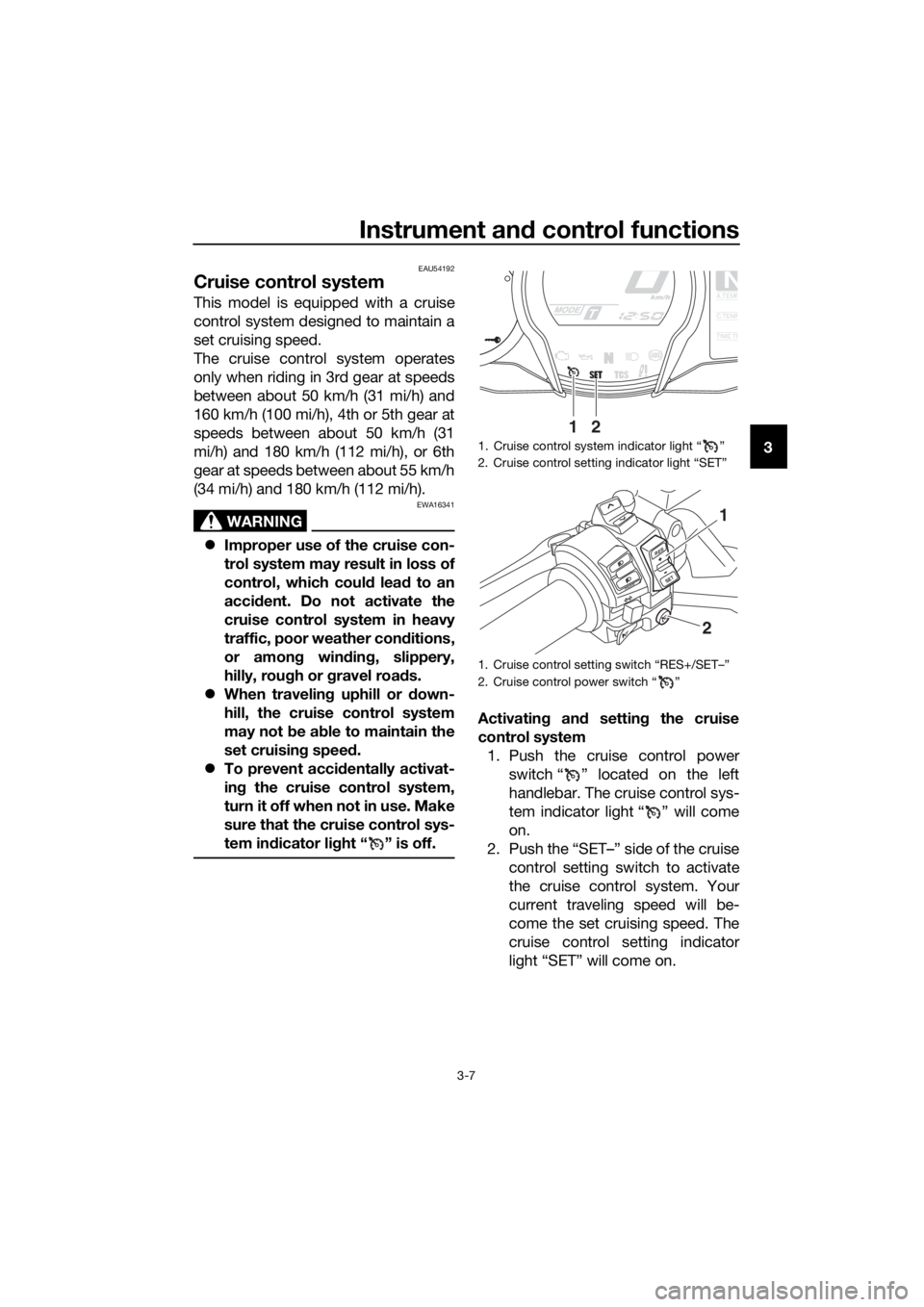
control system 1. Push the cruise control power switch “ ” located on the left
handlebar. The cruise control sys-
tem indicator light “ ” will come
on.
2. Push the “SET–” side of the cruise control setting switch to activate
the cruise control system. Your
current traveling speed will be-
come the set cruising speed. The
cruise control setting indicator
light “SET” will come on.
1. Cruise control system indicator light “ ”
2. Cruise control setting indicator light “SET”
1. Cruise control setting switch “RES+/SET–”
2. Cruise control power switch “ ”
NA.TEMP
C.TEMP
TIME TR
21
RES
SETPA S S
1
2
UB96E0E0.book Page 7 Wednesday, November 4, 2015 5:01 PM
Page 22 of 122
Instrument and control functions
3-8
3 A
djustin g the set cruisin g speed
While the cruise control system is op-
erating, push the “RES+” side of the
cruise control setting switch to in-
crease the set cruising speed or the
“SET–” side to decrease the set speed.
TIP
Pushing the setting switch once will
change the speed in increments of ap-
proximately 2.0 km/h (1.2 mi/h). Hold-
ing the “RES+” or “SET–” side of the
cruise control setting switch down will
increase or decrease the speed contin-
uously until the switch is released.
You can also manually increase your
traveling speed using the throttle. After
you have accelerated, you can set a
new cruising speed by pushing the
“SET–” side of the setting switch. If you
do not set a new cruising speed, when
you return the throttle grip, the vehicle
will decelerate to the previously set
cruising speed.
Deactivatin g the cruise control sys-
tem
Perform one of the following opera-
tions to cancel the set cruising speed.
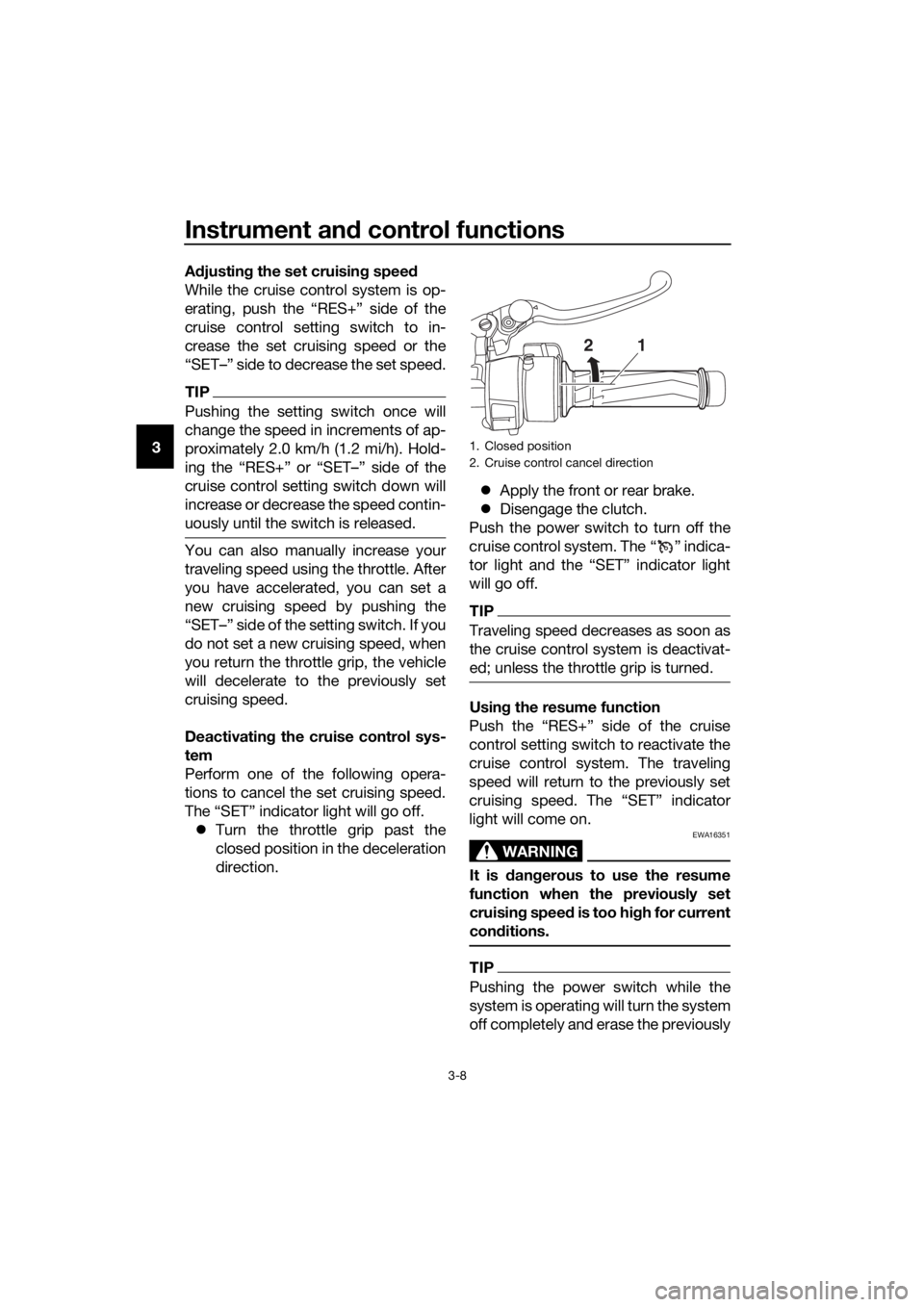
The “SET” indicator light will go off. Turn the throttle grip past the
closed position in the deceleration
direction.
Apply the front or rear brake.
Disengage the clutch.
Push the power switch to turn off the
cruise control system. The “ ” indica-
tor light and the “SET” indicator light
will go off.
TIP
Traveling speed decreases as soon as
the cruise control system is deactivat-
ed; unless the throttle grip is turned.
Usin g the resume function
Push the “RES+” side of the cruise
control setting switch to reactivate the
cruise control system. The traveling
speed will return to the previously set
cruising speed. The “SET” indicator
light will come on.
WARNING
EWA16351
It is d angerous to use the resume
function when the previously set
cruisin g speed is too hi gh for current
con ditions.
TIP
Pushing the power switch while the
system is operating will turn the system
off completely and erase the previously
1. Closed position
2. Cruise control cancel direction
21
UB96E0E0.book Page 8 Wednesday, November 4, 2015 5:01 PM
Page 40 of 122
Instrument and control functions
3-26
3
EAU39542
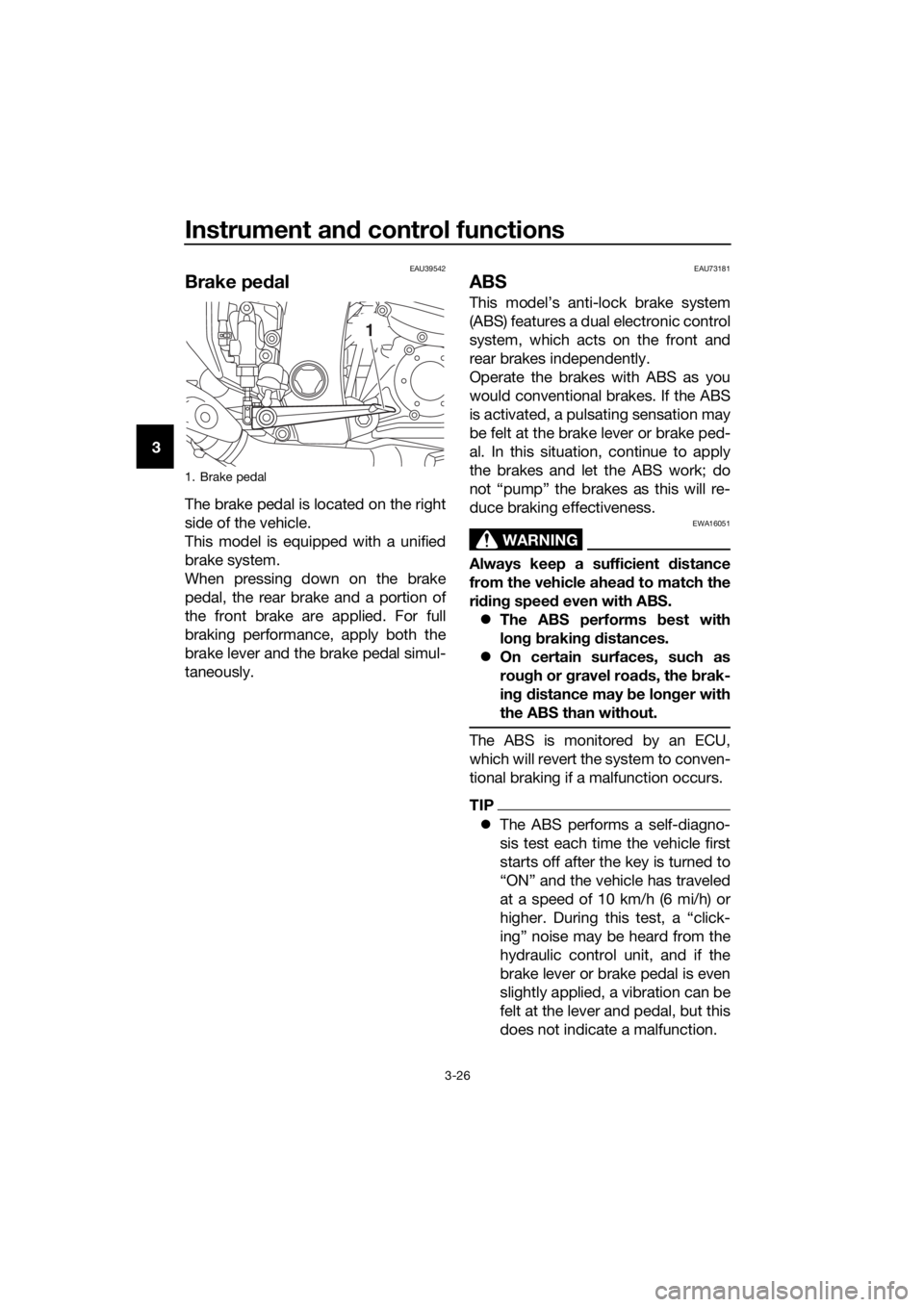
Brake ped al
The brake pedal is located on the right
side of the vehicle.
This model is equipped with a unified
brake system.
When pressing down on the brake
pedal, the rear brake and a portion of
the front brake are applied. For full
braking performance, apply both the
brake lever and the brake pedal simul-
taneously.
EAU73181
ABS
This model’s anti-lock brake system
(ABS) features a dual electronic control
system, which acts on the front and
rear brakes independently.
Operate the brakes with ABS as you
would conventional brakes. If the ABS
is activated, a pulsating sensation may
be felt at the brake lever or brake ped-
al. In this situation, continue to apply
the brakes and let the ABS work; do
not “pump” the brakes as this will re-
duce braking effectiveness.
WARNING
EWA16051
Always keep a sufficient d istance
from the vehicle ahead to match the
ri din g speed even with ABS.
The ABS performs b est with
lon g b rakin g d istances.
On certain surfaces, such as
rou gh or g ravel roa ds, the b rak-
in g d istance may be lon ger with
the ABS than without.
The ABS is monitored by an ECU,
which will revert the system to conven-
tional braking if a malfunction occurs.
TIP
The ABS performs a self-diagno-
sis test each time the vehicle first
starts off after the key is turned to
“ON” and the vehicle has traveled
at a speed of 10 km/h (6 mi/h) or
higher. During this test, a “click-
ing” noise may be heard from the
hydraulic control unit, and if the
brake lever or brake pedal is even
slightly applied, a vibration can be
felt at the lever and pedal, but this
does not indicate a malfunction.
1. Brake pedal
1
UB96E0E0.book Page 26 Wednesday, November 4, 2015 5:01 PM
Page 41 of 122
Instrument and control functions
3-27
3
This ABS has a test mode which
allows the owner to experience
the pulsation at the brake lever or
brake pedal when the ABS is op-
erating. However, special tools are
required, so please consult your
Yamaha dealer.
NOTICE
ECA16831
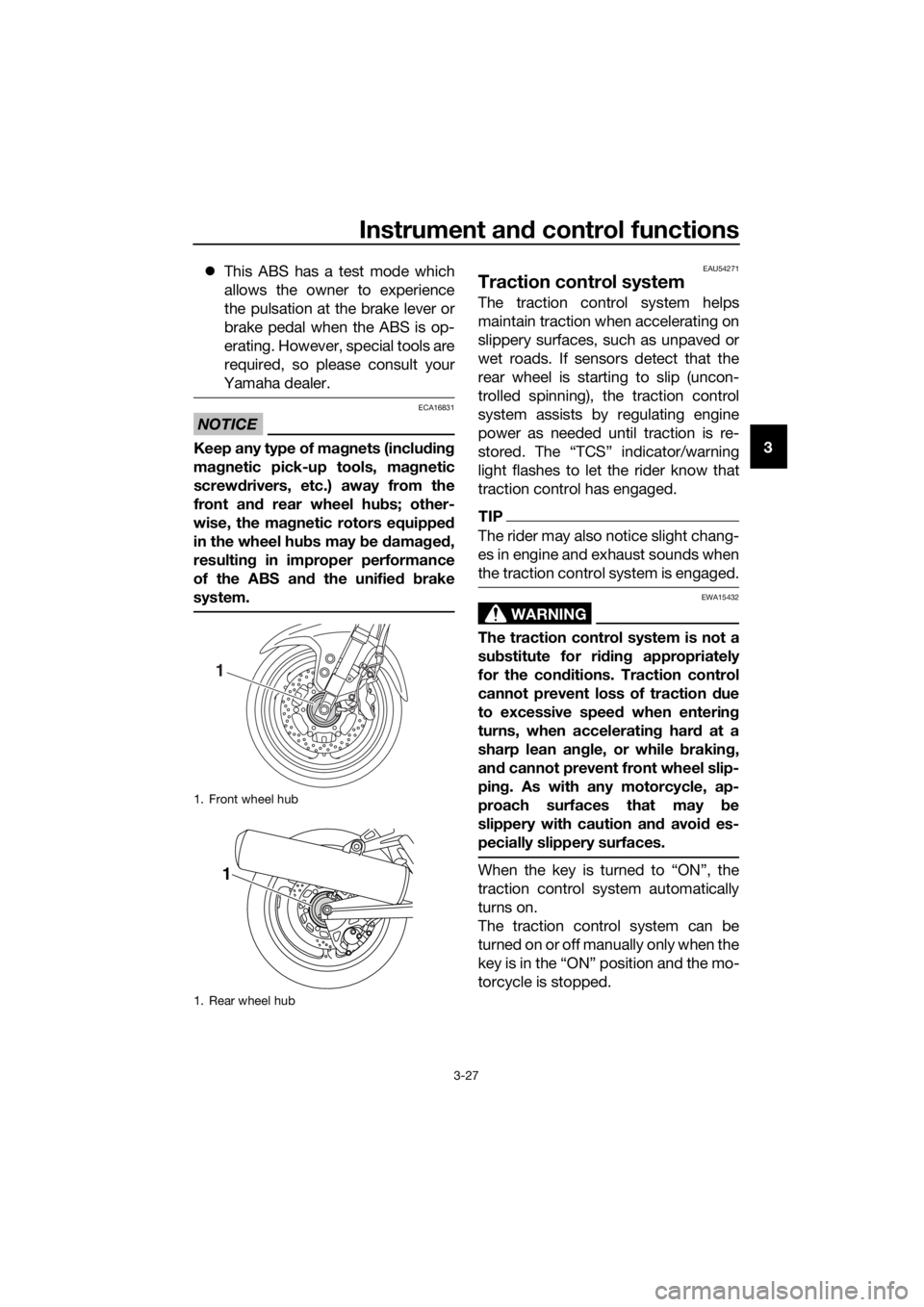
Keep any type of mag nets (includin g
ma gnetic pick-up tools, mag netic
screwd rivers, etc.) away from the
front an d rear wheel hu bs; other-
wise, the ma gnetic rotors equippe d
in the wheel hu bs may b e damag ed ,
resultin g in improper performance
of the ABS an d the unified b rake
system.
EAU54271
Traction control system
The traction control system helps
maintain traction when accelerating on
slippery surfaces, such as unpaved or
wet roads. If sensors detect that the
rear wheel is starting to slip (uncon-
trolled spinning), the traction control
system assists by regulating engine
power as needed until traction is re-
stored. The “TCS” indicator/warning
light flashes to let the rider know that
traction control has engaged.
TIP
The rider may also notice slight chang-
es in engine and exhaust sounds when
the traction control system is engaged.
WARNING
EWA15432
The traction control system is not a
su bstitute for ri din g appropriately
for the con ditions. Traction control
cannot prevent loss of traction d ue
to excessive spee d when enterin g
turns, when acceleratin g har d at a
sharp lean an gle, or while b raking,
an d cannot prevent front wheel slip-
pin g. As with any motorcycle, ap-
proach surfaces that may be
slippery with caution an d avoi d es-
pecially slippery surfaces.
When the key is turned to “ON”, the
traction control system automatically
turns on.
The traction control system can be
turned on or off manually only when the
key is in the “ON” position and the mo-
torcycle is stopped.
1. Front wheel hub
1. Rear wheel hub
1
1
UB96E0E0.book Page 27 Wednesday, November 4, 2015 5:01 PM
Page 42 of 122
Instrument and control functions
3-28
3
TIP
Turn the traction control system off to
help free the rear wheel if the motorcy-
cle gets stuck in mud, sand, or other
soft surfaces.
NOTICE
ECA16801
Use only the specifie d tires. (See
pa ge 6-20.) Usin g different sized
tires will prevent the traction control
system from controllin g tire rotation
accurately.
Turnin g on/off the traction control
system
WARNING
EWA15441
Be sure to stop the vehicle before
makin g any settin g chan ges to the
traction control system. Chan gin g
settin gs while ri din g can d istract the
operator an d increase the risk of an
acci dent.
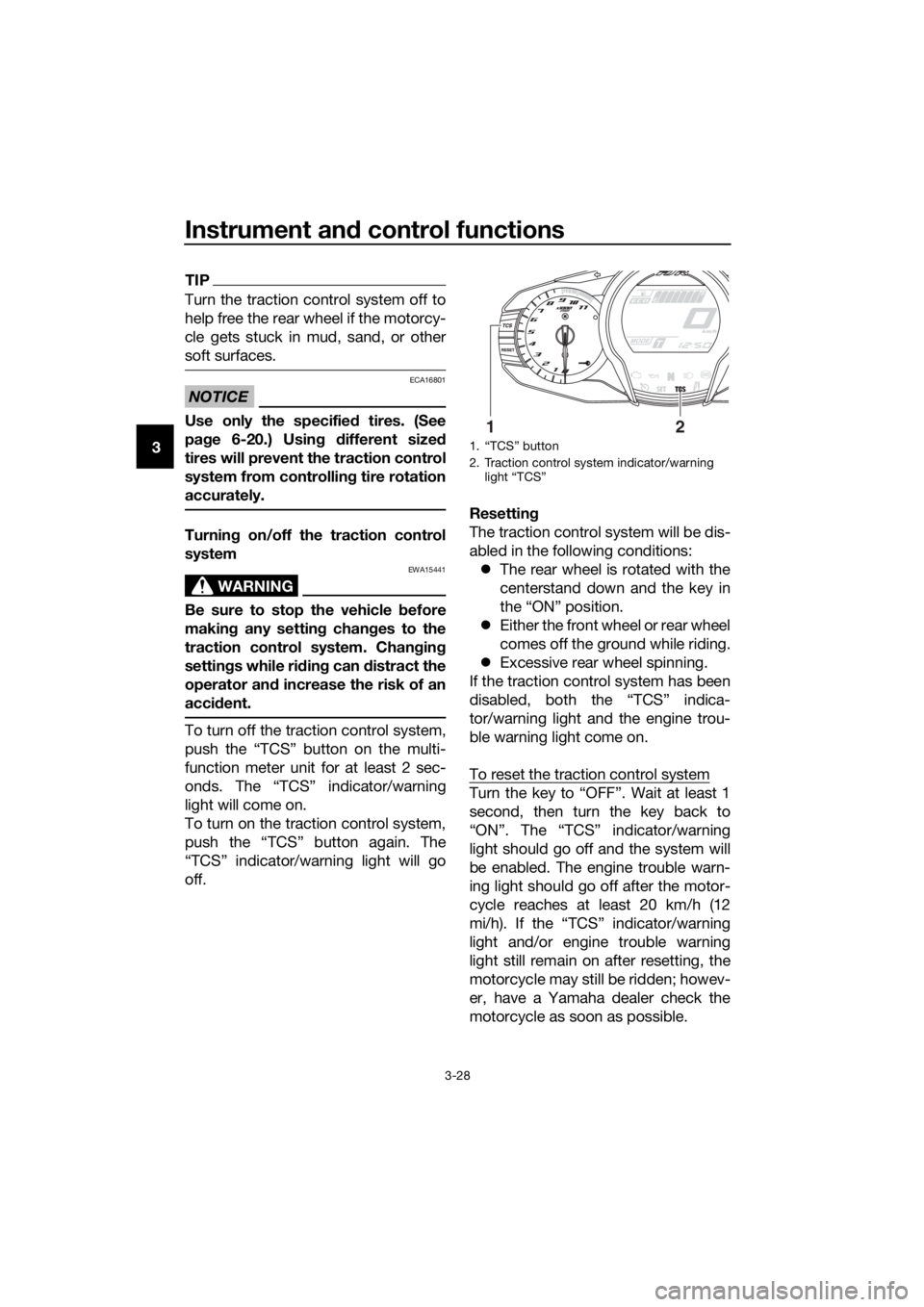
To turn off the traction control system,
push the “TCS” button on the multi-
function meter unit for at least 2 sec-
onds. The “TCS” indicator/warning
light will come on.
To turn on the traction control system,
push the “TCS” button again. The
“TCS” indicator/warning light will go
off. Resetting
The traction control system will be dis-
abled in the following conditions:
The rear wheel is rotated with the
centerstand down and the key in
the “ON” position.
Either the front wheel or rear wheel
comes off the ground while riding.
Excessive rear wheel spinning.
If the traction control system has been
disabled, both the “TCS” indica-
tor/warning light and the engine trou-
ble warning light come on.
To reset the traction control system
Turn the key to “OFF”. Wait at least 1
second, then turn the key back to
“ON”. The “TCS” indicator/warning
light should go off and the system will
be enabled. The engine trouble warn-
ing light should go off after the motor-
cycle reaches at least 20 km/h (12
mi/h). If the “TCS” indicator/warning
light and/or engine trouble warning
light still remain on after resetting, the
motorcycle may still be ridden; howev-
er, have a Yamaha dealer check the
motorcycle as soon as possible.
1. “TCS” button
2. Traction control system indicator/warning light “TCS”
12
UB96E0E0.book Page 28 Wednesday, November 4, 2015 5:01 PM