display YAMAHA FJR1300AE 2018 User Guide
[x] Cancel search | Manufacturer: YAMAHA, Model Year: 2018, Model line: FJR1300AE, Model: YAMAHA FJR1300AE 2018Pages: 122, PDF Size: 3.42 MB
Page 33 of 122
Instrument and control functions
3-19
3
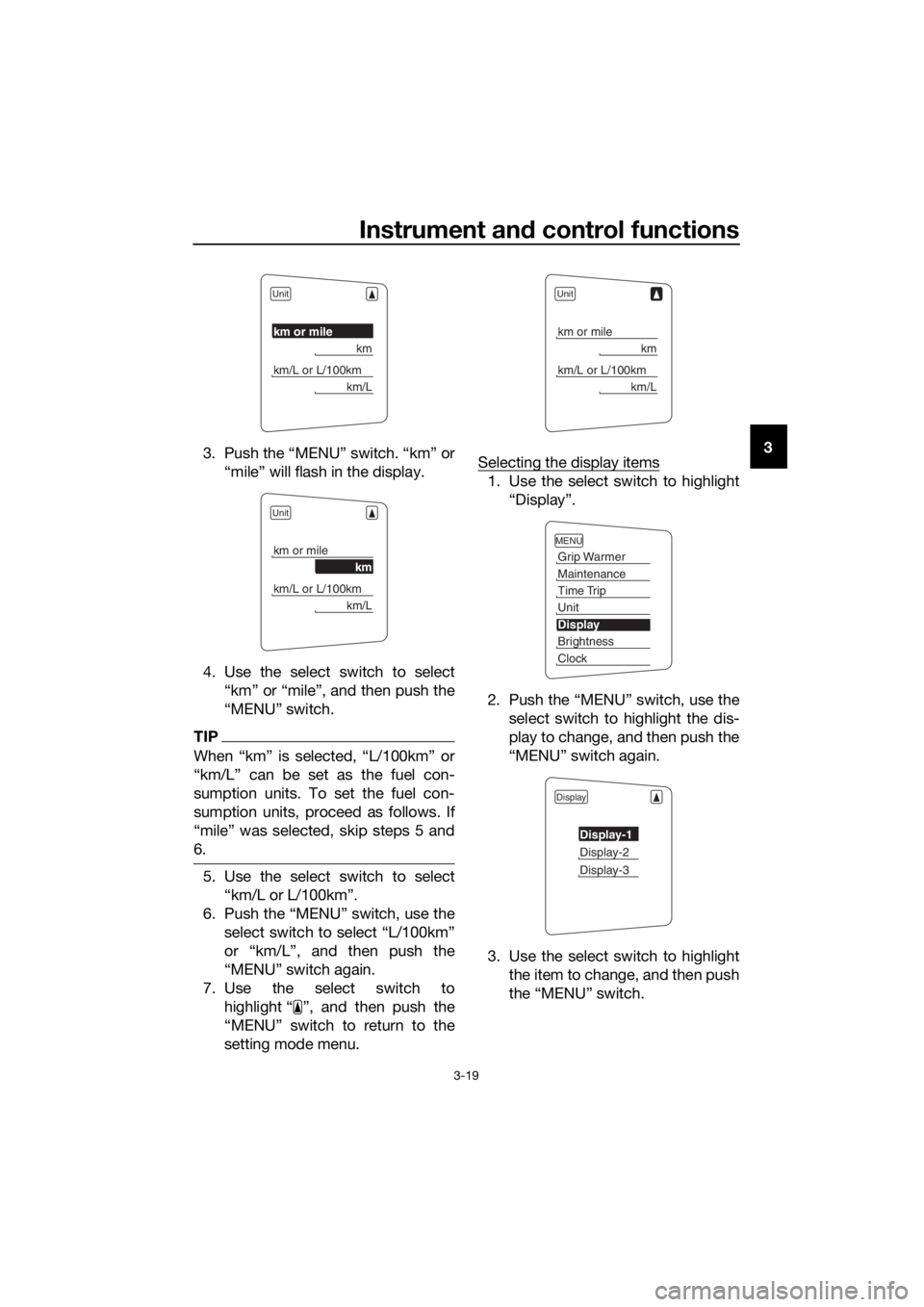
3. Push the “MENU” switch. “km” or
“mile” will flash in the display.
4. Use the select switch to select “km” or “mile”, and then push the
“MENU” switch.
TIP
When “km” is selected, “L/100km” or
“km/L” can be set as the fuel con-
sumption units. To set the fuel con-
sumption units, proceed as follows. If
“mile” was selected, skip steps 5 and
6.
5. Use the select switch to select“km/L or L/100km”.
6. Push the “MENU” switch, use the select switch to select “L/100km”
or “km/L”, and then push the
“MENU” switch again.
7. Use the select switch to highlight “ ”, and then push the
“MENU” switch to return to the
setting mode menu. Selecting the display items
1. Use the select switch to highlight
“Display”.
2. Push the “MENU” switch, use the select switch to highlight the dis-
play to change, and then push the
“MENU” switch again.
3. Use the select switch to highlight the item to change, and then push
the “MENU” switch.
Unit
km or mile
km
km/L or L/100km
km/L
Unit
km or mile
km
km/L or L/100km
km/L
Unit
km or mile
km
km/L or L/100km
km/L
MENU
Grip Warmer
Maintenance
Time Trip
Unit
Display
Brightness
Clock
Display
Display-1
Display-2
Display-3
UB96E1E0.book Page 19 Monday, July 10, 2017 10:57 AM
Page 34 of 122
Instrument and control functions
3-20
3
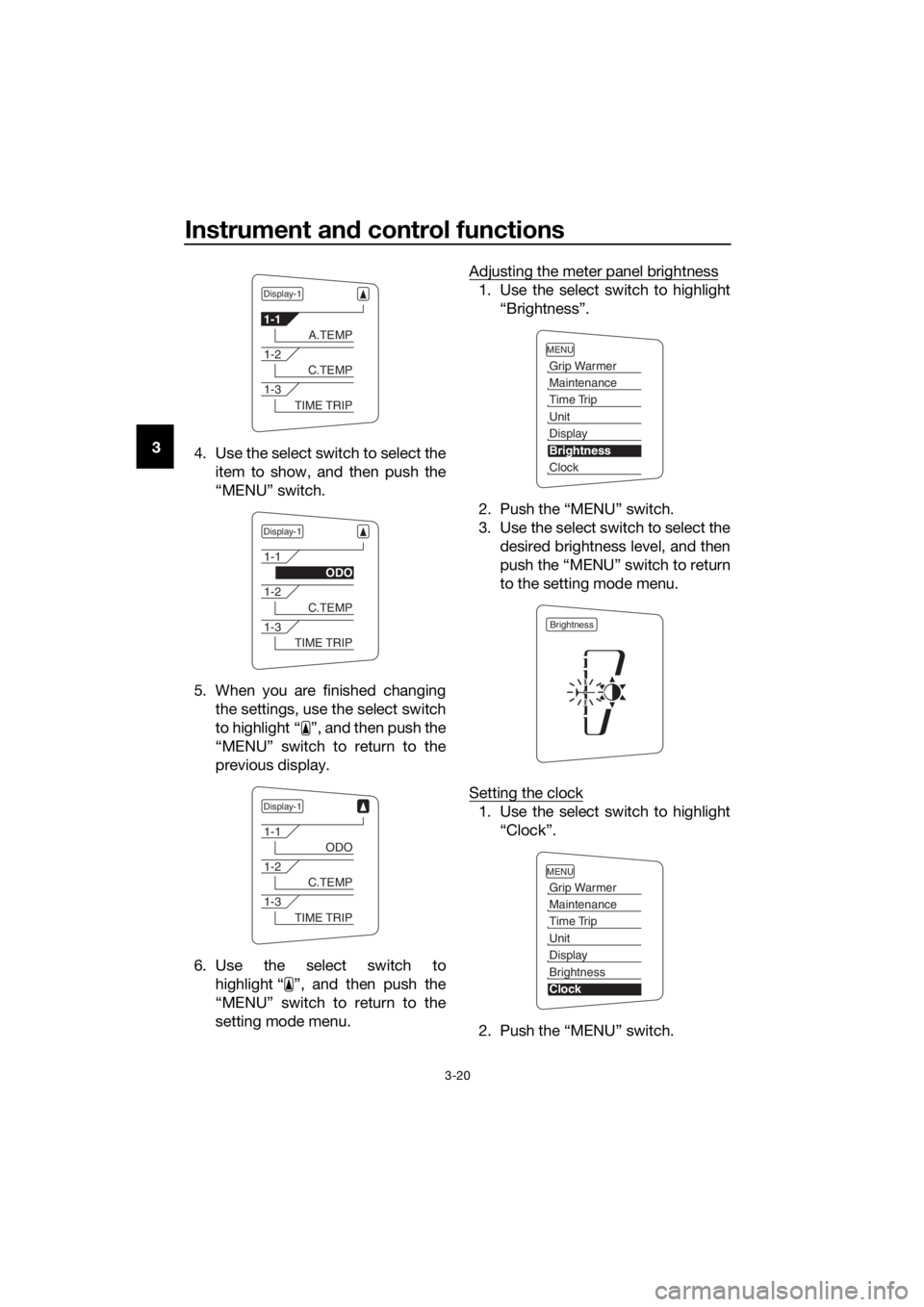
4. Use the select switch to select the
item to show, and then push the
“MENU” switch.
5. When you are finished changing the settings, use the select switch
to highlight “ ”, and then push the
“MENU” switch to return to the
previous display.
6. Use the select switch to highlight “ ”, and then push the
“MENU” switch to return to the
setting mode menu. Adjusting the meter panel brightness
1. Use the select switch to highlight
“Brightness”.
2. Push the “MENU” switch.
3. Use the select switch to select the desired brightness level, and then
push the “MENU” switch to return
to the setting mode menu.
Setting the clock
1. Use the select switch to highlight “Clock”.
2. Push the “MENU” switch.
Display-1
1-1
A.TEMP
1-2
C.TEMP
1-3
TIME TRIP
Display-1
1-1
ODO
1-2
C.TEMP
1-3
TIME TRIP
Display-1
1-1
ODO
1-2
C.TEMP
1-3
TIME TRIP
MENU
Grip Warmer
Maintenance
Time Trip
Unit
Display
Brightness
Clock
Brightness
MENU
Grip Warmer
Maintenance
Time Trip
Unit
Display
Brightness
Clock
UB96E1E0.book Page 20 Monday, July 10, 2017 10:57 AM
Page 35 of 122
Instrument and control functions
3-21
3
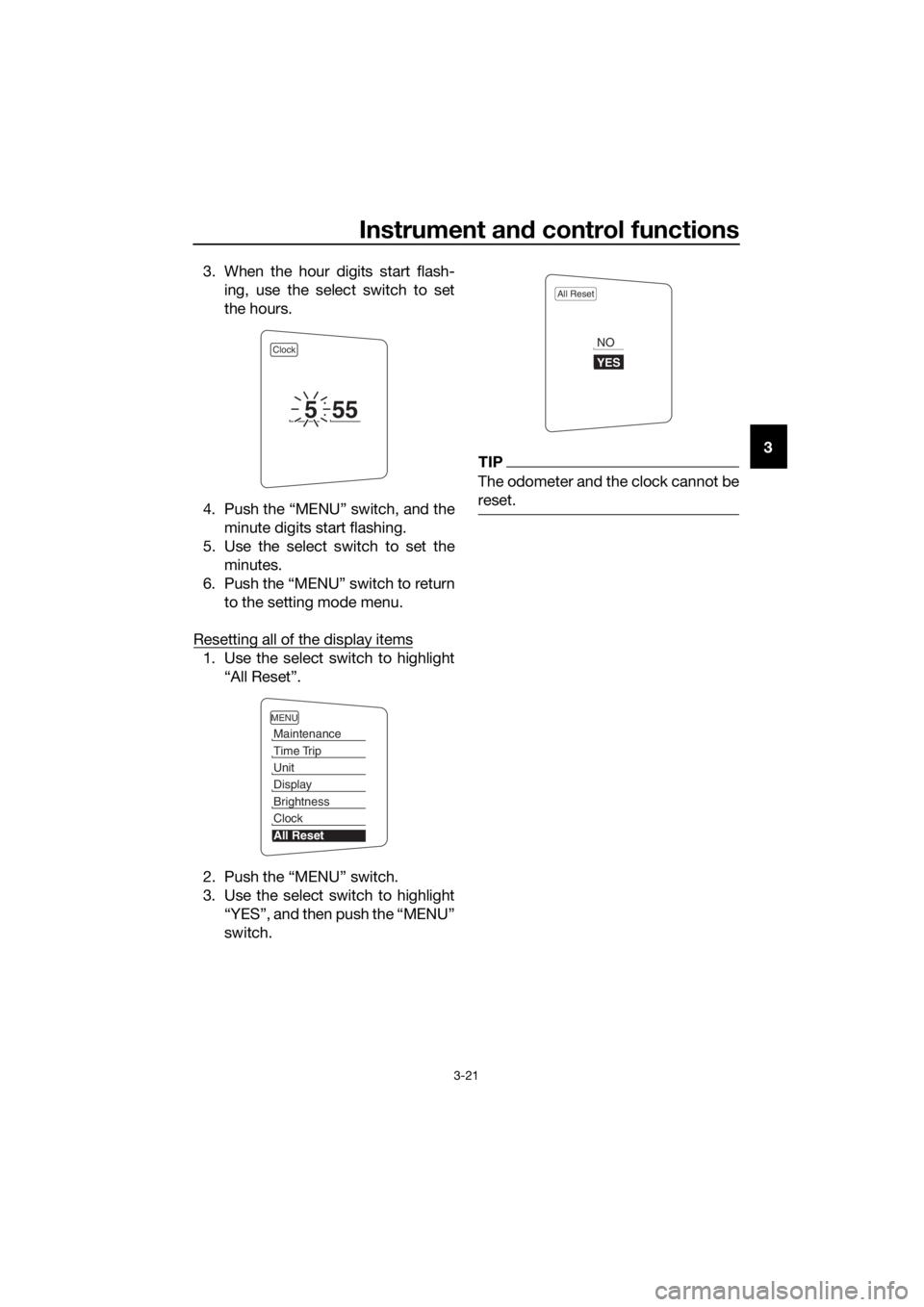
3. When the hour digits start flash-
ing, use the select switch to set
the hours.
4. Push the “MENU” switch, and the minute digits start flashing.
5. Use the select switch to set the minutes.
6. Push the “MENU” switch to return to the setting mode menu.
Resetting all of the display items
1. Use the select switch to highlight “All Reset”.
2. Push the “MENU” switch.
3. Use the select switch to highlight “YES”, and then push the “MENU”
switch.
TIP
The odometer and the clock cannot be
reset.
Clock
555
MENU
Maintenance
Time Trip
Unit
Display
Brightness
Clock
All Reset
All Reset
YES
NO
UB96E1E0.book Page 21 Monday, July 10, 2017 10:57 AM
Page 37 of 122
Instrument and control functions
3-23
3
EAU12461Turn si gnal switch “ / ”
To signal a right-hand turn, push this
switch to “ ”. To signal a left-hand
turn, push this switch to “ ”. When
released, the switch returns to the cen-
ter position. To cancel the turn signal
lights, push the switch in after it has re-
turned to the center position.
EAU12501Horn switch “ ”
Press this switch to sound the horn.
EAU54212Stop/Run/Start switch “ / / ”
To crank the engine with the starter,
set this switch to “ ”, and then push
the switch down towards “ ”. See
page 5-2 for starting instructions prior
to starting the engine.
Set this switch to “ ” to stop the en-
gine in case of an emergency, such as
when the vehicle overturns or when the
throttle cable is stuck.
EAU12735Hazar d switch “ ”
With the key in the “ON” or “ ” posi-
tion, use this switch to turn on the haz-
ard lights (simultaneous flashing of all
turn signal lights).
The hazard lights are used in case of an
emergency or to warn other drivers
when your vehicle is stopped where it
might be a traffic hazard.
NOTICE
ECA10062
Do not use the hazar d lig hts for an
exten ded len gth of time with the en-
g ine not runnin g, otherwise the bat-
tery may dischar ge.
EAU12781Cruise control switches
See page 3-6 for an explanation of the
cruise control system.
EAU54232Menu switch “MENU”
This switch is used to make setting
changes within the multi-function me-
ter unit. (See page 3-9.)
EAU54222Select switch “ / ”
This switch is used to make setting
changes within the multi-function me-
ter unit. (See page 3-9.)
EAU54691Drive mo de switch “MODE”
WARNING
EWA15341
Do not chan ge the D-mo de while the
vehicle is movin g.
Using this switch changes the drive
mode to touring mode “T” or sports
mode “S”.
The throttle grip must be completely
closed in order to change the drive mo-
de.
The selected mode is shown on the
drive mode display. (See page 3-11.)
The drive mode cannot be changed
while the cruise control system is oper-
ating.
UB96E1E0.book Page 23 Monday, July 10, 2017 10:57 AM
Page 54 of 122
Instrument and control functions
3-40
3
EAU55425
A djustin g the front an d rear
suspension
This model is equipped with an elec-
tronically adjustable suspension sys-
tem. The preload of the rear shock
absorber and the damping forces of
both the front fork and rear shock ab-
sorber can be adjusted.
WARNING
EWA12423
Be sure to stop the vehicle before
makin g any settin g chan ges to the
multi-function meter unit. Chang ing
settin gs while ri din g can d istract the
operator an d increase the risk of an
acci dent.
Preloa d
When riding with luggage or a passen-
ger, use the preload adjusting function
to adjust the suspension system to
match the load. There are 4 preload
settings.
TIP
The preload adjusting function will
appear only when the engine is
running.
Changing the preload setting will
also adjust the front and rear sus-
pension damping forces accord-
ingly. (See page 3-42.)
About cold temperature opera-
tion:
• When using the preload adjust- ing function, there should be no
weight on the vehicle.
• When using the preload adjust- ing function at ambient temper-
atures near or below 0 °C (32
°F), the suspension system
warning light may come on. • The suspension will still operate
as normal, only the preload ad-
justing function cannot be used.
• To reset the suspension system warning light, wait approximate-
ly 6 minutes and then turn the
main switch off or immediately
turn the main switch off and
then wait 6 minutes.
• If the suspension system warn- ing light remains on, have a
Yamaha dealer check the vehi- cle.
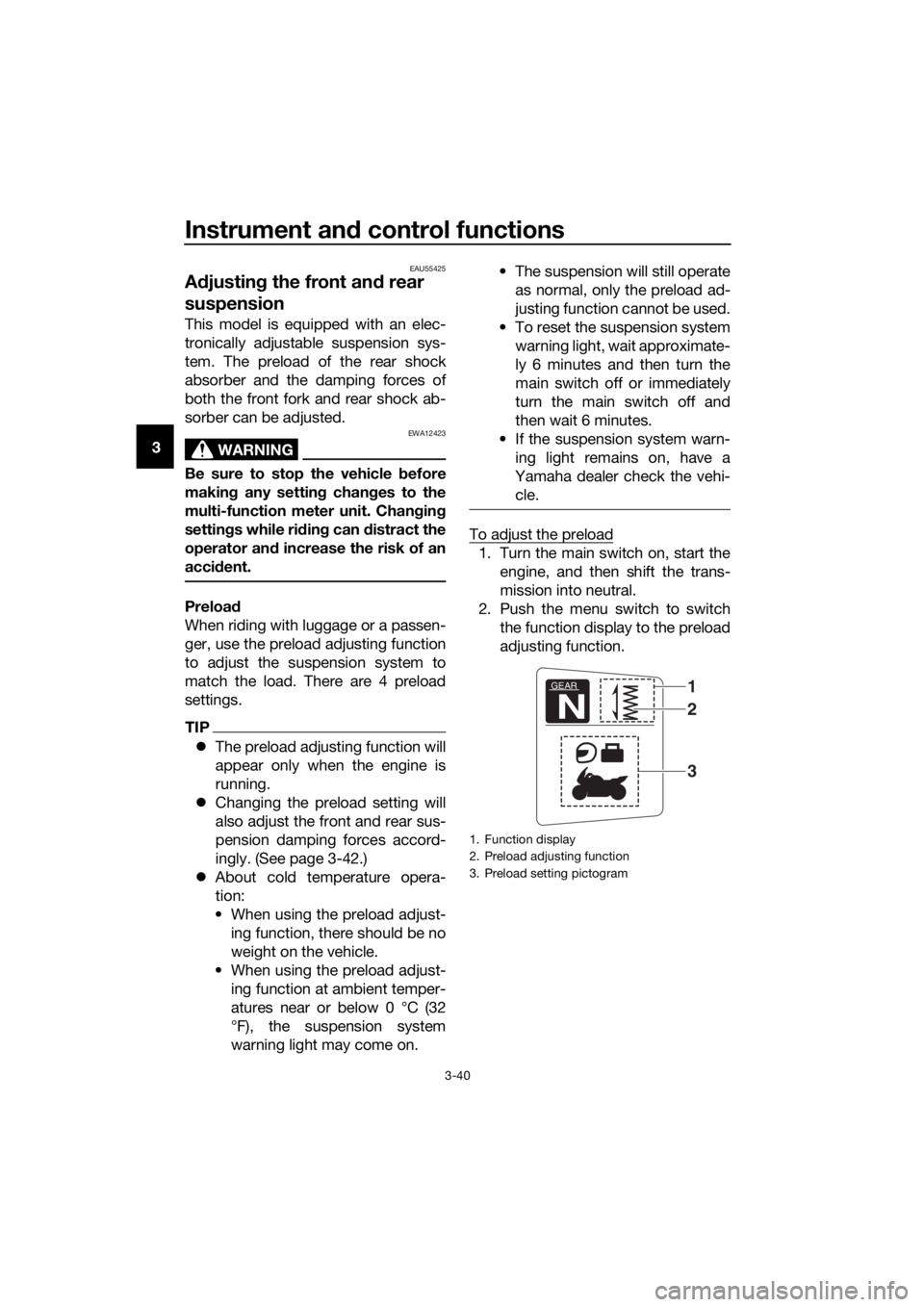
To adjust the preload
1. Turn the main switch on, start the engine, and then shift the trans-
mission into neutral.
2. Push the menu switch to switch the function display to the preload
adjusting function.
1. Function display
2. Preload adjusting function
3. Preload setting pictogram
GEAR
N
1
3
2
UB96E1E0.book Page 40 Monday, July 10, 2017 10:57 AM
Page 55 of 122
Instrument and control functions
3-41
3
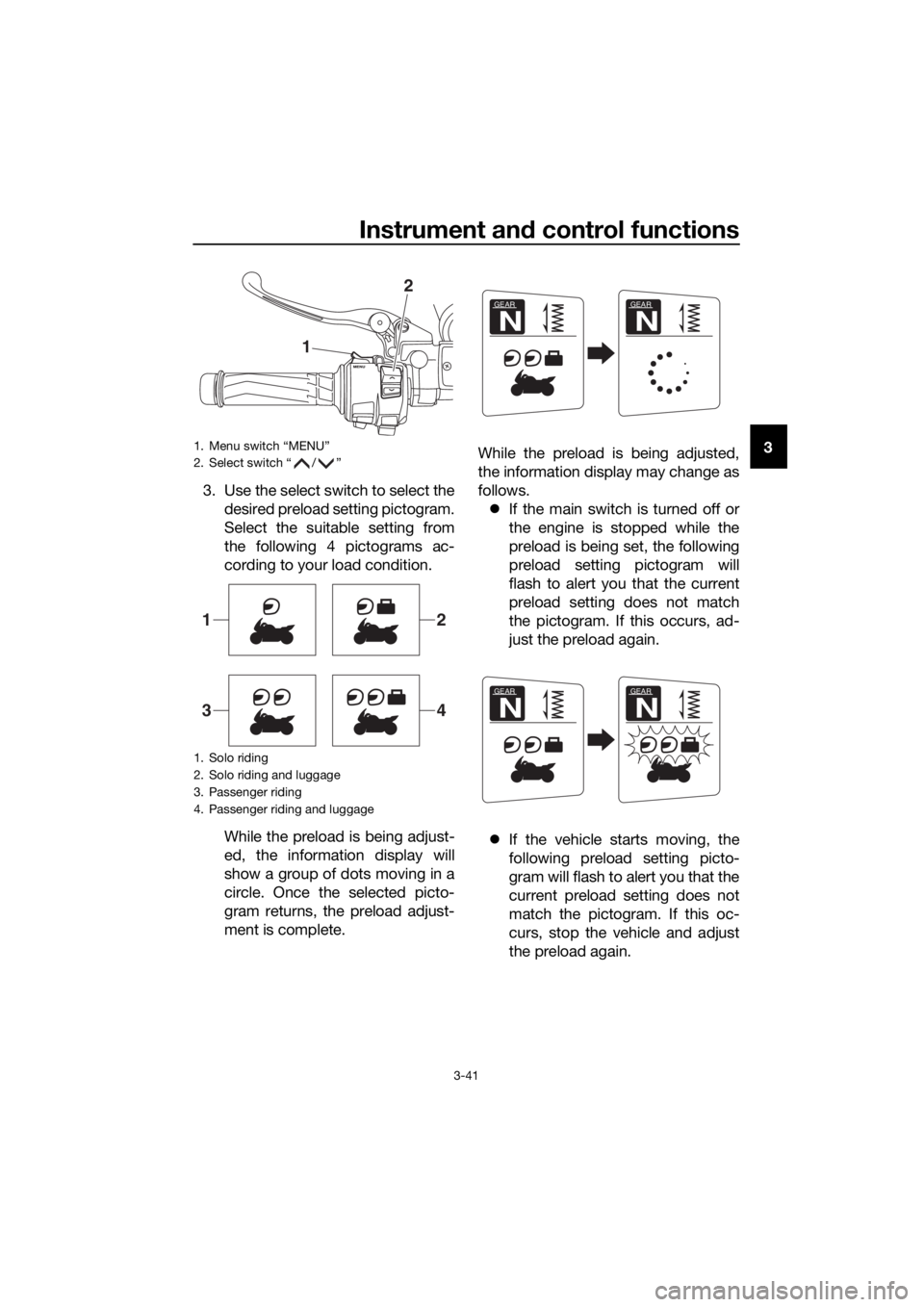
3. Use the select switch to select the desired preload setting pictogram.
Select the suitable setting from
the following 4 pictograms ac-
cording to your load condition.
While the preload is being adjust-
ed, the information display will
show a group of dots moving in a
circle. Once the selected picto-
gram returns, the preload adjust-
ment is complete. While the preload is being adjusted,
the information display may change as
follows.
If the main switch is turned off or
the engine is stopped while the
preload is being set, the following
preload setting pictogram will
flash to alert you that the current
preload setting does not match
the pictogram. If this occurs, ad-
just the preload again.
If the vehicle starts moving, the
following preload setting picto-
gram will flash to alert you that the
current preload setting does not
match the pictogram. If this oc-
curs, stop the vehicle and adjust
the preload again.1. Menu switch “MENU”
2. Select switch “ / ”
1. Solo riding
2. Solo riding and luggage
3. Passenger riding
4. Passenger riding and luggage
1
2
12
34
GEAR
N
GEAR
N
GEAR
N
GEAR
N
UB96E1E0.book Page 41 Monday, July 10, 2017 10:57 AM
Page 56 of 122
Instrument and control functions
3-42
3
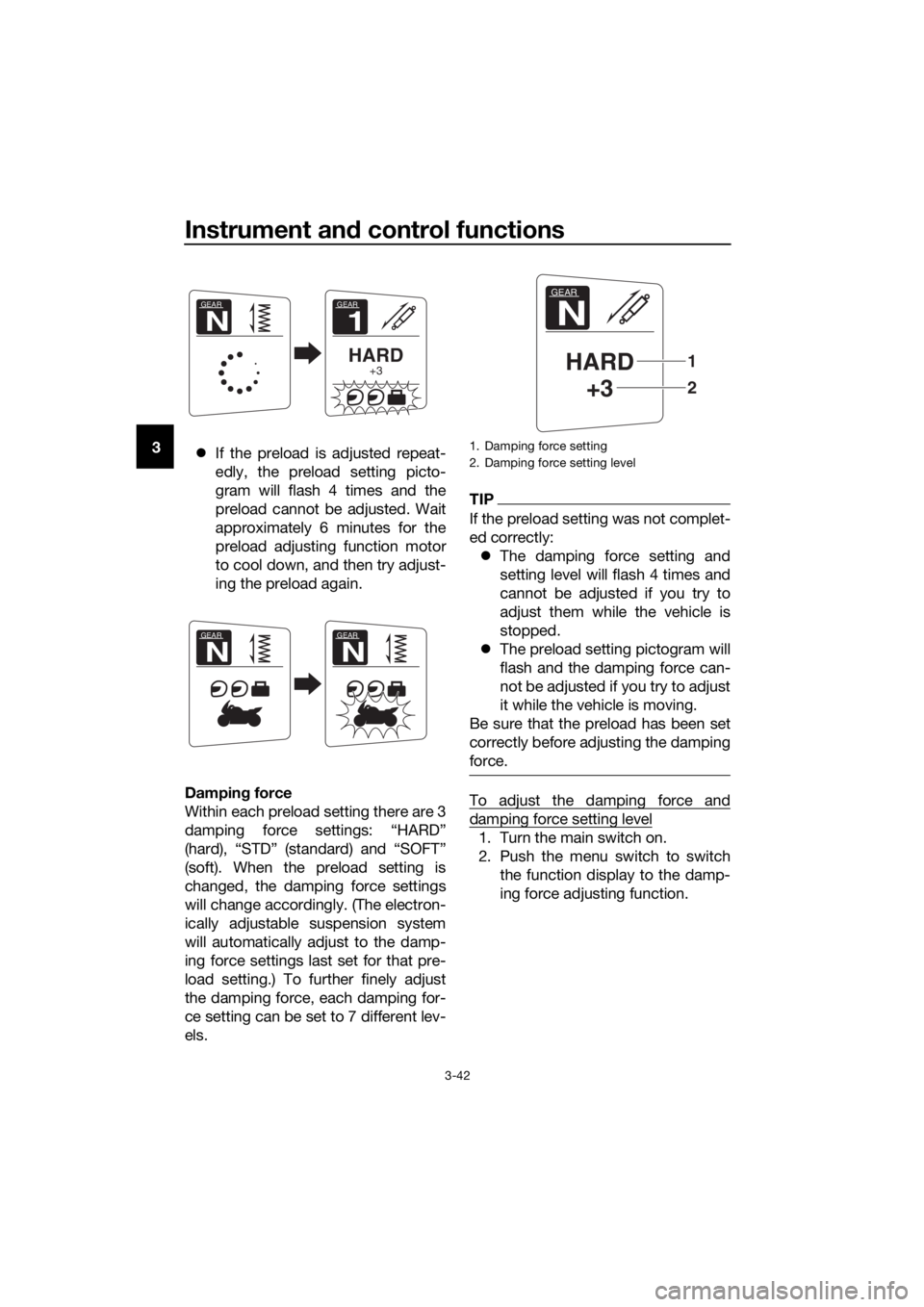
If the preload is adjusted repeat-
edly, the preload setting picto-
gram will flash 4 times and the
preload cannot be adjusted. Wait
approximately 6 minutes for the
preload adjusting function motor
to cool down, and then try adjust-
ing the preload again.
Dampin g force
Within each preload setting there are 3
damping force settings: “HARD”
(hard), “STD” (standard) and “SOFT”
(soft). When the preload setting is
changed, the damping force settings
will change accordingly. (The electron-
ically adjustable suspension system
will automatically adjust to the damp-
ing force settings last set for that pre-
load setting.) To further finely adjust
the damping force, each damping for-
ce setting can be set to 7 different lev-
els.
TIP
If the preload setting was not complet-
ed correctly: The damping force setting and
setting level will flash 4 times and
cannot be adjusted if you try to
adjust them while the vehicle is
stopped.
The preload setting pictogram will
flash and the damping force can-
not be adjusted if you try to adjust
it while the vehicle is moving.
Be sure that the preload has been set
correctly before adjusting the damping
force.
To adjust the damping force and
damping force setting level
1. Turn the main switch on.
2. Push the menu switch to switch the function display to the damp-
ing force adjusting function.
GEAR
1
HARD+3
GEAR
N
GEAR
N
GEAR
N
1. Damping force setting
2. Damping force setting level
GEAR
N
HARD+3
2
1
UB96E1E0.book Page 42 Monday, July 10, 2017 10:57 AM
Page 57 of 122
Instrument and control functions
3-43
3
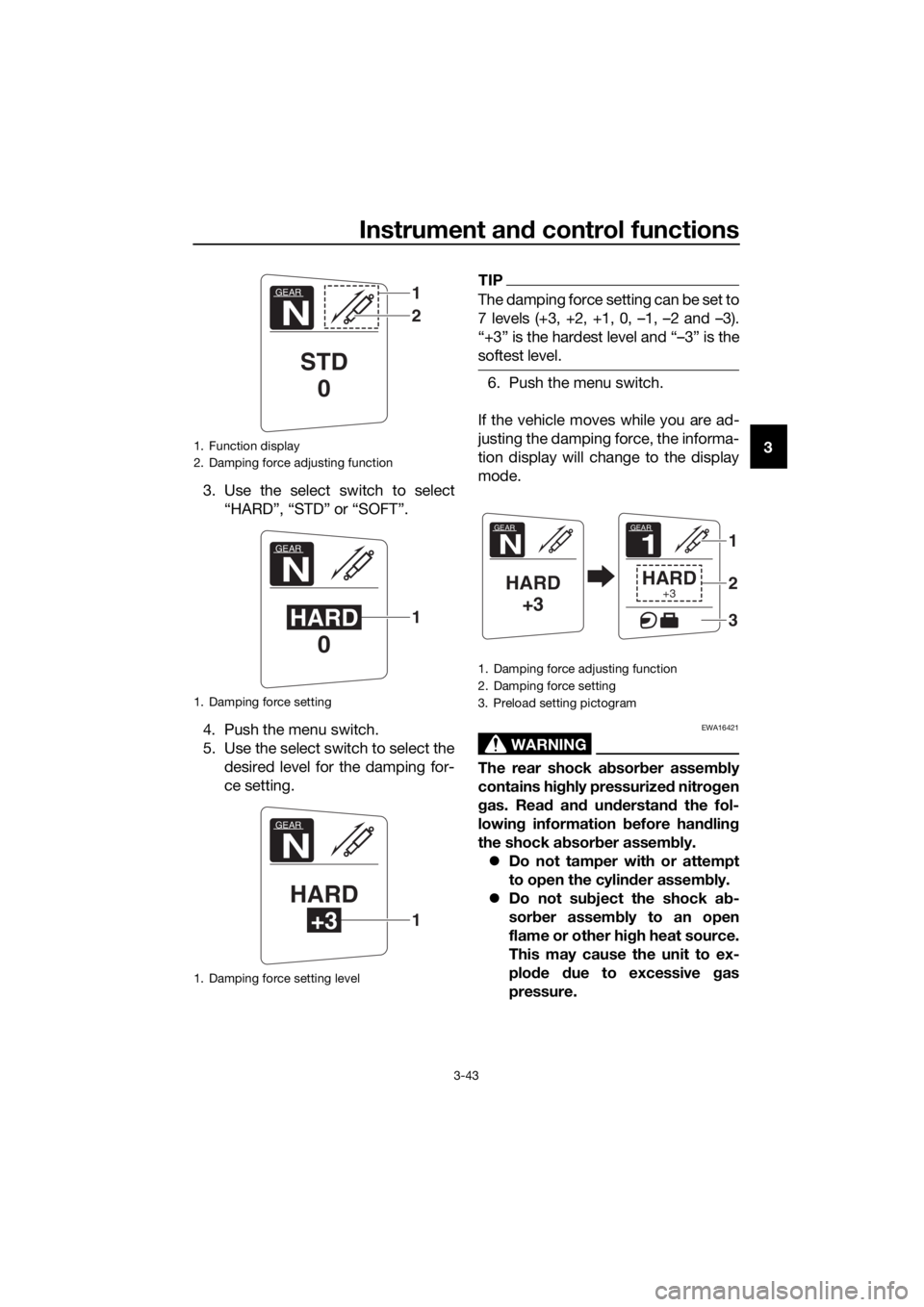
3. Use the select switch to select “HARD”, “STD” or “SOFT”.
4. Push the menu switch.
5. Use the select switch to select the desired level for the damping for-
ce setting.
TIP
The damping force setting can be set to
7 levels (+3, +2, +1, 0, –1, –2 and –3).
“+3” is the hardest level and “–3” is the
softest level.
6. Push the menu switch.
If the vehicle moves while you are ad-
justing the damping force, the informa-
tion display will change to the display
mode.
WARNING
EWA16421
The rear shock a bsor ber assem bly
contains hi ghly pressurize d nitro gen
g as. Rea d an d un derstan d the fol-
lowin g information before han dlin g
the shock a bsor ber assem bly.
Do not tamper with or attempt
to open the cylind er assembly.
Do not su bject the shock a b-
sor ber assem bly to an open
flame or other hi gh heat source.
This may cause the unit to ex-
plo de due to excessive gas
pressure.
1. Function display
2. Damping force adjusting function
1. Damping force setting
1. Damping force setting level
GEAR
N
STD 0
1
2
GEAR
N
HARD 01
GEAR
N
HARD
+31
1. Damping force adjusting function
2. Damping force setting
3. Preload setting pictogram
GEAR
N
HARD+3
GEAR
1
HARD+3
1
2
3
UB96E1E0.book Page 43 Monday, July 10, 2017 10:57 AM