light YAMAHA FJR1300AS 2018 Owner's Manual
[x] Cancel search | Manufacturer: YAMAHA, Model Year: 2018, Model line: FJR1300AS, Model: YAMAHA FJR1300AS 2018Pages: 122, PDF Size: 3.48 MB
Page 35 of 122
Instrument and control functions
3-21
3
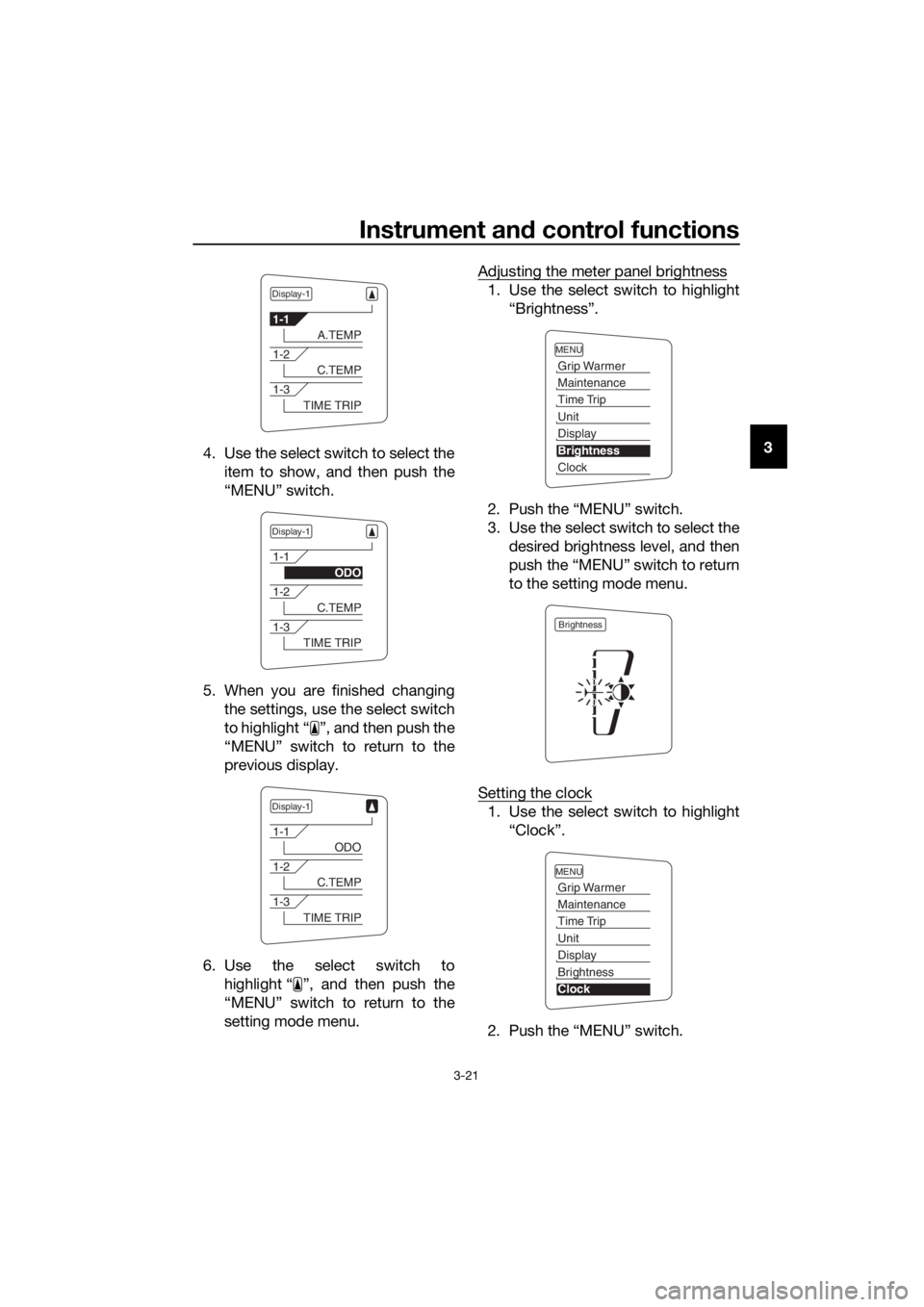
4. Use the select switch to select the
item to show, and then push the
“MENU” switch.
5. When you are finished changing the settings, use the select switch
to highlight “ ”, and then push the
“MENU” switch to return to the
previous display.
6. Use the select switch to highlight “ ”, and then push the
“MENU” switch to return to the
setting mode menu. Adjusting the meter panel brightness
1. Use the select switch to highlight
“Brightness”.
2. Push the “MENU” switch.
3. Use the select switch to select the desired brightness level, and then
push the “MENU” switch to return
to the setting mode menu.
Setting the clock
1. Use the select switch to highlight “Clock”.
2. Push the “MENU” switch.
Display-1
1-1
A.TEMP
1-2
C.TEMP
1-3
TIME TRIP
Display-1
1-1
ODO
1-2
C.TEMP
1-3
TIME TRIP
Display-1
1-1
ODO
1-2
C.TEMP
1-3
TIME TRIP
MENU
Grip Warmer
Maintenance
Time Trip
Unit
Display
Brightness
Clock
Brightness
MENU
Grip Warmer
Maintenance
Time Trip
Unit
Display
Brightness
Clock
UB95E1E0.book Page 21 Tuesday, September 26, 2017 12:01 PM
Page 36 of 122
Instrument and control functions
3-22
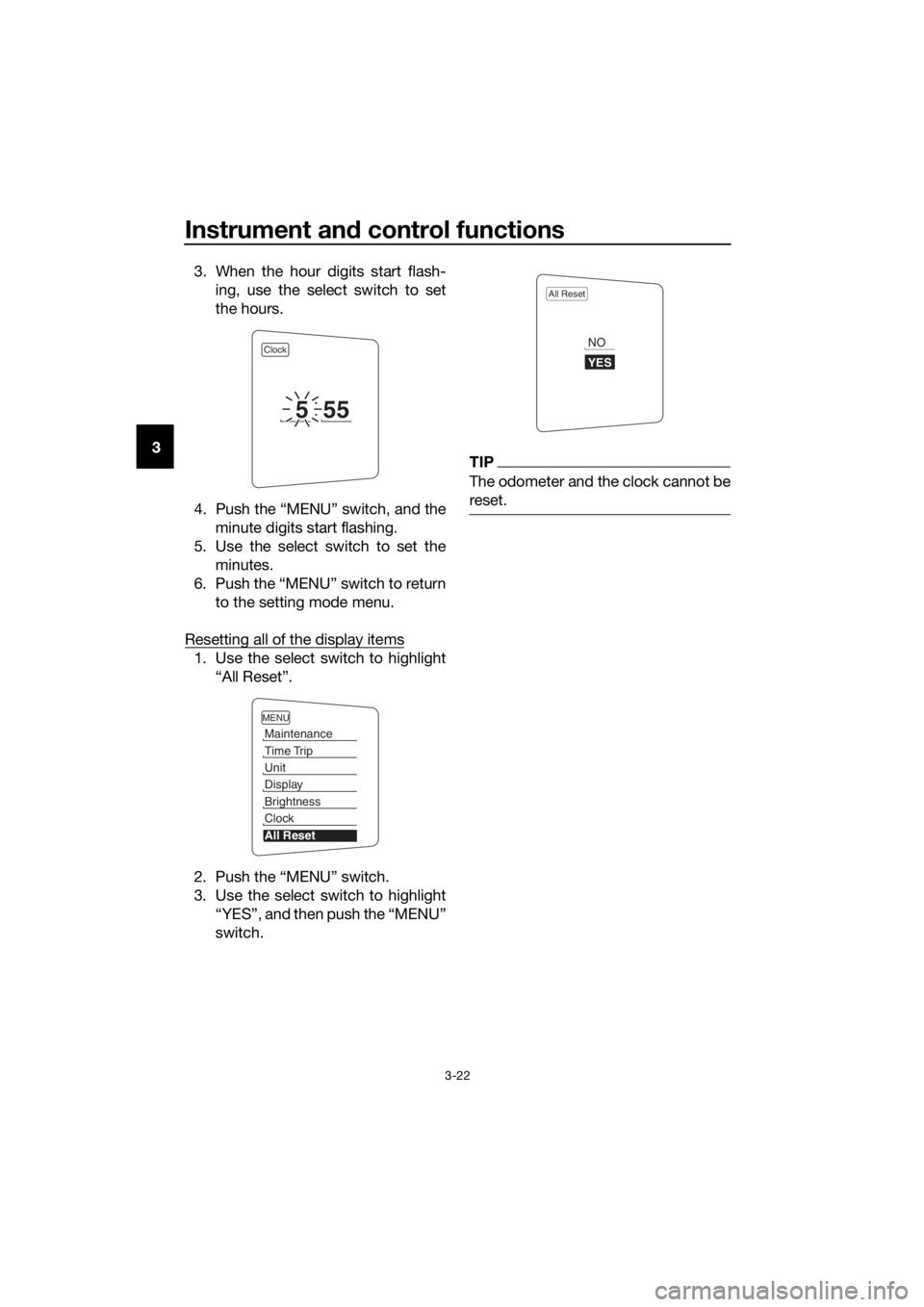
3 3. When the hour digits start flash-
ing, use the select switch to set
the hours.
4. Push the “MENU” switch, and the minute digits start flashing.
5. Use the select switch to set the minutes.
6. Push the “MENU” switch to return to the setting mode menu.
Resetting all of the display items
1. Use the select switch to highlight “All Reset”.
2. Push the “MENU” switch.
3. Use the select switch to highlight “YES”, and then push the “MENU”
switch.
TIP
The odometer and the clock cannot be
reset.
Clock
555
MENU
Maintenance
Time Trip
Unit
Display
Brightness
Clock
All Reset
All Reset
YES
NO
UB95E1E0.book Page 22 Tuesday, September 26, 2017 12:01 PM
Page 37 of 122
Instrument and control functions
3-23
3
EAU49433
D-mo de ( drive mo de)
D-mode is an electronically controlled
engine performance system with two
mode selections (touring mode “T” and
sports mode “S”).
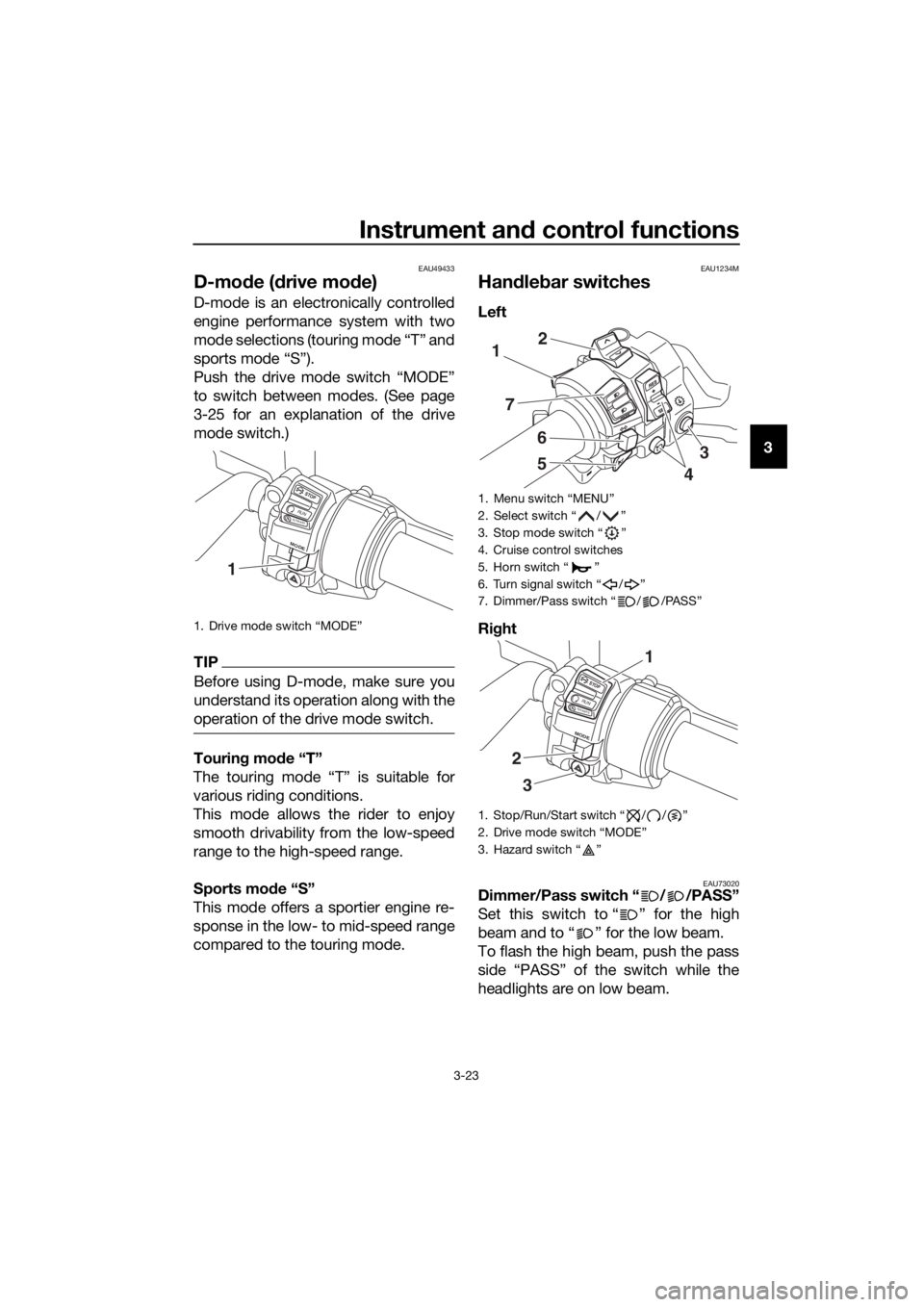
Push the drive mode switch “MODE”
to switch between modes. (See page
3-25 for an explanation of the drive
mode switch.)
TIP
Before using D-mode, make sure you
understand its operation along with the
operation of the drive mode switch.
Tourin g mo de “T”
The touring mode “T” is suitable for
various riding conditions.
This mode allows the rider to enjoy
smooth drivability from the low-speed
range to the high-speed range.
Sports mo de “S”
This mode offers a sportier engine re-
sponse in the low- to mid-speed range
compared to the touring mode.
EAU1234M
Han dle bar switches
Left
Ri ght
EAU73020Dimmer/Pass switch “ / /PASS”
Set this switch to “ ” for the high
beam and to “ ” for the low beam.
To flash the high beam, push the pass
side “PASS” of the switch while the
headlights are on low beam.
1. Drive mode switch “MODE”
STOP
M ODE
RUNSTART
1
1. Menu switch “MENU”
2. Select switch “ / ”
3. Stop mode switch “ ”
4. Cruise control switches
5. Horn switch “ ”
6. Turn signal switch “ / ”
7. Dimmer/Pass switch “ / /PASS”
1. Stop/Run/Start switch “ / / ”
2. Drive mode switch “MODE”
3. Hazard switch “ ”
1
7
6
5
2
4
3
STOP
M ODE
RUNSTART
3
2
1
UB95E1E0.book Page 23 Tuesday, September 26, 2017 12:01 PM
Page 38 of 122
Instrument and control functions
3-24
3
TIP
The inside cornering lights come on
with the high beam.
EAU12461Turn si gnal switch “ / ”
To signal a right-hand turn, push this
switch to “ ”. To signal a left-hand
turn, push this switch to “ ”. When
released, the switch returns to the cen-
ter position. To cancel the turn signal
lights, push the switch in after it has re-
turned to the center position.
EAU12501Horn switch “ ”
Press this switch to sound the horn.
EAU54212Stop/Run/Start switch “ / / ”
To crank the engine with the starter,
set this switch to “ ”, and then push
the switch down towards “ ”. See
page 5-2 for starting instructions prior
to starting the engine.
Set this switch to “ ” to stop the en-
gine in case of an emergency, such as
when the vehicle overturns or when the
throttle cable is stuck.
EAU12735Hazar d switch “ ”
With the key in the “ON” or “ ” posi-
tion, use this switch to turn on the haz-
ard lights (simultaneous flashing of all
turn signal lights).
The hazard lights are used in case of an
emergency or to warn other drivers
when your vehicle is stopped where it
might be a traffic hazard.
NOTICE
ECA10062
Do not use the hazar d lig hts for an
exten ded len gth of time with the en-
g ine not runnin g, otherwise the bat-
tery may dischar ge.
EAU12781Cruise control switches
See page 3-7 for an explanation of the
cruise control system.
EAU54232Menu switch “MENU”
This switch is used to make setting
changes within the multi-function me-
ter unit. (See page 3-10.)
EAU54222Select switch “ / ”
This switch is used to make setting
changes within the multi-function me-
ter unit. (See page 3-10.)
EAU55464Stop mo de switch “ ”
When this switch is pushed, the stop
mode function is activated and the
stop mode indicator light comes on.
Stop mode works via the YCC-S sys-
tem to automatically downshift to 1st
gear when coming to a stop.
If stop mode is turned on and the
transmission is in 2nd or higher gear,
when the rider stops the vehicle the
transmission will automatically shift
down to 1st gear.
TIP
When the stop mode function is acti-
vated, the shift down indicator light will
flash only when the rider attempts to
start off in 2nd gear or higher.
UB95E1E0.book Page 24 Tuesday, September 26, 2017 12:01 PM
Page 42 of 122
Instrument and control functions
3-28
3
EAU39542
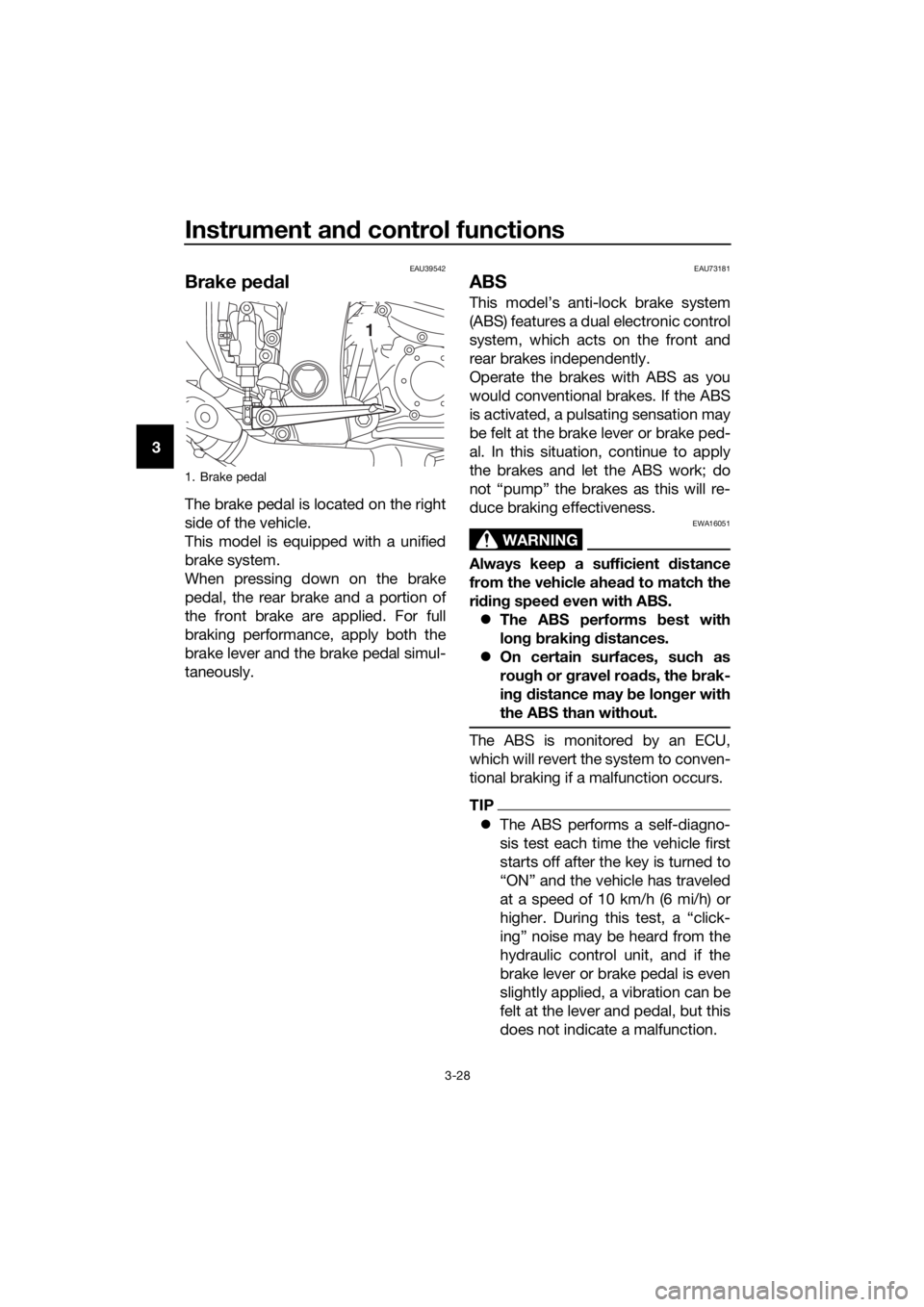
Brake ped al
The brake pedal is located on the right
side of the vehicle.
This model is equipped with a unified
brake system.
When pressing down on the brake
pedal, the rear brake and a portion of
the front brake are applied. For full
braking performance, apply both the
brake lever and the brake pedal simul-
taneously.
EAU73181
ABS
This model’s anti-lock brake system
(ABS) features a dual electronic control
system, which acts on the front and
rear brakes independently.
Operate the brakes with ABS as you
would conventional brakes. If the ABS
is activated, a pulsating sensation may
be felt at the brake lever or brake ped-
al. In this situation, continue to apply
the brakes and let the ABS work; do
not “pump” the brakes as this will re-
duce braking effectiveness.
WARNING
EWA16051
Always keep a sufficient d istance
from the vehicle ahead to match the
ri din g speed even with ABS.
The ABS performs b est with
lon g b rakin g d istances.
On certain surfaces, such as
rou gh or g ravel roa ds, the b rak-
in g d istance may be lon ger with
the ABS than without.
The ABS is monitored by an ECU,
which will revert the system to conven-
tional braking if a malfunction occurs.
TIP
The ABS performs a self-diagno-
sis test each time the vehicle first
starts off after the key is turned to
“ON” and the vehicle has traveled
at a speed of 10 km/h (6 mi/h) or
higher. During this test, a “click-
ing” noise may be heard from the
hydraulic control unit, and if the
brake lever or brake pedal is even
slightly applied, a vibration can be
felt at the lever and pedal, but this
does not indicate a malfunction.
1. Brake pedal
1
UB95E1E0.book Page 28 Tuesday, September 26, 2017 12:01 PM
Page 43 of 122
Instrument and control functions
3-29
3
This ABS has a test mode which
allows the owner to experience
the pulsation at the brake lever or
brake pedal when the ABS is op-
erating. However, special tools are
required, so please consult your
Yamaha dealer.
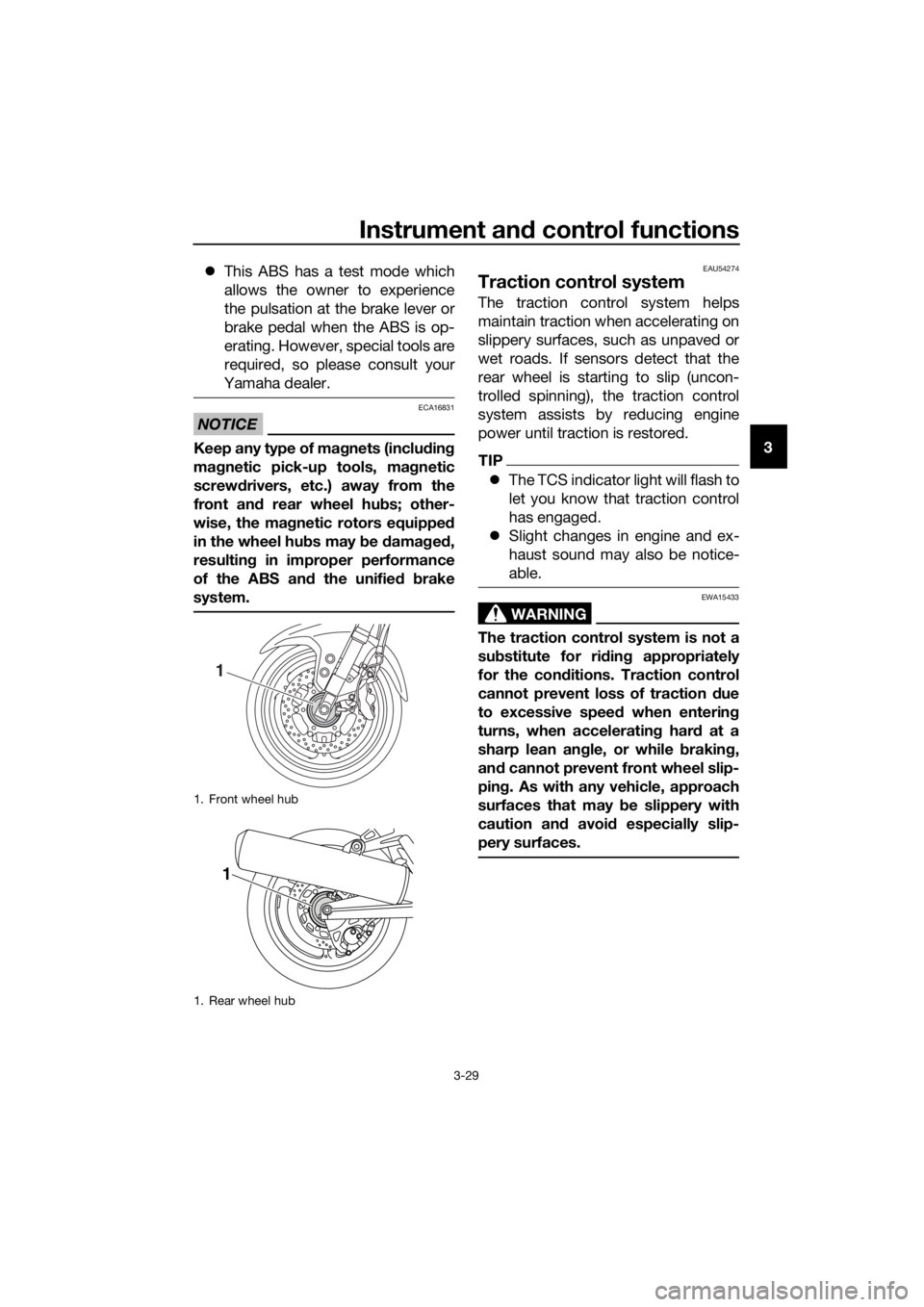
NOTICE
ECA16831
Keep any type of mag nets (includin g
ma gnetic pick-up tools, mag netic
screwd rivers, etc.) away from the
front an d rear wheel hu bs; other-
wise, the ma gnetic rotors equippe d
in the wheel hu bs may b e damag ed ,
resultin g in improper performance
of the ABS an d the unified b rake
system.
EAU54274
Traction control system
The traction control system helps
maintain traction when accelerating on
slippery surfaces, such as unpaved or
wet roads. If sensors detect that the
rear wheel is starting to slip (uncon-
trolled spinning), the traction control
system assists by reducing engine
power until traction is restored.
TIP
The TCS indicator light will flash to
let you know that traction control
has engaged.
Slight changes in engine and ex-
haust sound may also be notice-
able.
WARNING
EWA15433
The traction control system is not a
substitute for ri din g appropriately
for the con ditions. Traction control
cannot prevent loss of traction d ue
to excessive spee d when enterin g
turns, when acceleratin g har d at a
sharp lean an gle, or while b raking,
an d cannot prevent front wheel slip-
pin g. As with any vehicle, approach
surfaces that may be slippery with
caution an d avoi d especially slip-
pery surfaces.
1. Front wheel hub
1. Rear wheel hub
1
1
UB95E1E0.book Page 29 Tuesday, September 26, 2017 12:01 PM
Page 44 of 122
Instrument and control functions
3-30
3 Turnin
g TCS off or on
When the vehicle is turned on, the trac-
tion control system automatically turns
on.
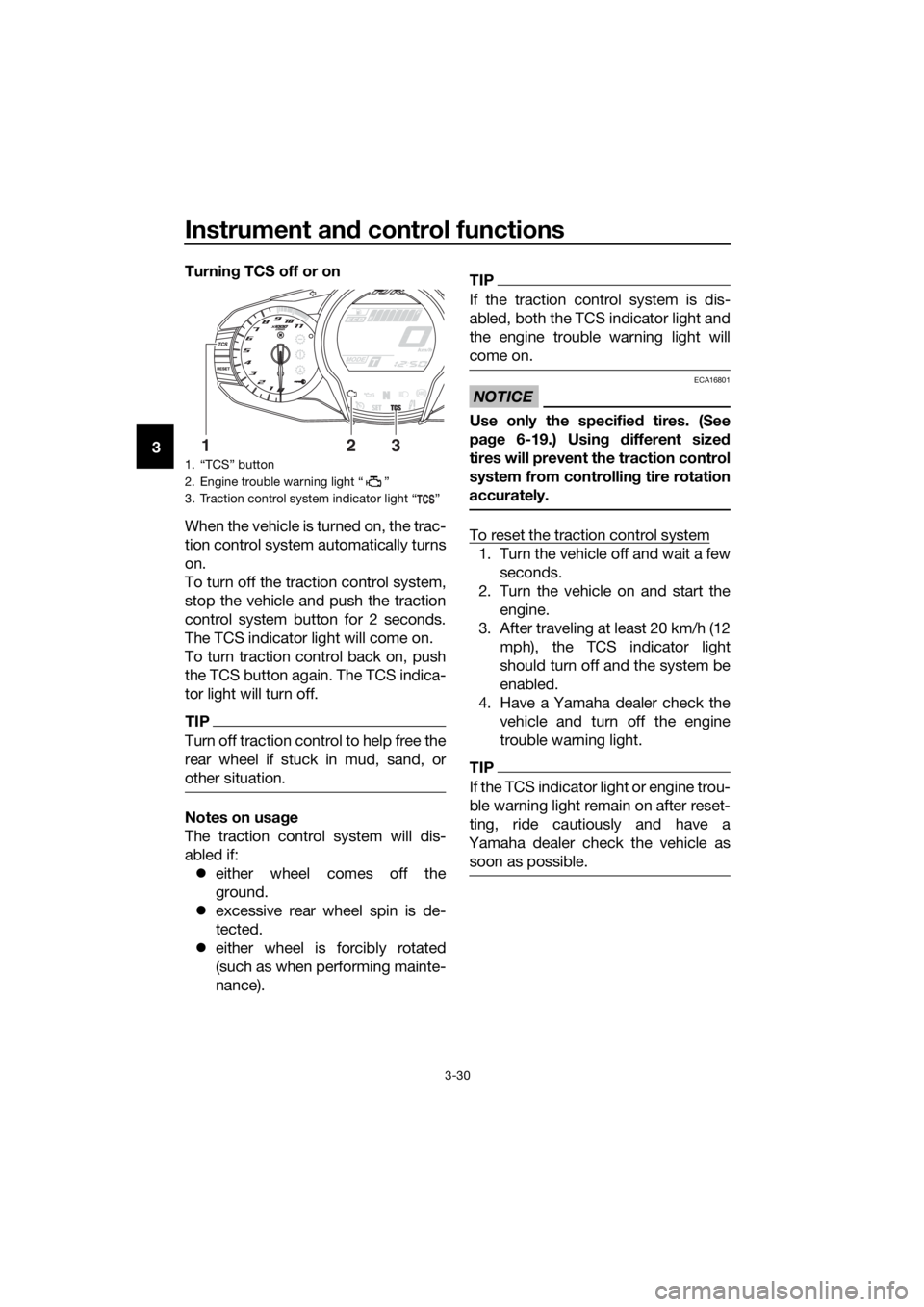
To turn off the traction control system,
stop the vehicle and push the traction
control system button for 2 seconds.
The TCS indicator light will come on.
To turn traction control back on, push
the TCS button again. The TCS indica-
tor light will turn off.
TIP
Turn off traction control to help free the
rear wheel if stuck in mud, sand, or
other situation.
Notes on usa ge
The traction control system will dis-
abled if: either wheel comes off the
ground.
excessive rear wheel spin is de-
tected.
either wheel is forcibly rotated
(such as when performing mainte-
nance).
TIP
If the traction control system is dis-
abled, both the TCS indicator light and
the engine trouble warning light will
come on.
NOTICE
ECA16801
Use only the specifie d tires. (See
pa ge 6-19.) Usin g different sized
tires will prevent the traction control
system from controllin g tire rotation
accurately.
To reset the traction control system
1. Turn the vehicle off and wait a few seconds.
2. Turn the vehicle on and start the engine.
3. After traveling at least 20 km/h (12 mph), the TCS indicator light
should turn off and the system be
enabled.
4. Have a Yamaha dealer check the vehicle and turn off the engine
trouble warning light.
TIP
If the TCS indicator light or engine trou-
ble warning light remain on after reset-
ting, ride cautiously and have a
Yamaha dealer check the vehicle as soon as possible.
1. “TCS” button
2. Engine trouble warning light “ ”
3. Traction control system indicator light “ ”
132
UB95E1E0.book Page 30 Tuesday, September 26, 2017 12:01 PM
Page 45 of 122
Instrument and control functions
3-31
3
EAU13075
Fuel tank cap
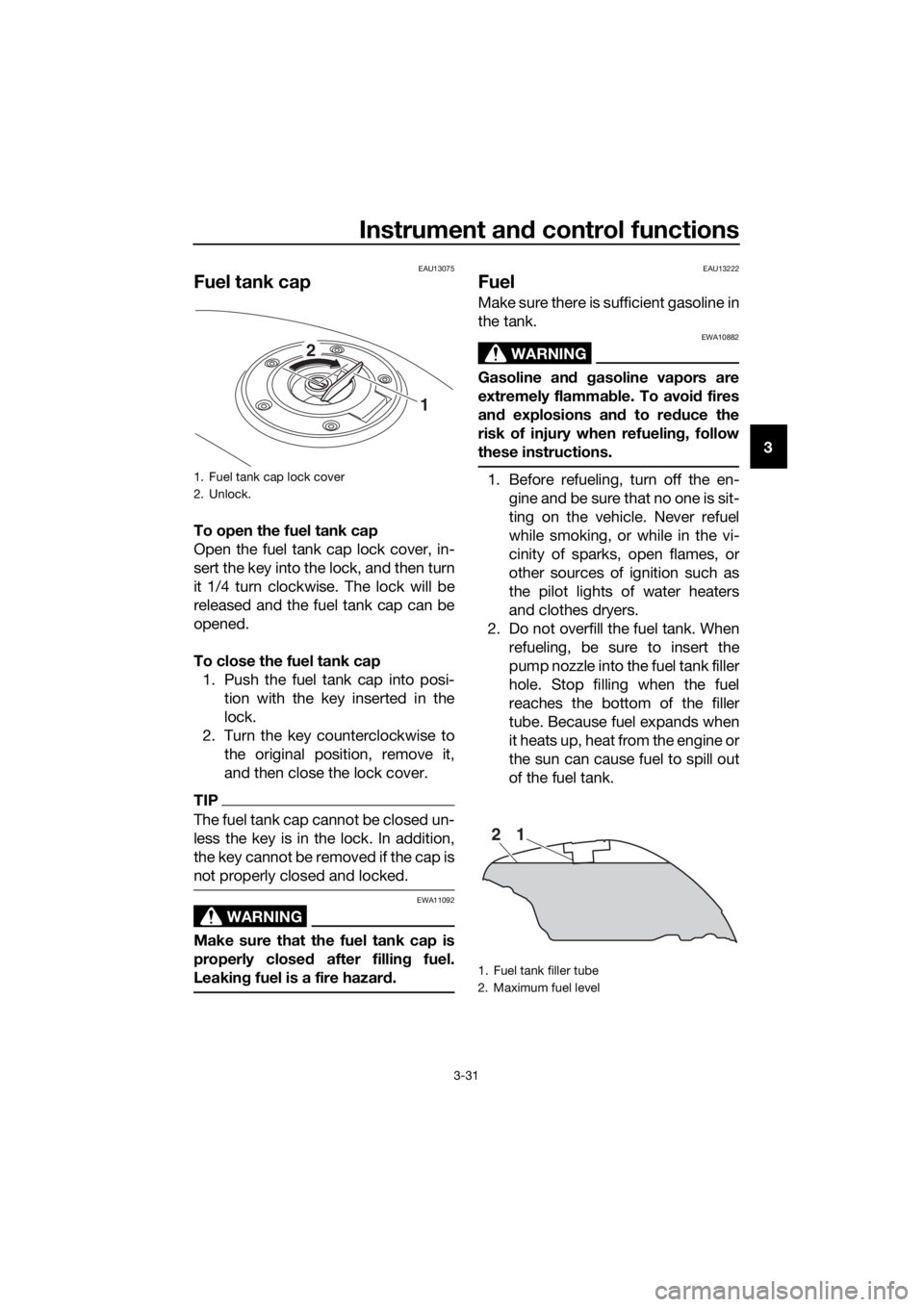
To open the fuel tank cap
Open the fuel tank cap lock cover, in-
sert the key into the lock, and then turn
it 1/4 turn clockwise. The lock will be
released and the fuel tank cap can be
opened.
To close the fuel tank cap
1. Push the fuel tank cap into posi- tion with the key inserted in the
lock.
2. Turn the key counterclockwise to the original position, remove it,
and then close the lock cover.
TIP
The fuel tank cap cannot be closed un-
less the key is in the lock. In addition,
the key cannot be removed if the cap is
not properly closed and locked.
WARNING
EWA11092
Make sure that the fuel tank cap is
properly close d after fillin g fuel.
Leakin g fuel is a fire hazar d.
EAU13222
Fuel
Make sure there is sufficient gasoline in
the tank.
WARNING
EWA10882
Gasoline an d gasoline vapors are
extremely flamma ble. To avoi d fires
an d explosions an d to re duce the
risk of injury when refuelin g, follow
these instructions.
1. Before refueling, turn off the en- gine and be sure that no one is sit-
ting on the vehicle. Never refuel
while smoking, or while in the vi-
cinity of sparks, open flames, or
other sources of ignition such as
the pilot lights of water heaters
and clothes dryers.
2. Do not overfill the fuel tank. When refueling, be sure to insert the
pump nozzle into the fuel tank filler
hole. Stop filling when the fuel
reaches the bottom of the filler
tube. Because fuel expands when
it heats up, heat from the engine or
the sun can cause fuel to spill out
of the fuel tank.1. Fuel tank cap lock cover
2. Unlock.
1
2
1. Fuel tank filler tube
2. Maximum fuel level
21
UB95E1E0.book Page 31 Tuesday, September 26, 2017 12:01 PM
Page 53 of 122
Instrument and control functions
3-39
3
Do not excee d the maximum
loa d of 208 k g (459 l b) for the ve-
hicle.
EAU39612
A djustin g the hea dlig ht beams
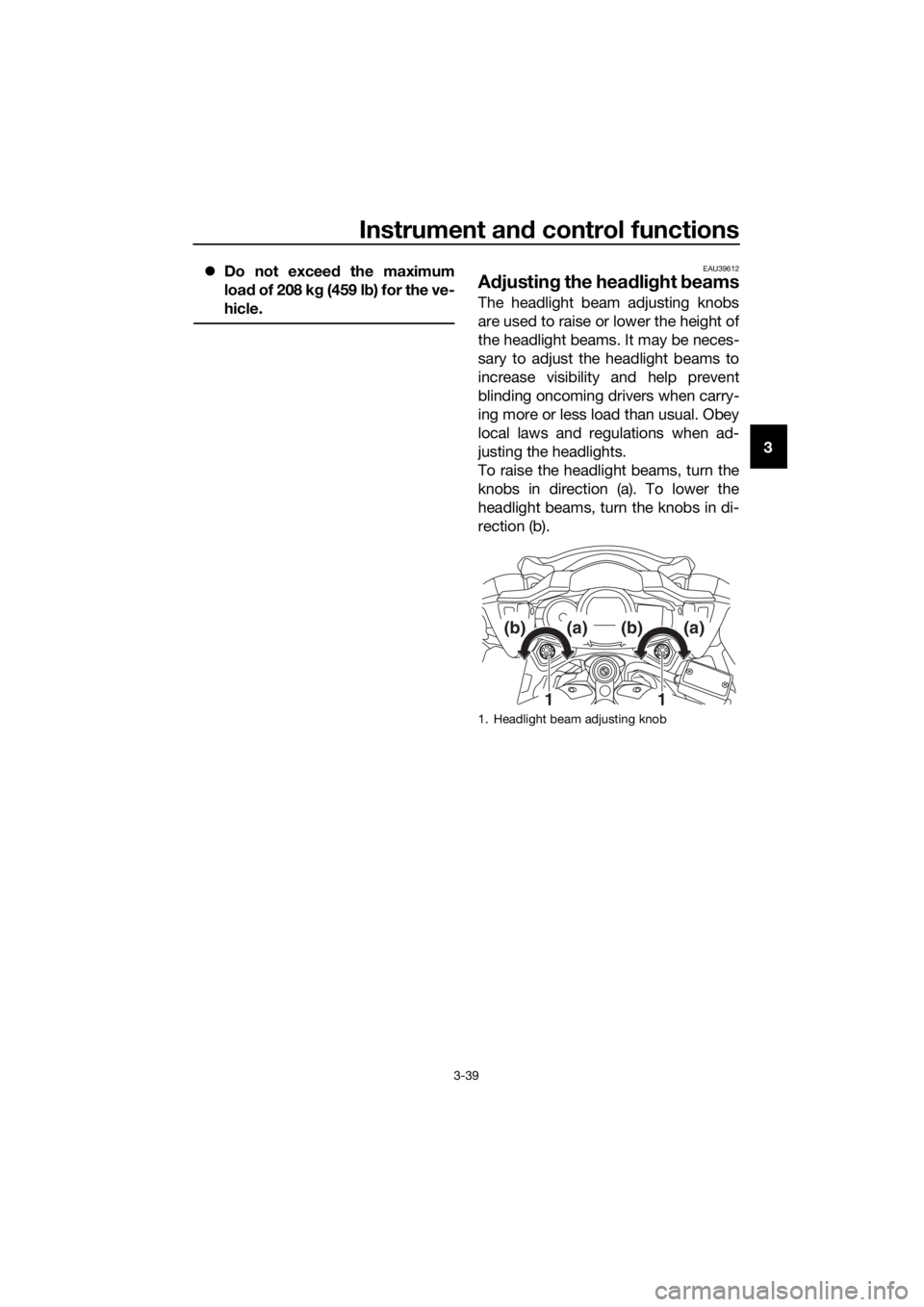
The headlight beam adjusting knobs
are used to raise or lower the height of
the headlight beams. It may be neces-
sary to adjust the headlight beams to
increase visibility and help prevent
blinding oncoming drivers when carry-
ing more or less load than usual. Obey
local laws and regulations when ad-
justing the headlights.
To raise the headlight beams, turn the
knobs in direction (a). To lower the
headlight beams, turn the knobs in di-
rection (b).
1. Headlight beam adjusting knob
11
(b)(a)(b)(a)
UB95E1E0.book Page 39 Tuesday, September 26, 2017 12:01 PM
Page 56 of 122
Instrument and control functions
3-42
3
EAU39672
Rear view mirrors
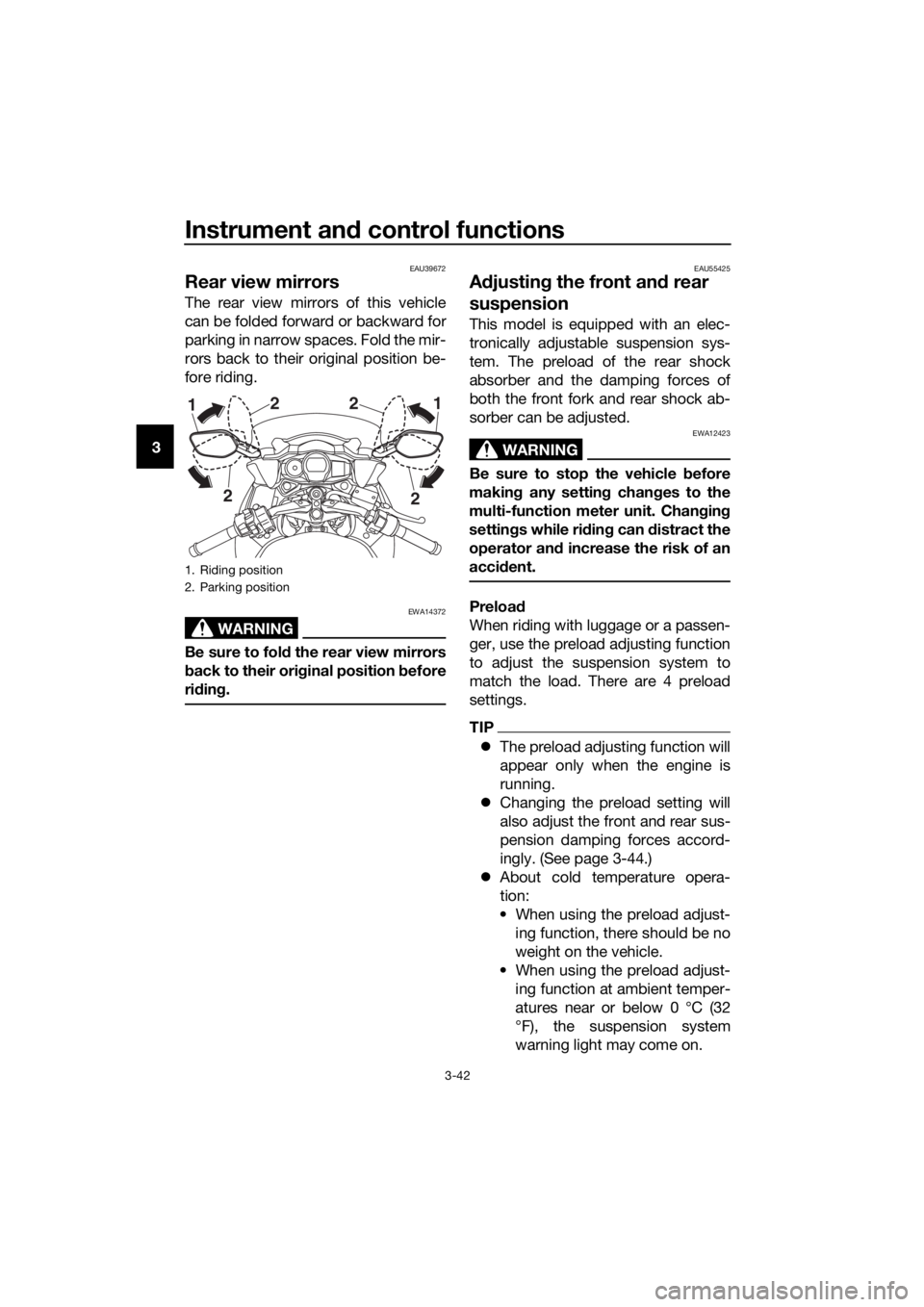
The rear view mirrors of this vehicle
can be folded forward or backward for
parking in narrow spaces. Fold the mir-
rors back to their original position be-
fore riding.
WARNING
EWA14372
Be sure to fol d the rear view mirrors
b ack to their ori ginal position before
ri din g.
EAU55425
A djustin g the front an d rear
suspension
This model is equipped with an elec-
tronically adjustable suspension sys-
tem. The preload of the rear shock
absorber and the damping forces of
both the front fork and rear shock ab-
sorber can be adjusted.
WARNING
EWA12423
Be sure to stop the vehicle before
makin g any settin g chan ges to the
multi-function meter unit. Chang ing
settin gs while ri din g can d istract the
operator an d increase the risk of an
acci dent.
Preloa d
When riding with luggage or a passen-
ger, use the preload adjusting function
to adjust the suspension system to
match the load. There are 4 preload
settings.
TIP
The preload adjusting function will
appear only when the engine is
running.
Changing the preload setting will
also adjust the front and rear sus-
pension damping forces accord-
ingly. (See page 3-44.)
About cold temperature opera-
tion:
• When using the preload adjust- ing function, there should be no
weight on the vehicle.
• When using the preload adjust- ing function at ambient temper-
atures near or below 0 °C (32
°F), the suspension system
warning light may come on.
1. Riding position
2. Parking position
2
2
1
2 2
1
UB95E1E0.book Page 42 Tuesday, September 26, 2017 12:01 PM