engine YAMAHA FX HO CRUISER 2014 Owner's Manual
[x] Cancel search | Manufacturer: YAMAHA, Model Year: 2014, Model line: FX HO CRUISER, Model: YAMAHA FX HO CRUISER 2014Pages: 114, PDF Size: 5.13 MB
Page 43 of 114
Watercraft operation
37
cruise assist. (See page 37 for information on
the cruise assist.)
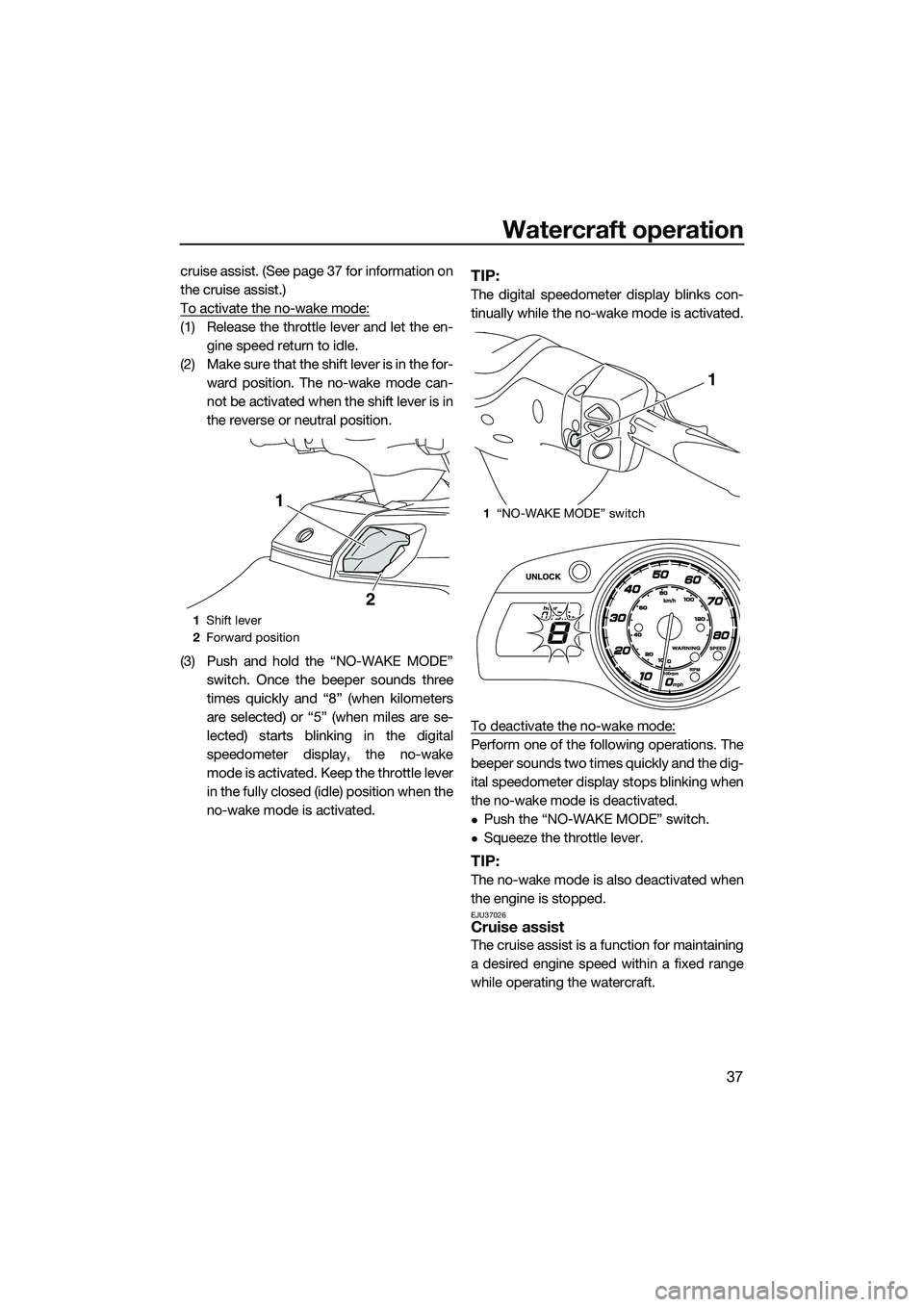
To activate the no-wake mode:
(1) Release the throttle lever and let the en-gine speed return to idle.
(2) Make sure that the shift lever is in the for- ward position. The no-wake mode can-
not be activated when the shift lever is in
the reverse or neutral position.
(3) Push and hold the “NO-WAKE MODE” switch. Once the beeper sounds three
times quickly and “8” (when kilometers
are selected) or “5” (when miles are se-
lected) starts blinking in the digital
speedometer display, the no-wake
mode is activated. Keep the throttle lever
in the fully closed (idle) position when the
no-wake mode is activated.
TIP:
The digital speedometer display blinks con-
tinually while the no-wake mode is activated.
To deactivate the no-wake mode:
Perform one of the following operations. The
beeper sounds two times quickly and the dig-
ital speedometer display stops blinking when
the no-wake mode is deactivated.
Push the “NO-WAKE MODE” switch.
Squeeze the throttle lever.
TIP:
The no-wake mode is also deactivated when
the engine is stopped.
EJU37026Cruise assist
The cruise assist is a function for maintaining
a desired engine speed within a fixed range
while operating the watercraft.
1Shift lever
2 Forward position
1
2
1“NO-WAKE MODE” switch
1
UF2T72E0.book Page 37 Monday, July 22, 2013 2:26 PM
Page 44 of 114
Watercraft operation
38
TIP:
The cruise assist can only be set between
engine speeds of approximately 3000
r/min and approximately 7000 r/min.
The cruise assist cannot be activated in the
Low RPM Mode. (See page 35 for Low
RPM Mode activation procedures.)
Activating and deactivating the cruise as-
sist
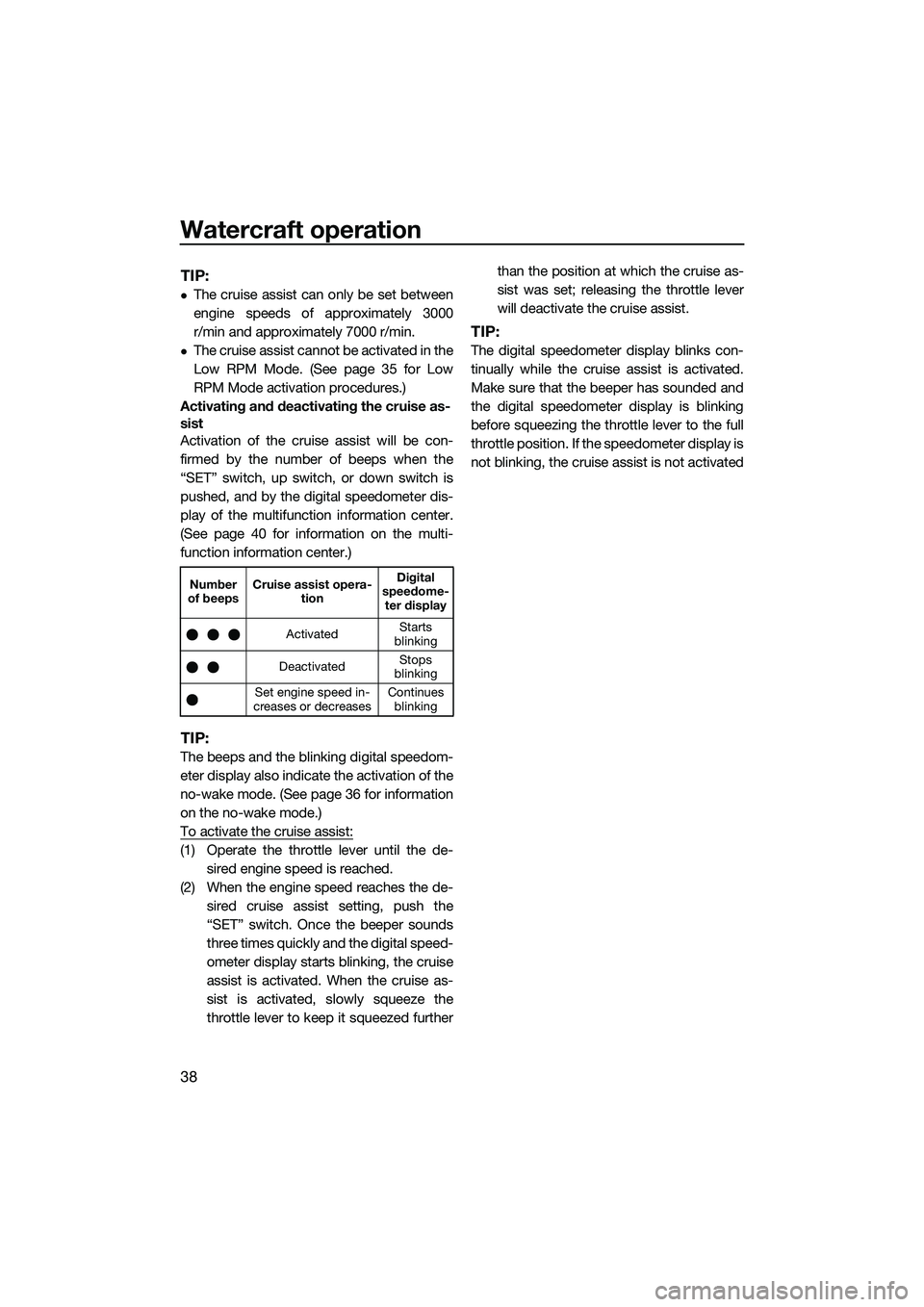
Activation of the cruise assist will be con-
firmed by the number of beeps when the
“SET” switch, up switch, or down switch is
pushed, and by the digital speedometer dis-
play of the multifunction information center.
(See page 40 for information on the multi-
function information center.)
TIP:
The beeps and the blinking digital speedom-
eter display also indicate the activation of the
no-wake mode. (See page 36 for information
on the no-wake mode.)
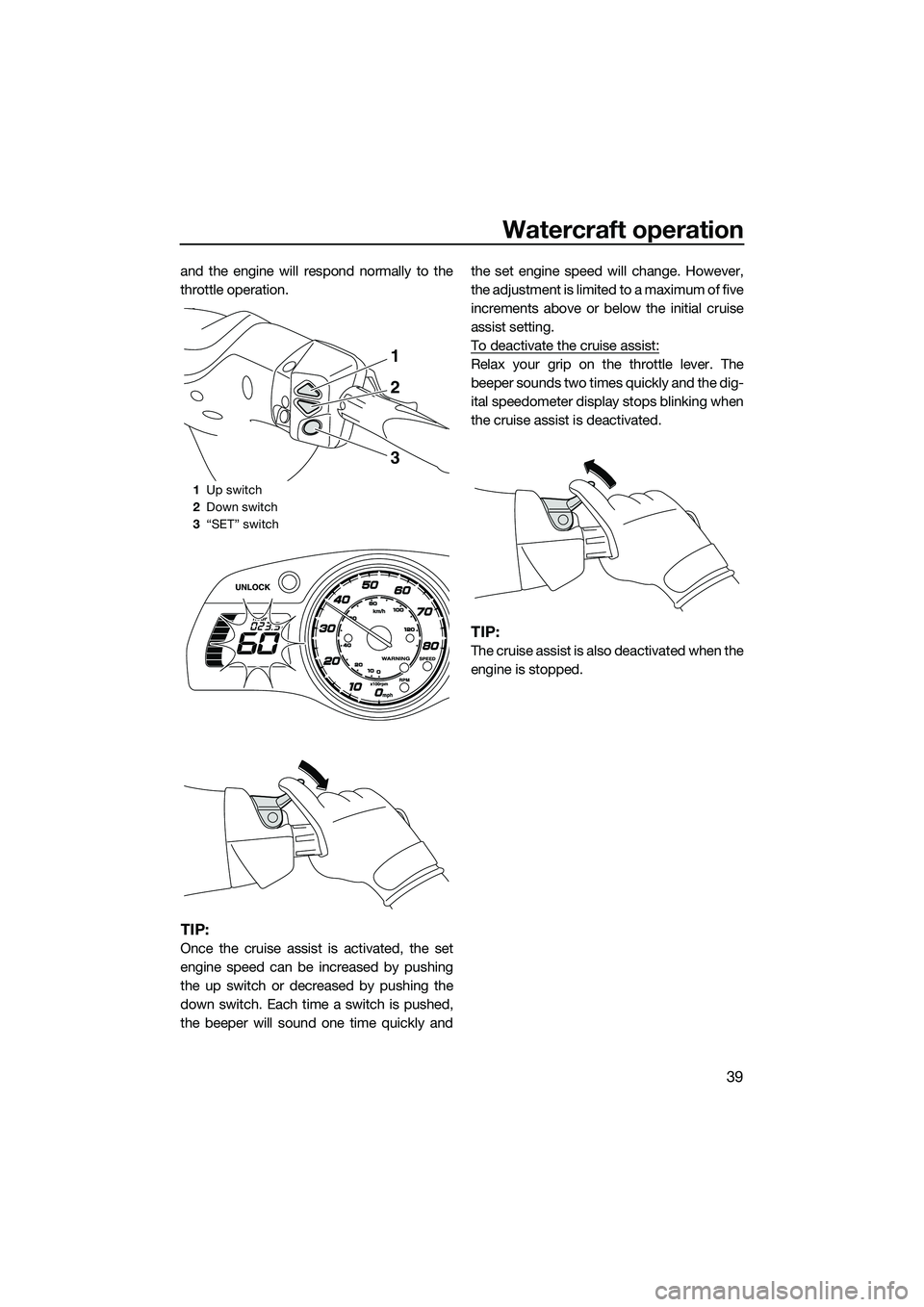
To activate the cruise assist:
(1) Operate the throttle lever until the de- sired engine speed is reached.
(2) When the engine speed reaches the de- sired cruise assist setting, push the
“SET” switch. Once the beeper sounds
three times quickly and the digital speed-
ometer display starts blinking, the cruise
assist is activated. When the cruise as-
sist is activated, slowly squeeze the
throttle lever to keep it squeezed further than the position at which the cruise as-
sist was set; releasing the throttle lever
will deactivate the cruise assist.
TIP:
The digital speedometer display blinks con-
tinually while the cruise assist is activated.
Make sure that the beeper has sounded and
the digital speedometer display is blinking
before squeezing the throttle lever to the full
throttle position. If the speedometer display is
not blinking, the cruise assist is not activated
Number
of beeps Cruise assist opera-
tion Digital
speedome- ter display
Activated Starts
blinking
Deactivated Stops
blinking
Set engine speed in-
creases or decreases Continues
blinking
UF2T72E0.book Page 38 Monday, July 22, 2013 2:26 PM
Page 45 of 114
Watercraft operation
39
and the engine will respond normally to the
throttle operation.
TIP:
Once the cruise assist is activated, the set
engine speed can be increased by pushing
the up switch or decreased by pushing the
down switch. Each time a switch is pushed,
the beeper will sound one time quickly andthe set engine speed will change. However,
the adjustment is limited to a maximum of five
increments above or below the initial cruise
assist setting.
To deactivate the cruise assist:
Relax your grip on the throttle lever. The
beeper sounds two times quickly and the dig-
ital speedometer display stops blinking when
the cruise assist is deactivated.
TIP:
The cruise assist is also deactivated when the
engine is stopped.
1
Up switch
2 Down switch
3 “SET” switch
1
2
3
UF2T72E0.book Page 39 Monday, July 22, 2013 2:26 PM
Page 46 of 114
Instrument operation
40
EJU42241
Multifunction information center
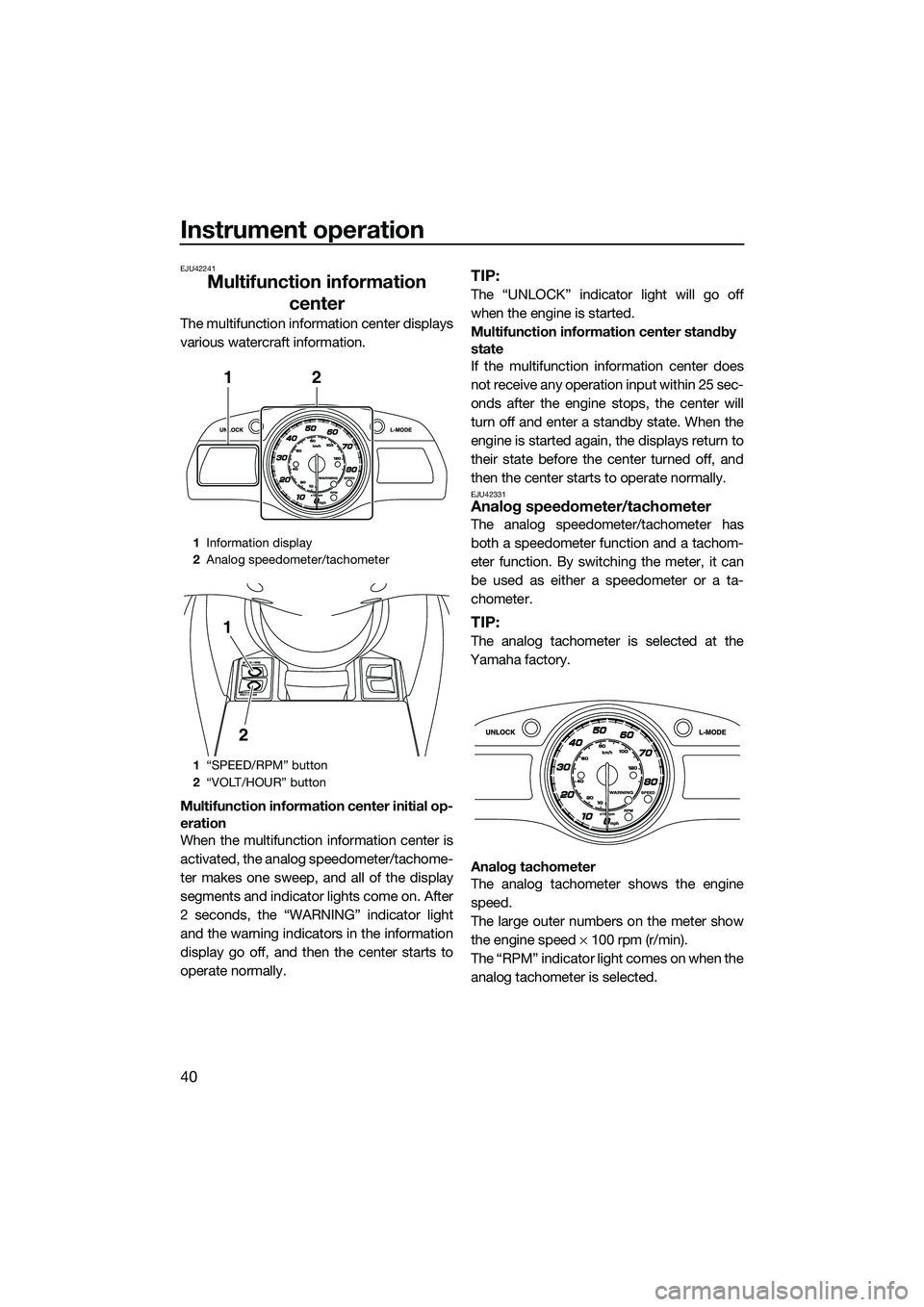
The multifunction information center displays
various watercraft information.
Multifunction information center initial op-
eration
When the multifunction information center is
activated, the analog speedometer/tachome-
ter makes one sweep, and all of the display
segments and indicator lights come on. After
2 seconds, the “WARNING” indicator light
and the warning indicators in the information
display go off, and then the center starts to
operate normally.
TIP:
The “UNLOCK” indicator light will go off
when the engine is started.
Multifunction information center standby
state
If the multifunction information center does
not receive any operation input within 25 sec-
onds after the engine stops, the center will
turn off and enter a standby state. When the
engine is started again, the displays return to
their state before the center turned off, and
then the center starts to operate normally.
EJU42331Analog speedometer/tachometer
The analog speedometer/tachometer has
both a speedometer function and a tachom-
eter function. By switching the meter, it can
be used as either a speedometer or a ta-
chometer.
TIP:
The analog tachometer is selected at the
Yamaha factory.
Analog tachometer
The analog tachometer shows the engine
speed.
The large outer numbers on the meter show
the engine speed × 100 rpm (r/min).
The “RPM” indicator light comes on when the
analog tachometer is selected.
1 Information display
2 Analog speedometer/tachometer
1 “SPEED/RPM” button
2 “VOLT/HOUR” button
12
1
2
UF2T72E0.book Page 40 Monday, July 22, 2013 2:26 PM
Page 47 of 114
Instrument operation
41
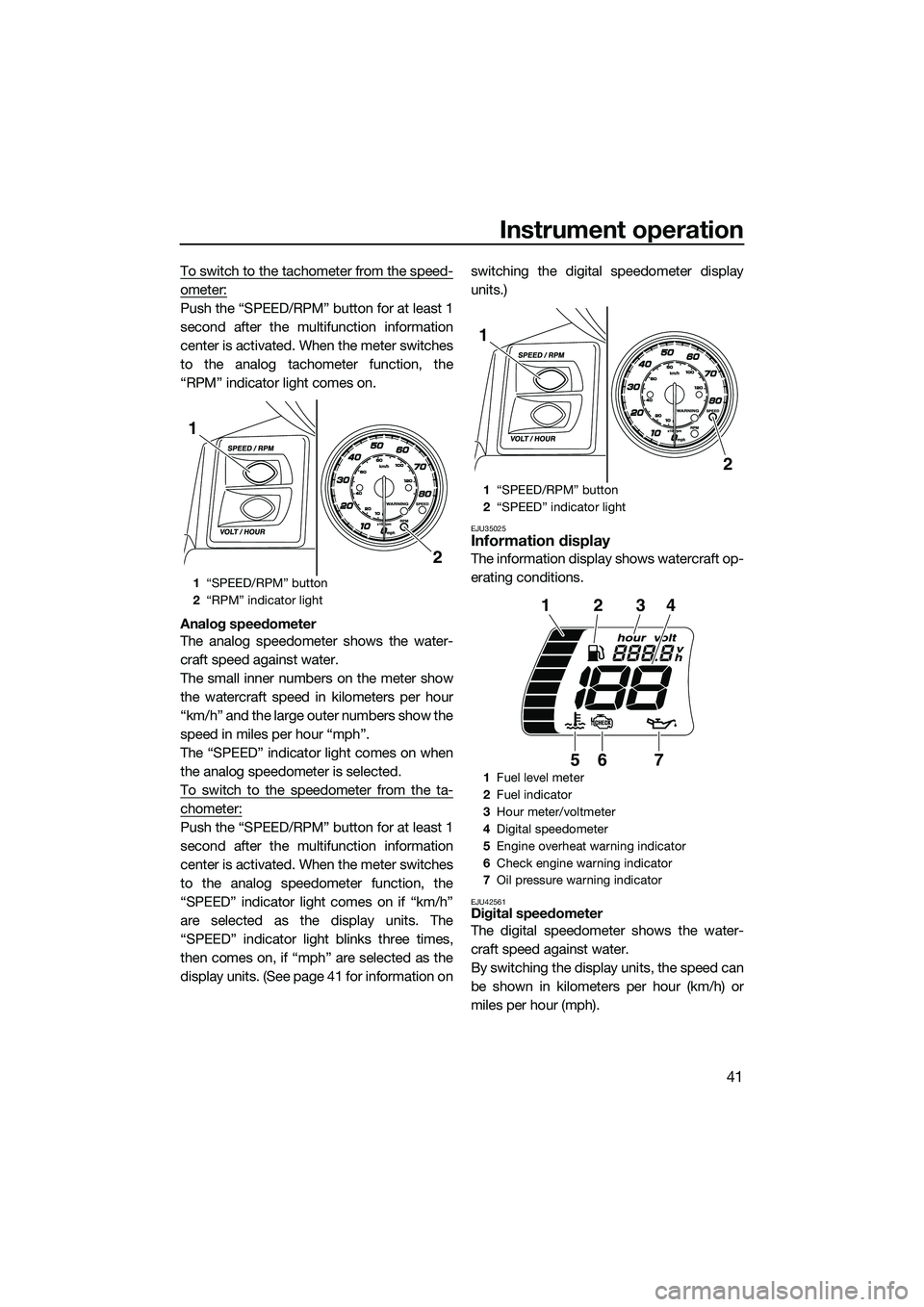
To switch to the tachometer from the speed-
ometer:
Push the “SPEED/RPM” button for at least 1
second after the multifunction information
center is activated. When the meter switches
to the analog tachometer function, the
“RPM” indicator light comes on.
Analog speedometer
The analog speedometer shows the water-
craft speed against water.
The small inner numbers on the meter show
the watercraft speed in kilometers per hour
“km/h” and the large outer numbers show the
speed in miles per hour “mph”.
The “SPEED” indicator light comes on when
the analog speedometer is selected.
To switch to the speedometer from the ta-
chometer:
Push the “SPEED/RPM” button for at least 1
second after the multifunction information
center is activated. When the meter switches
to the analog speedometer function, the
“SPEED” indicator light comes on if “km/h”
are selected as the display units. The
“SPEED” indicator light blinks three times,
then comes on, if “mph” are selected as the
display units. (See page 41 for information onswitching the digital speedometer display
units.)
EJU35025Information display
The information display shows watercraft op-
erating conditions.
EJU42561Digital speedometer
The digital speedometer shows the water-
craft speed against water.
By switching the display units, the speed can
be shown in kilometers per hour (km/h) or
miles per hour (mph).
1
“SPEED/RPM” button
2 “RPM” indicator light
2
1
1“SPEED/RPM” button
2 “SPEED” indicator light
1 Fuel level meter
2 Fuel indicator
3 Hour meter/voltmeter
4 Digital speedometer
5 Engine overheat warning indicator
6 Check engine warning indicator
7 Oil pressure warning indicator
2
1
123
567
4
UF2T72E0.book Page 41 Monday, July 22, 2013 2:26 PM
Page 48 of 114
Instrument operation
42
TIP:
Miles are selected as the display units at the
Yamaha factory.
Digital speedometer display (mph)
The “SPEED” indicator light blinks three
times if miles are selected as the display units
when the multifunction information center is
activated.
TIP:
If the analog speedometer is selected, the
“SPEED” indicator light blinks three times,
then comes on.
Digital speedometer display (km/h)
The “SPEED” indicator light blinks once if ki-
lometers are selected as the display units
when the multifunction information center is
activated.
TIP:
If the analog speedometer is selected, the
“SPEED” indicator light blinks once, then
comes on.
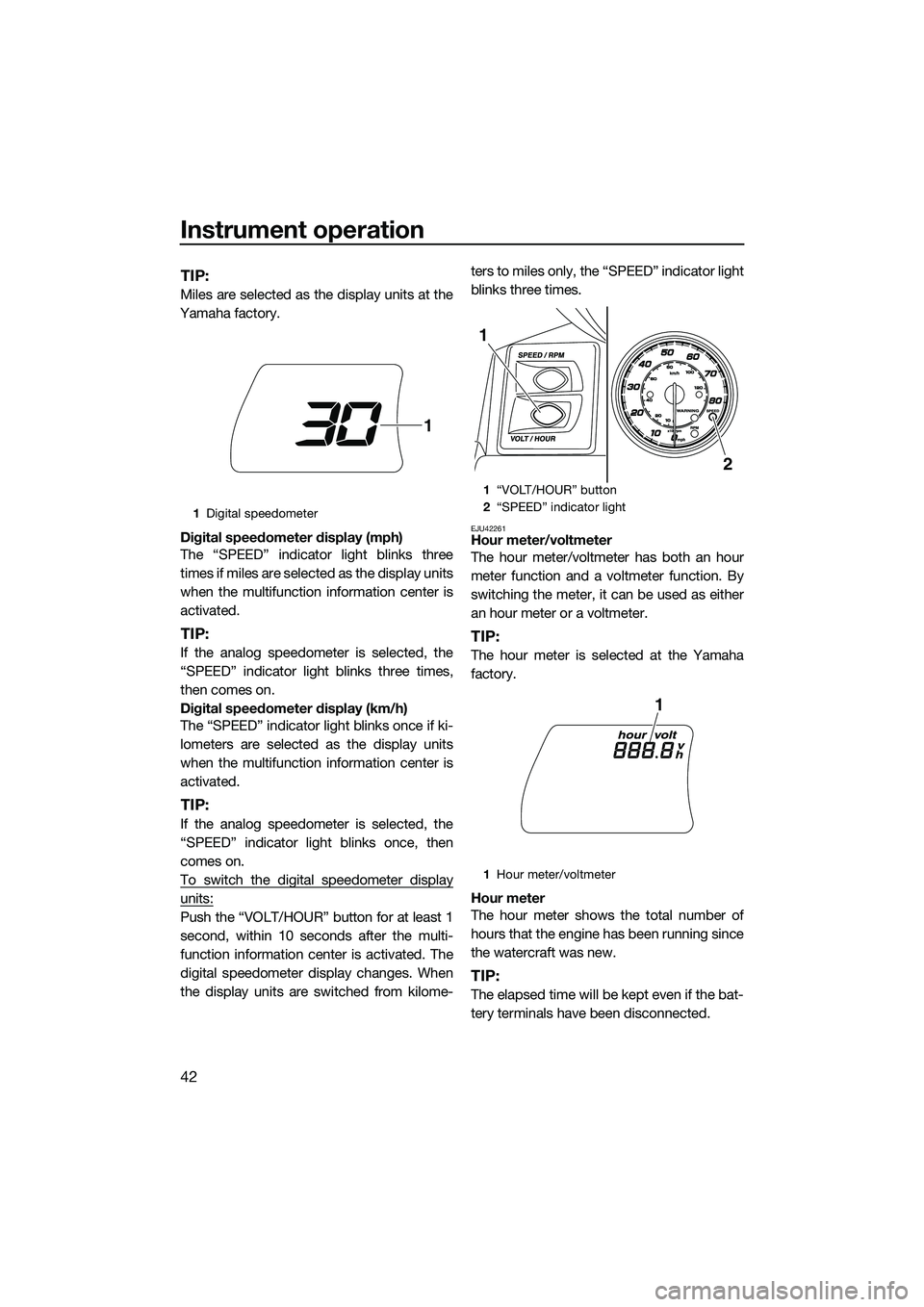
To switch the digital speedometer display
units:
Push the “VOLT/HOUR” button for at least 1
second, within 10 seconds after the multi-
function information center is activated. The
digital speedometer display changes. When
the display units are switched from kilome- ters to miles only, the “SPEED” indicator light
blinks three times.
EJU42261Hour meter/voltmeter
The hour meter/voltmeter has both an hour
meter function and a voltmeter function. By
switching the meter, it can be used as either
an hour meter or a voltmeter.
TIP:
The hour meter is selected at the Yamaha
factory.
Hour meter
The hour meter shows the total number of
hours that the engine has been running since
the watercraft was new.
TIP:
The elapsed time will be kept even if the bat-
tery terminals have been disconnected.
1
Digital speedometer
1
1“VOLT/HOUR” button
2 “SPEED” indicator light
1 Hour meter/voltmeter
2
1
1
UF2T72E0.book Page 42 Monday, July 22, 2013 2:26 PM
Page 50 of 114
Instrument operation
44
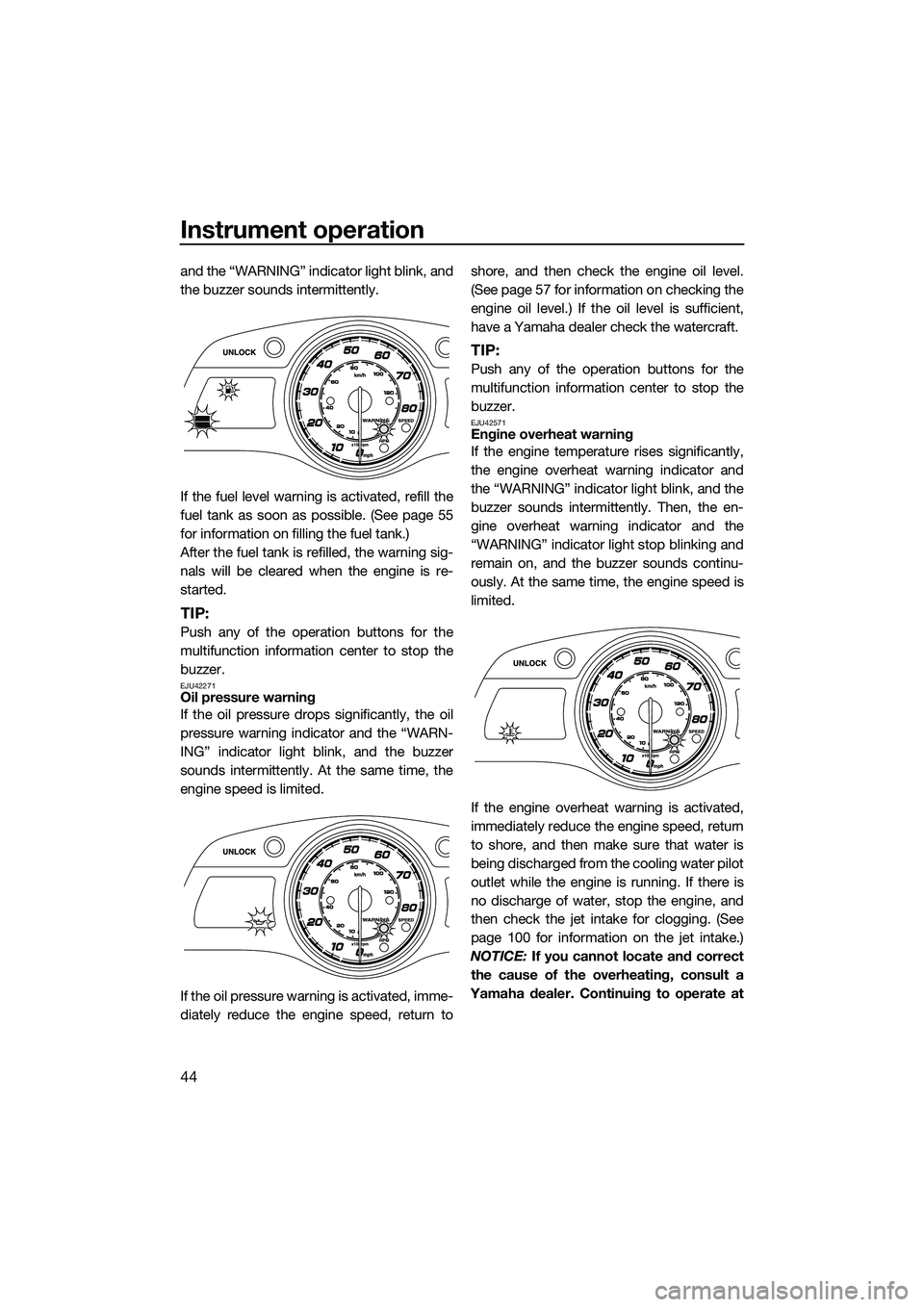
and the “WARNING” indicator light blink, and
the buzzer sounds intermittently.
If the fuel level warning is activated, refill the
fuel tank as soon as possible. (See page 55
for information on filling the fuel tank.)
After the fuel tank is refilled, the warning sig-
nals will be cleared when the engine is re-
started.
TIP:
Push any of the operation buttons for the
multifunction information center to stop the
buzzer.
EJU42271Oil pressure warning
If the oil pressure drops significantly, the oil
pressure warning indicator and the “WARN-
ING” indicator light blink, and the buzzer
sounds intermittently. At the same time, the
engine speed is limited.
If the oil pressure warning is activated, imme-
diately reduce the engine speed, return toshore, and then check the engine oil level.
(See page 57 for information on checking the
engine oil level.) If the oil level is sufficient,
have a Yamaha dealer check the watercraft.
TIP:
Push any of the operation buttons for the
multifunction information center to stop the
buzzer.
EJU42571Engine overheat warning
If the engine temperature rises significantly,
the engine overheat warning indicator and
the “WARNING” indicator light blink, and the
buzzer sounds intermittently. Then, the en-
gine overheat warning indicator and the
“WARNING” indicator light stop blinking and
remain on, and the buzzer sounds continu-
ously. At the same time, the engine speed is
limited.
If the engine overheat warning is activated,
immediately reduce the engine speed, return
to shore, and then make sure that water is
being discharged from the cooling water pilot
outlet while the engine is running. If there is
no discharge of water, stop the engine, and
then check the jet intake for clogging. (See
page 100 for information on the jet intake.)
NOTICE: If you cannot locate and correct
the cause of the overheating, consult a
Yamaha dealer. Continuing to operate at
UF2T72E0.book Page 44 Monday, July 22, 2013 2:26 PM
Page 51 of 114
![YAMAHA FX HO CRUISER 2014 Owners Manual Instrument operation
45
higher speeds could result in severe en-
gine damage.
[ECJ00042]
TIP:
Push any of the operation buttons for the
multifunction information center to stop the
buzzer.
EJU42281Ch](/img/51/49764/w960_49764-50.png "YAMAHA FX HO CRUISER 2014 Owners Manual Instrument operation
45
higher speeds could result in severe en-
gine damage.
[ECJ00042]
TIP:
Push any of the operation buttons for the
multifunction information center to stop the
buzzer.
EJU42281Ch")
Instrument operation
45
higher speeds could result in severe en-
gine damage.
[ECJ00042]
TIP:
Push any of the operation buttons for the
multifunction information center to stop the
buzzer.
EJU42281Check engine warning
If a sensor malfunction or a short circuit is de-
tected, the check engine warning indicator
and the “WARNING” indicator light blink, and
the buzzer sounds intermittently.
If the check engine warning is activated, im-
mediately reduce the engine speed, return to
shore, and have a Yamaha dealer check the
engine.
TIP:
Push any of the operation buttons for the
multifunction information center to stop the
buzzer.
UF2T72E0.book Page 45 Monday, July 22, 2013 2:26 PM
Page 52 of 114
Equipment operation
46
EJU40334
EquipmentEJU42203Seats
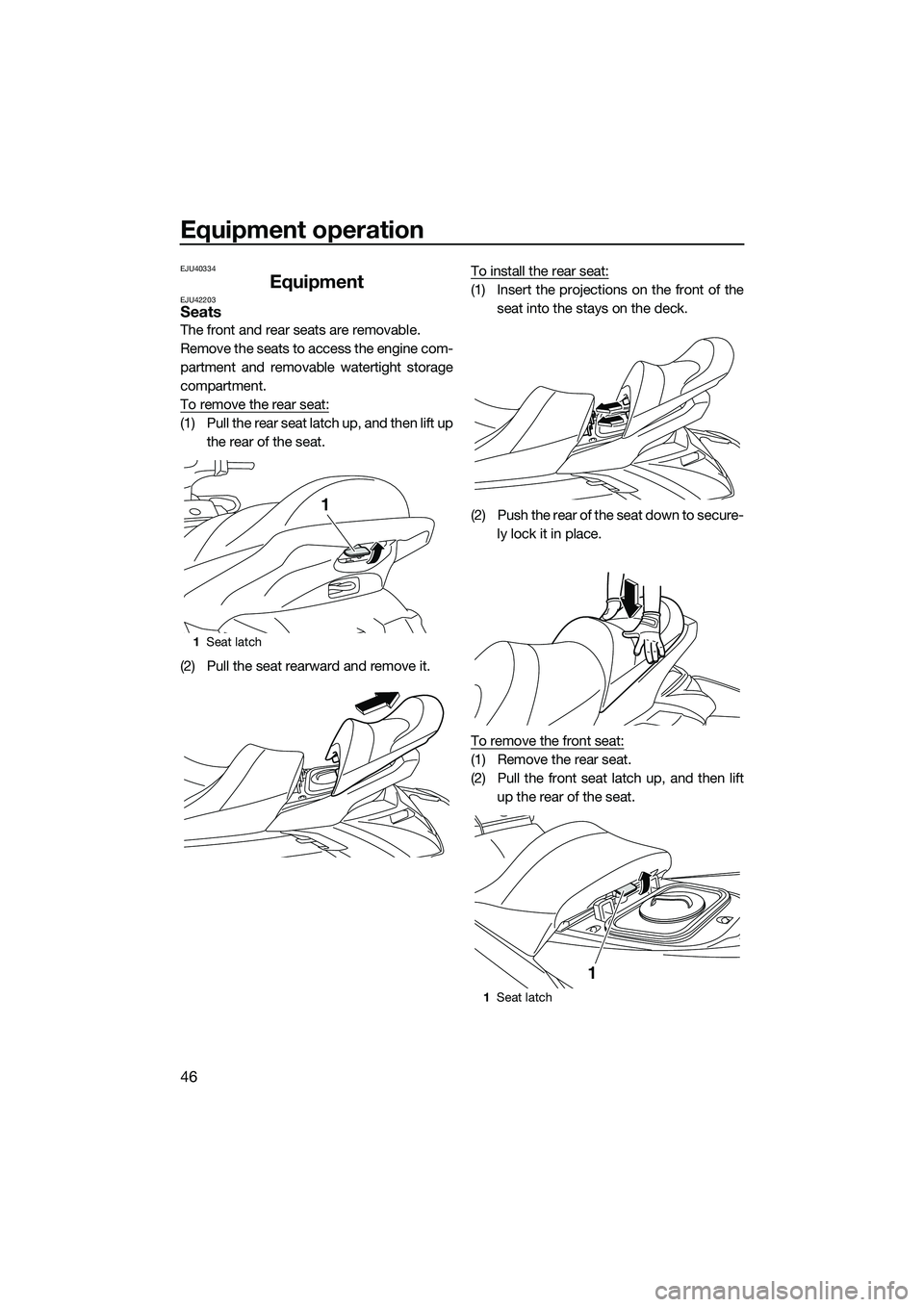
The front and rear seats are removable.
Remove the seats to access the engine com-
partment and removable watertight storage
compartment.
To remove the rear seat:
(1) Pull the rear seat latch up, and then lift upthe rear of the seat.
(2) Pull the seat rearward and remove it. To install the rear seat:
(1) Insert the projections on the front of the
seat into the stays on the deck.
(2) Push the rear of the seat down to secure- ly lock it in place.
To remove the front seat:
(1) Remove the rear seat.
(2) Pull the front seat latch up, and then lift up the rear of the seat.
1Seat latch
1
1Seat latch
1
UF2T72E0.book Page 46 Monday, July 22, 2013 2:26 PM
Page 56 of 114
Equipment operation
50
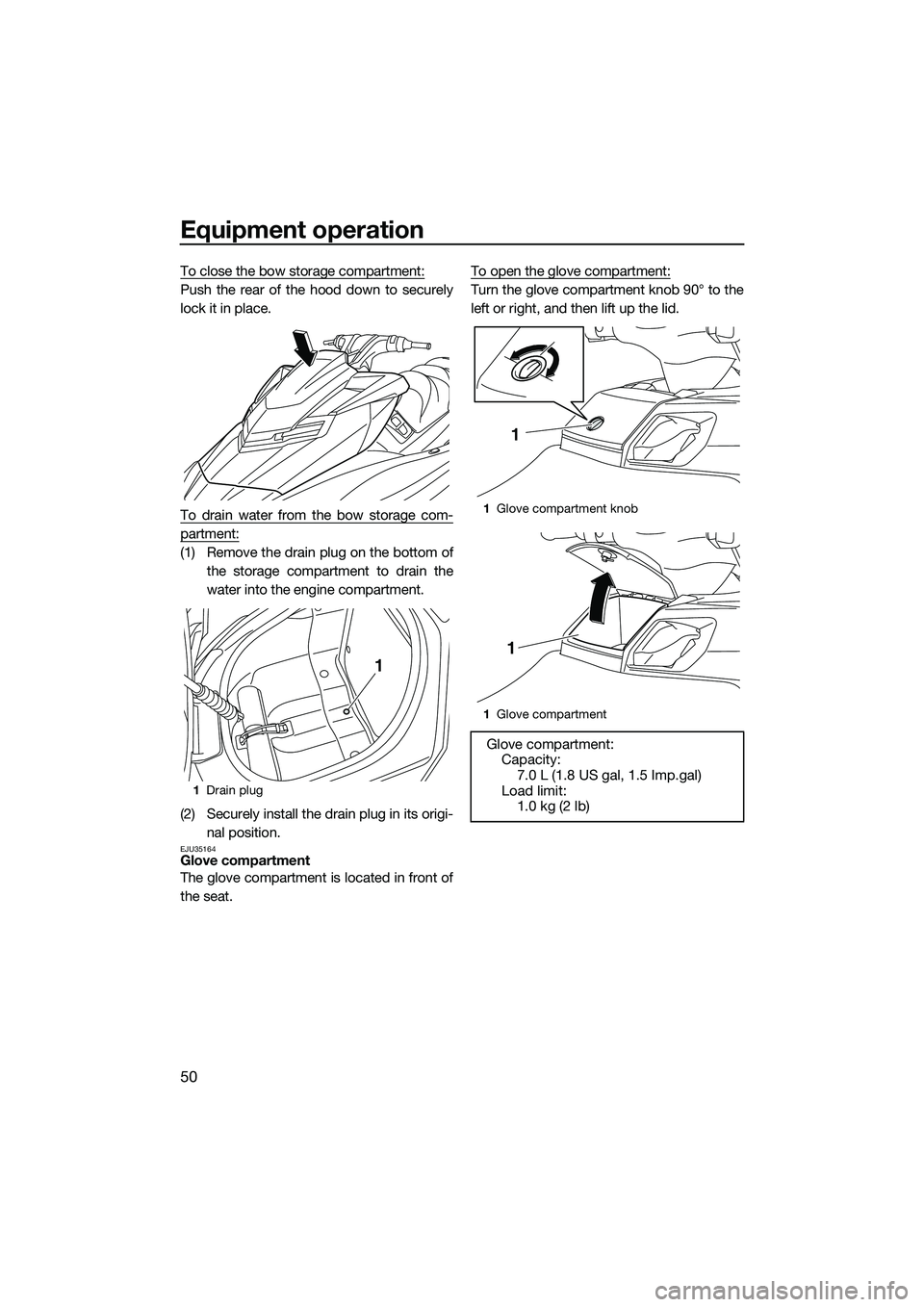
To close the bow storage compartment:
Push the rear of the hood down to securely
lock it in place.
To drain water from the bow storage com-
partment:
(1) Remove the drain plug on the bottom ofthe storage compartment to drain the
water into the engine compartment.
(2) Securely install the drain plug in its origi- nal position.
EJU35164Glove compartment
The glove compartment is located in front of
the seat. To open the glove compartment:
Turn the glove compartment knob 90° to the
left or right, and then lift up the lid.
1
Drain plug
1
1Glove compartment knob
1 Glove compartment
Glove compartment:
Capacity: 7.0 L (1.8 US gal, 1.5 Imp.gal)
Load limit: 1.0 kg (2 lb)
1
1
UF2T72E0.book Page 50 Monday, July 22, 2013 2:26 PM