fuel YAMAHA FX HO CRUISER 2020 User Guide
[x] Cancel search | Manufacturer: YAMAHA, Model Year: 2020, Model line: FX HO CRUISER, Model: YAMAHA FX HO CRUISER 2020Pages: 116, PDF Size: 12.71 MB
Page 51 of 116
Instrument operation
44
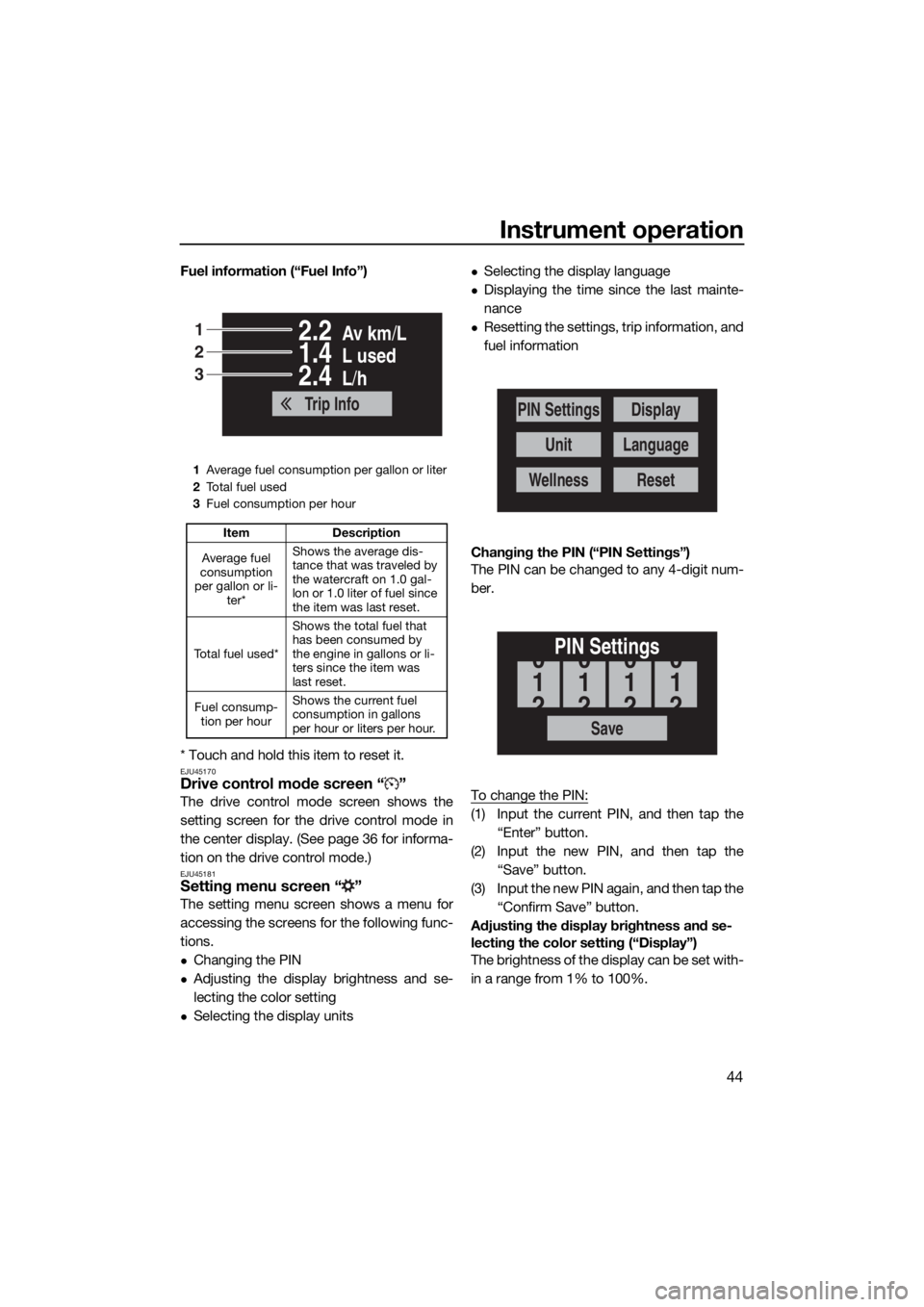
Fuel information (“Fuel Info”)
* Touch and hold this item to reset it.
EJU45170Drive control mode screen “ ”
The drive control mode screen shows the
setting screen for the drive control mode in
the center display. (See page 36 for informa-
tion on the drive control mode.)
EJU45181Setting menu screen “ ”
The setting menu screen shows a menu for
accessing the screens for the following func-
tions.
Changing the PIN
Adjusting the display brightness and se-
lecting the color setting
Selecting the display units
Selecting the display language
Displaying the time since the last mainte-
nance
Resetting the settings, trip information, and
fuel information
Changing the PIN (“PIN Settings”)
The PIN can be changed to any 4-digit num-
ber.
To change the PIN:
(1) Input the current PIN, and then tap the
“Enter” button.
(2) Input the new PIN, and then tap the
“Save” button.
(3) Input the new PIN again, and then tap the
“Confirm Save” button.
Adjusting the display brightness and se-
lecting the color setting (“Display”)
The brightness of the display can be set with-
in a range from 1% to 100%.
1Average fuel consumption per gallon or liter
2To t a l f u e l u s e d
3Fuel consumption per hour
Item Description
Average fuel
consumption
per gallon or li-
ter*Shows the average dis-
tance that was traveled by
the watercraft on 1.0 gal-
lon or 1.0 liter of fuel since
the item was last reset.
To t a l f u e l u s e d *Shows the total fuel that
has been consumed by
the engine in gallons or li-
ters since the item was
last reset.
Fuel consump-
tion per hourShows the current fuel
consumption in gallons
per hour or liters per hour.
Av km/L2.2
L used1.4
L/h2.4
Trip Info
1
2
3
PIN Settings
Unit
Wellness
Display
Language
Reset
Save
PIN Settings
1
0
2
1
0
2
1
0
2
1
0
2
UF3V71E0.book Page 44 Tuesday, June 25, 2019 9:14 AM
Page 52 of 116
Instrument operation
45
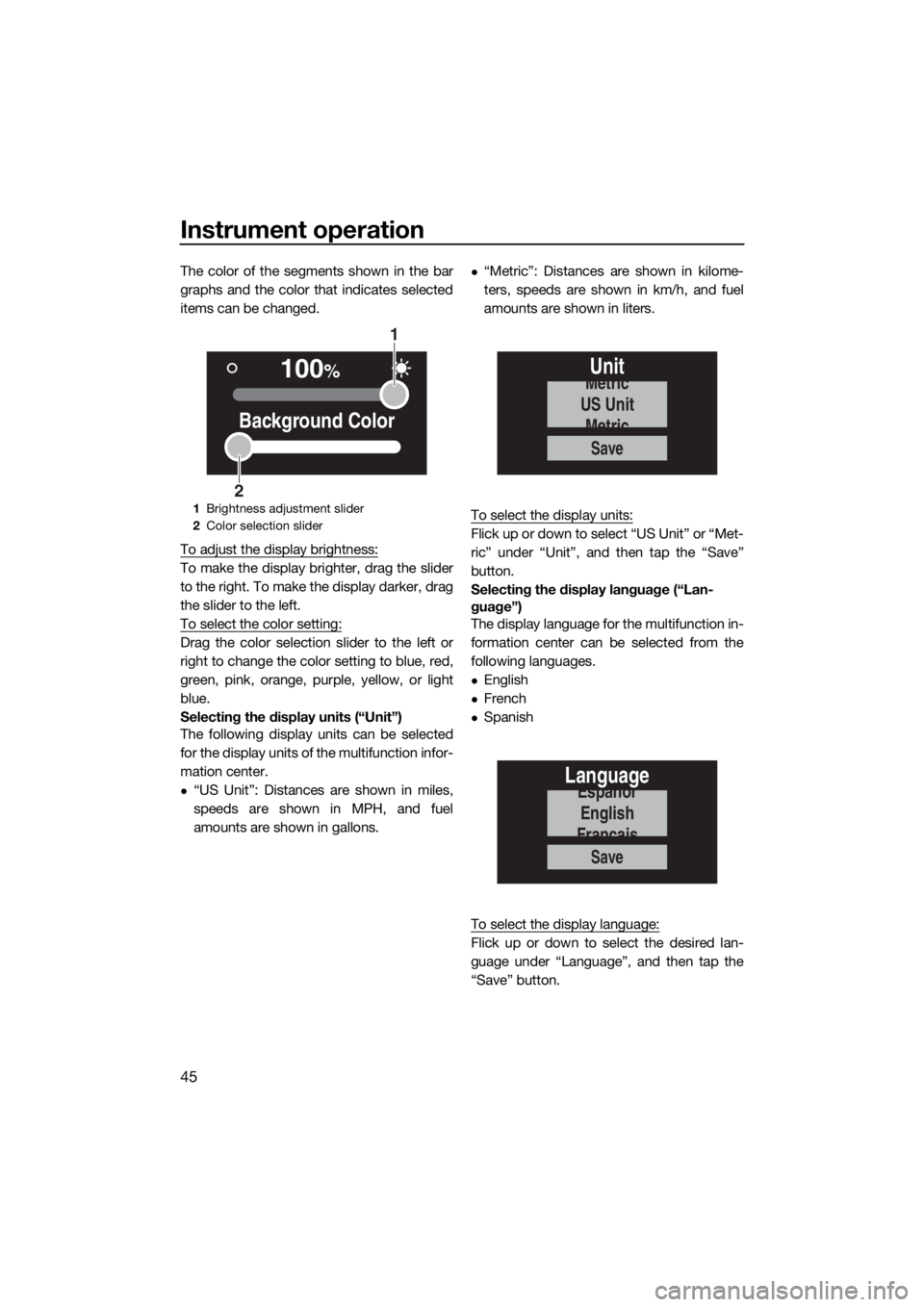
The color of the segments shown in the bar
graphs and the color that indicates selected
items can be changed.
To adjust the display brightness:
To make the display brighter, drag the slider
to the right. To make the display darker, drag
the slider to the left.
To select the color setting:
Drag the color selection slider to the left or
right to change the color setting to blue, red,
green, pink, orange, purple, yellow, or light
blue.
Selecting the display units (“Unit”)
The following display units can be selected
for the display units of the multifunction infor-
mation center.
“US Unit”: Distances are shown in miles,
speeds are shown in MPH, and fuel
amounts are shown in gallons.
“Metric”: Distances are shown in kilome-
ters, speeds are shown in km/h, and fuel
amounts are shown in liters.
To select the display units:
Flick up or down to select “US Unit” or “Met-
ric” under “Unit”, and then tap the “Save”
button.
Selecting the display language (“Lan-
guage”)
The display language for the multifunction in-
formation center can be selected from the
following languages.
English
French
Spanish
To select the display language:
Flick up or down to select the desired lan-
guage under “Language”, and then tap the
“Save” button.
1Brightness adjustment slider
2Color selection slider
100%
Background Color
1
2
Save
Unit
US Unit
Metric
Metric
Save
Language
English
Españor
Français
UF3V71E0.book Page 45 Tuesday, June 25, 2019 9:14 AM
Page 53 of 116
Instrument operation
46
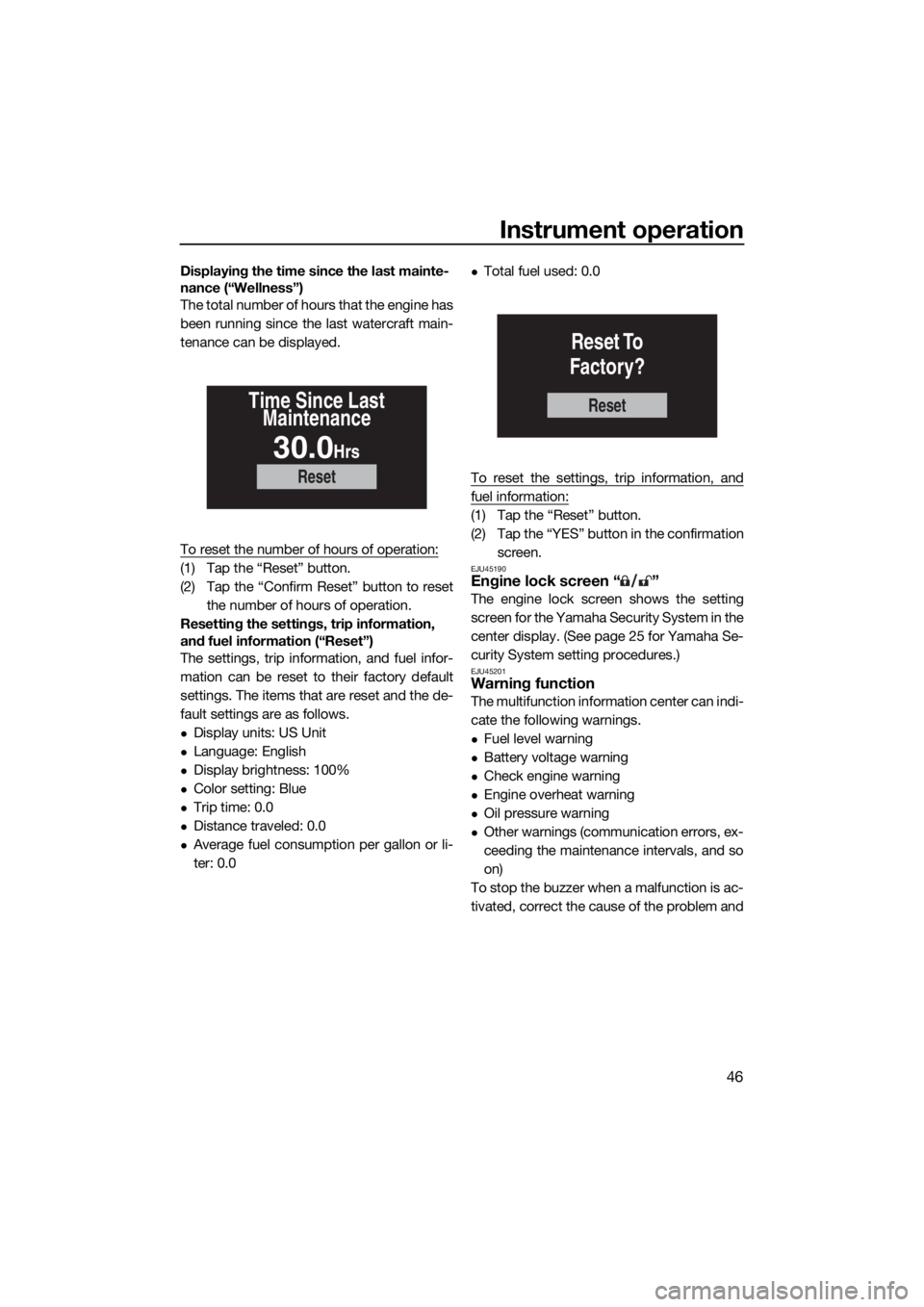
Displaying the time since the last mainte-
nance (“Wellness”)
The total number of hours that the engine has
been running since the last watercraft main-
tenance can be displayed.
To reset the number of hours of operation:
(1) Tap the “Reset” button.
(2) Tap the “Confirm Reset” button to reset
the number of hours of operation.
Resetting the settings, trip information,
and fuel information (“Reset”)
The settings, trip information, and fuel infor-
mation can be reset to their factory default
settings. The items that are reset and the de-
fault settings are as follows.
Display units: US Unit
Language: English
Display brightness: 100%
Color setting: Blue
Trip time: 0.0
Distance traveled: 0.0
Average fuel consumption per gallon or li-
ter: 0.0
Total fuel used: 0.0
To reset the settings, trip information, and
fuel information:
(1) Tap the “Reset” button.
(2) Tap the “YES” button in the confirmation
screen.
EJU45190Engine lock screen “ ”
The engine lock screen shows the setting
screen for the Yamaha Security System in the
center display. (See page 25 for Yamaha Se-
curity System setting procedures.)
EJU45201Warning function
The multifunction information center can indi-
cate the following warnings.
Fuel level warning
Battery voltage warning
Check engine warning
Engine overheat warning
Oil pressure warning
Other warnings (communication errors, ex-
ceeding the maintenance intervals, and so
on)
To stop the buzzer when a malfunction is ac-
tivated, correct the cause of the problem and
Reset
Time Since Last
Maintenance
30.0Hrs
Reset
Reset To
Factory?
UF3V71E0.book Page 46 Tuesday, June 25, 2019 9:14 AM
Page 54 of 116
Instrument operation
47
start the engine again, or push the “ALARM
MUTE” button.
TIP:
If the “ALARM MUTE” button was pushed to
stop the buzzer, the buzzer will start sound-
ing again after 5 minutes.
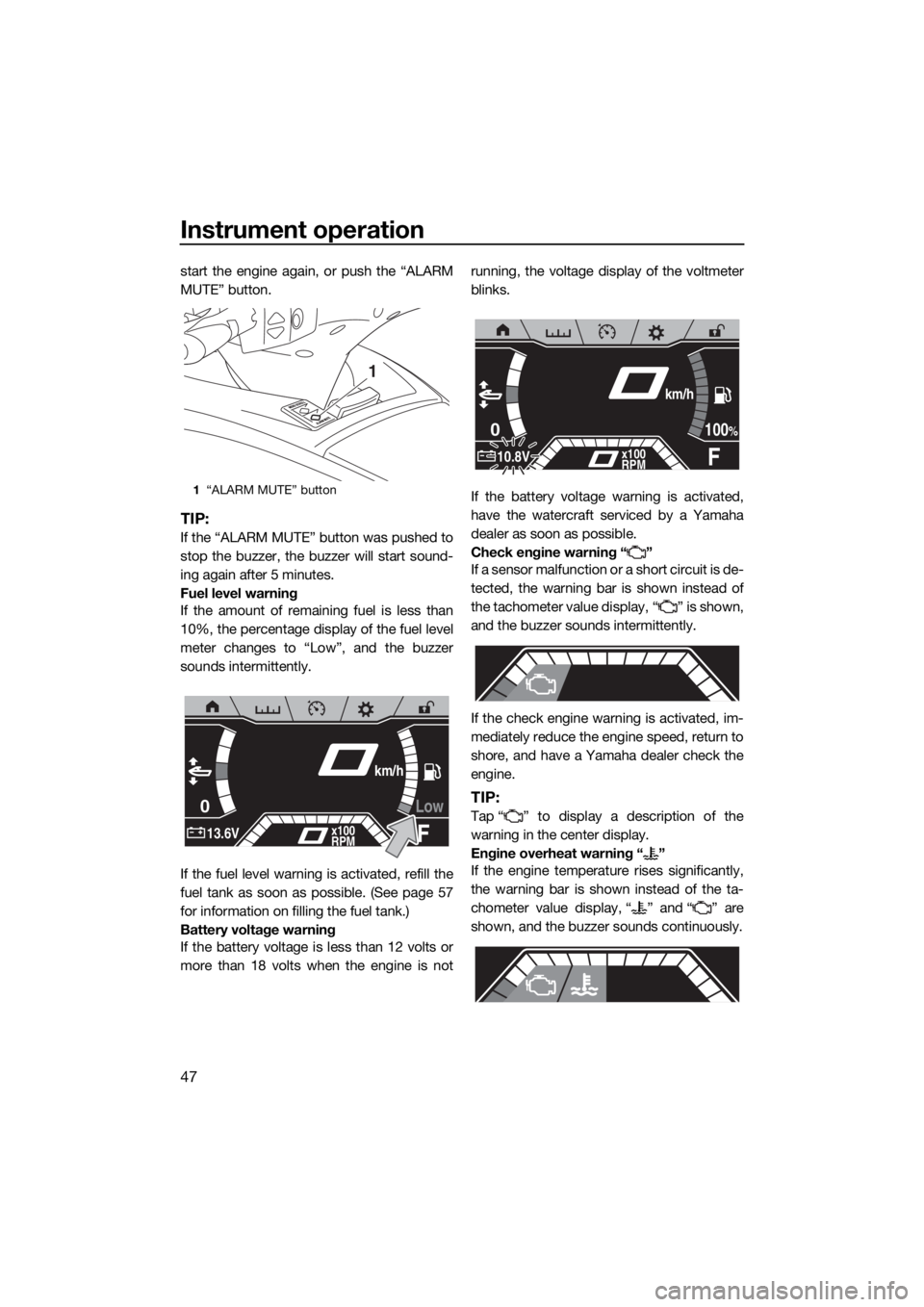
Fuel level warning
If the amount of remaining fuel is less than
10%, the percentage display of the fuel level
meter changes to “Low”, and the buzzer
sounds intermittently.
If the fuel level warning is activated, refill the
fuel tank as soon as possible. (See page 57
for information on filling the fuel tank.)
Battery voltage warning
If the battery voltage is less than 12 volts or
more than 18 volts when the engine is notrunning, the voltage display of the voltmeter
blinks.
If the battery voltage warning is activated,
have the watercraft serviced by a Yamaha
dealer as soon as possible.
Check engine warning “ ”
If a sensor malfunction or a short circuit is de-
tected, the warning bar is shown instead of
the tachometer value display, “ ” is shown,
and the buzzer sounds intermittently.
If the check engine warning is activated, im-
mediately reduce the engine speed, return to
shore, and have a Yamaha dealer check the
engine.
TIP:
Tap “ ” to display a description of the
warning in the center display.
Engine overheat warning “ ”
If the engine temperature rises significantly,
the warning bar is shown instead of the ta-
chometer value display, “ ” and “ ” are
shown, and the buzzer sounds continuously.
1“ALARM MUTE” button
1
Low0
F13.6Vx100
RPM
km/h
0
F10.8Vx100
RPM
100%
km/h
UF3V71E0.book Page 47 Tuesday, June 25, 2019 9:14 AM
Page 64 of 116
Operation and handling requirements
57
EJU31823
Fuel requirementsEJU45310Fuel
WARNING
EWJ00283
Gasoline and gasoline vapors are ex-
tremely flammable. To avoid fires and
explosions and to reduce the risk of in-
jury when refueling, follow these in-
structions.
Gasoline is poisonous and can cause in-
jury or death. Handle gasoline with care.
Never siphon gasoline by mouth. If you
should swallow some gasoline, inhale a
lot of gasoline vapor, or get some gaso-
line in your eyes, see your doctor imme-
diately. If gasoline spills on your skin,
wash with soap and water. If gasoline
spills on your clothing, change your
clothes.
NOTICE
ECJ00322
Do not use leaded gasoline. Leaded
gasoline can seriously damage the en-
gine.
Avoid getting water and contaminants in
the fuel tank. Contaminated fuel can
cause poor performance and engine
damage. Use only fresh gasoline that
has been stored in clean containers.
TIP:
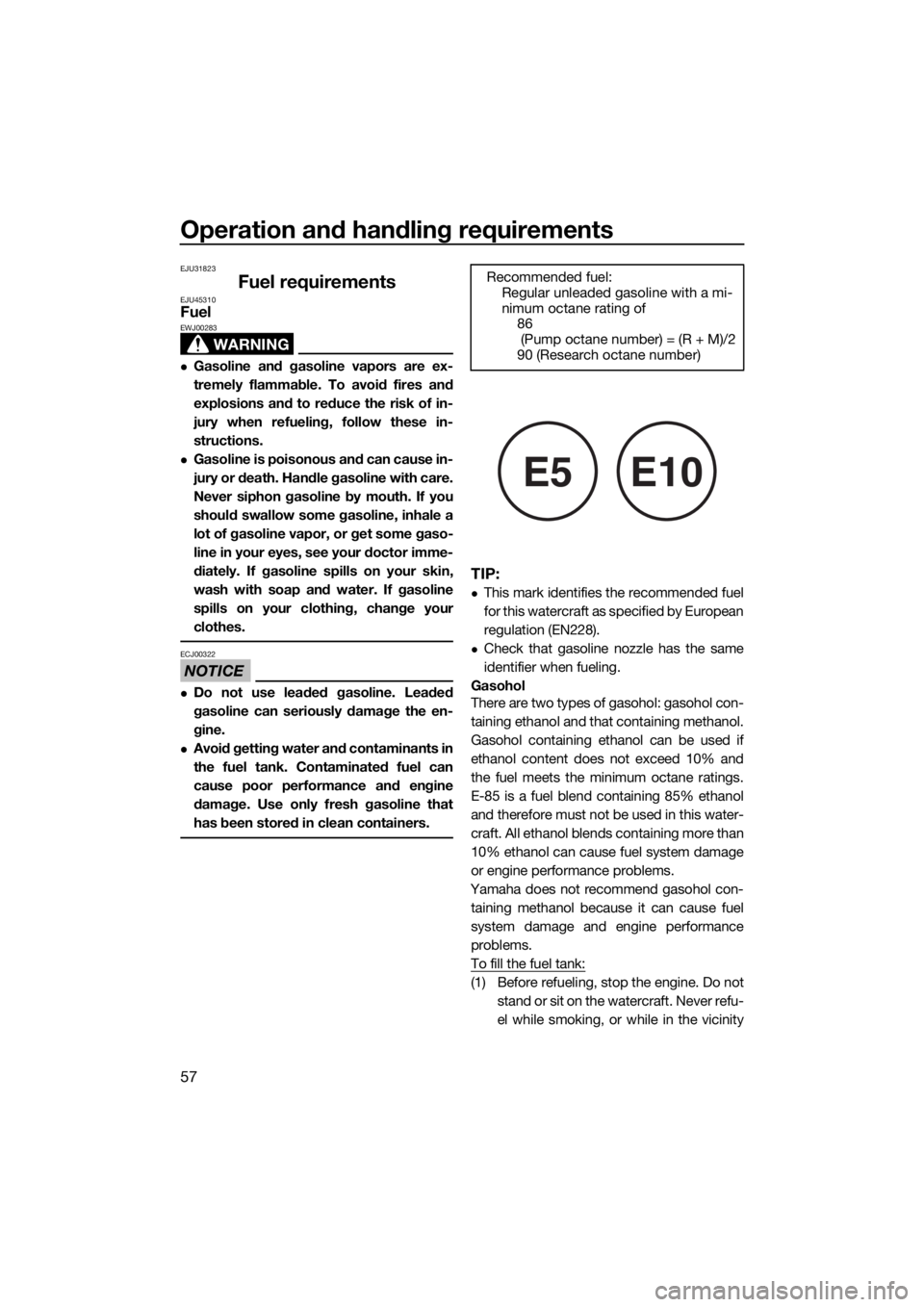
This mark identifies the recommended fuel
for this watercraft as specified by European
regulation (EN228).
Check that gasoline nozzle has the same
identifier when fueling.
Gasohol
There are two types of gasohol: gasohol con-
taining ethanol and that containing methanol.
Gasohol containing ethanol can be used if
ethanol content does not exceed 10% and
the fuel meets the minimum octane ratings.
E-85 is a fuel blend containing 85% ethanol
and therefore must not be used in this water-
craft. All ethanol blends containing more than
10% ethanol can cause fuel system damage
or engine performance problems.
Yamaha does not recommend gasohol con-
taining methanol because it can cause fuel
system damage and engine performance
problems.
To fill the fuel tank:
(1) Before refueling, stop the engine. Do not
stand or sit on the watercraft. Never refu-
el while smoking, or while in the vicinity Recommended fuel:
Regular unleaded gasoline with a mi-
nimum octane rating of
86
(Pump octane number) = (R + M)/2
90 (Research octane number)
E5E10
UF3V71E0.book Page 57 Tuesday, June 25, 2019 9:14 AM
Page 65 of 116
Operation and handling requirements
58
of sparks, open flames, or other sources
of ignition.
(2) Place the watercraft in a well-ventilated
area and in a horizontal position.
(3) Remove the seats, and then check the
fuel level. (See page 49 for seat removal
and installation procedures.)
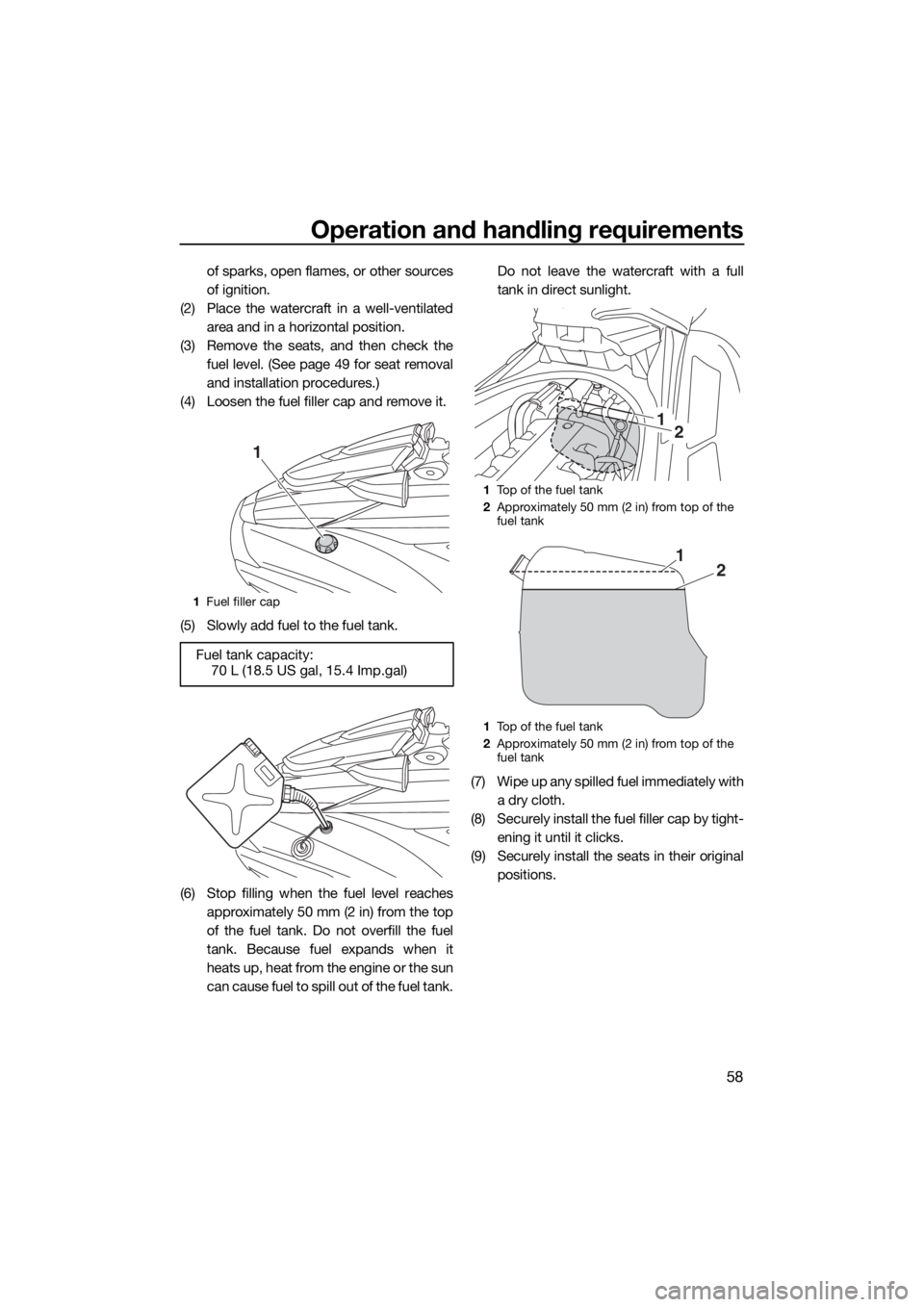
(4) Loosen the fuel filler cap and remove it.
(5) Slowly add fuel to the fuel tank.
(6) Stop filling when the fuel level reaches
approximately 50 mm (2 in) from the top
of the fuel tank. Do not overfill the fuel
tank. Because fuel expands when it
heats up, heat from the engine or the sun
can cause fuel to spill out of the fuel tank.Do not leave the watercraft with a full
tank in direct sunlight.
(7) Wipe up any spilled fuel immediately with
a dry cloth.
(8) Securely install the fuel filler cap by tight-
ening it until it clicks.
(9) Securely install the seats in their original
positions.
1Fuel filler cap
Fuel tank capacity:
70 L (18.5 US gal, 15.4 Imp.gal)
1
1Top of the fuel tank
2Approximately 50 mm (2 in) from top of the
fuel tank
1Top of the fuel tank
2Approximately 50 mm (2 in) from top of the
fuel tank
21
21
UF3V71E0.book Page 58 Tuesday, June 25, 2019 9:14 AM
Page 71 of 116

Pre-operation checks
64
EJU31982
WARNING
EWJ00412
Failure to inspect or maintain the watercraft properly increases the possibility of an ac-
cident or damage to the watercraft. Do not operate the watercraft if you find any prob-
lem. If a problem cannot be corrected by the procedures provided in this manual, have
the watercraft inspected by a Yamaha dealer.
EJU41235Pre-operation checklist
Before using this watercraft, be sure to perform the checks in the following checklist.
ITEM ROUTINE PAGE
PRE-LAUNCH CHECKS
Engine compartmentVentilate the engine compartment.
Check inside the engine compartment for damage.66
Fuel systemCheck the fuel system for leakage.
Check the fuel level in the fuel tank.66
Water separatorCheck the water separator for water. 67
Engine unitCheck the exterior of the engine unit for damage. 67
Engine oil levelCheck the engine oil level. 67
Bilge waterCheck the engine compartment for bilge water. 67
BatteryCheck the battery connections and electrolyte level. 67
Steering systemCheck the steering system for proper operation. 68
Adjustable tilt steering sys-
temCheck the adjustable tilt steering system for proper
operation and check that the handlebars are se-
curely locked in place.69
RiDE lever Check the RiDE lever for proper operation. 69
Throttle leverCheck the throttle lever for proper operation. 69
Yamaha Security SystemCheck the Yamaha Security System for proper op-
eration.70
Engine shut-off cord (lan-
yard)Check the engine shut-off cord (lanyard) for dam-
age.70
SwitchesCheck the start switch, engine stop switch, and en-
gine shut-off switch for proper operation.70
Electric trim systemCheck the electric trim system for proper operation. 70
Storage compartmentsCheck the storage compartments for damage and
water.71
Fire extinguisher holder,
cover, and bandCheck the fire extinguisher holder, cover, and band
for damage.71
Fire extinguisherCheck the condition of the fire extinguisher. 71
Safety equipmentCheck that safety equipment meeting the applica-
ble regulations is on board.71
Hull and deckCheck the hull and deck for damage. 71
Jet intakeCheck the jet intake for damage and clogging. 71
UF3V71E0.book Page 64 Tuesday, June 25, 2019 9:14 AM
Page 73 of 116
Pre-operation checks
66
EJU32282
Pre-operation check pointsEJU42384Pre-launch checks
Perform the pre-launch checks in the pre-op-
eration checklist while the watercraft is on
land.
To perform the pre-launch checks:
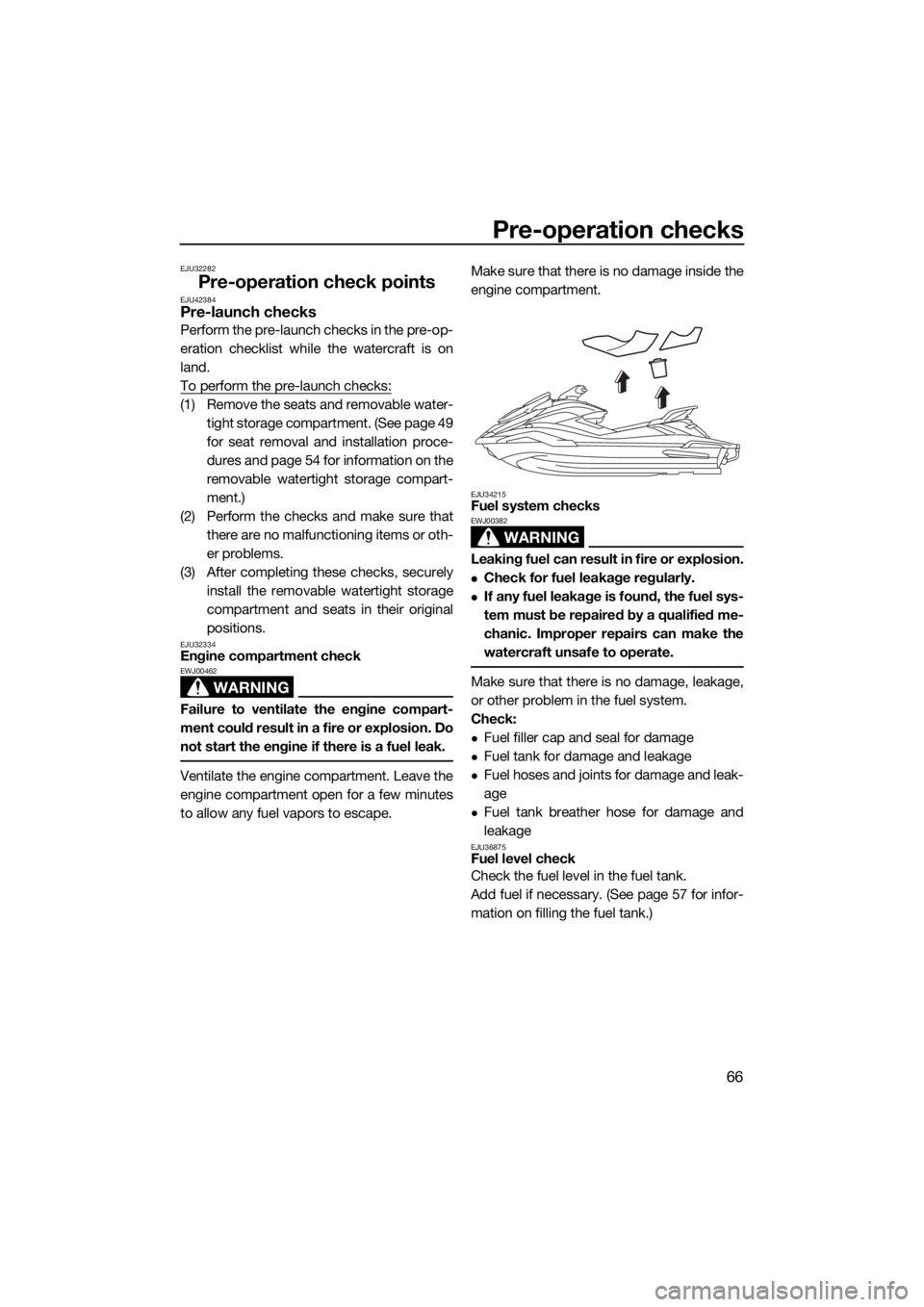
(1) Remove the seats and removable water-
tight storage compartment. (See page 49
for seat removal and installation proce-
dures and page 54 for information on the
removable watertight storage compart-
ment.)
(2) Perform the checks and make sure that
there are no malfunctioning items or oth-
er problems.
(3) After completing these checks, securely
install the removable watertight storage
compartment and seats in their original
positions.
EJU32334Engine compartment check
WARNING
EWJ00462
Failure to ventilate the engine compart-
ment could result in a fire or explosion. Do
not start the engine if there is a fuel leak.
Ventilate the engine compartment. Leave the
engine compartment open for a few minutes
to allow any fuel vapors to escape.Make sure that there is no damage inside the
engine compartment.
EJU34215Fuel system checks
WARNING
EWJ00382
Leaking fuel can result in fire or explosion.
Check for fuel leakage regularly.
If any fuel leakage is found, the fuel sys-
tem must be repaired by a qualified me-
chanic. Improper repairs can make the
watercraft unsafe to operate.
Make sure that there is no damage, leakage,
or other problem in the fuel system.
Check:
Fuel filler cap and seal for damage
Fuel tank for damage and leakage
Fuel hoses and joints for damage and leak-
age
Fuel tank breather hose for damage and
leakage
EJU36875Fuel level check
Check the fuel level in the fuel tank.
Add fuel if necessary. (See page 57 for infor-
mation on filling the fuel tank.)
UF3V71E0.book Page 66 Tuesday, June 25, 2019 9:14 AM
Page 93 of 116
Care and storage
86
EJU37146
Post-operation care
WARNING
EWJ00331
Always place the watercraft upright in a
horizontal position when storing it, other-
wise fuel could leak out into the engine or
engine compartment, which could create
a fire hazard.
After using the watercraft, always take it out
of the water, clean it, and store it. Leaving the
watercraft in the water for extended periods
will accelerate the rate of normal deteriora-
tion of the jet pump and hull. Marine organ-
isms and corrosion are some of the
conditions that can shorten the life of many
watercraft components.
EJU42222Flushing the cooling water passages
NOTICE
ECJ01311
Do not run the engine over 4000 r/min on
land. Also, do not run the engine for more
than 15 seconds without supplying water,
otherwise the engine could overheat.
Flush the cooling water passages to prevent
them from clogging with salt, sand, or dirt.
(1) Place the watercraft in a horizontal posi-
tion.
(2) Remove the seats and removable water-
tight storage compartment. (See page 49
for seat removal and installation proce-
dures and page 54 for information on the
removable watertight storage compart-
ment.)
(3) Open the stern storage compartment.
(See page 53 for information on the stern
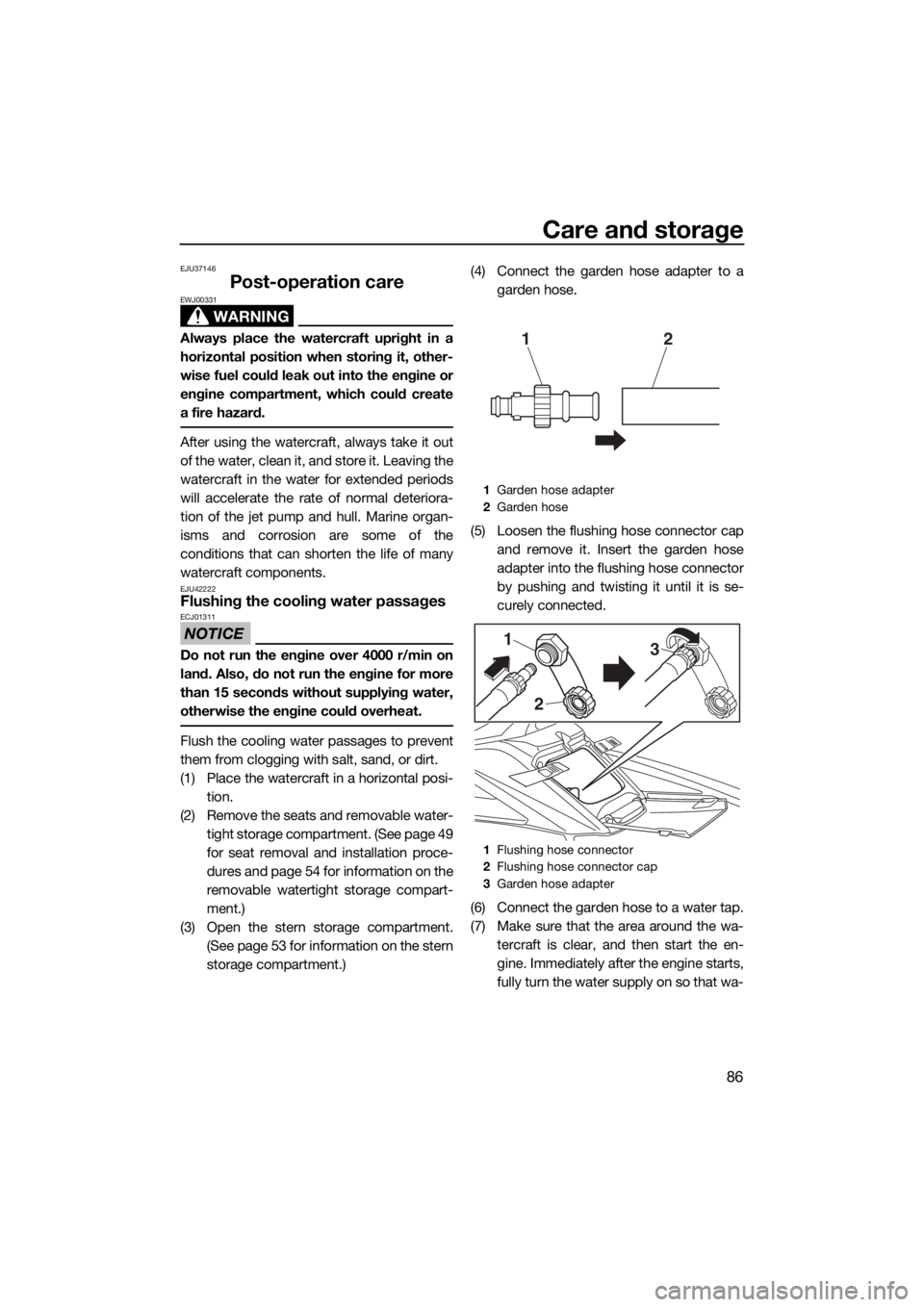
storage compartment.)(4) Connect the garden hose adapter to a
garden hose.
(5) Loosen the flushing hose connector cap
and remove it. Insert the garden hose
adapter into the flushing hose connector
by pushing and twisting it until it is se-
curely connected.
(6) Connect the garden hose to a water tap.
(7) Make sure that the area around the wa-
tercraft is clear, and then start the en-
gine. Immediately after the engine starts,
fully turn the water supply on so that wa-
1Garden hose adapter
2Garden hose
1Flushing hose connector
2Flushing hose connector cap
3Garden hose adapter
12
2 1
3
UF3V71E0.book Page 86 Tuesday, June 25, 2019 9:14 AM
Page 97 of 116
Care and storage
90
EJU33493
Long-term storage
WARNING
EWJ00331
Always place the watercraft upright in a
horizontal position when storing it, other-
wise fuel could leak out into the engine or
engine compartment, which could create
a fire hazard.
Storage for long periods of time, such as win-
ter storage, requires preventive maintenance
to ensure against deterioration. It is advisable
to have the watercraft serviced by a Yamaha
dealer prior to storage.
However, the following procedures can be
performed easily by the owner.
EJU40763Cleaning
(1) Flush the cooling water passages. (See
page 86 for information on flushing the
cooling water passages.)
TIP:
If you will be storing the watercraft for a pro-
longed period, such as winter storage, top off
the fuel tank with fresh gasoline and add fuel
stabilizer and conditioner to the fuel tank ac-
cording to the manufacturer’s instruction be-
fore starting the engine.
(2) Clean the watercraft. (See page 87 for in-
formation on cleaning the watercraft.)
Wax the hull with a non-abrasive wax.
EJU44741Lubrication
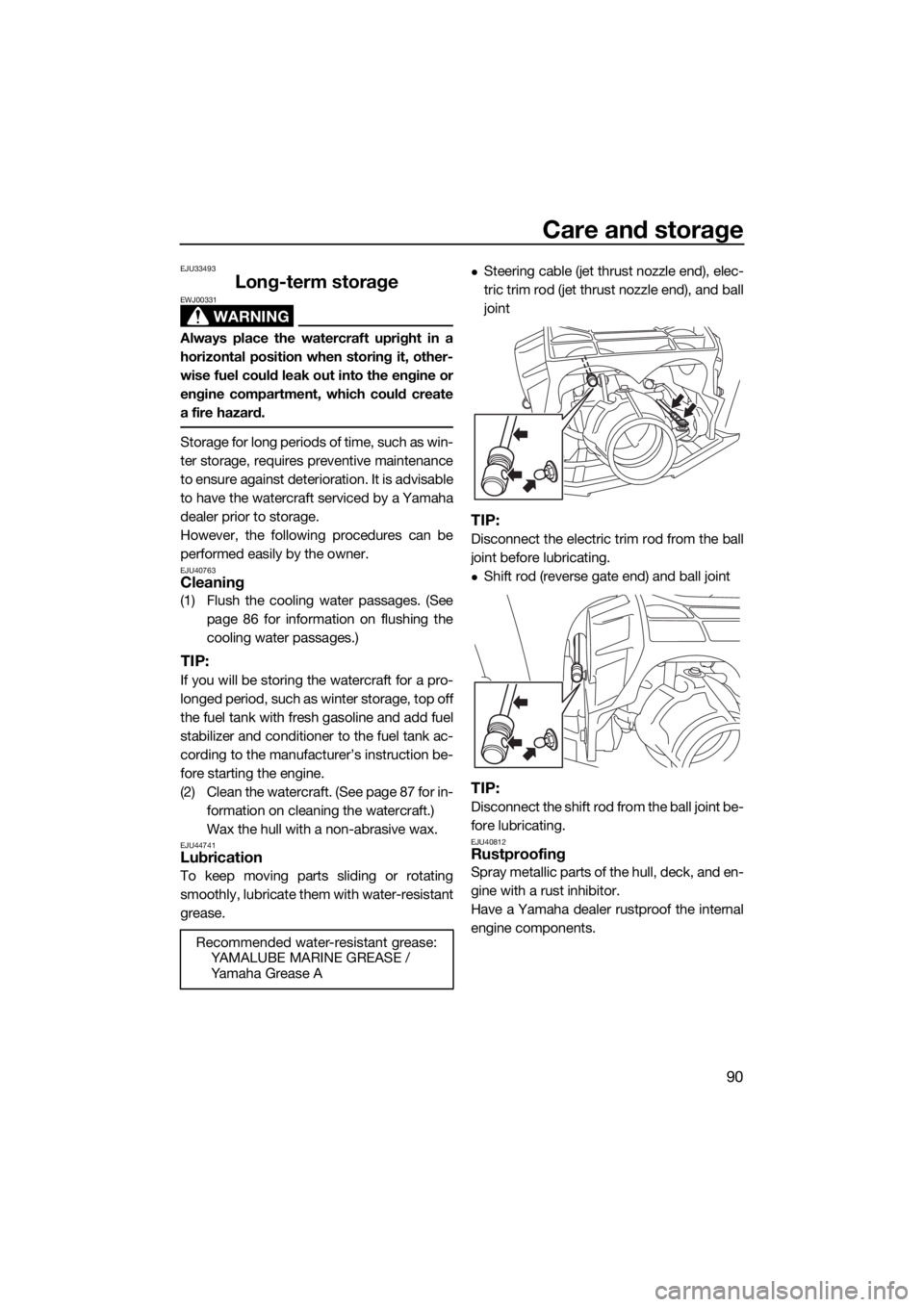
To keep moving parts sliding or rotating
smoothly, lubricate them with water-resistant
grease.
Steering cable (jet thrust nozzle end), elec-
tric trim rod (jet thrust nozzle end), and ball
joint
TIP:
Disconnect the electric trim rod from the ball
joint before lubricating.
Shift rod (reverse gate end) and ball joint
TIP:
Disconnect the shift rod from the ball joint be-
fore lubricating.
EJU40812Rustproofing
Spray metallic parts of the hull, deck, and en-
gine with a rust inhibitor.
Have a Yamaha dealer rustproof the internal
engine components.
Recommended water-resistant grease:
YAMALUBE MARINE GREASE /
Ya m a h a G r e a s e A
UF3V71E0.book Page 90 Tuesday, June 25, 2019 9:14 AM