lock YAMAHA FZ1 S 2012 Owners Manual
[x] Cancel search | Manufacturer: YAMAHA, Model Year: 2012, Model line: FZ1 S, Model: YAMAHA FZ1 S 2012Pages: 106, PDF Size: 2.28 MB
Page 6 of 106

TABLE OF CONTENTSSAFETY INFORMATION ..................1-1
DESCRIPTION ..................................2-1
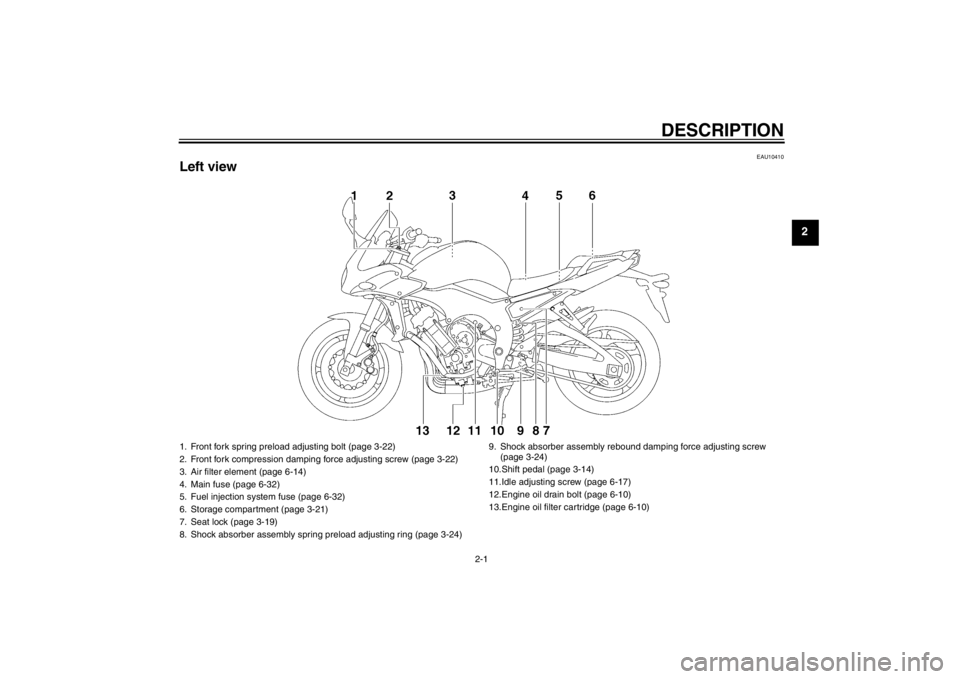
Left view ..........................................2-1
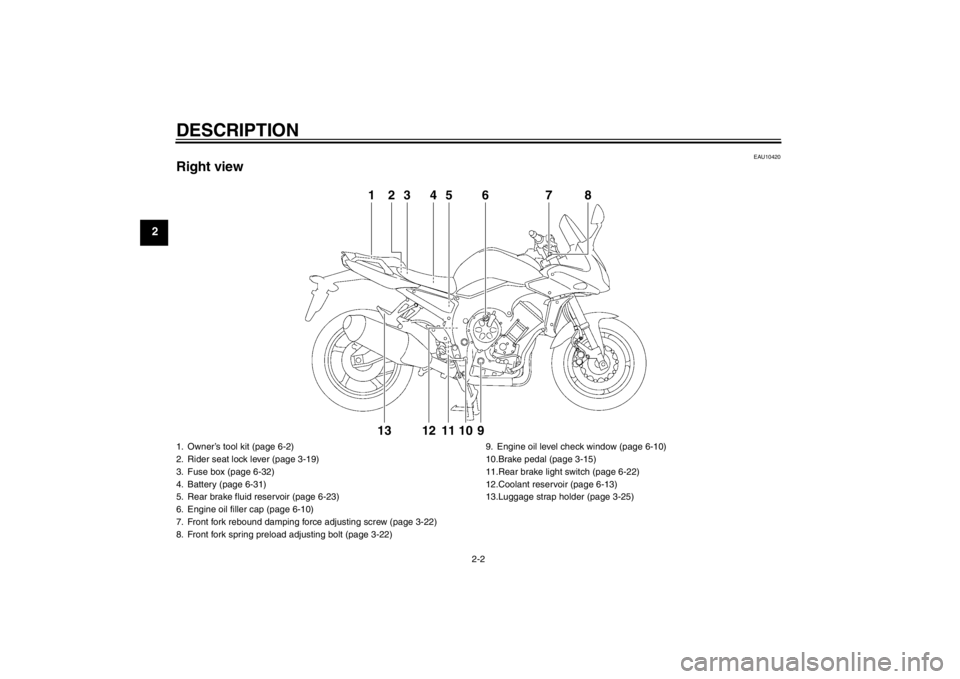
Right view ........................................2-2
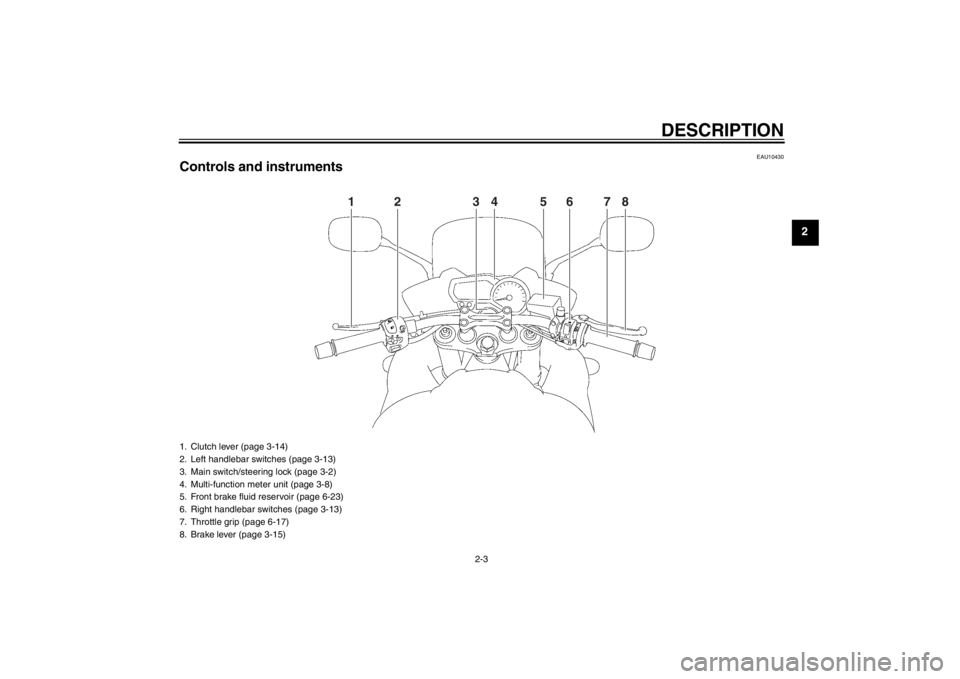
Controls and instruments.................2-3
INSTRUMENT AND CONTROL
FUNCTIONS .......................................3-1
Immobilizer system .........................3-1
Main switch/steering lock ................3-2
Indicator lights and warning lights ..............................3-4
Multi-function meter unit .................3-8
Anti-theft alarm (optional) .............3-12
Handlebar switches ......................3-13
Clutch lever ...................................3-14
Shift pedal .....................................3-14
Brake lever ...................................3-15
Brake pedal ..................................3-15
ABS (for ABS models) ..................3-15
Fuel tank cap ................................3-16
Fuel ...............................................3-17
Fuel tank breather hose and
overflow hose ............................3-18
Catalytic converters ......................3-19
Seats ............................................3-19
Storage compartment ...................3-21
Rear view mirrors .........................3-21
Adjusting the front fork ..................3-22 Adjusting the shock absorber
assembly ................................... 3-24
Luggage strap holders ................. 3-25
EXUP system ............................... 3-26
Sidestand ..................................... 3-26
Ignition circuit cut-off system ........ 3-27
FOR YOUR SAFETY –
PRE-OPERATION CHECKS ............. 4-1
OPERATION AND IMPORTANT
RIDING POINTS ................................. 5-1
Starting the engine ......................... 5-1
Shifting ........................................... 5-2
Tips for reducing fuel consumption ............................... 5-3
Engine break-in .............................. 5-3
Parking ........................................... 5-4
PERIODIC MAINTENANCE AND
ADJUSTMENT ................................... 6-1
Owner’s tool kit ............................... 6-2
Periodic maintenance chart for the emission control system ....... 6-3
General maintenance and lubrication chart .......................... 6-4
Removing and installing panels ..... 6-8
Checking the spark plugs ............... 6-9
Engine oil and oil filter cartridge ... 6-10
Coolant ......................................... 6-13
Replacing the air filter element ..... 6-14 Adjusting the engine idling
speed ........................................ 6-17
Checking the throttle grip free play ........................................... 6-17
Valve clearance ........................... 6-18
Tires ............................................. 6-18
Cast wheels ................................. 6-20
Adjusting the clutch lever free
play ........................................... 6-21
Checking the brake lever free play ........................................... 6-21
Brake light switches (for ABS models) ...................... 6-22
Brake light switches
(for non-ABS models) ............... 6-22
Checking the front and rear brake pads ........................ 6-23
Checking the brake fluid level ...... 6-23
Changing the brake fluid .............. 6-25
Drive chain slack .......................... 6-25
Cleaning and lubricating the drive chain .......................... 6-26
Checking and lubricating
the cables ................................. 6-27
Checking and lubricating the throttle grip and cable ......... 6-27
Checking and lubricating the brake and shift pedals ........ 6-28
Checking and lubricating
the brake and clutch levers ...... 6-28U1CAE1E0.book Page 1 Tuesday, September 13, 2011 5:02 PM
Page 13 of 106
DESCRIPTION
2-1
2
EAU10410
Left view1. Front fork spring preload adjusting bolt (page 3-22)
2. Front fork compression damping force adjusting screw (page 3-22)
3. Air filter element (page 6-14)
4. Main fuse (page 6-32)
5. Fuel injection system fuse (page 6-32)
6. Storage compartment (page 3-21)
7. Seat lock (page 3-19)
8. Shock absorber assembly spring preload adjusting ring (page 3-24) 9. Shock absorber assembly rebo
und damping force adjusting screw
(page 3-24)
10.Shift pedal (page 3-14)
11.Idle adjusting screw (page 6-17)
12.Engine oil drain bolt (page 6-10)
13.Engine oil filter cartridge (page 6-10)
U1CAE1E0.book Page 1 Tuesday, September 13, 2011 5:02 PM
Page 14 of 106
DESCRIPTION
2-2
2
EAU10420
Right view
1
2
3
4
5
6
8
9
10
12
13
11
7
1. Owner’s tool kit (page 6-2)
2. Rider seat lock lever (page 3-19)
3. Fuse box (page 6-32)
4. Battery (page 6-31)
5. Rear brake fluid reservoir (page 6-23)
6. Engine oil filler cap (page 6-10)
7. Front fork rebound damping force adjusting screw (page 3-22)
8. Front fork spring preload adjusting bolt (page 3-22)9. Engine oil level check window (page 6-10)
10.Brake pedal (page 3-15)
11.Rear brake light switch (page 6-22)
12.Coolant reservoir (page 6-13)
13.Luggage strap holder (page 3-25)U1CAE1E0.book Page 2 Tuesday, September 13, 2011 5:02 PM
Page 15 of 106
DESCRIPTION
2-3
2
EAU10430
Controls and instruments
1
2
3
4
6
7
8
5
1. Clutch lever (page 3-14)
2. Left handlebar switches (page 3-13)
3. Main switch/steering lock (page 3-2)
4. Multi-function meter unit (page 3-8)
5. Front brake fluid reservoir (page 6-23)
6. Right handlebar switches (page 3-13)
7. Throttle grip (page 6-17)
8. Brake lever (page 3-15)
U1CAE1E0.book Page 3 Tuesday, September 13, 2011 5:02 PM
Page 17 of 106
INSTRUMENT AND CONTROL FUNCTIONS
3-2
3
●
Keep other immobilizer system
keys away from the main switch
as they may cause signal inter-
ference.
EAU10472
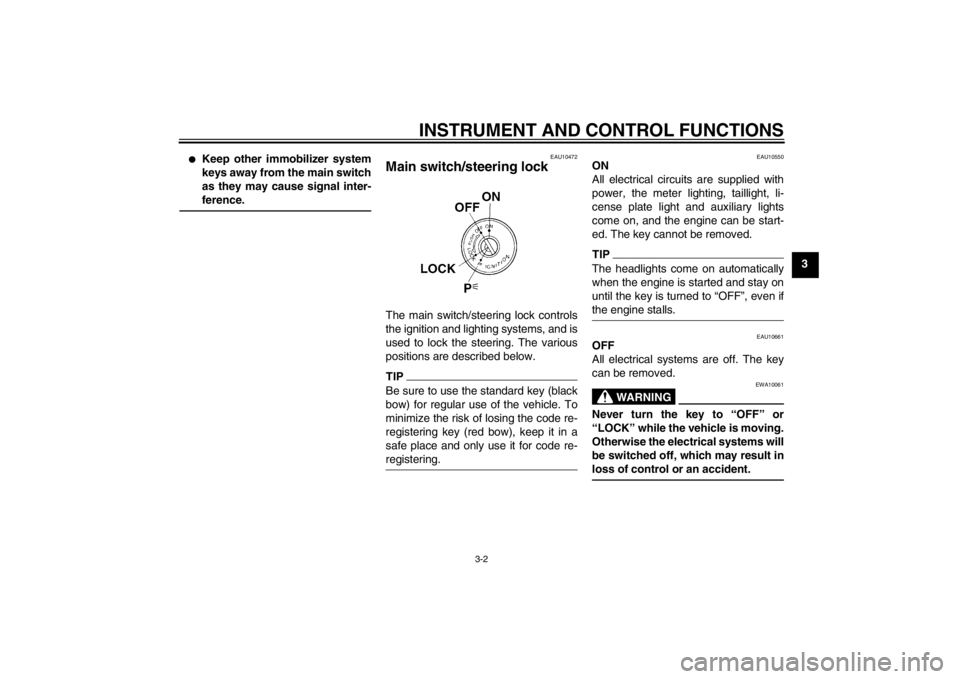
Main switch/steering lock The main switch/steering lock controls
the ignition and lighting systems, and is
used to lock the steering. The various
positions are described below.TIPBe sure to use the standard key (black
bow) for regular use of the vehicle. To
minimize the risk of losing the code re-
registering key (red bow), keep it in a
safe place and only use it for code re-
registering.
EAU10550
ON
All electrical circuits are supplied with
power, the meter lighting, taillight, li-
cense plate light and auxiliary lights
come on, and the engine can be start-
ed. The key cannot be removed.TIPThe headlights come on automatically
when the engine is started and stay on
until the key is turned to “OFF”, even if
the engine stalls.
EAU10661
OFF
All electrical systems are off. The key
can be removed.
WARNING
EWA10061
Never turn the key to “OFF” or
“LOCK” while the vehicle is moving.
Otherwise the electrical systems will
be switched off, which may result in
loss of control or an accident.
U1CAE1E0.book Page 2 Tuesday, September 13, 2011 5:02 PM
Page 18 of 106
INSTRUMENT AND CONTROL FUNCTIONS
3-3
3
EAU10683
LOCK
The steering is locked, and all electrical
systems are off. The key can be re-
moved.
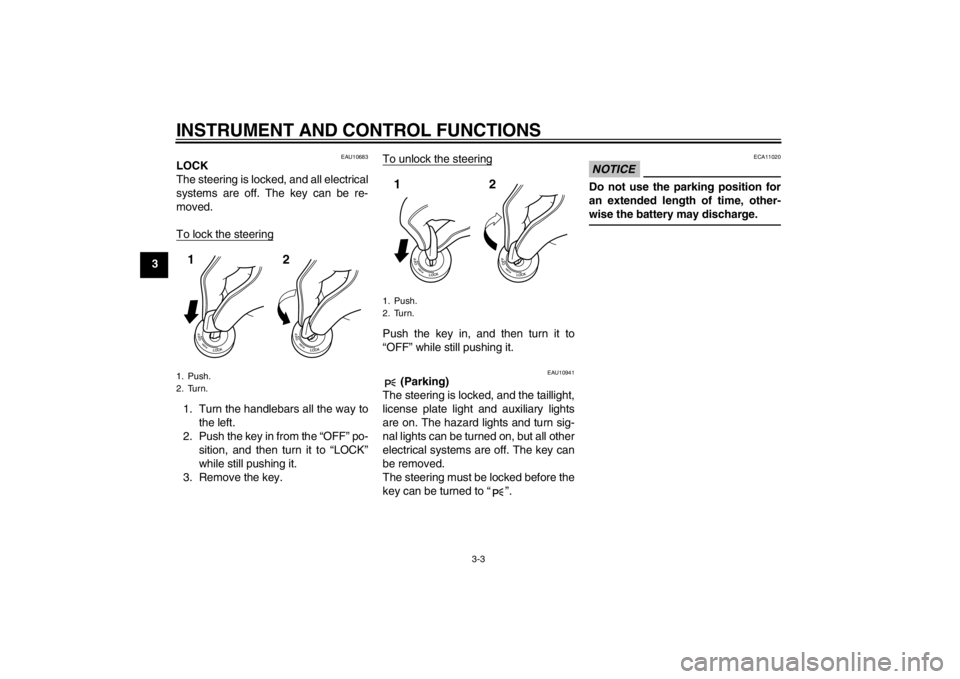
To lock the steering1. Turn the handlebars all the way tothe left.
2. Push the key in from the “OFF” po- sition, and then turn it to “LOCK”
while still pushing it.
3. Remove the key. To unlock the steering
Push the key in, and then turn it to
“OFF” while still pushing it.
EAU10941
(Parking)
The steering is locked, and the taillight,
license plate light and auxiliary lights
are on. The hazard lights and turn sig-
nal lights can be turned on, but all other
electrical systems are off. The key can
be removed.
The steering must be locked before the
key can be turned to “ ”.
NOTICE
ECA11020
Do not use the parking position for
an extended length of time, other-
wise the battery may discharge.
1. Push.
2. Turn.12
1. Push.
2. Turn.12
U1CAE1E0.book Page 3 Tuesday, September 13, 2011 5:02 PM
Page 19 of 106
INSTRUMENT AND CONTROL FUNCTIONS
3-4
3
EAU49391
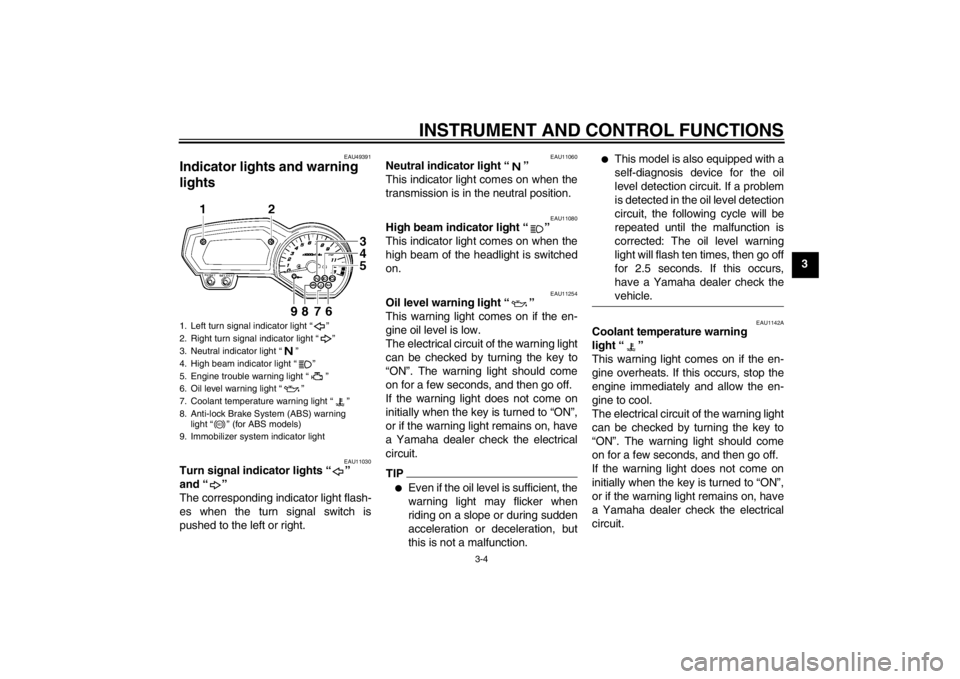
Indicator lights and warning
lights
EAU11030
Turn signal indicator lights “ ”
and “ ”
The corresponding indicator light flash-
es when the turn signal switch is
pushed to the left or right.
EAU11060
Neutral indicator light “ ”
This indicator light comes on when the
transmission is in the neutral position.
EAU11080
High beam indicator light “ ”
This indicator light comes on when the
high beam of the headlight is switched
on.
EAU11254
Oil level warning light “ ”
This warning light comes on if the en-
gine oil level is low.
The electrical circuit of the warning light
can be checked by turning the key to
“ON”. The warning light should come
on for a few seconds, and then go off.
If the warning light does not come on
initially when the key is turned to “ON”,
or if the warning light remains on, have
a Yamaha dealer check the electrical
circuit.TIP●
Even if the oil level is sufficient, the
warning light may flicker when
riding on a slope or during sudden
acceleration or deceleration, but
this is not a malfunction.
●
This model is also equipped with a
self-diagnosis device for the oil
level detection circuit. If a problem
is detected in the oil level detection
circuit, the following cycle will be
repeated until the malfunction is
corrected: The oil level warning
light will flash ten times, then go off
for 2.5 seconds. If this occurs,
have a Yamaha dealer check the
vehicle.
EAU1142A
Coolant temperature warning
light “ ”
This warning light comes on if the en-
gine overheats. If this occurs, stop the
engine immediately and allow the en-
gine to cool.
The electrical circuit of the warning light
can be checked by turning the key to
“ON”. The warning light should come
on for a few seconds, and then go off.
If the warning light does not come on
initially when the key is turned to “ON”,
or if the warning light remains on, have
a Yamaha dealer check the electrical
circuit.
1. Left turn signal indicator light “ ”
2. Right turn signal indicator light “ ”
3. Neutral indicator light “ ”
4. High beam indicator light “ ”
5. Engine trouble warning light “ ”
6. Oil level warning light “ ”
7. Coolant temperature warning light “ ”
8. Anti-lock Brake System (ABS) warning light “ ” (for ABS models)
9. Immobilizer system indicator light
ABS
U1CAE1E0.book Page 4 Tuesday, September 13, 2011 5:02 PM
Page 22 of 106
INSTRUMENT AND CONTROL FUNCTIONS
3-7
3
EAU11534
Engine trouble warning light “ ”
This warning light comes on or flashes
if a problem is detected in the electrical
circuit monitoring the engine. If this oc-
curs, have a Yamaha dealer check the
self-diagnosis system. (See page 3-11
for an explanation of the self-diagnosis
device.)
The electrical circuit of the warning light
can be checked by turning the key to
“ON”. The warning light should come
on for a few seconds, and then go off.
If the warning light does not come on
initially when the key is turned to “ON”,
or if the warning light remains on, have
a Yamaha dealer check the electrical
circuit.
EAU11545
ABS warning light “ ” (for ABS
models)
If this warning light comes on or flashes
while riding, the ABS may not work cor-
rectly. If this occurs, have a Yamaha
dealer check the system as soon as
possible. (See page 3-15.)
WARNING
EWA10081
If the ABS warning light comes on or
flashes while riding, the brake sys-
tem reverts to conventional braking.
Therefore, be careful not to cause
the wheels to lock during emergen-
cy braking. If the warning light
comes on or flashes while riding,
have a Yamaha dealer check the
brake system as soon as possible.The electrical circuit of the warning light
can be checked by turning the key to
“ON”. The warning light should come
on for a few seconds, and then go off.
If the warning light does not come on
initially when the key is turned to “ON”,
or if the warning light remains on, have
a Yamaha dealer check the electrical
circuit.
EAU38624
Immobilizer system indicator light
The electrical circuit of the indicator
light can be checked by turning the key
to “ON”. The indicator light should
come on for a few seconds, and then
go off.If the indicator light does not come on
initially when the key is turned to “ON”,
or if the indicator light remains on, have
a Yamaha dealer check the electrical
circuit.
When the key is turned to “OFF” and 30
seconds have passed, the indicator
light will start flashing indicating the im-
mobilizer system is enabled. After 24
hours have passed, the indicator light
will stop flashing, however the immobi-
lizer system is still enabled.
The self-diagnosis device also detects
problems in the immobilizer system cir-
cuits. (See page 3-11 for an explana-
tion of the self-diagnosis device.)
ABS
U1CAE1E0.book Page 7 Tuesday, September 13, 2011 5:02 PM
Page 23 of 106
INSTRUMENT AND CONTROL FUNCTIONS
3-8
3
EAU3942H
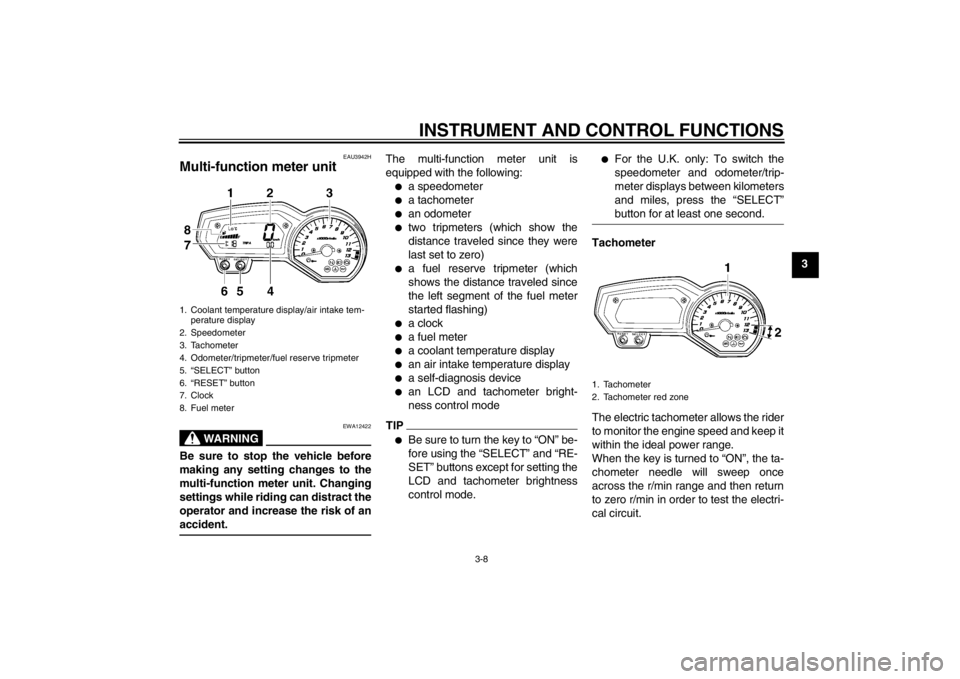
Multi-function meter unit
WARNING
EWA12422
Be sure to stop the vehicle before
making any setting changes to the
multi-function meter unit. Changing
settings while riding can distract the
operator and increase the risk of an
accident.
The multi-function meter unit is
equipped with the following:●
a speedometer
●
a tachometer
●
an odometer
●
two tripmeters (which show the
distance traveled since they were
last set to zero)
●
a fuel reserve tripmeter (which
shows the distance traveled since
the left segment of the fuel meter
started flashing)
●
a clock
●
a fuel meter
●
a coolant temperature display
●
an air intake temperature display
●
a self-diagnosis device
●
an LCD and tachometer bright-
ness control mode
TIP●
Be sure to turn the key to “ON” be-
fore using the “SELECT” and “RE-
SET” buttons except for setting the
LCD and tachometer brightness
control mode.
●
For the U.K. only: To switch the
speedometer and odometer/trip-
meter displays between kilometers
and miles, press the “SELECT”
button for at least one second.
Tachometer
The electric tachometer allows the rider
to monitor the engine speed and keep it
within the ideal power range.
When the key is turned to “ON”, the ta-
chometer needle will sweep once
across the r/min range and then return
to zero r/min in order to test the electri-
cal circuit.
1. Coolant temperature display/air intake tem-perature display
2. Speedometer
3. Tachometer
4. Odometer/tripmeter/fuel reserve tripmeter
5. “SELECT” button
6. “RESET” button
7. Clock
8. Fuel meter
1. Tachometer
2. Tachometer red zone
U1CAE1E0.book Page 8 Tuesday, September 13, 2011 5:02 PM
Page 24 of 106
INSTRUMENT AND CONTROL FUNCTIONS
3-9
3
NOTICE
ECA10031
Do not operate the engine in the ta-
chometer red zone.
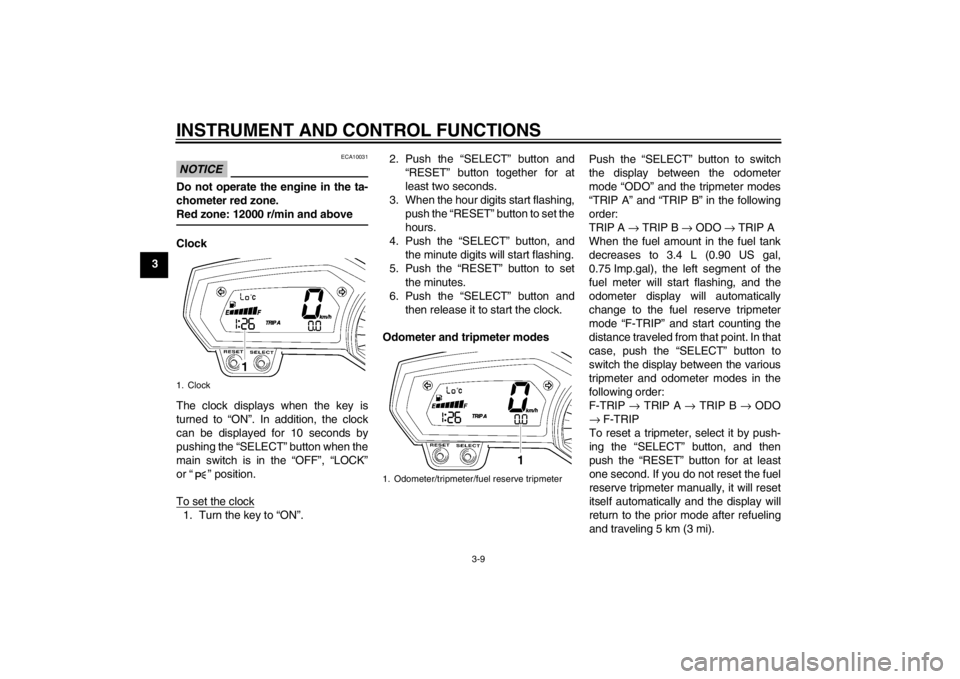
Red zone: 12000 r/min and aboveClock
The clock displays when the key is
turned to “ON”. In addition, the clock
can be displayed for 10 seconds by
pushing the “SELECT” button when the
main switch is in the “OFF”, “LOCK”
or “ ” position.
To set the clock1. Turn the key to “ON”.2. Push the “SELECT” button and
“RESET” button together for at
least two seconds.
3. When the hour digits start flashing, push the “RESET” button to set the
hours.
4. Push the “SELECT” button, and the minute digits will start flashing.
5. Push the “RESET” button to set the minutes.
6. Push the “SELECT” button and then release it to start the clock.
Odometer and tripmeter modes Push the “SELECT” button to switch
the display between the odometer
mode “ODO” and the tripmeter modes
“TRIP A” and “TRIP B” in the following
order:
TRIP A
→ TRIP B → ODO → TRIP A
When the fuel amount in the fuel tank
decreases to 3.4 L (0.90 US gal,
0.75 Imp.gal), the left segment of the
fuel meter will start flashing, and the
odometer display will automatically
change to the fuel reserve tripmeter
mode “F-TRIP” and start counting the
distance traveled from that point. In that
case, push the “SELECT” button to
switch the display between the various
tripmeter and odometer modes in the
following order:
F-TRIP → TRIP A → TRIP B → ODO
→ F-TRIP
To reset a tripmeter, select it by push-
ing the “SELECT” button, and then
push the “RESET” button for at least
one second. If you do not reset the fuel
reserve tripmeter manually, it will reset
itself automatically and the display will
return to the prior mode after refueling
and traveling 5 km (3 mi).1. Clock
1. Odometer/tripmeter/fuel reserve tripmeter
U1CAE1E0.book Page 9 Tuesday, September 13, 2011 5:02 PM