lock YAMAHA GP1800R SVHO 2022 Owners Manual
[x] Cancel search | Manufacturer: YAMAHA, Model Year: 2022, Model line: GP1800R SVHO, Model: YAMAHA GP1800R SVHO 2022Pages: 112, PDF Size: 4.91 MB
Page 7 of 112

Table of contents
General and important labels ........... 1Identification numbers .................... 1
Primary Identification (PRI-ID)
number............................................ 1
Craft Identification Number (CIN) ....... 1
Engine serial number.......................... 1
Manufactured date label .................... 2
Model information ........................... 2
Builder’s plate .................................... 2
Important labels .............................. 4
Warning labels.................................... 5
Other labels ........................................ 8
Safety information ............................. 9 Limitations on who may operate the watercraft ............................... 9
Cruising limitations ........................ 10
Operation requirements ................ 11
Recommended equipment ........... 13
Hazard information........................ 14
Watercraft characteristics ............. 14
Wakeboarding and water-skiing ... 16
Safe boating rules ......................... 17
Enjoy your watercraft responsibly ................................. 18
Description....................................... 19 Watercraft glossary ....................... 19
Location of main components ...... 20
Control function operation ............. 24 Watercraft control functions ......... 24
Yamaha Security System ................. 24
Engine start/stop switch ................. 25
Engine shut-off switch .................... 25
Throttle lever .................................... 25
RiDE lever ........................................ 26
Steering system ............................... 26
Adjustable tilt steering system ......... 26
Cooling water pilot outlets ............... 27
Water separator................................ 27
Watercraft operation ...................... 29Watercraft operation functions ..... 29
Shift system ..................................... 29
Electric trim system .......................... 31
Watercraft operation modes ......... 33
Reverse assist .................................. 33
T.D.E.
(thrust directional enhancer) ......... 33
No-wake mode ................................. 34
Drive control mode ........................... 36
Cruise assist ..................................... 37
Instrument operation ...................... 39 Multifunction information center ... 39
Operation buttons ............................ 39
Display.............................................. 39
Home screen ................................... 41
Information screen .......................... 41
Drive control mode screen .............. 42
Setting menu screen ....................... 42
Engine lock screen .......................... 43
Warning function .............................. 44
Audio system (equipped models) ..................... 46
Audio control .................................... 46
Equipment operation ...................... 48Equipment..................................... 48
Seats ................................................ 48
Handgrip........................................... 49
Reboarding grip................................ 49
Reboarding step ............................... 49
Bow eye............................................ 50
Stern eyes ........................................ 50
Cleat ................................................. 50
Storage compartments .................... 51
Fire extinguisher holder and cover ... 53
Operation and handling
requirements ................................... 55Fuel requirements ......................... 55
Fuel................................................... 55
Engine oil requirements ................ 57
Engine oil .......................................... 57
UF4P72E0.book Page 1 Tuesday, August 24, 2021 3:18 PM
Page 18 of 112
Safety information
10
EJU43323
Cruising limitations
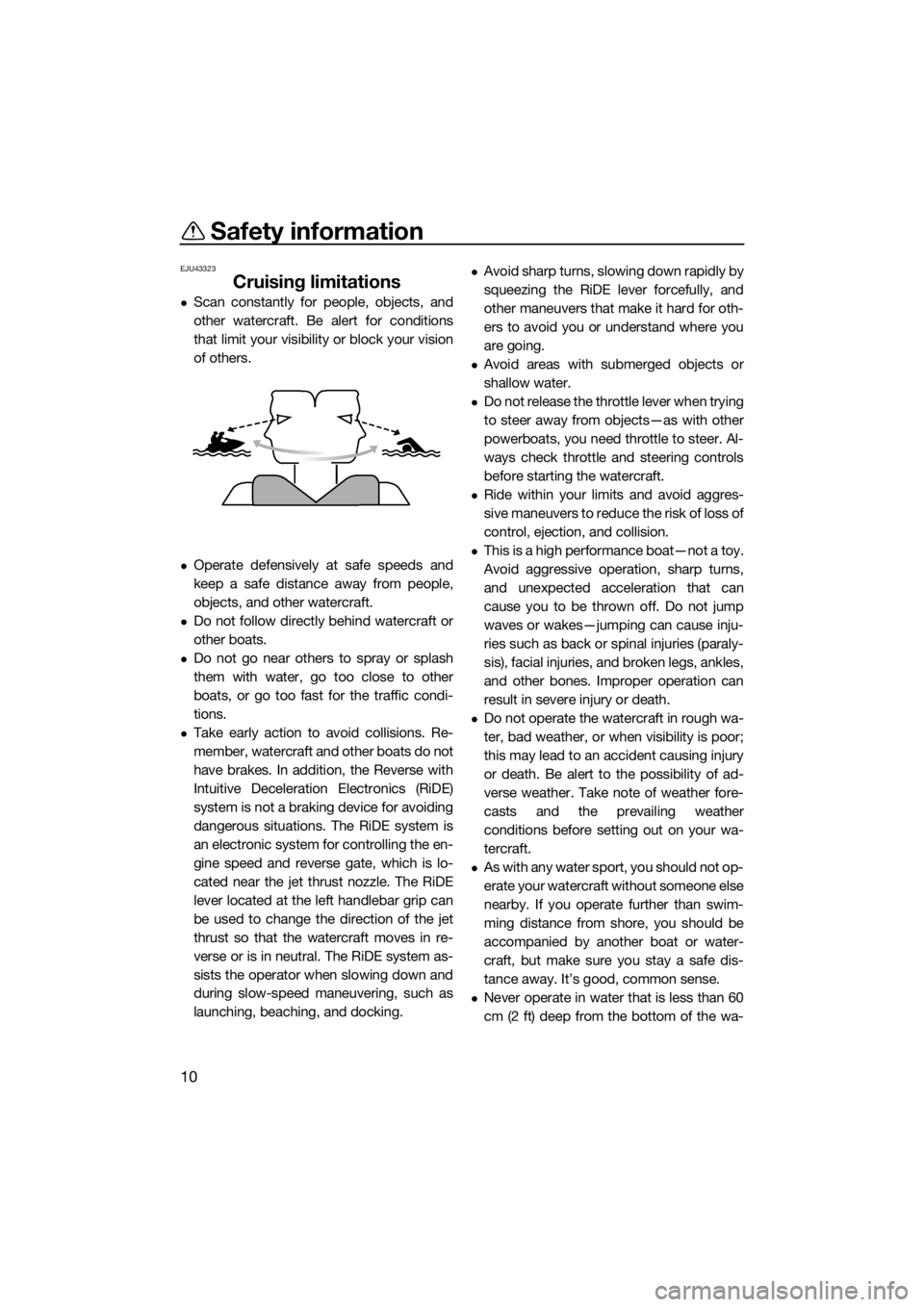
Scan constantly for people, objects, and
other watercraft. Be alert for conditions
that limit your visibility or block your vision
of others.
Operate defensively at safe speeds and
keep a safe distance away from people,
objects, and other watercraft.
Do not follow directly behind watercraft or
other boats.
Do not go near others to spray or splash
them with water, go too close to other
boats, or go too fast for the traffic condi-
tions.
Take early action to avoid collisions. Re-
member, watercraft and other boats do not
have brakes. In addition, the Reverse with
Intuitive Deceleration Electronics (RiDE)
system is not a braking device for avoiding
dangerous situations. The RiDE system is
an electronic system for controlling the en-
gine speed and reverse gate, which is lo-
cated near the jet thrust nozzle. The RiDE
lever located at the left handlebar grip can
be used to change the direction of the jet
thrust so that the watercraft moves in re-
verse or is in neutral. The RiDE system as-
sists the operator when slowing down and
during slow-speed maneuvering, such as
launching, beaching, and docking.
Avoid sharp turns, slowing down rapidly by
squeezing the RiDE lever forcefully, and
other maneuvers that make it hard for oth-
ers to avoid you or understand where you
are going.
Avoid areas with submerged objects or
shallow water.
Do not release the throttle lever when trying
to steer away from objects—as with other
powerboats, you need throttle to steer. Al-
ways check throttle and steering controls
before starting the watercraft.
Ride within your limits and avoid aggres-
sive maneuvers to reduce the risk of loss of
control, ejection, and collision.
This is a high performance boat—not a toy.
Avoid aggressive operation, sharp turns,
and unexpected acceleration that can
cause you to be thrown off. Do not jump
waves or wakes—jumping can cause inju-
ries such as back or spinal injuries (paraly-
sis), facial injuries, and broken legs, ankles,
and other bones. Improper operation can
result in severe injury or death.
Do not operate the watercraft in rough wa-
ter, bad weather, or when visibility is poor;
this may lead to an accident causing injury
or death. Be alert to the possibility of ad-
verse weather. Take note of weather fore-
casts and the prevailing weather
conditions before setting out on your wa-
tercraft.
As with any water sport, you should not op-
erate your watercraft without someone else
nearby. If you operate further than swim-
ming distance from shore, you should be
accompanied by another boat or water-
craft, but make sure you stay a safe dis-
tance away. It’s good, common sense.
Never operate in water that is less than 60
cm (2 ft) deep from the bottom of the wa-
UF4P72E0.book Page 10 Tuesday, August 24, 2021 3:18 PM
Page 32 of 112
Control function operation
24
EJU31027
Watercraft control functionsEJU45091Yamaha Security System
The Yamaha Security System functions to
help prevent unauthorized use or theft of the
watercraft. The lock and unlock modes of the
security system can be selected using the
engine lock screen of the multifunction infor-
mation center. The engine cannot be started
if the lock mode of the security system is se-
lected. The engine can only be started if the
unlock mode is selected.
TIP
The Yamaha Security System setting can
only be selected while the engine is stopped.
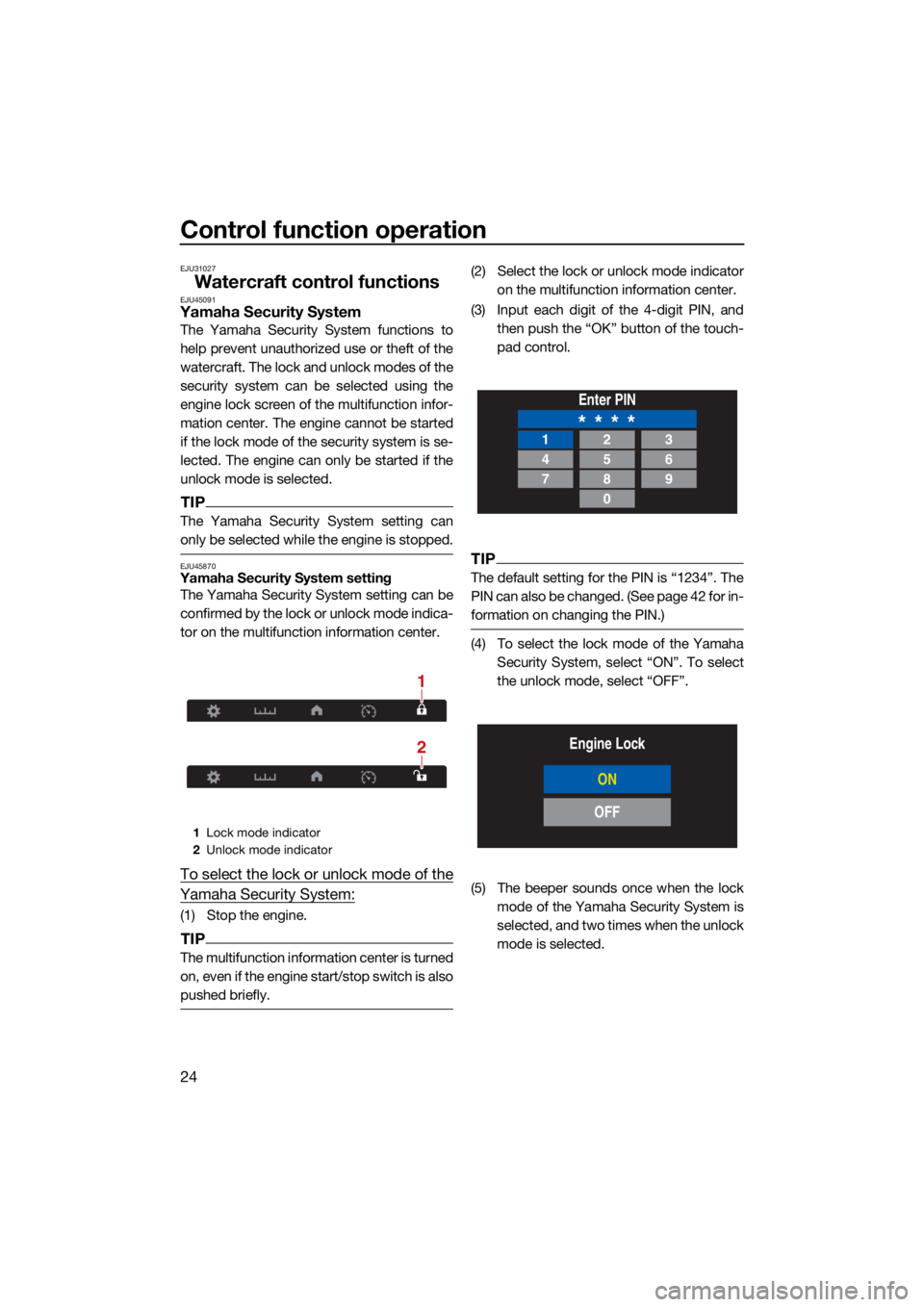
EJU45870Yamaha Security System settingThe Yamaha Security System setting can be
confirmed by the lock or unlock mode indica-
tor on the multifunction information center.
To select the lock or unlock mode of the
Yamaha Security System:
(1) Stop the engine.
TIP
The multifunction information center is turned
on, even if the engine start/stop switch is also
pushed briefly.
(2) Select the lock or unlock mode indicator
on the multifunction information center.
(3) Input each digit of the 4-digit PIN, and then push the “OK” button of the touch-
pad control.
TIP
The default setting for the PIN is “1234”. The
PIN can also be changed. (See page 42 for in-
formation on changing the PIN.)
(4) To select the lock mode of the YamahaSecurity System, select “ON”. To select
the unlock mode, select “OFF”.
(5) The beeper sounds once when the lock mode of the Yamaha Security System is
selected, and two times when the unlock
mode is selected.
1Lock mode indicator
2 Unlock mode indicator
2
1
Enter PIN
* * * *123
456
789
0
Engine Lock
ON
OFF
UF4P72E0.book Page 24 Tuesday, August 24, 2021 3:18 PM
Page 33 of 112
Control function operation
25
EJU46112Engine start/stop switch “ / ”ECJ01311
Do not run the engine over 4000 r/min on
land. Also, do not run the engine for more
than 15 seconds without supplying water,
otherwise the engine could overheat.
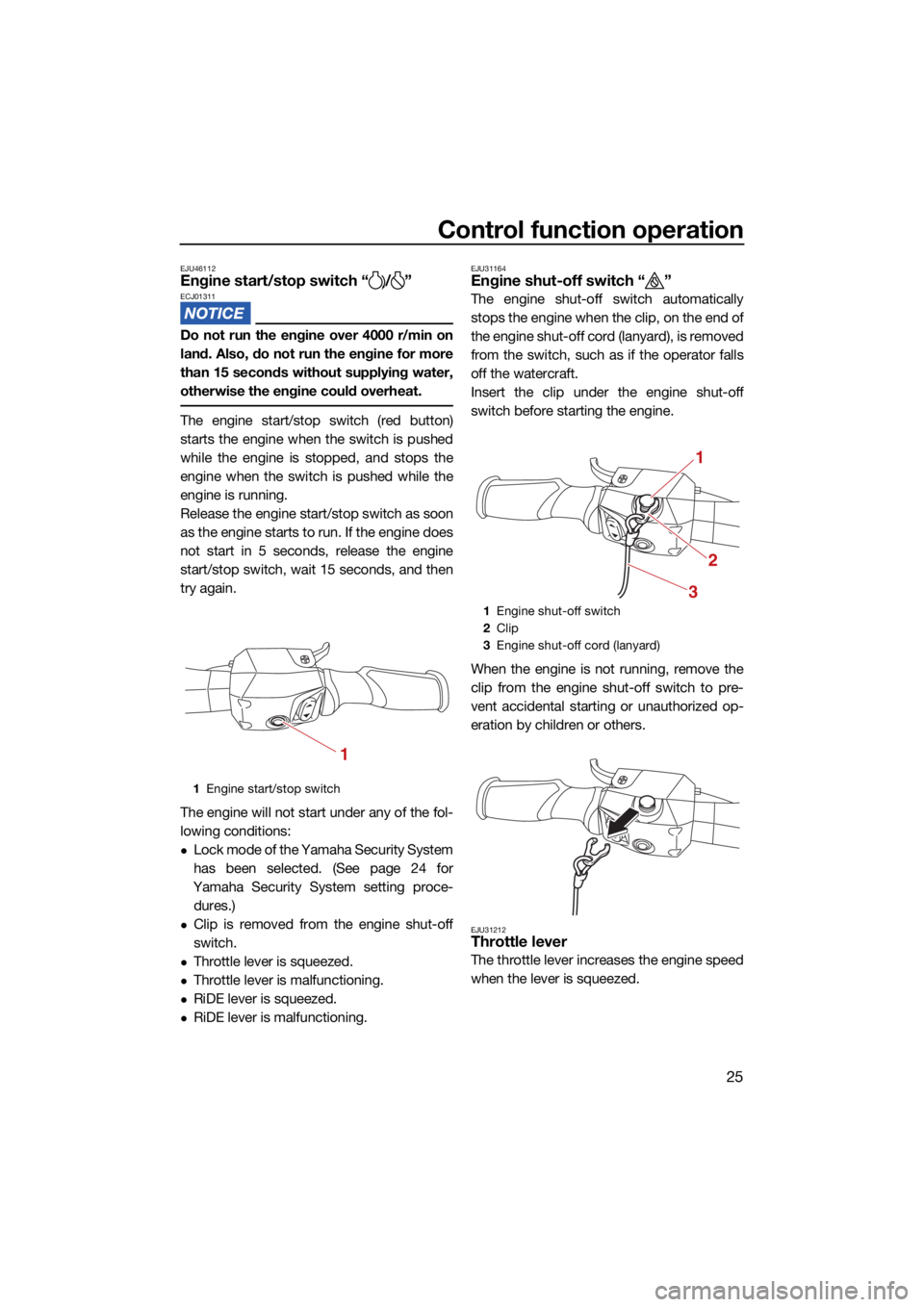
The engine start/stop switch (red button)
starts the engine when the switch is pushed
while the engine is stopped, and stops the
engine when the switch is pushed while the
engine is running.
Release the engine start/stop switch as soon
as the engine starts to run. If the engine does
not start in 5 seconds, release the engine
start/stop switch, wait 15 seconds, and then
try again.
The engine will not start under any of the fol-
lowing conditions:
Lock mode of the Yamaha Security System
has been selected. (See page 24 for
Yamaha Security System setting proce- dures.)
Clip is removed from the engine shut-off
switch.
Throttle lever is squeezed.
Throttle lever is malfunctioning.
RiDE lever is squeezed.
RiDE lever is malfunctioning.
EJU31164Engine shut-off switch “ ”
The engine shut-off switch automatically
stops the engine when the clip, on the end of
the engine shut-off cord (lanyard), is removed
from the switch, such as if the operator falls
off the watercraft.
Insert the clip under the engine shut-off
switch before starting the engine.
When the engine is not running, remove the
clip from the engine shut-off switch to pre-
vent accidental starting or unauthorized op-
eration by children or others.
EJU31212Throttle lever
The throttle lever increases the engine speed
when the lever is squeezed.
1 Engine start/stop switch
1
1Engine shut-off switch
2 Clip
3 Engine shut-off cord (lanyard)
1
2
3
UF4P72E0.book Page 25 Tuesday, August 24, 2021 3:18 PM
Page 34 of 112
Control function operation
26
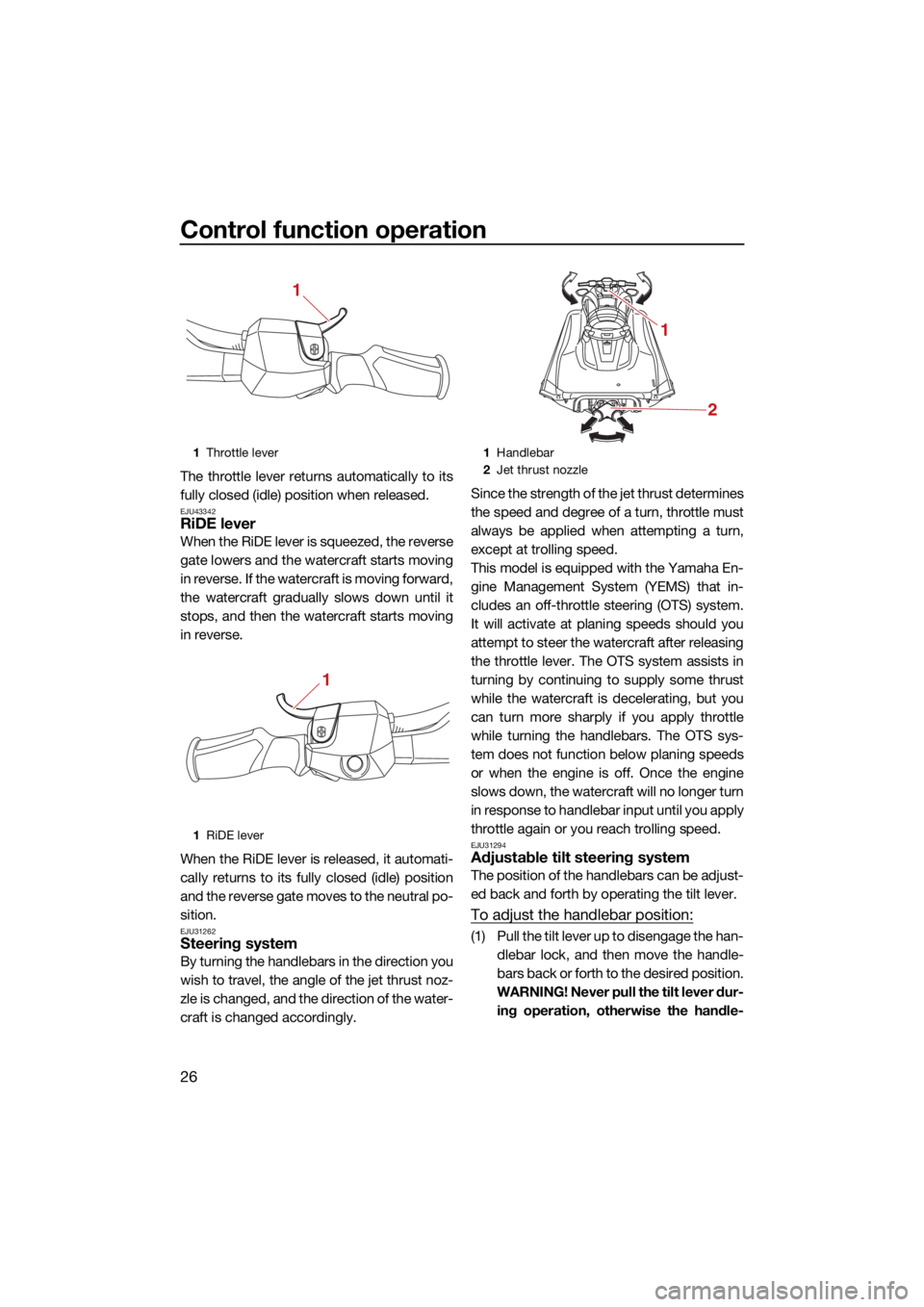
The throttle lever returns automatically to its
fully closed (idle) position when released.
EJU43342RiDE lever
When the RiDE lever is squeezed, the reverse
gate lowers and the watercraft starts moving
in reverse. If the watercraft is moving forward,
the watercraft gradually slows down until it
stops, and then the watercraft starts moving
in reverse.
When the RiDE lever is released, it automati-
cally returns to its fully closed (idle) position
and the reverse gate moves to the neutral po-
sition.
EJU31262Steering system
By turning the handlebars in the direction you
wish to travel, the angle of the jet thrust noz-
zle is changed, and the direction of the water-
craft is changed accordingly.Since the strength of the jet thrust determines
the speed and degree of a turn, throttle must
always be applied when attempting a turn,
except at trolling speed.
This model is equipped with the Yamaha En-
gine Management System (YEMS) that in-
cludes an off-throttle steering (OTS) system.
It will activate at planing speeds should you
attempt to steer the watercraft after releasing
the throttle lever. The OTS system assists in
turning by continuing to supply some thrust
while the watercraft is decelerating, but you
can turn more sharply if you apply throttle
while turning the handlebars. The OTS sys-
tem does not function below planing speeds
or when the engine is off. Once the engine
slows down, the watercraft will no longer turn
in response to handlebar input until you apply
throttle again or you reach trolling speed.
EJU31294Adjustable tilt steering system
The position of the handlebars can be adjust-
ed back and forth by operating the tilt lever.
To adjust the handlebar position:
(1) Pull the tilt lever up to disengage the han-
dlebar lock, and then move the handle-
bars back or forth to the desired position.
WARNING! Never pull the tilt lever dur- ing operation, otherwise the handle-
1 Throttle lever
1 RiDE lever
1
1
1Handlebar
2 Jet thrust nozzle
1
2
UF4P72E0.book Page 26 Tuesday, August 24, 2021 3:18 PM
Page 35 of 112
![YAMAHA GP1800R SVHO 2022 Owners Manual Control function operation
27
bars may suddenly change position,
which may lead to an accident.
[EWJ00042]
(2) Make sure that the tilt lever returns to itsoriginal position and that the handlebars
ar](/img/51/50304/w960_50304-34.png "YAMAHA GP1800R SVHO 2022 Owners Manual Control function operation
27
bars may suddenly change position,
which may lead to an accident.
[EWJ00042]
(2) Make sure that the tilt lever returns to itsoriginal position and that the handlebars
ar")
Control function operation
27
bars may suddenly change position,
which may lead to an accident.
[EWJ00042]
(2) Make sure that the tilt lever returns to itsoriginal position and that the handlebars
are securely locked in place.
EJU41801Cooling water pilot outlets
When the engine is running, some of the
cooling water that is circulated in the engine
is discharged from the cooling water pilot
outlets. There are cooling water pilot outlets on the
port (left) and starboard (right) sides of the
watercraft. To check for proper operation of
the cooling system, make sure that water is
being discharged from the port (left) pilot out-
let. If water is not being discharged from the
outlet, stop the engine and check the jet in-
take for clogging. (See page 98 for informa-
tion on the jet intake.)
TIP
It will take about 60 seconds for the water
to reach the outlets after the engine is start-
ed.
Water discharge may not be constant
when the engine is running at idling speed.
If this occurs, apply a little throttle to make
sure that water discharges properly.
EJU40323Water separator
The water separator prevents water from en-
tering the fuel tank by collecting any water
that has entered the fuel tank breather hose if
the watercraft was capsized.
If water has collected in the water separator,
drain it by loosening the drain screw.
1
Tilt lever
1
1Cooling water pilot outlet
1
UF4P72E0.book Page 27 Tuesday, August 24, 2021 3:18 PM
Page 44 of 112
Watercraft operation
36
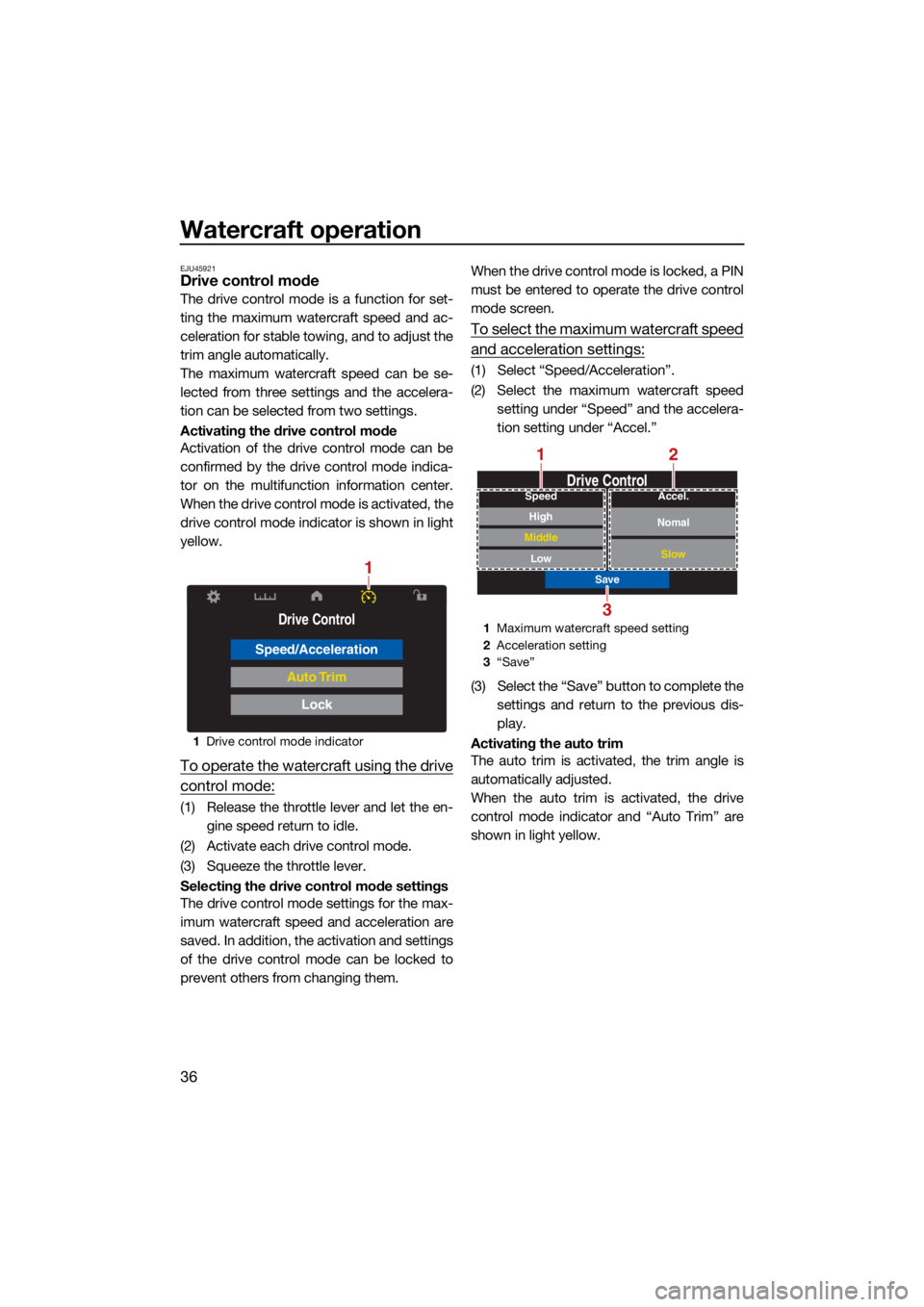
EJU45921Drive control mode
The drive control mode is a function for set-
ting the maximum watercraft speed and ac-
celeration for stable towing, and to adjust the
trim angle automatically.
The maximum watercraft speed can be se-
lected from three settings and the accelera-
tion can be selected from two settings.
Activating the drive control mode
Activation of the drive control mode can be
confirmed by the drive control mode indica-
tor on the multifunction information center.
When the drive control mode is activated, the
drive control mode indicator is shown in light
yellow.
To operate the watercraft using the drive
control mode:
(1) Release the throttle lever and let the en- gine speed return to idle.
(2) Activate each drive control mode.
(3) Squeeze the throttle lever.
Selecting the drive control mode settings
The drive control mode settings for the max-
imum watercraft speed and acceleration are
saved. In addition, the activation and settings
of the drive control mode can be locked to
prevent others from changing them. When the drive control mode is locked, a PIN
must be entered to operate the drive control
mode screen.
To select the maximum watercraft speed
and acceleration settings:
(1) Select “Speed/Acceleration”.
(2) Select the maximum watercraft speed
setting under “Speed” and the accelera-
tion setting under “Accel.”
(3) Select the “Save” button to complete the settings and return to the previous dis-
play.
Activating the auto trim
The auto trim is activated, the trim angle is
automatically adjusted.
When the auto trim is activated, the drive
control mode indicator and “Auto Trim” are
shown in light yellow.
1 Drive control mode indicator
Drive Control
Speed/Acceleration
Auto Trim
Lock
1
1Maximum watercraft speed setting
2 Acceleration setting
3 “Save”
Drive Control
Save
Low
Middle
High
SpeedNomal
Slow
Accel.
2
3
1
UF4P72E0.book Page 36 Tuesday, August 24, 2021 3:18 PM
Page 45 of 112
Watercraft operation
37
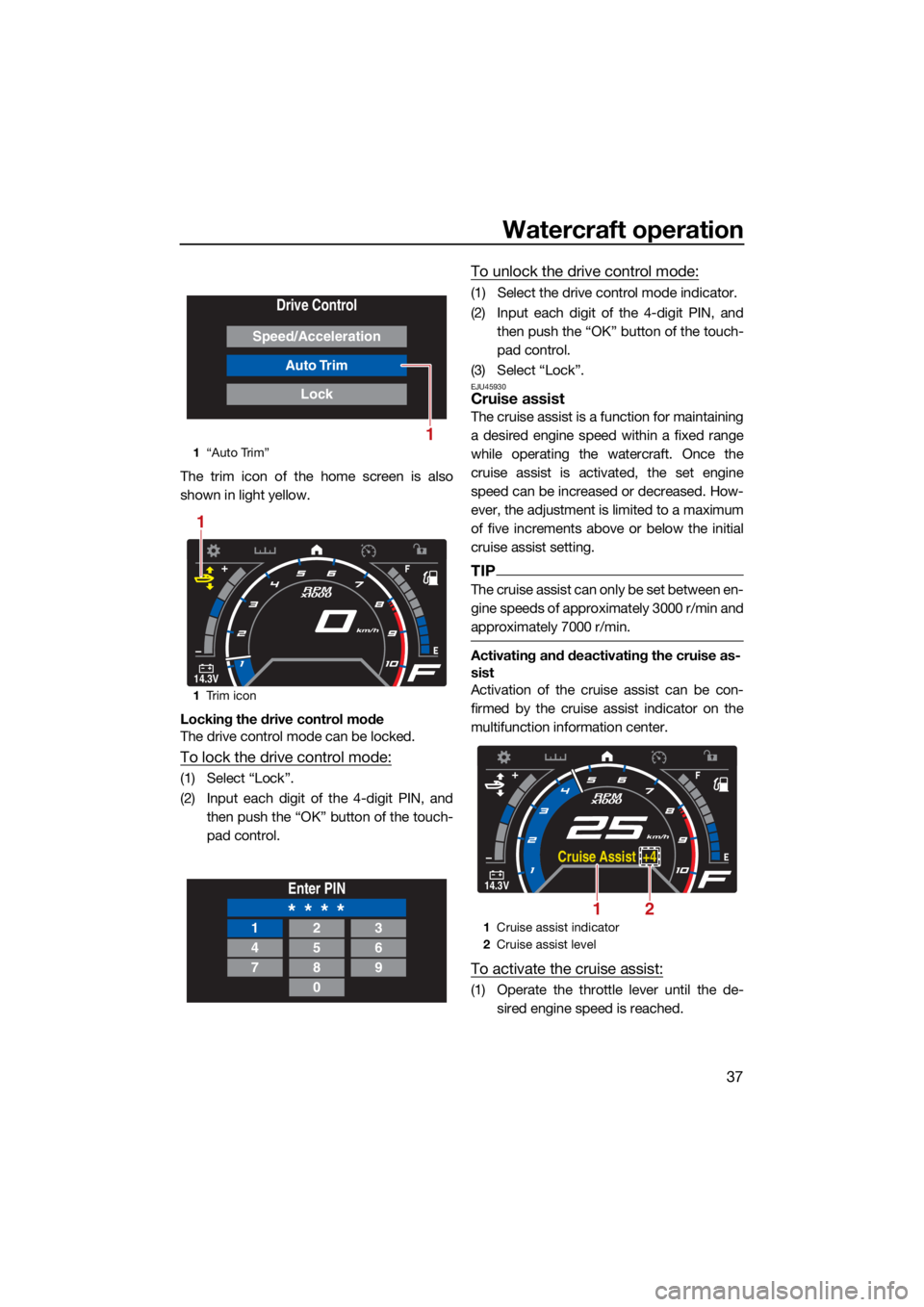
The trim icon of the home screen is also
shown in light yellow.
Locking the drive control mode
The drive control mode can be locked.
To lock the drive control mode:
(1) Select “Lock”.
(2) Input each digit of the 4-digit PIN, andthen push the “OK” button of the touch-
pad control.
To unlock the drive control mode:
(1) Select the drive control mode indicator.
(2) Input each digit of the 4-digit PIN, andthen push the “OK” button of the touch-
pad control.
(3) Select “Lock”.
EJU45930Cruise assist
The cruise assist is a function for maintaining
a desired engine speed within a fixed range
while operating the watercraft. Once the
cruise assist is activated, the set engine
speed can be increased or decreased. How-
ever, the adjustment is limited to a maximum
of five increments above or below the initial
cruise assist setting.
TIP
The cruise assist can only be set between en-
gine speeds of approximately 3000 r/min and
approximately 7000 r/min.
Activating and deactivating the cruise as-
sist
Activation of the cruise assist can be con-
firmed by the cruise assist indicator on the
multifunction information center.
To activate the cruise assist:
(1) Operate the throttle lever until the de- sired engine speed is reached.
1“Auto Trim”
1 Trim icon
Drive Control
Speed/Acceleration
Auto Trim
Lock
1
14.3V
RPM
x1000
km/h
1
Enter PIN
* * * *123
456
789
0
1 Cruise assist indicator
2 Cruise assist level
14.3V
RPM
x1000
km/h
Cruise Assist +4
21
UF4P72E0.book Page 37 Tuesday, August 24, 2021 3:18 PM
Page 47 of 112

Instrument operation
39
EJU45941
Multifunction information center
The multifunction information center displays
various watercraft information.
The multifunction information center can turn
the various functions on or off or change set-
tings by using the d-pad of the touchpad
control.
In addition, the language and display units
shown can be changed. (See page 42 for in-
formation on changing the language and dis-
play units.) In the illustrations in this manual,
English is used for the language and US units
are used for the display units.
Turning on the multifunction information
center
When the engine start/stop switch is pushed,
the multifunction information center turns on.
After the logo display appears for a few sec-
onds, the home screen is displayed.
TIP
The multifunction information center is turned
on, even if the engine start/stop switch is also
pushed briefly.
Turning off the multifunction information
center
If the multifunction information center does
not receive any operation input within 25 sec-
onds after the engine stops or if 3 minutes
have elapsed after the engine stops, the cen-
ter turns off.
TIP
The multifunction information center turns off
3 minutes after the engine stops even if there
is operation input.
EJU45951Operation buttons
This model is equipped with a touchpad con-
trol to operate the multifunction information
center. D-pad
Operate the d-pad to switch or select
screens for each item.
If the right side of the d-pad is pushed when
the home screen is displayed, the multifunc-
tion information center switches in the follow-
ing order.
Home screen →
Drive control screen → En-
gine lock screen → Setting screen → Infor-
mation screen → Home screen
“BACK” button
Push this button to go back to the previous
screen.
Push and hold the “BACK” button and the
“OK” button simultaneously to display the
home screen.
“OK” button
Push this button to select the currently high-
lighted item.
TIP
Push this button to stop the buzzer when a
warning is activated.
EJU45960Display
The display is configured as shown below.
1 D-pad
2 “BACK” button
3 “OK” button
1
23
UF4P72E0.book Page 39 Tuesday, August 24, 2021 3:18 PM
Page 49 of 112
Instrument operation
41
If the amount of remaining fuel is low, the fuel
level warning will activate. (See page 44 for
information on the fuel level warning.)
TIP
The accuracy of the fuel level meter varies
depending on the operating conditions. Use
this function as a reference only.
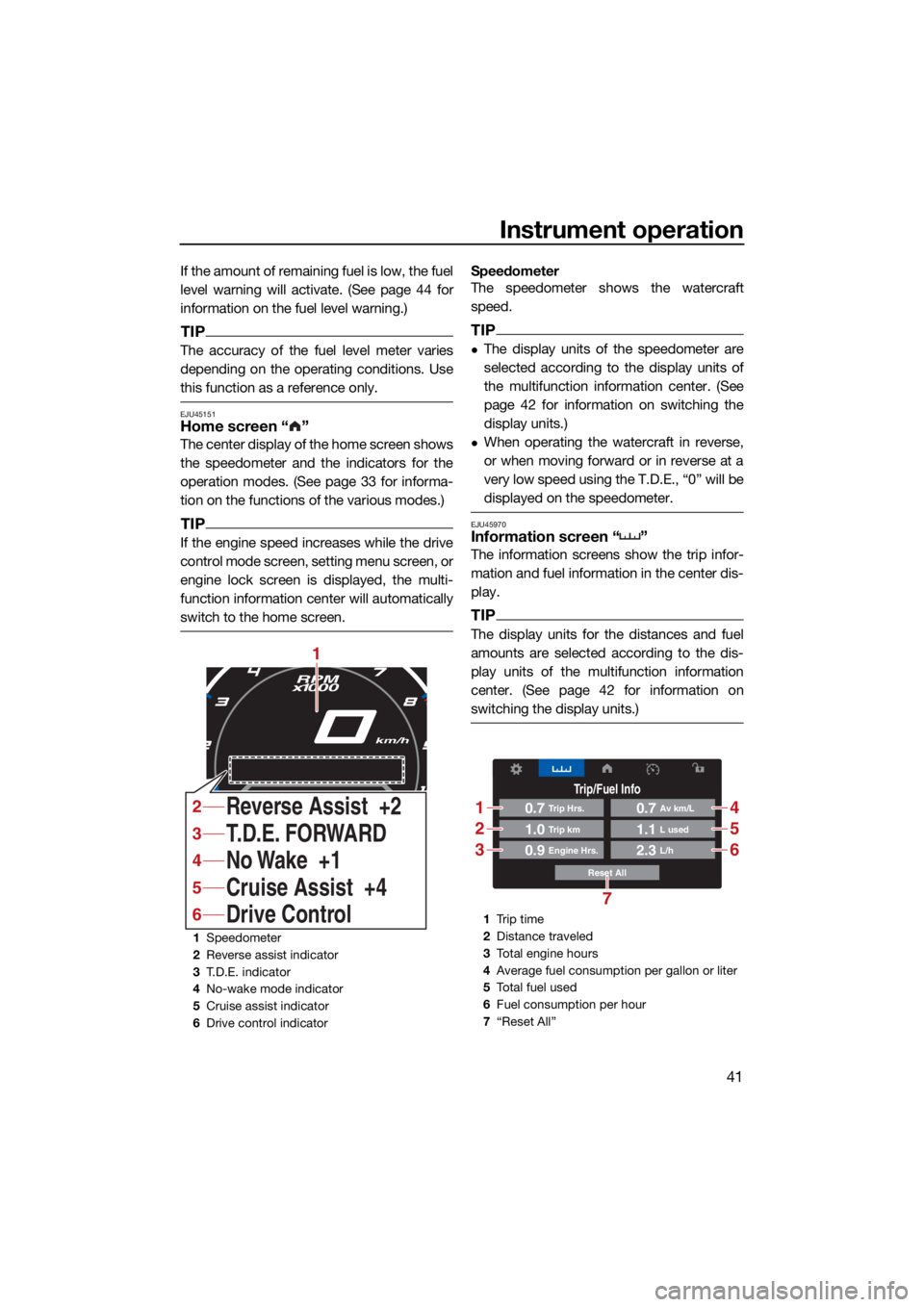
EJU45151Home screen “ ”
The center display of the home screen shows
the speedometer and the indicators for the
operation modes. (See page 33 for informa-
tion on the functions of the various modes.)
TIP
If the engine speed increases while the drive
control mode screen, setting menu screen, or
engine lock screen is displayed, the multi-
function information center will automatically
switch to the home screen.
Speedometer
The speedometer shows the watercraft
speed.
TIP
The display units of the speedometer are
selected according to the display units of
the multifunction information center. (See
page 42 for information on switching the
display units.)
When operating the watercraft in reverse,
or when moving forward or in reverse at a
very low speed using the T.D.E., “0” will be
displayed on the speedometer.
EJU45970Information screen “ ”
The information screens show the trip infor-
mation and fuel information in the center dis-
play.
TIP
The display units for the distances and fuel
amounts are selected according to the dis-
play units of the multifunction information
center. (See page 42 for information on
switching the display units.)
1Speedometer
2 Reverse assist indicator
3 T.D.E. indicator
4 No-wake mode indicator
5 Cruise assist indicator
6 Drive control indicator
RPM
x1000
km/h
No Wake +1 T.D.E. FORWARD
Cruise Assist +4
Drive Control Reverse Assist +2
1
4
3
5
6
2
1 Tr i p t i m e
2 Distance traveled
3 Total engine hours
4 Average fuel consumption per gallon or liter
5 To t a l f u e l u s e d
6 Fuel consumption per hour
7 “Reset All”
Trip/Fuel Info
Reset All
0.7Trip Hrs.
0.9Engine Hrs.
1.0Trip km
0.7Av km/L
2.3L/h
1.1L used
1
2
3
4
5
6
7
UF4P72E0.book Page 41 Tuesday, August 24, 2021 3:18 PM