Switch YAMAHA GRIZZLY 550 2014 User Guide
[x] Cancel search | Manufacturer: YAMAHA, Model Year: 2014, Model line: GRIZZLY 550, Model: YAMAHA GRIZZLY 550 2014Pages: 174, PDF Size: 4.2 MB
Page 39 of 174
4-9
4
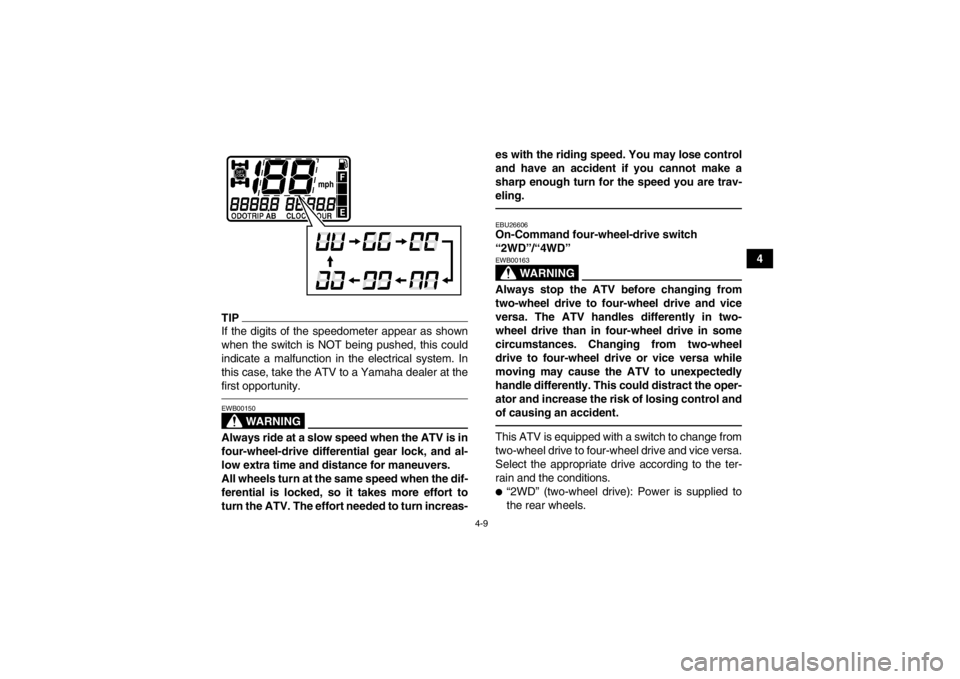
TIPIf the digits of the speedometer appear as shown
when the switch is NOT being pushed, this could
indicate a malfunction in the electrical system. In
this case, take the ATV to a Yamaha dealer at the
first opportunity.
WARNING
EWB00150Always ride at a slow speed when the ATV is in
four-wheel-drive differential gear lock, and al-
low extra time and distance for maneuvers.
All wheels turn at the same speed when the dif-
ferential is locked, so it takes more effort to
turn the ATV. The effort needed to turn increas-es with the riding speed. You may lose control
and have an accident if you cannot make a
sharp enough turn for the speed you are trav-
eling.
EBU26606On-Command four-wheel-drive switch
“2WD”/“4WD”
WARNING
EWB00163Always stop the ATV before changing from
two-wheel drive to four-wheel drive and vice
versa. The ATV handles differently in two-
wheel drive than in four-wheel drive in some
circumstances. Changing from two-wheel
drive to four-wheel drive or vice versa while
moving may cause the ATV to unexpectedly
handle differently. This could distract the oper-
ator and increase the risk of losing control and
of causing an accident.This ATV is equipped with a switch to change from
two-wheel drive to four-wheel drive and vice versa.
Select the appropriate drive according to the ter-
rain and the conditions.●“2WD” (two-wheel drive): Power is supplied to
the rear wheels.
U2LB60E0.book Page 9 Thursday, March 21, 2013 10:20 AM
Page 40 of 174
4-10
4
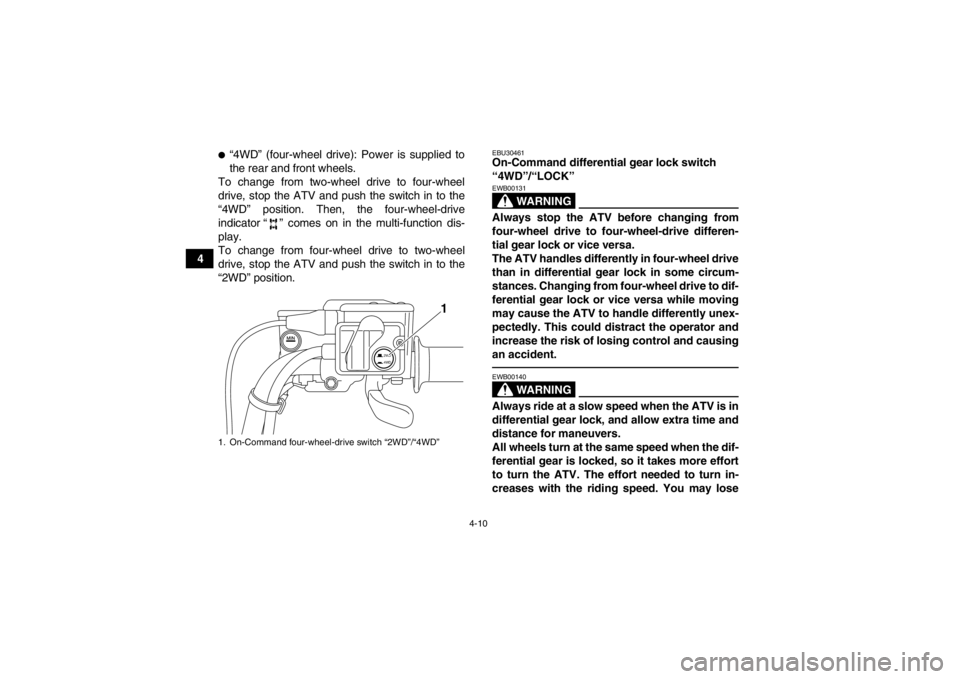
●“4WD” (four-wheel drive): Power is supplied to
the rear and front wheels.
To change from two-wheel drive to four-wheel
drive, stop the ATV and push the switch in to the
“4WD” position. Then, the four-wheel-drive
indicator “ ” comes on in the multi-function dis-
play.
To change from four-wheel drive to two-wheel
drive, stop the ATV and push the switch in to the
“2WD” position.
EBU30461On-Command differential gear lock switch
“4WD”/“LOCK”
WARNING
EWB00131Always stop the ATV before changing from
four-wheel drive to four-wheel-drive differen-
tial gear lock or vice versa.
The ATV handles differently in four-wheel drive
than in differential gear lock in some circum-
stances. Changing from four-wheel drive to dif-
ferential gear lock or vice versa while moving
may cause the ATV to handle differently unex-
pectedly. This could distract the operator and
increase the risk of losing control and causing
an accident.
WARNING
EWB00140Always ride at a slow speed when the ATV is in
differential gear lock, and allow extra time and
distance for maneuvers.
All wheels turn at the same speed when the dif-
ferential gear is locked, so it takes more effort
to turn the ATV. The effort needed to turn in-
creases with the riding speed. You may lose
1. On-Command four-wheel-drive switch “2WD”/“4WD”
2WD
4WD
1
U2LB60E0.book Page 10 Thursday, March 21, 2013 10:20 AM
Page 41 of 174
4-11
4
control and have an accident if you cannot
make a sharp enough turn for the speed you
are traveling.
This ATV is equipped with a switch allowing you to
lock the differential gear when in four-wheel drive.
Select the appropriate switch position according to
the terrain and the conditions.●“4WD” (four-wheel drive): Power is supplied to
the rear and front wheels.●“LOCK” (four-wheel drive with the differential
gear locked): Power is supplied to the rear and
front wheels and the differential gear is locked.
Unlike in four-wheel drive, all wheels turn at the
same speed.
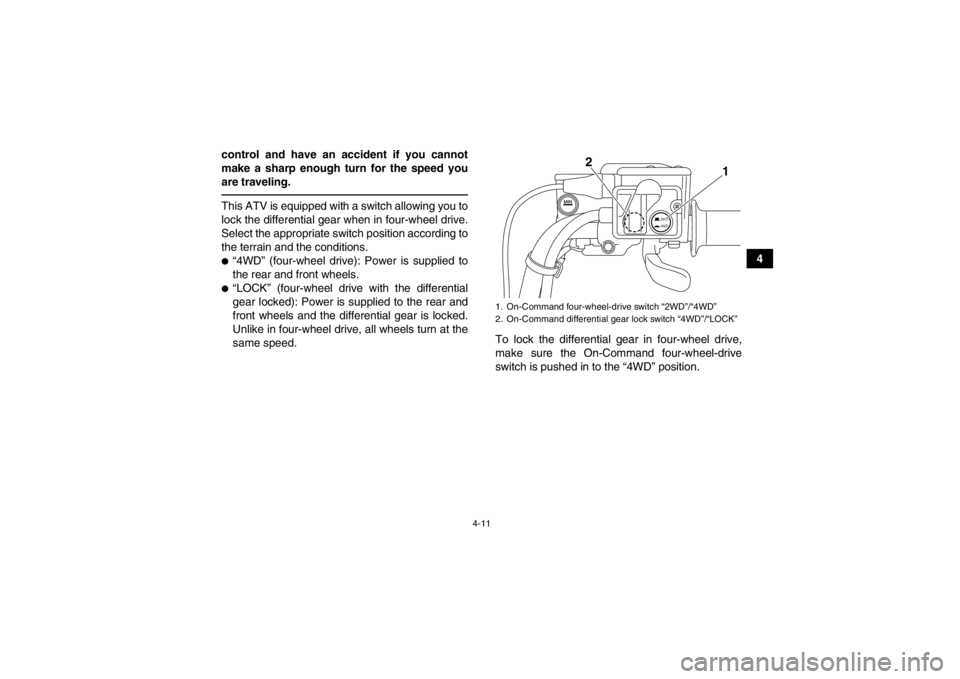
To lock the differential gear in four-wheel drive,
make sure the On-Command four-wheel-drive
switch is pushed in to the “4WD” position.
1. On-Command four-wheel-drive switch “2WD”/“4WD”
2. On-Command differential gear lock switch “4WD”/“LOCK”
2WD
4WD
1
2
U2LB60E0.book Page 11 Thursday, March 21, 2013 10:20 AM
Page 42 of 174
4-12
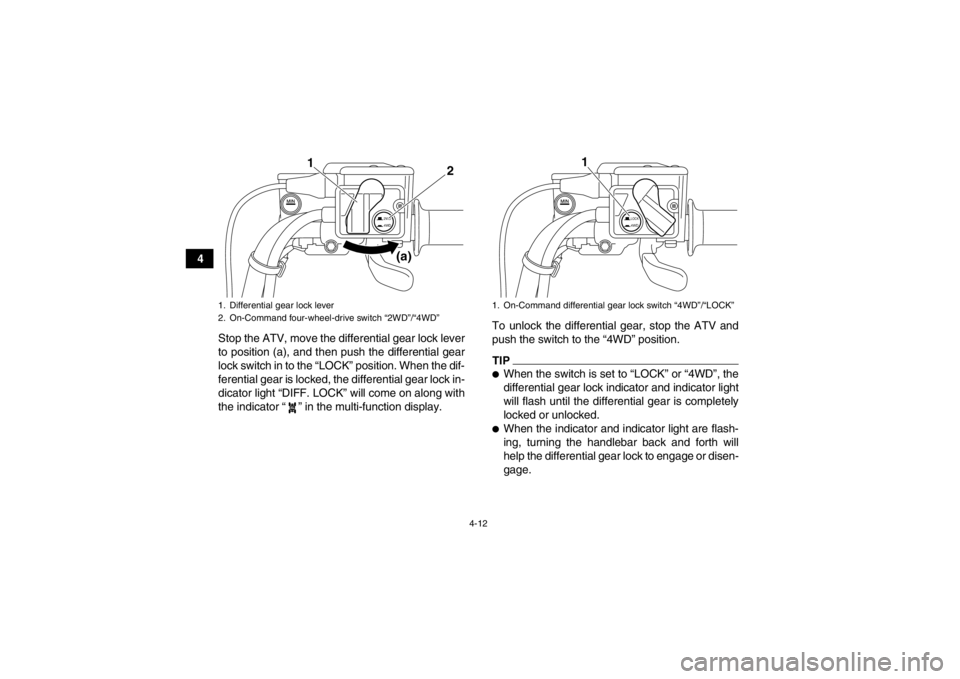
4Stop the ATV, move the differential gear lock lever
to position (a), and then push the differential gear
lock switch in to the “LOCK” position. When the dif-
ferential gear is locked, the differential gear lock in-
dicator light “DIFF. LOCK” will come on along with
the indicator “ ” in the multi-function display. To unlock the differential gear, stop the ATV and
push the switch to the “4WD” position.
TIP●When the switch is set to “LOCK” or “4WD”, the
differential gear lock indicator and indicator light
will flash until the differential gear is completely
locked or unlocked.●When the indicator and indicator light are flash-
ing, turning the handlebar back and forth will
help the differential gear lock to engage or disen-
gage.
1. Differential gear lock lever
2. On-Command four-wheel-drive switch “2WD”/“4WD”
2WD
4WD
2
1
(a)
1. On-Command differential gear lock switch “4WD”/“LOCK”
LOCK4WD
1
U2LB60E0.book Page 12 Thursday, March 21, 2013 10:20 AM
Page 43 of 174
4-13
4
●Riding before the differential gear is properly en-
gaged or disengaged (e.g., when the indicator
and indicator light are flashing) will cause the ve-
hicle speed to be limited until the differential gear
is completely engaged or disengaged.●When the ATV is in four-wheel-drive differential
gear lock, the maximum traveling speed is limit-
ed to 35 km/h (22 mi/h). However, if conditions
require full engine power to be available, push
and hold the override switch to disable the differ-
ential gear lock speed limiter. (See page 4-8 for
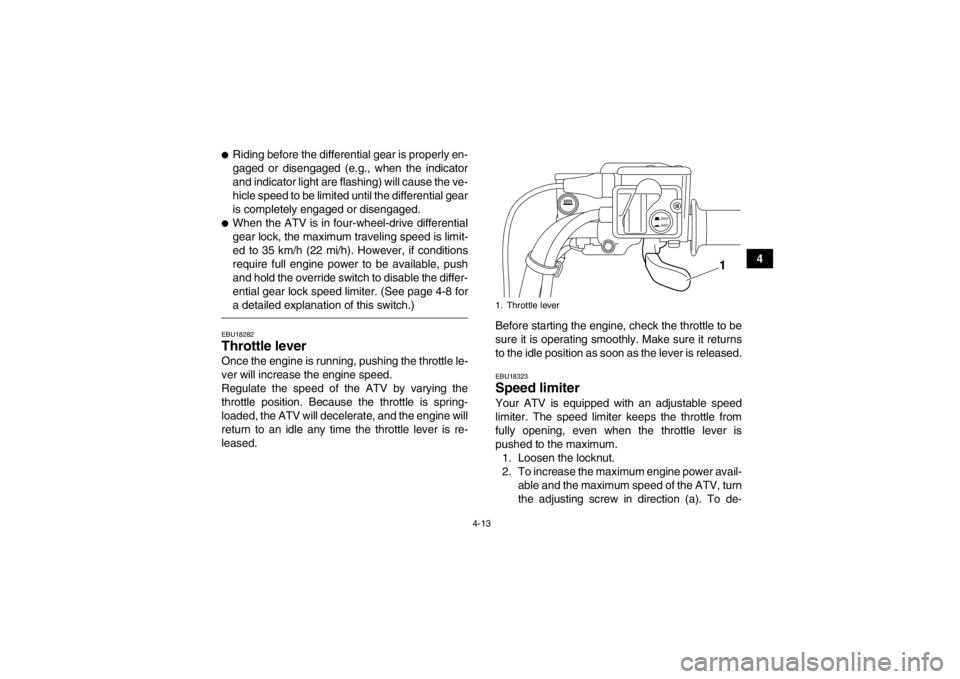
a detailed explanation of this switch.)EBU18282Throttle lever Once the engine is running, pushing the throttle le-
ver will increase the engine speed.
Regulate the speed of the ATV by varying the
throttle position. Because the throttle is spring-
loaded, the ATV will decelerate, and the engine will
return to an idle any time the throttle lever is re-
leased.Before starting the engine, check the throttle to be
sure it is operating smoothly. Make sure it returns
to the idle position as soon as the lever is released.
EBU18323Speed limiter Your ATV is equipped with an adjustable speed
limiter. The speed limiter keeps the throttle from
fully opening, even when the throttle lever is
pushed to the maximum.
1. Loosen the locknut.
2. To increase the maximum engine power avail- able and the maximum speed of the ATV, turn
the adjusting screw in direction (a). To de-1. Throttle lever
2WD
4WD
1
U2LB60E0.book Page 13 Thursday, March 21, 2013 10:20 AM
Page 53 of 174
4-23
4
Shock absorber cylinder damage could also
result in poor handling which could cause an
accident.
●Do not tamper with or attempt to open the
cylinder assembly.●Do not subject the shock absorber assembly
to an open flame or other high heat.●Do not deform or damage the cylinder in any
way.●Do not dispose of a damaged or worn out
shock absorber assembly yourself. Take the
shock absorber assembly to a Yamaha deal-
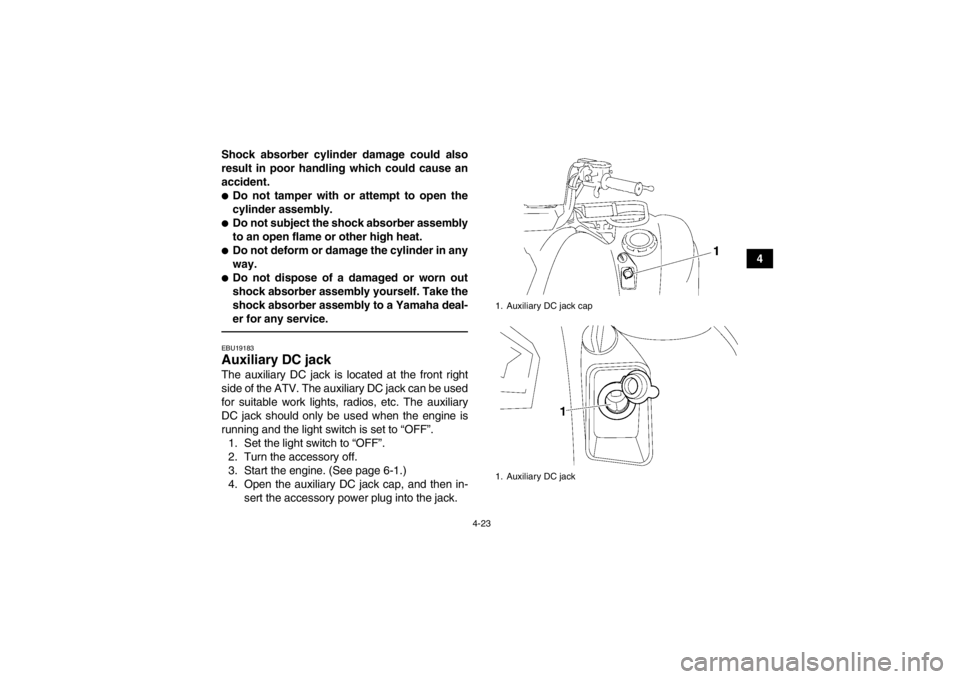
er for any service.EBU19183Auxiliary DC jack The auxiliary DC jack is located at the front right
side of the ATV. The auxiliary DC jack can be used
for suitable work lights, radios, etc. The auxiliary
DC jack should only be used when the engine is
running and the light switch is set to “OFF”.
1. Set the light switch to “OFF”.
2. Turn the accessory off.
3. Start the engine. (See page 6-1.)
4. Open the auxiliary DC jack cap, and then in- sert the accessory power plug into the jack.
1. Auxiliary DC jack cap
1. Auxiliary DC jack
U2LB60E0.book Page 23 Thursday, March 21, 2013 10:20 AM
Page 56 of 174

5-2
5
Front brake Check operation. If soft or spongy, have Yamaha dealer bleed hy-
draulic system.
Check brake pads for wear , and replace if necessary.
Check brake fluid level in reservoir, and add specified brake fluid to specified level if necessary.
Check hydraulic system for leakage. Correct if necessary. 5-3, 8-46, 8-47, 8-49
Rear brake Check operation. If soft or spongy, have Yamaha dealer bleed hy-
draulic system.
Check pedal free play, and adjust if necessary.
Check brake pads for wear , and replace if necessary.
Check brake fluid level in reservoir, and add specified brake fluid to specified level if necessary.
Check hydraulic system for leakage. Correct if necessary. 5-3, 8-46, 8-47, 8-49,
8-50
Throttle lever Make sure that operation is smooth. Lubricate cable and lever hous-
ing if necessary.
Check lever free play, and adjust if necessary. 5-4, 8-45
Control cables Make sure that operation is smooth. Lubricate if necessary. 8-52
Wheels and tires Check wheel condition, and replace if damaged.
Check tire condition and tread depth. Replace if necessary.
Check air pressure. Correct if necessary. 5-4
Brake pedal Make sure that operation is smooth. Lubricate pedal pivoting point if
necessary. 8-54
Brake levers Make sure that operation is smooth. Lubricate lever pivoting points if
necessary. 8-53
Axle boots Check for cracks or damage, and replace if necessary. 8-52
Chassis fasteners Make sure that all nuts, bolts and screws are properly tightened. 5-7
Instruments, lights and
switches Check operation, and correct if necessary. 5-7
ITEM ROUTINE PAGEU2LB60E0.book Page 2 Thursday, March 21, 2013 10:20 AM
Page 61 of 174

5-7
5
Aftermarket tires and rims
The tires and rims that came with your ATV were
designed to match the performance capabilities
and to provide the best combination of handling,
braking, and comfort. Other tires, rims, sizes, and
combinations may not be appropriate.
EBU19840Chassis fasteners Make sure that all nuts, bolts and screws are prop-
erly tightened.EBU19850Instruments, lights and switches Check that all instruments, lights and switches are
working properly. Correct if necessary.U2LB60E0.book Page 7 Thursday, March 21, 2013 10:20 AM
Page 62 of 174
6-1
6
EBU19881
OPERATION
EBU19901Read the Owner’s Manual carefully before riding
the ATV. If there is a control or function you do not
understand, ask your Yamaha dealer.
WARNING
EWB00631Read the Owner’s Manual carefully to become
familiar with all controls in order to help pre-
vent any loss of control, which could cause an
accident or injury.EBU30560Starting the engine NOTICEECB00150See the “Engine break-in” section on page 6-4
prior to operating the engine for the first time.1. Turn the key to “ ” (on) and the engine stopswitch to “ ”.
The following warning lights should come on
for a few seconds, then go off.
●Coolant temperature warning light
●Engine trouble warning light
The EPS warning light should come on, then
go off when the engine is started. (for EPS
model)
NOTICEECB00824If a warning light does not go off, see page 4-2
for the corresponding warning light circuit
check. To avoid possible damage, do not oper-
ate the ATV if a warning light stays on.2. Apply the brake pedal, and then shift the drive select lever into the neutral or park position.
The corresponding indicator light should
come on. If the indicator light does not come
on, have a Yamaha dealer check the electrical
circuit.TIPThis model is equipped with an ignition circuit cut-
off system. The engine can be started under the
following conditions:●The drive select lever is in the neutral or park po-
sition.
U2LB60E0.book Page 1 Thursday, March 21, 2013 10:20 AM
Page 63 of 174
6-2
6
●The rear brake lever or brake pedal is applied
with the drive select lever in any position. How-
ever, it is recommended to shift into the neutral
or park position before starting the engine.3. Apply the rear brake lever or brake pedal.
4. Completely close the throttle lever and startthe engine by pushing the start switch.TIPIf the engine fails to start, release the start switch,
then push it again. Pause a few seconds before
the next attempt. Each cranking should be as short
as possible to preserve battery energy. Do not
crank the engine more than 10 seconds on each
attempt.NOTICEECB00163For maximum engine life, never accelerate
hard when the engine is cold!
EBU20441Operating the drive select lever and
driving in reverse NOTICEECB00170Before shifting, stop the ATV, otherwise the
transmission may be damaged.Shifting: Neutral to High-range and High-range
to Low-range1. Bring the ATV to a complete stop.
2. Apply the brake pedal, and then shift by mov- ing the drive select lever along the shift guide.TIPMake sure that the drive select lever is completely
shifted into position.
U2LB60E0.book Page 2 Thursday, March 21, 2013 10:20 AM