lock YAMAHA MT-03 2016 Owners Manual
[x] Cancel search | Manufacturer: YAMAHA, Model Year: 2016, Model line: MT-03, Model: YAMAHA MT-03 2016Pages: 96, PDF Size: 5.66 MB
Page 6 of 96

Table of contentsSafety information ............................ 1-1
Description ....................................... 2-1
Left view ......................................... 2-1
Right view ....................................... 2-2
Controls and instruments ............... 2-3
Instrument an d control functions ... 3-1
Main switch/steering lock............... 3-1
Indicator lights and warning lights............................................ 3-2
Multi-function meter unit ................ 3-4
Handlebar switches ...................... 3-11
Clutch lever .................................. 3-12
Shift pedal .................................... 3-13
Brake lever.................................... 3-13
Brake pedal .................................. 3-13
ABS .............................................. 3-14
Fuel tank cap ................................ 3-15
Fuel ............................................... 3-15
Fuel tank breather hose and overflow hose ............................ 3-17
Catalytic converter ....................... 3-17
Seats ............................................ 3-18
Helmet holders ............................. 3-19
Storage compartment .................. 3-20
Adjusting the shock absorber
assembly ................................... 3-20
Luggage strap holders ................. 3-21
Sidestand ..................................... 3-21
Ignition circuit cut-off system ....... 3-22 For your safety – pre-operation
checks
............................................... 4-1
Operation an d important ri din g
points ................................................. 5-1
Starting the engine .......................... 5-1
Shifting ............................................ 5-2
Engine break-in ............................... 5-4
Parking ............................................ 5-4
Perio dic maintenance an d
a d justment ........................................ 6-1
Owner’s tool kit ............................... 6-2
Periodic maintenance chart for the emission control system ........ 6-3
General maintenance and lubrication chart ........................... 6-4
Checking the spark plugs ............... 6-8
Engine oil and oil filter cartridge...... 6-9
Coolant.......................................... 6-12
Replacing the air filter element and cleaning the check hose..... 6-13
Checking the throttle grip
free play ..................................... 6-15
Valve clearance ............................. 6-15
Tires .............................................. 6-15
Cast wheels................................... 6-17
Adjusting the clutch lever free play ..................................... 6-17
Checking the brake lever free play ..................................... 6-18 Brake light switches ..................... 6-19
Checking the front and rear
brake pads ................................ 6-19
Checking the brake fluid level ...... 6-20
Changing the brake fluid .............. 6-21
Drive chain slack........................... 6-21
Cleaning and lubricating the drive chain ................................. 6-23
Checking and lubricating the cables ........................................ 6-24
Checking and lubricating the
throttle grip and cable ............... 6-24
Checking and lubricating the brake and shift pedals............... 6-24
Checking and lubricating the brake and clutch levers ............. 6-25
Checking and lubricating the
sidestand................................... 6-26
Lubricating the swingarm pivots......................................... 6-26
Checking the front fork ................. 6-26
Checking the steering................... 6-27
Checking the wheel bearings ....... 6-27
Battery .......................................... 6-28
Replacing the fuses ...................... 6-29
Replacing the headlight bulb ........ 6-31
Auxiliary light ................................ 6-31
Tail/brake light .............................. 6-32
Replacing a turn signal light bulb ........................................... 6-32UB08E1E0.book Page 1 Friday, October 2, 2015 9:33 AM
Page 13 of 96

Description
2-1
2
EAU10411
Left view
176 2345
98
1. Coolant reservoir (page 6-12)
2. Main fuse (page 6-29)
3. Owner’s tool kit (page 6-2)
4. Passenger seat lock (page 3-18)
5. Storage compartment (page 3-20)
6. Shock absorber assembly spring preload adjusting ring (page 3-20)
7. Shift pedal (page 3-13)
8. Engine oil drain bolt (page 6-9) 9. Engine oil filter cartridge (page 6-9)
UB08E1E0.book Page 1 Friday, October 2, 2015 9:33 AM
Page 15 of 96
Description
2-3
2
EAU10431
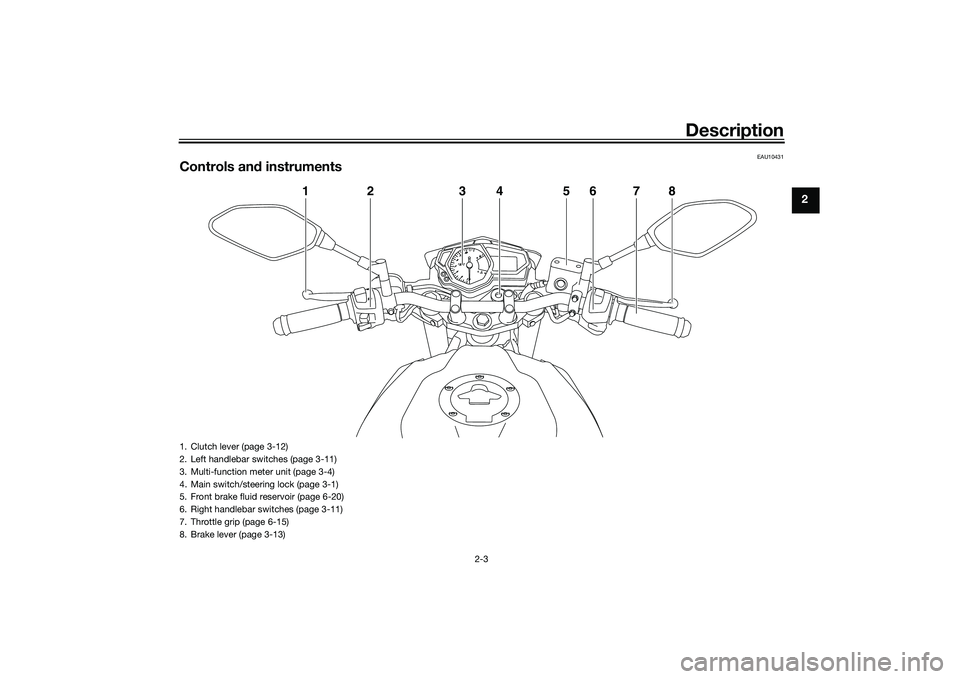
Controls and instruments
1
2
3
4
5
6
7
8
1. Clutch lever (page 3-12)
2. Left handlebar switches (page 3-11)
3. Multi-function meter unit (page 3-4)
4. Main switch/steering lock (page 3-1)
5. Front brake fluid reservoir (page 6-20)
6. Right handlebar switches (page 3-11)
7. Throttle grip (page 6-15)
8. Brake lever (page 3-13)
UB08E1E0.book Page 3 Friday, October 2, 2015 9:33 AM
Page 16 of 96
Instrument and control functions
3-1
3
EAU10462
Main switch/steerin g lockThe main switch/steering lock controls
the ignition and lighting systems, and is
used to lock the steering. The various
positions are described below.
EAU62480
(on)
All electrical circuits are supplied with
power; the meter lighting, taillight, li-
cense plate light and auxiliary light
come on, and the engine can be start-
ed. The key cannot be removed.
TIPThe headlight comes on automatically
when the engine is started and stays
on until the key is turned to “ ”, even
if the engine stalls.
EAU54301
(off)
All electrical systems are off. The key
can be removed.
WARNING
EWA16371
Never turn the key to “ ” or “LOCK”
while the vehicle is movin g. Other-
wise the electrical systems will be
switched off, which may result in
loss of control or an acci dent.
EAU60861
LOCK
The steering is locked and all electrical
systems are off. The key can be re-
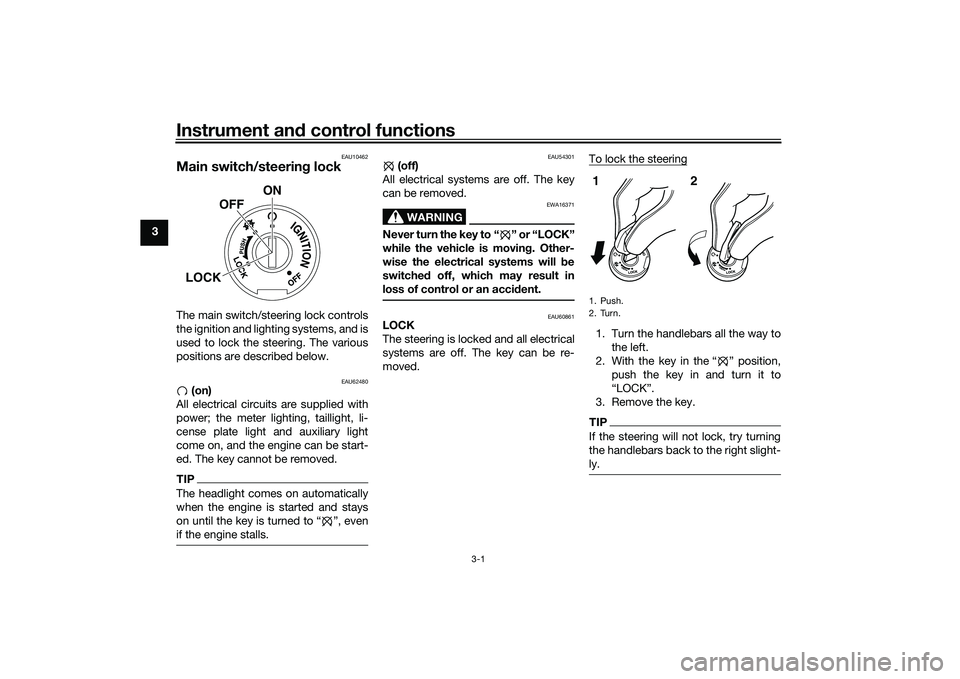
moved. To lock the steering
1. Turn the handlebars all the way to
the left.
2. With the key in the “ ” position, push the key in and turn it to
“LOCK”.
3. Remove the key.TIPIf the steering will not lock, try turning
the handlebars back to the right slight-
ly.
ON
OFF
LOCK
1. Push.
2. Turn.12
UB08E1E0.book Page 1 Friday, October 2, 2015 9:33 AM
Page 17 of 96

Instrument and control functions
3-2
3
To unlock the steering
1. Insert the key.
2. With the key in the “LOCK” posi-
tion, push the key in and turn it
to “ ”.
EAU49398
Indicator li ghts an d warnin g
lig hts
EAU11022
Turn si gnal in dicator li ght “ ”
This indicator light flashes when a turn
signal light is flashing.
EAU11061
Neutral in dicator li ght “ ”
This indicator light comes on when the
transmission is in the neutral position.
EAU11081
Hi gh beam in dicator li ght “ ”
This indicator light comes on when the
high beam of the headlight is switched
on.
EAU62530
Oil pressure warnin g li ght “ ”
This warning light comes on if the en-
gine oil pressure is low.
The electrical circuit of the warning
light can be checked by turning the key
to “ ”. The warning light should come
on and remain on until the engine is
started.
If the warning light does not come on
initially when the key is turned to “ ”,
have a Yamaha dealer check the elec-
trical circuit.NOTICE
ECA21210
If the warnin g li ght comes on when
the en gine is runnin g, stop the en-
g ine imme diately an d check oil level.
If the oil level is below the minimum
level, a dd sufficient oil of the recom-
men ded t y p e t o r a i s e i t u p t o t h e c o r -
rect level. If the oil pressure warnin g
li g ht remains on even if the oil level
1. Push.
2. Turn.12
1. Neutral indicator light “ ”
2. High beam indicator light “ ”
3. Turn signal indicator light “ ”
4. Shift timing indicator light
5. Engine trouble warning light “ ”
6. Oil pressure warning light “ ”
7. Anti-lock Brake System (ABS) warning
light “ ”
5
6
3
1
2
4
km/hkm/L
L/100km7MPHmileMPG
ABS
UB08E1E0.book Page 2 Friday, October 2, 2015 9:33 AM
Page 18 of 96

Instrument and control functions
3-3
3 is correct, imme
diately turn the en-
g ine off an d have a Yamaha d ealer
check the vehicle.
TIPIf the warning light does not go off after
starting the engine, check the engine
oil level and add oil if necessary. (See
page 6-9.)
If the warning light remains on after
adding engine oil, have a Yamaha
dealer check the vehicle.
EAU62790
En gine trou ble warnin g lig ht “ ”
This warning light comes on or flashes
if a problem is detected in the electrical
circuit monitoring the engine. If this oc-
curs, have a Yamaha dealer check the
self-diagnosis system. (See page 3-11
for an explanation of the self-diagnosis
device.)
The electrical circuit of the warning
light can be checked by turning the key
to “ ”. The warning light should come
on for a few seconds, and then go off. If the warning light does not come on
initially when the key is turned to “ ”,
or if the warning light remains on, have
a Yamaha dealer check the electrical
circuit.
TIPThe engine trouble warning light will
come on while the start switch is
pushed, but this does not indicate a
malfunction.
EAU51662
ABS warnin
g li ght “ ”
In normal operation, the ABS warning
light comes on when the key is turned
to “ON”, and goes off after traveling at
a speed of 10 km/h (6 mi/h) or higher.
If the ABS warning light: does not come on when the key is
turned to “ON”
comes on or flashes while riding
does not go off after traveling at a
speed of 10 km/h (6 mi/h) or high-
er
The ABS may not work correctly. If any
of the above occurs, have a Yamaha
dealer check the system as soon as
possible. (See page 3-14 for an expla-
nation of the ABS.)
WARNING
EWA16041
If the ABS warnin g li ght does not g o
off after travelin g at a speed of 10
km/h (6 mi/h) or hi gher, or if the
warnin g li ght comes on or flashes
while ri din g, the brake system re-
verts to conventional brakin g. If ei-
ther of the a bove occurs, or if the
warnin g li ght does not come on at
all, use extra caution to avoi d possi-
b le wheel lock durin g emer gency
b rakin g. Have a Yamaha d ealer
check the brake system an d electri-
cal circuits as soon as possi ble.TIPIf the start switch is pushed while the
engine is running, the ABS warning
light will come on, but this is not a mal-
function.
EAU62470
Shift timin g in dicator li ght
This indicator light can be set to come
on and go off at the desired engine
speeds and is used to inform the rider
when it is time to shift to the next high-
ABS
UB08E1E0.book Page 3 Friday, October 2, 2015 9:33 AM
Page 19 of 96

Instrument and control functions
3-4
3
er gear. (See page 3-9 for a more de-
tailed explanation of this indicator light
and on how to set it.)
The electrical circuit of the indicator
light can be checked by turning the key
to “ ”. The indicator light should
come on for a few seconds, and then
go off.
If the indicator light does not come on
initially when the key is turned to “ ”,
or if the indicator light remains on, have
a Yamaha dealer check the electrical
circuit.
EAUN0871
Multi-function meter unit
WARNING
EWA12423
Be sure to stop the vehicle
before
makin g any settin g chan ges to the
multi-function meter unit. Chan gin g settin
gs while ri din g can d istract the
operator an d increase the risk of an
acci dent.
The multi-function meter unit is
equipped with the following:
a speedometer
a tachometer
a clock
a fuel meter
a coolant temperature meter
a transmission gear display
a multi-function display
a shift timing indicator light
a self-diagnosis deviceTIPBe sure to turn the key to “ ” be-
fore using the “SEL” and “RES”
buttons, except for setting the
shift timing indicator light control
mode.
For the UK only: To switch the
speedometer and multi-function
displays between kilometers and
miles, press the “SEL” button for
at least one second.
1. “SEL” button
2. “RES” button
3. Tachometer
4. Fuel meter
5. Shift timing indicator light
6. Clock
7. Transmission gear display
8. Speedometer
9. Multi-function display
10.Coolant temperature meter
10
9
1 32
4
6
5
7
8
km/hkm/L
L/100kmMPHmileMPG
UB08E1E0.book Page 4 Friday, October 2, 2015 9:33 AM
Page 20 of 96

Instrument and control functions
3-5
3 Speed
ometer
The speedometer shows the vehicle’s
traveling speed.
Tachometer
The tachometer allows the rider to
monitor the engine speed and keep it
within the ideal power range.
When the key is turned to “ ”, the ta-
chometer will sweep across the r/min
range and then return to zero r/min in
order to test the electrical circuit.
NOTICE
ECA10032
Do not operate the en gine in the ta-
chometer red zone. Re
d zone: 12500 r/min an d a bove
Clock
The clock is displayed when the key is
turned to “ ”.
To set the clock1. Turn the key to “ ”.
2. Push the “SEL” button and “RES”
button together for at least two
seconds.
3. When the hour digits start flash- ing, push the “RES” button to set
the hours.
4. Push the “SEL” button, and the minute digits will start flashing.
5. Push the “RES” button to set the minutes. 6. Push the “SEL” button and then
release it to start the clock.
Fuel meter
The fuel meter indicates the amount of
fuel in the fuel tank.
When the key is turned to “ ”, the dis-
play segments of the fuel meter will
sweep once across the fuel level range
and then return to the current amount
in order to test the electrical circuit.
The display segments of the fuel meter
disappear towards “E” (Empty) as the
fuel level decreases. When the last
segment starts flashing, refuel as soon
as possible.
1. Tachometer
2. Tachometer red zone
2
1
km/hkm/L
L/100kmMPHmileMPG
1. Clock
1
1. Fuel meter
1
UB08E1E0.book Page 5 Friday, October 2, 2015 9:33 AM
Page 23 of 96

Instrument and control functions
3-8
3
that point. In that case, push the “SEL”
button to switch the display between
the various tripmeter, odometer, in-
stantaneous fuel consumption and av-
erage fuel consumption modes in the
following order:
TRIP F
→ MPG, L/100 km or km/L →
AVE_ _._ MPG, AVE_ _._ L/100 km or
AVE_ _._ km/L → OIL TRIP → ODO →
TRIP 1 → TRIP 2 → TRIP F
To reset a tripmeter, select it by push-
ing the “SEL” button, and then push
the “RES” button for at least one sec-
ond.
If you do not reset the fuel reserve trip-
meter manually, it resets itself auto-
matically and the display returns to the
prior mode after refueling and traveling
5 km (3 mi).
TIP The odometer will lock at 999999.
The tripmeters will reset and con-
tinue counting after 9999.9 is
reached.
Instantaneous fuel consumption
display
The instantaneous fuel consumption
display can be set to either “L/100 km”,
“km/L” or “MPG” (for the UK only). “L/100 km”: The amount of fuel
necessary to travel 100 km under
the current riding conditions is
shown.
“km/L”: The distance that can be
traveled on 1.0 L of fuel under the
current riding conditions is shown.
“MPG” (for the UK only): The dis-
tance that can be traveled on 1.0
Imp. gal of fuel under the current
riding conditions is shown. To switch between the instantaneous
fuel consumption displays, push the
“SEL” button for one second.
TIPIf traveling at speeds under 20 km/h
(12 mi/h), “_ _._” is displayed.Avera
ge fuel consumption display
The average fuel consumption display
can be set to either “AVE_ _._ L/100
km”, “AVE_ _._ km/L” or “AVE_ _._
MPG” (for the UK only).
This display shows the average fuel
consumption since it was last reset. “AVE_ _._ L/100 km”: The average
amount of fuel necessary to travel
100 km is shown.
1. Instantaneous fuel consumption display
MPH
km/h
km/L
1
1. Average fuel consumption display
MPH
km/h
km/L
1
UB08E1E0.book Page 8 Friday, October 2, 2015 9:33 AM
Page 29 of 96

Instrument and control functions
3-14
3
EAU63040
ABSThe Yamaha ABS (Anti-lock Brake
System) features a dual electronic con-
trol system, which acts on the front and
rear brakes independently.
Operate the brakes with ABS as you
would conventional brakes. If the ABS
is activated, a pulsating sensation may
be felt at the brake lever or brake ped-
al. In this situation, continue to apply
the brakes and let the ABS work; do
not “pump” the brakes as this will re-
duce braking effectiveness.
WARNING
EWA16051
Always keep a sufficient d istance
from the vehicle ahea d to match the
ri din g speed even with ABS.
The ABS performs best with
lon g b rakin g d istances.
On certain surfaces, such as
rou gh or g ravel roa ds, the b rak-
in g d istance may be lon ger with
the ABS than without.The ABS is monitored by an ECU,
which will revert the system to conven-
tional braking if a malfunction occurs.
TIP The ABS performs a self-diagno-
sis test each time the vehicle first
starts off after the key is turned to
“ON” and the vehicle has traveled
at a speed of 10 km/h (6 mi/h) or
higher. During this test, a “click-
ing” noise can be heard from the
hydraulic control unit, and if the
brake lever or brake pedal is even
slightly applied, a vibration can be
felt at the lever and pedal, but
these do not indicate a malfunc-
tion.
This ABS has a test mode which
allows the owner to experience
the pulsation at the brake lever or
brake pedal when the ABS is op-
erating. However, special tools are
required, so please consult your
Yamaha dealer.NOTICE
ECA20100
Be careful not to d amage the wheel
sensor or wheel sensor rotor; other-
wise, improper performance of the
ABS will result.
1. Front wheel sensor
2. Front wheel sensor rotor
1. Rear wheel sensor
2. Rear wheel sensor rotor
2
1
1
2
UB08E1E0.book Page 14 Friday, October 2, 2015 9:33 AM