light YAMAHA NIKEN 2018 Owners Manual
[x] Cancel search | Manufacturer: YAMAHA, Model Year: 2018, Model line: NIKEN, Model: YAMAHA NIKEN 2018Pages: 106, PDF Size: 9.44 MB
Page 6 of 106

Table of contentsSafety information ............................ 1-1
Description ....................................... 2-1
Left view ......................................... 2-1
Right view ....................................... 2-2
Controls and instruments ............... 2-3
Instrument an d control functions ... 3-1
Immobilizer system......................... 3-1
Main switch/steering lock............... 3-2
Handlebar switches ........................ 3-3
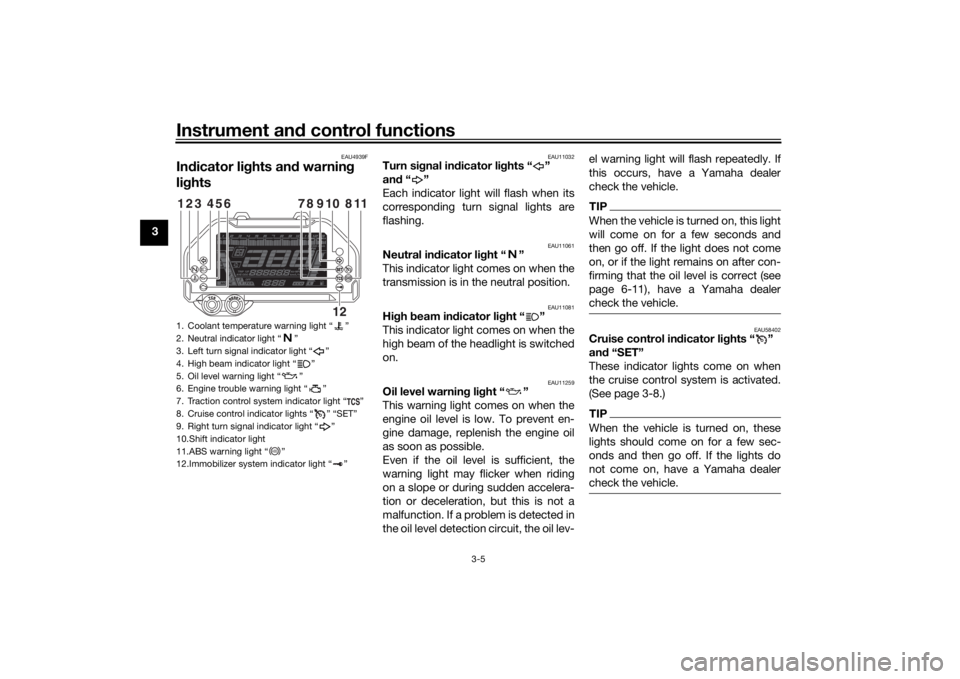
Indicator lights and warning lights............................................ 3-5
Cruise control system..................... 3-8
Multi-function meter unit .............. 3-11
D-mode (drive mode).................... 3-18
Clutch lever .................................. 3-18
Shift pedal .................................... 3-19
Quick shift system ........................ 3-19
Brake lever.................................... 3-20
Brake pedal .................................. 3-20
ABS .............................................. 3-20
Traction control system ................ 3-21
Fuel tank cap ................................ 3-23
Fuel ............................................... 3-24
Fuel tank overflow hose ............... 3-26
Catalytic converter ....................... 3-26
Seats ............................................ 3-27
Helmet holding cable.................... 3-28
Storage compartment .................. 3-29
Rear view mirrors.......................... 3-30 Adjusting the front fork ................. 3-30
Adjusting the shock absorber
assembly.................................... 3-31
Auxiliary DC jack ........................... 3-33
Auxiliary DC connector ................. 3-34
Sidestand ...................................... 3-34
Ignition circuit cut-off system ....... 3-35
For your safety – pre-operation
checks ............................................... 4-1
Operation an d important ri din g
points ................................................. 5-1
Starting the engine .......................... 5-1
Shifting ............................................ 5-2
Tips for reducing fuel consumption ................................ 5-3
Engine break-in ............................... 5-3
Parking ............................................ 5-4
Perio dic maintenance an d
a d justment ........................................ 6-1
Tool kit ............................................ 6-2
Periodic maintenance charts .......... 6-3
Periodic maintenance chart for the emission control system .............. 6-3
General maintenance and lubrication chart ........................... 6-5
Removing and installing the
panel ............................................ 6-9
Checking the spark plugs ............. 6-10 Canister ........................................ 6-11
Engine oil ...................................... 6-11
Coolant ......................................... 6-13
Air filter element ............................ 6-15
Checking the engine idling
speed ........................................ 6-15
Checking the throttle grip free play ............................................ 6-15
Valve clearance............................. 6-16
Tires .............................................. 6-16
Cast wheels .................................. 6-18
Adjusting the clutch lever free play ............................................ 6-19
Checking the brake lever free
play ............................................ 6-19
Brake light switches ..................... 6-20
Checking the front and rear brake pads ................................ 6-20
Checking the brake fluid level ...... 6-21
Changing the brake fluid .............. 6-23
Drive chain slack........................... 6-23
Cleaning and lubricating the drive chain ................................. 6-24
Checking and lubricating the cables ........................................ 6-25
Checking and lubricating the
throttle grip and cable ............... 6-25
Checking and lubricating the brake and shift pedals............... 6-26
Checking and lubricating the brake and clutch levers ............. 6-26UBD5E0E0.book Page 1 Wednesday, April 25, 2018 2:23 PM
Page 7 of 106

Table of contents
Checking and lubricating the
sidestand ...................................6-27
Lubricating the swingarm pivots ...6-27
Checking the front fork..................6-28
Checking the steering ...................6-28
Lubricating the steering bearings .....................................6-29
Checking the wheel bearings ........6-29
Battery ...........................................6-29
Replacing the fuses .......................6-31
Vehicle lights .................................6-33
Stability bar ...................................6-33
Troubleshooting ............................6-33
Troubleshooting charts .................6-35
Motorcycle care an d stora ge ..........7-1
Matte color caution .........................7-1
Care .................................................7-1
Storage ............................................7-3
Specifications ....................................8-1
Consumer information .....................9-1
Identification numbers .....................9-1
Diagnostic connector ......................9-2
Vehicle data recording ....................9-2
In dex ................................................10-1
UBD5E0E0.book Page 2 Wednesday, April 25, 2018 2:23 PM
Page 11 of 106

Safety information
1-4
1
tents, can create unstable han-
dling or a slow steering re-
sponse.
This vehicle is not desi gne d to
pull a trailer or to be attached to
a si decar.
Genuine Yamaha Accessories
Choosing accessories for your vehicle
is an important decision. Genuine
Yamaha accessories, which are avail- able only from a Yamaha dealer, have
been designed, tested, and approved
by Yamaha for use on your vehicle.
Many companies with no connection
to Yamaha manufacture parts and ac-
cessories or offer other modifications
for Yamaha vehicles. Yamaha is not in
a position to test the products that
these aftermarket companies produce.
Therefore, Yamaha can neither en-
dorse nor recommend the use of ac-
cessories not sold by Yamaha or
modifications not specifically recom-
mended by Yamaha, even if sold and
installed by a Yamaha dealer. Aftermarket Parts, Accessories, an
d
Mo difications
While you may find aftermarket prod-
ucts similar in design and quality to
genuine Yamaha accessories, recog-
nize that some aftermarket accesso-
ries or modifications are not suitable
because of potential safety hazards to
you or others. Installing aftermarket
products or having other modifications
performed to your vehicle that change
any of the vehicle’s design or operation
characteristics can put you and others
at greater risk of serious injury or
death. You are responsible for injuries
related to changes in the vehicle.
Keep the following guidelines in mind,
as well as those provided on page 1-3
when mounting accessories. Never install accessories or carry
cargo that would impair the per-
formance of your motorcycle.
Carefully inspect the accessory
before using it to make sure that it
does not in any way reduce
ground clearance or cornering
clearance, limit suspension travel, steering travel or control opera-
tion, or obscure lights or reflec-
tors.
• Accessories fitted to the han- dlebar or the front fork area can
create instability due to improp-
er weight distribution or aerody-
namic changes. If accessories
are added to the handlebar or
front fork area, they must be as
lightweight as possible and
should be kept to a minimum.
• Bulky or large accessories may seriously affect the stability of
the motorcycle due to aerody-
namic effects. Wind may at-
tempt to lift the motorcycle, or
the motorcycle may become
unstable in cross winds. These
accessories may also cause in-
stability when passing or being
passed by large vehicles.
• Certain accessories can dis- place the operator from his or
her normal riding position. This
improper position limits the
freedom of movement of the
UBD5E0E0.book Page 4 Wednesday, April 25, 2018 2:23 PM
Page 12 of 106

Safety information
1-5
1operator and may limit control
ability, therefore, such accesso-
ries are not recommended.
Use caution when adding electri-
cal accessories. If electrical ac-
cessories exceed the capacity of
the motorcycle’s electrical sys-
tem, an electric failure could re-
sult, which could cause a
dangerous loss of lights or engine
power.
Aftermarket Tires an d Rims
The tires and rims that came with your
motorcycle were designed to match
the performance capabilities and to
provide the best combination of han-
dling, braking, and comfort. Other
tires, rims, sizes, and combinations
may not be appropriate. See page 6-16
for tire specifications and for informa-
tion on servicing and replacing your
tires.
Transportin g the Motorcycle
Be sure to observe the following in-
structions before transporting the mo-
torcycle in another vehicle.
Remove all loose items from the
motorcycle.
Confirm there are no fuel or oil
leaks.
Shift the transmission into gear.
Secure with suitable straps that
are attached to solid parts of the
motorcycle, such as the frame or
upper front fork triple clamp. Do
not attach to turn signals, cowl-
ings and fairings, or any other
parts that can break. Choose the
location for the straps carefully so
the straps will not rub against
painted surfaces during transport.
The suspension should be partial-
ly compressed by the tie-down
straps so that the motorcycle will
not bounce excessively during
transport.
UBD5E0E0.book Page 5 Wednesday, April 25, 2018 2:23 PM
Page 16 of 106
Instrument and control functions
3-1
3
EAU10979
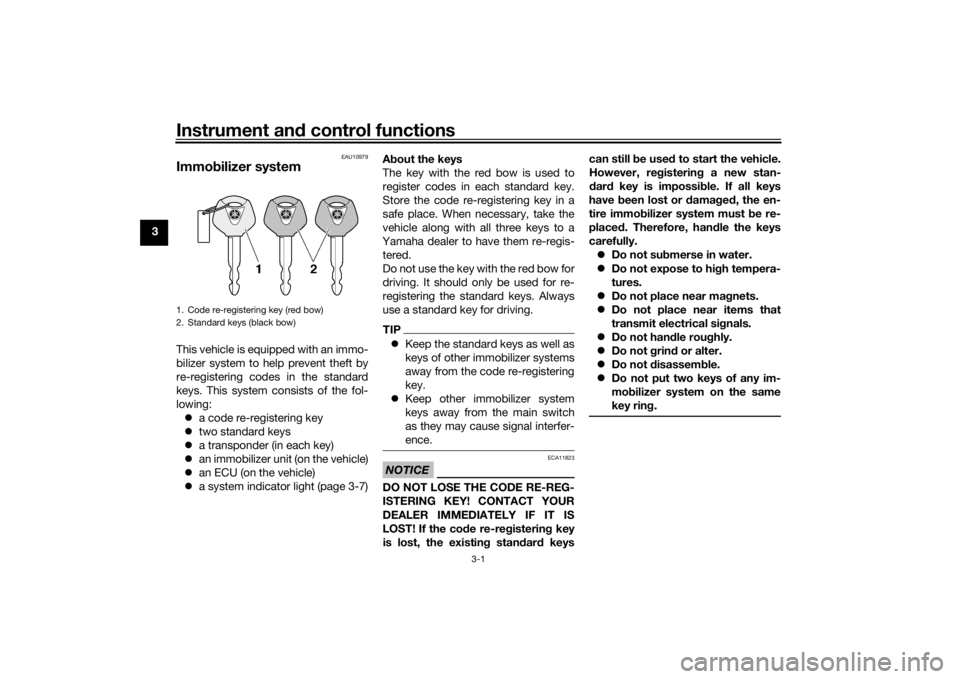
Immo bilizer systemThis vehicle is equipped with an immo-
bilizer system to help prevent theft by
re-registering codes in the standard
keys. This system consists of the fol-
lowing:
a code re-registering key
two standard keys
a transponder (in each key)
an immobilizer unit (on the vehicle)
an ECU (on the vehicle)
a system indicator light (page 3-7) A
bout the keys
The key with the red bow is used to
register codes in each standard key.
Store the code re-registering key in a
safe place. When necessary, take the
vehicle along with all three keys to a
Yamaha dealer to have them re-regis- tered.
Do not use the key with the red bow for
driving. It should only be used for re-
registering the standard keys. Always
use a standard key for driving.
TIP Keep the standard keys as well as
keys of other immobilizer systems
away from the code re-registering
key.
Keep other immobilizer system
keys away from the main switch
as they may cause signal interfer-
ence.NOTICE
ECA11823
DO NOT LOSE THE CODE RE-REG-
ISTERING KEY! CONTACT YOUR
DEALER IMMEDIATELY IF IT IS
LOST! If the cod e re-registering key
is lost, the existin g stan dar d keys can still b
e used to start the vehicle.
However, re gisterin g a new stan-
d ar d key is impossi ble. If all keys
have been lost or damag ed , the en-
tire immo bilizer system must be re-
place d. Therefore, han dle the keys
carefully. Do not su bmerse in water.
Do not expose to hi gh tempera-
tures.
Do not place near ma gnets.
Do not place near items that
transmit electrical si gnals.
Do not han dle rou ghly.
Do not grin d or alter.
Do not disassem ble.
Do not put two keys of any im-
mo bilizer system on the same
key rin g.
1. Code re-registering key (red bow)
2. Standard keys (black bow)UBD5E0E0.book Page 1 Wednesday, April 25, 2018 2:23 PM
Page 17 of 106
Instrument and control functions
3-2
3
EAU10474
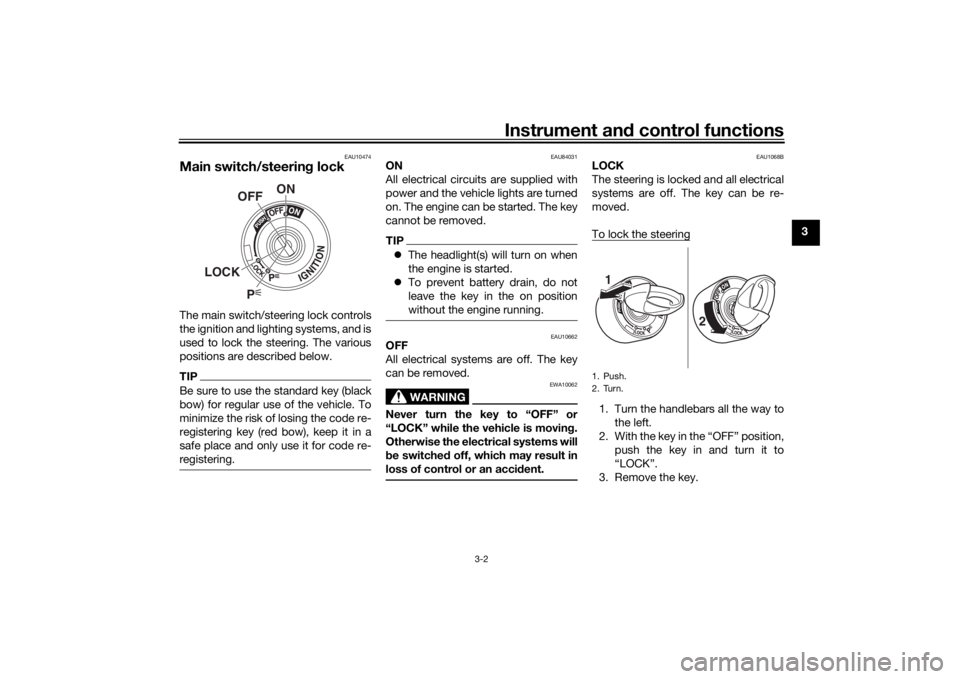
Main switch/steerin g lockThe main switch/steering lock controls
the ignition and lighting systems, and is
used to lock the steering. The various
positions are described below.TIPBe sure to use the standard key (black
bow) for regular use of the vehicle. To
minimize the risk of losing the code re-
registering key (red bow), keep it in a
safe place and only use it for code re-
registering.
EAU84031
ON
All electrical circuits are supplied with
power and the vehicle lights are turned
on. The engine can be started. The key
cannot be removed.TIP The headlight(s) will turn on when
the engine is started.
To prevent battery drain, do not
leave the key in the on position
without the engine running.
EAU10662
OFF
All electrical systems are off. The key
can be removed.
WARNING
EWA10062
Never turn the key to “OFF” or
“LOCK” while the vehicle is movin g.
Otherwise the electrical systems will
b e switched off, which may result in
loss of control or an acci dent.
EAU1068B
LOCK
The steering is locked and all electrical
systems are off. The key can be re-
moved.
To lock the steering1. Turn the handlebars all the way to
the left.
2. With the key in the “OFF” position, push the key in and turn it to
“LOCK”.
3. Remove the key.
P
ON
OFF
LOCK
1. Push.
2. Turn.
1
2
UBD5E0E0.book Page 2 Wednesday, April 25, 2018 2:23 PM
Page 18 of 106
Instrument and control functions
3-3
3
TIPIf the steering will not lock, try turning
the handlebars back to the right slight-
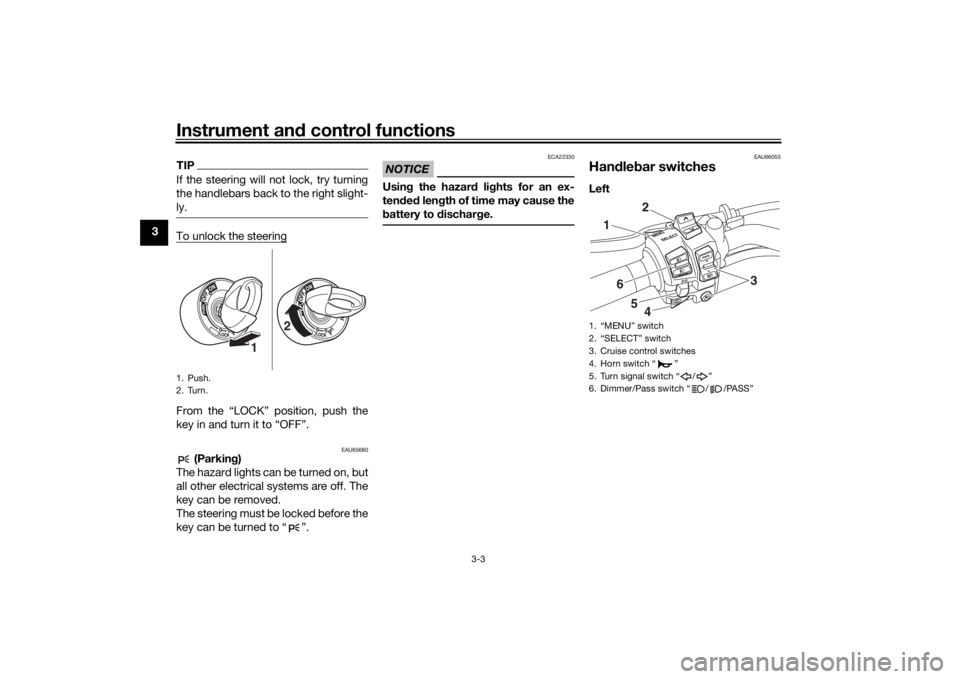
ly.To unlock the steeringFrom the “LOCK” position, push the
key in and turn it to “OFF”.
EAU65680
(Parkin g)
The hazard lights can be turned on, but
all other electrical systems are off. The
key can be removed.
The steering must be locked before the
key can be turned to “ ”.
NOTICE
ECA22330
Usin g the hazar d li ghts for an ex-
ten ded len gth of time may cause the
b attery to d ischarge.
EAU66055
Han dle bar switchesLeft
1. Push.
2. Turn.
1 2
1. “MENU” switch
2. “SELECT” switch
3. Cruise control switches
4. Horn switch “ ”
5. Turn signal switch “ / ”
6. Dimmer/Pass switch “ / /PASS”
1
2
34
5
6
UBD5E0E0.book Page 3 Wednesday, April 25, 2018 2:23 PM
Page 19 of 106
Instrument and control functions
3-4
3
Ri
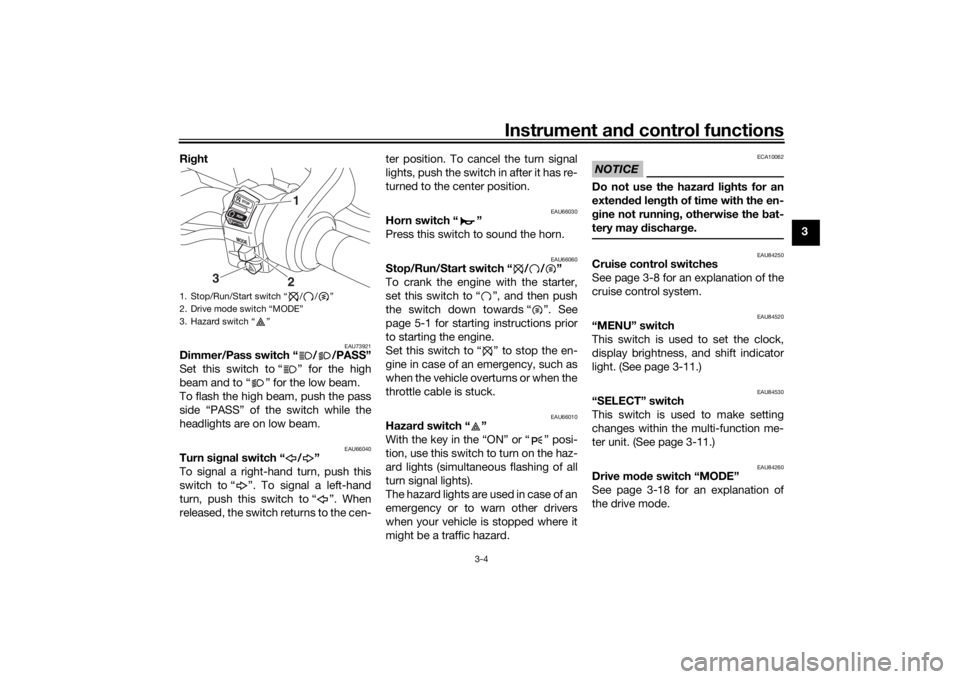
ght
EAU73921
Dimmer/Pass switch “ / /PASS”
Set this switch to “ ” for the high
beam and to “ ” for the low beam.
To flash the high beam, push the pass
side “PASS” of the switch while the
headlights are on low beam.
EAU66040
Turn si gnal switch “ / ”
To signal a right-hand turn, push this
switch to “ ”. To signal a left-hand
turn, push this switch to “ ”. When
released, the switch returns to the cen- ter position. To cancel the turn signal
lights, push the switch in after it has re-
turned to the center position.
EAU66030
Horn switch “ ”
Press this switch to sound the horn.
EAU66060
Stop/Run/Start switch “ / / ”
To crank the engine with the starter,
set this switch to “ ”, and then push
the switch down towards “ ”. See
page 5-1 for starting instructions prior
to starting the engine.
Set this switch to “ ” to stop the en-
gine in case of an emergency, such as
when the vehicle overturns or when the
throttle cable is stuck.
EAU66010
Hazar
d switch “ ”
With the key in the “ON” or “ ” posi-
tion, use this switch to turn on the haz-
ard lights (simultaneous flashing of all
turn signal lights).
The hazard lights are used in case of an
emergency or to warn other drivers
when your vehicle is stopped where it
might be a traffic hazard.
NOTICE
ECA10062
Do not use the hazar d lig hts for an
exten ded len gth of time with the en-
g ine not runnin g, otherwise the bat-
tery may d ischarge.
EAU84250
Cruise control switches
See page 3-8 for an explanation of the
cruise control system.
EAU84520
“MENU” switch
This switch is used to set the clock,
display brightness, and shift indicator
light. (See page 3-11.)
EAU84530
“SELECT” switch
This switch is used to make setting
changes within the multi-function me-
ter unit. (See page 3-11.)
EAU84260
Drive mo de switch “MODE”
See page 3-18 for an explanation of
the drive mode.
1. Stop/Run/Start switch “ / / ”
2. Drive mode switch “MODE”
3. Hazard switch “ ”
1
3
2
UBD5E0E0.book Page 4 Wednesday, April 25, 2018 2:23 PM
Page 20 of 106
Instrument and control functions
3-5
3
EAU4939F
In dicator li ghts an d warnin g
li g hts
EAU11032
Turn si gnal in dicator li ghts “ ”
an d“”
Each indicator light will flash when its
corresponding turn signal lights are
flashing.
EAU11061
Neutral in dicator li ght “ ”
This indicator light comes on when the
transmission is in the neutral position.
EAU11081
Hi gh beam in dicator li ght “ ”
This indicator light comes on when the
high beam of the headlight is switched
on.
EAU11259
Oil level warnin g li ght “ ”
This warning light comes on when the
engine oil level is low. To prevent en-
gine damage, replenish the engine oil
as soon as possible.
Even if the oil level is sufficient, the
warning light may flicker when riding
on a slope or during sudden accelera-
tion or deceleration, but this is not a
malfunction. If a problem is detected in
the oil level detection circuit, the oil lev- el warning light will flash repeatedly. If
this occurs, have a Yamaha dealer
check the vehicle.
TIPWhen the vehicle is turned on, this light
will come on for a few seconds and
then go off. If the light does not come
on, or if the light remains on after con-
firming that the oil level is correct (see
page 6-11), have a Yamaha dealer
check the vehicle.
EAU58402
Cruise control in
dicator li ghts “ ”
an d “SET”
These indicator lights come on when
the cruise control system is activated.
(See page 3-8.)TIPWhen the vehicle is turned on, these
lights should come on for a few sec-
onds and then go off. If the lights do
not come on, have a Yamaha dealer
check the vehicle.
1. Coolant temperature warning light “ ”
2. Neutral indicator light “ ”
3. Left turn signal indicator light “ ”
4. High beam indicator light “ ”
5. Oil level warning light “ ”
6. Engine trouble warning light “ ”
7. Traction control system indicator light “ ”
8. Cruise control indicator lights “ ” “SET”
9. Right turn signal indicator light “ ”
10.Shift indicator light
11.ABS warning light “ ”
12.Immobilizer system indicator light “ ”123
654
118
910
78
12
ABS
UBD5E0E0.book Page 5 Wednesday, April 25, 2018 2:23 PM
Page 21 of 106
Instrument and control functions
3-6
3
EAU11448
Coolant temperature warnin g
lig ht “ ”
This warning light comes on when the
engine is overheating. If this occurs,
stop the engine immediately and allow
the engine to cool.
When the vehicle is turned on, the light
will come on for a few seconds, and
then go off. If the light does not come
on, or if the light remains on, have a
Yamaha dealer check the vehicle. TIP For vehicles with a radiator fan,
the radiator fan(s) automatically
switch on or off according to the
coolant temperature.
If the engine overheats, see page
6-36 for further instructions.NOTICE
ECA10022
Do not continue to operate the en-
gine if it is overheatin g.
EAU79310
En gine trou ble warnin g li ght “ ”
This warning light comes on if a prob-
lem is detected in the engine. If this oc-
curs, have a Yamaha dealer check the
on-board diagnostic system.
The electrical circuit of the warning
light can be checked by turning the ve-
hicle power on. The warning light
should come on for a few seconds,
and then go off.
If the warning light does not come on at
all, or if the warning light remains on,
have a Yamaha dealer check the vehi-
cle.
EAU69892
ABS warnin g lig ht “ ”
This warning light comes on when the
vehicle is first turned on, and goes off
after starting riding. If the warning light
comes on while riding, the anti-lock
brake system may not work correctly.
(See page 3-20.)TIPIf the light does not come at all, or if the
light does not go off after traveling 10
km/h (6 mi/h), have a Yamaha dealer
check the vehicle.
WARNING
EWA16041
If the ABS warning light does not go
off after travelin g at a speed of 10
km/h (6 mi/h) or hi gher, or if the
warnin g lig ht comes on or flashes
while ri din g, the b rake system re-
verts to conventional brakin g. If ei-
ther of the a bove occurs, or if the
warnin g lig ht does not come on at
all, use extra caution to avoi d possi-
b le wheel lock durin g emer gency
b rakin g. Have a Yamaha d ealer
check the brake system an d electri-
cal circuits as soon as possi ble.
EAU73272
Traction control system in dicator
li g ht “ ”
In normal operation, this indicator light
is off. When traction control has en-
gaged, this indicator light will flash for
a few seconds and then go off.
When the traction control system is
turned off, this indicator light will come
on.
If the traction control system becomes
disabled while riding, or if a problem is
detected in the traction control system,
ABS
UBD5E0E0.book Page 6 Wednesday, April 25, 2018 2:23 PM