steering YAMAHA RHINO 700 2013 Owners Manual
[x] Cancel search | Manufacturer: YAMAHA, Model Year: 2013, Model line: RHINO 700, Model: YAMAHA RHINO 700 2013Pages: 188, PDF Size: 4.9 MB
Page 7 of 188

Accelerator pedal ............................ 5-7
Seat belts ........................................ 5-7
Steering ........................................... 5-8
Fittings and fasteners...................... 5-8
Instruments, lights and switches ..... 5-8
Control cables ................................. 5-8
Tires ................................................ 5-9
OPERATION..................................... 6-1 Engine break-in ............................... 6-1
Starting the engine .......................... 6-2
Drive select lever operation and reverse driving............................... 6-4
On-Command four-wheel-drive
switch and differential gear lock
switch ............................................ 6-6
Parking ............................................ 6-8
Loading ........................................... 6-9
BASIC GUIDE FOR SAFE USE....... 7-1 KNOW YOUR VEHICLE................. 7-1
Driver requirements ........................ 7-3
Passenger requirements................. 7-4 Occupant protection system............ 7-4
Protective structure.......................... 7-6
Seat belts ......................................... 7-6
Doors ............................................... 7-9
Passenger handholds.................... 7-10
Seat and hip restraints .................. 7-11
Floorboard ..................................... 7-11
Steering wheel ............................... 7-12
LEARNING TO OPERATE
YOUR VEHICLE.......................... 7-13
Personal protective equipment...... 7-13
Practice for new Rhino users ........ 7-14
Getting ready to ride ...................... 7-15
Turning........................................... 7-15
Accelerating ................................... 7-16
Braking........................................... 7-17
Engine braking............................... 7-17
Leaving the vehicle ........................ 7-18
Parking on a flat area .................... 7-18
Parking on a slope ......................... 7-18
Loading .......................................... 7-19
Operation on different surfaces and terrains.................................. 7-19
67
1RB7A_EE.book Page 2 Tuesday, April 24, 2012 9:07 AM
Page 9 of 188

Rear knuckle upper and lower pivot lubrication (left and right).... 8-42
Steering shaft lubrication .............. 8-43
Wheel removal .............................. 8-44
Tire replacement ........................... 8-44
Wheel installation .......................... 8-45
Battery ........................................... 8-47
Jump-starting ................................ 8-51
Fuse replacement ......................... 8-53
Replacing a headlight bulb ........... 8-55
Headlight beam adjustment .......... 8-58
Tail/brake light bulb replacement ................................ 8-58
Troubleshooting ............................ 8-60
Troubleshooting charts ................. 8-62
CLEANING AND STORAGE............ 9-1 A. Cleaning...................................... 9-1
B. Storage ....................................... 9-2
SPECIFICATIONS.......................... 10-1 CONSUMER INFORMATION ........ 11-1
Identification number records ........ 11-1
910
11
1RB7A_EE.book Page 4 Tuesday, April 24, 2012 9:07 AM
Page 23 of 188

2-4
While using the Rhino●
Keep your body completely inside the vehicle at all times. Keep both hands on the steering
wheel. Be sure the passenger is seated, belted, and holding onto the handholds. Close doors
before driving. Any part of your body (arms, legs, and head) outside the vehicle can be struck
by objects your vehicle is passing or crushed by the vehicle cage/frame in a rollover accident.
●
Watch for branches, brush, or other hazards that could enter the vehicle.
●
Abrupt maneuvers or aggressive driving, even on flat, open areas, can cause loss of control,
including rollovers. The Rhino has higher gr ound clearance and other features to handle rug-
ged terrain, and, as a result, can overturn in situations where some other vehicles may not.
1RB7A_EE.book Page 4 Tuesday, April 24, 2012 9:07 AM
Page 24 of 188
2-5
●
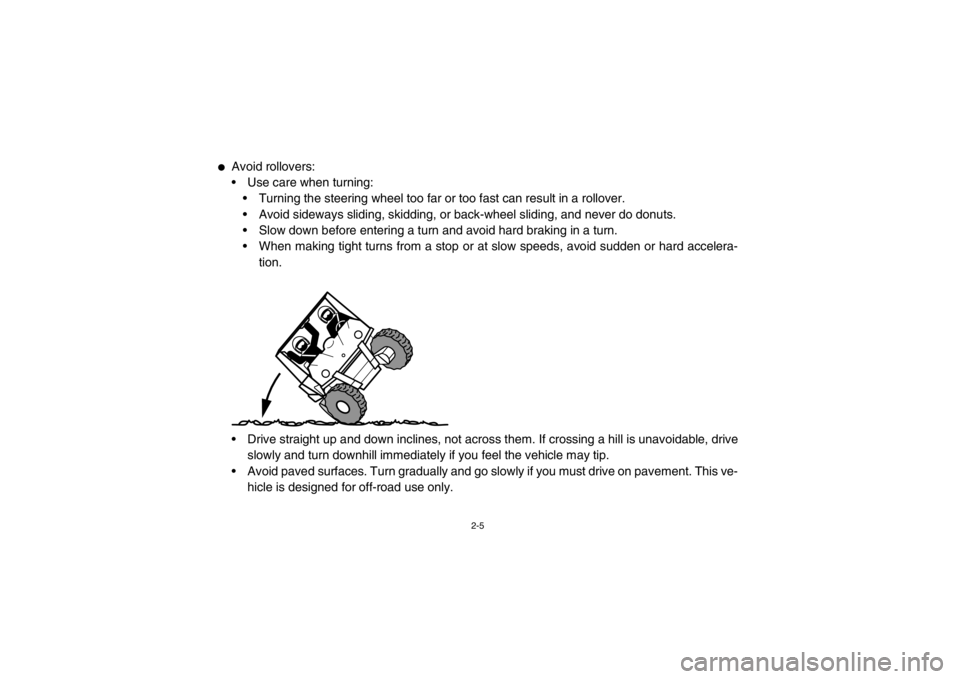
Avoid rollovers:
Use care when turning:
Turning the steering wheel too far or too fast can result in a rollover.
Avoid sideways sliding, skidding, or back-wheel sliding, and never do donuts.
Slow down before entering a turn and avoid hard braking in a turn.
When making tight turns from a stop or at slow speeds, avoid sudden or hard accelera-
tion.
Drive straight up and down inclines, not across them. If crossing a hill is unavoidable, drive slowly and turn downhill immediately if you feel the vehicle may tip.
Avoid paved surfaces. Turn gradually and go slowly if you must drive on pavement. This ve- hicle is designed for off-road use only.
1RB7A_EE.book Page 5 Tuesday, April 24, 2012 9:07 AM
Page 25 of 188

2-6
●
If you think or feel that the vehicle may tip or roll, keep your body completely inside the protec-
tive structure of the vehicle:
Brace yourself by pressing your feet firmly on the floorboards and keep a firm grip on the
steering wheel or handholds.
Do not put your hands or feet outside of the vehicle for any reason. Your arm or leg could be crushed.
Do not try to stop a vehicle tipover using your arm or leg.
●
Do not operate this vehicle on any public street , road, or highway, even if dirt or gravel.
●
Do not operate the vehicle in fast-flowing water or water deeper than 33 cm (13 in). If you must
cross shallow, slow-moving water, choose your path carefully to avoid sharp drop-offs, large
rocks, or slippery surfaces. Operating this vehicle through deep or fast-flowing water can lead
to loss of control or overturn. To reduce your risk of drowning or other injuries, use care when
crossing through water.
●
When loaded with cargo or towing a trailer:
Reduce speed, operate in low gear only, and allow more room to stop.
Avoid hills and rough terrain. Use extreme caution when towing or carrying a load on in-
clines.
Load trailer properly and use extra care when towing or pulling.
●
Do not tow or pull objects from any part of the vehicle other than the trailer hitch bracket or
winch (if installed).
1RB7A_EE.book Page 6 Tuesday, April 24, 2012 9:07 AM
Page 30 of 188
3-2
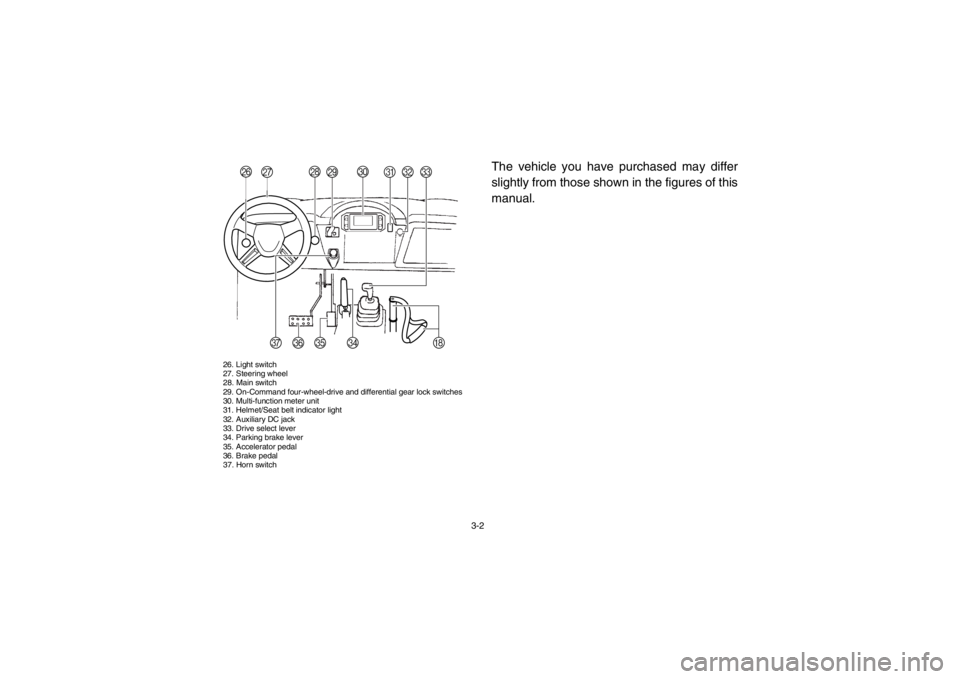
26. Light switch
27. Steering wheel
28. Main switch
29. On-Command four-wheel-drive and differential gear lock switches
30. Multi-function meter unit
31. Helmet/Seat belt indicator light
32. Auxiliary DC jack
33. Drive select lever
34. Parking brake lever
35. Accelerator pedal
36. Brake pedal
37. Horn switch
The vehicle you have purchased may differ
slightly from those shown in the figures of this
manual.
RS
P
Q T
YZ
X
H
W
[
U
V
1RB7A_EE.book Page 2 Tuesday, April 24, 2012 9:07 AM
Page 69 of 188

5-2
1
2
3
45
6
7
8
9
10
11
12
13
14
Final gear oil/
Differential gear oil
Check for leakage. 5-7, 8-15–8-21
Accelerator pedal Check for proper accelerator pedal operation. 5-7
Seat belts Check for proper operation and belt wear. 5-7–5-8
Steering Check for proper operation. 5-8
Fittings and fasteners Check all fittings and fasteners. 5-8
Instruments, lights and
switches Check operation, and correct if necessary. 5-8, 8-55–8-60
Wheels and tires Check tire pressure and for wear and damage. 5-9–5-10, 8-44–8-46
Axle boots Check for damage. 8-23–8-24
ITEM ROUTINE PAGE
1RB7A_EE.book Page 2 Tuesday, April 24, 2012 9:07 AM
Page 75 of 188

5-8
A crash can damage the restraint systems in
your vehicle. A damaged restraint system
may not properly protect the person using it,
resulting in serious injury or death in a crash.
To help make sure your restraint systems are
working properly after a crash, have them in-
spected and any necessary replacements
made as soon as possible.EVU01230Steering
Park on level ground. Turn the steering wheel
right and left. Check for excessive free play,
abnormal noises, or a rough feeling. Have a
Yamaha dealer repair as necessary for proper
operation.EVU00470Fittings and fasteners
Always check the tightness of chassis fittings
and fasteners before a ride. Take the vehicle
to a Yamaha dealer or refer to the Service
Manual for correct tightening torque.Instruments, lights and switches
Check that all instruments, lights and switches
are working properly. Correct if necessary.
Control cables
When riding in cold weather, always make
sure all control cables work smoothly before
you begin riding.
WARNING! Control cables
can freeze in cold weather and you could
be unable to control the vehicle.1RB7A_EE.book Page 8 Tuesday, April 24, 2012 9:07 AM
Page 84 of 188
6-7
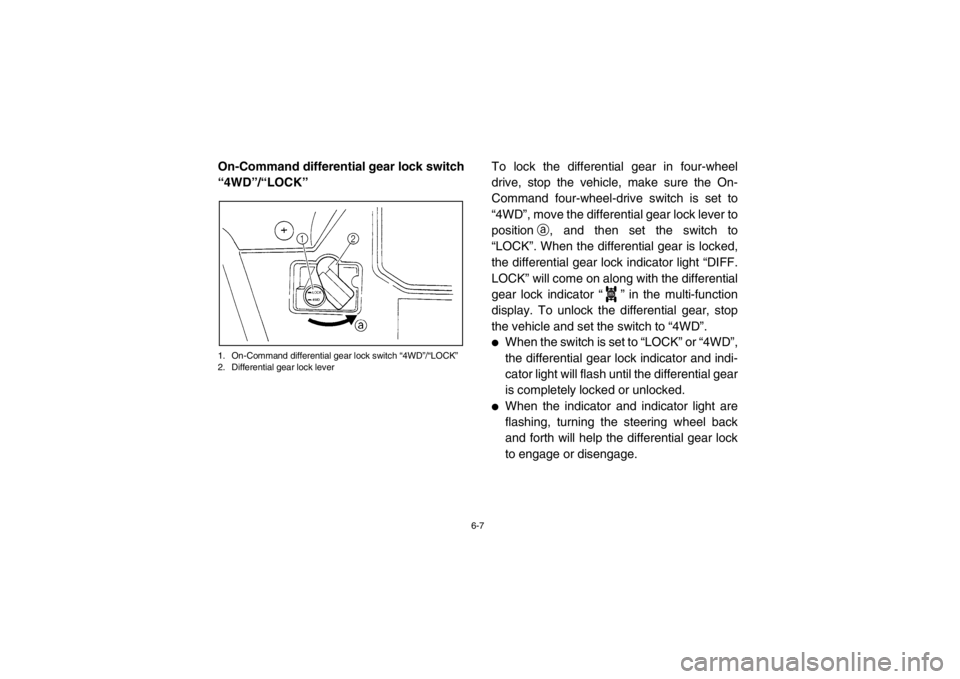
On-Command differential gear lock switch
“4WD”/“LOCK”1. On-Command differential gear lock switch “4WD”/“LOCK”
2. Differential gear lock lever
To lock the differential gear in four-wheel
drive, stop the vehicle, make sure the On-
Command four-wheel-drive switch is set to
“4WD”, move the differential gear lock lever to
positiona, and then set the switch to
“LOCK”. When the differential gear is locked,
the differential gear lock indicator light “DIFF.
LOCK” will come on along with the differential
gear lock indicator “ ” in the multi-function
display. To unlock the differential gear, stop
the vehicle and set the switch to “4WD”.●
When the switch is set to “LOCK” or “4WD”,
the differential gear lock indicator and indi-
cator light will flash until the differential gear
is completely locked or unlocked.
●
When the indicator and indicator light are
flashing, turning the steering wheel back
and forth will help the differential gear lock
to engage or disengage.
DIFF.
LOCK
1RB7A_EE.book Page 7 Tuesday, April 24, 2012 9:07 AM
Page 100 of 188
7-12
Steering wheel
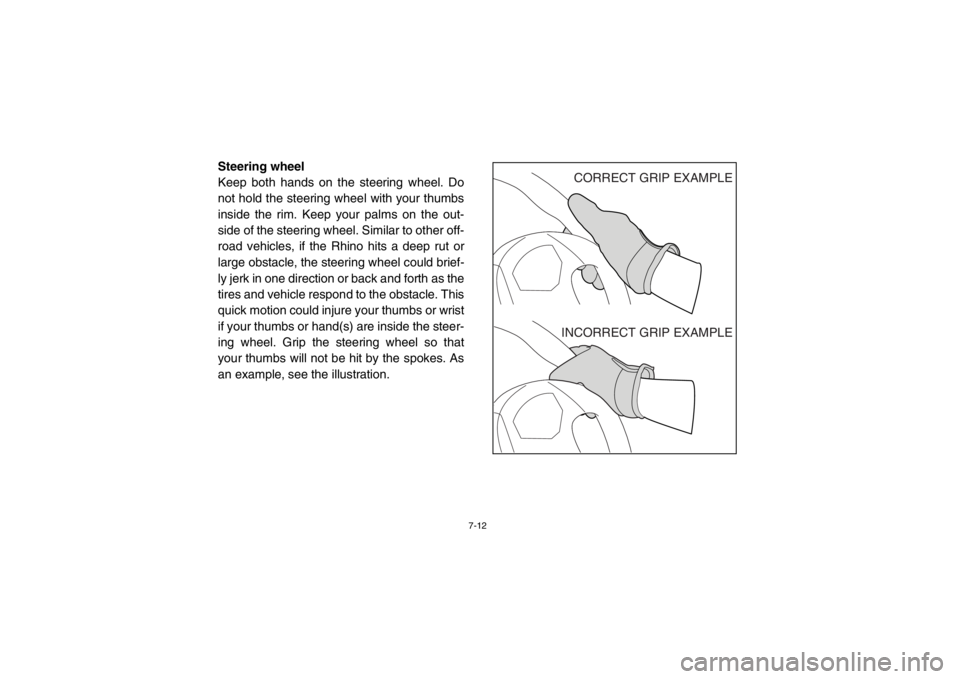
Keep both hands on the steering wheel. Do
not hold the steering wheel with your thumbs
inside the rim. Keep your palms on the out-
side of the steering wheel. Similar to other off-
road vehicles, if the Rhino hits a deep rut or
large obstacle, the steering wheel could brief-
ly jerk in one direction or back and forth as the
tires and vehicle respond to the obstacle. This
quick motion could injure your thumbs or wrist
if your thumbs or hand(s) are inside the steer-
ing wheel. Grip the steering wheel so that
your thumbs will not be hit by the spokes. As
an example, see the illustration.
CORRECT GRIP EXAMPLE
INCORRECT GRIP EXAMPLE
1RB7A_EE.book Page 12 Tuesday, April 24, 2012 9:07 AM