lock YAMAHA T110C 2013 Owners Manual
[x] Cancel search | Manufacturer: YAMAHA, Model Year: 2013, Model line: T110C, Model: YAMAHA T110C 2013Pages: 82, PDF Size: 2.06 MB
Page 6 of 82

TABLE OF CONTENTSSAFETY INFORMATION ..................1-1
DESCRIPTION ..................................2-1
Left view ..........................................2-1
Right view ........................................2-2
Controls and instruments.................2-3
INSTRUMENT AND CONTROL
FUNCTIONS.......................................3-1
Main switch/steering lock ................3-1
Indicator lights ................................3-2
Speedometer unit ...........................3-3
Fuel gauge ......................................3-3
Handlebar switches ........................3-3
Shift pedal .......................................3-4
Brake lever .....................................3-4
Brake pedal ....................................3-5
Fuel tank cap ..................................3-5
Fuel .................................................3-6
Catalytic converters ........................3-7
Starter (choke) lever .......................3-7
Kickstarter .......................................3-8
Seat ................................................3-8
Helmet holders ...............................3-8
Storage compartment .....................3-9
Carrier ...........................................3-10
Sidestand (for sidestand-equipped
models) .....................................3-10FOR YOUR SAFETY –
PRE-OPERATION CHECKS............. 4-1
OPERATION AND IMPORTANT
RIDING POINTS................................. 5-1
Starting and warming up a cold
engine ......................................... 5-1
Starting a warm engine .................. 5-2
Shifting ........................................... 5-2
Tips for reducing fuel
consumption ............................... 5-3
Engine break-in .............................. 5-3
Parking ........................................... 5-4
PERIODIC MAINTENANCE AND
ADJUSTMENT................................... 6-1
Owner’s tool kit ............................... 6-2
Periodic maintenance chart for the
emission control system ............. 6-3
General maintenance and
lubrication chart .......................... 6-4
Removing and installing the
cowling and panel ....................... 6-7
Checking the spark plug ................. 6-8
Engine oil ....................................... 6-9
Cleaning the air filter element ...... 6-11
Adjusting the carburetor ............... 6-12
Adjusting the engine idling
speed ........................................ 6-12
Checking the throttle grip free
play ........................................... 6-13Valve clearance ........................... 6-13
Tires ............................................. 6-14
Cast wheels ................................. 6-16
Checking the brake lever free
play ........................................... 6-16
Adjusting the brake pedal free
play ........................................... 6-17
Checking the shift pedal .............. 6-17
Brake light switches ..................... 6-18
Checking the front brake pads and
rear brake shoes ...................... 6-18
Checking the brake fluid level ...... 6-19
Changing the brake fluid .............. 6-20
Drive chain slack .......................... 6-20
Cleaning and lubricating the drive
chain ......................................... 6-22
Checking and lubricating the
cables ....................................... 6-23
Checking and lubricating the
throttle grip and cable ............... 6-23
Checking and lubricating the
brake lever ................................ 6-23
Checking and lubricating the
brake pedal ............................... 6-24
Checking and lubricating the
centerstand and sidestand
(for sidestand-equipped
models) ..................................... 6-24
Lubricating the swingarm
pivots ........................................ 6-25
Checking the front fork ................. 6-25U40BE2E0.book Page 1 Wednesday, October 10, 2012 8:01 AM
Page 13 of 82
DESCRIPTION
2-1
2
EAU10410
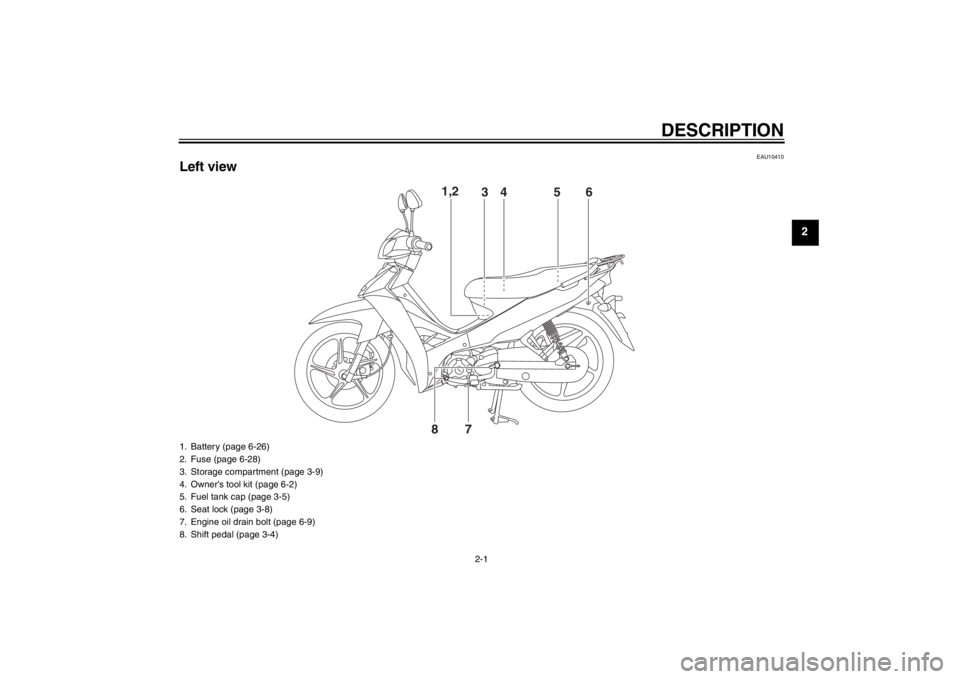
Left view
1,2
3
456
87
1. Battery (page 6-26)
2. Fuse (page 6-28)
3. Storage compartment (page 3-9)
4. Owner’s tool kit (page 6-2)
5. Fuel tank cap (page 3-5)
6. Seat lock (page 3-8)
7. Engine oil drain bolt (page 6-9)
8. Shift pedal (page 3-4)
U40BE2E0.book Page 1 Wednesday, October 10, 2012 8:01 AM
Page 15 of 82
DESCRIPTION
2-3
2
EAU10430
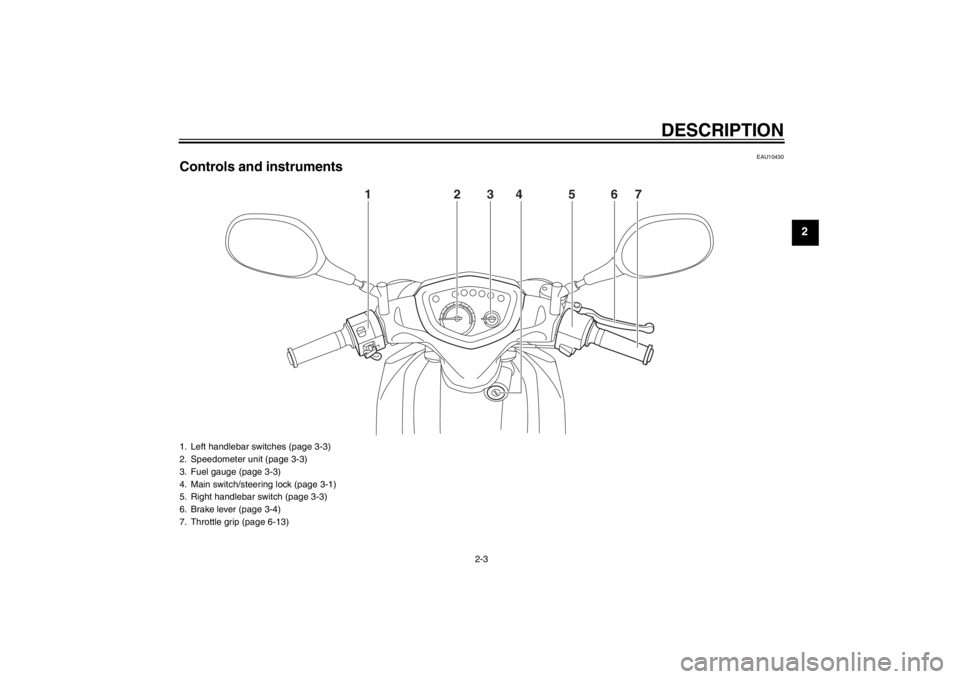
Controls and instruments
123567
4
1. Left handlebar switches (page 3-3)
2. Speedometer unit (page 3-3)
3. Fuel gauge (page 3-3)
4. Main switch/steering lock (page 3-1)
5. Right handlebar switch (page 3-3)
6. Brake lever (page 3-4)
7. Throttle grip (page 6-13)
U40BE2E0.book Page 3 Wednesday, October 10, 2012 8:01 AM
Page 16 of 82
INSTRUMENT AND CONTROL FUNCTIONS
3-1
3
EAU10461
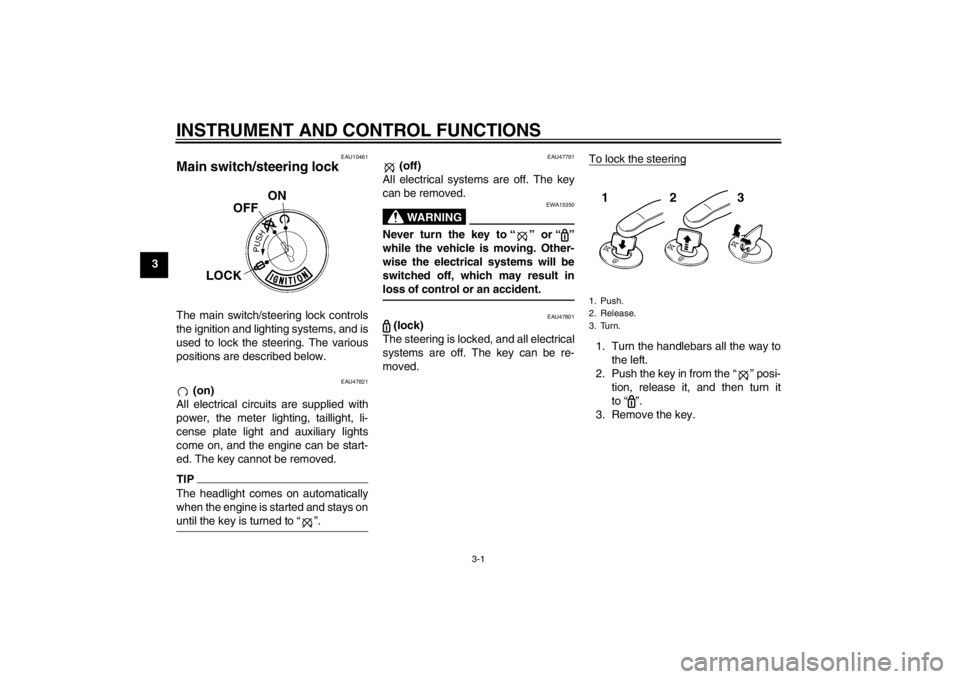
Main switch/steering lock The main switch/steering lock controls
the ignition and lighting systems, and is
used to lock the steering. The various
positions are described below.
EAU47821
(on)
All electrical circuits are supplied with
power, the meter lighting, taillight, li-
cense plate light and auxiliary lights
come on, and the engine can be start-
ed. The key cannot be removed.
TIPThe headlight comes on automatically
when the engine is started and stays on
until the key is turned to “ ”.
EAU47791
(off)
All electrical systems are off. The key
can be removed.WARNING
EWA15350
Never turn the key to “ ” or “ ”
while the vehicle is moving. Other-
wise the electrical systems will be
switched off, which may result in
loss of control or an accident.
EAU47801
(lock)
The steering is locked, and all electrical
systems are off. The key can be re-
moved.To lock the steering
1. Turn the handlebars all the way to
the left.
2. Push the key in from the “ ” posi-
tion, release it, and then turn it
to “ ”.
3. Remove the key.1. Push.
2. Release.
3. Turn.
123
U40BE2E0.book Page 1 Wednesday, October 10, 2012 8:01 AM
Page 17 of 82
INSTRUMENT AND CONTROL FUNCTIONS
3-2
3 To unlock the steering
Insert the key and turn it to “ ”.
EAU10981
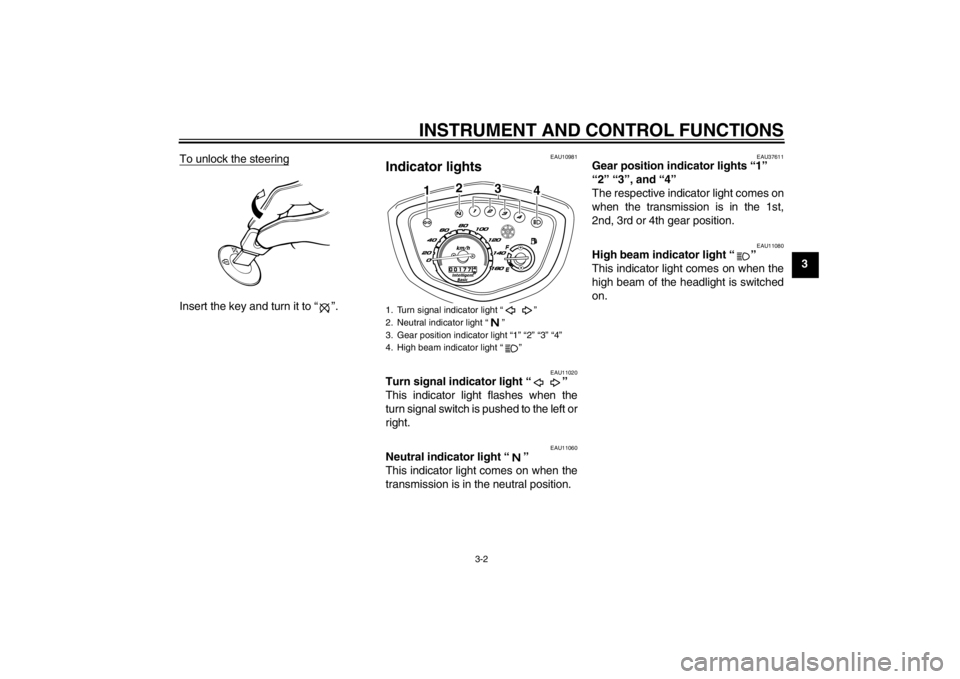
Indicator lights
EAU11020
Turn signal indicator light “ ”
This indicator light flashes when the
turn signal switch is pushed to the left or
right.
EAU11060
Neutral indicator light “ ”
This indicator light comes on when the
transmission is in the neutral position.
EAU37611
Gear position indicator lights “1”
“2” “3”, and “4”
The respective indicator light comes on
when the transmission is in the 1st,
2nd, 3rd or 4th gear position.
EAU11080
High beam indicator light “ ”
This indicator light comes on when the
high beam of the headlight is switched
on.
1. Turn signal indicator light “ ”
2. Neutral indicator light “ ”
3. Gear position indicator light “1” “2” “3” “4”
4. High beam indicator light “ ”
12
3
4
U40BE2E0.book Page 2 Wednesday, October 10, 2012 8:01 AM
Page 20 of 82
INSTRUMENT AND CONTROL FUNCTIONS
3-5
3
EAU12941
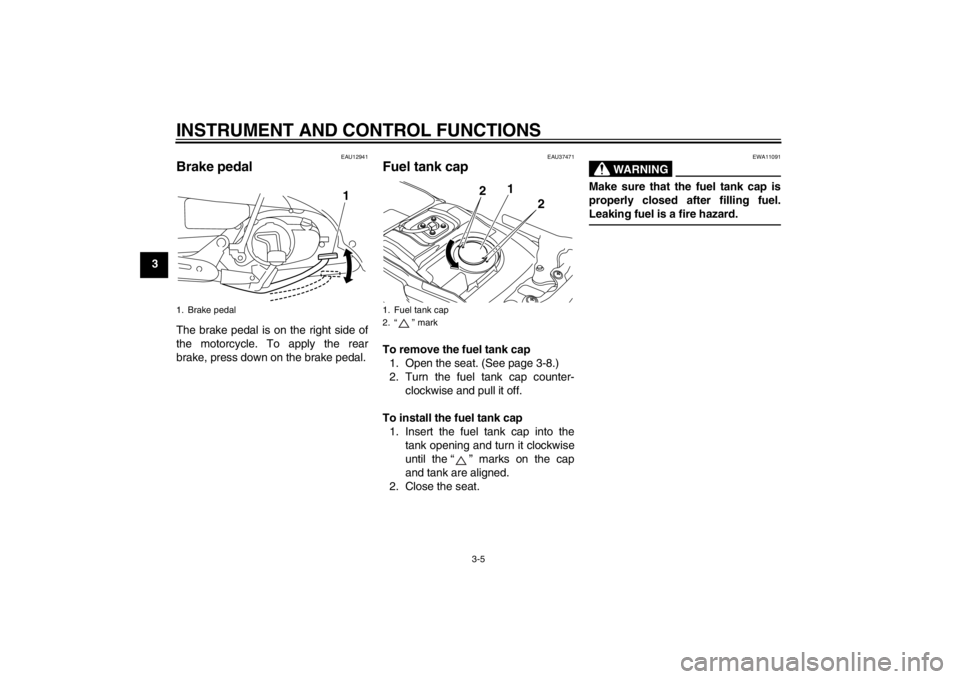
Brake pedal The brake pedal is on the right side of
the motorcycle. To apply the rear
brake, press down on the brake pedal.
EAU37471
Fuel tank cap To remove the fuel tank cap
1. Open the seat. (See page 3-8.)
2. Turn the fuel tank cap counter-
clockwise and pull it off.
To install the fuel tank cap
1. Insert the fuel tank cap into the
tank opening and turn it clockwise
until the “ ” marks on the cap
and tank are aligned.
2. Close the seat.
WARNING
EWA11091
Make sure that the fuel tank cap is
properly closed after filling fuel.
Leaking fuel is a fire hazard.
1. Brake pedal
1
1. Fuel tank cap
2. “ ” mark
1
2
2
U40BE2E0.book Page 5 Wednesday, October 10, 2012 8:01 AM
Page 23 of 82
INSTRUMENT AND CONTROL FUNCTIONS
3-8
3
EAU47860
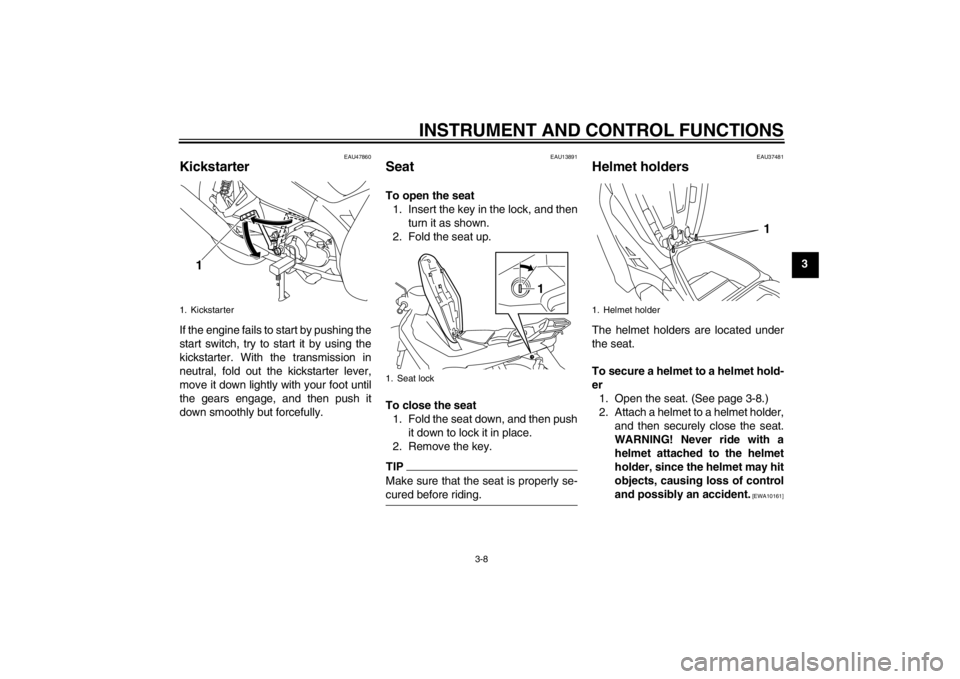
Kickstarter If the engine fails to start by pushing the
start switch, try to start it by using the
kickstarter. With the transmission in
neutral, fold out the kickstarter lever,
move it down lightly with your foot until
the gears engage, and then push it
down smoothly but forcefully.
EAU13891
Seat To open the seat
1. Insert the key in the lock, and then
turn it as shown.
2. Fold the seat up.
To close the seat
1. Fold the seat down, and then push
it down to lock it in place.
2. Remove the key.TIPMake sure that the seat is properly se-
cured before riding.
EAU37481
Helmet holders The helmet holders are located under
the seat.
To secure a helmet to a helmet hold-
er
1. Open the seat. (See page 3-8.)
2. Attach a helmet to a helmet holder,
and then securely close the seat.
WARNING! Never ride with a
helmet attached to the helmet
holder, since the helmet may hit
objects, causing loss of control
and possibly an accident.
[EWA10161]
1. Kickstarter
1
1. Seat lock
1
1. Helmet holder
1
U40BE2E0.book Page 8 Wednesday, October 10, 2012 8:01 AM
Page 50 of 82
PERIODIC MAINTENANCE AND ADJUSTMENT
6-19
6indicator grooves have almost disap-
peared, have a Yamaha dealer replace
the brake pads as a set.
EAU22540
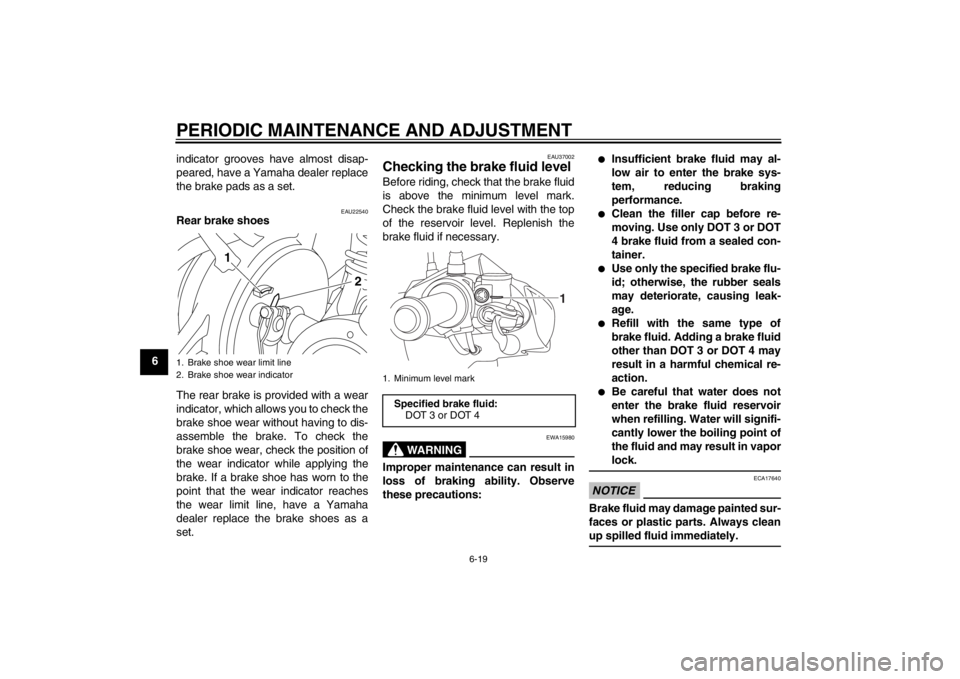
Rear brake shoes
The rear brake is provided with a wear
indicator, which allows you to check the
brake shoe wear without having to dis-
assemble the brake. To check the
brake shoe wear, check the position of
the wear indicator while applying the
brake. If a brake shoe has worn to the
point that the wear indicator reaches
the wear limit line, have a Yamaha
dealer replace the brake shoes as a
set.
EAU37002
Checking the brake fluid level Before riding, check that the brake fluid
is above the minimum level mark.
Check the brake fluid level with the top
of the reservoir level. Replenish the
brake fluid if necessary.
WARNING
EWA15980
Improper maintenance can result in
loss of braking ability. Observe
these precautions:
●
Insufficient brake fluid may al-
low air to enter the brake sys-
tem, reducing braking
performance.
●
Clean the filler cap before re-
moving. Use only DOT 3 or DOT
4 brake fluid from a sealed con-
tainer.
●
Use only the specified brake flu-
id; otherwise, the rubber seals
may deteriorate, causing leak-
age.
●
Refill with the same type of
brake fluid. Adding a brake fluid
other than DOT 3 or DOT 4 may
result in a harmful chemical re-
action.
●
Be careful that water does not
enter the brake fluid reservoir
when refilling. Water will signifi-
cantly lower the boiling point of
the fluid and may result in vapor
lock.
NOTICE
ECA17640
Brake fluid may damage painted sur-
faces or plastic parts. Always clean
up spilled fluid immediately.
1. Brake shoe wear limit line
2. Brake shoe wear indicator
2 1
1. Minimum level markSpecified brake fluid:
DOT 3 or DOT 4
1
U40BE2E0.book Page 19 Wednesday, October 10, 2012 8:01 AM
Page 52 of 82

PERIODIC MAINTENANCE AND ADJUSTMENT
6-21
65. Install the check hole cap.
6. If the drive chain slack is incorrect,
adjust it as follows.
EAU55190
To adjust the drive chain slack
Consult a Yamaha dealer before ad-
justing the drive chain slack.
1. Place the motorcycle on the cen-
terstand.
2. Loosen the brake pedal free play
adjusting nut and the brake torque
rod nut.3. Loosen the axle nut, then loosen
the locknut at each end of the
swingarm.4. To tighten the drive chain, turn the
drive chain slack adjusting nut at
each end of the swingarm in direc-
tion (a). To loosen the drive chain,
turn the adjusting nut at each end
of the swingarm in direction (b),
and then push the rear wheel for-
ward. NOTICE: Improper drive
chain slack will overload the en-
gine as well as other vital parts
of the motorcycle and can lead
to chain slippage or breakage.
To prevent this from occurring,
keep the drive chain slack with-
in the specified limits.
[ECA10571]
TIPUsing the alignment marks on each
side of the swingarm, make sure that
both drive chain pullers are in the same
position for proper wheel alignment.
1. Drive chain slackDrive chain slack:
25.0–35.0 mm (0.98–1.38 in)
1
1. Brake pedal free play adjusting nut
2. Brake torque rod nut
1. Axle nut
2. Locknut
1
2
2
1
U40BE2E0.book Page 21 Wednesday, October 10, 2012 8:01 AM
Page 53 of 82

PERIODIC MAINTENANCE AND ADJUSTMENT
6-22
6 5. Tighten both locknuts, and then
tighten the axle nut and brake
torque rod nut to their specified
torques.
TIPWhen tightening the axle nut, hold the
wheel axle with a wrench to keep it from
turning.6. Adjust the brake pedal free play.
(See page 6-17.) WARNING! Af-
ter adjusting the brake pedal
free play, check the operation of
the brake light.
[EWA16080]
7. Make sure that the drive chain pull-
ers are in the same position, the
drive chain slack is correct, and
the drive chain moves smoothly.
EAU23016
Cleaning and lubricating the
drive chain The drive chain must be cleaned and
lubricated at the intervals specified in
the periodic maintenance and lubrica-
tion chart, otherwise it will quickly wear
out, especially when riding in dusty or
wet areas. Service the drive chain as
follows.NOTICE
ECA10583
The drive chain must be lubricated
after washing the motorcycle, riding
in the rain or riding in wet areas.1. Remove all dirt and mud from the
drive chain with a brush or cloth.TIPFor a thorough cleaning, have a
Yamaha dealer remove the drive chain
and soak it in solvent.2. Spray Yamaha Chain and Cable
Lube or a high-quality spray-type
drive chain lubricant on the entire
chain, making sure that all side
plates and rollers have been suffi-
ciently oiled.
1. Alignment marks
2. Drive chain slack adjusting nut
3. Drive chain pullerTightening torques:
Locknut:
7 Nm (0.7 m·kgf, 5.1 ft·lbf)
Axle nut:
60 Nm (6.0 m·kgf, 43 ft·lbf)
Brake torque rod nut:
19 Nm (1.9 m·kgf, 14 ft·lbf)13
2
(a)
(b)
U40BE2E0.book Page 22 Wednesday, October 10, 2012 8:01 AM