maintenance YAMAHA TMAX 2020 Owners Manual
[x] Cancel search | Manufacturer: YAMAHA, Model Year: 2020, Model line: TMAX, Model: YAMAHA TMAX 2020Pages: 126, PDF Size: 21.59 MB
Page 1 of 126
DIC183
XP560E (TMAX)
XP560D (TMAX TECH MAX)
1
2
3
4
5
6
7
8
9
10
11
12
B3T-28199-E0
Read this manual carefully
before operating this vehicle.
MOTORCYCLE
OWNER’S MANUAL
Specifications
Consumer information
Scooter care and storage
Periodic maintenance and adjustment
For your safety – pre-operation checks
Instrument and control functions Special features
Smart key system Description
Safety information
Operation and important riding points Index
[English (E)]
Page 8 of 126
Table of contentsSafety information ............................ 1-1
Further safe-riding points ............... 1-5
Description ....................................... 2-1
Left view ......................................... 2-1
Right view ....................................... 2-2
Controls and instruments ............... 2-3
Smart key system ........................... 3-1
Smart key system ........................... 3-1
Operating range of the smart key system......................................... 3-2
Handling of the smart key and mechanical key ........................... 3-3
Smart key ....................................... 3-5
Replacing the smart key battery..... 3-6
Powering on the vehicle ................. 3-7
Powering off the vehicle ................. 3-8
How to lock the steering ................ 3-9
How to lock the centerstand ........ 3-10
Storage compartment and fuel tank access ............................... 3-11
Parking mode ............................... 3-13
Special features ............................... 4-1
Cruise control system (XP560D)..... 4-1
D-mode (drive mode)...................... 4-3
Traction control system .................. 4-4
Instrument an d control functions ... 5-1
Handlebar switches ........................ 5-1 Indicator lights and warning
lights ............................................ 5-2
Speedometer .................................. 5-4
Tachometer ..................................... 5-5
Multi-function display...................... 5-5
Front brake lever ........................... 5-18
Rear brake lever ............................ 5-18
Rear brake lock lever .................... 5-18
Anti-lock brake system (ABS) ....... 5-19
Fuel tank cap ................................ 5-20
Fuel ............................................... 5-21
Fuel tank overflow hose ................ 5-22
Catalytic converter ........................ 5-23
Storage compartments ................. 5-23
Windshield (XP560E) ..................... 5-25
Rear view mirrors .......................... 5-26
Shock absorber assembly ............ 5-27
Auxiliary DC jack ........................... 5-28
Sidestand ...................................... 5-29
Ignition circuit cut-off system ....... 5-30
For your safety – pre-operation
checks ............................................... 6-1
Operation an d important ri din g
points ................................................. 7-1
Engine break-in ............................... 7-1
Starting the engine .......................... 7-2
Starting off ...................................... 7-3
Acceleration and deceleration ........ 7-3
Braking ............................................ 7-3 Tips for reducing fuel
consumption ............................... 7-4
Parking............................................ 7-4
Perio dic maintenance an d
a d justment ........................................ 8-1
Tool kit ............................................ 8-2
Periodic maintenance charts .......... 8-3
Periodic maintenance chart for the emission control system ............. 8-3
General maintenance and
lubrication chart .......................... 8-5
Removing and installing panels ...... 8-9
Checking the spark plugs ............. 8-11
Canister ........................................ 8-12
Engine oil and oil filter cartridge ... 8-12
Why Yamalube.............................. 8-15
Coolant ......................................... 8-15
Replacing the engine air filter element and cleaning the
check hose ................................ 8-17
Checking the engine idling speed ........................................ 8-18
Checking the throttle grip free play ............................................ 8-18
Valve clearance............................. 8-19
Tires .............................................. 8-19
Cast wheels .................................. 8-21
Checking the front and rear brake
lever free play ............................ 8-22UB3TE0E0.book Page 1 Tuesday, September 17, 2019 9:35 AM
Page 10 of 126
1-1
1
Safety information
EAU1026B
Be a Responsible Owner
As the vehicle’s owner, you are re-
sponsible for the safe and proper oper-
ation of your scooter.
Scooters are single-track vehicles.
Their safe use and operation are de-
pendent upon the use of proper riding
techniques as well as the expertise of
the operator. Every operator should
know the following requirements be-
fore riding this scooter.
He or she should: Obtain thorough instructions from
a competent source on all aspects
of scooter operation.
Observe the warnings and mainte-
nance requirements in this Own-
er’s Manual.
Obtain qualified training in safe
and proper riding techniques.
Obtain professional technical ser-
vice as indicated in this Owner’s
Manual and/or when made neces-
sary by mechanical conditions.
Never operate a scooter without
proper training or instruction. Take
a training course. Beginners
should receive training from a cer-
tified instructor. Contact an autho-
rized scooter dealer to find out
about the training courses nearest
you.
Safe Ri din g
Perform the pre-operation checks
each time you use the vehicle to make
sure it is in safe operating condition.
Failure to inspect or maintain the vehi-
cle properly increases the possibility of
an accident or equipment damage.
See page 6-1 for a list of pre-operation
checks. This scooter is designed to carry
the operator and a passenger.
The failure of motorists to detect
and recognize scooters in traffic is
the predominating cause of auto-
mobile/scooter accidents. Many
accidents have been caused by
an automobile driver who did not
see the scooter. Making yourself conspicuous appears to be very
effective in reducing the chance of
this type of accident.
Therefore:
• Wear a brightly colored jacket.
• Use extra caution when you are approaching and passing
through intersections, since in-
tersections are the most likely
places for scooter accidents to
occur.
• Ride where other motorists can see you. Avoid riding in another
motorist’s blind spot.
• Never maintain a scooter with- out proper knowledge. Contact
an authorized scooter dealer to
inform you on basic scooter
maintenance. Certain mainte-
nance can only be carried out
by certified staff.UB3TE0E0.book Page 1 Tuesday, September 17, 2019 9:35 AM
Page 39 of 126

Instrument and control functions
5-3
5
EAU88690
Hi gh beam in dicator li ght “ ”
This indicator light comes on when the
high beam of the headlight is switched
on.
EAU77550
Cruise control in dicator li ghts
See page 4-1 for an explanation of
these indicator lights.
EAU88710
Malfunction ind icator light
(MIL) “ ”
This light comes on or flashes if a prob-
lem is detected in the engine or other
vehicle control system. If this occurs,
have a Yamaha dealer check the on-
board diagnostic system. The electri-
cal circuit of the warning light can be
checked by vehicle power on. The light
should come on for a few seconds,
and then go off. If the light does not
come on initially when the vehicle pow-
er on, or if the light remains on, have a
Yamaha dealer check the vehicle.
NOTICE
ECA26820
If the MIL starts flashin g, re duce en-
g ine spee d to prevent exhaust sys-
tem damag e.TIPThe engine is sensitively controlled for
the on-board diagnostic system to de-
tect deterioration and malfunction of
the emission control system. Due to
this specification, the MIL may come
on or flash for vehicle modifications,
lack of maintenance, or excessive or
improper use of the motorcycle. To
prevent this, observe these precau-
tions.
Do not attempt to modify the soft-
ware of the engine control unit.
Do not add any electrical acces-
sories that interfere with engine
control.
Do not use aftermarket accesso-
ries or parts such as suspension,
spark plugs, injectors, exhaust
system, etc.
Do not change drivetrain specifi-
cations (chain, sprockets, wheels,
tires, etc.).
Do not remove or alter the O2 sen-
sor, air induction system, or ex-
haust parts (catalysts or EXUP,
etc.).
Maintain proper V-belt and drive
belt (if equipped).
Maintain correct tire pressure.
Do not operate the vehicle in an
extreme manner. For example, re-
peated or excessive opening and
closing of the throttle, racing,
burnouts, wheelies, etc.
EAU77075
ABS warnin g lig ht “ ”
This warning light comes on when a
problem is detected with the ABS. (See
page 5-19.)
When the vehicle power is turned on,
this light will come on and then go off
after reaching a traveling speed of 10
km/h (6 mi/h). If the warning light: does not come on when the vehi-
cle power is turned on
does not go off after traveling at a
speed of 10 km/h (6 mi/h) or high-
er
comes on or flashes while riding
UB3TE0E0.book Page 3 Tuesday, September 17, 2019 9:35 AM
Page 47 of 126

Instrument and control functions
5-11
5
Instantaneous fuel consumption:
The instantaneous fuel consumption
mode “CRNT.F” can be set to “km/L”
or “L/100km”. For UK-spec vehicles:
“MPG”. (See page 5-14.)TIPIf traveling at speeds under 10 km/h (6
mi/h), “– –.–” will be displayed.NOTICE
ECA15474
If there is a malfunction, “– –.–” will
b
e continuously d isplayed. Have a
Yamaha dealer check the vehicle.
Settin g mo de
Stop the vehicle and then push the
“MENU” switch for 2 seconds to enter
the setting mode. To exit the setting
mode and return to the standard dis-
play mode, push the “MENU” switch
again for 2 seconds or
select “ ”.TIPWhen the malfunction indicator light is
on, setting mode cannot be entered.Menu items1. Setting mode display
Categ ory Description
This function allows you to
set the low, middle, and
high settings to 10 tem-
perature levels.
1
Grip Warmer
This function allows you to
set the low, middle, and
high settings to 10 tem-
perature levels.
This function allows you to
turn the traction control
system on or off.
This function allows you to
check and reset the oil
change interval (indicator),
V-Belt change interval (in-
dicator), and the “FREE”
maintenance interval.
This function allows you to
switch the fuel consump-
tion units between
“L/100km” and “km/L”.
For UK-spec vehicles: this
function is not available.
This function allows you to
change the items shown in
3 information displays.
This function allows you to
adjust the brightness of
the instrument panel.
This function allows you to
set the clock.
This function allows you to
reset all items to their fac-
tory preset or default set-
tings; excepting the
odometer, clock, and
maintenance counter
items “Oil” and “V-Belt”.
Seat HeaterTraction ControlMaintenance
UnitDisplayBrightnessCloc
k
All Reset
UB3TE0E0.book Page 11 Tuesday, September 17, 2019 9:35 AM
Page 49 of 126

Instrument and control functions
5-13
5
4. Use the select switch to highlight
“Mid” or “Low”, and then change
the setting using the same proce-
dure that was used for the high
setting.
5. When you finished changing the settings, use the select switch to
highlight “ ”, and then push the
“MENU” switch to return to the
menu screen.
Traction control system settings
1. Use the select switch to highlight “Traction Control”. 2. Push the “MENU” switch. The
traction control system setting
display will be shown.
3. To set the traction control system to “OFF”, push the select
switch “ ” side for 2 seconds. 4. To set the traction control system
to “ON” again, push the select
switch “ ”.
TIPWhen the vehicle is powered on, the
traction control system is automatically
set to “ON”.5. When you finished changing thesettings, push the “MENU” switch
to return to the menu screen.
Resettin g the maintenance counters
1. Use the select switch to highlight “Maintenance”.
UB3TE0E0.book Page 13 Tuesday, September 17, 2019 9:35 AM
Page 53 of 126

Instrument and control functions
5-17
5
6. Push the “MENU” switch to return
to the menu screen.
Resetting all of the display items
1. Use the select switch to highlight “All Reset”.
2. Push the “MENU” switch.
3. Use the select switch to highlight “YES”, and then push the “MENU”
switch. All items are reset to facto-
ry preset or default settings.
TIPThe odometer, clock, maintenance
counter item “Oil” and maintenance
counter item “V-Belt” will not be reset.To exit the setting mode1. Use the select switch to highlight“Return”. 2. Push the “MENU” switch to exit
the setting mode and return to the
standard display mode.
UB3TE0E0.book Page 17 Tuesday, September 17, 2019 9:35 AM
Page 59 of 126

Instrument and control functions
5-23
5
EAU13435
Catalytic converterThe exhaust system contains catalytic
converter(s) to reduce harmful exhaust
emissions.
WARNING
EWA10863
The exhaust system is hot after op-
eration. To prevent a fire hazar d or
b urns:
Do not park the vehicle near
possi ble fire hazar ds such as
g rass or other materials that
easily burn.
Park the vehicle in a place
where pe destrians or chil dren
are not likely to touch the hot
exhaust system.
Make sure that the exhaust sys-
tem has coole d down before
d oin g any maintenance work.
Do not allow the en gine to i dle
more than a few minutes. Lon g
i d lin g can cause a buil d-up of
heat.
EAU88751
Stora ge compartmentsFront storag e compartment
To open the storage compartment,
press the button.
Open the lid as shown. To close the storage compartment,
push the lid into the original position.
TIPFor XP560D: this compartment has an
electronic lock. (See page 3-12.)Rear storag
e compartment
This storage compartment was de-
signed to hold one full-faced helmet or
two 3/4-faced helmets. NOTICE: The
sha ded area is not a stora ge com-
partment. To prevent damag ing the
seat hin ges, do not place any items
in this area.
[ECA16092]
1. Button
1. Lid
1
1
1. Lid1
UB3TE0E0.book Page 23 Tuesday, September 17, 2019 9:35 AM
Page 68 of 126
For your safety – pre-operation checks
6-1
6
EAU1559A
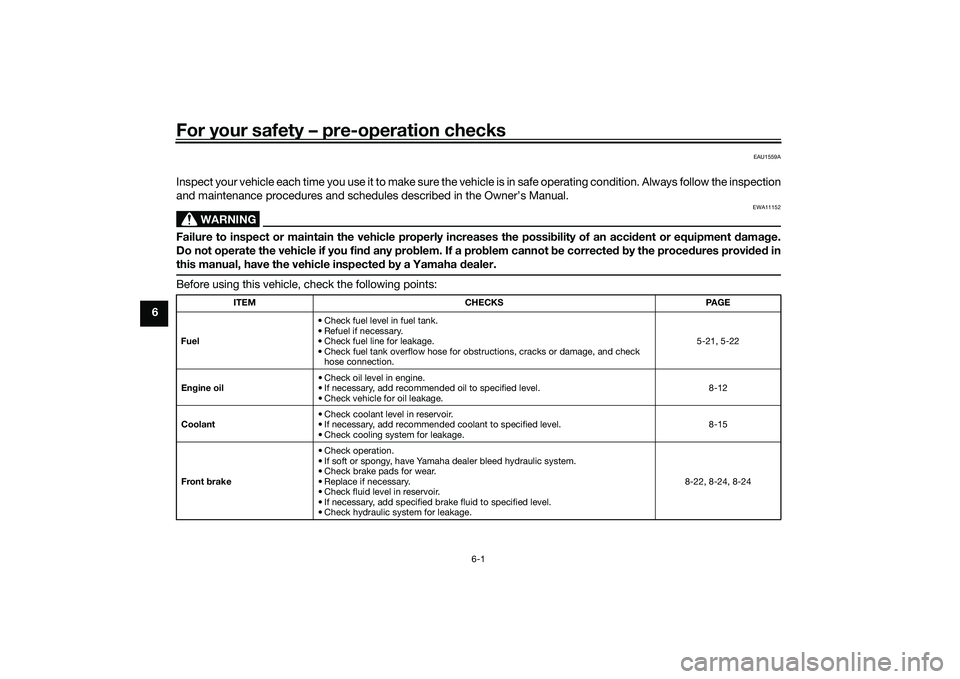
Inspect your vehicle each time you use it to make sure the vehicle is in safe operating condition. Always follow the inspection
and maintenance procedures and schedules described in the Owner’s Manual.
WARNING
EWA11152
Failure to inspect or maintain the vehicle properly increases the possibility of an acci dent or equipment damag e.
Do not operate the vehicle if you fin d any pro blem. If a pro blem cannot be corrected b y the proce dures provi ded in
this manual, have the vehicle inspecte d b y a Yamaha dealer.Before using this vehicle, check the following points:
ITEM CHECKS PAGE
Fuel • Check fuel level in fuel tank.
• Refuel if necessary.
• Check fuel line for leakage.
• Check fuel tank overflow hose for obstructions, cracks or damage, and check
hose connection. 5-21, 5-22
En gine oil • Check oil level in engine.
• If necessary, add recommended oil to specified level.
• Check vehicle for oil leakage. 8-12
Coolant • Check coolant level in reservoir.
• If necessary, add recommended coolant to specified level.
• Check cooling system for leakage. 8-15
Front brake • Check operation.
• If soft or spongy, have Yamaha dealer bleed hydraulic system.
• Check brake pads for wear.
• Replace if necessary.
• Check fluid level in reservoir.
• If necessary, add specified brake fluid to specified level.
• Check hydraulic system for leakage. 8-22, 8-24, 8-24
UB3TE0E0.book Page 1 Tuesday, September 17, 2019 9:35 AM
Page 75 of 126

Periodic maintenance an d a djustment
8-1
8
EAU17246
Periodic inspection, adjustment, and
lubrication will keep your vehicle in the
safest and most efficient condition
possible. Safety is an obligation of the
vehicle owner/operator. The most im-
portant points of vehicle inspection,
adjustment, and lubrication are ex-
plained on the following pages.
The intervals given in the periodic
maintenance charts should be simply
considered as a general guide under
normal riding conditions. However, de-
pending on the weather, terrain, geo-
graphical location, and individual use,
the maintenance intervals may need to
be shortened.
WARNING
EWA10322
Failure to properly maintain the vehi-
cle or performin g maintenance ac-
tivities incorrectly may increase
your risk of injury or death during
service or while usin g the vehicle. If
you are not familiar with vehicle ser-
vice, have a Yamaha d ealer perform
service.
WARNING
EWA15123
Turn off the en gine when performin g
maintenance unless otherwise
specified .
A runnin g en gine has movin g
parts that can catch on b ody
parts or clothin g an d electrical
parts that can cause shocks or
fires.
Runnin g the eng ine while ser-
vicin g can lead to eye injury,
b urns, fire, or car bon monoxi de
poisonin g – possi bly lea din g to
d eath. See pag e 1-3 for more in-
formation a bout car bon monox-
i d e.
WARNING
EWA15461
Brake discs, calipers, drums, an d
linin gs can b ecome very hot during
use. To avoi d possi ble burns, let
b rake components cool before
touching them.
EAU17303
Emission controls not only function to
ensure cleaner air, but are also vital to
proper engine operation and maximum
performance. In the following periodic
maintenance charts, the services relat-
ed to emissions control are grouped
separately. These services require
specialized data, knowledge, and
equipment. Maintenance, replace-
ment, or repair of the emission control
devices and systems may be per-
formed by any repair establishment or
individual that is certified (if applicable).
Yamaha dealers are trained and
equipped to perform these particular
services.
UB3TE0E0.book Page 1 Tuesday, September 17, 2019 9:35 AM