display YAMAHA TRACER 900 2015 User Guide
[x] Cancel search | Manufacturer: YAMAHA, Model Year: 2015, Model line: TRACER 900, Model: YAMAHA TRACER 900 2015Pages: 114, PDF Size: 3.26 MB
Page 31 of 114
INSTRUMENT AND CONTROL FUNCTIONS
3-16
3
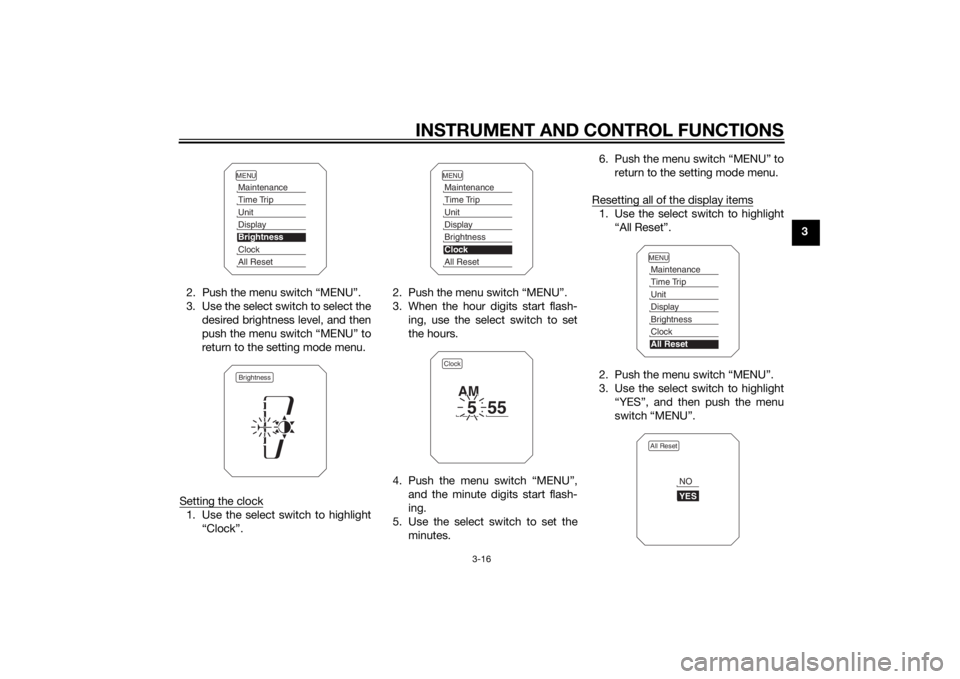
2. Push the menu switch “MENU”.
3. Use the select switch to select the desired brightness level, and then
push the menu switch “MENU” to
return to the setting mode menu.
Setting the clock
1. Use the select switch to highlight “Clock”. 2. Push the menu switch “MENU”.
3. When the hour digits start flash-
ing, use the select switch to set
the hours.
4. Push the menu switch “MENU”, and the minute digits start flash-
ing.
5. Use the select switch to set the minutes. 6. Push the menu switch “MENU” to
return to the setting mode menu.
Resetting all of the display items
1. Use the select switch to highlight “All Reset”.
2. Push the menu switch “MENU”.
3. Use the select switch to highlight “YES”, and then push the menu
switch “MENU”.
MENUMaintenanceTime TripUnitDisplayBrightnessClockAll ResetBrightness
MENUMaintenanceTime TripUnitDisplayBrightnessClockAll ResetClock
5
55
AM
MENUMaintenanceTime TripUnitDisplayBrightnessClockAll ResetAll Reset
YESNO
U2PPE0E0.book Page 16 Monday, July 14, 2014 3:25 PM
Page 32 of 114
INSTRUMENT AND CONTROL FUNCTIONS
3-17
3
TIPThe odometer and the clock cannot be
reset.Self-diagnosis mo de
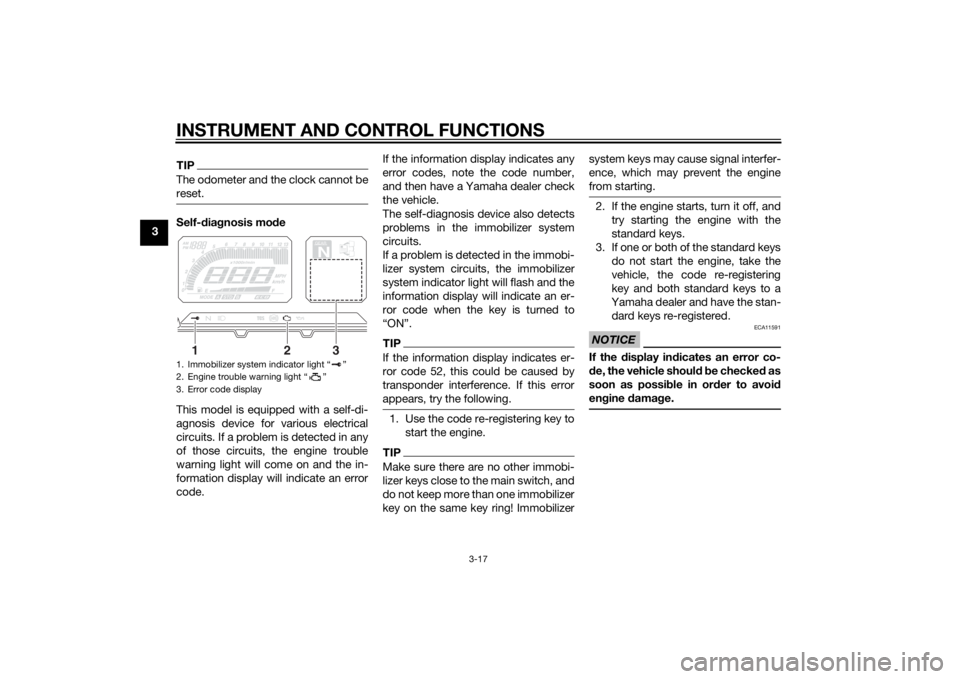
This model is equipped with a self-di-
agnosis device for various electrical
circuits. If a problem is detected in any
of those circuits, the engine trouble
warning light will come on and the in-
formation display will indicate an error
code. If the information display indicates any
error codes, note the code number,
and then have a Yamaha dealer check
the vehicle.
The self-diagnosis device also detects
problems in the immobilizer system
circuits.
If a problem is detected in the immobi-
lizer system circuits, the immobilizer
system indicator light will flash and the
information display will indicate an er-
ror code when the key is turned to
“ON”.
TIPIf the information display indicates er-
ror code 52, this could be caused by
transponder interference. If this error
appears, try the following.1. Use the code re-registering key to
start the engine.TIPMake sure there are no other immobi-
lizer keys close to the main switch, and
do not keep more than one immobilizer
key on the same key ring! Immobilizer system keys may cause signal interfer-
ence, which may prevent the engine
from starting.
2. If the engine starts, turn it off, and
try starting the engine with the
standard keys.
3. If one or both of the standard keys do not start the engine, take the
vehicle, the code re-registering
key and both standard keys to a
Yamaha dealer and have the stan-
dard keys re-registered.NOTICE
ECA11591
If the display in dicates an error co-
d e, the vehicle shoul d b e checked as
soon as possi ble in or der to avoi d
en gine damag e.
1. Immobilizer system indicator light “ ”
2. Engine trouble warning light “ ”
3. Error code display
GEARN
25
A.TEMP ˚C
Lo
C.TEMP˚C
0:00
TIME TRIP
1
2
3
U2PPE0E0.book Page 17 Monday, July 14, 2014 3:25 PM
Page 34 of 114
INSTRUMENT AND CONTROL FUNCTIONS
3-19
3Ri
ght
EAU54201
Dimmer/Pass switch “ / /PASS”
Set this switch to “ ” for the high
beam and to “ ” for the low beam.
To flash the high beam, push the pass
side “PASS” of the switch while the
headlights are on low beam.
EAU12461
Turn si gnal switch “ / ”
To signal a right-hand turn, push this
switch to “ ”. To signal a left-hand
turn, push this switch to “ ”. When
released, the switch returns to the cen- ter position. To cancel the turn signal
lights, push the switch in after it has re-
turned to the center position.
EAU12501
Horn switch “ ”
Press this switch to sound the horn.
EAU54211
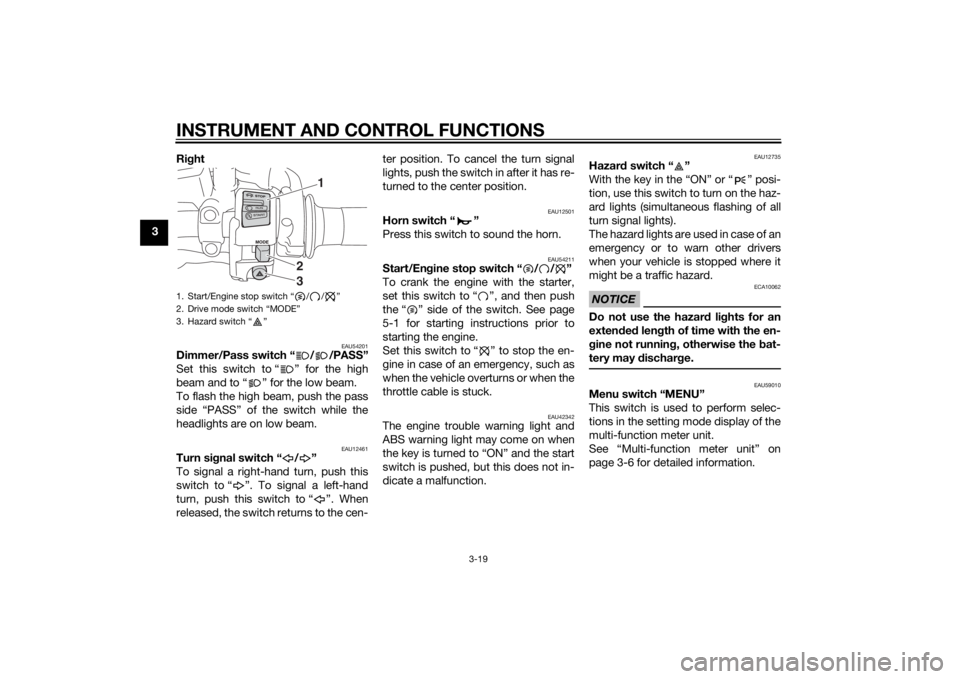
Start/En
gine stop switch “ / / ”
To crank the engine with the starter,
set this switch to “ ”, and then push
the “ ” side of the switch. See page
5-1 for starting instructions prior to
starting the engine.
Set this switch to “ ” to stop the en-
gine in case of an emergency, such as
when the vehicle overturns or when the
throttle cable is stuck.
EAU42342
The engine trouble warning light and
ABS warning light may come on when
the key is turned to “ON” and the start
switch is pushed, but this does not in-
dicate a malfunction.
EAU12735
Hazar d switch “ ”
With the key in the “ON” or “ ” posi-
tion, use this switch to turn on the haz-
ard lights (simultaneous flashing of all
turn signal lights).
The hazard lights are used in case of an
emergency or to warn other drivers
when your vehicle is stopped where it
might be a traffic hazard.NOTICE
ECA10062
Do not use the hazard lights for an
exten ded len gth of time with the en-
g ine not runnin g, otherwise the bat-
tery may dischar ge.
EAU59010
Menu switch “MENU”
This switch is used to perform selec-
tions in the setting mode display of the
multi-function meter unit.
See “Multi-function meter unit” on
page 3-6 for detailed information.
1. Start/Engine stop switch “ / / ”
2. Drive mode switch “MODE”
3. Hazard switch “ ”
1
23
U2PPE0E0.book Page 19 Monday, July 14, 2014 3:25 PM
Page 35 of 114
INSTRUMENT AND CONTROL FUNCTIONS
3-20
3
EAU59000
Select switch “ / ”
This switch is used to perform selec-
tions in the information display and
setting mode display of the multi-func-
tion meter unit.
See “Multi-function meter unit” on
page 3-6 for detailed information.
EAU47496
Drive mode switch “MODE”
WARNING
EWA15341
Do not chan ge the D-mod e while the
vehicle is movin g.Using this switch changes the drive
mode to “STD”, “A”, or “B” in the fol-
lowing order:
STD → A → B → STD
The throttle grip must be completely
closed in order to change the drive mo-
de. (See page 3-18 for an explanation
of each drive mode.)TIP The mode is set to “STD” by de-
fault. The mode resets to “STD”
when the key is turned to “OFF”.
The selected mode is shown on
the drive mode display. (See page
3-9.)
EAU12821
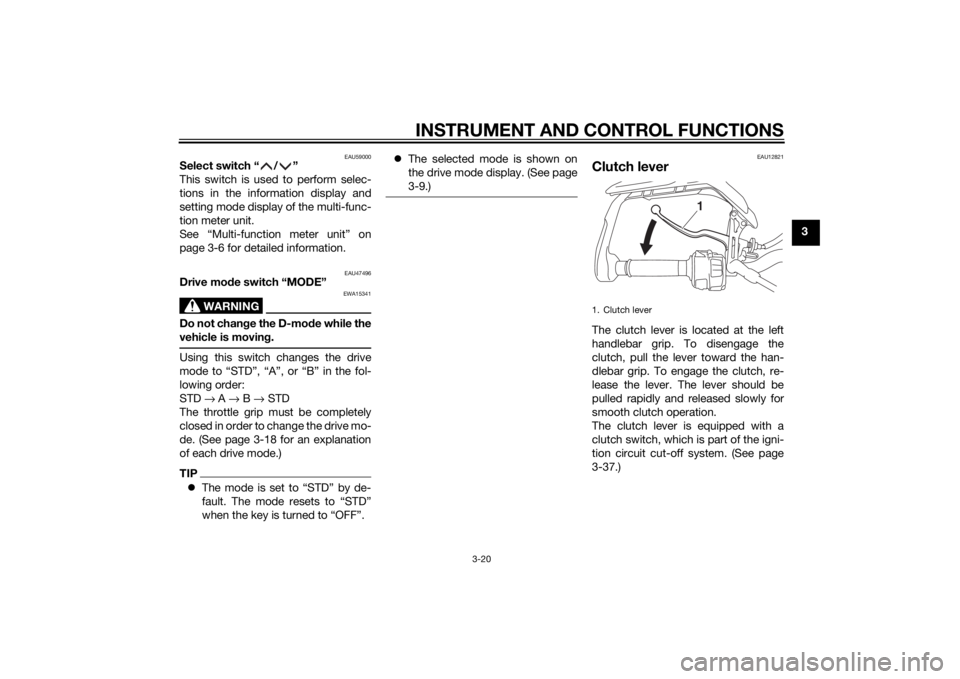
Clutch leverThe clutch lever is located at the left
handlebar grip. To disengage the
clutch, pull the lever toward the han-
dlebar grip. To engage the clutch, re-
lease the lever. The lever should be
pulled rapidly and released slowly for
smooth clutch operation.
The clutch lever is equipped with a
clutch switch, which is part of the igni-
tion circuit cut-off system. (See page
3-37.)1. Clutch lever
1
U2PPE0E0.book Page 20 Monday, July 14, 2014 3:25 PM
Page 58 of 114
OPERATION AND IMPORTANT RIDING POINTS
5-1
5
EAU15952
Read the Owner’s Manual carefully to
become familiar with all controls. If
there is a control or function you do not
understand, ask your Yamaha dealer.
WARNING
EWA10272
Failure to familiarize yourself with
the controls can lead to loss of con-
trol, which coul d cause an acci dent
or injury.
EAU48712
TIPThis model is equipped with: a lean angle sensor to stop the en-
gine in case of a turnover. In this
case, the display will indicate error
code 30, but this is not a malfunc-
tion. Turn the key to “OFF” and
then to “ON” to clear the error co-
d e . F ai l in g to do s o wi ll pr e v e nt the
engine from starting even though
the engine will crank when push-
ing the start switch.
an engine auto-stop system. The
engine stops automatically if left
idling for 20 minutes. If the engine
stops, simply push the start
switch to restart the engine.
EAU63090
Startin g the en gineIn order for the ignition circuit cut-off
system to enable starting, one of the
following conditions must be met:
The transmission is in the neutral
position.
The transmission is in gear with
the clutch lever pulled and the
sidestand up.
See page 3-37 for more informa-
tion.
1. Turn the key to “ON” and make sure that the start/engine stop
switch is set to “ ”.
The following warning lights and
indicator lights should come on for
a few seconds, then go off. Oil level warning light
Engine trouble warning light
Traction control system indi-
cator/warning light
Immobilizer system indicator
lightNOTICE
ECA11834
If a warnin g or in dicator li ght does
not come on initially when the key is
turne d to “ON”, or if a warning or in-
U2PPE0E0.book Page 1 Monday, July 14, 2014 3:25 PM