light YAMAHA TRACER 900 2015 User Guide
[x] Cancel search | Manufacturer: YAMAHA, Model Year: 2015, Model line: TRACER 900, Model: YAMAHA TRACER 900 2015Pages: 114, PDF Size: 3.26 MB
Page 21 of 114
INSTRUMENT AND CONTROL FUNCTIONS
3-6
3
The electrical circuit of the indicator
light can be checked by turning the key
to “ON”. The indicator light should
come on for a few seconds, and then
go off.
If the indicator light does not come on
initially when the key is turned to “ON”,
or if the indicator light remains on, have
a Yamaha dealer check the electrical
circuit.
The self-diagnosis device also detects
problems in the immobilizer system
circuits. (See page 3-17 for an expla-
nation of the self-diagnosis device.)
EAU63141
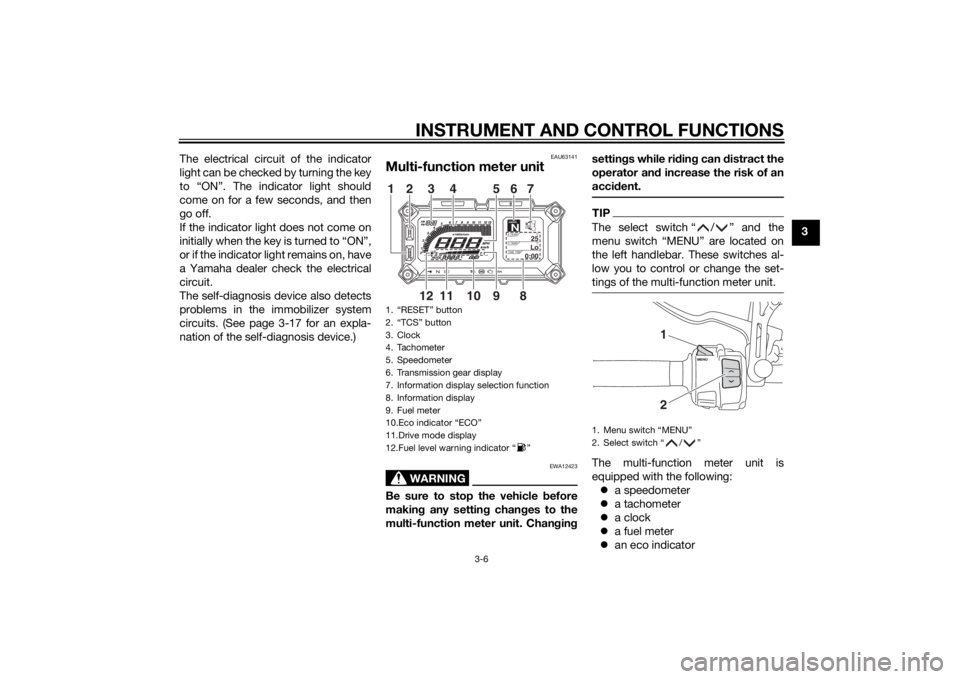
Multi-function meter unit
WARNING
EWA12423
Be sure to stop the vehicle
before
makin g any settin g chan ges to the
multi-function meter unit. Chan gin g settin
gs while ri din g can d istract the
operator an d increase the risk of an
acci dent.
TIPThe select switch “ / ” and the
menu switch “MENU” are located on
the left handlebar. These switches al-
low you to control or change the set-
tings of the multi-function meter unit.The multi-function meter unit is
equipped with the following:
a speedometer
a tachometer
a clock
a fuel meter
an eco indicator
1. “RESET” button
2. “TCS” button
3. Clock
4. Tachometer
5. Speedometer
6. Transmission gear display
7. Information display selection function
8. Information display
9. Fuel meter
10.Eco indicator “ECO”
11.Drive mode display
12.Fuel level warning indicator “ ”
GEARN
25
A.TEMP ˚C
Lo
C.TEMP ˚C
0:00
TIME TRIP
89101112
12 3 4 567
1. Menu switch “MENU”
2. Select switch “ / ”
12
U2PPE0E0.book Page 6 Monday, July 14, 2014 3:25 PM
Page 23 of 114
INSTRUMENT AND CONTROL FUNCTIONS
3-8
3
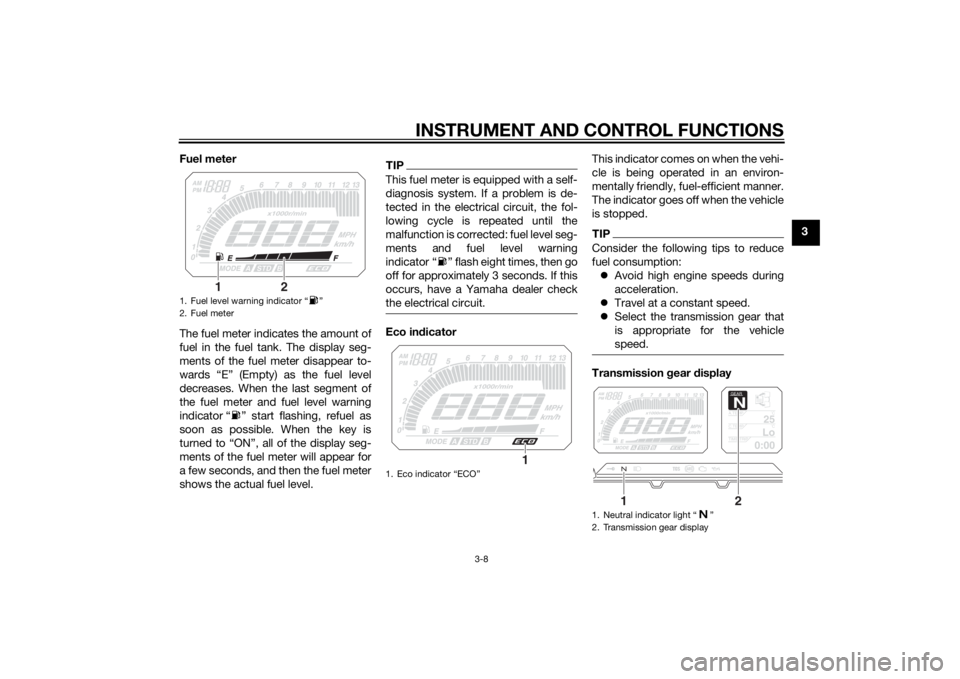
Fuel meter
The fuel meter indicates the amount of
fuel in the fuel tank. The display seg-
ments of the fuel meter disappear to-
wards “E” (Empty) as the fuel level
decreases. When the last segment of
the fuel meter and fuel level warning
indicator “ ” start flashing, refuel as
soon as possible. When the key is
turned to “ON”, all of the display seg-
ments of the fuel meter will appear for
a few seconds, and then the fuel meter
shows the actual fuel level.
TIPThis fuel meter is equipped with a self-
diagnosis system. If a problem is de-
tected in the electrical circuit, the fol-
lowing cycle is repeated until the
malfunction is corrected: fuel level seg-
ments and fuel level warning
indicator “ ” flash eight times, then go
off for approximately 3 seconds. If this
occurs, have a Yamaha dealer check
the electrical circuit.Eco in
dicator This indicator comes on when the vehi-
cle is being operated in an environ-
mentally friendly, fuel-efficient manner.
The indicator goes off when the vehicle
is stopped.
TIPConsider the following tips to reduce
fuel consumption:
Avoid high engine speeds during
acceleration.
Travel at a constant speed.
Select the transmission gear that
is appropriate for the vehicle
speed.Transmission gear display
1. Fuel level warning indicator “ ”
2. Fuel meter
2
1
1. Eco indicator “ECO”
1
1. Neutral indicator light “ ”
2. Transmission gear display
GEARN
25
A.TEMP ˚C
Lo
C.TEMP˚C
0:00
TIME TRIP
1
2
U2PPE0E0.book Page 8 Monday, July 14, 2014 3:25 PM
Page 24 of 114
INSTRUMENT AND CONTROL FUNCTIONS
3-9
3This display shows the selected gear.
This model is equipped with 6 gears.
The neutral position is indicated by the
neutral indicator light “ ” and by the
transmission gear display “ ”.
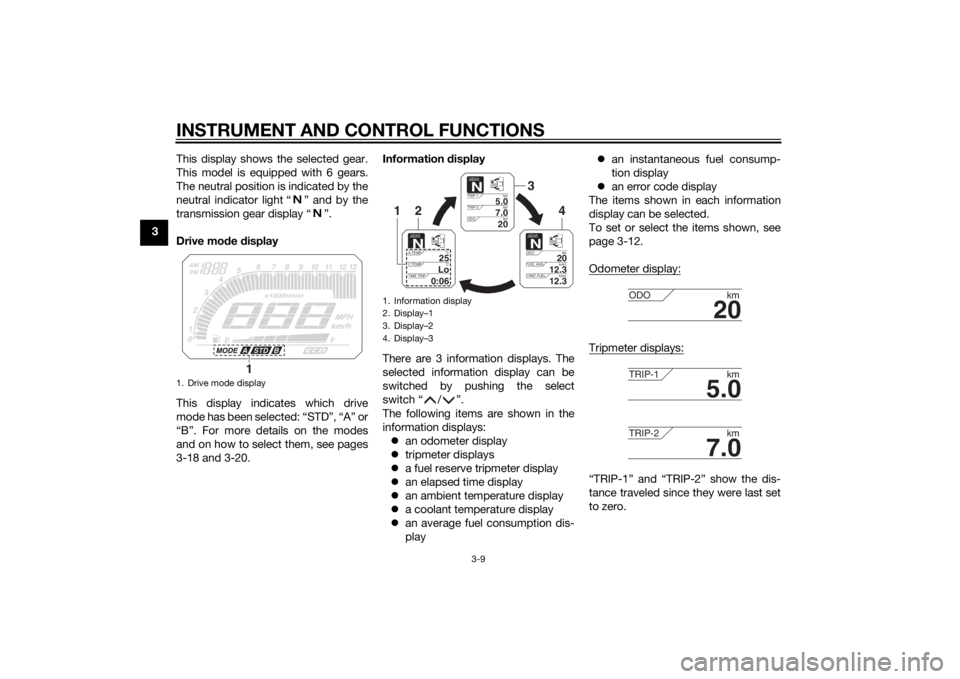
Drive mo
de display
This display indicates which drive
mode has been selected: “STD”, “A” or
“B”. For more details on the modes
and on how to select them, see pages
3-18 and 3-20. Information
display
There are 3 information displays. The
selected information display can be
switched by pushing the select
switch “ / ”.
The following items are shown in the
information displays: an odometer display
tripmeter displays
a fuel reserve tripmeter display
an elapsed time display
an ambient temperature display
a coolant temperature display
an average fuel consumption dis-
play
an instantaneous fuel consump-
tion display
an error code display
The items shown in each information
display can be selected.
To set or select the items shown, see
page 3-12.
Odometer display:
Tripmeter displays:“TRIP-1” and “TRIP-2” show the dis-
tance traveled since they were last set
to zero.
1. Drive mode display
1
1. Information display
2. Display–1
3. Display–2
4. Display–3
GEARN
5.0
TRIP-1 km
7.0
TRIP-2km
km
20
ODO
GEARN
20
ODOkm
12.3
FUEL AVG km/L
km/L
12.3
CRNT FUEL
GEARN
25
A.TEMP ˚C
Lo
C.TEMP ˚C
0:06
TIME TRIP
3
4
2
1
20
ODOkm
5.0
TRIP-1km
7.0
TRIP-2km
U2PPE0E0.book Page 9 Monday, July 14, 2014 3:25 PM
Page 28 of 114
INSTRUMENT AND CONTROL FUNCTIONS
3-13
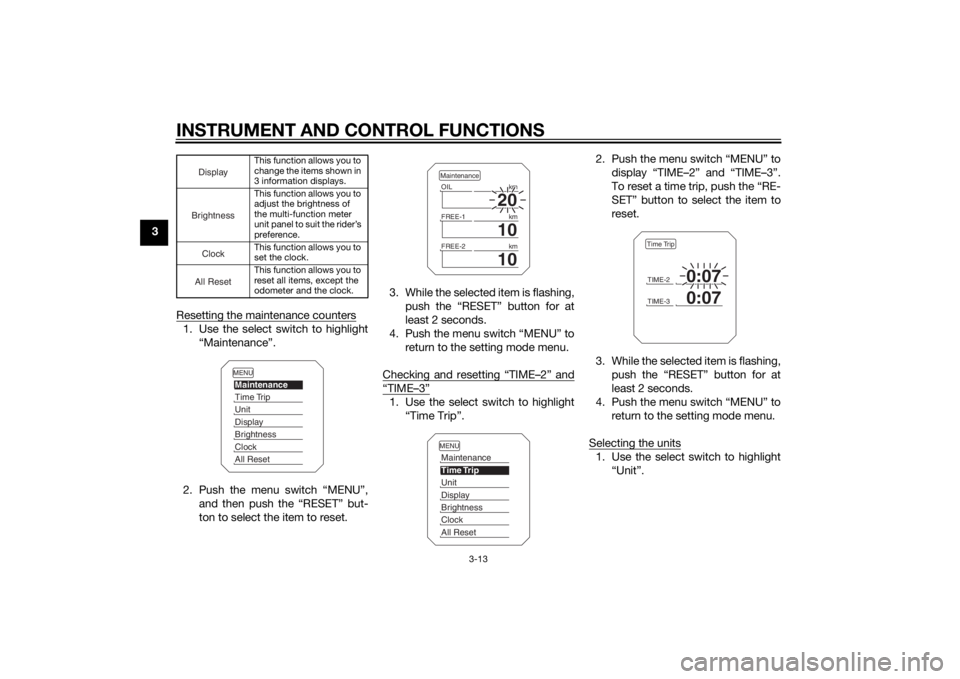
3Resetting the maintenance counters
1. Use the select switch to highlight“Maintenance”.
2. Push the menu switch “MENU”, and then push the “RESET” but-
ton to select the item to reset. 3. While the selected item is flashing,
push the “RESET” button for at
least 2 seconds.
4. Push the menu switch “MENU” to return to the setting mode menu.
Checking and resetting “TIME–2” and
“TIME–3”1. Use the select switch to highlight “Time Trip”. 2. Push the menu switch “MENU” to
display “TIME–2” and “TIME–3”.
To reset a time trip, push the “RE-
SET” button to select the item to
reset.
3. While the selected item is flashing, push the “RESET” button for at
least 2 seconds.
4. Push the menu switch “MENU” to return to the setting mode menu.
Selecting the units
1. Use the select switch to highlight “Unit”.
This function allows you to
change the items shown in
3 information displays.
This function allows you to
adjust the brightness of
the multi-function meter
unit panel to suit the rider’s
preference.
This function allows you to
set the clock.
This function allows you to
reset all items, except the
odometer and the clock.
DisplayBrightnessClockAll Reset
MENUMaintenanceTime TripUnitDisplayBrightnessClockAll Reset
20
OIL km
10
FREE-1km
10
FREE-2kmMaintenanceMENUMaintenanceTime TripUnitDisplayBrightnessClockAll Reset
TIME-2
0:07
TIME-3
0:07
Time Trip
U2PPE0E0.book Page 13 Monday, July 14, 2014 3:25 PM
Page 29 of 114
INSTRUMENT AND CONTROL FUNCTIONS
3-14
3
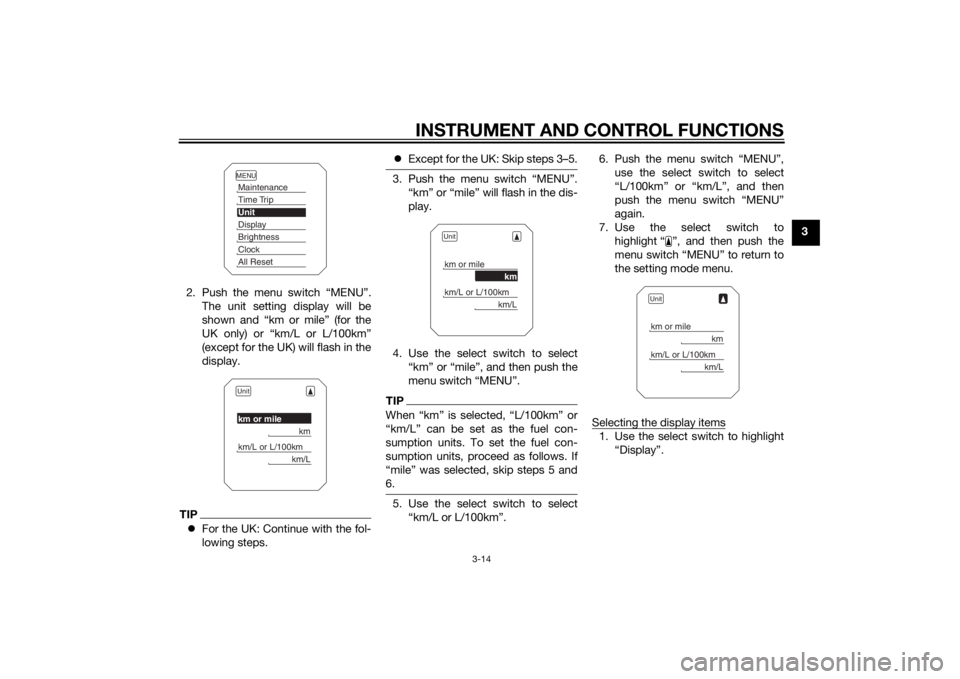
2. Push the menu switch “MENU”. The unit setting display will be
shown and “km or mile” (for the
UK only) or “km/L or L/100km”
(except for the UK) will flash in the
display.
TIPFor the UK: Continue with the fol-
lowing steps.
Except for the UK: Skip steps 3–5.
3. Push the menu switch “MENU”.
“km” or “mile” will flash in the dis-
play.
4. Use the select switch to select “km” or “mile”, and then push the
menu switch “MENU”.TIPWhen “km” is selected, “L/100km” or
“km/L” can be set as the fuel con-
sumption units. To set the fuel con-
sumption units, proceed as follows. If
“mile” was selected, skip steps 5 and
6.5. Use the select switch to select“km/L or L/100km”. 6. Push the menu switch “MENU”,
use the select switch to select
“L/100km” or “km/L”, and then
push the menu switch “MENU”
again.
7. Use the select switch to highlight “ ”, and then push the
menu switch “MENU” to return to
the setting mode menu.
Selecting the display items
1. Use the select switch to highlight “Display”.
MENUMaintenanceTime TripUnitDisplayBrightnessClockAll ResetUnitkm or mile
km
km/L or L/100km
km/L
Unitkm or mile
km
km/L or L/100km
km/L
Unitkm or mile
km
km/L or L/100km
km/L
U2PPE0E0.book Page 14 Monday, July 14, 2014 3:25 PM
Page 30 of 114
INSTRUMENT AND CONTROL FUNCTIONS
3-15
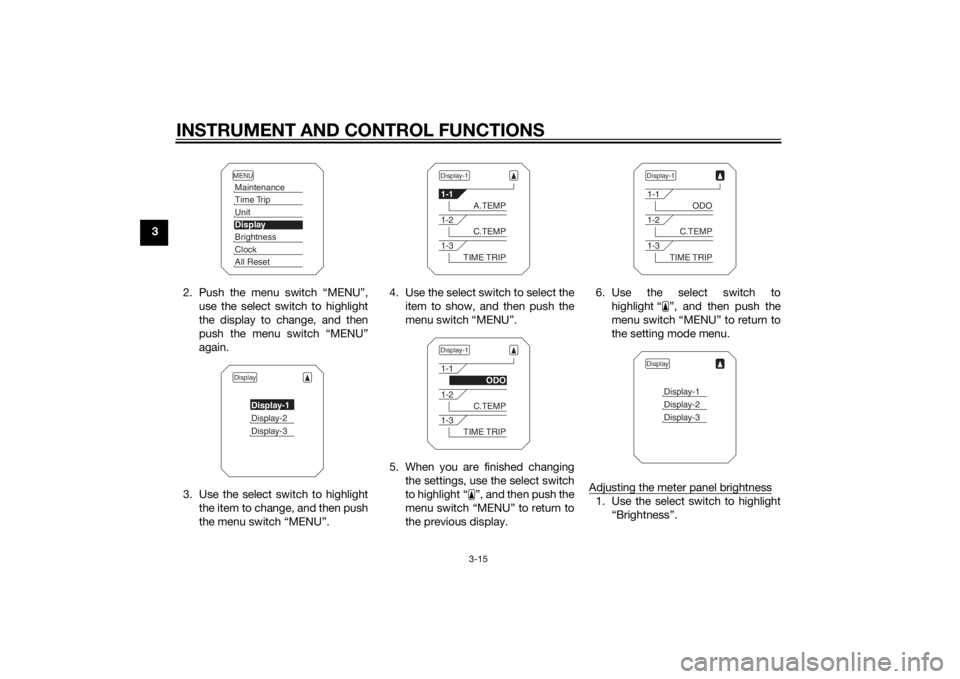
32. Push the menu switch “MENU”,use the select switch to highlight
the display to change, and then
push the menu switch “MENU”
again.
3. Use the select switch to highlight the item to change, and then push
the menu switch “MENU”. 4. Use the select switch to select the
item to show, and then push the
menu switch “MENU”.
5. When you are finished changing the settings, use the select switch
to highlight “ ”, and then push the
menu switch “MENU” to return to
the previous display. 6. Use the select switch to
highlight “ ”, and then push the
menu switch “MENU” to return to
the setting mode menu.
Adjusting the meter panel brightness
1. Use the select switch to highlight “Brightness”.
MENUMaintenanceTime TripUnitDisplayBrightnessClockAll ResetDisplay
Display-1Display-2Display-3
Display-11-1
A.TEMP
1-2
C.TEMP
1-3
TIME TRIP
Display-11-1
ODO
1-2
C.TEMP
1-3
TIME TRIP
Display-11-1
ODO
1-2
C.TEMP
1-3
TIME TRIP
Display
Display-1Display-2Display-3
U2PPE0E0.book Page 15 Monday, July 14, 2014 3:25 PM
Page 31 of 114
INSTRUMENT AND CONTROL FUNCTIONS
3-16
3
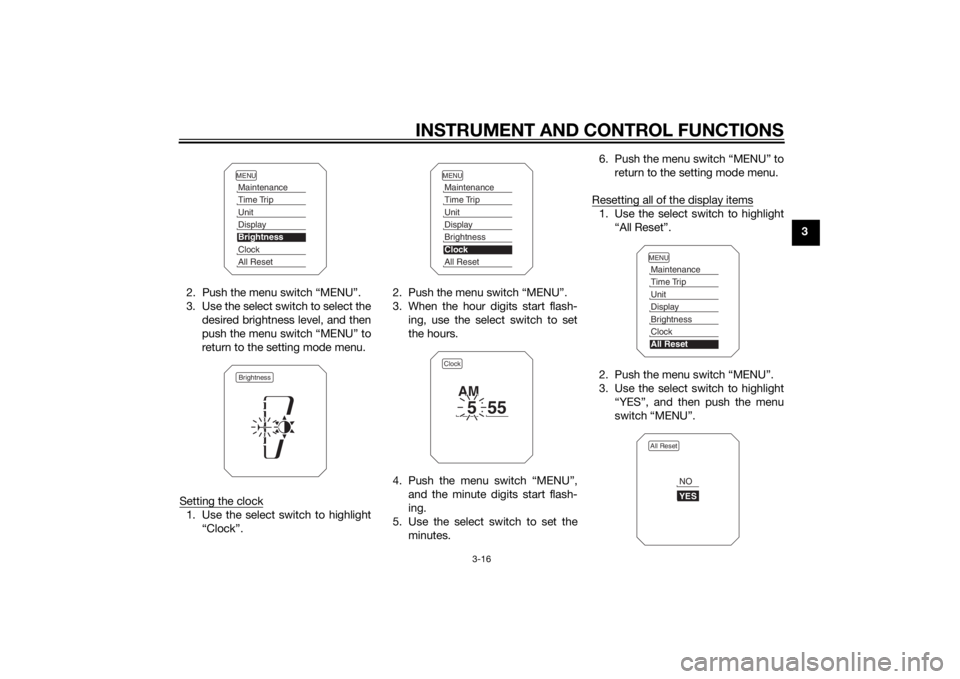
2. Push the menu switch “MENU”.
3. Use the select switch to select the desired brightness level, and then
push the menu switch “MENU” to
return to the setting mode menu.
Setting the clock
1. Use the select switch to highlight “Clock”. 2. Push the menu switch “MENU”.
3. When the hour digits start flash-
ing, use the select switch to set
the hours.
4. Push the menu switch “MENU”, and the minute digits start flash-
ing.
5. Use the select switch to set the minutes. 6. Push the menu switch “MENU” to
return to the setting mode menu.
Resetting all of the display items
1. Use the select switch to highlight “All Reset”.
2. Push the menu switch “MENU”.
3. Use the select switch to highlight “YES”, and then push the menu
switch “MENU”.
MENUMaintenanceTime TripUnitDisplayBrightnessClockAll ResetBrightness
MENUMaintenanceTime TripUnitDisplayBrightnessClockAll ResetClock
5
55
AM
MENUMaintenanceTime TripUnitDisplayBrightnessClockAll ResetAll Reset
YESNO
U2PPE0E0.book Page 16 Monday, July 14, 2014 3:25 PM
Page 32 of 114
INSTRUMENT AND CONTROL FUNCTIONS
3-17
3
TIPThe odometer and the clock cannot be
reset.Self-diagnosis mo de
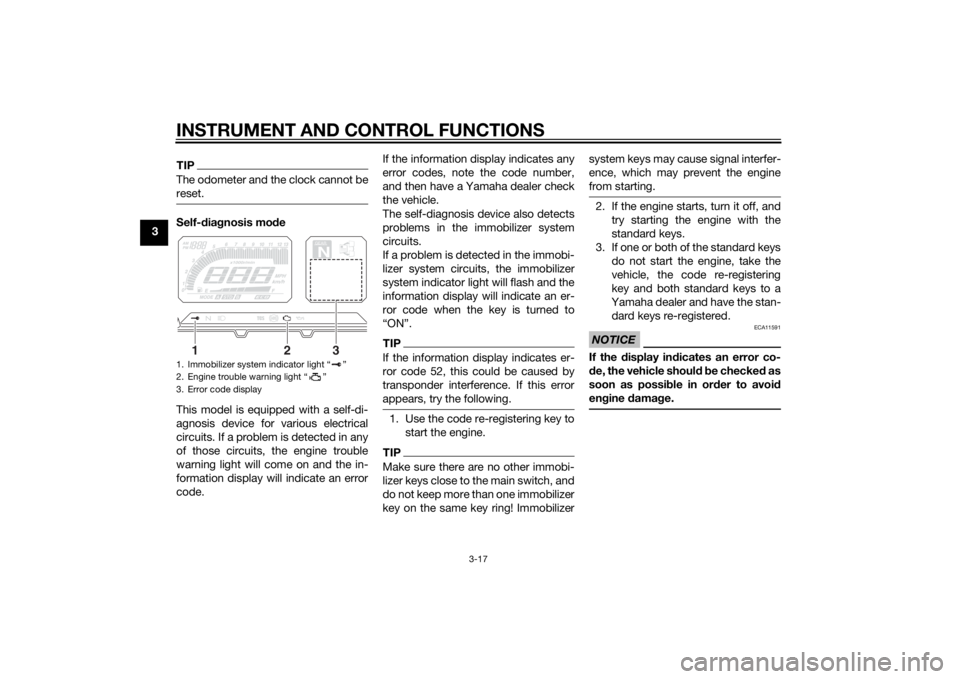
This model is equipped with a self-di-
agnosis device for various electrical
circuits. If a problem is detected in any
of those circuits, the engine trouble
warning light will come on and the in-
formation display will indicate an error
code. If the information display indicates any
error codes, note the code number,
and then have a Yamaha dealer check
the vehicle.
The self-diagnosis device also detects
problems in the immobilizer system
circuits.
If a problem is detected in the immobi-
lizer system circuits, the immobilizer
system indicator light will flash and the
information display will indicate an er-
ror code when the key is turned to
“ON”.
TIPIf the information display indicates er-
ror code 52, this could be caused by
transponder interference. If this error
appears, try the following.1. Use the code re-registering key to
start the engine.TIPMake sure there are no other immobi-
lizer keys close to the main switch, and
do not keep more than one immobilizer
key on the same key ring! Immobilizer system keys may cause signal interfer-
ence, which may prevent the engine
from starting.
2. If the engine starts, turn it off, and
try starting the engine with the
standard keys.
3. If one or both of the standard keys do not start the engine, take the
vehicle, the code re-registering
key and both standard keys to a
Yamaha dealer and have the stan-
dard keys re-registered.NOTICE
ECA11591
If the display in dicates an error co-
d e, the vehicle shoul d b e checked as
soon as possi ble in or der to avoi d
en gine damag e.
1. Immobilizer system indicator light “ ”
2. Engine trouble warning light “ ”
3. Error code display
GEARN
25
A.TEMP ˚C
Lo
C.TEMP˚C
0:00
TIME TRIP
1
2
3
U2PPE0E0.book Page 17 Monday, July 14, 2014 3:25 PM
Page 34 of 114
INSTRUMENT AND CONTROL FUNCTIONS
3-19
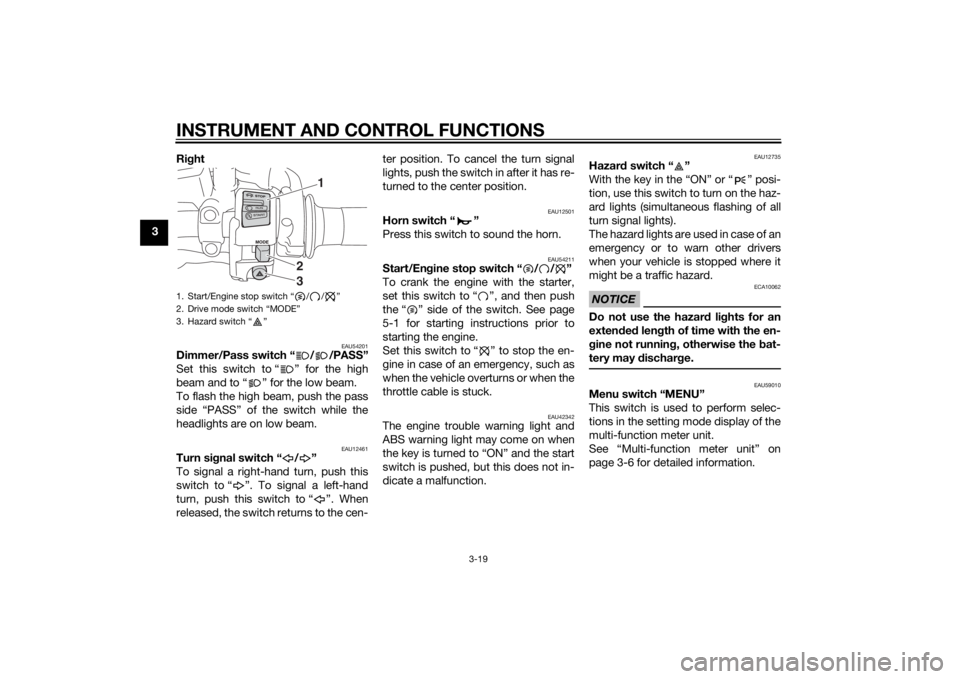
3Ri
ght
EAU54201
Dimmer/Pass switch “ / /PASS”
Set this switch to “ ” for the high
beam and to “ ” for the low beam.
To flash the high beam, push the pass
side “PASS” of the switch while the
headlights are on low beam.
EAU12461
Turn si gnal switch “ / ”
To signal a right-hand turn, push this
switch to “ ”. To signal a left-hand
turn, push this switch to “ ”. When
released, the switch returns to the cen- ter position. To cancel the turn signal
lights, push the switch in after it has re-
turned to the center position.
EAU12501
Horn switch “ ”
Press this switch to sound the horn.
EAU54211
Start/En
gine stop switch “ / / ”
To crank the engine with the starter,
set this switch to “ ”, and then push
the “ ” side of the switch. See page
5-1 for starting instructions prior to
starting the engine.
Set this switch to “ ” to stop the en-
gine in case of an emergency, such as
when the vehicle overturns or when the
throttle cable is stuck.
EAU42342
The engine trouble warning light and
ABS warning light may come on when
the key is turned to “ON” and the start
switch is pushed, but this does not in-
dicate a malfunction.
EAU12735
Hazar d switch “ ”
With the key in the “ON” or “ ” posi-
tion, use this switch to turn on the haz-
ard lights (simultaneous flashing of all
turn signal lights).
The hazard lights are used in case of an
emergency or to warn other drivers
when your vehicle is stopped where it
might be a traffic hazard.NOTICE
ECA10062
Do not use the hazard lights for an
exten ded len gth of time with the en-
g ine not runnin g, otherwise the bat-
tery may dischar ge.
EAU59010
Menu switch “MENU”
This switch is used to perform selec-
tions in the setting mode display of the
multi-function meter unit.
See “Multi-function meter unit” on
page 3-6 for detailed information.
1. Start/Engine stop switch “ / / ”
2. Drive mode switch “MODE”
3. Hazard switch “ ”
1
23
U2PPE0E0.book Page 19 Monday, July 14, 2014 3:25 PM
Page 37 of 114
INSTRUMENT AND CONTROL FUNCTIONS
3-22
3
EAU63040
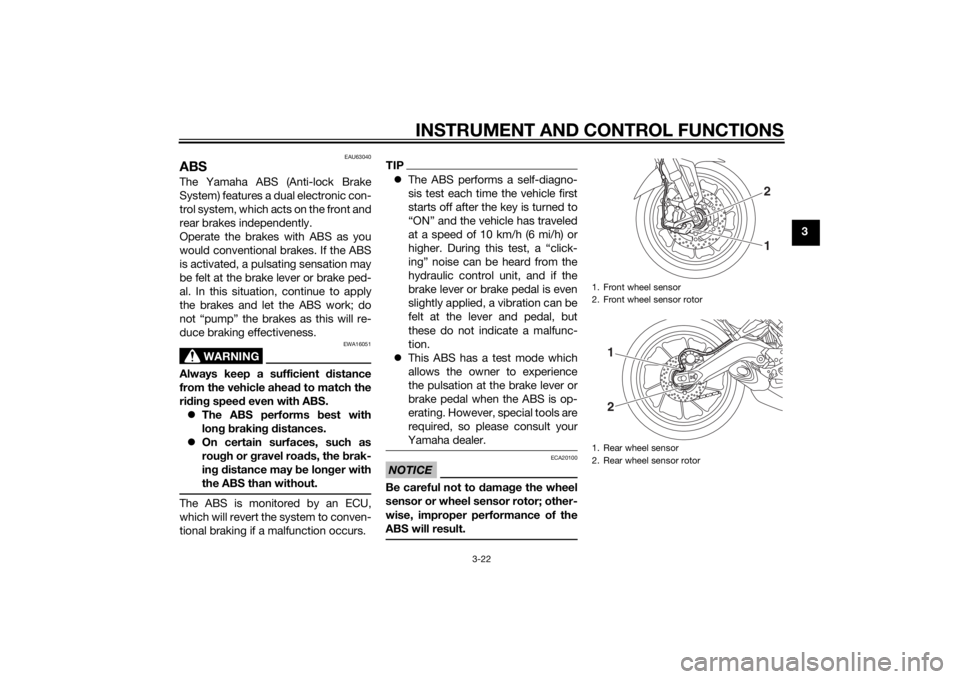
ABSThe Yamaha ABS (Anti-lock Brake
System) features a dual electronic con-
trol system, which acts on the front and
rear brakes independently.
Operate the brakes with ABS as you
would conventional brakes. If the ABS
is activated, a pulsating sensation may
be felt at the brake lever or brake ped-
al. In this situation, continue to apply
the brakes and let the ABS work; do
not “pump” the brakes as this will re-
duce braking effectiveness.
WARNING
EWA16051
Always keep a sufficient distance
from the vehicle ahea d to match the
ri din g speed even with ABS.
The ABS performs best with
lon g b rakin g d istances.
On certain surfaces, such as
rou gh or g ravel roa ds, the b rak-
in g d istance may be lon ger with
the ABS than without.The ABS is monitored by an ECU,
which will revert the system to conven-
tional braking if a malfunction occurs.
TIP The ABS performs a self-diagno-
sis test each time the vehicle first
starts off after the key is turned to
“ON” and the vehicle has traveled
at a speed of 10 km/h (6 mi/h) or
higher. During this test, a “click-
ing” noise can be heard from the
hydraulic control unit, and if the
brake lever or brake pedal is even
slightly applied, a vibration can be
felt at the lever and pedal, but
these do not indicate a malfunc-
tion.
This ABS has a test mode which
allows the owner to experience
the pulsation at the brake lever or
brake pedal when the ABS is op-
erating. However, special tools are
required, so please consult your
Yamaha dealer.NOTICE
ECA20100
Be careful not to d amage the wheel
sensor or wheel sensor rotor; other-
wise, improper performance of the
ABS will result.
1. Front wheel sensor
2. Front wheel sensor rotor
1. Rear wheel sensor
2. Rear wheel sensor rotor
21
12
U2PPE0E0.book Page 22 Monday, July 14, 2014 3:25 PM