oil reset YAMAHA TRICITY 2015 Owners Manual
[x] Cancel search | Manufacturer: YAMAHA, Model Year: 2015, Model line: TRICITY, Model: YAMAHA TRICITY 2015Pages: 86, PDF Size: 2.6 MB
Page 20 of 86
INSTRUMENT AND CONTROL FUNCTIONS
3-4
3b
le wheel lock during emer gency
b rakin g. Have a Yamaha d ealer
check the brake system an d electri-
cal circuits as soon as possi ble.
TIPThe ABS warning light may come on
while accelerating the engine with the
vehicle on its centerstand, but this
does not indicate a malfunction.
EAU12096
Self- dia gnosis device This model is equipped with a self-di-
agnosis device for various electrical
circuits.
If a problem is detected in any of those
circuits, the engine trouble warning
light will come on or flash. If this oc-
curs, have a Yamaha dealer check the
vehicle.NOTICE
ECA11171
To prevent en gine damag e, be sure
to consult a Yamaha d ealer as soon
as possi ble if this occurs.
EAUU1730
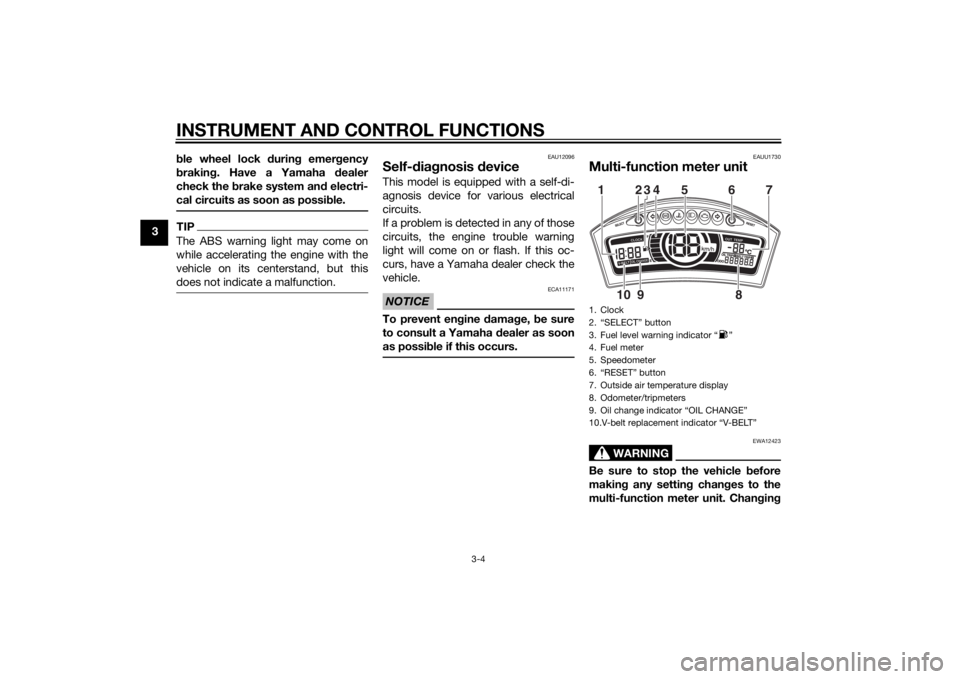
Multi-function meter unit
WARNING
EWA12423
Be sure to stop the vehicle before
makin g any settin g chan ges to the
multi-function meter unit. Chan gin g1. Clock
2. “SELECT” button
3. Fuel level warning indicator “ ”
4. Fuel meter
5. Speedometer
6. “RESET” button
7. Outside air temperature display
8. Odometer/tripmeters
9. Oil change indicator “OIL CHANGE”
10.V-belt replacement indicator “V-BELT”12345 6
8
910 7
U2CME1E0.book Page 4 Tuesday, December 9, 2014 4:12 PM
Page 23 of 86
INSTRUMENT AND CONTROL FUNCTIONS
3-7
3
Push the “SELECT” button to switch
the display between the odometer
mode “ODO”, the tripmeter modes
“TRIP 1” and “TRIP 2”, the oil change
tripmeter mode “OIL TRIP” and the V-
belt replacement tripmeter mode
“BELT TRIP” in the following order:
ODO
→ TRIP 1 → TRIP 2 → OIL TRIP
→ BELT TRIP → ODO
When approximately 1.6 L (0.42 US
gal, 0.35 Imp.gal) of fuel remains in the
fuel tank, the bottom segment of the
fuel meter and fuel level warning indi-
cator will start flashing, and the display
will automatically change to the fuel re-
serve tripmeter mode “F” and start
counting the distance traveled from
that point. In this case, pushing the
“SELECT” button switches the display
between the various tripmeter and
odometer modes in the following or-
der:
F → TRIP 1 → TRIP 2 → OIL TRIP →
BELT TRIP → ODO → F
To reset tripmeters 1, 2, or the fuel re-
serve tripmeter, select it by pushing the
“SELECT” button, and then push the
“RESET” button for at least one sec-
ond. If you do not reset the fuel reserve tripmeter manually, it will reset itself
automatically and the display will re-
turn to the prior mode after refueling
and traveling 5 km (3 mi).
To reset the oil change tripmeter or V-
belt replacement tripmeter, select it by
pushing the “SELECT” button, and
then push the “RESET” button for
three to four seconds.
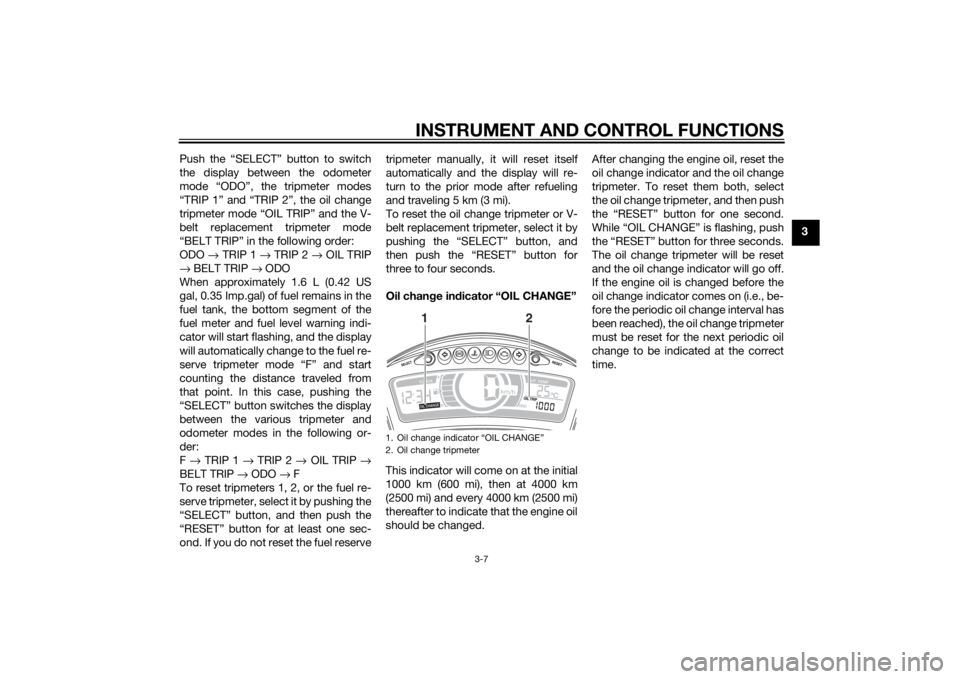
Oil chan
ge in dicator “OIL CHANGE”
This indicator will come on at the initial
1000 km (600 mi), then at 4000 km
(2500 mi) and every 4000 km (2500 mi)
thereafter to indicate that the engine oil
should be changed. After changing the engine oil, reset the
oil change indicator and the oil change
tripmeter. To reset them both, select
the oil change tripmeter, and then push
the “RESET” button for one second.
While “OIL CHANGE” is flashing, push
the “RESET” button for three seconds.
The oil change tripmeter will be reset
and the oil change indicator will go off.
If the engine oil is changed before the
oil change indicator comes on (i.e., be-
fore the periodic oil change interval has
been reached), the oil change tripmeter
must be reset for the next periodic oil
change to be indicated at the correct
time.
1. Oil change indicator “OIL CHANGE”
2. Oil change tripmeter
12
U2CME1E0.book Page 7 Tuesday, December 9, 2014 4:12 PM
Page 52 of 86
PERIODIC MAINTENANCE AND ADJUSTMENT
6-11
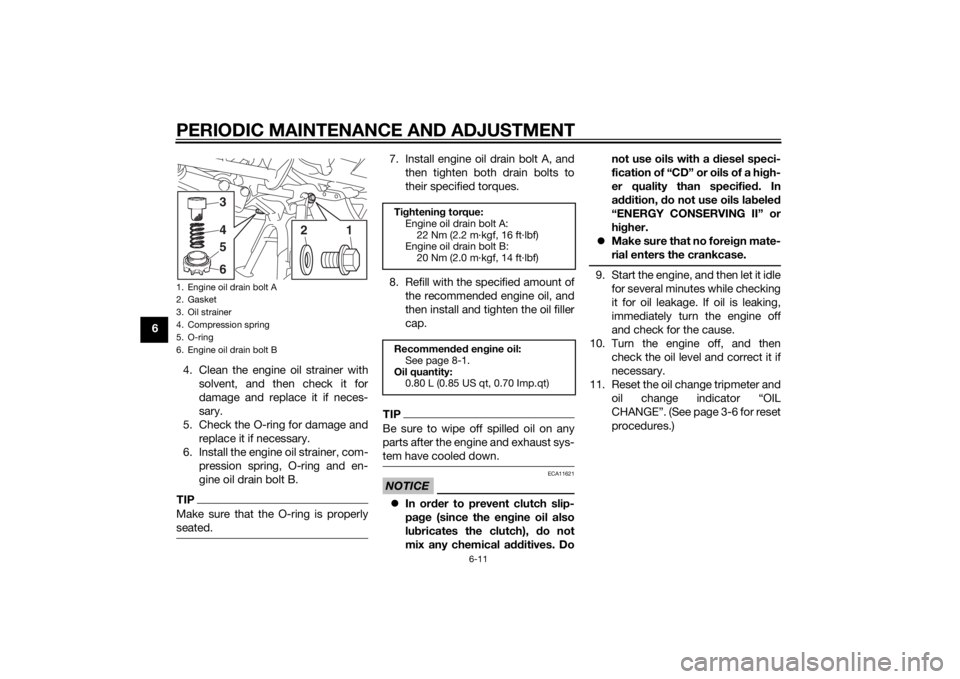
64. Clean the engine oil strainer withsolvent, and then check it for
damage and replace it if neces-
sary.
5. Check the O-ring for damage and replace it if necessary.
6. Install the engine oil strainer, com- pression spring, O-ring and en-
gine oil drain bolt B.
TIPMake sure that the O-ring is properly
seated.
7. Install engine oil drain bolt A, andthen tighten both drain bolts to
their specified torques.
8. Refill with the specified amount of the recommended engine oil, and
then install and tighten the oil filler
cap.TIPBe sure to wipe off spilled oil on any
parts after the engine and exhaust sys-
tem have cooled down.NOTICE
ECA11621
In or der to prevent clutch slip-
pa ge (since the en gine oil also
lu bricates the clutch), do not
mix any chemical additives. Do not use oils with a
diesel speci-
fication of “CD” or oils of a hi gh-
er quality than specifie d. In
a ddition, do not use oils la beled
“ENERGY CONSERVING II” or
hi gher.
Make sure that no forei gn mate-
rial enters the crankcase.
9. Start the engine, and then let it idle for several minutes while checking
it for oil leakage. If oil is leaking,
immediately turn the engine off
and check for the cause.
10. Turn the engine off, and then check the oil level and correct it if
necessary.
11. Reset the oil change tripmeter and oil change indicator “OIL
CHANGE”. (See page 3-6 for reset
procedures.)
1. Engine oil drain bolt A
2. Gasket
3. Oil strainer
4. Compression spring
5. O-ring
6. Engine oil drain bolt B
1
3456
2
Tightenin g torque:
Engine oil drain bolt A: 22 Nm (2.2 m·kgf, 16 ft·lbf)
Engine oil drain bolt B:
20 Nm (2.0 m·kgf, 14 ft·lbf)
Recommen ded en gine oil:
See page 8-1.
Oil quantity: 0.80 L (0.85 US qt, 0.70 Imp.qt)
U2CME1E0.book Page 11 Tuesday, December 9, 2014 4:12 PM