brake light YAMAHA TRICITY 2016 Owners Manual
[x] Cancel search | Manufacturer: YAMAHA, Model Year: 2016, Model line: TRICITY, Model: YAMAHA TRICITY 2016Pages: 87, PDF Size: 2.59 MB
Page 6 of 87

Table of contentsSafety information ............................ 1-1
Further safe-riding points ............... 1-5
Description ....................................... 2-1
Left view ......................................... 2-1
Right view ....................................... 2-2
Controls and instruments ............... 2-3
Instrument an d control functions ... 3-1
Main switch/steering lock............... 3-1
Keyhole shutter .............................. 3-3
Indicator lights and warning lights............................................ 3-3
Self-diagnosis device .................... 3-5
Multi-function meter unit ................ 3-5
Handlebar switches ........................ 3-9
Front brake lever .......................... 3-10
Rear brake lever ........................... 3-10
ABS (for ABS models) .................. 3-11
Fuel tank cap ................................ 3-12
Fuel ............................................... 3-13
Catalytic converter ....................... 3-14
Seat .............................................. 3-15
Passenger footrest ....................... 3-15
Storage compartment .................. 3-16
Luggage hook............................... 3-17
Sidestand ..................................... 3-17
Ignition circuit cut-off system ....... 3-18
Auxiliary DC connector ................. 3-20 For your safety – pre-operation
checks
............................................... 4-1
Operation an d important ri din g
points ................................................. 5-1
Starting the engine .......................... 5-1
Starting off ...................................... 5-2
Acceleration and deceleration ........ 5-3
Braking ............................................ 5-3
Tips for reducing fuel consumption ................................ 5-3
Engine break-in ............................... 5-4
Parking ............................................ 5-4
Perio dic maintenance an d
a d justment ........................................ 6-1
Owner’s tool kit ............................... 6-2
Periodic maintenance chart for
the emission control system ........ 6-3
General maintenance and
lubrication chart ........................... 6-4
Removing and installing the panel ............................................ 6-8
Checking the spark plug ................. 6-8
Engine oil and oil strainer .............. 6-10
Final transmission oil..................... 6-12
Coolant.......................................... 6-13
Air filter and V-belt case air filter elements .................................... 6-14
Checking the throttle grip free play ..................................... 6-16 Valve clearance............................. 6-16
Tires .............................................. 6-17
Cast wheels .................................. 6-18
Checking the front brake lever
free play..................................... 6-19
Checking the rear brake lever free play..................................... 6-19
Checking the front and rear
brake pads ................................ 6-20
Checking the brake fluid level ...... 6-20
Changing the brake fluid .............. 6-22
Checking and lubricating the cables ........................................ 6-22
Checking and lubricating the
throttle grip and cable ............... 6-22
Lubricating the front and rear brake levers ............................... 6-23
Checking and lubricating the centerstand and sidestand........ 6-23
Checking the front fork ................. 6-24
Checking the steering................... 6-25
Checking the wheel bearings ....... 6-25
Checking the steering tie rod ....... 6-25
Checking the leaning system ....... 6-26
Battery .......................................... 6-26
Replacing the fuses ...................... 6-27
Replacing the headlight bulb ........ 6-29
Auxiliary lights............................... 6-30
Tail/brake light .............................. 6-30
Turn signal light bulb .................... 6-31
Troubleshooting............................ 6-31U2CME2E0.book Page 1 Friday, August 21, 2015 9:16 AM
Page 19 of 87
Instrument and control functions
3-3
3
EAUN0353
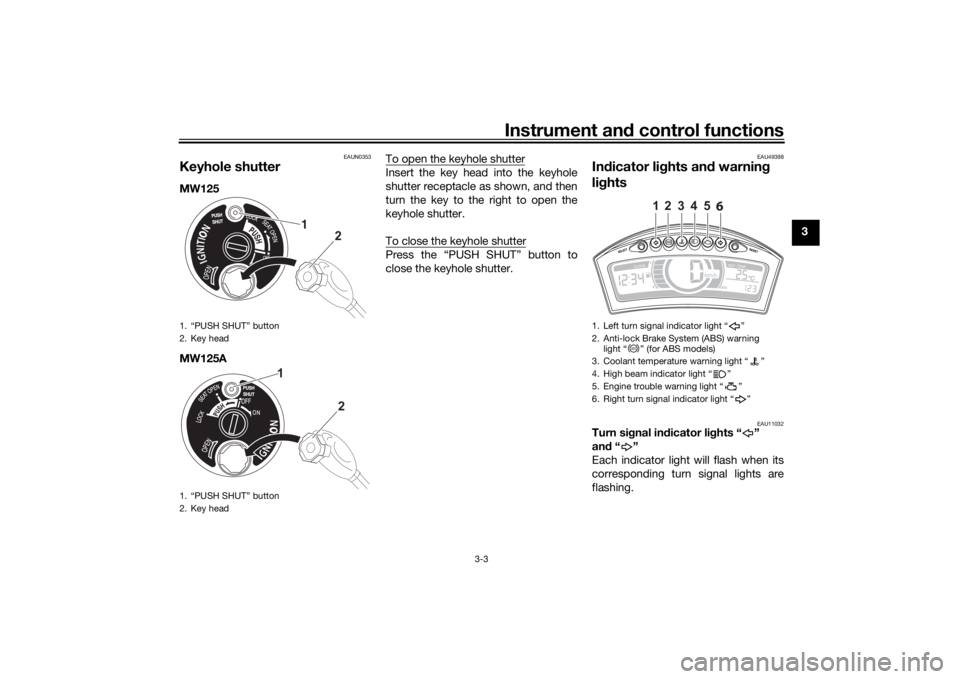
Keyhole shutterMW125
MW125A To open the keyhole shutter
Insert the key head into the keyhole
shutter receptacle as shown, and then
turn the key to the right to open the
keyhole shutter.
To close the keyhole shutterPress the “PUSH SHUT” button to
close the keyhole shutter.
EAU49398
In
dicator li ghts an d warnin g
lig hts
EAU11032
Turn si gnal in dicator li ghts “ ”
an d“”
Each indicator light will flash when its
corresponding turn signal lights are
flashing.
1. “PUSH SHUT” button
2. Key head
1. “PUSH SHUT” button
2. Key head
1
2
1
2
1. Left turn signal indicator light “ ”
2. Anti-lock Brake System (ABS) warning light “ ” (for ABS models)
3. Coolant temperature warning light “ ”
4. High beam indicator light “ ”
5. Engine trouble warning light “ ”
6. Right turn signal indicator light “ ”
1
2
3
4
5
6
ABS
U2CME2E0.book Page 3 Friday, August 21, 2015 9:16 AM
Page 20 of 87
Instrument and control functions
3-4
3
EAU11081
Hi gh beam in dicator li ght “ ”
This indicator light comes on when the
high beam of the headlight is switched
on.
EAU11447
Coolant temperature warnin g
li g ht “ ”
This warning light comes on if the en-
gine overheats. If this occurs, stop the
engine immediately and allow the en-
gine to cool.
The electrical circuit of the warning
light can be checked by turning the key
to “ON”. The warning light should
come on for a few seconds, and then
go off.
If the warning light does not come on
initially when the key is turned to “ON”,
or if the warning light remains on, have
a Yamaha dealer check the electrical
circuit.NOTICE
ECA10022
Do not continue to operate the en-
g ine if it is overheatin g.
TIP For radiator-fan-equipped vehi-
cles, the radiator fan(s) automati-
cally switch on or off according to
the coolant temperature in the ra-
diator.
If the engine overheats, see page
6-33 for further instructions.
EAU11506
Engine trou ble warnin g lig ht “ ”
This warning light comes on or flashes
if a problem is detected in the electrical
circuit monitoring the engine. If this oc-
curs, have a Yamaha dealer check the
self-diagnosis system. (See page 3-5
for an explanation of the self-diagnosis
device.)
The electrical circuit of the warning
light can be checked by turning the key
to “ON”. The warning light should
come on for a few seconds, and then
go off.
If the warning light does not come on
initially when the key is turned to “ON”,
or if the warning light remains on, have
a Yamaha dealer check the electrical
circuit.
EAUU1960
ABS warnin g li ght “ ” (for ABS
mo dels)
In normal operation, the ABS warning
light comes on when the key is turned
to “ON”, and goes off after traveling at
a speed of 10 km/h (6 mi/h) or higher.
If the ABS warning light: does not come on when the key is
turned to “ON”
comes on or flashes while riding
does not go off after traveling at a
speed of 10 km/h (6 mi/h) or high-
er
The ABS may not work correctly. If any
of the above occurs, have a Yamaha
dealer check the system as soon as
possible. (See page 3-11 for an expla-
nation of the ABS.)
WARNING
EWA16041
If the ABS warnin g li ght does not g o
off after travelin g at a speed of 10
km/h (6 mi/h) or hi gher, or if the
warnin g li ght comes on or flashes
while ri din g, the brake system re-
verts to conventional braking . If ei-
ther of the a bove occurs, or if the
warnin g li ght does not come on at
ABS
U2CME2E0.book Page 4 Friday, August 21, 2015 9:16 AM
Page 21 of 87
Instrument and control functions
3-5
3
all, use extra caution to avoi
d possi-
b le wheel lock durin g emer gency
b rakin g. Have a Yamaha d ealer
check the brake system an d electri-
cal circuits as soon as possi ble.
TIPThe ABS warning light may come on
while accelerating the engine with the
vehicle on its centerstand, but this
does not indicate a malfunction.
EAU12096
Self- dia gnosis device This model is equipped with a self-di-
agnosis device for various electrical
circuits.
If a problem is detected in any of those
circuits, the engine trouble warning
light will come on or flash. If this oc-
curs, have a Yamaha dealer check the
vehicle.NOTICE
ECA11171
To prevent en gine damag e, be sure
to consult a Yamaha dealer as soon
as possi ble if this occurs.
EAUU1731
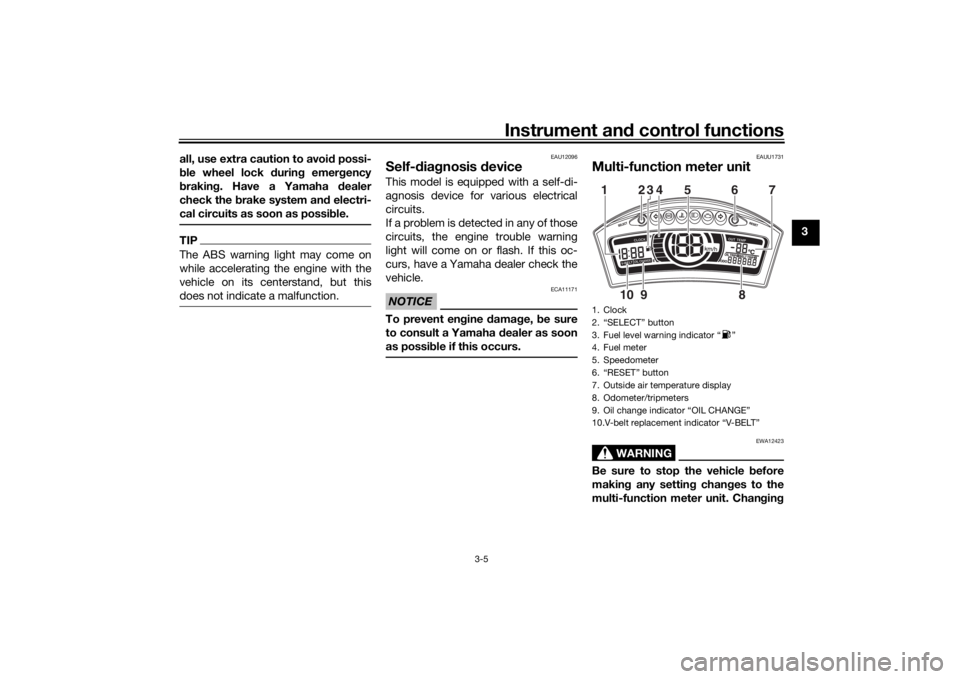
Multi-function meter unit
WARNING
EWA12423
Be sure to stop the vehicle before
makin g any settin g chan ges to the
multi-function meter unit. Chan gin g1. Clock
2. “SELECT” button
3. Fuel level warning indicator “ ”
4. Fuel meter
5. Speedometer
6. “RESET” button
7. Outside air temperature display
8. Odometer/tripmeters
9. Oil change indicator “OIL CHANGE”
10.V-belt replacement indicator “V-BELT”12345 6
8
910 7
U2CME2E0.book Page 5 Friday, August 21, 2015 9:16 AM
Page 26 of 87
Instrument and control functions
3-10
3
EAU12401
Dimmer switch “ / ”
Set this switch to “ ” for the high
beam and to “ ” for the low beam.
EAU12461
Turn si gnal switch “ / ”
To signal a right-hand turn, push this
switch to “ ”. To signal a left-hand
turn, push this switch to “ ”. When
released, the switch returns to the cen-
ter position. To cancel the turn signal
lights, push the switch in after it has re-
turned to the center position.
EAU12501
Horn switch “ ”
Press this switch to sound the horn.
EAU12722
Start switch “ ”
With the sidestand up, push this switch
while applying the front or rear brake to
crank the engine with the starter. See
page 5-1 for starting instructions prior
to starting the engine.
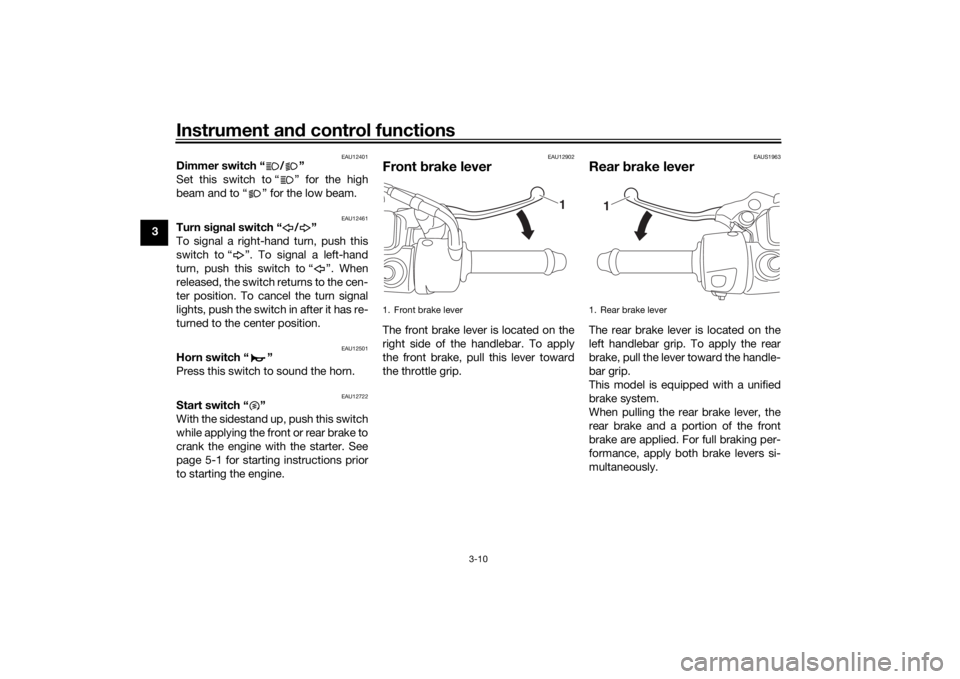
EAU12902
Front brake leverThe front brake lever is located on the
right side of the handlebar. To apply
the front brake, pull this lever toward
the throttle grip.
EAUS1963
Rear brake leverThe rear brake lever is located on the
left handlebar grip. To apply the rear
brake, pull the lever toward the handle-
bar grip.
This model is equipped with a unified
brake system.
When pulling the rear brake lever, the
rear brake and a portion of the front
brake are applied. For full braking per-
formance, apply both brake levers si-
multaneously.
1. Front brake lever
1
1. Rear brake lever
1
U2CME2E0.book Page 10 Friday, August 21, 2015 9:16 AM
Page 27 of 87
Instrument and control functions
3-11
3
TIP As the unified brake system is me-
chanical, additional free play can
be felt in the front brake lever
when the rear brake lever is being
pulled.
The unified brake system does not
function when the front brake is
applied alone.
EAU70900
ABS (for ABS mo dels)Your leaning multi-wheel vehicle’s ABS
(Anti-lock Brake System) features an
electronic control system, which acts
on each of the front and rear brakes in-
dependently.
Operate the brakes with ABS as you
would conventional brakes. If the ABS
is activated, a pulsating sensation may
be felt at the brake levers. In this situa-
tion, continue to apply the brakes and
let the ABS work; do not “pump” the
brakes as this will reduce braking ef-
fectiveness.
WARNING
EWA16051
Always keep a sufficient d istance
from the vehicle ahead to match the
ri din g speed even with ABS.
The ABS performs best with
lon g b rakin g d istances.
On certain surfaces, such as
rou gh or g ravel roa ds, the b rak-
in g d istance may be lon ger with
the ABS than without.The ABS is monitored by an ECU,
which will revert the system to conven-
tional braking if a malfunction occurs.
TIP The ABS performs a self-diagno-
sis test each time the vehicle first
starts off after the key is turned to
“ON” and the vehicle has traveled
at a speed of 10 km/h (6 mi/h) or
higher. During this test, a “click-
ing” noise can be heard from the
front of the vehicle, and if either
brake lever is even slightly ap-
plied, a vibration can be felt at the
lever, but these do not indicate a
malfunction.
This ABS has a test mode which
allows the owner to experience
the pulsation at the brake levers
when the ABS is operating. How-
ever, special tools are required, so
please consult your Yamaha deal-
er.NOTICE
ECA20100
Be careful not to d amage the wheel
sensor or wheel sensor rotor; other-
wise, improper performance of the
ABS will result.
U2CME2E0.book Page 11 Friday, August 21, 2015 9:16 AM
Page 40 of 87
Operation and important rid ing points
5-2
5 For ABS models:
The ABS warning light should
come on when the main switch is
turned to “ON” and then go off af-
ter traveling at a speed of 10 km/h
(6 mi/h) or higher.
NOTICE
ECA17682
If the ABS warnin
g lig ht does not
come on an d then g o off as ex-
plaine d a bove, see pa ge 3-3 for the
warnin g lig ht circuit check.2. Close the throttle completely.
3. Start the engine by pushing the
start switch while applying the
front or rear brake.
If the engine fails to start, release
the start switch, wait a few sec-
onds, and then try again. Each
starting attempt should be as
short as possible to preserve the
battery. Do not crank the engine
more than 10 seconds on any one
attempt.
NOTICE
ECA11043
For maximum en gine life, never ac-
celerate har d when the en gine is
col d!
EAU60640
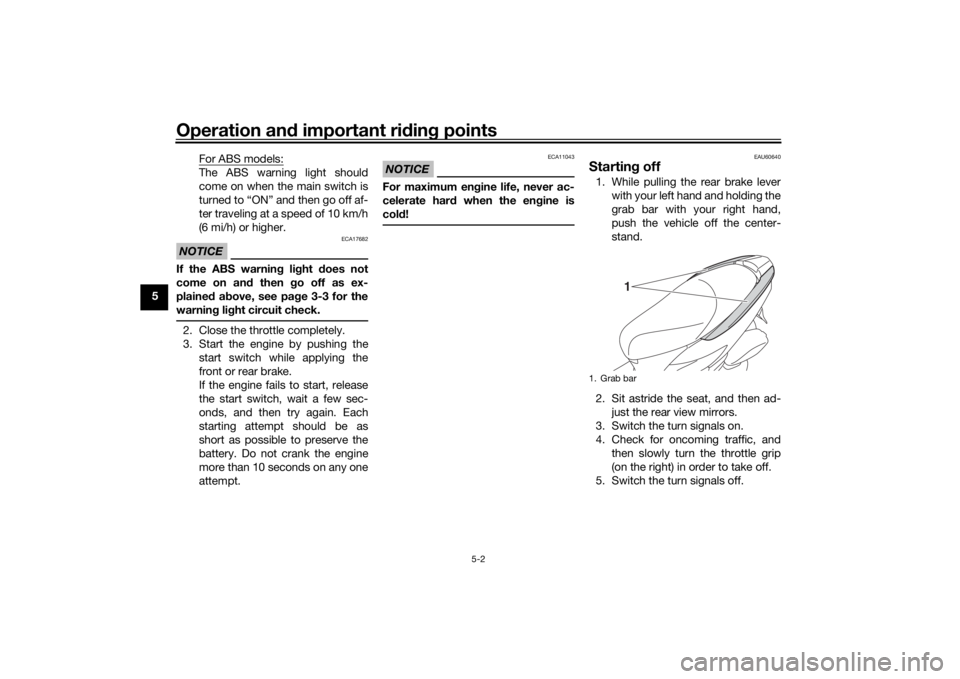
Startin g off1. While pulling the rear brake lever
with your left hand and holding the
grab bar with your right hand,
push the vehicle off the center-
stand.
2. Sit astride the seat, and then ad- just the rear view mirrors.
3. Switch the turn signals on.
4. Check for oncoming traffic, and then slowly turn the throttle grip
(on the right) in order to take off.
5. Switch the turn signals off.1. Grab bar
1
U2CME2E0.book Page 2 Friday, August 21, 2015 9:16 AM
Page 41 of 87
Operation and important ri din g points
5-3
5
EAU16782
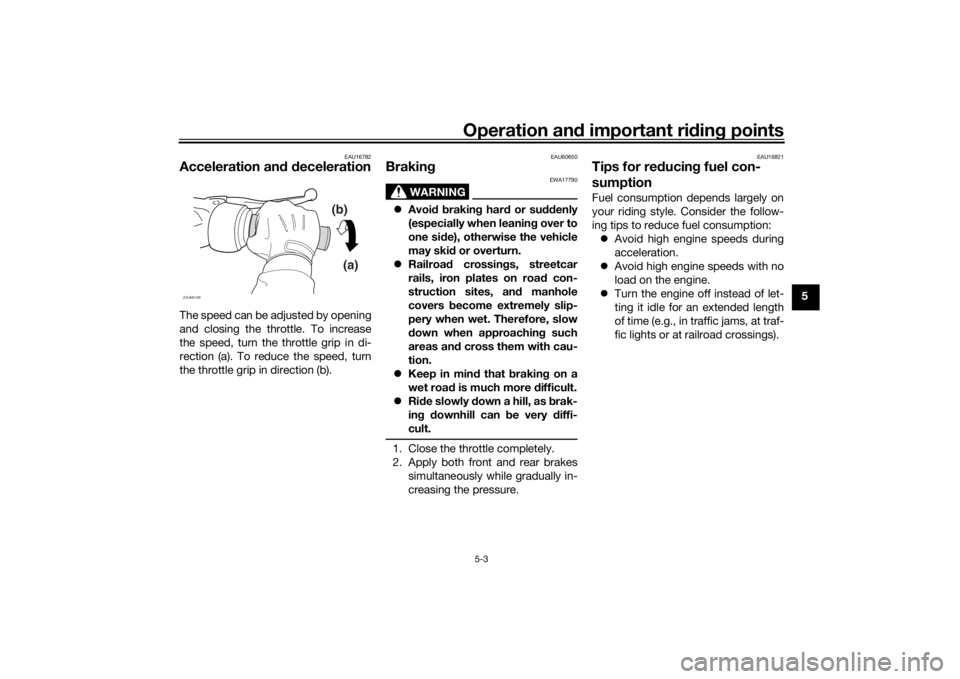
Acceleration an d d ecelerationThe speed can be adjusted by opening
and closing the throttle. To increase
the speed, turn the throttle grip in di-
rection (a). To reduce the speed, turn
the throttle grip in direction (b).
EAU60650
Brakin g
WARNING
EWA17790
Avoi d b rakin g har d or su ddenly
(especially when leanin g over to
one si de), otherwise the vehicle
may ski d or overturn.
Railroa d crossin gs, streetcar
rails, iron plates on roa d con-
struction sites, an d manhole
covers become extremely slip-
pery when wet. Therefore, slow
d own when approachin g such
areas an d cross them with cau-
tion.
Keep in min d that b raking on a
wet roa d is much more difficult.
Ride slowly down a hill, as b rak-
in g d ownhill can be very d iffi-
cult.1. Close the throttle completely.
2. Apply both front and rear brakes simultaneously while gradually in-
creasing the pressure.
EAU16821
Tips for re ducin g fuel con-
sumptionFuel consumption depends largely on
your riding style. Consider the follow-
ing tips to reduce fuel consumption:
Avoid high engine speeds during
acceleration.
Avoid high engine speeds with no
load on the engine.
Turn the engine off instead of let-
ting it idle for an extended length
of time (e.g., in traffic jams, at traf-
fic lights or at railroad crossings).
(b)
(a)
ZAUM0199
U2CME2E0.book Page 3 Friday, August 21, 2015 9:16 AM
Page 72 of 87
Periodic maintenance an d a djustment
6-30
6 3. Place a new headlight bulb into
position, and then secure it with
the bulb holder.
4. Install the headlight bulb cover, and then connect the coupler.
5. Have a Yamaha dealer adjust the headlight beam if necessary.
EAU54502
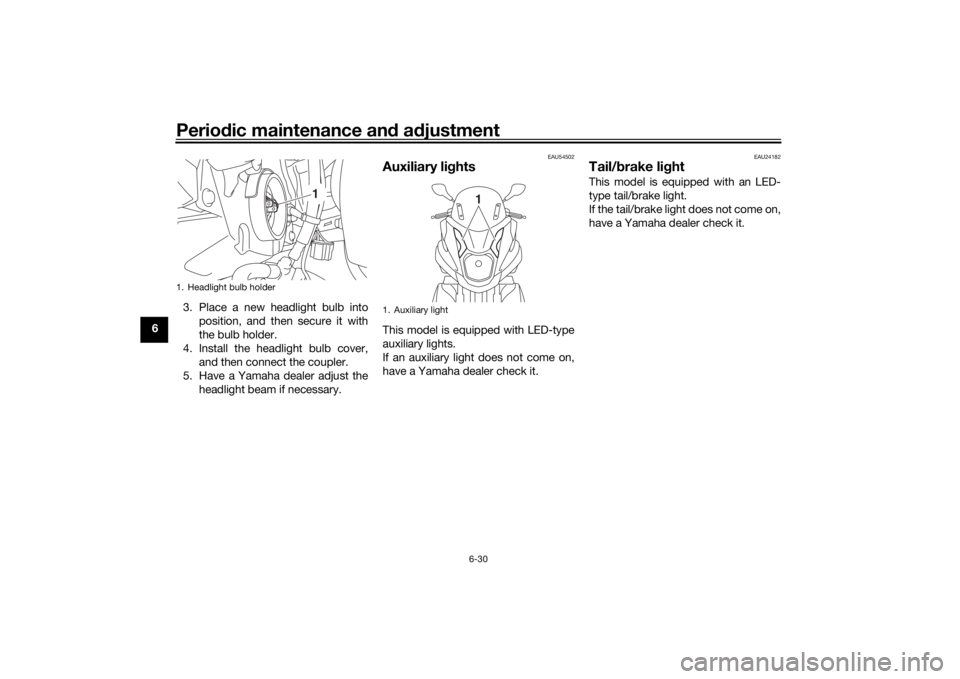
Auxiliary li ghtsThis model is equipped with LED-type
auxiliary lights.
If an auxiliary light does not come on,
have a Yamaha dealer check it.
EAU24182
Tail/ brake li ghtThis model is equipped with an LED-
type tail/brake light.
If the tail/brake light does not come on,
have a Yamaha dealer check it.
1. Headlight bulb holder
1
1. Auxiliary light
1
U2CME2E0.book Page 30 Friday, August 21, 2015 9:16 AM
Page 78 of 87
Vehicle care and stora ge
7-3
7 thoroughly with water. For additional
cleaning, use Yamaha Windshield
Cleaner or another high-quality wind-
shield cleaner. Some cleaning com-
pounds for plastics may leave
scratches on the windshield. Before
using such cleaners, test an area of the
windshield which does not affect your
visibility and which cannot be easily
recognized.
After cleaning
1. Dry the vehicle with a chamois or an absorbing cloth.
2. Use a chrome polish to shine chrome, aluminum, and stainless-
steel parts, including the exhaust
system. (Even the thermally in-
duced discoloring of stainless-
steel exhaust systems can be re-
moved through polishing.)
3. To prevent corrosion, it is recom- mended to apply a corrosion pro-
tection spray on all metal,
including chrome- and nickel-plat-
ed surfaces.
4. Use spray oil as a universal clean- er to remove any remaining dirt. 5. Touch up minor paint damage
caused by stones, etc.
6. Wax all painted surfaces.
7. Let the vehicle dry completely be- fore storing or covering it.
WARNING
EWA17830
Contaminants on the brakes or tires
can cause loss of control. Make sure that there is no oil or
wax on the b rakes or tires. If
necessary, clean the brake
d iscs an d b rake linin gs with a
re gular brake disc cleaner or
acetone, an d wash the tires with
warm water an d a mil d d eter-
g ent.
Before operating the vehicle
test its brakin g performance
an d cornerin g b ehavior.NOTICE
ECAU0022
Apply spray oil an d wax spar-
in gly an d make sure to wipe off
any excess.
Never apply oil or wax to any
rubber parts, plastic parts or
hea dlig ht, tailli ght an d meter
lenses, but treat them with a
suita ble care prod uct.
Avoi d usin g a brasive polishin g
compoun ds as they will wear
away the paint.
TIP Consult a Yamaha dealer for ad-
vice on what products to use.
Washing, rainy weather or humid
climates can cause the headlight
lens to fog. Turning the headlight
on for a short period of time will
help remove the moisture from the
lens.
U2CME2E0.book Page 3 Friday, August 21, 2015 9:16 AM