cruise YAMAHA VX 2013 User Guide
[x] Cancel search | Manufacturer: YAMAHA, Model Year: 2013, Model line: VX, Model: YAMAHA VX 2013Pages: 96, PDF Size: 3.03 MB
Page 28 of 96
Description
22
9
8
7 6 5 4123
10 11
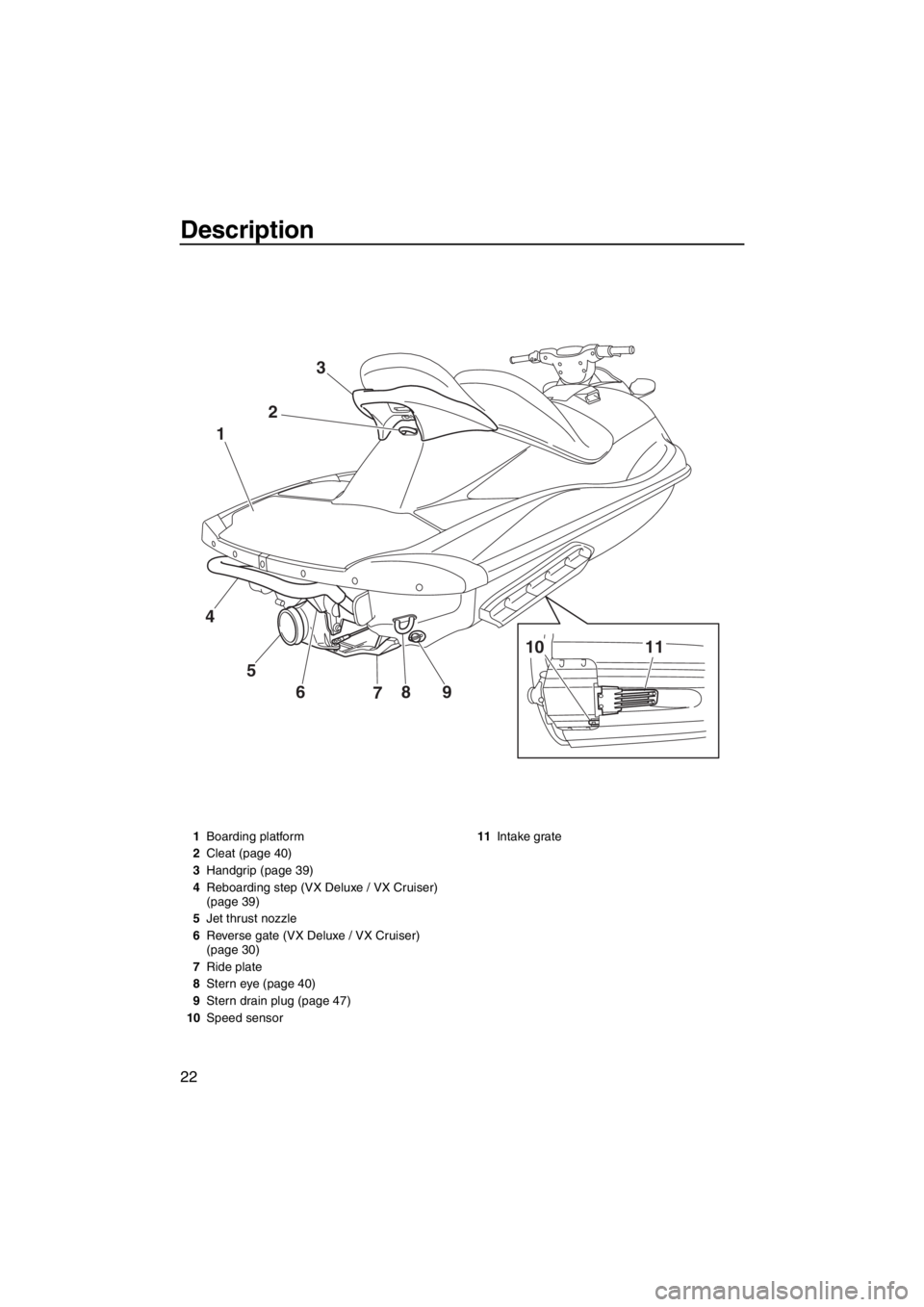
1Boarding platform
2Cleat (page 40)
3Handgrip (page 39)
4Reboarding step (VX Deluxe / VX Cruiser)
(page 39)
5Jet thrust nozzle
6Reverse gate (VX Deluxe / VX Cruiser)
(page 30)
7Ride plate
8Stern eye (page 40)
9Stern drain plug (page 47)
10Speed sensor11Intake grate
UF2P70E0.book Page 22 Tuesday, July 31, 2012 1:48 PM
Page 29 of 96
Description
23
5
4 1
23
10
1112 7
68
9
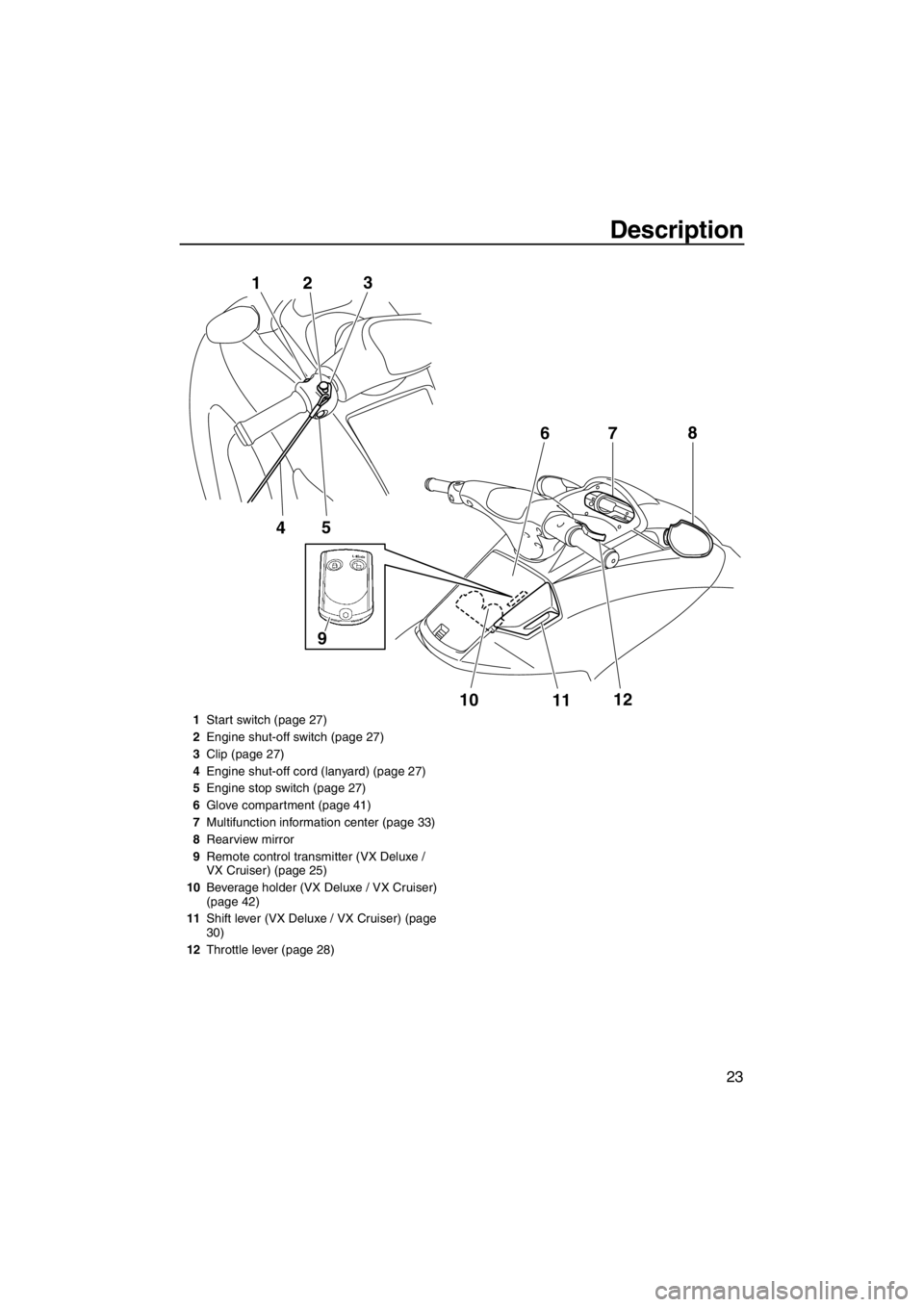
1Start switch (page 27)
2Engine shut-off switch (page 27)
3Clip (page 27)
4Engine shut-off cord (lanyard) (page 27)
5Engine stop switch (page 27)
6Glove compartment (page 41)
7Multifunction information center (page 33)
8Rearview mirror
9Remote control transmitter (VX Deluxe /
VX Cruiser) (page 25)
10Beverage holder (VX Deluxe / VX Cruiser)
(page 42)
11Shift lever (VX Deluxe / VX Cruiser) (page
30)
12Throttle lever (page 28)
UF2P70E0.book Page 23 Tuesday, July 31, 2012 1:48 PM
Page 31 of 96
Control function operation
25
EJU31024
Watercraft control functions EJU41390Remote control transmitter
(VX Deluxe / VX Cruiser)
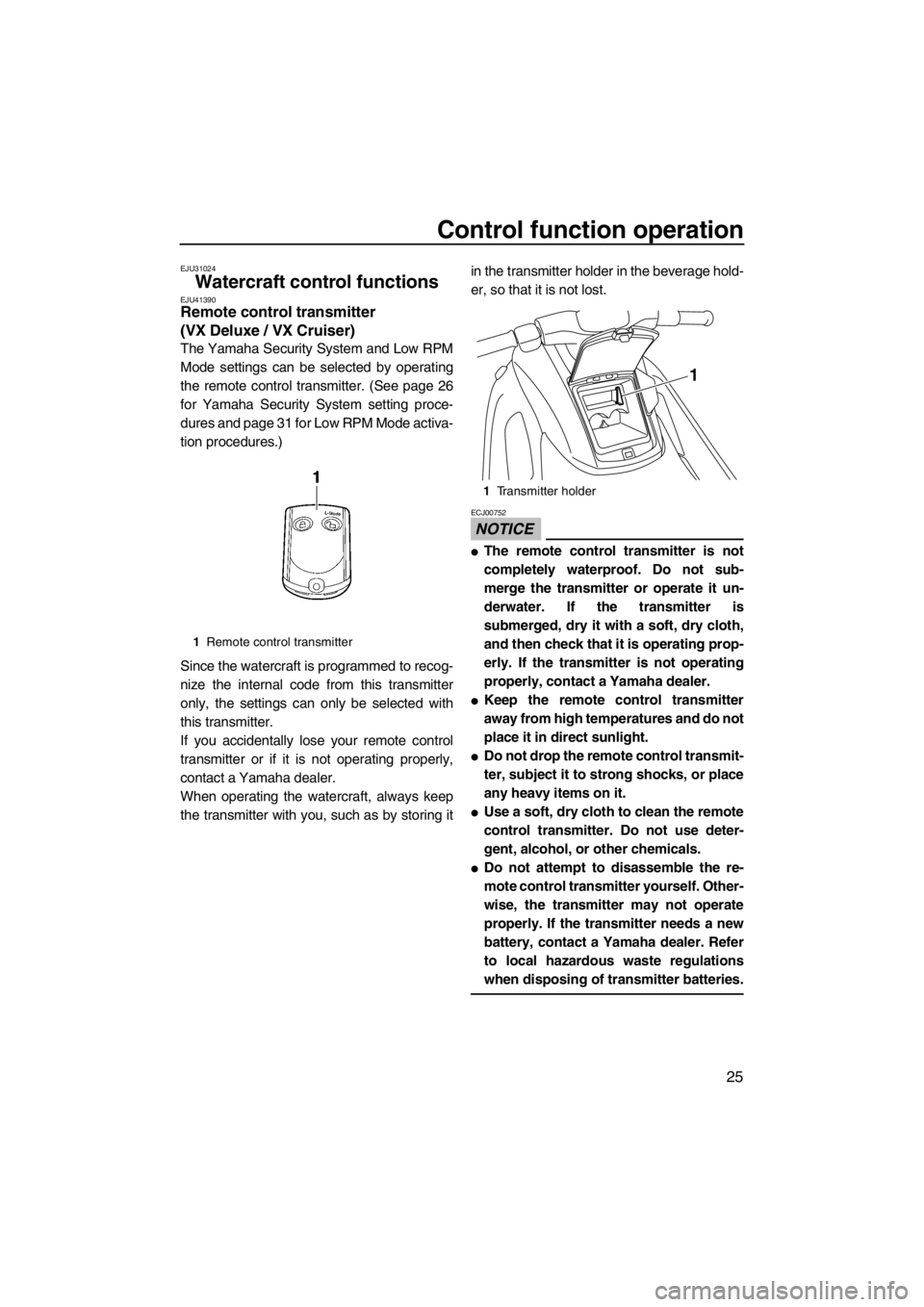
The Yamaha Security System and Low RPM
Mode settings can be selected by operating
the remote control transmitter. (See page 26
for Yamaha Security System setting proce-
dures and page 31 for Low RPM Mode activa-
tion procedures.)
Since the watercraft is programmed to recog-
nize the internal code from this transmitter
only, the settings can only be selected with
this transmitter.
If you accidentally lose your remote control
transmitter or if it is not operating properly,
contact a Yamaha dealer.
When operating the watercraft, always keep
the transmitter with you, such as by storing itin the transmitter holder in the beverage hold-
er, so that it is not lost.
NOTICE
ECJ00752
●The remote control transmitter is not
completely waterproof. Do not sub-
merge the transmitter or operate it un-
derwater. If the transmitter is
submerged, dry it with a soft, dry cloth,
and then check that it is operating prop-
erly. If the transmitter is not operating
properly, contact a Yamaha dealer.
●Keep the remote control transmitter
away from high temperatures and do not
place it in direct sunlight.
●Do not drop the remote control transmit-
ter, subject it to strong shocks, or place
any heavy items on it.
●Use a soft, dry cloth to clean the remote
control transmitter. Do not use deter-
gent, alcohol, or other chemicals.
●Do not attempt to disassemble the re-
mote control transmitter yourself. Other-
wise, the transmitter may not operate
properly. If the transmitter needs a new
battery, contact a Yamaha dealer. Refer
to local hazardous waste regulations
when disposing of transmitter batteries.
1Remote control transmitter
1Transmitter holder
1
UF2P70E0.book Page 25 Tuesday, July 31, 2012 1:48 PM
Page 32 of 96
Control function operation
26
EJU31384Yamaha Security System (VX Deluxe /
VX Cruiser)
The Yamaha Security System functions to
help prevent unauthorized use or theft of the
watercraft. The lock and unlock modes of the
security system can be selected by operating
the remote control transmitter that is included
with this watercraft. The engine cannot be
started if the lock mode of the security system
is selected. The engine can only be started if
the unlock mode is selected. (See page 25 for
information on the remote control transmitter.)
TIP:
The Yamaha Security System settings can
only be selected while the engine is stopped.
EJU36106Yamaha Security System settings
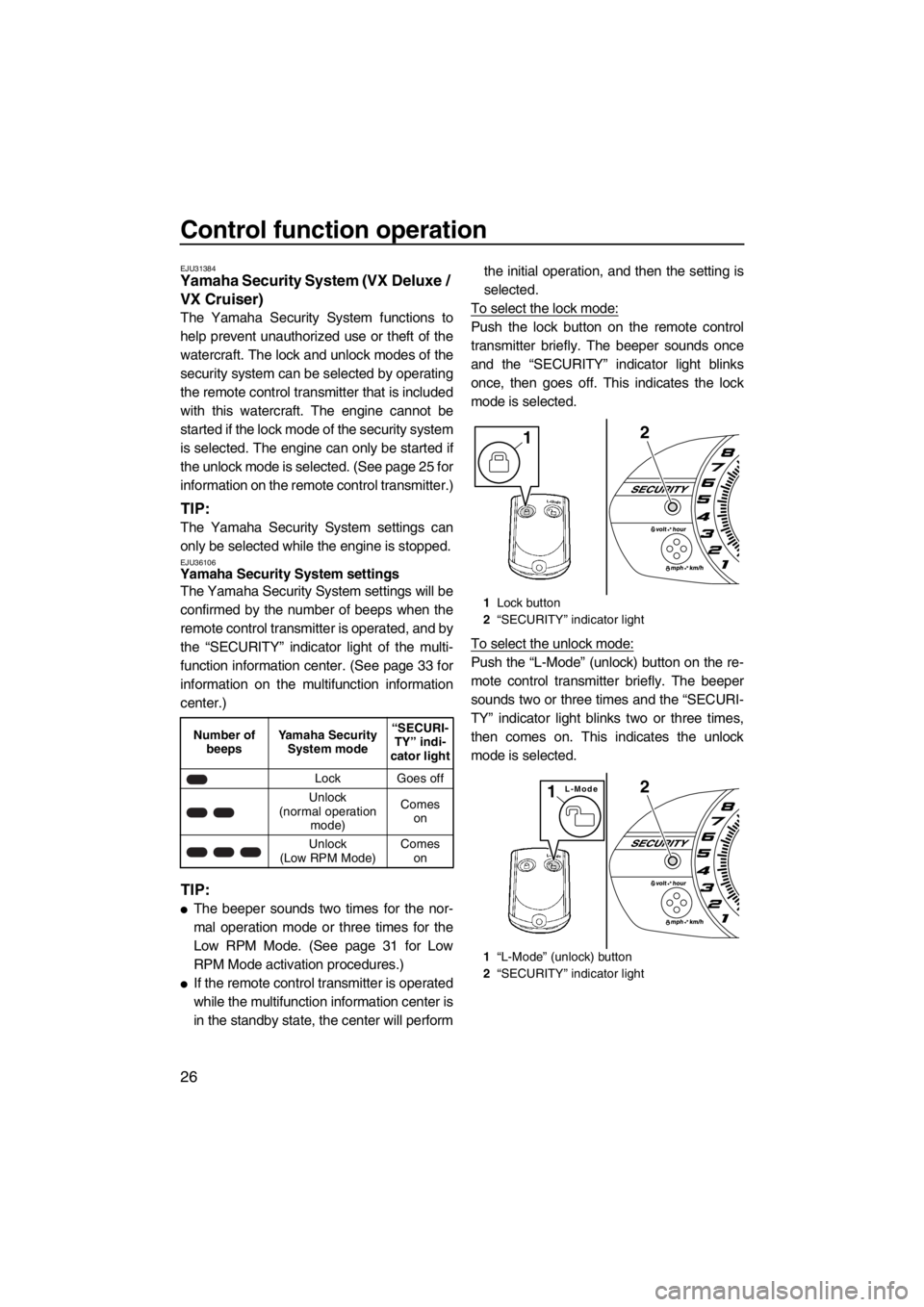
The Yamaha Security System settings will be
confirmed by the number of beeps when the
remote control transmitter is operated, and by
the “SECURITY” indicator light of the multi-
function information center. (See page 33 for
information on the multifunction information
center.)
TIP:
●The beeper sounds two times for the nor-
mal operation mode or three times for the
Low RPM Mode. (See page 31 for Low
RPM Mode activation procedures.)
●If the remote control transmitter is operated
while the multifunction information center is
in the standby state, the center will performthe initial operation, and then the setting is
selected.
To select the lock mode:
Push the lock button on the remote control
transmitter briefly. The beeper sounds once
and the “SECURITY” indicator light blinks
once, then goes off. This indicates the lock
mode is selected.
To select the unlock mode:
Push the “L-Mode” (unlock) button on the re-
mote control transmitter briefly. The beeper
sounds two or three times and the “SECURI-
TY” indicator light blinks two or three times,
then comes on. This indicates the unlock
mode is selected.
Number of
beepsYamaha Security
System mode“SECURI-
TY” indi-
cator light
Lock Goes off
Unlock
(normal operation
mode)Comes
on
Unlock
(Low RPM Mode)Comes
on
1Lock button
2“SECURITY” indicator light
1“L-Mode” (unlock) button
2“SECURITY” indicator light
21
2L-Mode1
UF2P70E0.book Page 26 Tuesday, July 31, 2012 1:48 PM
Page 34 of 96
![YAMAHA VX 2013 User Guide Control function operation
28
will not start. Also, the starter motor could
be damaged.
[ECJ01040]
The engine will not start under any of the fol-
lowing conditions:
●Clip is removed from the engin](/img/51/52097/w960_52097-33.png "YAMAHA VX 2013 User Guide Control function operation
28
will not start. Also, the starter motor could
be damaged.
[ECJ01040]
The engine will not start under any of the fol-
lowing conditions:
●Clip is removed from the engin")
Control function operation
28
will not start. Also, the starter motor could
be damaged.
[ECJ01040]
The engine will not start under any of the fol-
lowing conditions:
●Clip is removed from the engine shut-off
switch.
●Throttle lever is squeezed.
●VX Deluxe / VX Cruiser: Lock mode of the
Yamaha Security System has been select-
ed. (See page 26 for Yamaha Security Sys-
tem setting procedures.)
EJU31211Throttle lever
The throttle lever increases the engine speed
when the lever is squeezed.
The throttle lever returns automatically to its
fully closed (idle) position when released.
EJU31261Steering system
By turning the handlebars in the direction you
wish to travel, the angle of the jet thrust nozzle
is changed, and the direction of the watercraft
is changed accordingly.
Since the strength of the jet thrust determines
the speed and degree of a turn, throttle must
always be applied when attempting a turn, ex-
cept at trolling speed.
This model is equipped with the Yamaha En-
gine Management System (YEMS) that in-
cludes an off-throttle steering (OTS) system.
It will activate at planing speeds should you
attempt to steer the watercraft after releasing
the throttle lever. The OTS system assists in
turning by continuing to supply some thrust
while the watercraft is decelerating, but you
can turn more sharply if you apply throttle
while turning the handlebars. The OTS sys-
tem does not function below planing speeds
or when the engine is off. Once the engine
slows down, the watercraft will no longer turn
1Start switch
1Throttle lever
START
1
1
1Handlebar
2Jet thrust nozzle
2
1
UF2P70E0.book Page 28 Tuesday, July 31, 2012 1:48 PM
Page 36 of 96
Watercraft operation
30
EJU40011
Watercraft operation functions
EJU40520Reverse system (VX Deluxe /
VX Cruiser)
WARNING
EWJ01230
●Do not use the reverse function to slow
down or stop the watercraft as it could
cause you to lose control, be ejected, or
impact the handlebars.
●Make sure that there are no obstacles or
people behind you before shifting into
reverse.
●Do not touch the reverse gate while the
shift lever is being operated, otherwise
you could be pinched.
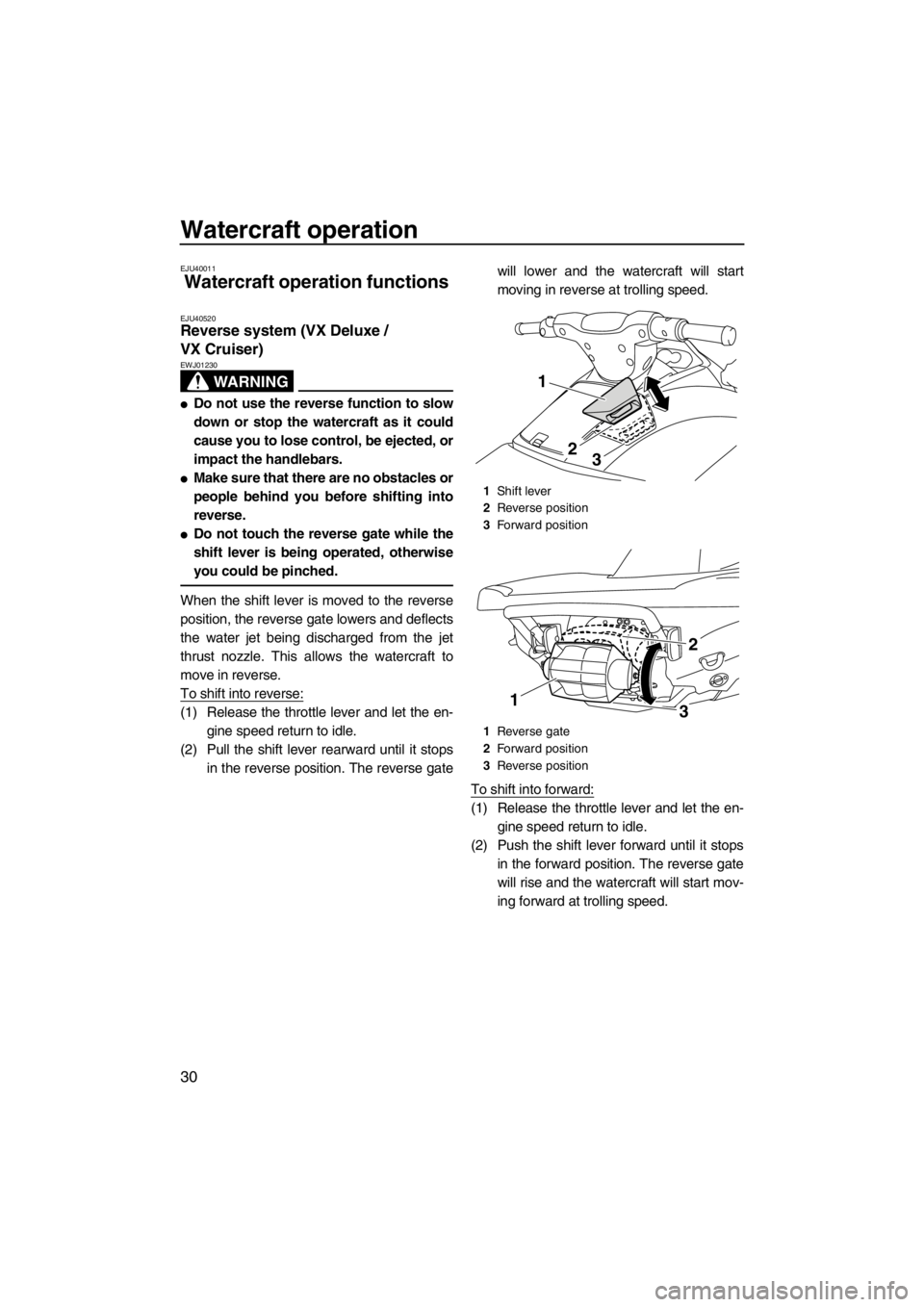
When the shift lever is moved to the reverse
position, the reverse gate lowers and deflects
the water jet being discharged from the jet
thrust nozzle. This allows the watercraft to
move in reverse.
To shift into reverse:
(1) Release the throttle lever and let the en-
gine speed return to idle.
(2) Pull the shift lever rearward until it stops
in the reverse position. The reverse gatewill lower and the watercraft will start
moving in reverse at trolling speed.
To shift into forward:
(1) Release the throttle lever and let the en-
gine speed return to idle.
(2) Push the shift lever forward until it stops
in the forward position. The reverse gate
will rise and the watercraft will start mov-
ing forward at trolling speed.
1Shift lever
2Reverse position
3Forward position
1Reverse gate
2Forward position
3Reverse position
1
23
13
2
UF2P70E0.book Page 30 Tuesday, July 31, 2012 1:48 PM
Page 37 of 96
Watercraft operation
31
EJU40000
Watercraft operation modes
EJU31417Low RPM Mode (VX Deluxe /
VX Cruiser)
The Low RPM Mode is a function that limits
the maximum engine speed to approximately
90% of the maximum engine speed in the nor-
mal mode.
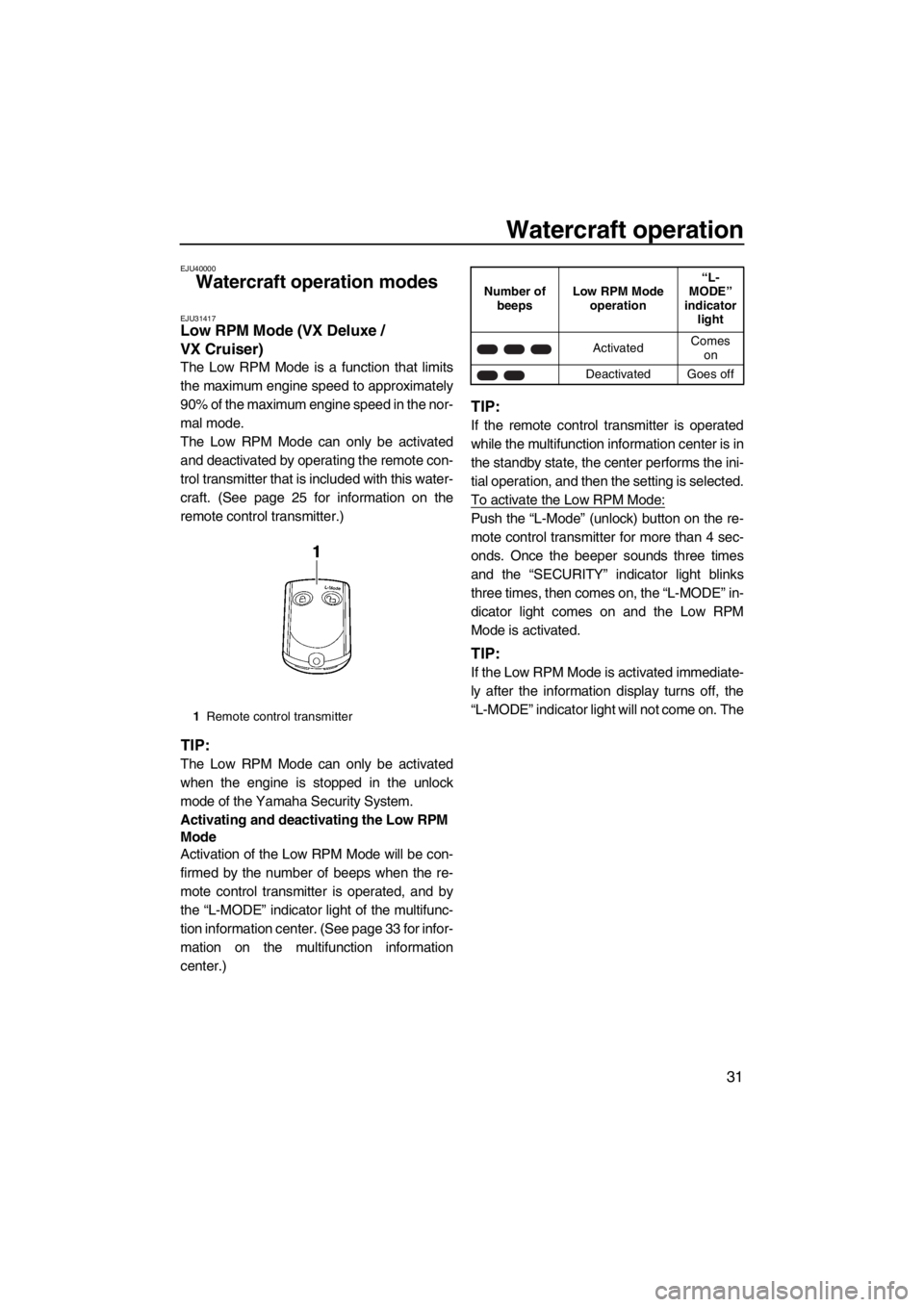
The Low RPM Mode can only be activated
and deactivated by operating the remote con-
trol transmitter that is included with this water-
craft. (See page 25 for information on the
remote control transmitter.)
TIP:
The Low RPM Mode can only be activated
when the engine is stopped in the unlock
mode of the Yamaha Security System.
Activating and deactivating the Low RPM
Mode
Activation of the Low RPM Mode will be con-
firmed by the number of beeps when the re-
mote control transmitter is operated, and by
the “L-MODE” indicator light of the multifunc-
tion information center. (See page 33 for infor-
mation on the multifunction information
center.)
TIP:
If the remote control transmitter is operated
while the multifunction information center is in
the standby state, the center performs the ini-
tial operation, and then the setting is selected.
To activate the Low RPM Mode:
Push the “L-Mode” (unlock) button on the re-
mote control transmitter for more than 4 sec-
onds. Once the beeper sounds three times
and the “SECURITY” indicator light blinks
three times, then comes on, the “L-MODE” in-
dicator light comes on and the Low RPM
Mode is activated.
TIP:
If the Low RPM Mode is activated immediate-
ly after the information display turns off, the
“L-MODE” indicator light will not come on. The
1Remote control transmitter
Number of
beepsLow RPM Mode
operation“L-
MODE”
indicator
light
ActivatedComes
on
Deactivated Goes off
UF2P70E0.book Page 31 Tuesday, July 31, 2012 1:48 PM
Page 39 of 96
Instrument operation
33
EJU31458
Multifunction information
center
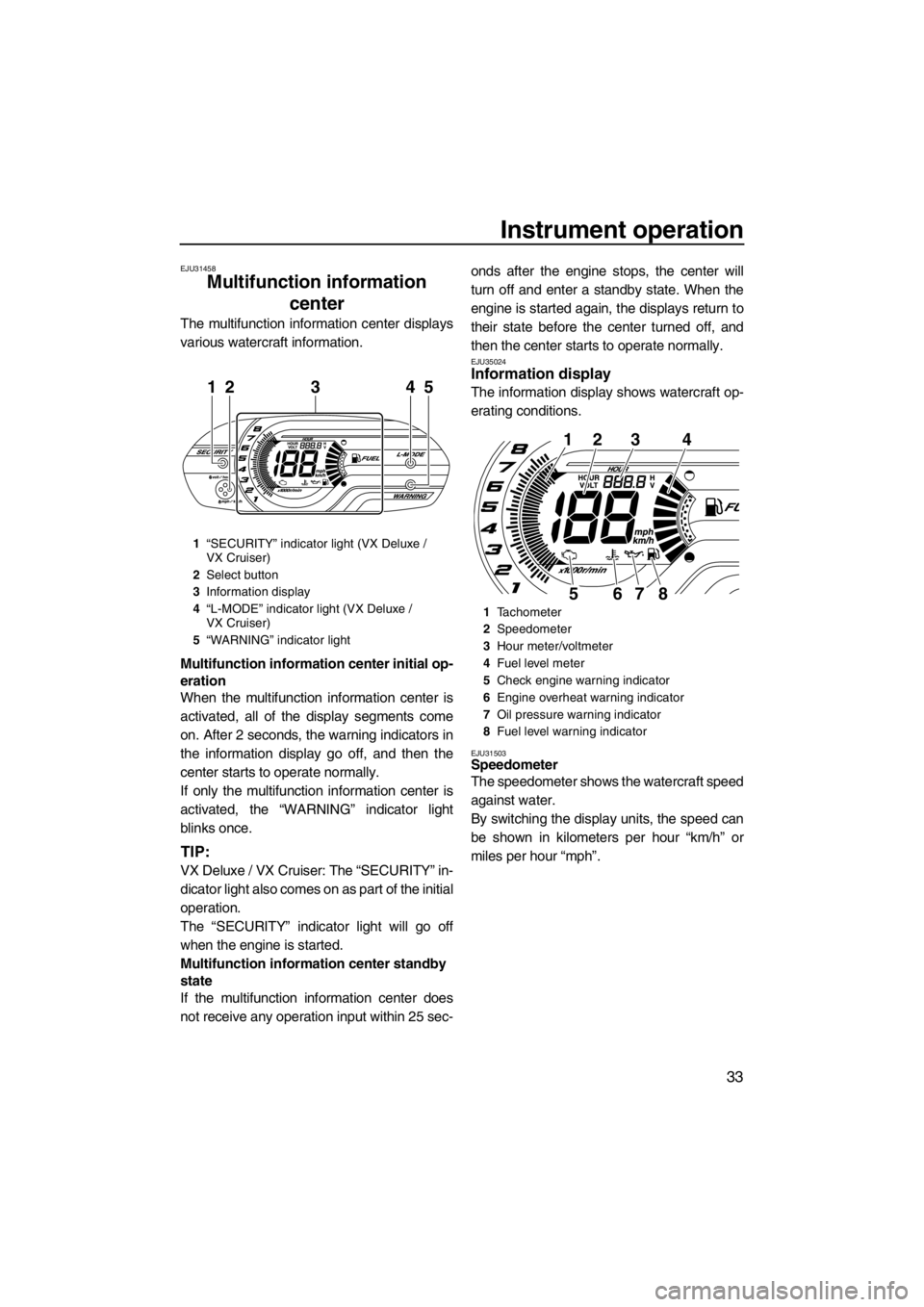
The multifunction information center displays
various watercraft information.
Multifunction information center initial op-
eration
When the multifunction information center is
activated, all of the display segments come
on. After 2 seconds, the warning indicators in
the information display go off, and then the
center starts to operate normally.
If only the multifunction information center is
activated, the “WARNING” indicator light
blinks once.
TIP:
VX Deluxe / VX Cruiser: The “SECURITY” in-
dicator light also comes on as part of the initial
operation.
The “SECURITY” indicator light will go off
when the engine is started.
Multifunction information center standby
state
If the multifunction information center does
not receive any operation input within 25 sec-onds after the engine stops, the center will
turn off and enter a standby state. When the
engine is started again, the displays return to
their state before the center turned off, and
then the center starts to operate normally.
EJU35024Information display
The information display shows watercraft op-
erating conditions.
EJU31503Speedometer
The speedometer shows the watercraft speed
against water.
By switching the display units, the speed can
be shown in kilometers per hour “km/h” or
miles per hour “mph”.
1“SECURITY” indicator light (VX Deluxe /
VX Cruiser)
2Select button
3Information display
4“L-MODE” indicator light (VX Deluxe /
VX Cruiser)
5“WARNING” indicator light
21345
1Tachometer
2Speedometer
3Hour meter/voltmeter
4Fuel level meter
5Check engine warning indicator
6Engine overheat warning indicator
7Oil pressure warning indicator
8Fuel level warning indicator
1234
8765
UF2P70E0.book Page 33 Tuesday, July 31, 2012 1:48 PM
Page 44 of 96
Equipment operation
38
EJU40333
Equipment EJU31036Seat
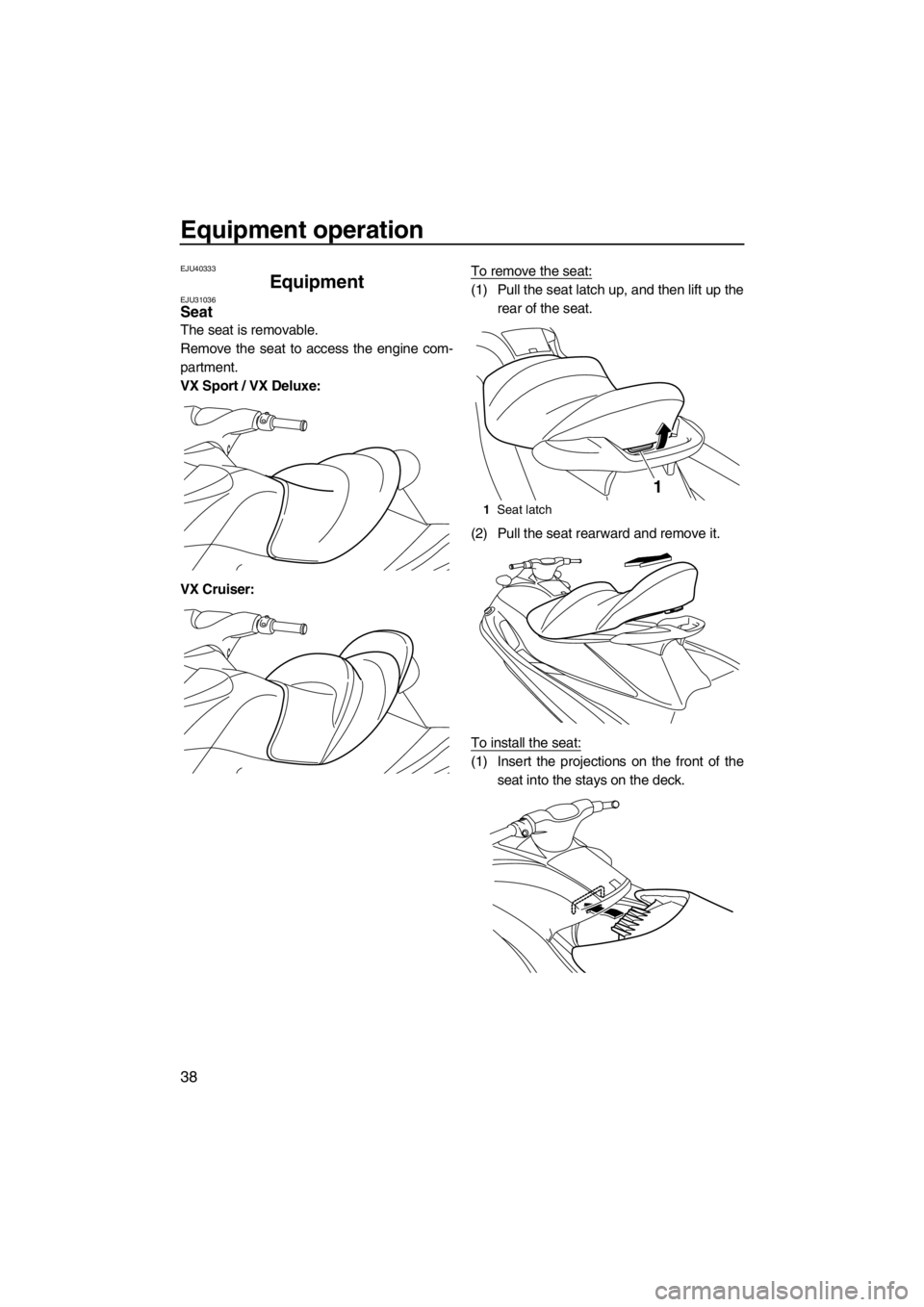
The seat is removable.
Remove the seat to access the engine com-
partment.
VX Sport / VX Deluxe:
VX Cruiser:To remove the seat:
(1) Pull the seat latch up, and then lift up the
rear of the seat.
(2) Pull the seat rearward and remove it.
To install the seat:
(1) Insert the projections on the front of the
seat into the stays on the deck.
1Seat latch
1
UF2P70E0.book Page 38 Tuesday, July 31, 2012 1:48 PM
Page 45 of 96
Equipment operation
39
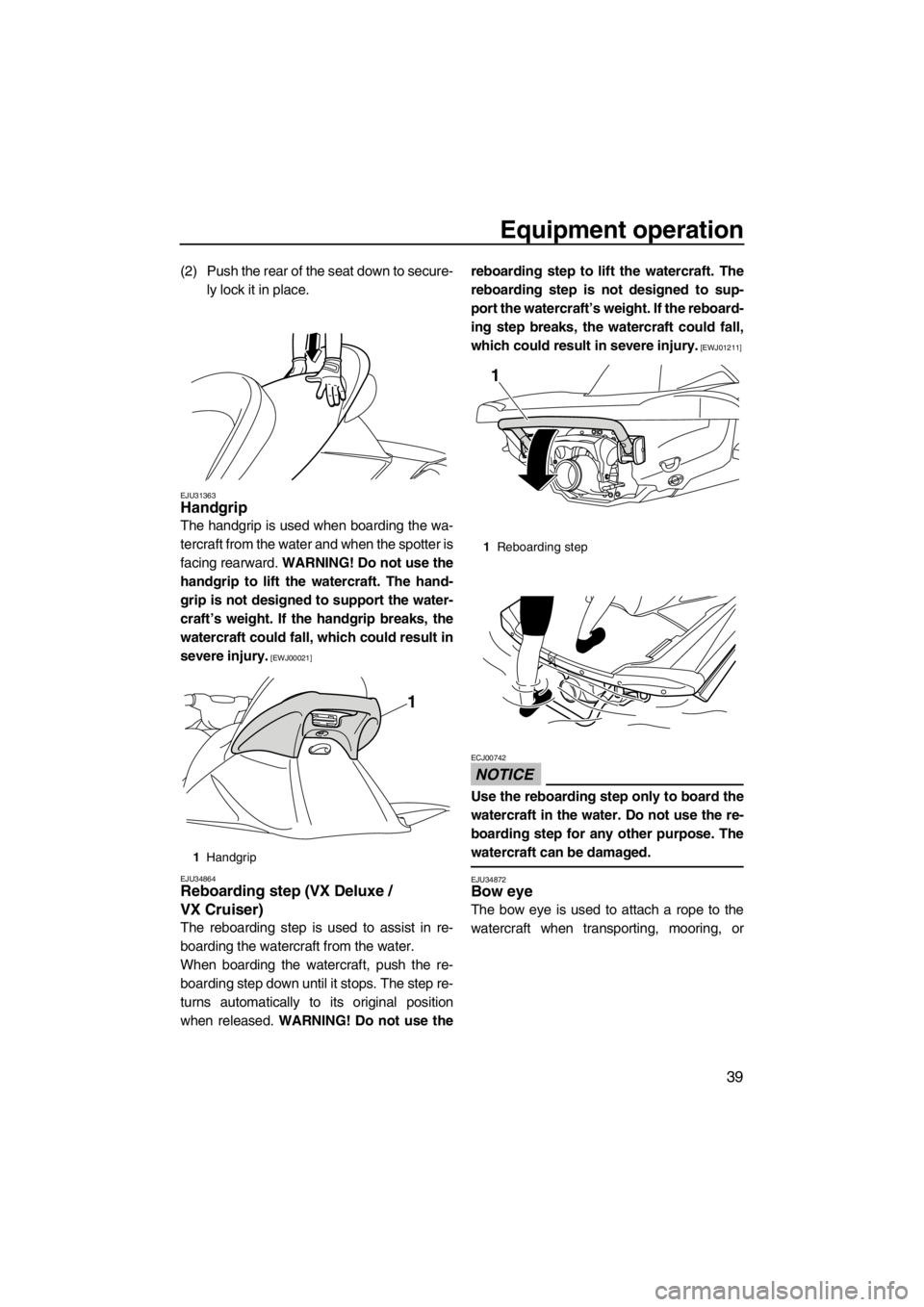
(2) Push the rear of the seat down to secure-
ly lock it in place.
EJU31363Handgrip
The handgrip is used when boarding the wa-
tercraft from the water and when the spotter is
facing rearward. WARNING! Do not use the
handgrip to lift the watercraft. The hand-
grip is not designed to support the water-
craft’s weight. If the handgrip breaks, the
watercraft could fall, which could result in
severe injury.
[EWJ00021]
EJU34864
Reboarding step (VX Deluxe /
VX Cruiser)
The reboarding step is used to assist in re-
boarding the watercraft from the water.
When boarding the watercraft, push the re-
boarding step down until it stops. The step re-
turns automatically to its original position
when released. WARNING! Do not use thereboarding step to lift the watercraft. The
reboarding step is not designed to sup-
port the watercraft’s weight. If the reboard-
ing step breaks, the watercraft could fall,
which could result in severe injury.
[EWJ01211]
NOTICE
ECJ00742
Use the reboarding step only to board the
watercraft in the water. Do not use the re-
boarding step for any other purpose. The
watercraft can be damaged.
EJU34872Bow eye
The bow eye is used to attach a rope to the
watercraft when transporting, mooring, or
1Handgrip
1
1Reboarding step
1
UF2P70E0.book Page 39 Tuesday, July 31, 2012 1:48 PM