fuel YAMAHA VX CRUISER HO 2022 Owners Manual
[x] Cancel search | Manufacturer: YAMAHA, Model Year: 2022, Model line: VX CRUISER HO, Model: YAMAHA VX CRUISER HO 2022Pages: 112, PDF Size: 4.8 MB
Page 3 of 112
Important manual information
EJU46172
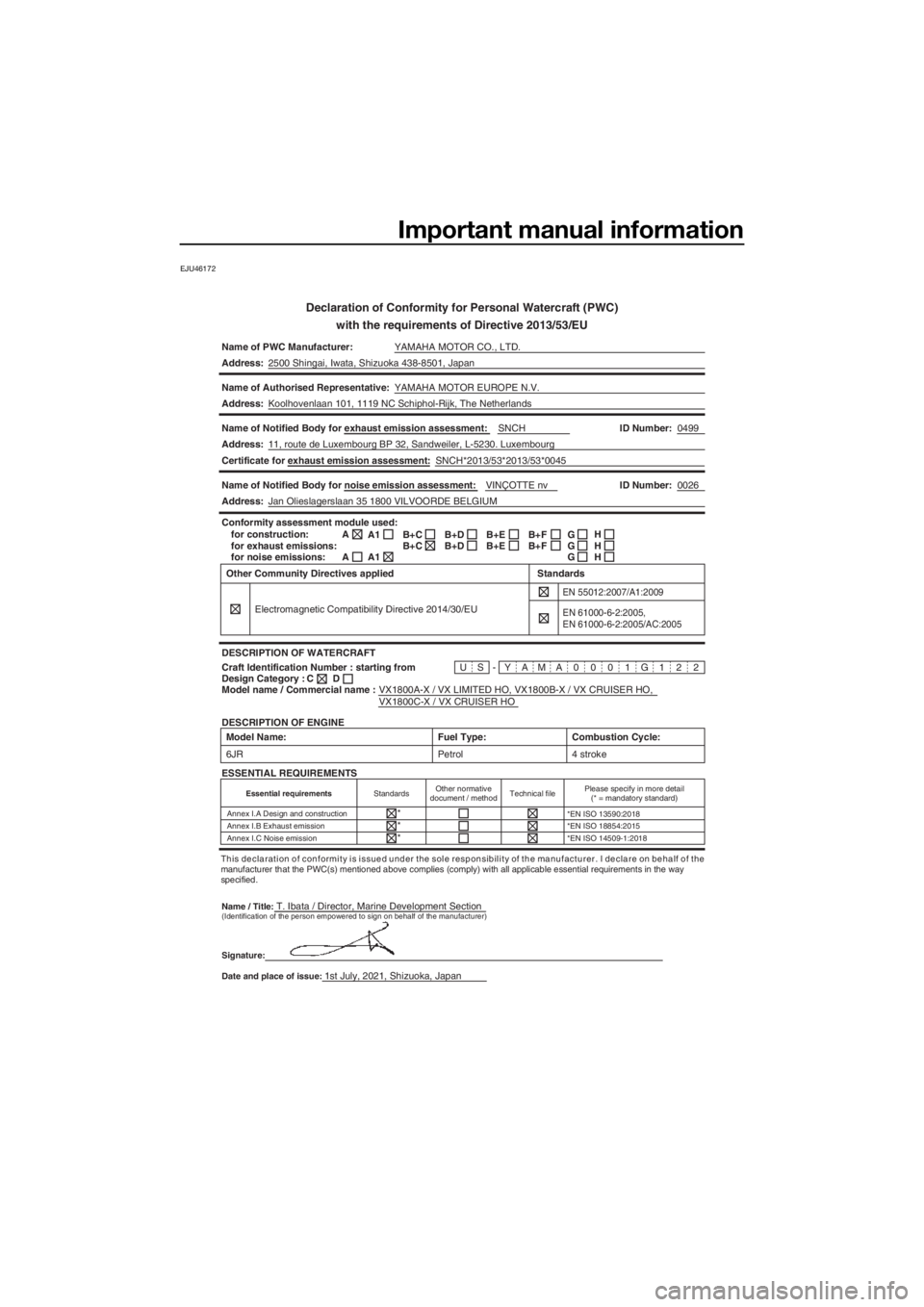
Declaration of Conformity for Personal Watercraft (PWC)with the requirements of Directive 2013/53/EU
Name of PWC Manufacturer: YAMAHA MOTOR CO., LTD.
Address: 2500 Shingai, Iwata, Shizuoka 438-8501, Japan
Name of Authorised Representative: YAMAHA MOTOR EUROPE N.V.
Address: Koolhovenlaan 101, 1119 NC Schiphol-Rijk, The Netherlands
Name of Notified Body for exhaust emission assessment: SNCH
VX1800A-X / VX LIMITED HO, VX1800B-X / VX CRUISER HO,
VX1800C-X / VX CRUISER HO 0499
0026
ID Number:
Address: 11, route de Luxembourg BP 32, Sandweiler, L-5230. Luxembourg
Name of Notified Body for noise emission assessment: VINÇOTTE nvID Number:
Address: Jan Olieslagerslaan 35 1800 VILVOORDE BELGIUM
US-YAMA0001G122
Conformity assessment module used:
for construction:
for exhaust emissions:
for noise emissions:
DESCRIPTION OF WATERCRAFT
DESCRIPTION OF ENGINE A
A
Craft Identification Number : starting from
Model name / Commercial name : C
Design Category : Other Community Directives applied
Electromagnetic Compatibility Directive 2014/30/EU
EN 55012:2007/A1:2009
Standards
D
A1
A1B+C
B+CB+D
B+D B+E
B+EB+F
B+FG
G
GH
H
H
Model Name:
6JR
Combustion Cycle:
4 stroke
Fuel Type:
Petrol
ESSENTIAL REQUIREMENTS
Essential requirements StandardsOther normative
document / method Technical filePlease specify in more detail
(* = mandatory standard)
Annex I.A Design and construction *EN ISO 13590:2018
Annex I.B Exhaust emission *EN ISO 18854:2015
Annex I.C Noise emission *EN ISO 14509-1:2018
*
* *
This declaration of conformity is issued under the sole responsibility of the manufacturer. I declare on behalf of the
manufacturer that the PWC(s) mentioned above complies (comply) with \
all applicable essential requirements in the way
specified.
Name / Title:
T. Ibata / Director, Marine Development Section(Identification of the person empowered to sign on behalf of the manufa\
cturer)
Signature:
Date and place of issue:
1st July, 2021, Shizuoka, Japan
EN 61000-6-2:2005,
EN 61000-6-2:2005/AC:2005
Certificate for exhaust emission assessment: SNCH*2013/53*2013/53*0045
UF4S71E0.book Page 1 Wednesday, August 4, 2021 5:18 PM
Page 8 of 112

Table of contents
Operation and handling
requirements ................................... 54Fuel requirements ......................... 54
Fuel................................................... 54
Engine oil requirements ................ 56
Engine oil .......................................... 56
Draining the bilge water ................ 58
Draining the bilge water on land ...... 58
Draining the bilge water on water .... 58
Transporting on a trailer ................ 59
First-time operation ........................ 60 Engine break-in ............................. 60
Pre-operation checks ..................... 61
Pre-operation checklist .................... 61
Pre-operation check points........... 63
Pre-launch checks ........................... 63
Post-launch checks ......................... 68
Operation ......................................... 70 Operating your watercraft ............. 70
Getting to know your watercraft ...... 70
Learning to operate your
watercraft ...................................... 70
Riding position ................................. 71
Launching the watercraft ................. 71
Starting the engine on water ............ 71
Stopping the engine ......................... 72
Leaving the watercraft...................... 72
Operating the watercraft .................. 72
Turning the watercraft ...................... 73
Stopping the watercraft ................... 74
Operating the watercraft in reverse or neutral ...................................... 75
Boarding the watercraft ................... 76
Starting off........................................ 78
Capsized watercraft ......................... 79
Beaching and docking the watercraft ...................................... 80
Operating in weeded areas .............. 80
After removing the watercraft from
the water ....................................... 81
Care and storage ............................ 82Post-operation care ...................... 82
Flushing the cooling water
passages....................................... 82
Cleaning the watercraft .................... 83
Battery care ...................................... 83
Long-term storage ........................ 85
Cleaning ........................................... 85
Lubrication ....................................... 85
Rustproofing ..................................... 86
Maintenance .................................... 87 Maintenance ................................. 87
Removing and installing the engine
cover ............................................. 87
Periodic maintenance chart ............. 89
Engine oil and oil filter ...................... 91
Specifications .................................. 92 Specifications ............................... 92
Trouble recovery ............................. 94 Troubleshooting ............................ 94
Troubleshooting chart ...................... 94
Emergency procedures ................ 97
Cleaning the jet intake and
impeller ......................................... 97
Raising the reverse gate .................. 98
Jumping the battery ......................... 98
Towing the watercraft....................... 99
Submerged watercraft ..................... 99
Index............................................... 101
UF4S71E0.book Page 2 Wednesday, August 4, 2021 5:18 PM
Page 26 of 112

Safety information
18
EJU30992
Enjoy your watercraft responsibly
You share the areas you enjoy when riding
your watercraft with others and with nature.
So your enjoyment includes a responsibility
to treat these other people, and the lands,
waters, and wildlife with respect and courte-
sy.
Whenever and wherever you ride, think of
yourself as the guest of those around you.
Remember, for example, that the sound of
your watercraft may be music to you, but it
could be just noise to others. And the exciting
splash of your wake can make waves others
won’t enjoy.
Avoid riding close to shoreline homes and
waterfowl nesting areas or other wildlife ar-
eas, and keep a respectful distance from fish-
ermen, other boats, swimmers, and
populated beaches. When travel in areas like
these is unavoidable, ride slowly and obey all
laws.
Proper maintenance is necessary to ensure
that the exhaust emission and sound levels of
your watercraft will continue to be within reg-
ulated limits. You have the responsibility to
make sure that the recommended mainte-
nance in this owner’s/operator’s manual is
carried out.
Remember, pollution can be harmful to the
environment. Do not refuel or add oil where a
spill could cause damage to nature. Remove
your watercraft from the water and move it
away from the shoreline before refueling. Dis-
pose of water and any fuel and oil residue in
the engine compartment according to local
regulations. And keep your surroundings
pleasant for the people and wildlife that share
the waterways: don’t litter. When you ride responsibly, with respect and
courtesy for others, you help ensure that our
waterways stay open for the enjoyment of a
variety of recreational opportunities.
UF4S71E0.book Page 18 Wednesday, August 4, 2021 5:18 PM
Page 27 of 112

Description
19
EJU43331
Watercraft glossary
Trolling speed
“Trolling” is the lowest maneuvering speed. You are applying little or no throttle. The water-
craft is down in the water, and there is no wake.
Sub-planing speed
“Sub-planing” is a medium speed. The bow of the watercraft is slightly up from the water sur-
face, but you are still traveling through the water. There is a wake.
Planing speed
“Planing” is a faster speed. The watercraft is more level and is skimming on top of the water.
There is a wake.
Bow
The front end of the watercraft.
Stern
The rear end of the watercraft.
Starboard
The right side of the watercraft when facing forward.
Port
The left side of the watercraft when facing forward.
Bilge water
Water that has collected in the engine compartment.
Yamaha Engine Management System (YEMS) YEMS is an integrated, computerized management system that controls and adjusts ignition
timing, fuel injection, engine diagnostics, and the off-throttle steering (OTS) system.
Reverse with Intuitive Deceleration Electronics (RiDE)
RiDE is an electronic system that controls the reverse, neutral, and deceleration operations of
the watercraft.
UF4S71E0.book Page 19 Wednesday, August 4, 2021 5:18 PM
Page 28 of 112
Description
20
EJU31012
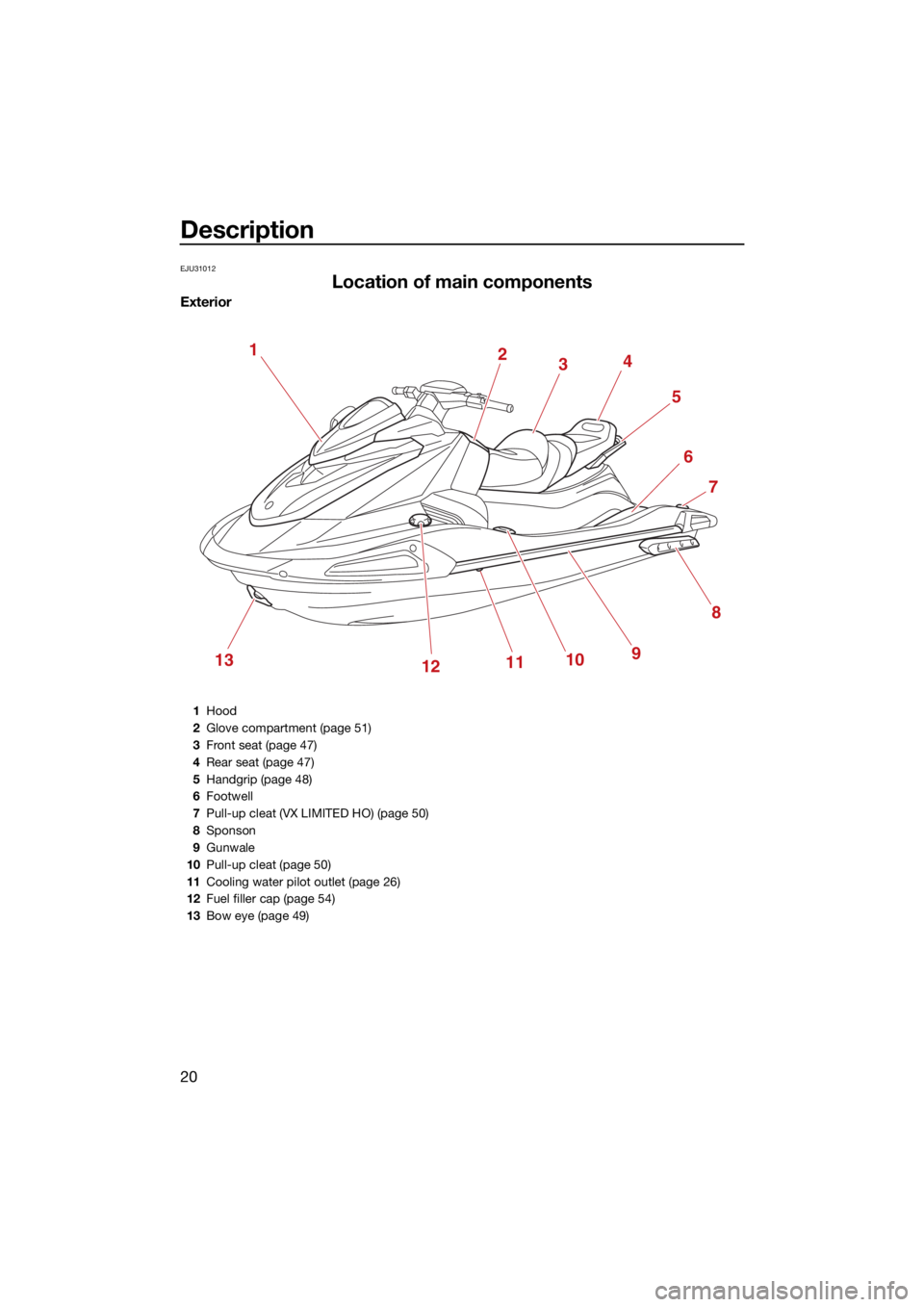
Location of main components
Exterior
12
3 4
6
7
12910
8
1113
5
1Hood
2 Glove compartment (page 51)
3 Front seat (page 47)
4 Rear seat (page 47)
5 Handgrip (page 48)
6 Footwell
7 Pull-up cleat (VX LIMITED HO) (page 50)
8 Sponson
9 Gunwale
10 Pull-up cleat (page 50)
11 Cooling water pilot outlet (page 26)
12 Fuel filler cap (page 54)
13 Bow eye (page 49)
UF4S71E0.book Page 20 Wednesday, August 4, 2021 5:18 PM
Page 31 of 112
Description
23
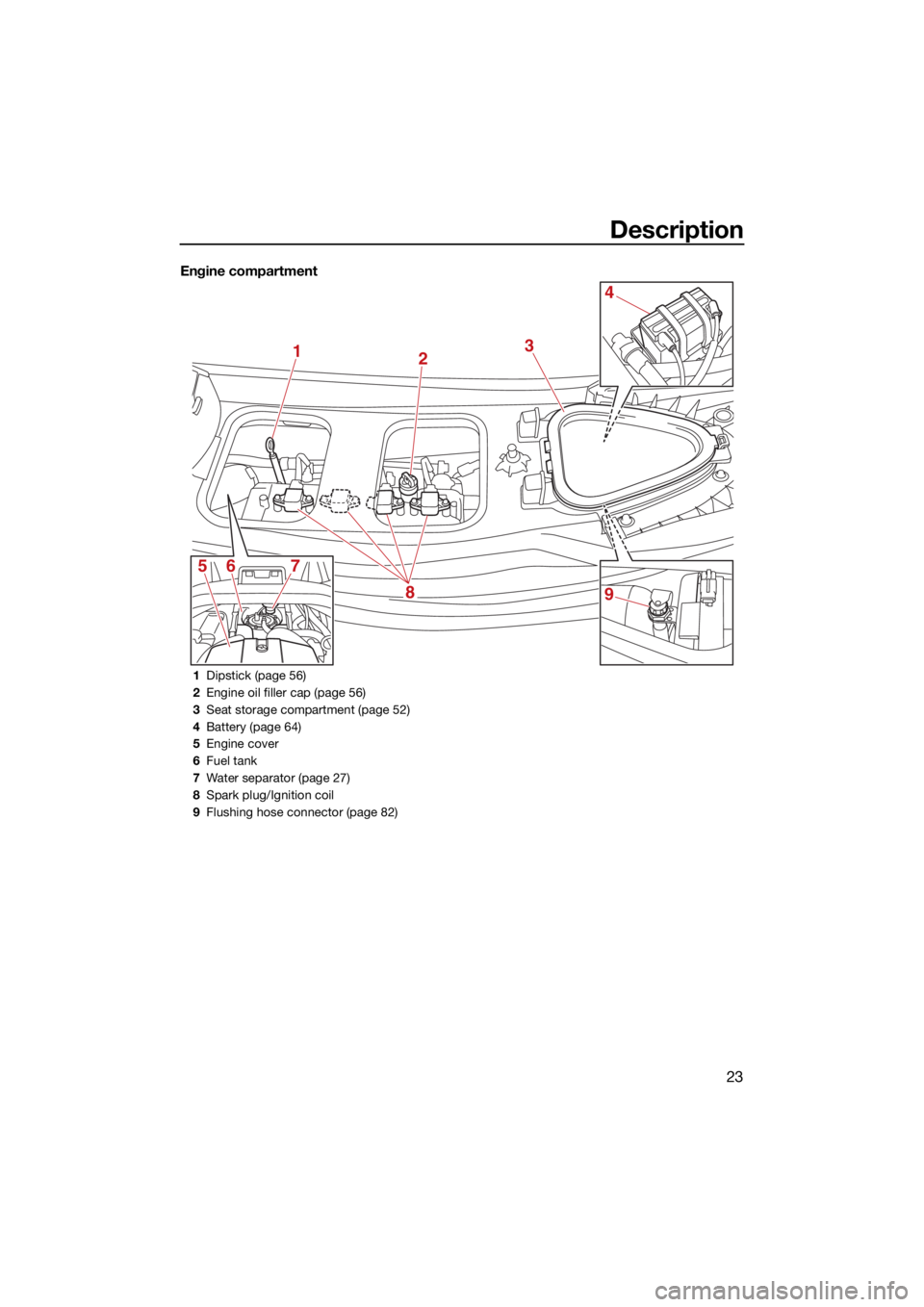
Engine compartment
12
8
567 3
4
9
1
Dipstick (page 56)
2 Engine oil filler cap (page 56)
3 Seat storage compartment (page 52)
4 Battery (page 64)
5 Engine cover
6 Fuel tank
7 Water separator (page 27)
8 Spark plug/Ignition coil
9 Flushing hose connector (page 82)
UF4S71E0.book Page 23 Wednesday, August 4, 2021 5:18 PM
Page 35 of 112
Control function operation
27
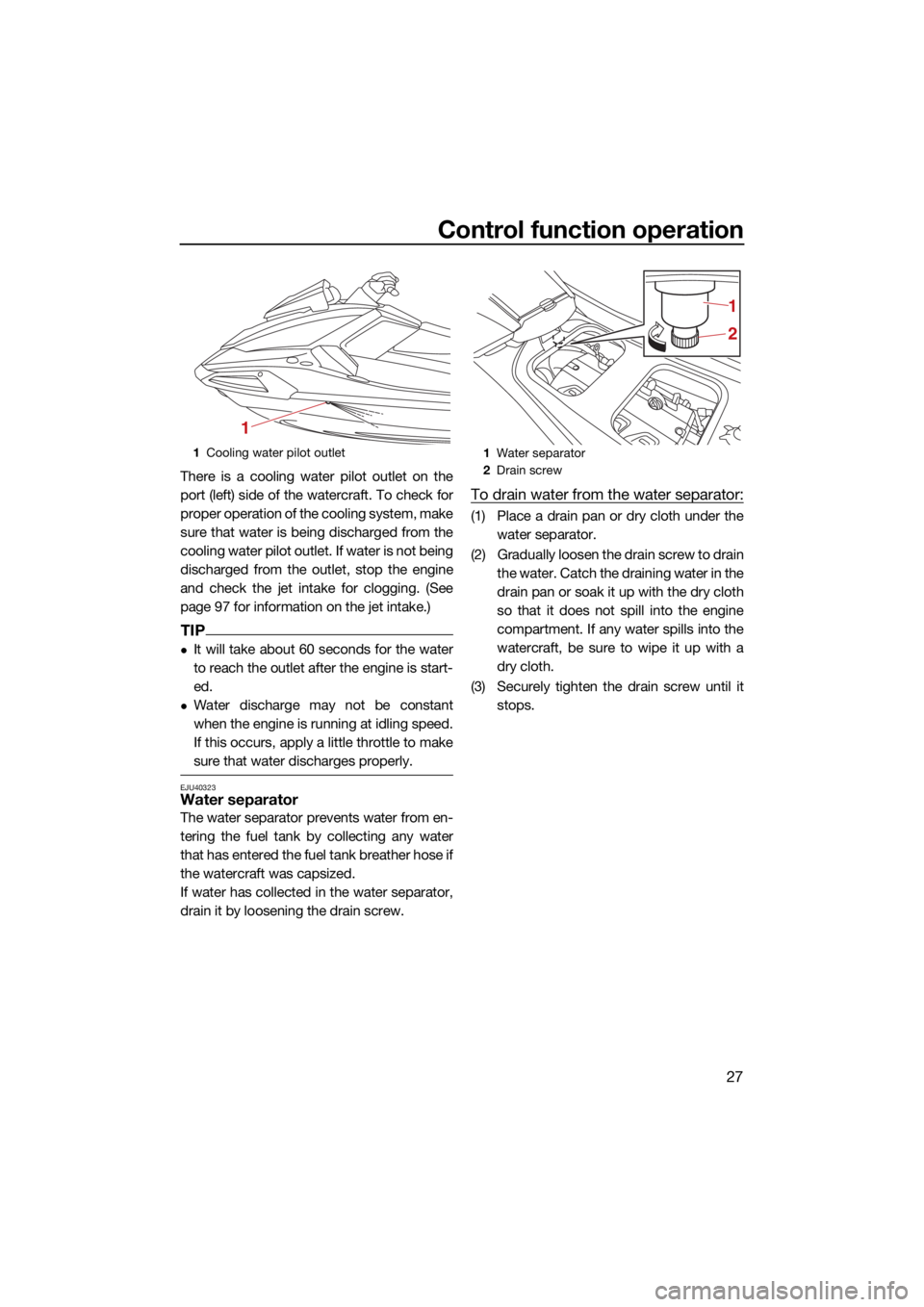
There is a cooling water pilot outlet on the
port (left) side of the watercraft. To check for
proper operation of the cooling system, make
sure that water is being discharged from the
cooling water pilot outlet. If water is not being
discharged from the outlet, stop the engine
and check the jet intake for clogging. (See
page 97 for information on the jet intake.)
TIP
It will take about 60 seconds for the water
to reach the outlet after the engine is start-
ed.
Water discharge may not be constant
when the engine is running at idling speed.
If this occurs, apply a little throttle to make
sure that water discharges properly.
EJU40323Water separator
The water separator prevents water from en-
tering the fuel tank by collecting any water
that has entered the fuel tank breather hose if
the watercraft was capsized.
If water has collected in the water separator,
drain it by loosening the drain screw.
To drain water from the water separator:
(1) Place a drain pan or dry cloth under thewater separator.
(2) Gradually loosen the drain screw to drain the water. Catch the draining water in the
drain pan or soak it up with the dry cloth
so that it does not spill into the engine
compartment. If any water spills into the
watercraft, be sure to wipe it up with a
dry cloth.
(3) Securely tighten the drain screw until it stops.
1Cooling water pilot outlet
1
1Water separator
2 Drain screw
2 1
UF4S71E0.book Page 27 Wednesday, August 4, 2021 5:18 PM
Page 46 of 112
Instrument operation
38
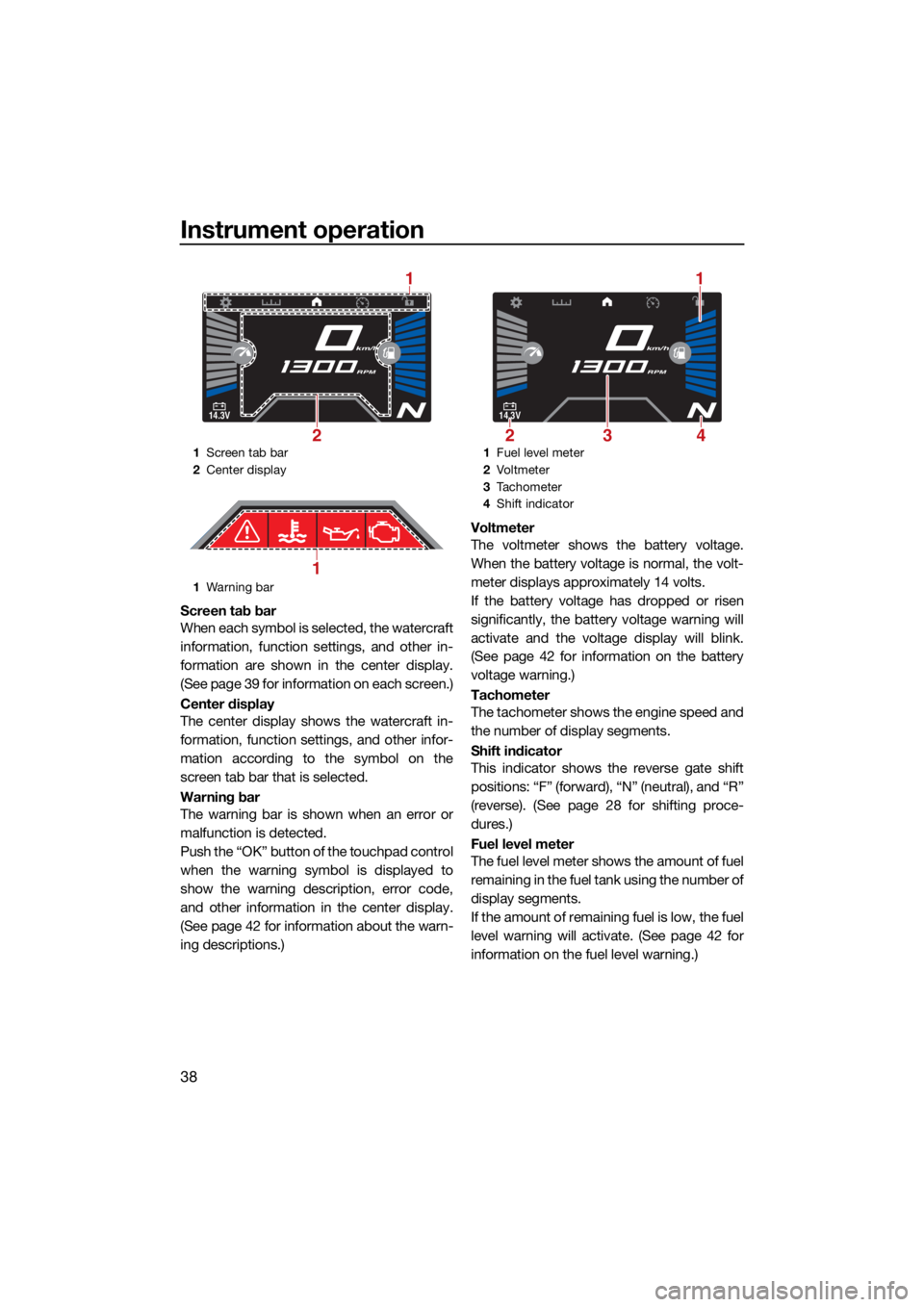
Screen tab bar
When each symbol is selected, the watercraft
information, function settings, and other in-
formation are shown in the center display.
(See page 39 for information on each screen.)
Center display
The center display shows the watercraft in-
formation, function settings, and other infor-
mation according to the symbol on the
screen tab bar that is selected.
Warning bar
The warning bar is shown when an error or
malfunction is detected.
Push the “OK” button of the touchpad control
when the warning symbol is displayed to
show the warning description, error code,
and other information in the center display.
(See page 42 for information about the warn-
ing descriptions.)Voltmeter
The voltmeter shows the battery voltage.
When the battery voltage is normal, the volt-
meter displays approximately 14 volts.
If the battery voltage has dropped or risen
significantly, the battery voltage warning will
activate and the voltage display will blink.
(See page 42 for information on the battery
voltage warning.)
Tachometer
The tachometer shows the engine speed and
the number of display segments.
Shift indicator
This indicator shows the reverse gate shift
positions: “F” (forward), “N” (neutral), and “R”
(reverse). (See page 28 for shifting proce-
dures.)
Fuel level meter
The fuel level meter shows the amount of fuel
remaining in the fuel tank using the number of
display segments.
If the amount of remaining fuel is low, the fuel
level warning will activate. (See page 42 for
information on the fuel level warning.)
1
Screen tab bar
2 Center display
1 Warning bar
14.3V
km/h
RPM
2
1
1
1Fuel level meter
2 Vo l t m et e r
3 Tachometer
4 Shift indicator
14.3V
km/h
RPM
23
1
4
UF4S71E0.book Page 38 Wednesday, August 4, 2021 5:18 PM
Page 47 of 112
Instrument operation
39
TIP
The accuracy of the fuel level meter varies
depending on the operating conditions. Use
this function as a reference only.
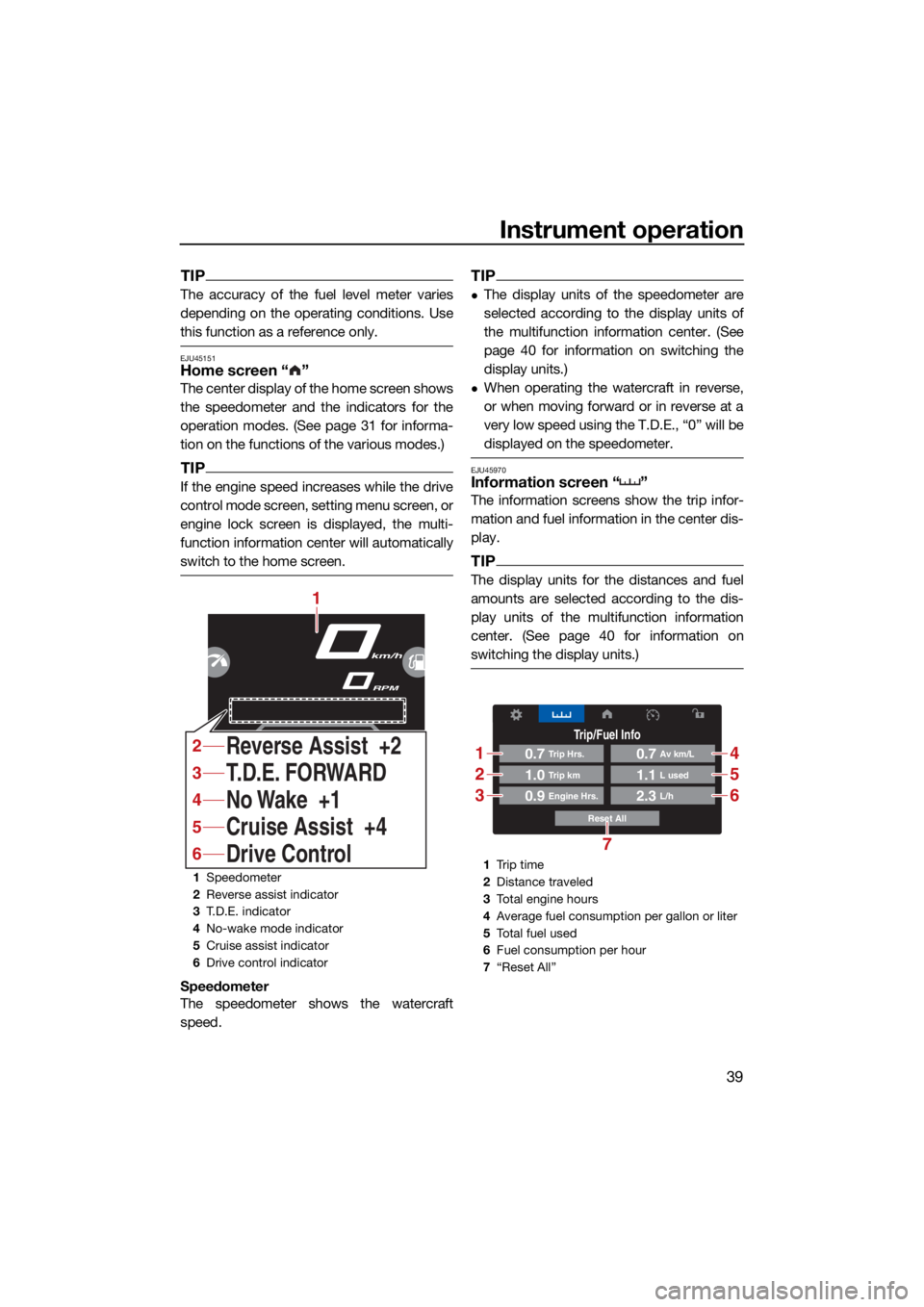
EJU45151Home screen “ ”
The center display of the home screen shows
the speedometer and the indicators for the
operation modes. (See page 31 for informa-
tion on the functions of the various modes.)
TIP
If the engine speed increases while the drive
control mode screen, setting menu screen, or
engine lock screen is displayed, the multi-
function information center will automatically
switch to the home screen.
Speedometer
The speedometer shows the watercraft
speed.
TIP
The display units of the speedometer are
selected according to the display units of
the multifunction information center. (See
page 40 for information on switching the
display units.)
When operating the watercraft in reverse,
or when moving forward or in reverse at a
very low speed using the T.D.E., “0” will be
displayed on the speedometer.
EJU45970Information screen “ ”
The information screens show the trip infor-
mation and fuel information in the center dis-
play.
TIP
The display units for the distances and fuel
amounts are selected according to the dis-
play units of the multifunction information
center. (See page 40 for information on
switching the display units.)
1Speedometer
2 Reverse assist indicator
3 T.D.E. indicator
4 No-wake mode indicator
5 Cruise assist indicator
6 Drive control indicator
km/h
RPM
No Wake +1 T.D.E. FORWARD
Cruise Assist +4
Drive Control Reverse Assist +2
1
4
3
5
6
2
1Tr i p t i m e
2 Distance traveled
3 Total engine hours
4 Average fuel consumption per gallon or liter
5 To t a l f u e l u s e d
6 Fuel consumption per hour
7 “Reset All”
Trip/Fuel Info
Reset All
0.7Trip Hrs.
0.9Engine Hrs.
1.0Trip km
0.7Av km/L
2.3L/h
1.1L used
1
2
3
4
5
6
7
UF4S71E0.book Page 39 Wednesday, August 4, 2021 5:18 PM
Page 48 of 112
Instrument operation
40
* This item can be reset by pushing the “OK”
button of the touchpad control.
To reset all items, select “Reset All”.
EJU45170Drive control mode screen “ ”
The drive control mode screen shows the
setting screen for the drive control mode in
the center display. (See page 33 for informa-
tion on the drive control mode.)
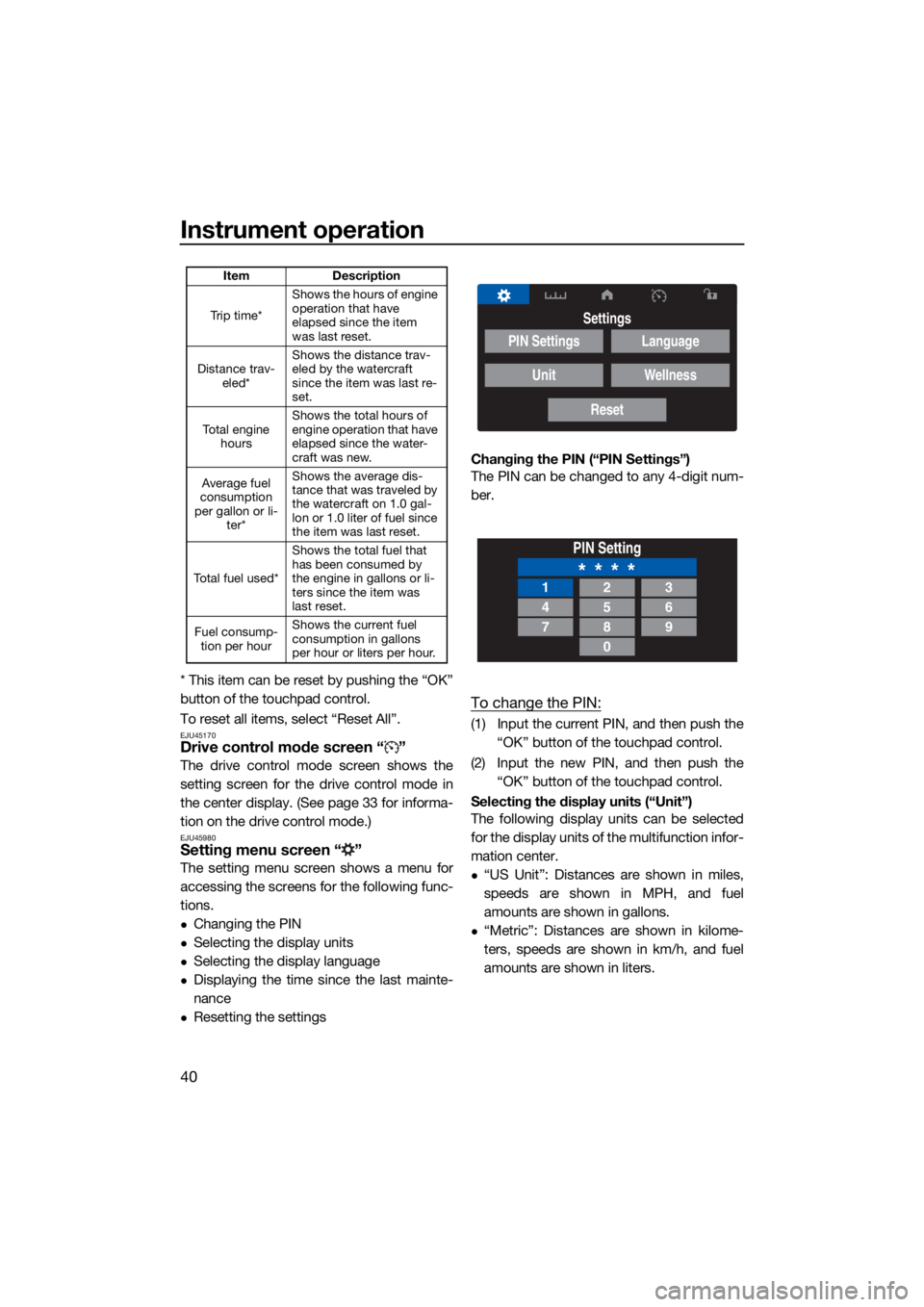
EJU45980Setting menu screen “ ”
The setting menu screen shows a menu for
accessing the screens for the following func-
tions.
Changing the PIN
Selecting the display units
Selecting the display language
Displaying the time since the last mainte-
nance
Resetting the settingsChanging the PIN (“PIN Settings”)
The PIN can be changed to any 4-digit num-
ber.
To change the PIN:
(1) Input the current PIN, and then push the
“OK” button of the touchpad control.
(2) Input the new PIN, and then push the “OK” button of the touchpad control.
Selecting the display units (“Unit”)
The following display units can be selected
for the display units of the multifunction infor-
mation center.
“US Unit”: Distances are shown in miles,
speeds are shown in MPH, and fuel
amounts are shown in gallons.
“Metric”: Distances are shown in kilome-
ters, speeds are shown in km/h, and fuel
amounts are shown in liters.
Item Description
Tr i p t i m e * Shows the hours of engine
operation that have
elapsed since the item
was last reset.
Distance trav- eled* Shows the distance trav-
eled by the watercraft
since the item was last re-
set.
To t a l e n g i n e hours Shows the total hours of
engine operation that have
elapsed since the water-
craft was new.
Average fuel
consumption
per gallon or li- ter* Shows the average dis-
tance that was traveled by
the watercraft on 1.0 gal-
lon or 1.0 liter of fuel since
the item was last reset.
To t a l f u e l u s e d * Shows the total fuel that
has been consumed by
the engine in gallons or li-
ters since the item was
last reset.
Fuel consump- tion per hour Shows the current fuel
consumption in gallons
per hour or liters per hour.
Settings
PIN Settings
Unit
Language
Wellness
Reset
PIN Setting
* * * *123
456
789
0
UF4S71E0.book Page 40 Wednesday, August 4, 2021 5:18 PM