display YAMAHA VX LIMITED HO 2022 User Guide
[x] Cancel search | Manufacturer: YAMAHA, Model Year: 2022, Model line: VX LIMITED HO, Model: YAMAHA VX LIMITED HO 2022Pages: 112, PDF Size: 4.8 MB
Page 46 of 112
Instrument operation
38
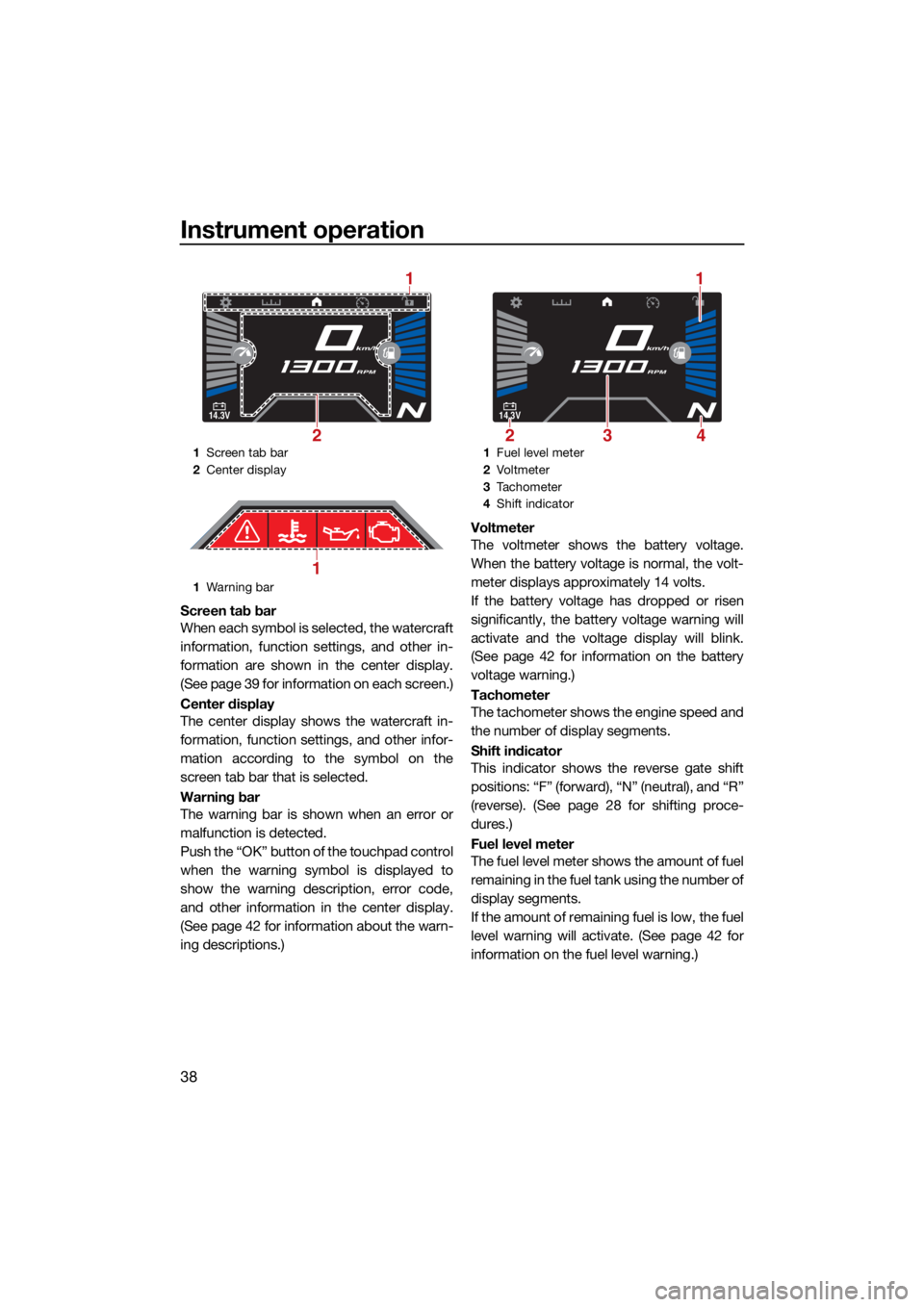
Screen tab bar
When each symbol is selected, the watercraft
information, function settings, and other in-
formation are shown in the center display.
(See page 39 for information on each screen.)
Center display
The center display shows the watercraft in-
formation, function settings, and other infor-
mation according to the symbol on the
screen tab bar that is selected.
Warning bar
The warning bar is shown when an error or
malfunction is detected.
Push the “OK” button of the touchpad control
when the warning symbol is displayed to
show the warning description, error code,
and other information in the center display.
(See page 42 for information about the warn-
ing descriptions.)Voltmeter
The voltmeter shows the battery voltage.
When the battery voltage is normal, the volt-
meter displays approximately 14 volts.
If the battery voltage has dropped or risen
significantly, the battery voltage warning will
activate and the voltage display will blink.
(See page 42 for information on the battery
voltage warning.)
Tachometer
The tachometer shows the engine speed and
the number of display segments.
Shift indicator
This indicator shows the reverse gate shift
positions: “F” (forward), “N” (neutral), and “R”
(reverse). (See page 28 for shifting proce-
dures.)
Fuel level meter
The fuel level meter shows the amount of fuel
remaining in the fuel tank using the number of
display segments.
If the amount of remaining fuel is low, the fuel
level warning will activate. (See page 42 for
information on the fuel level warning.)
1
Screen tab bar
2 Center display
1 Warning bar
14.3V
km/h
RPM
2
1
1
1Fuel level meter
2 Vo l t m et e r
3 Tachometer
4 Shift indicator
14.3V
km/h
RPM
23
1
4
UF4S71E0.book Page 38 Wednesday, August 4, 2021 5:18 PM
Page 47 of 112
Instrument operation
39
TIP
The accuracy of the fuel level meter varies
depending on the operating conditions. Use
this function as a reference only.
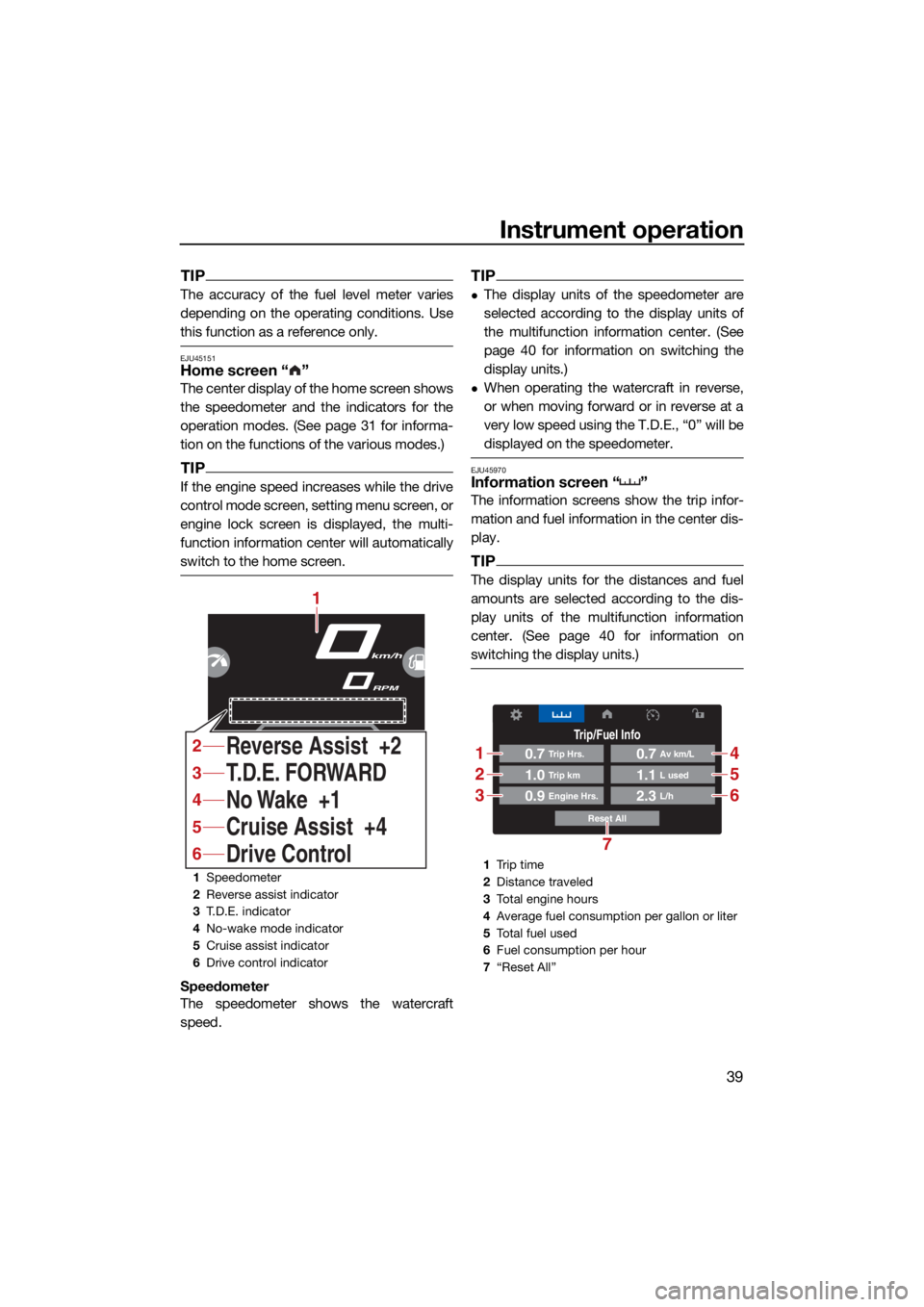
EJU45151Home screen “ ”
The center display of the home screen shows
the speedometer and the indicators for the
operation modes. (See page 31 for informa-
tion on the functions of the various modes.)
TIP
If the engine speed increases while the drive
control mode screen, setting menu screen, or
engine lock screen is displayed, the multi-
function information center will automatically
switch to the home screen.
Speedometer
The speedometer shows the watercraft
speed.
TIP
The display units of the speedometer are
selected according to the display units of
the multifunction information center. (See
page 40 for information on switching the
display units.)
When operating the watercraft in reverse,
or when moving forward or in reverse at a
very low speed using the T.D.E., “0” will be
displayed on the speedometer.
EJU45970Information screen “ ”
The information screens show the trip infor-
mation and fuel information in the center dis-
play.
TIP
The display units for the distances and fuel
amounts are selected according to the dis-
play units of the multifunction information
center. (See page 40 for information on
switching the display units.)
1Speedometer
2 Reverse assist indicator
3 T.D.E. indicator
4 No-wake mode indicator
5 Cruise assist indicator
6 Drive control indicator
km/h
RPM
No Wake +1 T.D.E. FORWARD
Cruise Assist +4
Drive Control Reverse Assist +2
1
4
3
5
6
2
1Tr i p t i m e
2 Distance traveled
3 Total engine hours
4 Average fuel consumption per gallon or liter
5 To t a l f u e l u s e d
6 Fuel consumption per hour
7 “Reset All”
Trip/Fuel Info
Reset All
0.7Trip Hrs.
0.9Engine Hrs.
1.0Trip km
0.7Av km/L
2.3L/h
1.1L used
1
2
3
4
5
6
7
UF4S71E0.book Page 39 Wednesday, August 4, 2021 5:18 PM
Page 48 of 112
Instrument operation
40
* This item can be reset by pushing the “OK”
button of the touchpad control.
To reset all items, select “Reset All”.
EJU45170Drive control mode screen “ ”
The drive control mode screen shows the
setting screen for the drive control mode in
the center display. (See page 33 for informa-
tion on the drive control mode.)
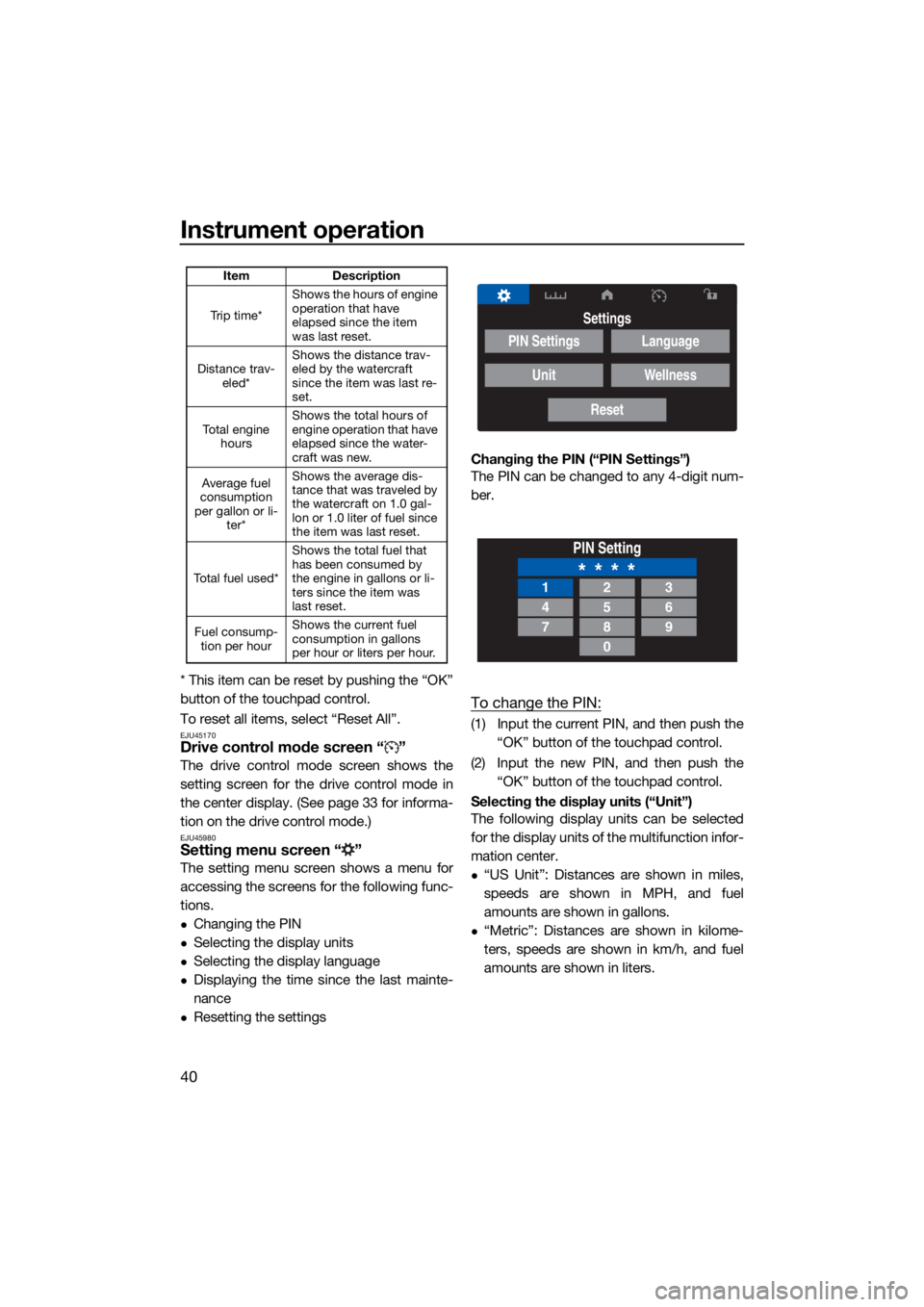
EJU45980Setting menu screen “ ”
The setting menu screen shows a menu for
accessing the screens for the following func-
tions.
Changing the PIN
Selecting the display units
Selecting the display language
Displaying the time since the last mainte-
nance
Resetting the settingsChanging the PIN (“PIN Settings”)
The PIN can be changed to any 4-digit num-
ber.
To change the PIN:
(1) Input the current PIN, and then push the
“OK” button of the touchpad control.
(2) Input the new PIN, and then push the “OK” button of the touchpad control.
Selecting the display units (“Unit”)
The following display units can be selected
for the display units of the multifunction infor-
mation center.
“US Unit”: Distances are shown in miles,
speeds are shown in MPH, and fuel
amounts are shown in gallons.
“Metric”: Distances are shown in kilome-
ters, speeds are shown in km/h, and fuel
amounts are shown in liters.
Item Description
Tr i p t i m e * Shows the hours of engine
operation that have
elapsed since the item
was last reset.
Distance trav- eled* Shows the distance trav-
eled by the watercraft
since the item was last re-
set.
To t a l e n g i n e hours Shows the total hours of
engine operation that have
elapsed since the water-
craft was new.
Average fuel
consumption
per gallon or li- ter* Shows the average dis-
tance that was traveled by
the watercraft on 1.0 gal-
lon or 1.0 liter of fuel since
the item was last reset.
To t a l f u e l u s e d * Shows the total fuel that
has been consumed by
the engine in gallons or li-
ters since the item was
last reset.
Fuel consump- tion per hour Shows the current fuel
consumption in gallons
per hour or liters per hour.
Settings
PIN Settings
Unit
Language
Wellness
Reset
PIN Setting
* * * *123
456
789
0
UF4S71E0.book Page 40 Wednesday, August 4, 2021 5:18 PM
Page 49 of 112
Instrument operation
41
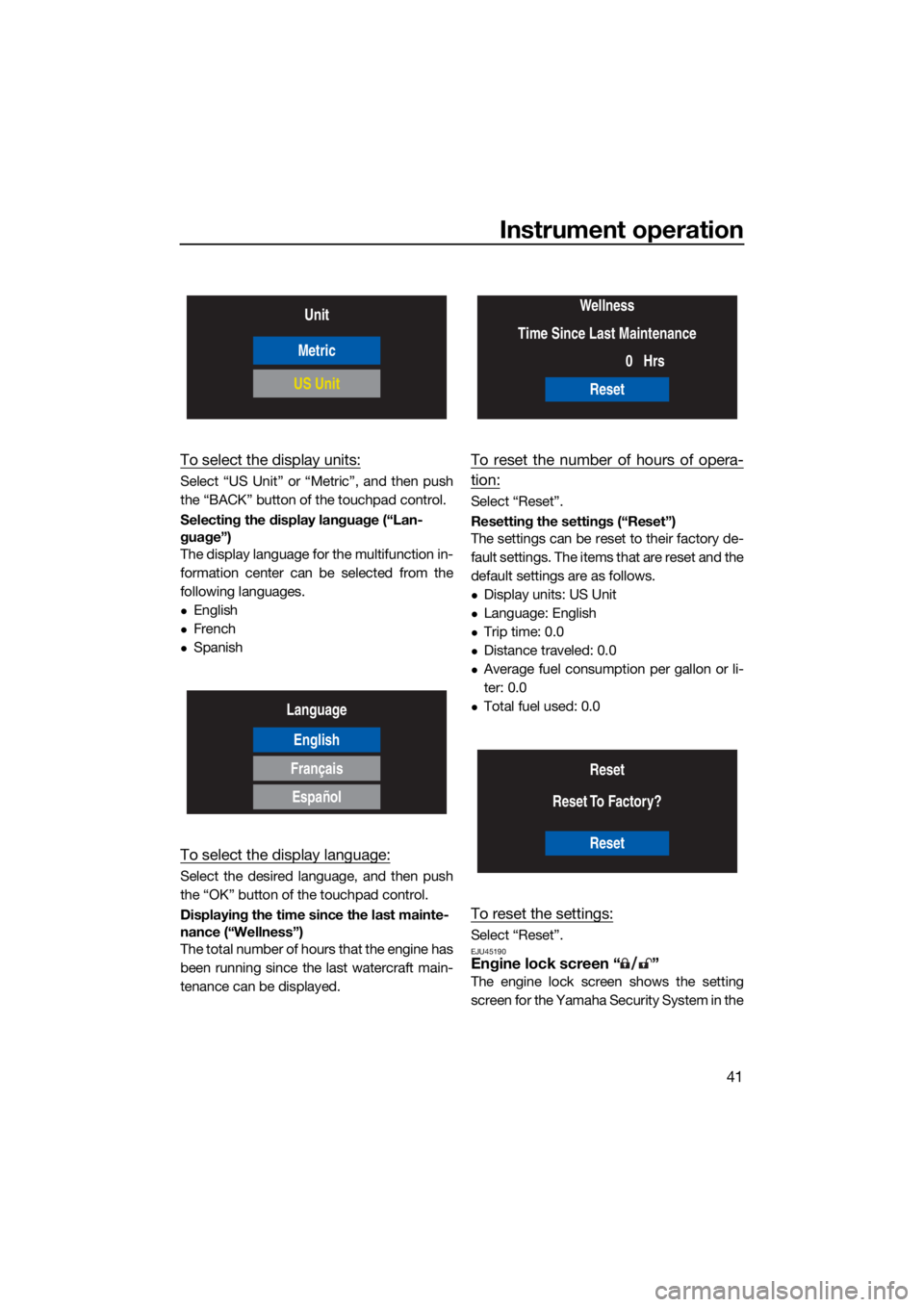
To select the display units:
Select “US Unit” or “Metric”, and then push
the “BACK” button of the touchpad control.
Selecting the display language (“Lan-
guage”)
The display language for the multifunction in-
formation center can be selected from the
following languages.
English
French
Spanish
To select the display language:
Select the desired language, and then push
the “OK” button of the touchpad control.
Displaying the time since the last mainte-
nance (“Wellness”)
The total number of hours that the engine has
been running since the last watercraft main-
tenance can be displayed.
To reset the number of hours of opera-
tion:
Select “Reset”.
Resetting the settings (“Reset”)
The settings can be reset to their factory de-
fault settings. The items that are reset and the
default settings are as follows.
Display units: US Unit
Language: English
Trip time: 0.0
Distance traveled: 0.0
Average fuel consumption per gallon or li-
ter: 0.0
Total fuel used: 0.0
To reset the settings:
Select “Reset”.EJU45190Engine lock screen “ ”
The engine lock screen shows the setting
screen for the Yamaha Security System in the
Unit
Metric
US Unit
Language
English
Français
Español
Wellness
Time Since Last Maintenance 0Hrs
Reset
Reset
Reset To Factory?
Reset
UF4S71E0.book Page 41 Wednesday, August 4, 2021 5:18 PM
Page 50 of 112
Instrument operation
42
center display. (See page 24 for Yamaha Se-
curity System setting procedures.)
EJU46400Warning function
The multifunction information center can indi-
cate the following warnings.
Fuel level warning
Battery voltage warning
Check engine warning
Engine overheat warning
Oil pressure warning
Other warnings (communication errors, ex-
ceeding the maintenance intervals, and so
on)
To stop the buzzer when a malfunction is ac-
tivated, correct the cause of the problem and
start the engine again, or push the “OK” but-
ton of the touchpad control.
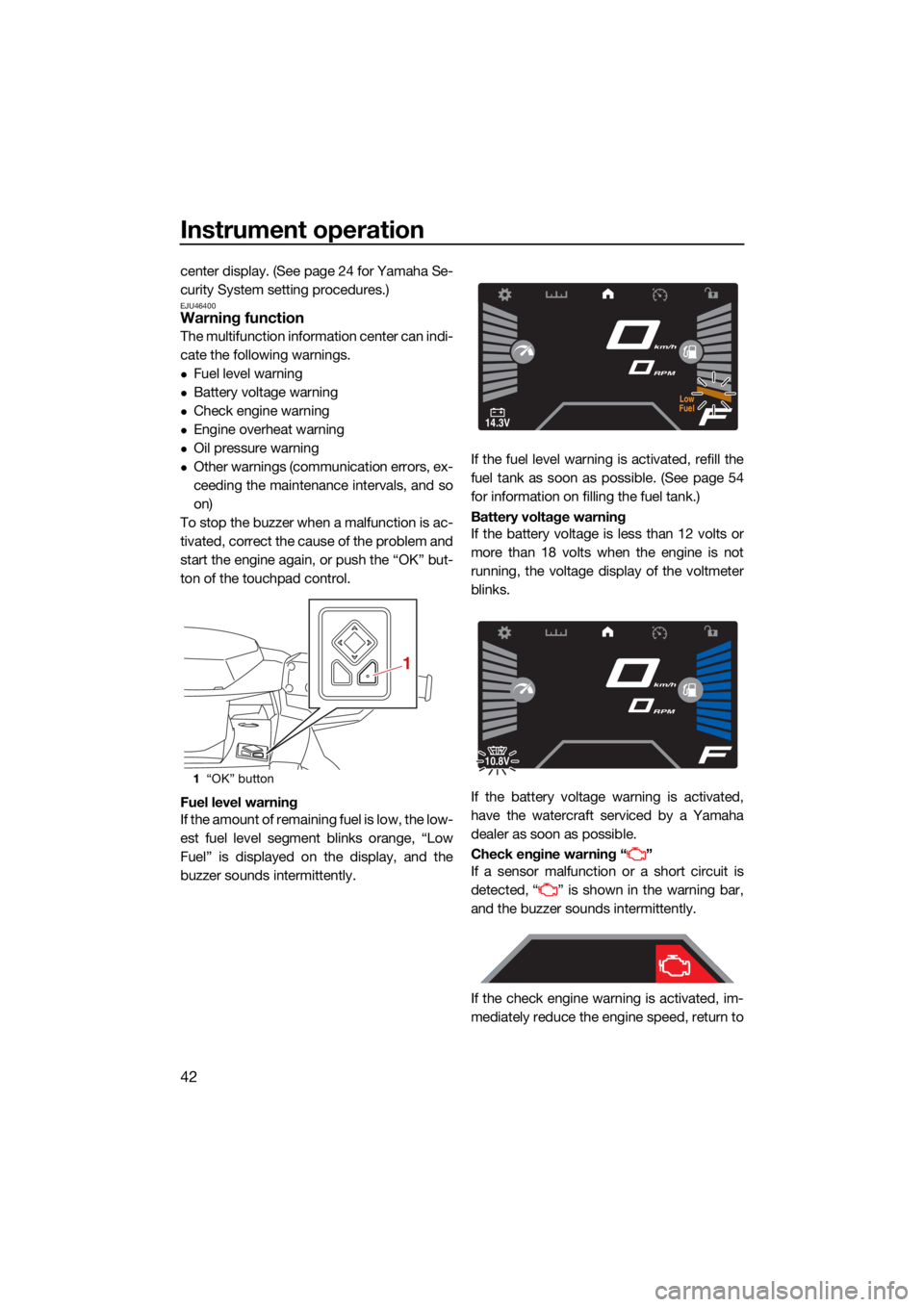
Fuel level warning
If the amount of remaining fuel is low, the low-
est fuel level segment blinks orange, “Low
Fuel” is displayed on the display, and the
buzzer sounds intermittently. If the fuel level warning is activated, refill the
fuel tank as soon as possible. (See page 54
for information on filling the fuel tank.)
Battery voltage warning
If the battery voltage is less than 12 volts or
more than 18 volts when the engine is not
running, the voltage display of the voltmeter
blinks.
If the battery voltage warning is activated,
have the watercraft serviced by a Yamaha
dealer as soon as possible.
Check engine warning “ ”
If a sensor malfunction or a short circuit is
detected, “ ” is shown in the warning bar,
and the buzzer sounds intermittently.
If the check engine warning is activated, im-
mediately reduce the engine speed, return to
1
“OK” button
1
14.3V
km/h
RPM
Low
Fuel
10.8V
km/h
RPM
UF4S71E0.book Page 42 Wednesday, August 4, 2021 5:18 PM
Page 51 of 112
Instrument operation
43
shore, and have a Yamaha dealer check the
engine.
TIP
Push the “OK” button of the touchpad control
to display a description of the warning in the
center display.
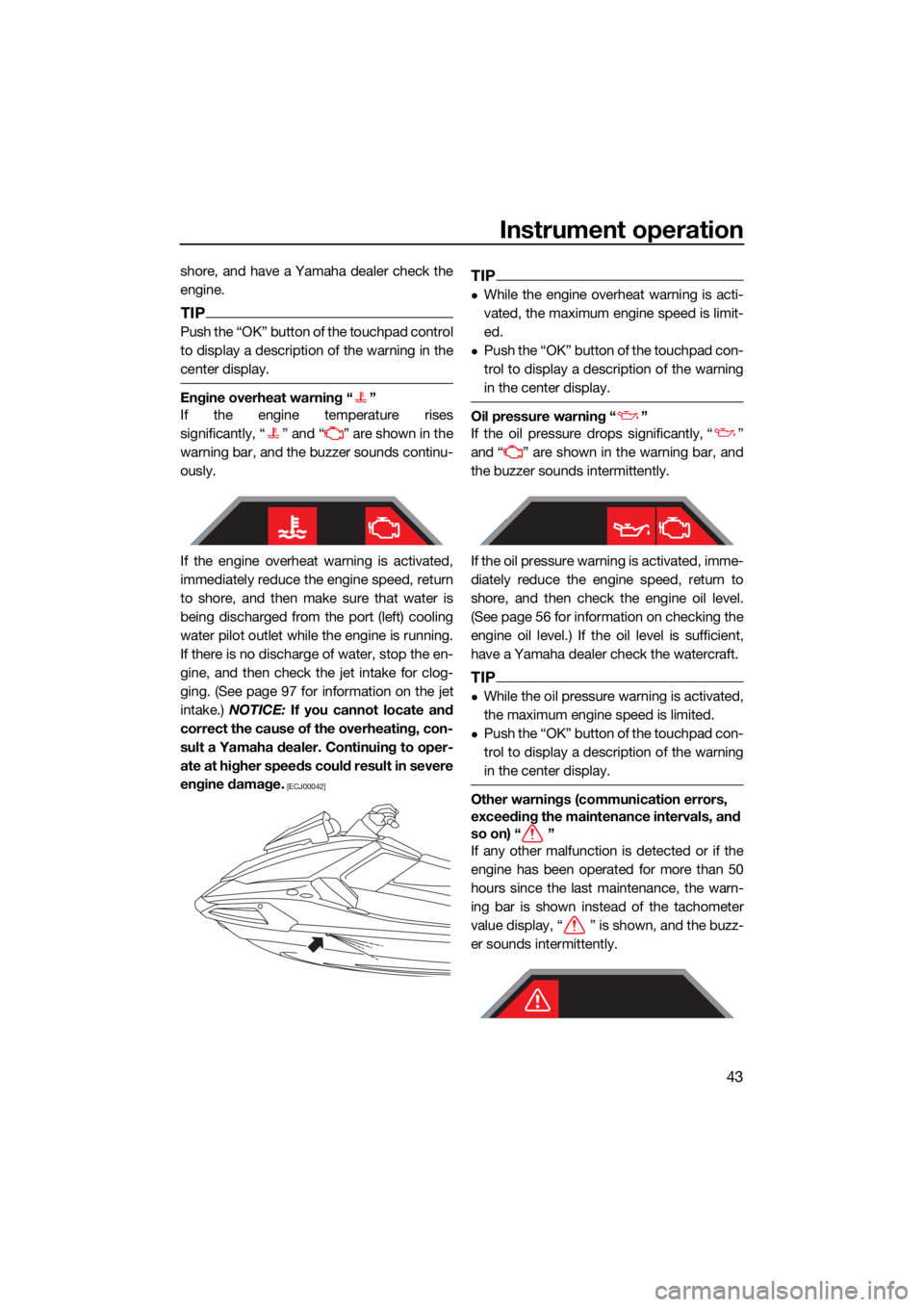
Engine overheat warning “ ”
If the engine temperature rises
significantly, “ ” and “ ” are shown in the
warning bar, and the buzzer sounds continu-
ously.
If the engine overheat warning is activated,
immediately reduce the engine speed, return
to shore, and then make sure that water is
being discharged from the port (left) cooling
water pilot outlet while the engine is running.
If there is no discharge of water, stop the en-
gine, and then check the jet intake for clog-
ging. (See page 97 for information on the jet
intake.) NOTICE: If you cannot locate and
correct the cause of the overheating, con-
sult a Yamaha dealer. Continuing to oper-
ate at higher speeds could result in severe
engine damage.
[ECJ00042]
TIP
While the engine overheat warning is acti-
vated, the maximum engine speed is limit-
ed.
Push the “OK” button of the touchpad con-
trol to display a description of the warning
in the center display.
Oil pressure warning “ ”
If the oil pressure drops significantly, “ ”
and “ ” are shown in the warning bar, and
the buzzer sounds intermittently.
If the oil pressure warning is activated, imme-
diately reduce the engine speed, return to
shore, and then check the engine oil level.
(See page 56 for information on checking the
engine oil level.) If the oil level is sufficient,
have a Yamaha dealer check the watercraft.
TIP
While the oil pressure warning is activated,
the maximum engine speed is limited.
Push the “OK” button of the touchpad con-
trol to display a description of the warning
in the center display.
Other warnings (communication errors,
exceeding the maintenance intervals, and
so on) “ ”
If any other malfunction is detected or if the
engine has been operated for more than 50
hours since the last maintenance, the warn-
ing bar is shown instead of the tachometer
value display, “ ” is shown, and the buzz-
er sounds intermittently.
UF4S71E0.book Page 43 Wednesday, August 4, 2021 5:18 PM
Page 52 of 112
Instrument operation
44
If a warning is activated, have the watercraft
serviced by a Yamaha dealer as soon as pos-
sible.
TIP
Push the “OK” button of the touchpad control
to display a description of the warning in the
center display.
EJU46301
Audio system (equipped models)
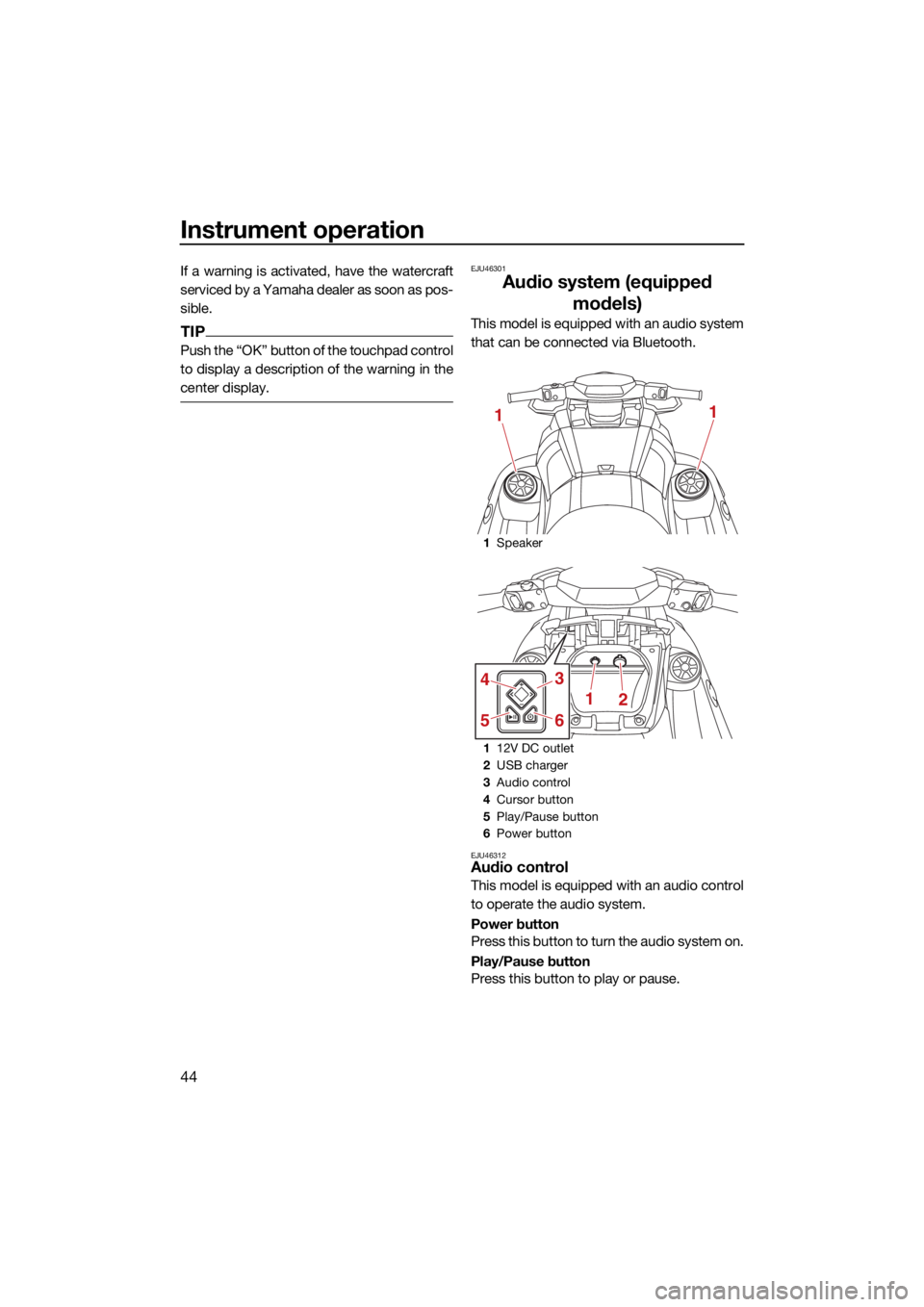
This model is equipped with an audio system
that can be connected via Bluetooth.
EJU46312Audio control
This model is equipped with an audio control
to operate the audio system.
Power button
Press this button to turn the audio system on.
Play/Pause button
Press this button to play or pause.
1Speaker
1 12V DC outlet
2 USB charger
3 Audio control
4 Cursor button
5 Play/Pause button
6 Power button
11
1
3
65
4
2
UF4S71E0.book Page 44 Wednesday, August 4, 2021 5:18 PM
Page 76 of 112
Pre-operation checks
68
EJU41441Hood check
Push down on the rear of the hood and make
sure that it is securely closed.
EJU40147Post-launch checks
Perform the post-launch checks in the pre-
operation checklist while the watercraft is in
the water and the engine is running.
To perform the post-launch checks:
(1) Launch the watercraft. (See page 71 forinformation on launching the watercraft.)
(2) Perform the checks and make sure that there are no malfunctioning items or oth-
er problems.
EJU40553Cooling water pilot outlet check
Make sure that water is discharged from the
cooling water pilot outlet while the engine is
running. (See page 26 for information on the
cooling water pilot outlet.)
EJU45260Multifunction information center check
Make sure that the multifunction information
center operates properly. (See page 37 for in-
formation on proper operation of the multi-
function information center.)
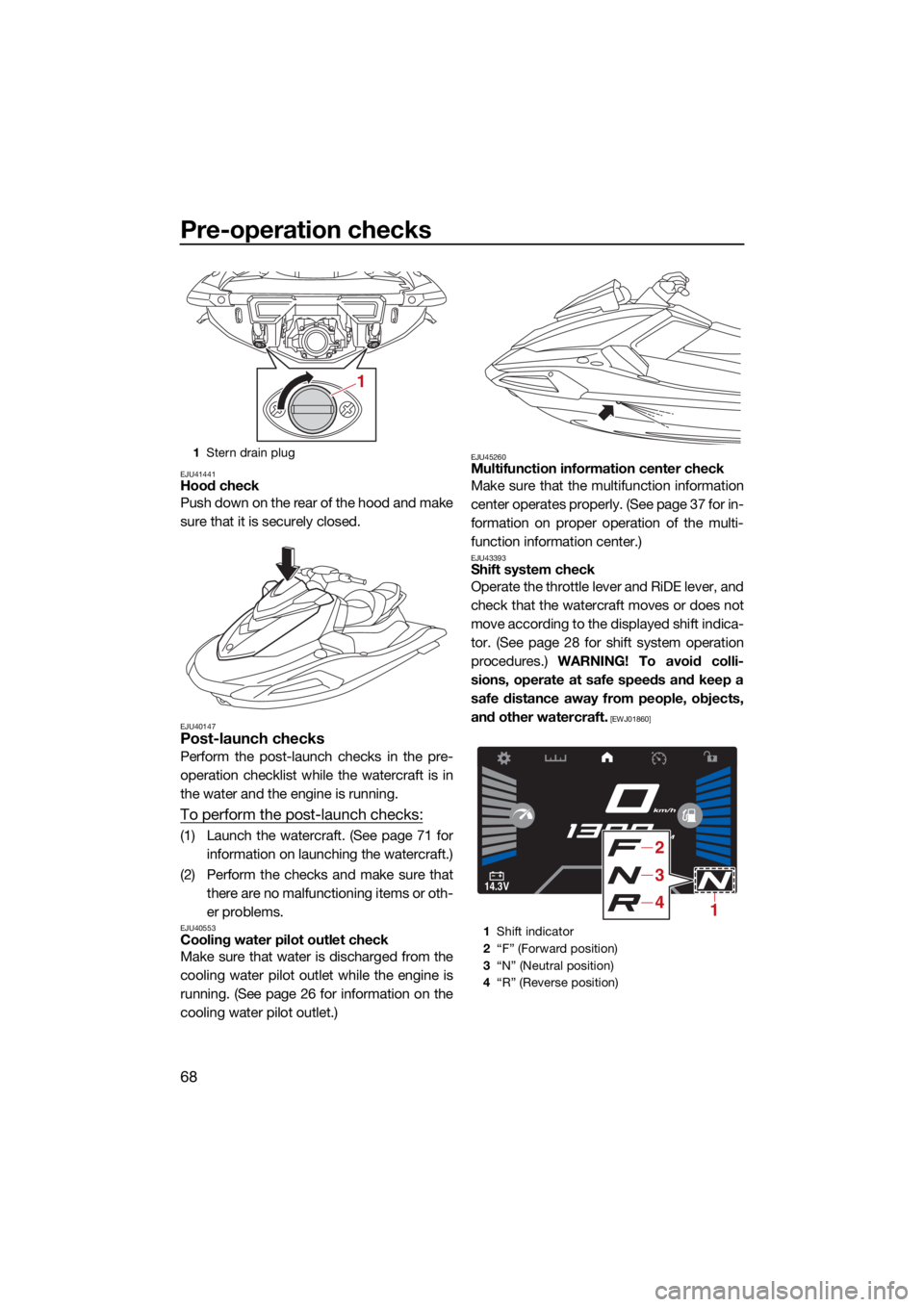
EJU43393Shift system check
Operate the throttle lever and RiDE lever, and
check that the watercraft moves or does not
move according to the displayed shift indica-
tor. (See page 28 for shift system operation
procedures.) WARNING! To avoid colli-
sions, operate at safe speeds and keep a
safe distance away from people, objects,
and other watercraft.
[EWJ01860]
1 Stern drain plug
1
1Shift indicator
2 “F” (Forward position)
3 “N” (Neutral position)
4 “R” (Reverse position)
14.3V
km/h
RPM
1
2
3
4
UF4S71E0.book Page 68 Wednesday, August 4, 2021 5:18 PM
Page 80 of 112
Operation
72
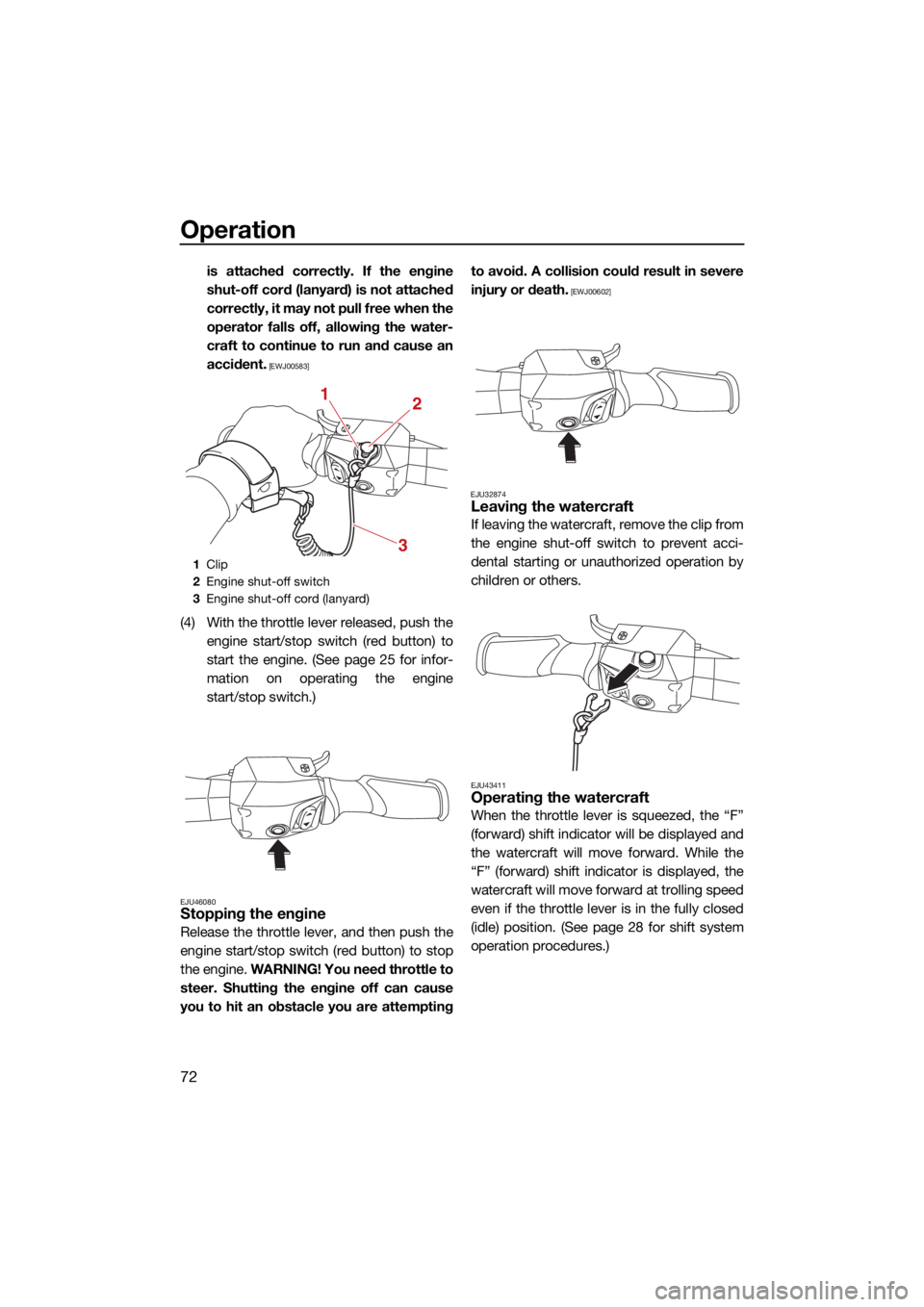
is attached correctly. If the engine
shut-off cord (lanyard) is not attached
correctly, it may not pull free when the
operator falls off, allowing the water-
craft to continue to run and cause an
accident.
[EWJ00583]
(4) With the throttle lever released, push theengine start/stop switch (red button) to
start the engine. (See page 25 for infor-
mation on operating the engine
start/stop switch.)
EJU46080Stopping the engine
Release the throttle lever, and then push the
engine start/stop switch (red button) to stop
the engine. WARNING! You need throttle to
steer. Shutting the engine off can cause
you to hit an obstacle you are attempting to avoid. A collision could result in severe
injury or death.
[EWJ00602]
EJU32874
Leaving the watercraft
If leaving the watercraft, remove the clip from
the engine shut-off switch to prevent acci-
dental starting or unauthorized operation by
children or others.
EJU43411Operating the watercraft
When the throttle lever is squeezed, the “F”
(forward) shift indicator will be displayed and
the watercraft will move forward. While the
“F” (forward) shift indicator is displayed, the
watercraft will move forward at trolling speed
even if the throttle lever is in the fully closed
(idle) position. (See page 28 for shift system
operation procedures.)
1 Clip
2 Engine shut-off switch
3 Engine shut-off cord (lanyard)
12
3
UF4S71E0.book Page 72 Wednesday, August 4, 2021 5:18 PM
Page 83 of 112
Operation
75
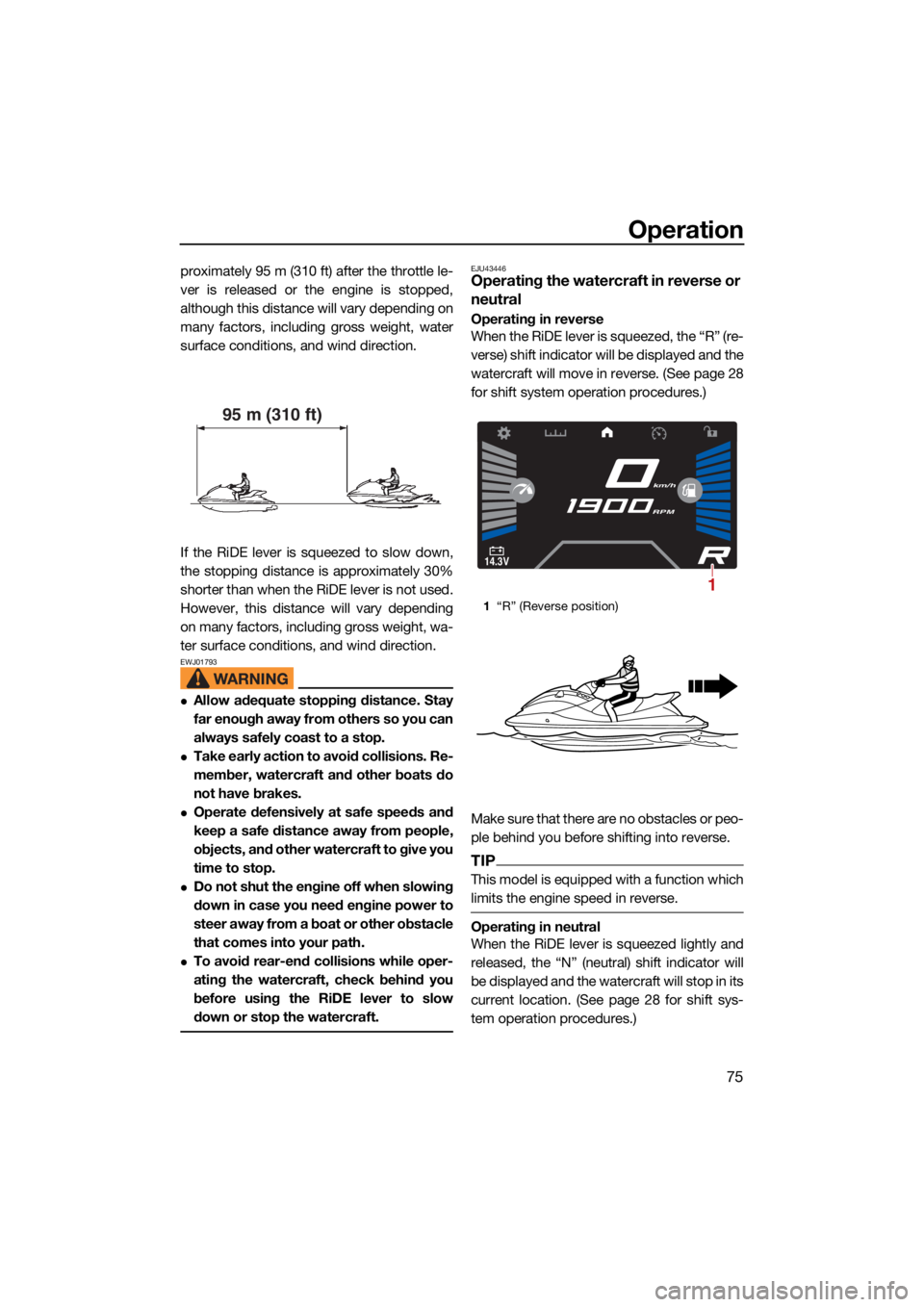
proximately 95 m (310 ft) after the throttle le-
ver is released or the engine is stopped,
although this distance will vary depending on
many factors, including gross weight, water
surface conditions, and wind direction.
If the RiDE lever is squeezed to slow down,
the stopping distance is approximately 30%
shorter than when the RiDE lever is not used.
However, this distance will vary depending
on many factors, including gross weight, wa-
ter surface conditions, and wind direction.
EWJ01793
Allow adequate stopping distance. Stay
far enough away from others so you can
always safely coast to a stop.
Take early action to avoid collisions. Re-
member, watercraft and other boats do
not have brakes.
Operate defensively at safe speeds and
keep a safe distance away from people,
objects, and other watercraft to give you
time to stop.
Do not shut the engine off when slowing
down in case you need engine power to
steer away from a boat or other obstacle
that comes into your path.
To avoid rear-end collisions while oper-
ating the watercraft, check behind you
before using the RiDE lever to slow
down or stop the watercraft.
EJU43446Operating the watercraft in reverse or
neutral
Operating in reverse
When the RiDE lever is squeezed, the “R” (re-
verse) shift indicator will be displayed and the
watercraft will move in reverse. (See page 28
for shift system operation procedures.)
Make sure that there are no obstacles or peo-
ple behind you before shifting into reverse.
TIP
This model is equipped with a function which
limits the engine speed in reverse.
Operating in neutral
When the RiDE lever is squeezed lightly and
released, the “N” (neutral) shift indicator will
be displayed and the watercraft will stop in its
current location. (See page 28 for shift sys-
tem operation procedures.)
95 m (310 ft)
1“R” (Reverse position)
14.3V
km/h
RPM
1
UF4S71E0.book Page 75 Wednesday, August 4, 2021 5:18 PM