parking brake YAMAHA WOLVERINE 2017 User Guide
[x] Cancel search | Manufacturer: YAMAHA, Model Year: 2017, Model line: WOLVERINE, Model: YAMAHA WOLVERINE 2017Pages: 186, PDF Size: 4.22 MB
Page 88 of 186

6-7
6
EBU31930ParkingWhen parking, stop the engine and shift the
drive select lever into the neutral position. Ap-
ply the parking brake to help prevent the ve-
hicle from rolling. See page 7-16 for more
information on parking and parking on a
slope.EBU33531LoadingTake extra precautions when driving with a
load or trailer. Follow these instructions and
always use common sense and good judg-
ment when carrying cargo or towing a trailer.
Prepare your load or trailer
WARNING
EWB03310Improper loading or towing can increase
the risk of loss of control, an overturn, or
other accident:
Do not exceed the Maximum Loading
Limits for the vehicle (see “MAXIMUM
LOADING LIMIT” in this section and ve-
hicle labeling).
Keep weight in the cargo bed centered
side to side, and as low and as far for-
ward as possible. Top-heavy loads in-
crease the risk of overturn. Be sure
cargo is secured – a loose load could
change handling unexpectedly or strike
occupants.
Do not exceed the maximum tongue
weight.
Make sure the load does not interfere
with your control or ability to see where
you are going.
Tie down cargo in the trailer securely.
Make sure cargo in the trailer cannot
move around. A shifting load can cause
an accident.
Use the hooks equipped on the cargo bed to
tie down loads.
U2MB7BE0.book Page 7 Thursday, March 3, 2016 11:46 AM
Page 105 of 186

7-15
7
If you think or feel that the vehicle may tip or
roll, keep your body completely inside the
protective structure of the vehicle:
Brace yourself by pressing your feet firmly
on the floorboard and keep a firm grip on
the steering wheel or passenger handhold.
Do not put your hands or feet outside of the
vehicle for any reason. Do not try to stop a
tipover using your arm or leg.
Accelerating
With the engine idling in neutral and your foot
on the brake, shift the drive select lever into
low or high. NOTICE: Do not shift from low
to high or vice versa without coming to a
complete stop and waiting for the engine
to return to normal idle speed – damage to
the engine or drive train may occur. Then
release the parking brake.
[ECB02160]
Press the
accelerator pedal slowly and smoothly. The
centrifugal clutch will engage and the vehicle
will begin to accelerate. Avoid higher speeds and sudden or hard ac-
celeration until you are thoroughly familiar
with the operation of your vehicle. Avoid sud-
den or hard acceleration in any turn.
Braking
When slowing down or stopping, take your
foot off the accelerator pedal and press the
brake pedal smoothly. Improper use of the
brakes can cause the tires to lose traction, re-
ducing control of the vehicle and increasing
the possibility of an accident.
Braking ability is affected by type of terrain. In
most cases, gradual application of the brakes
is more effective than
abrupt braking, partic-
ularly on loose surfaces, such as gravel. Al-
ways allow for greater braking distance on
rough, loose, or slippery surfaces.
Engine braking
Engine compression braking is designed to
assist you when operating your Wolverine off-
road. With this feature, the engine helps slow
U2MB7BE0.book Page 15 Thursday, March 3, 2016 11:46 AM
Page 106 of 186

7-16
7
the vehicle down after you take your foot off
the accelerator. Engine braking is more no-
ticeable in four-wheel drive. Application of ve-
hicle brakes provides additional stopping
power.
Leaving the vehicle
Do not get out of the vehicle while the engine
is running and the drive select lever is in any
gear. There is a risk of injury because:
Children or others may accidentally press
the accelerator pedal.
Objects tossed into the vehicle may strike
the accelerator pedal.
The parking brake may not keep the vehicle
from accelerating.
Unwanted vehicle movement can cause seri-
ous injury or death, and it may be dangerous
to try to stop the vehicle. Parking on a flat area
When parking on a flat area, stop the engine
and shift the drive select lever into the neutral
position. Apply the parking brake to help pre-
vent the vehicle from rolling.
Parking on a slope
The parking brake acts only on the rear
wheels when in “2WD”. For the parking brake
to take effect on all four wheels, shift to “DIFF
LOCK” before stopping the engine.
If you park on a hill that is too steep, the vehi-
cle may roll out of control. Never park on hills
that are so steep you cannot walk up them
easily. If you must park on an incline, follow
these instructions:
1. Bring the vehicle to a stop by applying the brake pedal.
2. Put the vehicle in “DIFF LOCK”.
3. Turn the key to “ ” (off).
4. With the brake pedal applied, set the parking brake.U2MB7BE0.book Page 16 Thursday, March 3, 2016 11:46 AM
Page 111 of 186

7-21
7
If you feel the vehicle begin to slide sideways
or the back wheels slide during a turn, steer
into the direction of the slide if possible, to re-
gain directional control. For example, if you
feel the back of the vehicle start to slide to
your right, steer to the right.
Brush or wooded areas
When operating in areas with brush or trees,
watch carefully on both sides and above the
vehicle for obstacles such as branches that
the vehicle might hit, causing an accident.
Watch for brush that might enter the vehicle
as you pass and strike you or the passenger.
Never hold onto the cage/frame. The passen-
ger should always hold onto the passenger
handhold with both hands.
The muffler and other engine parts become
extremely hot during operation and remain
hot after the engine has stopped. To reduce
the risk of fire during operation or after leaving
the vehicle, do not let brush, grass and other
materials collect under the vehicle, near themuffler or exhaust pipe, or next to other hot
parts. Check under the vehicle after operating
in areas where combustible materials may
have collected. Do not idle or park the vehicle
in long dry grass or other dry ground cover.
Encountering obstacles
If you cannot go around an obstacle, such as
a fallen tree or a ditch, stop the vehicle where
it is safe to do so. Set the parking brake and
get out to inspect the area thoroughly. Look
from both your approach side and exit side. If
you believe you can continue safely, choose
the path that will allow you to get over the ob-
stacle and at as close to a right angle as pos-
sible to minimize vehicle tipping. Go only fast
enough to maintain your momentum but still
give yourself plenty of time to react to chang-
es in conditions.U2MB7BE0.book Page 21 Thursday, March 3, 2016 11:46 AM
Page 119 of 186

8-7
8
8*Parking brake • Check operation and adjust if necessary. √√√√√
9 *Brake fluid • Change. Every 2 years
10 *Accelerator pedal • Check operation and free play. √√√√√
11 *V-b e l t • Check operation.
• Check for wear, cracks, or damage. √√√
12 *Wheels • Check balance/damage/runout.
• Repair if necessary. √√√√
13 *Wheel bearings • Check bearing assemblies for loose-
ness/damage.
• Replace if damaged. √√√√
14 *Front and rear
suspension • Check operation and for oil leakage.
• Correct if necessary.
√√
15 *Steering system • Check operation and for looseness. Replace
if damaged.
• Check toe-in. Adjust if necessary. √√√√√
16 *Stabilizer bushes • Check for cracks or other damage, and re-
place if necessary. √√√
17 *Rear knuckle up-
per and lower piv-
ots
• Lubricate with lithium-soap-based grease.
√√√
NO. ITEM
ROUTINE INITIAL
EVERY
Whichev- er comes first month 1 3 6 6 12
km
(mi) 320
(200) 1200
(750) 2400
(1500) 2400
(1500) 4800
(3000)
hours 20 75 150 150 300
U2MB7BE0.book Page 7 Thursday, March 3, 2016 11:46 AM
Page 154 of 186
8-42
8
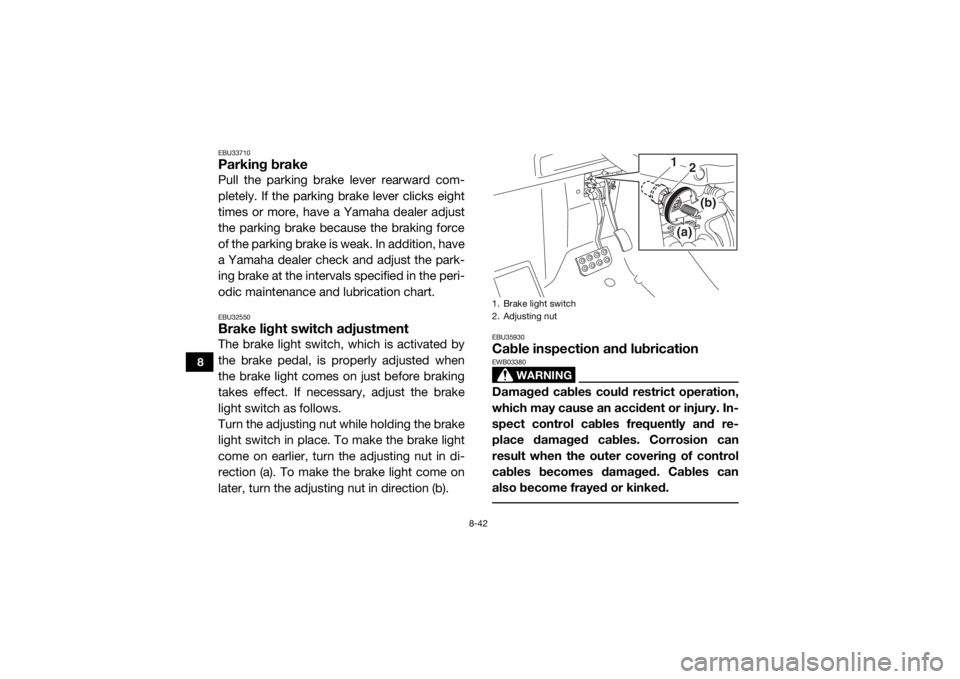
EBU33710Parking brakePull the parking brake lever rearward com-
pletely. If the parking brake lever clicks eight
times or more, have a Yamaha dealer adjust
the parking brake because the braking force
of the parking brake is weak. In addition, have
a Yamaha dealer check and adjust the park-
ing brake at the intervals specified in the peri-
odic maintenance and lubrication chart.EBU32550Brake light switch adjustmentThe brake light switch, which is activated by
the brake pedal, is properly adjusted when
the brake light comes on just before braking
takes effect. If necessary, adjust the brake
light switch as follows.
Turn the adjusting nut while holding the brake
light switch in place. To make the brake light
come on earlier, turn the adjusting nut in di-
rection (a). To make the brake light come on
later, turn the adjusting nut in direction (b).
EBU35930Cable inspection and lubrication
WARNING
EWB03380Damaged cables could restrict operation,
which may cause an accident or injury. In-
spect control cables frequently and re-
place damaged cables. Corrosion can
result when the outer covering of control
cables becomes damaged. Cables can
also become frayed or kinked. 1. Brake light switch
2. Adjusting nut
(a)
(b)
1
2
U2MB7BE0.book Page 42 Thursday, March 3, 2016 11:46 AM
Page 180 of 186

10-5
10
Parking brake indicator light:LED
On-Command four-wheel-drive/differential gear lock
indicator: LCD
High-range indicator light: LED
Low-range indicator light:
LED
Differential gear lock indicator light: LED
EPS warning light: LED
Helmet/Seat belt indicator light:
14 V, 0.85 W × 2Fuses:Main fuse:
40.0 A
Fuel injection system fuse:
10.0 A
EPS fuse: 40.0 A
Headlight fuse: 15.0 A
Signaling system fuse:
10.0 A
Ignition fuse: 10.0 A
Auxiliary DC jack fuse: 10.0 A
Backup fuse:
10.0 A Four-wheel-drive motor fuse:
10.0 A
Radiator fan motor fuse: 25.0 A
EBU33221For Europe only
The figures quoted are emission levels and
are not necessarily safe working levels. Whilst
there is a correlation between the emission
and exposure levels, this cannot be used reli-
ably to determine whether or not further pre-
cautions are required. Factors that influence
the actual level of exposure of work-force in-
clude the characteristics of the work room,
the other sources of noise, etc. i.e. the num-
ber of machines and other adjacent process-
es, and the length of time for which an
operator is exposed to the noise. Also the
permissible exposure level can vary from
country. This information, however, will en-
able the user of the machine to make a better
evaluation of the hazard and risk.
U2MB7BE0.book Page 5 Thursday, March 3, 2016 11:46 AM
Page 184 of 186

12-2
12
Indicator lights and warning lights ................................. 4-2
Instruments, lights and switches, Pre-operation check ........................................................................... 5-7JJump-starting ............................................................... 8-50LLabel locations ............................................................... 1-1
Light switch .................................................................. 4-11
Loading ..........................................................................6-7
Low-range indicator light ............................................... 4-2MMain switch .................................................................... 4-1
Maintenance and lubrication chart ................................8-6
Maintenance chart, emission control system ................ 8-4
Model label ................................................................... 11-1
Multi-function meter unit ................................................ 4-6NNeutral indicator light .....................................................4-3OOn-Command drive knob ............................................ 4-12
On-Command drive knob, operation ............................. 6-5
On-Command four-wheel-drive /differential gear lock
indicator ....................................................................... 4-3
Owner’s manual and tool kit .......................................... 8-2PPanels .......................................................................... 8-11
Parking ........................................................................... 6-7
Parking brake ............................................................... 8-42
Parking brake indicator light .......................................... 4-3
Parking brake lever ...................................................... 4-13
Passenger handhold, Pre-operation check ................... 5-7
RRear knuckle upper and lower pivot, lubrication ......... 8-44
Reverse indicator light ................................................... 4-3SSafety information .......................................................... 2-1
Seat belt indicator light .................................................. 4-5
Seat belts ..................................................................... 4-17
Seat belts, Pre-operation check .................................... 5-6
Seats ............................................................................ 4-15
Shock absorber assemblies, adjusting the front ......... 4-23
Shock absorber assemblies, adjusting the rear ........... 4-28
Spark arrester, cleaning ............................................... 8-37
Spark plug, inspecting ................................................. 8-30
Specifications .............................................................. 10-1
Stabilizer bushes, checking ......................................... 8-43
Starting the engine ......................................................... 6-2
Steering, Pre-operation check ....................................... 5-7
Steering shaft, lubrication ............................................ 8-44
Storage .......................................................................... 9-2
Storage compartments ................................................ 4-19TTail/brake light bulb, replacing ..................................... 8-57
Tire, replacing .............................................................. 8-45
Tires, Pre-operation check ............................................. 5-8
Trailer hitch bracket and receiver ................................ 4-33
Troubleshooting ........................................................... 8-58
Troubleshooting charts ................................................ 8-59VValve clearance ............................................................ 8-38
V-belt case drain plug .................................................. 8-36
Vehicle identification number ....................................... 11-1
U2MB7BE0.book Page 2 Thursday, March 3, 2016 11:46 AM