steering YAMAHA WR 250F 2008 User Guide
[x] Cancel search | Manufacturer: YAMAHA, Model Year: 2008, Model line: WR 250F, Model: YAMAHA WR 250F 2008Pages: 224, PDF Size: 13.66 MB
Page 79 of 224
3-24
CHASSIS
Do not force the adjuster past the
minimum or maximum extent of
adjustment. The adjuster may be
damaged.
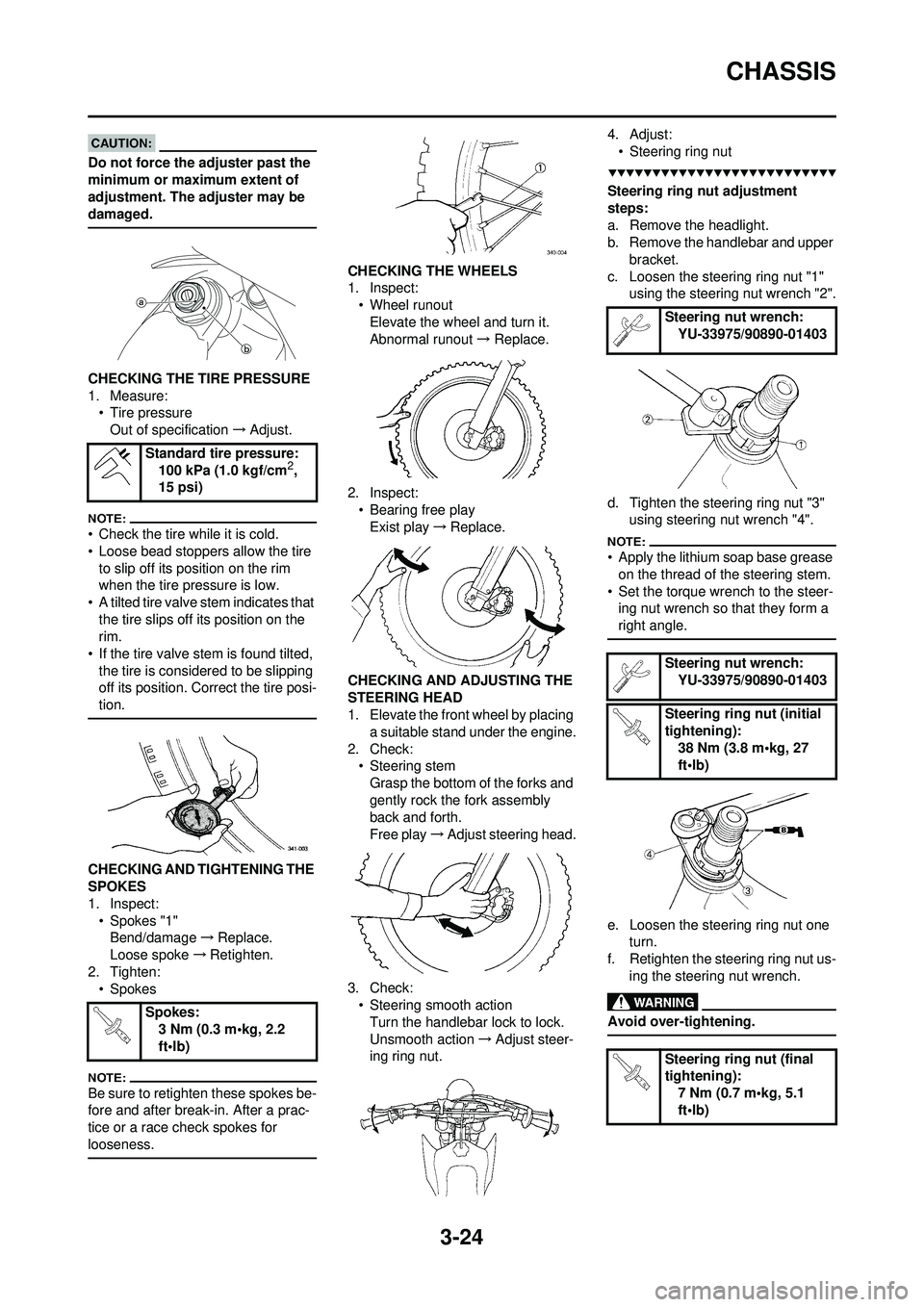
CHECKING THE TIRE PRESSURE
1. Measure:• Tire pressure
Out of specification →Adjust.
• Check the tire while it is cold.
• Loose bead stoppers allow the tire
to slip off its position on the rim
when the tire pressure is low.
• A tilted tire valve stem indicates that
the tire slips off its position on the
rim.
• If the tire valve st em is found tilted,
the tire is considered to be slipping
off its position. Correct the tire posi-
tion.
CHECKING AND TIGHTENING THE
SPOKES
1. Inspect: • Spokes "1"Bend/damage →Replace.
Loose spoke →Retighten.
2. Tighten: • Spokes
Be sure to retighten these spokes be-
fore and after break-in. After a prac-
tice or a race check spokes for
looseness.
CHECKING THE WHEELS
1. Inspect:
• Wheel runoutElevate the wheel and turn it.
Abnormal runout → Replace.
2. Inspect: • Bearing free playExist play →Replace.
CHECKING AND ADJUSTING THE
STEERING HEAD
1. Elevate the front wheel by placing a suitable stand under the engine.
2. Check: • Steering stemGrasp the bottom of the forks and
gently rock the fork assembly
back and forth.
Free play →Adjust steering head.
3. Check: • Steering smooth actionTurn the handlebar lock to lock.
Unsmooth action →Adjust steer-
ing ring nut. 4. Adjust:
• Steering ring nut
Steering ring nut adjustment
steps:
a. Remove the headlight.
b. Remove the handlebar and upper bracket.
c. Loosen the steering ring nut "1" using the steering nut wrench "2".
d. Tighten the steering ring nut "3" using steering nut wrench "4".
• Apply the lithium soap base grease
on the thread of the steering stem.
• Set the torque wrench to the steer- ing nut wrench so that they form a
right angle.
e. Loosen the steering ring nut one turn.
f. Retighten the steering ring nut us- ing the steering nut wrench.
Avoid over-tightening.
Standard tire pressure:100 kPa (1.0 kgf/cm2,
15 psi)
Spokes: 3 Nm (0.3 m•kg, 2.2
ft•lb)
Steering nut wrench:YU-33975/90890-01403
Steering nut wrench: YU-33975/90890-01403
Steering ring nut (initial
tightening): 38 Nm (3.8 m•kg, 27
ft•lb)
Steering ring nut (final
tightening): 7 Nm (0.7 m•kg, 5.1
ft•lb)
Page 80 of 224
3-25
CHASSIS
g. Check the steering stem by turn-ing it lock to lock. If there is any
binding, remove the steering stem
assembly and inspect the steer-
ing bearings.
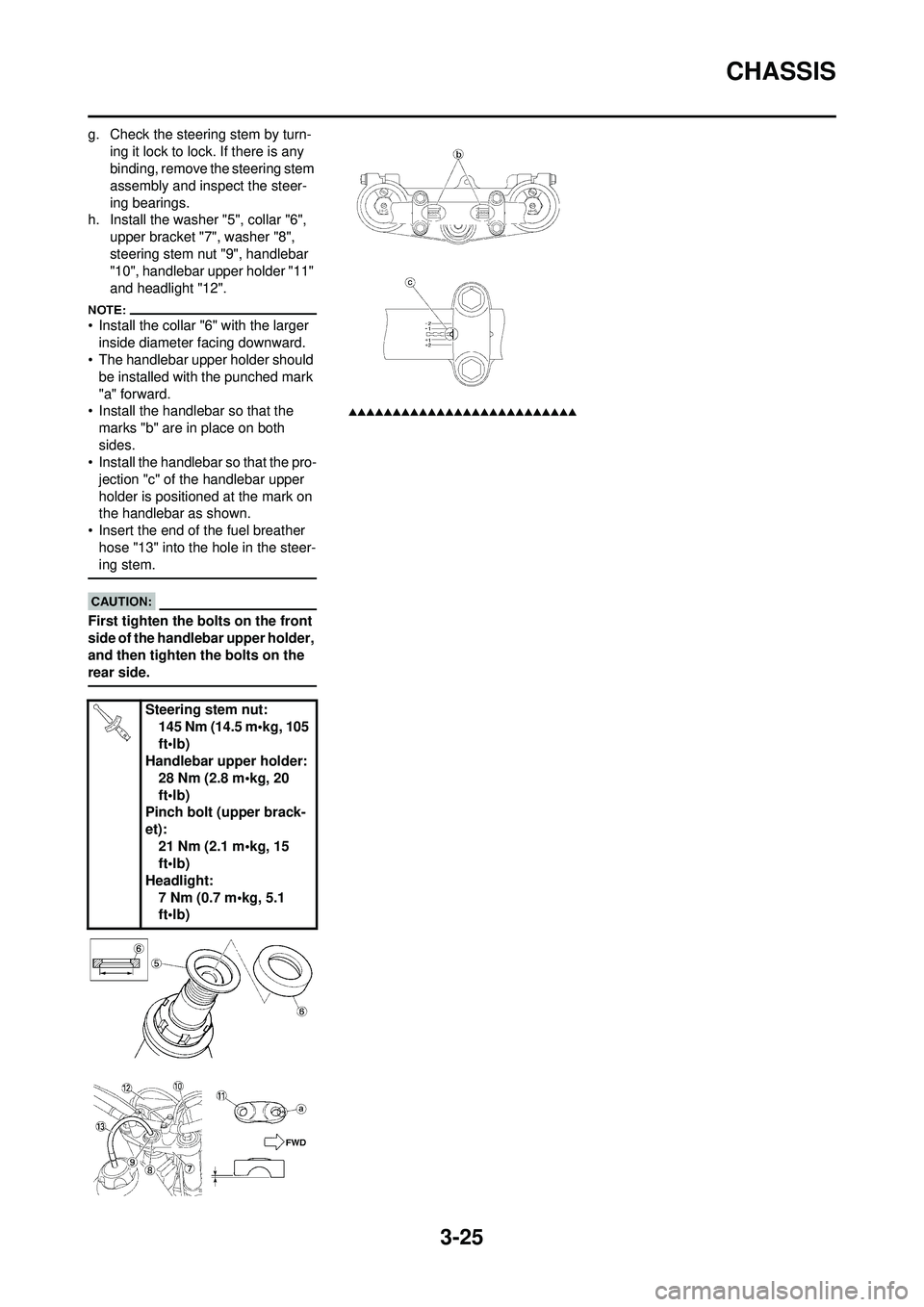
h. Install the washer "5", collar "6", upper bracket "7", washer "8",
steering stem nut "9", handlebar
"10", handlebar upper holder "11"
and headlight "12".
• Install the collar "6" with the larger
inside diameter facing downward.
• The handlebar upper holder should be installed with the punched mark
"a" forward.
• Install the handlebar so that the marks "b" are in place on both
sides.
• Install the handlebar so that the pro- jection "c" of the handlebar upper
holder is positioned at the mark on
the handlebar as shown.
• Insert the end of the fuel breather
hose "13" into the hole in the steer-
ing stem.
First tighten the bolts on the front
side of the handlebar upper holder,
and then tighten the bolts on the
rear side.
Steering stem nut: 145 Nm (14.5 m•kg, 105
ft•lb)
Handlebar upper holder:
28 Nm (2.8 m•kg, 20
ft•lb)
Pinch bolt (upper brack-
et): 21 Nm (2.1 m•kg, 15
ft•lb)
Headlight: 7 Nm (0.7 m•kg, 5.1
ft•lb)
Page 188 of 224
6-27
STEERING
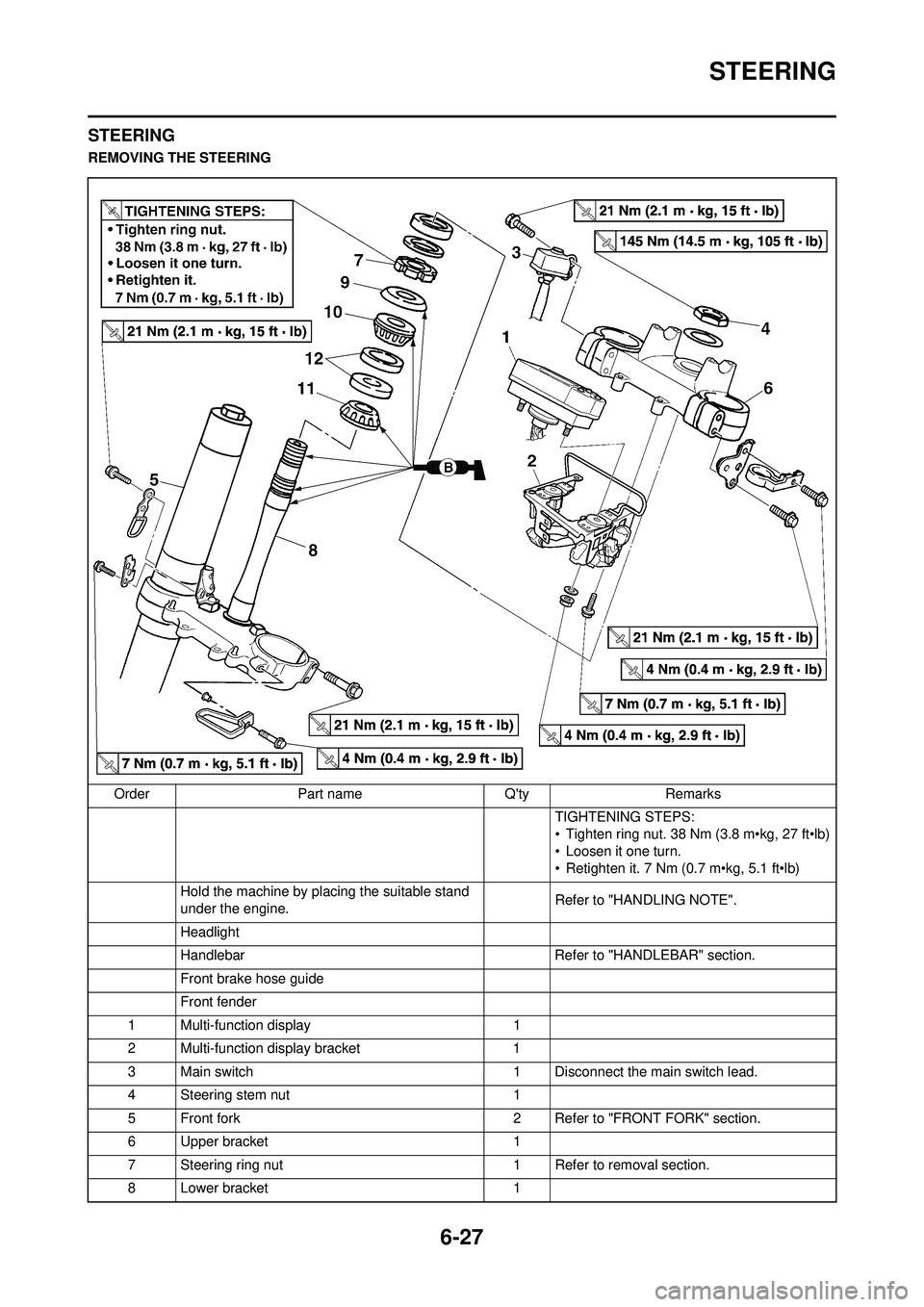
STEERING
REMOVING THE STEERINGOrder Part name Q'ty Remarks TIGHTENING STEPS:
• Tighten ring nut. 38 Nm (3.8 m•kg, 27 ft•lb)
• Loosen it one turn.
• Retighten it. 7 Nm (0.7 m•kg, 5.1 ft•lb)
Hold the machine by placing the suitable stand
under the engine. Refer to "HANDLING NOTE".
Headlight
Handlebar Refer to "HANDLEBAR" section.
Front brake hose guide
Front fender
1 Multi-function display 1
2 Multi-function display bracket 1
3 Main switch 1 Disconnect the main switch lead.
4 Steering stem nut 1
5 Front fork 2 Refer to "FRONT FORK" section.
6 Upper bracket 1
7 Steering ring nut 1 Refer to removal section.
8 Lower bracket 1
Page 189 of 224
6-28
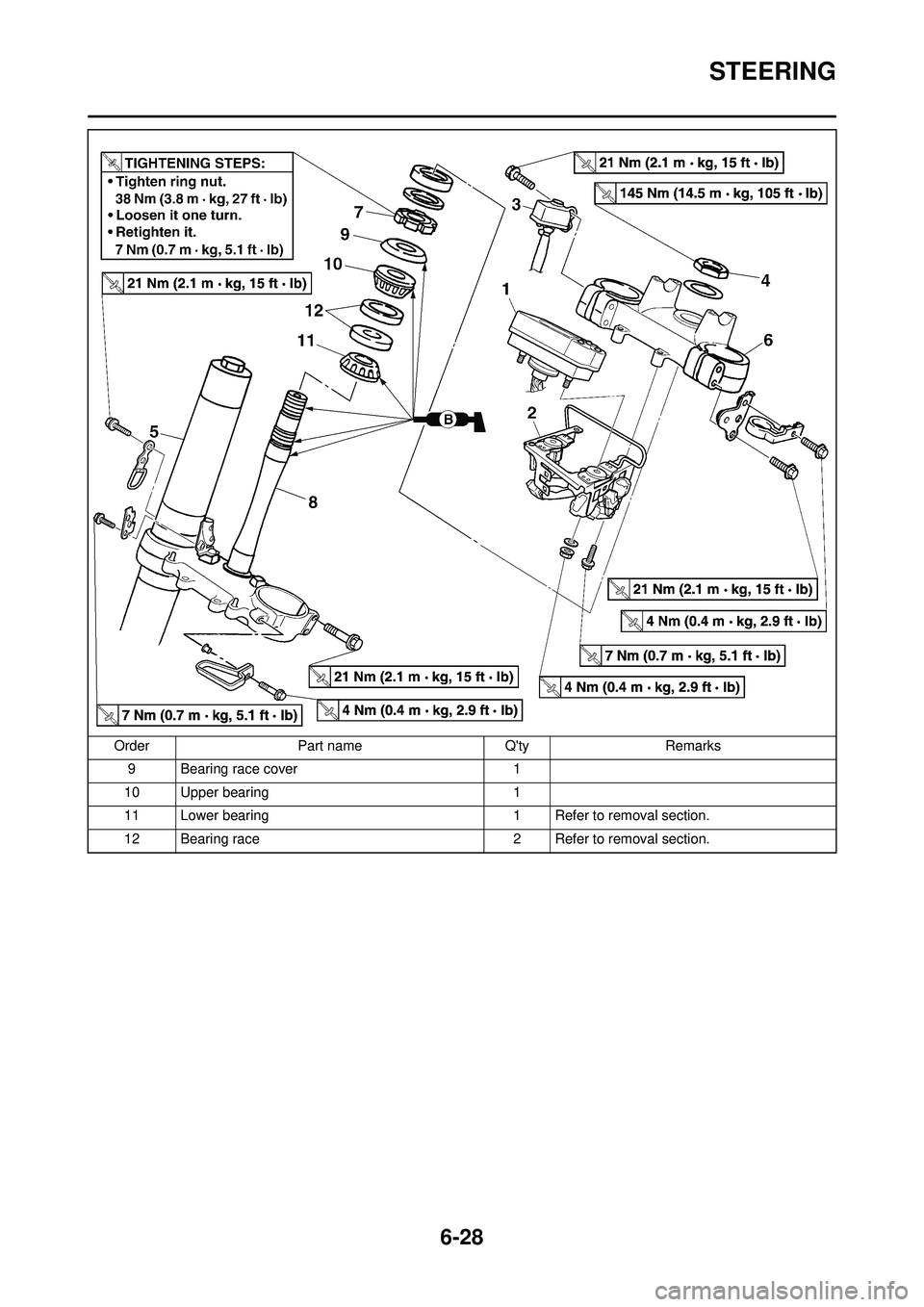
STEERING
9 Bearing race cover 1
10 Upper bearing 1
11 Lower bearing 1 Refer to removal section.
12 Bearing race 2 Refer to removal section.
Order
Part name Q'tyRemarks
Page 190 of 224
6-29
STEERING
HANDLING NOTE
Support the machine securely so
there is no danger of it falling over.
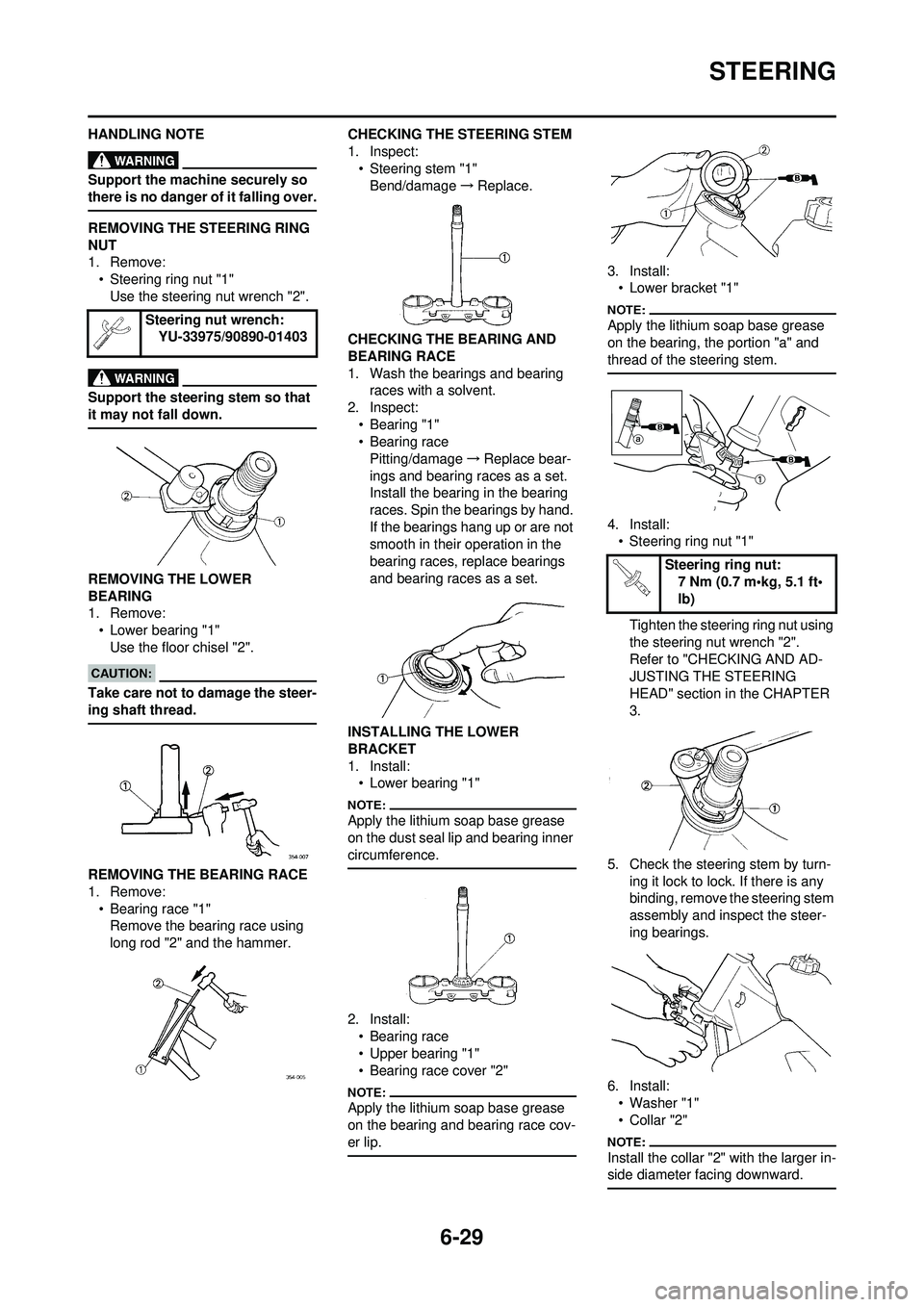
REMOVING THE STEERING RING
NUT
1. Remove:• Steering ring nut "1"Use the steering nut wrench "2".
Support the steering stem so that
it may not fall down.
REMOVING THE LOWER
BEARING
1. Remove:
• Lower bearing "1"Use the floor chisel "2".
Take care not to damage the steer-
ing shaft thread.
REMOVING THE BEARING RACE
1. Remove:
• Bearing race "1"Remove the bearing race using
long rod "2" and the hammer. CHECKING THE STEERING STEM
1. Inspect:
• Steering stem "1"Bend/damage →Replace.
CHECKING THE BEARING AND
BEARING RACE
1. Wash the bearings and bearing races with a solvent.
2. Inspect: •Bearing "1"
• Bearing race
Pitting/damage →Replace bear-
ings and bearing races as a set.
Install the bearing in the bearing
races. Spin the bearings by hand.
If the bearings hang up or are not
smooth in their operation in the
bearing races, replace bearings
and bearing races as a set.
INSTALLING THE LOWER
BRACKET
1. Install: • Lower bearing "1"
Apply the lithium soap base grease
on the dust seal lip and bearing inner
circumference.
2. Install:
• Bearing race
• Upper bearing "1"
• Bearing race cover "2"
Apply the lithium soap base grease
on the bearing and bearing race cov-
er lip.
3. Install:• Lower bracket "1"
Apply the lithium soap base grease
on the bearing, the portion "a" and
thread of the steering stem.
4. Install:• Steering ring nut "1"
Tighten the steering ring nut using
the steering nut wrench "2".
Refer to "CHECKING AND AD-
JUSTING THE STEERING
HEAD" section in the CHAPTER
3.
5. Check the steering stem by turn- ing it lock to lock. If there is any
binding, remove the steering stem
assembly and inspect the steer-
ing bearings.
6. Install: • Washer "1"
•Collar "2"
Install the collar "2" with the larger in-
side diameter facing downward.
Steering nut wrench: YU-33975/90890-01403
Steering ring nut:7 Nm (0.7 m•kg, 5.1 ft•
lb)
Page 191 of 224
6-30
STEERING
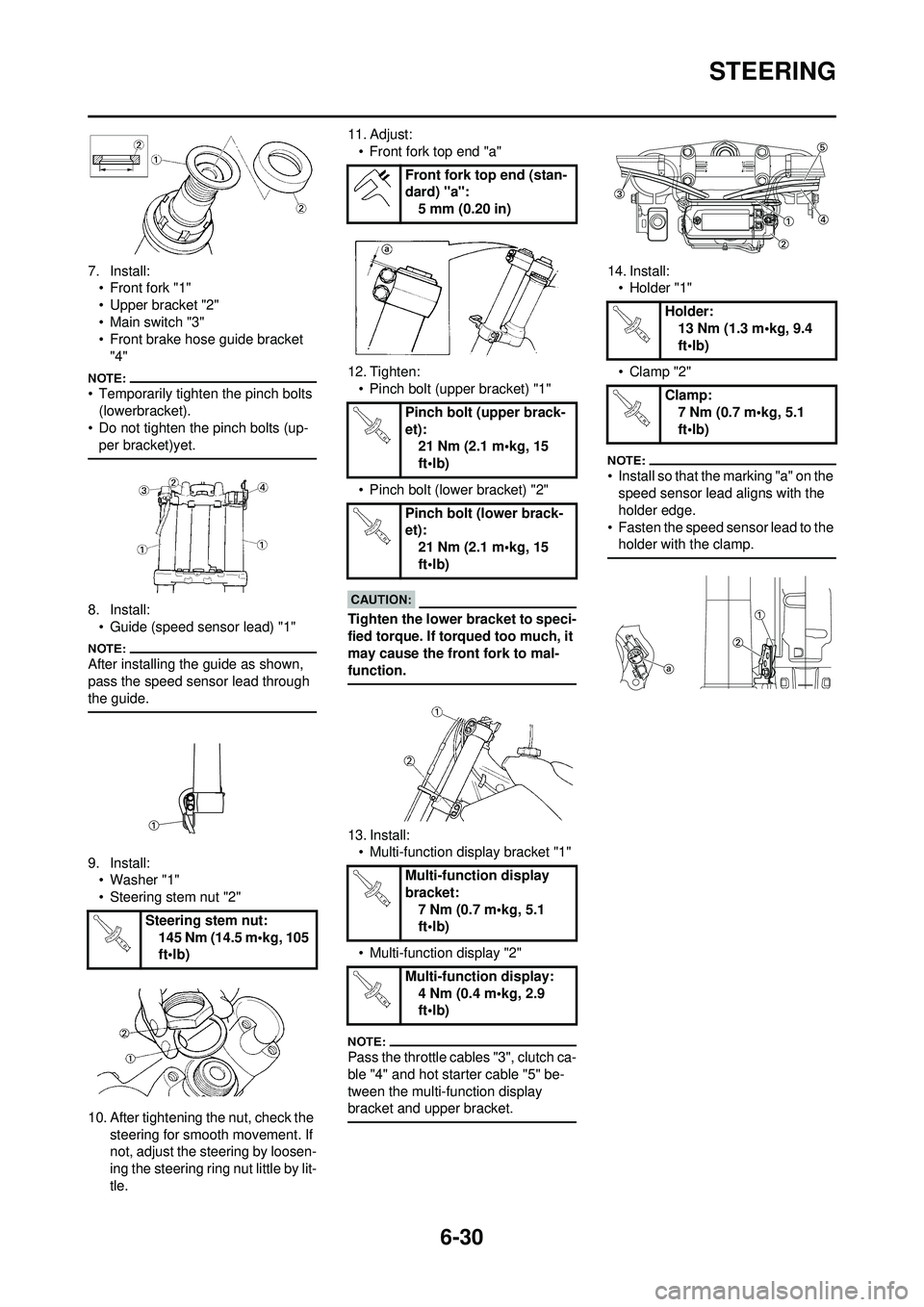
7. Install:• Front fork "1"
• Upper bracket "2"
• Main switch "3"
• Front brake hose guide bracket
"4"
• Temporarily tighten the pinch bolts (lowerbracket).
• Do not tighten the pinch bolts (up-
per bracket)yet.
8. Install:• Guide (speed sensor lead) "1"
After installing the guide as shown,
pass the speed sensor lead through
the guide.
9. Install:• Washer "1"
• Steering stem nut "2"
10. After tightening the nut, check the steering for smooth movement. If
not, adjust the steering by loosen-
ing the steering ring nut little by lit-
tle. 11. Adjust:
• Front fork top end "a"
12. Tighten: • Pinch bolt (upper bracket) "1"
• Pinch bolt (lower bracket) "2"
Tighten the lower bracket to speci-
fied torque. If to rqued too much, it
may cause the front fork to mal-
function.
13. Install: • Multi-function display bracket "1"
• Multi-function display "2"
Pass the throttle cables "3", clutch ca-
ble "4" and hot starter cable "5" be-
tween the multi-function display
bracket and upper bracket.
14. Install: • Holder "1"
• Clamp "2"
• Install so that the marking "a" on the speed sensor lead aligns with the
holder edge.
• Fasten the speed sensor lead to the holder with the clamp.
Steering stem nut:
145 Nm (14.5 m•kg, 105
ft•lb)
Front fork top end (stan-
dard) "a":5 mm (0.20 in)
Pinch bolt (upper brack-
et): 21 Nm (2.1 m•kg, 15
ft•lb)
Pinch bolt (lower brack-
et): 21 Nm (2.1 m•kg, 15
ft•lb)
Multi-function display
bracket: 7 Nm (0.7 m•kg, 5.1
ft•lb)
Multi-function display: 4 Nm (0.4 m•kg, 2.9
ft•lb)
Holder: 13 Nm (1.3 m•kg, 9.4
ft•lb)
Clamp: 7 Nm (0.7 m•kg, 5.1
ft•lb)