wheel YAMAHA WR 450F 2010 Owner's Guide
[x] Cancel search | Manufacturer: YAMAHA, Model Year: 2010, Model line: WR 450F, Model: YAMAHA WR 450F 2010Pages: 230, PDF Size: 13.87 MB
Page 173 of 230

6-5
FRONT WHEEL AND REAR WHEEL
2. Install:
• Brake disc "1"
• Bolt (brake disc) "2"
Tighten the bolts in stage, using a
crisscross pattern.
3. Install:
• Rear wheel sprocket "1"
• Bolt (rear wheel sprocket) "2"
• Washer (rear wheel sprocket) "3"
• Nut (rear wheel sprocket) "4"
Tighten the nuts in stage, using a
crisscross pattern.
4. Install:
•Collar "1"
Apply the lithium soap base grease
on the oil seal lip.
5. Install:
• Wheel
Install the brake disc "1" between the
brake pads "2" correctly.
6. Install:
• Drive chain "1"
Push the wheel "2" forward and install
the drive chain.
7. Install:
• Left drive chain puller "1"
• Wheel axle "2"
• Install the left drive chain puller, and
insert the wheel axle from left side.
• Apply the lithium soap base grease
on the wheel axle.
8. Install:
• Right drive chain puller "1"
• Washer "2"
• Nut (wheel axle) "3"
Temporarily tighten the nut (wheel
axle) at this point.
9. Adjust:
• Drive chain slack "a"
Refer to "ADJUSTING THE
DRIVE CHAIN SLACK" section in
the CHAPTER 3.
10. Tighten:
• Nut (wheel axle) "1"
• Locknut "2" Bolt (brake disc):
14 Nm (1.4 m•kg, 10
ft•lb)
Nut (rear wheel sprock-
et):
50 Nm (5.0 m•kg, 36
ft•lb)
Drive chain slack:
48–58 mm (1.9–2.3 in)
Nut (wheel axle):
125 Nm (12.5 m•kg, 90
ft•lb)
Locknut:
19 Nm (1.9 m•kg, 13
ft•lb)
Page 175 of 230
6-7
FRONT BRAKE AND REAR BRAKE
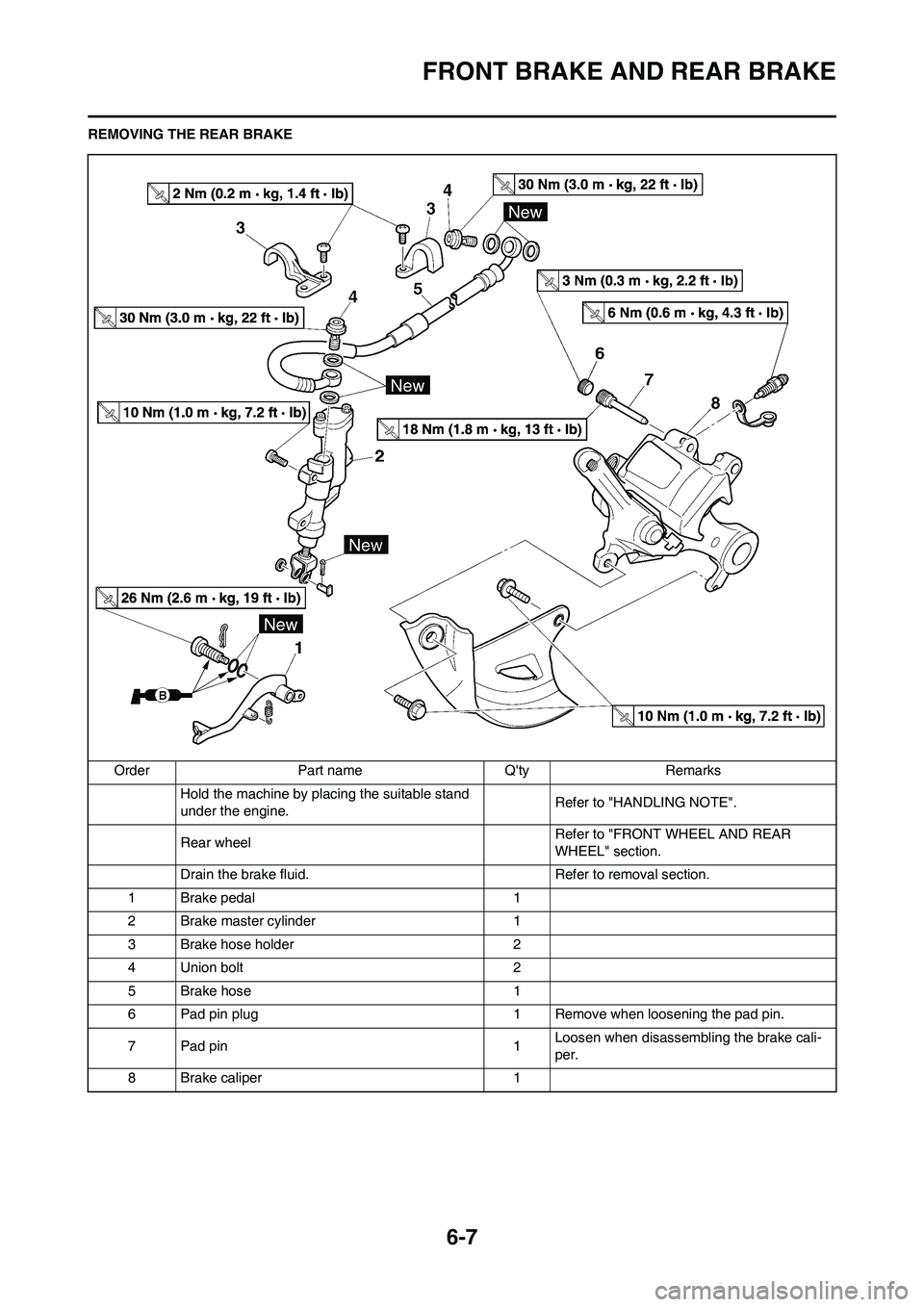
REMOVING THE REAR BRAKE
Order Part name Q'ty Remarks
Hold the machine by placing the suitable stand
under the engine.Refer to "HANDLING NOTE".
Rear wheel Refer to "FRONT WHEEL AND REAR
WHEEL" section.
Drain the brake fluid. Refer to removal section.
1 Brake pedal 1
2 Brake master cylinder 1
3 Brake hose holder 2
4 Union bolt 2
5 Brake hose 1
6 Pad pin plug 1 Remove when loosening the pad pin.
7Pad pin 1Loosen when disassembling the brake cali-
per.
8 Brake caliper 1
Page 180 of 230
6-12
FRONT BRAKE AND REAR BRAKE
2. Install:
• Brake caliper "1"
• Bolt (brake caliper) "2"
3. Tighten:
• Pad pin "3"
4. Install:
• Pad pin plug "4"
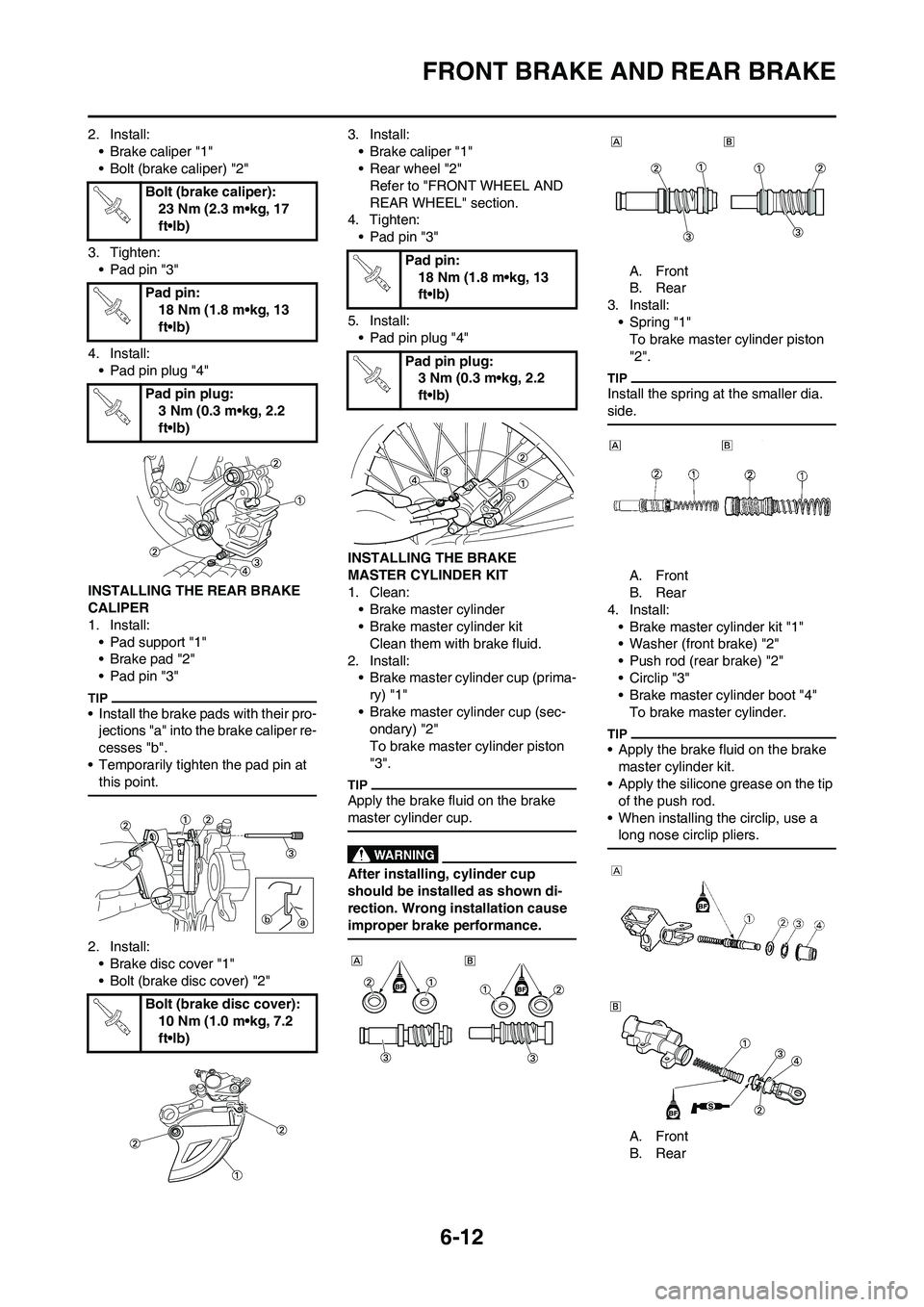
INSTALLING THE REAR BRAKE
CALIPER
1. Install:
• Pad support "1"
• Brake pad "2"
• Pad pin "3"
• Install the brake pads with their pro-
jections "a" into the brake caliper re-
cesses "b".
• Temporarily tighten the pad pin at
this point.
2. Install:
• Brake disc cover "1"
• Bolt (brake disc cover) "2"3. Install:
• Brake caliper "1"
• Rear wheel "2"
Refer to "FRONT WHEEL AND
REAR WHEEL" section.
4. Tighten:
• Pad pin "3"
5. Install:
• Pad pin plug "4"
INSTALLING THE BRAKE
MASTER CYLINDER KIT
1. Clean:
• Brake master cylinder
• Brake master cylinder kit
Clean them with brake fluid.
2. Install:
• Brake master cylinder cup (prima-
ry) "1"
• Brake master cylinder cup (sec-
ondary) "2"
To brake master cylinder piston
"3".
Apply the brake fluid on the brake
master cylinder cup.
After installing, cylinder cup
should be installed as shown di-
rection. Wrong installation cause
improper brake performance.
A. Front
B. Rear
3. Install:
• Spring "1"
To brake master cylinder piston
"2".
Install the spring at the smaller dia.
side.
A. Front
B. Rear
4. Install:
• Brake master cylinder kit "1"
• Washer (front brake) "2"
• Push rod (rear brake) "2"
• Circlip "3"
• Brake master cylinder boot "4"
To brake master cylinder.
• Apply the brake fluid on the brake
master cylinder kit.
• Apply the silicone grease on the tip
of the push rod.
• When installing the circlip, use a
long nose circlip pliers.
A. Front
B. Rear Bolt (brake caliper):
23 Nm (2.3 m•kg, 17
ft•lb)
Pad pin:
18 Nm (1.8 m•kg, 13
ft•lb)
Pad pin plug:
3 Nm (0.3 m•kg, 2.2
ft•lb)
Bolt (brake disc cover):
10 Nm (1.0 m•kg, 7.2
ft•lb)
Pad pin:
18 Nm (1.8 m•kg, 13
ft•lb)
Pad pin plug:
3 Nm (0.3 m•kg, 2.2
ft•lb)
Page 184 of 230
6-16
FRONT FORK
FRONT FORK
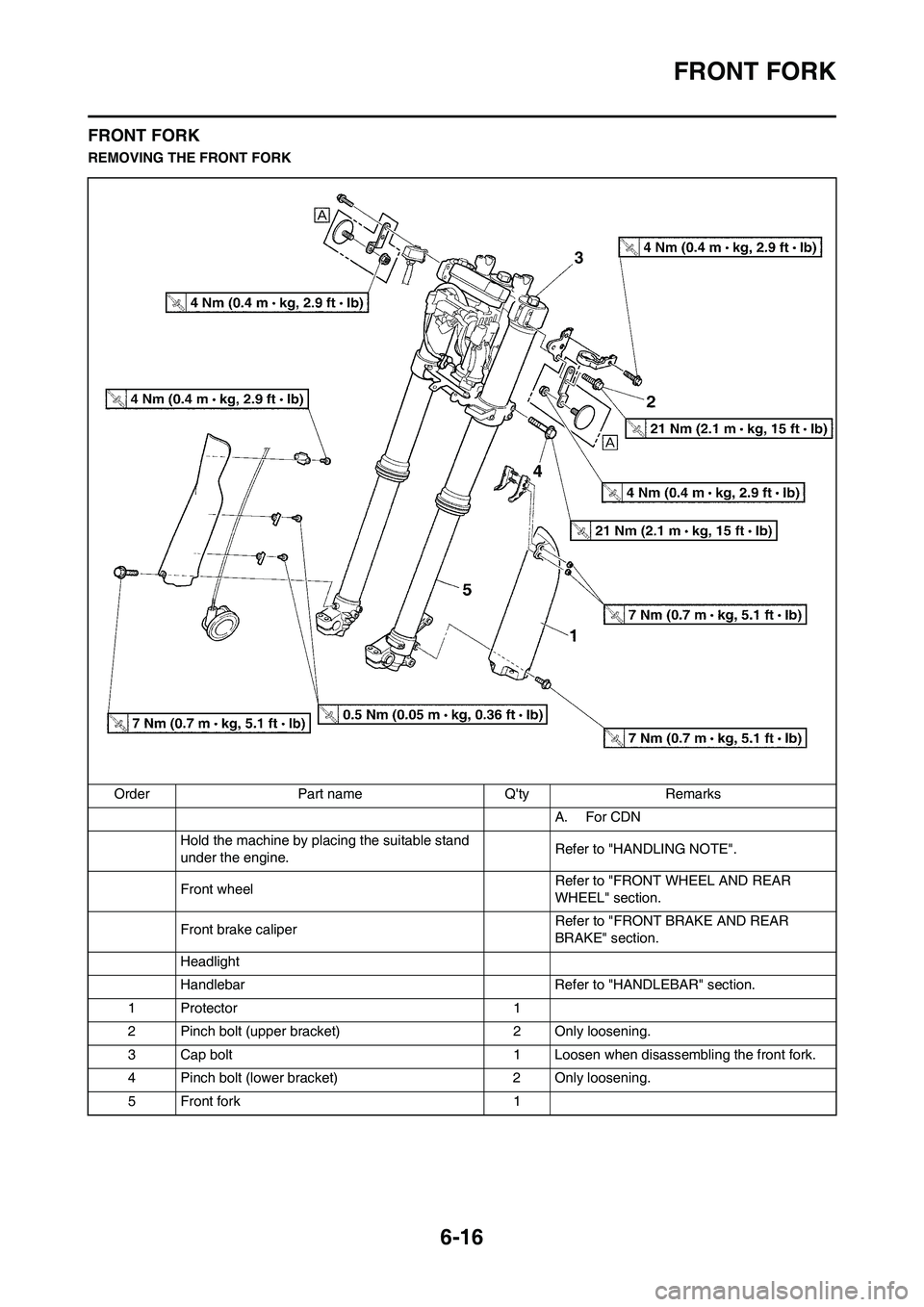
REMOVING THE FRONT FORK
Order Part name Q'ty Remarks
A. For CDN
Hold the machine by placing the suitable stand
under the engine.Refer to "HANDLING NOTE".
Front wheel Refer to "FRONT WHEEL AND REAR
WHEEL" section.
Front brake caliper Refer to "FRONT BRAKE AND REAR
BRAKE" section.
Headlight
Handlebar Refer to "HANDLEBAR" section.
1 Protector 1
2 Pinch bolt (upper bracket) 2 Only loosening.
3 Cap bolt 1 Loosen when disassembling the front fork.
4 Pinch bolt (lower bracket) 2 Only loosening.
5 Front fork 1
Page 229 of 230

7-21
SIGNALING SYSTEM
CHECKING THE COUPLERS AND
LEADS CONNECTION
1. Check:
• Couplers and leads connection
Rust/dust/looseness/short-circuit
→Repair or replace.
CHECKING THE MULTI-FUNCTION
DISPLAY INPUT VOLTAGE
1. Disconnect the multi-function dis-
play coupler.
2. Set the main switch to "ON".
3. Measure:
• Multi-function display input volt-
age
Out of specification→Replace
wire harness.
Make sure that a short-circuit does
not develop between the terminals
because it may cause damage to
electrical components.
CHECKING THE MULTI-FUNCTION
DISPLAY OUTPUT VOLTAGE
1. Disconnect the multi-function dis-
play coupler.
2. Set the main switch to "ON".
3. Measure:
• Multi-function display output volt-
age
Out of specification→Replace
multi-function display.
Make sure that a short-circuit does
not develop between the terminals
because it may cause damage to
electrical components.
CHECKING THE SPEED SENSOR
OUTPUT VOLTAGE
1. Insert the thin electric conductors
"1" (lead) into the speed sensor
coupler "2", as shown, and con-
nect the tester to them.
• Do not insert the electric conduc-
tors more than required because
it may reduce the waterproof
function of the coupler.
• Make sure that a short-circuit
does not develop between the
terminals because it may cause
damage to electrical compo-
nents.
2. Set the main switch to "ON".
3. Measure:
• Speed sensor output voltage
Output voltage not correct→Re-
place the speed sensor.
Measurement steps:
a. Elevate the front wheel and slowly
rotate it.
b. Measure the voltage (DCV) of
white lead and black lead. With
each full rotation of the front
wheel, the voltage reading should
cycle from 0.6 V to 4.8 V to 0.6 V
to 4.8 V.
Tester (+) lead→Brown lead "1"
Tester (-) lead→Black lead "2"
Multi-func-
tion dis-
play input
voltageTester se-
lector posi-
tion
10 V or
moreDCV-20
Tester (+) lead→Red lead "1"
Tester (-) lead→Black/White lead
"2"
Multi-func-
tion dis-
play output
voltageTester se-
lector posi-
tion
4.5 V or
moreDCV-20
Tester (+) lead→White lead "3"
Tester (-) lead→Black lead "4"