engine oil YAMAHA WR 450F 2011 Service Manual
[x] Cancel search | Manufacturer: YAMAHA, Model Year: 2011, Model line: WR 450F, Model: YAMAHA WR 450F 2011Pages: 230, PDF Size: 13.77 MB
Page 157 of 230
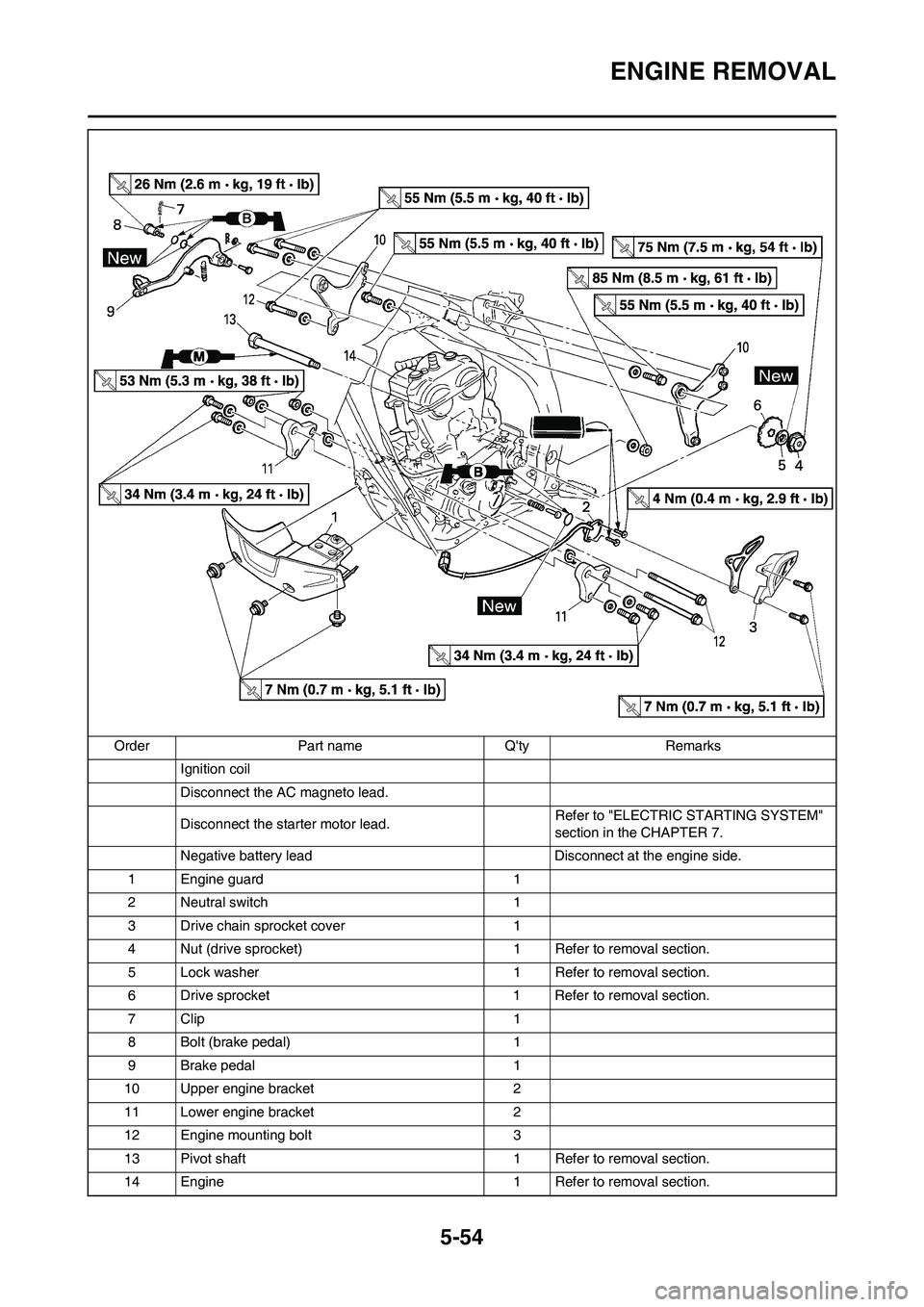
5-54
ENGINE REMOVAL
Ignition coil
Disconnect the AC magneto lead.
Disconnect the starter motor lead.Refer to "ELECTRIC STARTING SYSTEM"
section in the CHAPTER 7.
Negative battery lead Disconnect at the engine side.
1 Engine guard 1
2 Neutral switch 1
3 Drive chain sprocket cover 1
4 Nut (drive sprocket) 1 Refer to removal section.
5 Lock washer 1 Refer to removal section.
6 Drive sprocket 1 Refer to removal section.
7Clip 1
8 Bolt (brake pedal) 1
9 Brake pedal 1
10 Upper engine bracket 2
11 Lower engine bracket 2
12 Engine mounting bolt 3
13 Pivot shaft 1 Refer to removal section.
14 Engine 1 Refer to removal section. Order Part name Q'ty Remarks
Page 163 of 230
5-60
CRANKCASE AND CRANKSHAFT
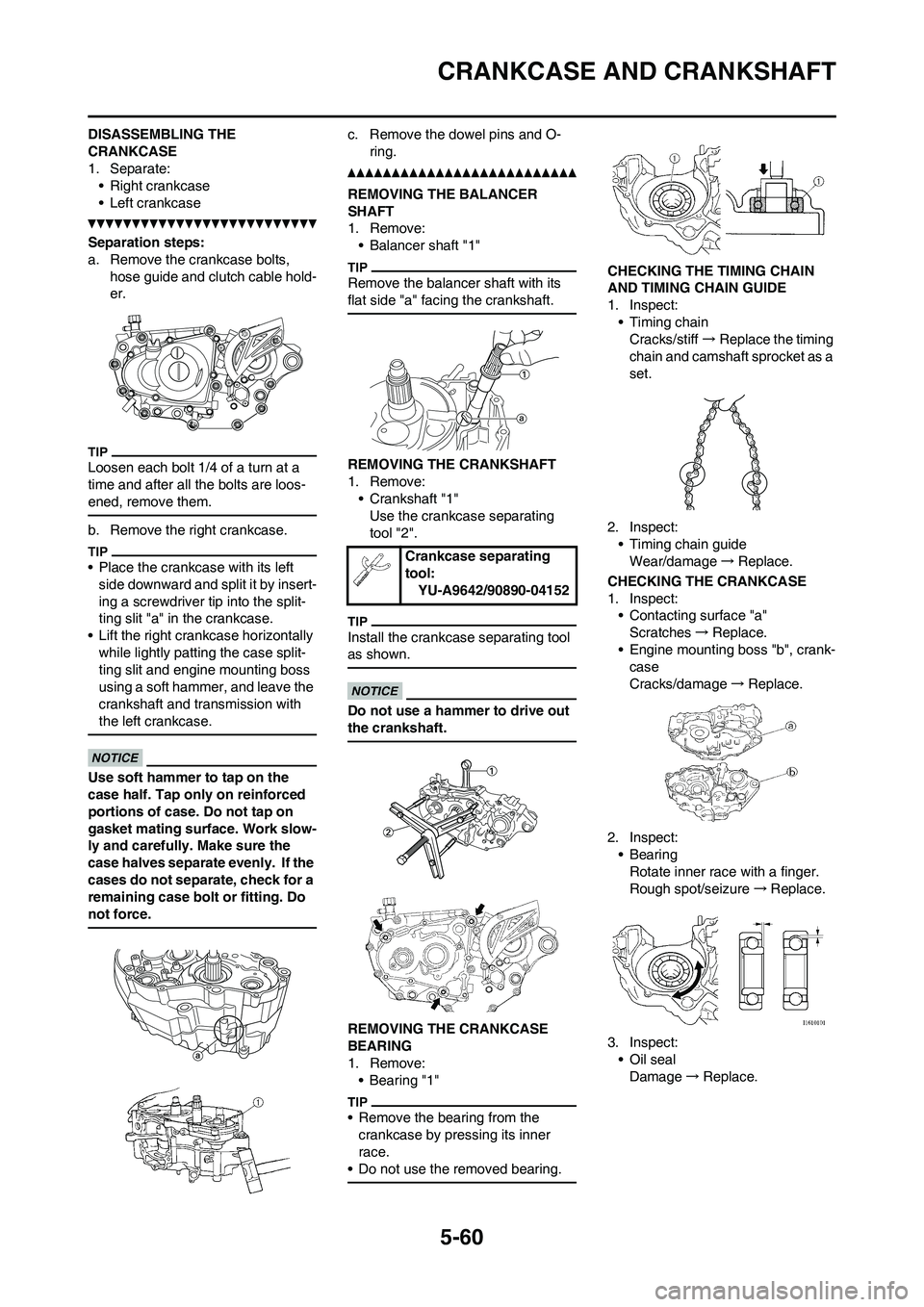
DISASSEMBLING THE
CRANKCASE
1. Separate:
• Right crankcase
• Left crankcase
Separation steps:
a. Remove the crankcase bolts,
hose guide and clutch cable hold-
er.
Loosen each bolt 1/4 of a turn at a
time and after all the bolts are loos-
ened, remove them.
b. Remove the right crankcase.
• Place the crankcase with its left
side downward and split it by insert-
ing a screwdriver tip into the split-
ting slit "a" in the crankcase.
• Lift the right crankcase horizontally
while lightly patting the case split-
ting slit and engine mounting boss
using a soft hammer, and leave the
crankshaft and transmission with
the left crankcase.
Use soft hammer to tap on the
case half. Tap only on reinforced
portions of case. Do not tap on
gasket mating surface. Work slow-
ly and carefully. Make sure the
case halves separate evenly. If the
cases do not separate, check for a
remaining case bolt or fitting. Do
not force.
c. Remove the dowel pins and O-
ring.
REMOVING THE BALANCER
SHAFT
1. Remove:
• Balancer shaft "1"
Remove the balancer shaft with its
flat side "a" facing the crankshaft.
REMOVING THE CRANKSHAFT
1. Remove:
• Crankshaft "1"
Use the crankcase separating
tool "2".
Install the crankcase separating tool
as shown.
Do not use a hammer to drive out
the crankshaft.
REMOVING THE CRANKCASE
BEARING
1. Remove:
•Bearing "1"
• Remove the bearing from the
crankcase by pressing its inner
race.
• Do not use the removed bearing.
CHECKING THE TIMING CHAIN
AND TIMING CHAIN GUIDE
1. Inspect:
• Timing chain
Cracks/stiff→Replace the timing
chain and camshaft sprocket as a
set.
2. Inspect:
• Timing chain guide
Wear/damage→Replace.
CHECKING THE CRANKCASE
1. Inspect:
• Contacting surface "a"
Scratches→Replace.
• Engine mounting boss "b", crank-
case
Cracks/damage→Replace.
2. Inspect:
• Bearing
Rotate inner race with a finger.
Rough spot/seizure→Replace.
3. Inspect:
• Oil seal
Damage→Replace.
Crankcase separating
tool:
YU-A9642/90890-04152
Page 165 of 230
5-62
CRANKCASE AND CRANKSHAFT
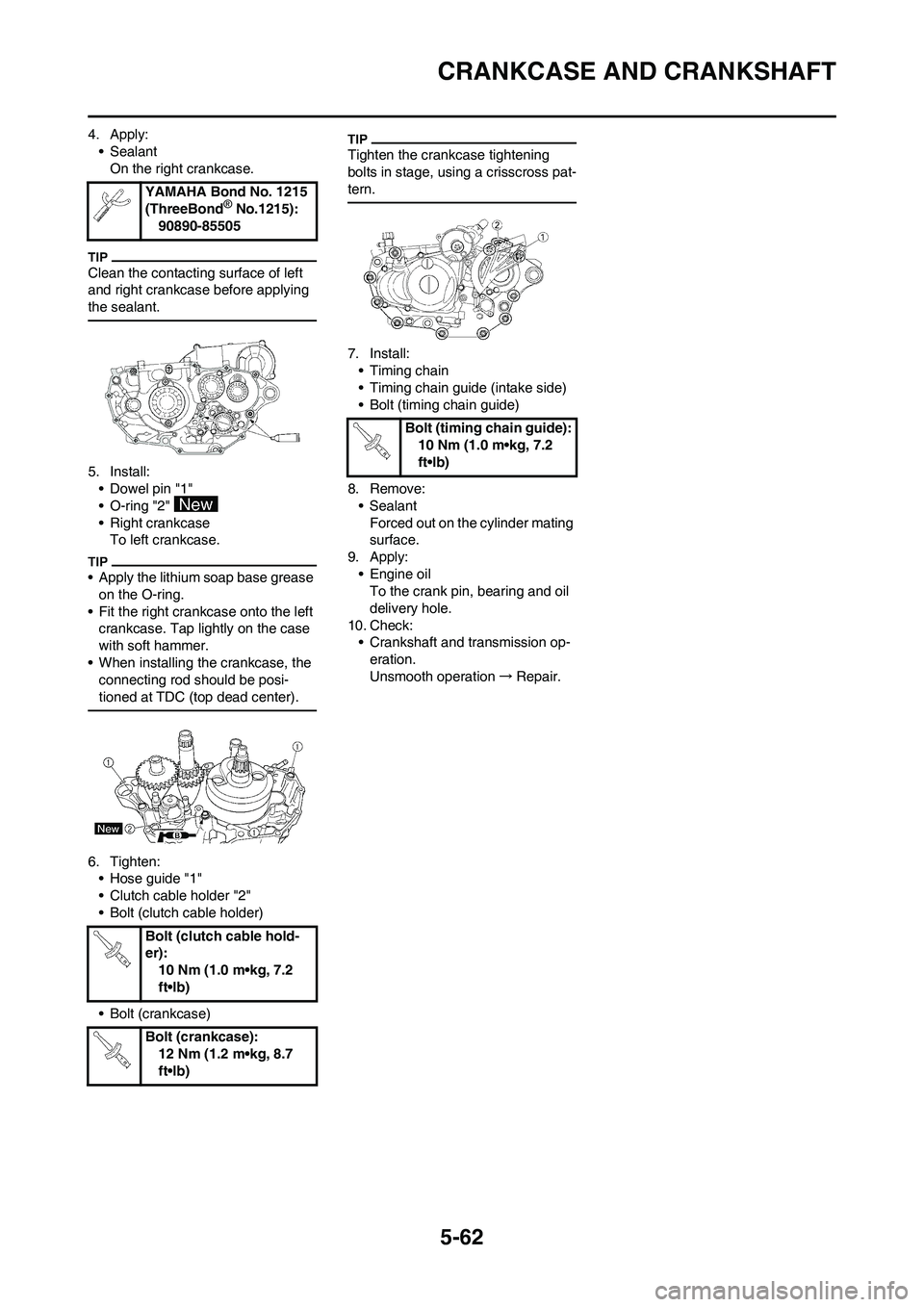
4. Apply:
• Sealant
On the right crankcase.
Clean the contacting surface of left
and right crankcase before applying
the sealant.
5. Install:
• Dowel pin "1"
• O-ring "2"
• Right crankcase
To left crankcase.
• Apply the lithium soap base grease
on the O-ring.
• Fit the right crankcase onto the left
crankcase. Tap lightly on the case
with soft hammer.
• When installing the crankcase, the
connecting rod should be posi-
tioned at TDC (top dead center).
6. Tighten:
• Hose guide "1"
• Clutch cable holder "2"
• Bolt (clutch cable holder)
• Bolt (crankcase)
Tighten the crankcase tightening
bolts in stage, using a crisscross pat-
tern.
7. Install:
• Timing chain
• Timing chain guide (intake side)
• Bolt (timing chain guide)
8. Remove:
• Sealant
Forced out on the cylinder mating
surface.
9. Apply:
• Engine oil
To the crank pin, bearing and oil
delivery hole.
10. Check:
• Crankshaft and transmission op-
eration.
Unsmooth operation→Repair. YAMAHA Bond No. 1215
(ThreeBond
® No.1215):
90890-85505
Bolt (clutch cable hold-
er):
10 Nm (1.0 m•kg, 7.2
ft•lb)
Bolt (crankcase):
12 Nm (1.2 m•kg, 8.7
ft•lb)
Bolt (timing chain guide):
10 Nm (1.0 m•kg, 7.2
ft•lb)
Page 168 of 230
5-65
TRANSMISSION, SHIFT CAM AND SHIFT FORK
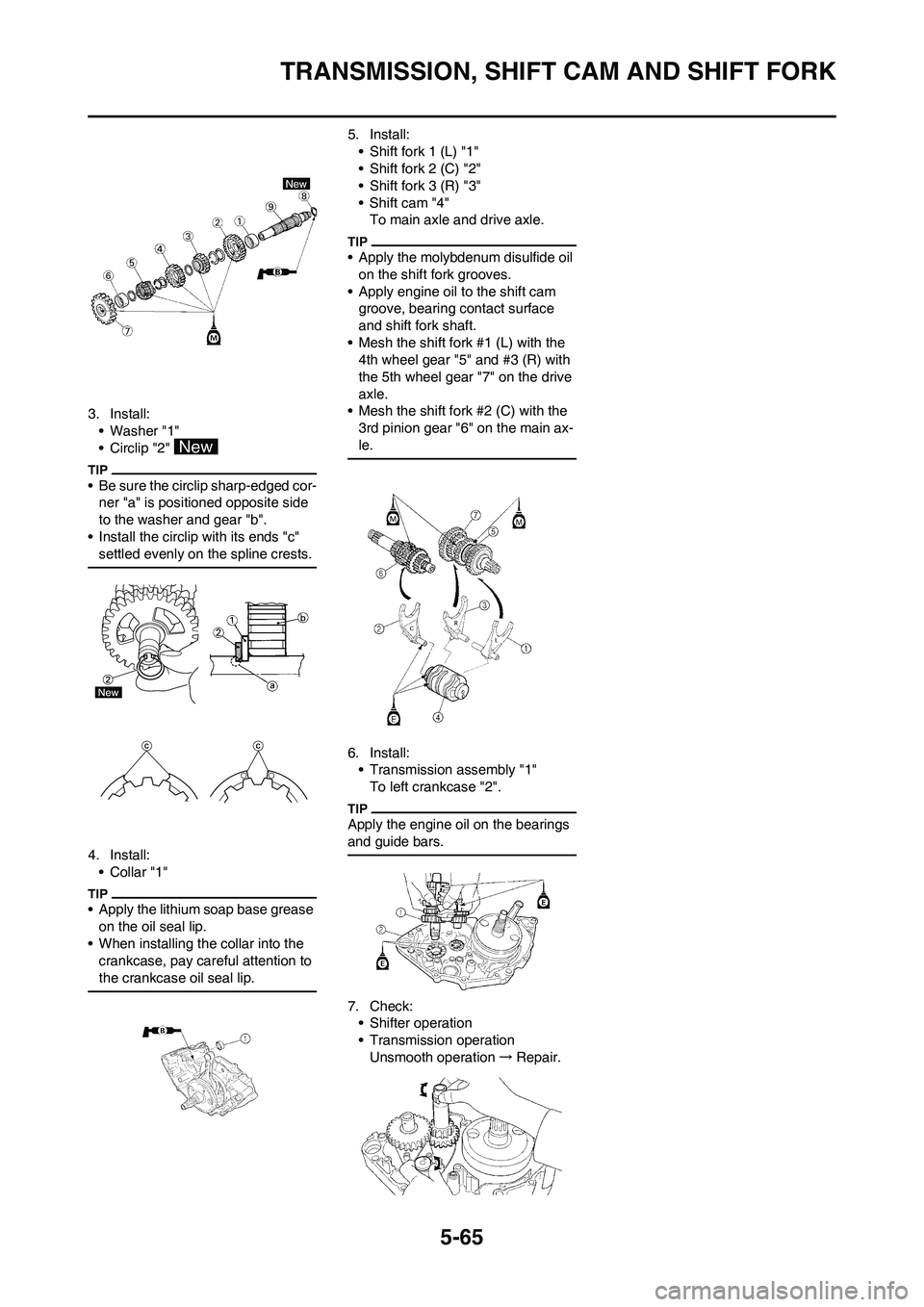
3. Install:
• Washer "1"
• Circlip "2"
• Be sure the circlip sharp-edged cor-
ner "a" is positioned opposite side
to the washer and gear "b".
• Install the circlip with its ends "c"
settled evenly on the spline crests.
4. Install:
•Collar "1"
• Apply the lithium soap base grease
on the oil seal lip.
• When installing the collar into the
crankcase, pay careful attention to
the crankcase oil seal lip.
5. Install:
• Shift fork 1 (L) "1"
• Shift fork 2 (C) "2"
• Shift fork 3 (R) "3"
• Shift cam "4"
To main axle and drive axle.
• Apply the molybdenum disulfide oil
on the shift fork grooves.
• Apply engine oil to the shift cam
groove, bearing contact surface
and shift fork shaft.
• Mesh the shift fork #1 (L) with the
4th wheel gear "5" and #3 (R) with
the 5th wheel gear "7" on the drive
axle.
• Mesh the shift fork #2 (C) with the
3rd pinion gear "6" on the main ax-
le.
6. Install:
• Transmission assembly "1"
To left crankcase "2".
Apply the engine oil on the bearings
and guide bars.
7. Check:
• Shifter operation
• Transmission operation
Unsmooth operation→Repair.
Page 169 of 230
6-1
FRONT WHEEL AND REAR WHEEL
CHASSIS
This section is intended for those who have basic knowledge and skill concerning the servicing of Yamaha motorcycles
(e.g., Yamaha dealers, service engineers, etc.) Those who have little knowledge and skill concerning servicing are request-
ed not to undertake inspection, adjustment, disassembly, or reassembly only by reference to this manual. It may lead to
servicing trouble and mechanical damage.
FRONT WHEEL AND REAR WHEEL
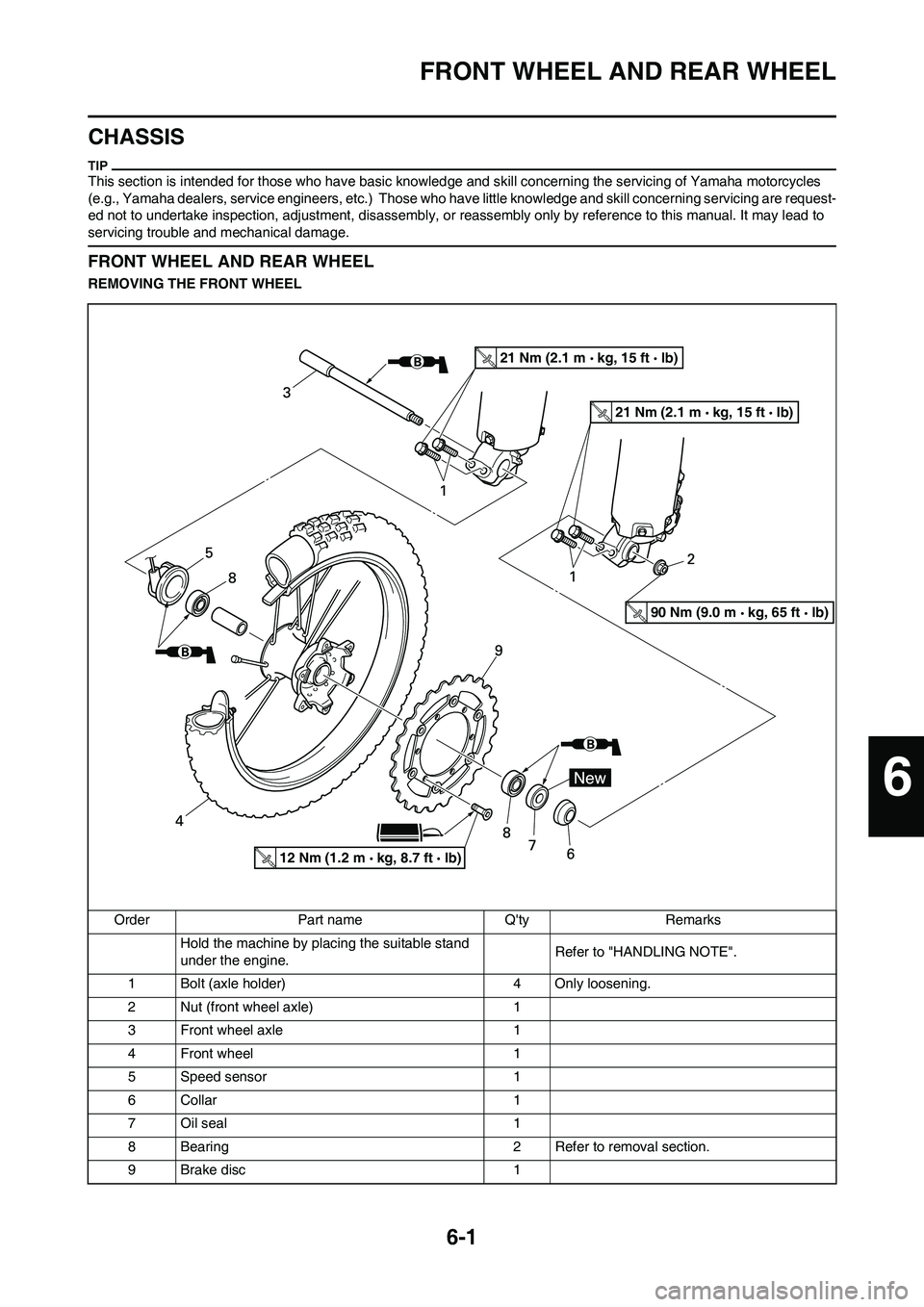
REMOVING THE FRONT WHEEL
Order Part name Q'ty Remarks
Hold the machine by placing the suitable stand
under the engine.Refer to "HANDLING NOTE".
1 Bolt (axle holder) 4 Only loosening.
2 Nut (front wheel axle) 1
3 Front wheel axle 1
4 Front wheel 1
5 Speed sensor 1
6 Collar 1
7 Oil seal 1
8 Bearing 2 Refer to removal section.
9 Brake disc 1
21 Nm (2.1 m kg, 15 ft lb)
21 Nm (2.1 m kg, 15 ft lb)
12 Nm (1.2 m kg, 8.7 ft lb)
90 Nm (9.0 m kg, 65 ft lb)
6
Page 170 of 230
6-2
FRONT WHEEL AND REAR WHEEL
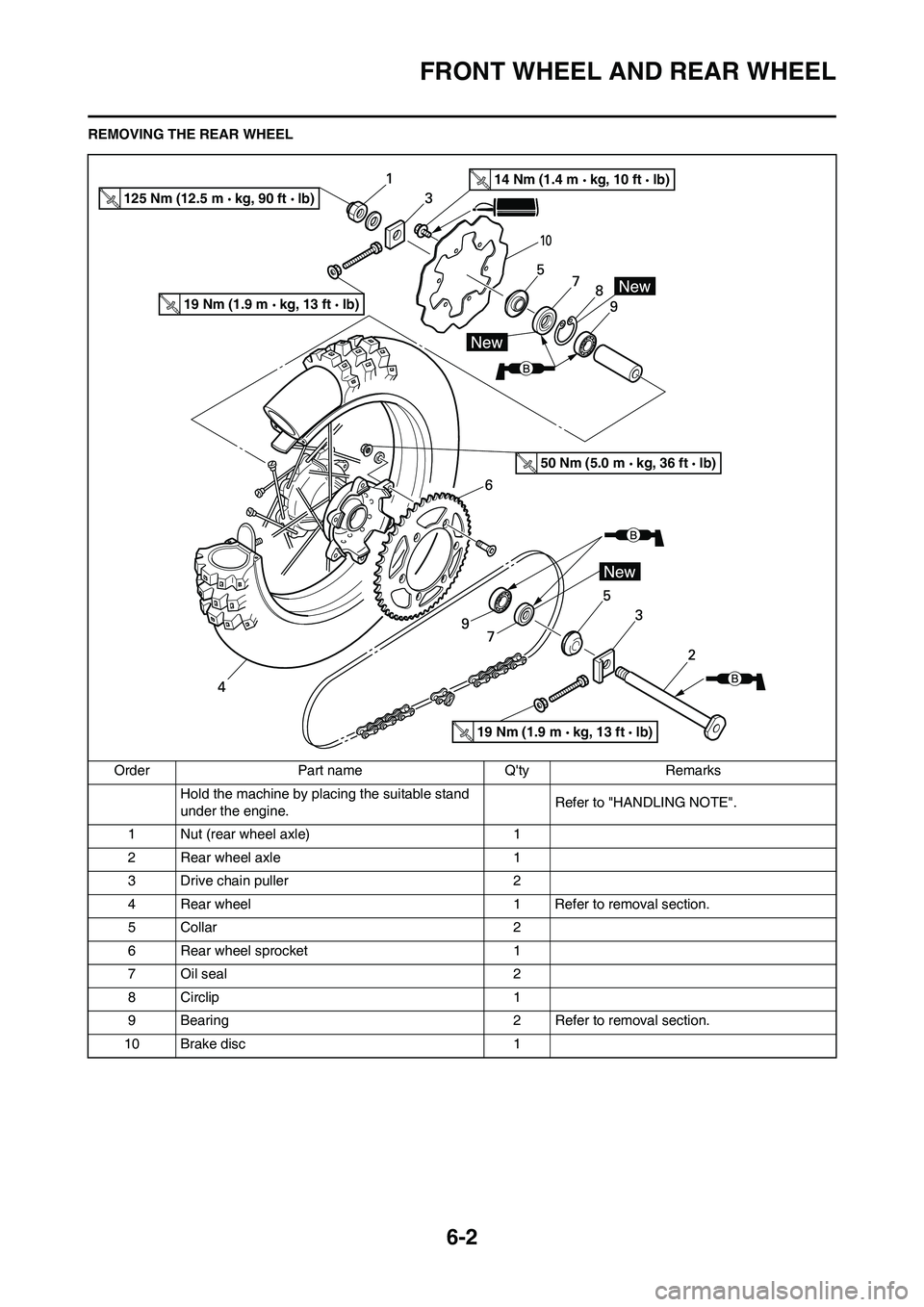
REMOVING THE REAR WHEELOrder Part name Q'ty Remarks Hold the machine by placing the suitable stand
under the engine. Refer to "HANDLING NOTE".
1 Nut (rear wheel axle) 1
2 Rear wheel axle 1
3 Drive chain puller 2
4 Rear wheel 1 Refer to removal section.
5 Collar 2
6 Rear wheel sprocket 1
7 Oil seal 2
8 Circlip 1
9 Bearing 2 Refer to removal section.
10 Brake disc 1
125 Nm (12.5 m kg, 90 ft lb)
14 Nm (1.4 m kg, 10 ft lb)
19 Nm (1.9 m kg, 13 ft lb)
19 Nm (1.9 m kg, 13 ft lb)
50 Nm (5.0 m kg, 36 ft lb)
Page 193 of 230
6-25
HANDLEBAR
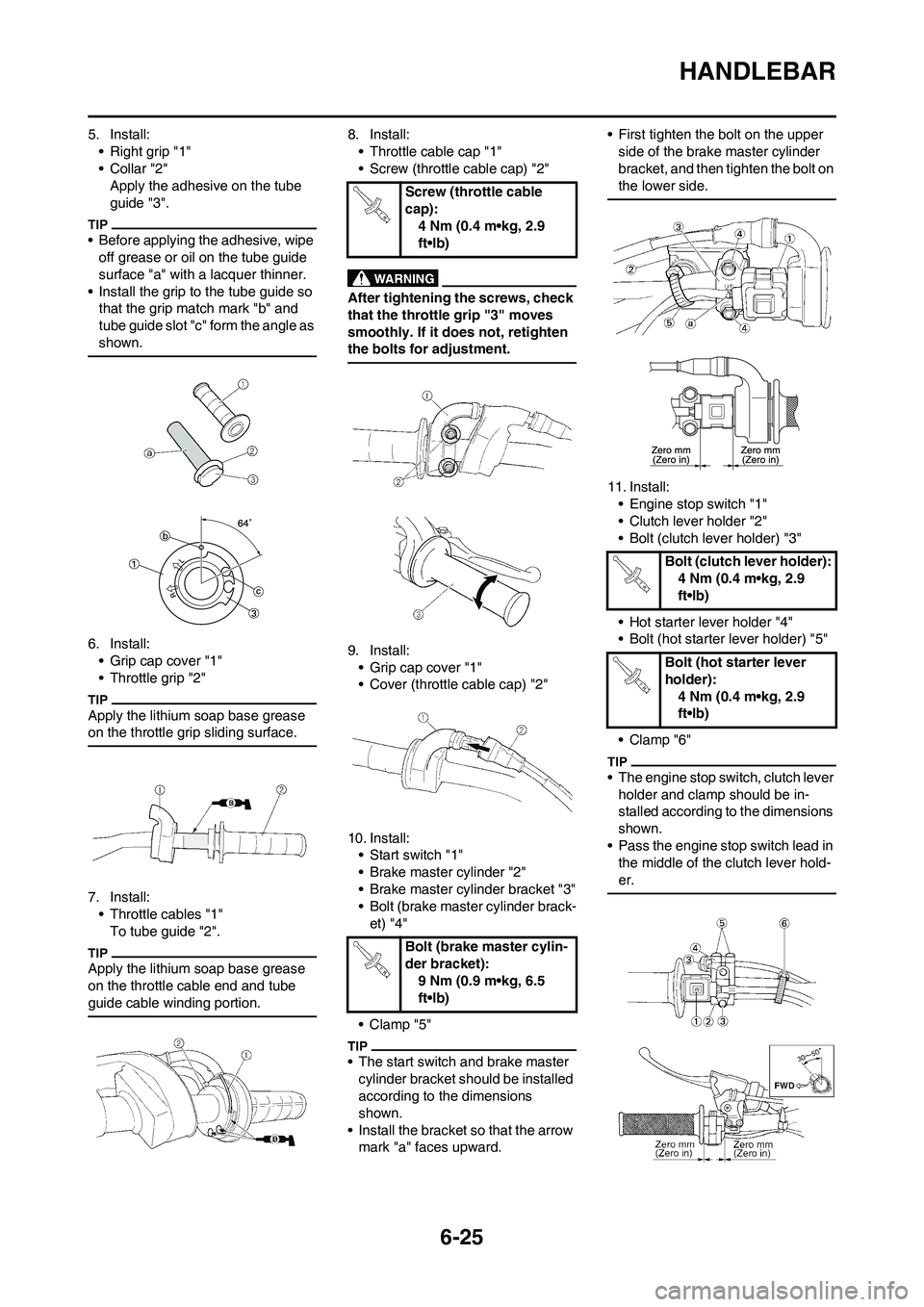
5. Install:
• Right grip "1"
•Collar "2"
Apply the adhesive on the tube
guide "3".
• Before applying the adhesive, wipe
off grease or oil on the tube guide
surface "a" with a lacquer thinner.
• Install the grip to the tube guide so
that the grip match mark "b" and
tube guide slot "c" form the angle as
shown.
6. Install:
• Grip cap cover "1"
• Throttle grip "2"
Apply the lithium soap base grease
on the throttle grip sliding surface.
7. Install:
• Throttle cables "1"
To tube guide "2".
Apply the lithium soap base grease
on the throttle cable end and tube
guide cable winding portion.
8. Install:
• Throttle cable cap "1"
• Screw (throttle cable cap) "2"
After tightening the screws, check
that the throttle grip "3" moves
smoothly. If it does not, retighten
the bolts for adjustment.
9. Install:
• Grip cap cover "1"
• Cover (throttle cable cap) "2"
10. Install:
• Start switch "1"
• Brake master cylinder "2"
• Brake master cylinder bracket "3"
• Bolt (brake master cylinder brack-
et) "4"
•Clamp "5"
• The start switch and brake master
cylinder bracket should be installed
according to the dimensions
shown.
• Install the bracket so that the arrow
mark "a" faces upward.• First tighten the bolt on the upper
side of the brake master cylinder
bracket, and then tighten the bolt on
the lower side.
11. Install:
• Engine stop switch "1"
• Clutch lever holder "2"
• Bolt (clutch lever holder) "3"
• Hot starter lever holder "4"
• Bolt (hot starter lever holder) "5"
• Clamp "6"
• The engine stop switch, clutch lever
holder and clamp should be in-
stalled according to the dimensions
shown.
• Pass the engine stop switch lead in
the middle of the clutch lever hold-
er.
Screw (throttle cable
cap):
4 Nm (0.4 m•kg, 2.9
ft•lb)
Bolt (brake master cylin-
der bracket):
9 Nm (0.9 m•kg, 6.5
ft•lb)
Bolt (clutch lever holder):
4 Nm (0.4 m•kg, 2.9
ft•lb)
Bolt (hot starter lever
holder):
4 Nm (0.4 m•kg, 2.9
ft•lb)
Page 209 of 230
7-1
ELECTRICAL COMPONENTS AND WIRING DIAGRAM
ELECTRICAL
This section is intended for those who have basic knowledge and skill concerning the servicing of Yamaha motorcycles
(e.g., Yamaha dealers, service engineers, etc.) Those who have little knowledge and skill concerning servicing are request-
ed not to undertake inspection, adjustment, disassembly, or reassembly only by reference to this manual. It may lead to
servicing trouble and mechanical damage.
ELECTRICAL COMPONENTS AND WIRING DIAGRAM
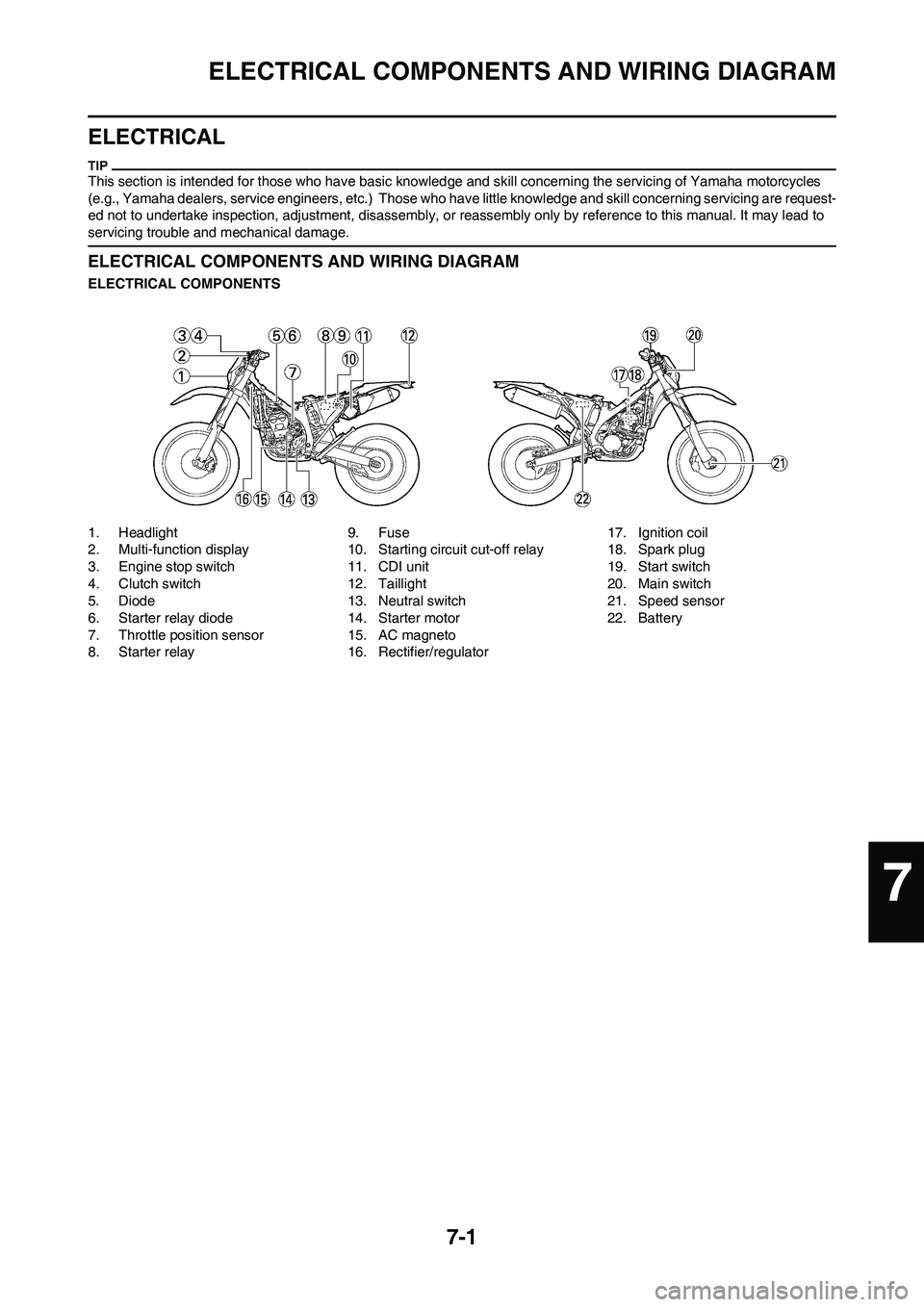
ELECTRICAL COMPONENTS
1. Headlight
2. Multi-function display
3. Engine stop switch
4. Clutch switch
5. Diode
6. Starter relay diode
7. Throttle position sensor
8. Starter relay9. Fuse
10. Starting circuit cut-off relay
11. CDI unit
12. Taillight
13. Neutral switch
14. Starter motor
15. AC magneto
16. Rectifier/regulator17. Ignition coil
18. Spark plug
19. Start switch
20. Main switch
21. Speed sensor
22. Battery
7
Page 210 of 230
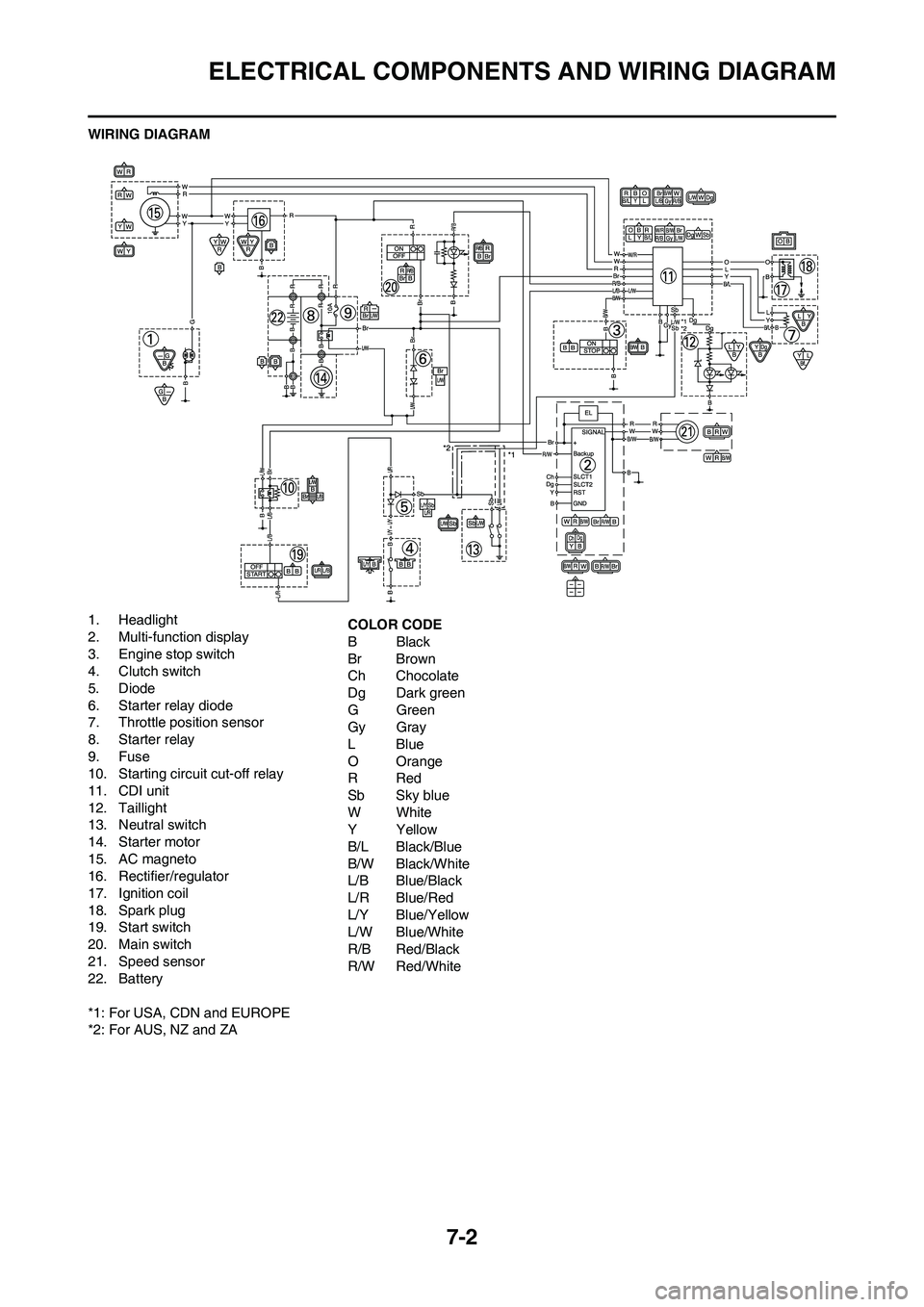
7-2
ELECTRICAL COMPONENTS AND WIRING DIAGRAM
WIRING DIAGRAM
1. Headlight
2. Multi-function display
3. Engine stop switch
4. Clutch switch
5. Diode
6. Starter relay diode
7. Throttle position sensor
8. Starter relay
9. Fuse
10. Starting circuit cut-off relay
11. CDI unit
12. Taillight
13. Neutral switch
14. Starter motor
15. AC magneto
16. Rectifier/regulator
17. Ignition coil
18. Spark plug
19. Start switch
20. Main switch
21. Speed sensor
22. Battery
*1: For USA, CDN and EUROPE
*2: For AUS, NZ and ZACOLOR CODE
BBlack
Br Brown
Ch Chocolate
Dg Dark green
GGreen
Gy Gray
LBlue
O Orange
RRed
Sb Sky blue
WWhite
YYellow
B/L Black/Blue
B/W Black/White
L/B Blue/Black
L/R Blue/Red
L/Y Blue/Yellow
L/W Blue/White
R/B Red/Black
R/W Red/White
Page 211 of 230
7-3
IGNITION SYSTEM
IGNITION SYSTEM
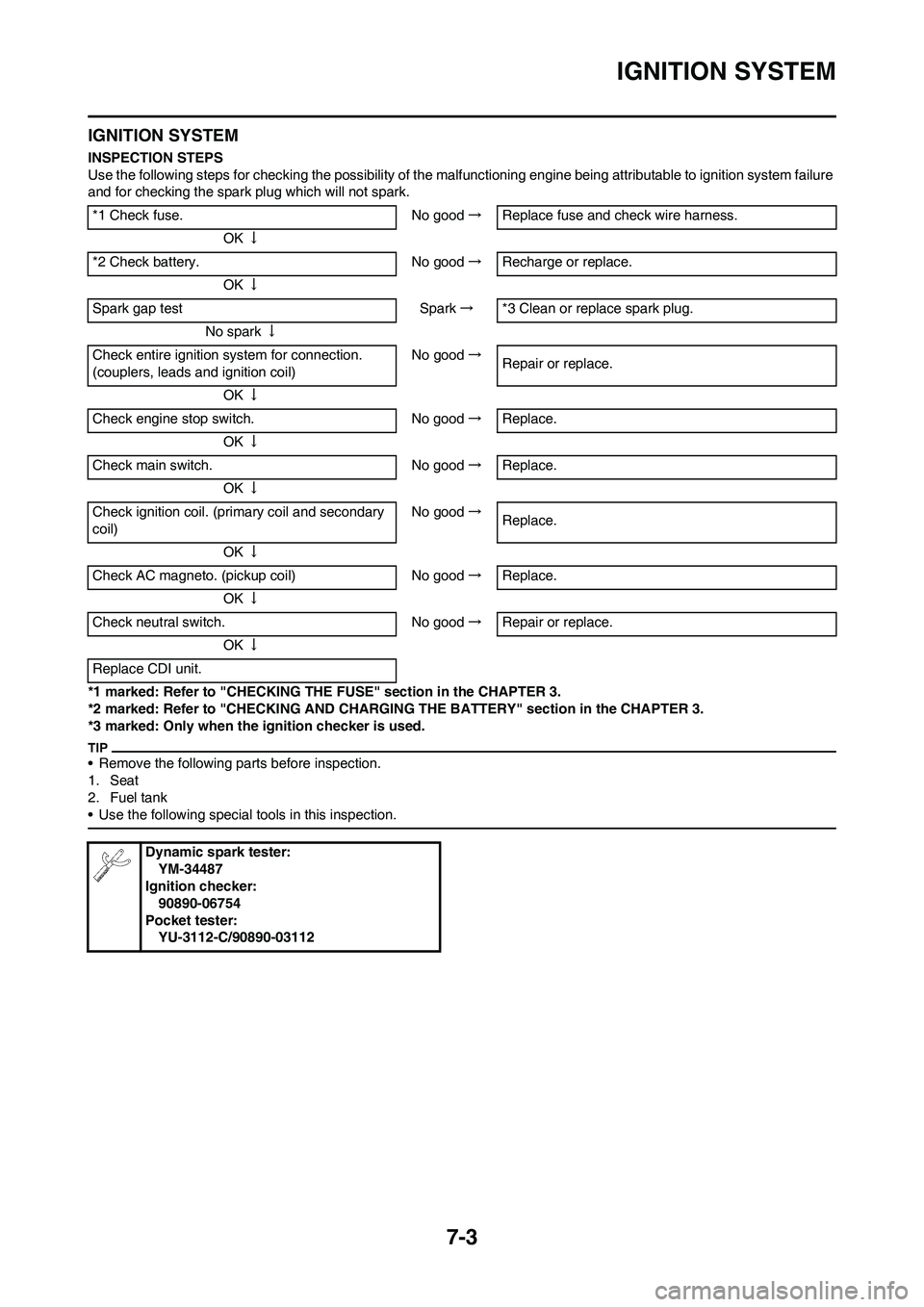
INSPECTION STEPS
Use the following steps for checking the possibility of the malfunctioning engine being attributable to ignition system failure
and for checking the spark plug which will not spark.
*1 marked: Refer to "CHECKING THE FUSE" section in the CHAPTER 3.
*2 marked: Refer to "CHECKING AND CHARGING THE BATTERY" section in the CHAPTER 3.
*3 marked: Only when the ignition checker is used.
• Remove the following parts before inspection.
1. Seat
2. Fuel tank
• Use the following special tools in this inspection.
*1 Check fuse. No good→Replace fuse and check wire harness.
OK↓
*2 Check battery. No good→Recharge or replace.
OK↓
Spark gap test Spark→*3 Clean or replace spark plug.
No spark↓
Check entire ignition system for connection.
(couplers, leads and ignition coil)No good→
Repair or replace.
OK↓
Check engine stop switch. No good→Replace.
OK↓
Check main switch. No good→Replace.
OK↓
Check ignition coil. (primary coil and secondary
coil)No good→
Replace.
OK↓
Check AC magneto. (pickup coil) No good→Replace.
OK↓
Check neutral switch. No good→Repair or replace.
OK↓
Replace CDI unit.
Dynamic spark tester:
YM-34487
Ignition checker:
90890-06754
Pocket tester:
YU-3112-C/90890-03112