clock reset YAMAHA XCITY 125 2008 Owners Manual
[x] Cancel search | Manufacturer: YAMAHA, Model Year: 2008, Model line: XCITY 125, Model: YAMAHA XCITY 125 2008Pages: 80, PDF Size: 3.75 MB
Page 21 of 80
INSTRUMENT AND CONTROL FUNCTIONS
3-6
3
NOTE:
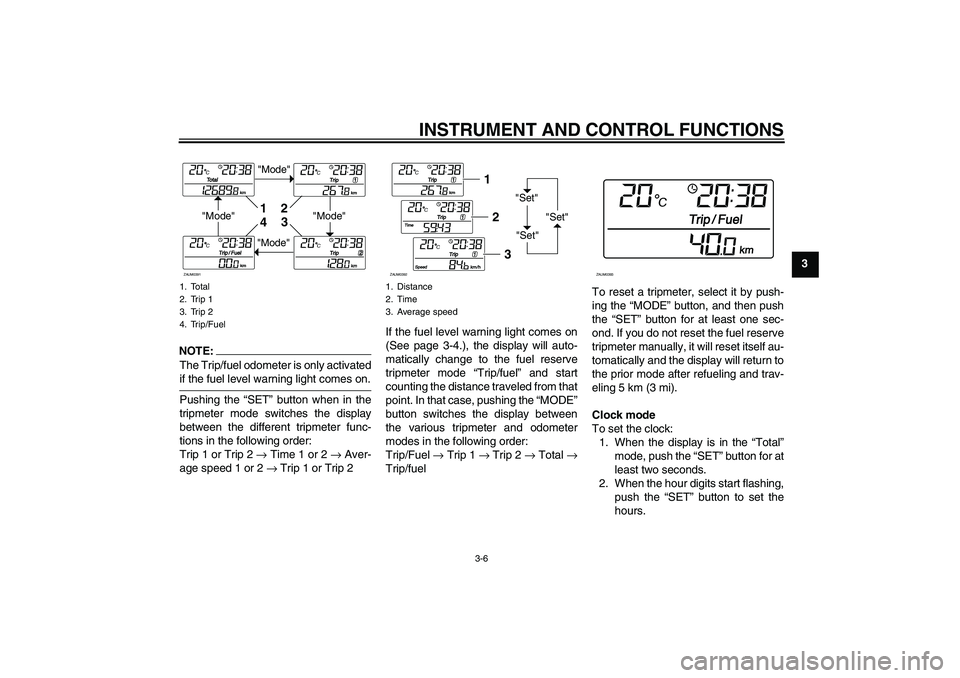
The Trip/fuel odometer is only activatedif the fuel level warning light comes on.
Pushing the “SET” button when in the
tripmeter mode switches the display
between the different tripmeter func-
tions in the following order:
Trip 1 or Trip 2 → Time 1 or 2 → Aver-
age speed 1 or 2 → Trip 1 or Trip 2If the fuel level warning light comes on
(See page 3-4.), the display will auto-
matically change to the fuel reserve
tripmeter mode “Trip/fuel” and start
counting the distance traveled from that
point. In that case, pushing the “MODE”
button switches the display between
the various tripmeter and odometer
modes in the following order:
Trip/Fuel → Trip 1 → Trip 2 → Total →
Trip/fuelTo reset a tripmeter, select it by push-
ing the “MODE” button, and then push
the “SET” button for at least one sec-
ond. If you do not reset the fuel reserve
tripmeter manually, it will reset itself au-
tomatically and the display will return to
the prior mode after refueling and trav-
eling 5 km (3 mi).
Clock mode
To set the clock:
1. When the display is in the “Total”
mode, push the “SET” button for at
least two seconds.
2. When the hour digits start flashing,
push the “SET” button to set the
hours.1. Total
2. Trip 1
3. Trip 2
4. Trip/Fuel
"Mode"
"Mode"
"Mode"
"Mode"1
2
3
4
ZAUM0391
1. Distance
2. Time
3. Average speed
"Set"
"Set""Set"
12
3
ZAUM0392
ZAUM0393
U16PE0E0.book Page 6 Tuesday, May 8, 2007 10:26 AM
Page 22 of 80
INSTRUMENT AND CONTROL FUNCTIONS
3-7
3
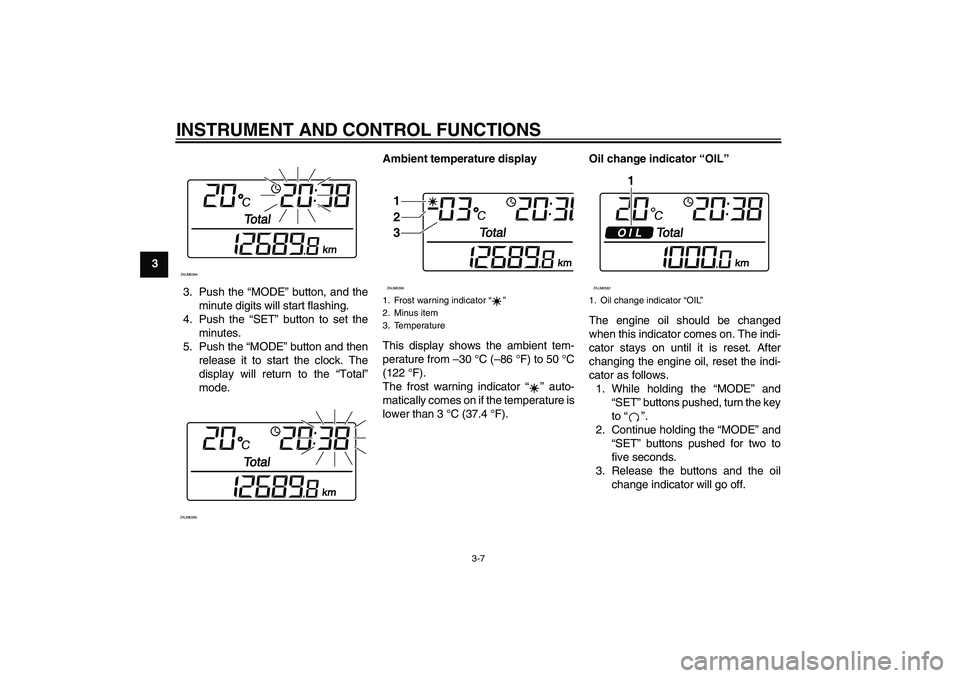
3. Push the “MODE” button, and the
minute digits will start flashing.
4. Push the “SET” button to set the
minutes.
5. Push the “MODE” button and then
release it to start the clock. The
display will return to the “Total”
mode.Ambient temperature display
This display shows the ambient tem-
perature from –30 °C (–86 °F) to 50 °C
(122 °F).
The frost warning indicator “” auto-
matically comes on if the temperature is
lower than 3 °C (37.4 °F).Oil change indicator “OIL”
The engine oil should be changed
when this indicator comes on. The indi-
cator stays on until it is reset. After
changing the engine oil, reset the indi-
cator as follows.
1. While holding the “MODE” and
“SET” buttons pushed, turn the key
to “”.
2. Continue holding the “MODE” and
“SET” buttons pushed for two to
five seconds.
3. Release the buttons and the oil
change indicator will go off.
ZAUM0394ZAUM0395
1. Frost warning indicator “”
2. Minus item
3. Temperature1
2
3ZAUM0396
1. Oil change indicator “OIL”
1
ZAUM0582
U16PE0E0.book Page 7 Tuesday, May 8, 2007 10:26 AM