light YAMAHA XCITY 125 2012 Owners Manual
[x] Cancel search | Manufacturer: YAMAHA, Model Year: 2012, Model line: XCITY 125, Model: YAMAHA XCITY 125 2012Pages: 86, PDF Size: 7.38 MB
Page 6 of 86

TABLE OF CONTENTSSAFETY INFORMATION ..................1-1
Further safe-riding points ................1-5
DESCRIPTION ..................................2-1
Left view ..........................................2-1
Right view ........................................2-2
Controls and instruments.................2-3
INSTRUMENT AND CONTROL
FUNCTIONS.......................................3-1
Immobilizer system .........................3-1
Main switch/steering lock ................3-2
Indicator lights and warning light ....3-3
Speedometer ..................................3-4
Fuel gauge ......................................3-5
Coolant temperature gauge ............3-5
Multi-function display ......................3-5
Handlebar switches ........................3-8
Front brake lever ............................3-9
Rear brake lever .............................3-9
Fuel tank cap ................................3-10
Fuel ...............................................3-10
Catalytic converters ......................3-12
Seat ..............................................3-12
Storage compartments .................3-13
Windshield ....................................3-14
Adjusting the shock absorber
assemblies ................................3-15
Carrier ...........................................3-16
Luggage hook ...............................3-16
Sidestand ......................................3-16Ignition circuit cut-off system ........ 3-17
FOR YOUR SAFETY –
PRE-OPERATION CHECKS............. 4-1
OPERATION AND IMPORTANT
RIDING POINTS................................. 5-1
Starting the engine ......................... 5-1
Starting off ...................................... 5-2
Acceleration and deceleration ........ 5-3
Braking ........................................... 5-3
Tips for reducing fuel
consumption ............................... 5-4
Engine break-in .............................. 5-4
Parking ........................................... 5-5
PERIODIC MAINTENANCE AND
ADJUSTMENT................................... 6-1
Owner’s tool kit ............................... 6-2
Periodic maintenance chart for the
emission control system ............. 6-3
General maintenance and
lubrication chart .......................... 6-4
Removing and installing cowlings
and panels .................................. 6-8
Checking the spark plug ................. 6-9
Engine oil ..................................... 6-10
Final transmission oil .................... 6-13
Coolant ......................................... 6-14
Air filter and V-belt case air filter
elements ................................... 6-15Checking the throttle grip free
play ........................................... 6-16
Valve clearance ........................... 6-17
Tires ............................................. 6-17
Cast wheels ................................. 6-19
Front and rear brake lever free
play ........................................... 6-19
Checking the front and rear brake
pads .......................................... 6-20
Checking the brake fluid level ...... 6-21
Changing the brake fluid .............. 6-22
Checking and lubricating the
cables ....................................... 6-22
Checking and lubricating the
throttle grip and cable ............... 6-23
Lubricating the front and rear
brake levers .............................. 6-23
Checking and lubricating the
centerstand and sidestand ....... 6-23
Checking the front fork ................. 6-24
Checking the steering .................. 6-25
Checking the wheel bearings ....... 6-25
Battery ......................................... 6-25
Replacing the fuses ..................... 6-27
Replacing a headlight bulb .......... 6-28
Replacing a front turn signal light
bulb ........................................... 6-29
Replacing a tail/brake light bulb or
a rear turn signal light bulb ....... 6-30
Replacing the license plate light
bulb ........................................... 6-31U16PE3E0.book Page 1 Tuesday, June 19, 2012 5:17 PM
Page 7 of 86

TABLE OF CONTENTS
Replacing an auxiliary light bulb ... 6-31
Troubleshooting ............................ 6-31
Troubleshooting charts ................. 6-33
SCOOTER CARE AND STORAGE... 7-1
Care ................................................ 7-1
Storage ...........................................7-3
SPECIFICATIONS ............................. 8-1
CONSUMER INFORMATION............. 9-1
Identification numbers .................... 9-1
U16PE3E0.book Page 2 Tuesday, June 19, 2012 5:17 PM
Page 11 of 86

SAFETY INFORMATION
1-4
1 Genuine Yamaha Accessories
Choosing accessories for your vehicle
is an important decision. Genuine
Yamaha accessories, which are avail-
able only from a Yamaha dealer, have
been designed, tested, and approved
by Yamaha for use on your vehicle.
Many companies with no connection to
Yamaha manufacture parts and acces-
sories or offer other modifications for
Yamaha vehicles. Yamaha is not in a
position to test the products that these
aftermarket companies produce.
Therefore, Yamaha can neither en-
dorse nor recommend the use of ac-
cessories not sold by Yamaha or
modifications not specifically recom-
mended by Yamaha, even if sold and
installed by a Yamaha dealer.
Aftermarket Parts, Accessories, and
Modifications
While you may find aftermarket prod-
ucts similar in design and quality to
genuine Yamaha accessories, recog-
nize that some aftermarket accessories
or modifications are not suitable be-
cause of potential safety hazards to you
or others. Installing aftermarket prod-ucts or having other modifications per-
formed to your vehicle that change any
of the vehicle’s design or operation
characteristics can put you and others
at greater risk of serious injury or death.
You are responsible for injuries related
to changes in the vehicle.
Keep the following guidelines in mind,
as well as those provided under “Load-
ing” when mounting accessories.
●
Never install accessories or carry
cargo that would impair the perfor-
mance of your scooter. Carefully
inspect the accessory before using
it to make sure that it does not in
any way reduce ground clearance
or cornering clearance, limit sus-
pension travel, steering travel or
control operation, or obscure lights
or reflectors.
Accessories fitted to the handle-
bar or the front fork area can
create instability due to improper
weight distribution or aerody-
namic changes. If accessories
are added to the handlebar or
front fork area, they must be as
lightweight as possible and
should be kept to a minimum. Bulky or large accessories may
seriously affect the stability of
the scooter due to aerodynamic
effects. Wind may attempt to lift
the scooter, or the scooter may
become unstable in cross
winds. These accessories may
also cause instability when
passing or being passed by
large vehicles.
Certain accessories can dis-
place the operator from his or
her normal riding position. This
improper position limits the free-
dom of movement of the opera-
tor and may limit control ability,
therefore, such accessories are
not recommended.
●
Use caution when adding electri-
cal accessories. If electrical acces-
sories exceed the capacity of the
scooter’s electrical system, an
electric failure could result, which
could cause a dangerous loss of
lights or engine power.
U16PE3E0.book Page 4 Tuesday, June 19, 2012 5:17 PM
Page 17 of 86
INSTRUMENT AND CONTROL FUNCTIONS
3-1
3
EAU10977
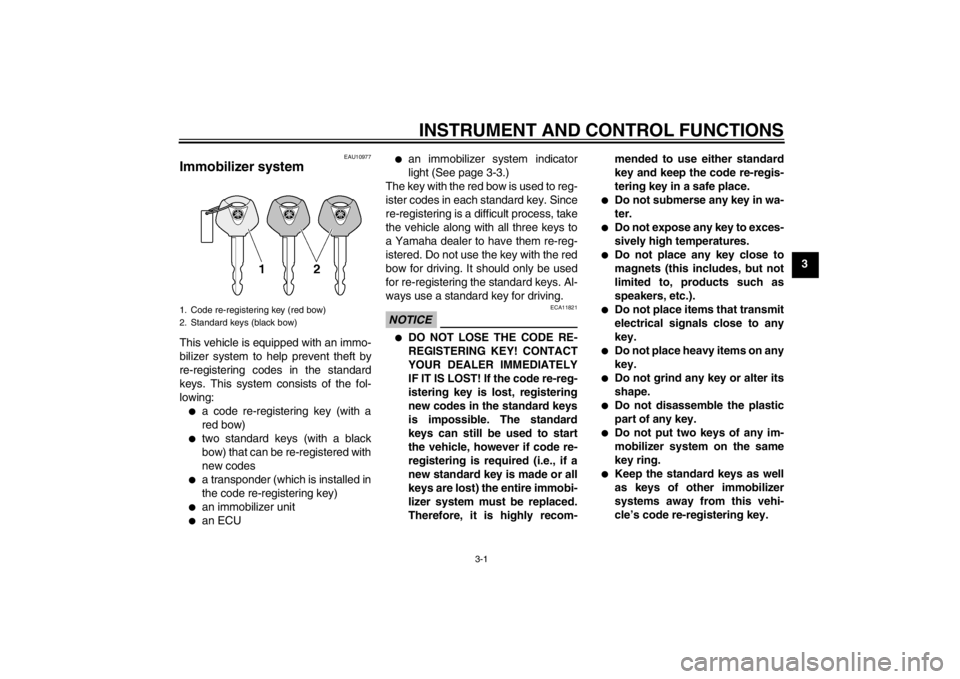
Immobilizer system This vehicle is equipped with an immo-
bilizer system to help prevent theft by
re-registering codes in the standard
keys. This system consists of the fol-
lowing:●
a code re-registering key (with a
red bow)
●
two standard keys (with a black
bow) that can be re-registered with
new codes
●
a transponder (which is installed in
the code re-registering key)
●
an immobilizer unit
●
an ECU
●
an immobilizer system indicator
light (See page 3-3.)
The key with the red bow is used to reg-
ister codes in each standard key. Since
re-registering is a difficult process, take
the vehicle along with all three keys to
a Yamaha dealer to have them re-reg-
istered. Do not use the key with the red
bow for driving. It should only be used
for re-registering the standard keys. Al-
ways use a standard key for driving.
NOTICE
ECA11821
●
DO NOT LOSE THE CODE RE-
REGISTERING KEY! CONTACT
YOUR DEALER IMMEDIATELY
IF IT IS LOST! If the code re-reg-
istering key is lost, registering
new codes in the standard keys
is impossible. The standard
keys can still be used to start
the vehicle, however if code re-
registering is required (i.e., if a
new standard key is made or all
keys are lost) the entire immobi-
lizer system must be replaced.
Therefore, it is highly recom-mended to use either standard
key and keep the code re-regis-
tering key in a safe place.
●
Do not submerse any key in wa-
ter.
●
Do not expose any key to exces-
sively high temperatures.
●
Do not place any key close to
magnets (this includes, but not
limited to, products such as
speakers, etc.).
●
Do not place items that transmit
electrical signals close to any
key.
●
Do not place heavy items on any
key.
●
Do not grind any key or alter its
shape.
●
Do not disassemble the plastic
part of any key.
●
Do not put two keys of any im-
mobilizer system on the same
key ring.
●
Keep the standard keys as well
as keys of other immobilizer
systems away from this vehi-
cle’s code re-registering key.
1. Code re-registering key (red bow)
2. Standard keys (black bow)
U16PE3E0.book Page 1 Tuesday, June 19, 2012 5:17 PM
Page 18 of 86
INSTRUMENT AND CONTROL FUNCTIONS
3-2
3
●
Keep other immobilizer system
keys away from the main switch
as they may cause signal inter-
ference.
EAU10472
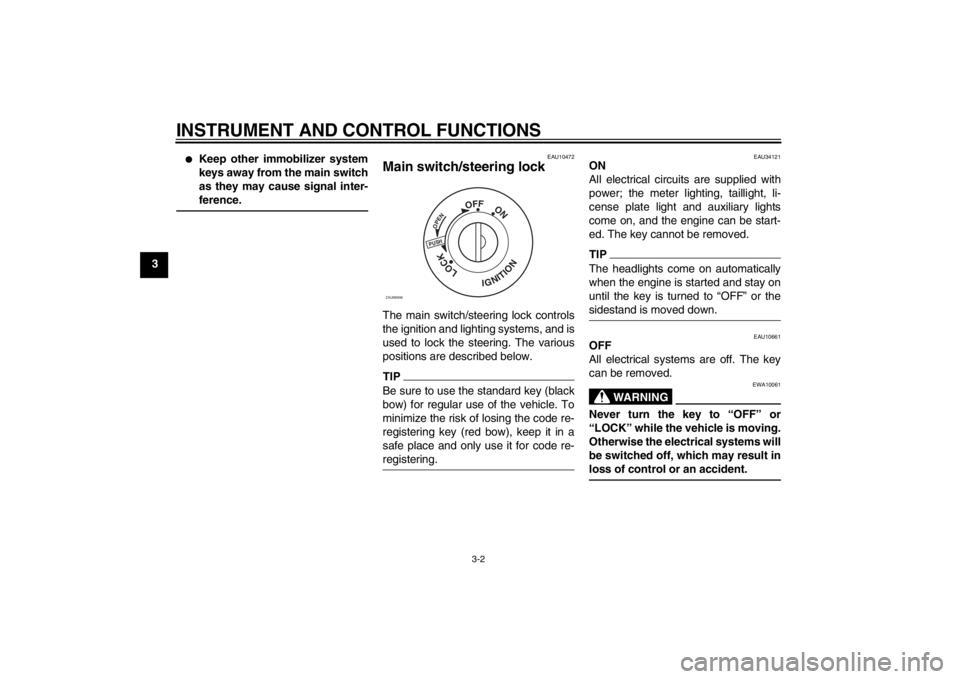
Main switch/steering lock The main switch/steering lock controls
the ignition and lighting systems, and is
used to lock the steering. The various
positions are described below.TIPBe sure to use the standard key (black
bow) for regular use of the vehicle. To
minimize the risk of losing the code re-
registering key (red bow), keep it in a
safe place and only use it for code re-
registering.
EAU34121
ON
All electrical circuits are supplied with
power; the meter lighting, taillight, li-
cense plate light and auxiliary lights
come on, and the engine can be start-
ed. The key cannot be removed.TIPThe headlights come on automatically
when the engine is started and stay on
until the key is turned to “OFF” or the
sidestand is moved down.
EAU10661
OFF
All electrical systems are off. The key
can be removed.
WARNING
EWA10061
Never turn the key to “OFF” or
“LOCK” while the vehicle is moving.
Otherwise the electrical systems will
be switched off, which may result in
loss of control or an accident.
PUSHOPEN
OFF
ON
LOCK
IGNITION
ZAUM0696
U16PE3E0.book Page 2 Tuesday, June 19, 2012 5:17 PM
Page 19 of 86
INSTRUMENT AND CONTROL FUNCTIONS
3-3
3
EAU10684
LOCK
The steering is locked, and all electrical
systems are off. The key can be re-
moved.
To lock the steering1. Turn the handlebars all the way to
the left.
2. Push the key in from the “OFF” po-
sition, and then turn it to “LOCK”
while still pushing it.
3. Remove the key.
To unlock the steeringPush the key in, and then turn it to
“OFF” while still pushing it.
EAU11006
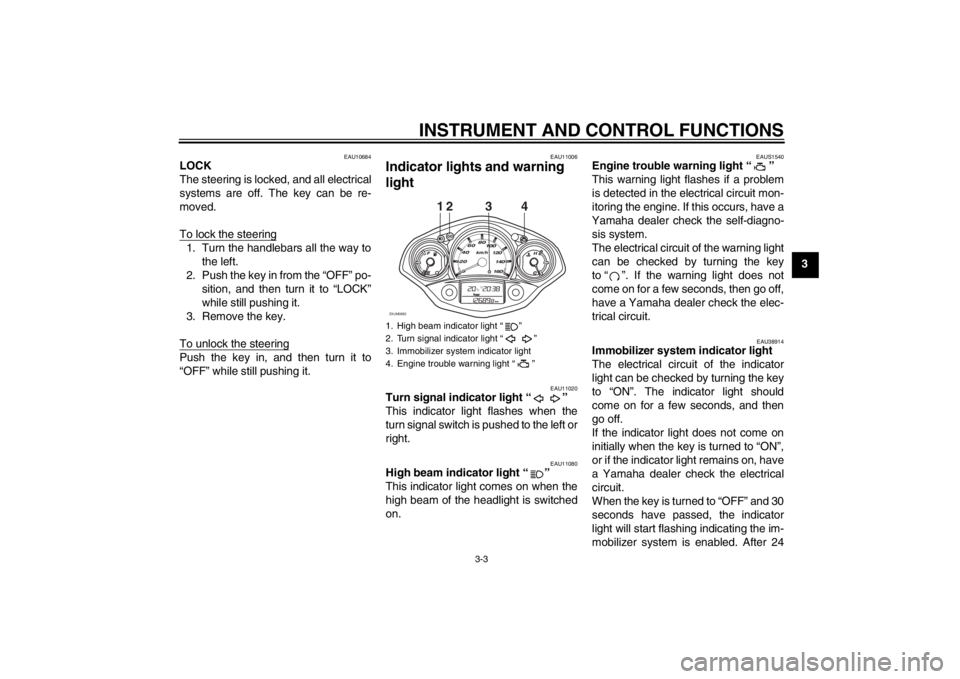
Indicator lights and warning
light
EAU11020
Turn signal indicator light “ ”
This indicator light flashes when the
turn signal switch is pushed to the left or
right.
EAU11080
High beam indicator light “ ”
This indicator light comes on when the
high beam of the headlight is switched
on.
EAUS1540
Engine trouble warning light “ ”
This warning light flashes if a problem
is detected in the electrical circuit mon-
itoring the engine. If this occurs, have a
Yamaha dealer check the self-diagno-
sis system.
The electrical circuit of the warning light
can be checked by turning the key
to “ ”. If the warning light does not
come on for a few seconds, then go off,
have a Yamaha dealer check the elec-
trical circuit.
EAU38914
Immobilizer system indicator light
The electrical circuit of the indicator
light can be checked by turning the key
to “ON”. The indicator light should
come on for a few seconds, and then
go off.
If the indicator light does not come on
initially when the key is turned to “ON”,
or if the indicator light remains on, have
a Yamaha dealer check the electrical
circuit.
When the key is turned to “OFF” and 30
seconds have passed, the indicator
light will start flashing indicating the im-
mobilizer system is enabled. After 24
1. High beam indicator light “ ”
2. Turn signal indicator light “ ”
3. Immobilizer system indicator light
4. Engine trouble warning light “ ”
12
ZAUM0882
34
U16PE3E0.book Page 3 Tuesday, June 19, 2012 5:17 PM
Page 20 of 86
INSTRUMENT AND CONTROL FUNCTIONS
3-4
3hours have passed, the indicator light
will stop flashing, however the immobi-
lizer system is still enabled.
TIPThe self-diagnosis device also detects
problems in the immobilizer system cir-
cuits. If the immobilizer system is not
working correctly, the indicator light will
start flashing a pattern when the key is
turned to “ON”. When this occurs, have
a Yamaha dealer check the self-diag-
nosis system. However, if the indicator
light slowly flashes five times, and then
quickly flashes two times repeatedly,
this error could be caused by signal in-
terference. If this occurs, try the follow-
ing.1. Use the code re-registering key to
start the engine.TIPMake sure there are no other immobi-
lizer keys close to the main switch, and
do not keep more than one immobilizer
key on the same key ring! Immobilizer
system keys may cause signal interfer-
ence, which may prevent the engine
from starting.
2. If the engine starts, turn it off, and
try starting the engine with the
standard keys.
3. If one or both of the standard keys
do not start the engine, take the
vehicle, the code re-registering
key and both standard keys to a
Yamaha dealer and have the stan-
dard keys re-registered.
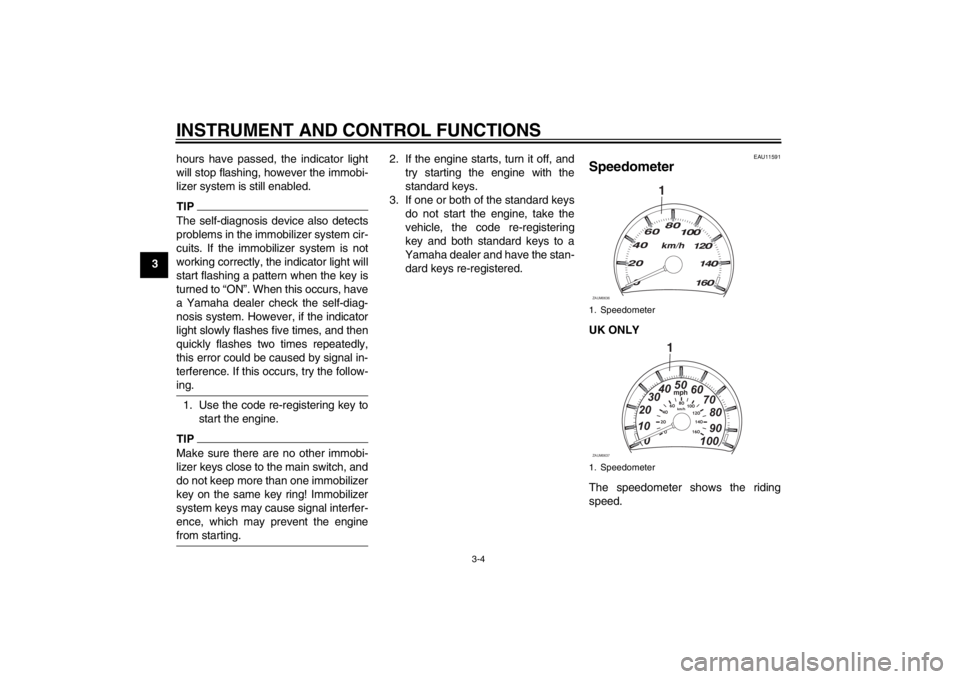
EAU11591
Speedometer UK ONLY
The speedometer shows the riding
speed.1. Speedometer
1. Speedometer
1
ZAUM0636
1mph
0 1020304050
60
70
80
90
100
ZAUM0637
U16PE3E0.book Page 4 Tuesday, June 19, 2012 5:17 PM
Page 21 of 86
INSTRUMENT AND CONTROL FUNCTIONS
3-5
3
EAUM1471
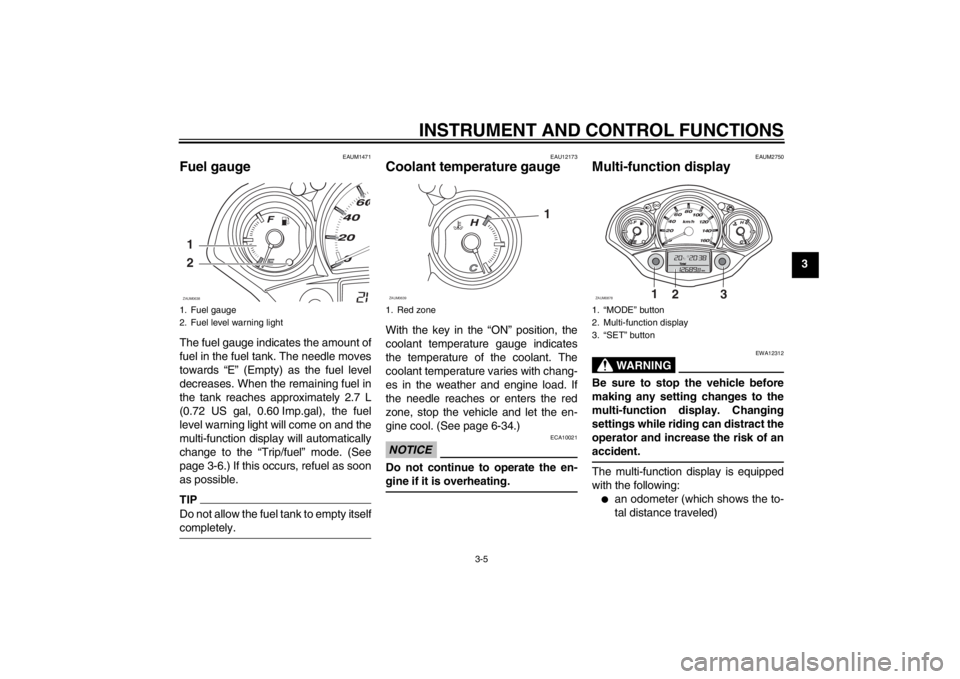
Fuel gauge The fuel gauge indicates the amount of
fuel in the fuel tank. The needle moves
towards “E” (Empty) as the fuel level
decreases. When the remaining fuel in
the tank reaches approximately 2.7 L
(0.72 US gal, 0.60 Imp.gal), the fuel
level warning light will come on and the
multi-function display will automatically
change to the “Trip/fuel” mode. (See
page 3-6.) If this occurs, refuel as soon
as possible.TIPDo not allow the fuel tank to empty itself
completely.
EAU12173
Coolant temperature gauge With the key in the “ON” position, the
coolant temperature gauge indicates
the temperature of the coolant. The
coolant temperature varies with chang-
es in the weather and engine load. If
the needle reaches or enters the red
zone, stop the vehicle and let the en-
gine cool. (See page 6-34.)NOTICE
ECA10021
Do not continue to operate the en-
gine if it is overheating.
EAUM2750
Multi-function display
WARNING
EWA12312
Be sure to stop the vehicle before
making any setting changes to the
multi-function display. Changing
settings while riding can distract the
operator and increase the risk of an
accident.The multi-function display is equipped
with the following:●
an odometer (which shows the to-
tal distance traveled)
1. Fuel gauge
2. Fuel level warning light1
2ZAUM0638
1. Red zone
1
ZAUM0639
1. “MODE” button
2. Multi-function display
3. “SET” button
1
2
3
ZAUM0878
U16PE3E0.book Page 5 Tuesday, June 19, 2012 5:17 PM
Page 22 of 86
INSTRUMENT AND CONTROL FUNCTIONS
3-6
3
●
two tripmeters (which show the
distance traveled since they were
last set to zero, the time passed
since the tripmeters were set to ze-
ro, and the average speed traveled
during this time)
●
a fuel reserve tripmeter (which
shows the distance traveled since
the fuel level warning light came
on)
●
a clock
●
an ambient temperature display
●
an oil change indicator (which
comes on when the engine oil
should be changed)
TIP●
For the UK, the distance traveled
is displayed in miles and the tem-
perature reading is displayed in °F.
●
For other countries, the distance
traveled is displayed in kilometers
and the temperature reading is dis-
played in °C.
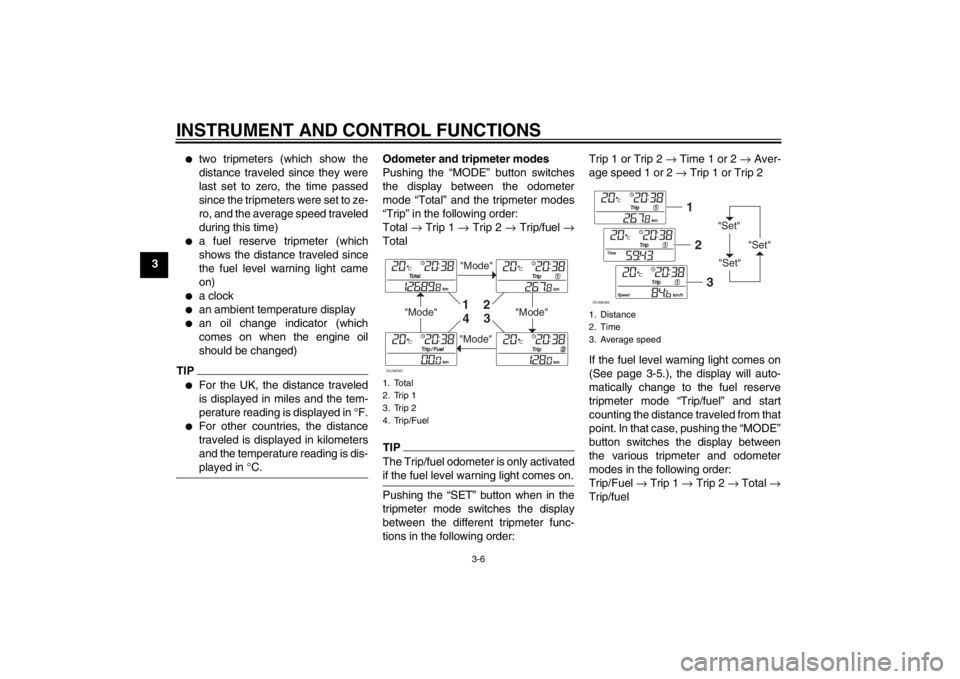
Odometer and tripmeter modes
Pushing the “MODE” button switches
the display between the odometer
mode “Total” and the tripmeter modes
“Trip” in the following order:
Total → Trip 1 → Trip 2 → Trip/fuel →
TotalTIPThe Trip/fuel odometer is only activated
if the fuel level warning light comes on.Pushing the “SET” button when in the
tripmeter mode switches the display
between the different tripmeter func-
tions in the following order:Trip 1 or Trip 2 → Time 1 or 2 → Aver-
age speed 1 or 2 → Trip 1 or Trip 2
If the fuel level warning light comes on
(See page 3-5.), the display will auto-
matically change to the fuel reserve
tripmeter mode “Trip/fuel” and start
counting the distance traveled from that
point. In that case, pushing the “MODE”
button switches the display between
the various tripmeter and odometer
modes in the following order:
Trip/Fuel → Trip 1 → Trip 2 → Total →
Trip/fuel1. Total
2. Trip 1
3. Trip 2
4. Trip/Fuel
"Mode"
"Mode"
"Mode"
"Mode"
1
2
3
4
ZAUM0391
1. Distance
2. Time
3. Average speed
"Set"
"Set""Set"
12
3
ZAUM0392
U16PE3E0.book Page 6 Tuesday, June 19, 2012 5:17 PM
Page 25 of 86

INSTRUMENT AND CONTROL FUNCTIONS
3-9
3
EAUS1020
Dimmer switch “ / ”
Set this switch to “ ” for the high
beam and to “ ” for the low beam.
With the headlight on low beam, press
this switch downwards to flash the
headlight.
EAU12460
Turn signal switch “ / ”
To signal a right-hand turn, push this
switch to “ ”. To signal a left-hand
turn, push this switch to “ ”. When re-
leased, the switch returns to the center
position. To cancel the turn signal
lights, push the switch in after it has re-
turned to the center position.
EAU12500
Horn switch “ ”
Press this switch to sound the horn.
EAU12721
Start switch “ ”
With the sidestand up, push this switch
while applying the front or rear brake to
crank the engine with the starter. See
page 5-1 for starting instructions prior
to starting the engine.
EAU12901
Front brake lever The front brake lever is located on the
right side of the handlebar. To apply the
front brake, pull this lever toward the
throttle grip.
EAU12951
Rear brake lever The rear brake lever is located on the
left side of the handlebar. To apply the
rear brake, pull this lever toward the
handlebar grip.
1. Front brake lever
1
ZAUM0791
1. Rear brake lever
1
ZAUM0085
U16PE3E0.book Page 9 Tuesday, June 19, 2012 5:17 PM