lock YAMAHA XCITY 125 2012 Owners Manual
[x] Cancel search | Manufacturer: YAMAHA, Model Year: 2012, Model line: XCITY 125, Model: YAMAHA XCITY 125 2012Pages: 86, PDF Size: 7.38 MB
Page 6 of 86

TABLE OF CONTENTSSAFETY INFORMATION ..................1-1
Further safe-riding points ................1-5
DESCRIPTION ..................................2-1
Left view ..........................................2-1
Right view ........................................2-2
Controls and instruments.................2-3
INSTRUMENT AND CONTROL
FUNCTIONS.......................................3-1
Immobilizer system .........................3-1
Main switch/steering lock ................3-2
Indicator lights and warning light ....3-3
Speedometer ..................................3-4
Fuel gauge ......................................3-5
Coolant temperature gauge ............3-5
Multi-function display ......................3-5
Handlebar switches ........................3-8
Front brake lever ............................3-9
Rear brake lever .............................3-9
Fuel tank cap ................................3-10
Fuel ...............................................3-10
Catalytic converters ......................3-12
Seat ..............................................3-12
Storage compartments .................3-13
Windshield ....................................3-14
Adjusting the shock absorber
assemblies ................................3-15
Carrier ...........................................3-16
Luggage hook ...............................3-16
Sidestand ......................................3-16Ignition circuit cut-off system ........ 3-17
FOR YOUR SAFETY –
PRE-OPERATION CHECKS............. 4-1
OPERATION AND IMPORTANT
RIDING POINTS................................. 5-1
Starting the engine ......................... 5-1
Starting off ...................................... 5-2
Acceleration and deceleration ........ 5-3
Braking ........................................... 5-3
Tips for reducing fuel
consumption ............................... 5-4
Engine break-in .............................. 5-4
Parking ........................................... 5-5
PERIODIC MAINTENANCE AND
ADJUSTMENT................................... 6-1
Owner’s tool kit ............................... 6-2
Periodic maintenance chart for the
emission control system ............. 6-3
General maintenance and
lubrication chart .......................... 6-4
Removing and installing cowlings
and panels .................................. 6-8
Checking the spark plug ................. 6-9
Engine oil ..................................... 6-10
Final transmission oil .................... 6-13
Coolant ......................................... 6-14
Air filter and V-belt case air filter
elements ................................... 6-15Checking the throttle grip free
play ........................................... 6-16
Valve clearance ........................... 6-17
Tires ............................................. 6-17
Cast wheels ................................. 6-19
Front and rear brake lever free
play ........................................... 6-19
Checking the front and rear brake
pads .......................................... 6-20
Checking the brake fluid level ...... 6-21
Changing the brake fluid .............. 6-22
Checking and lubricating the
cables ....................................... 6-22
Checking and lubricating the
throttle grip and cable ............... 6-23
Lubricating the front and rear
brake levers .............................. 6-23
Checking and lubricating the
centerstand and sidestand ....... 6-23
Checking the front fork ................. 6-24
Checking the steering .................. 6-25
Checking the wheel bearings ....... 6-25
Battery ......................................... 6-25
Replacing the fuses ..................... 6-27
Replacing a headlight bulb .......... 6-28
Replacing a front turn signal light
bulb ........................................... 6-29
Replacing a tail/brake light bulb or
a rear turn signal light bulb ....... 6-30
Replacing the license plate light
bulb ........................................... 6-31U16PE3E0.book Page 1 Tuesday, June 19, 2012 5:17 PM
Page 16 of 86
DESCRIPTION
2-3
2
EAU10430
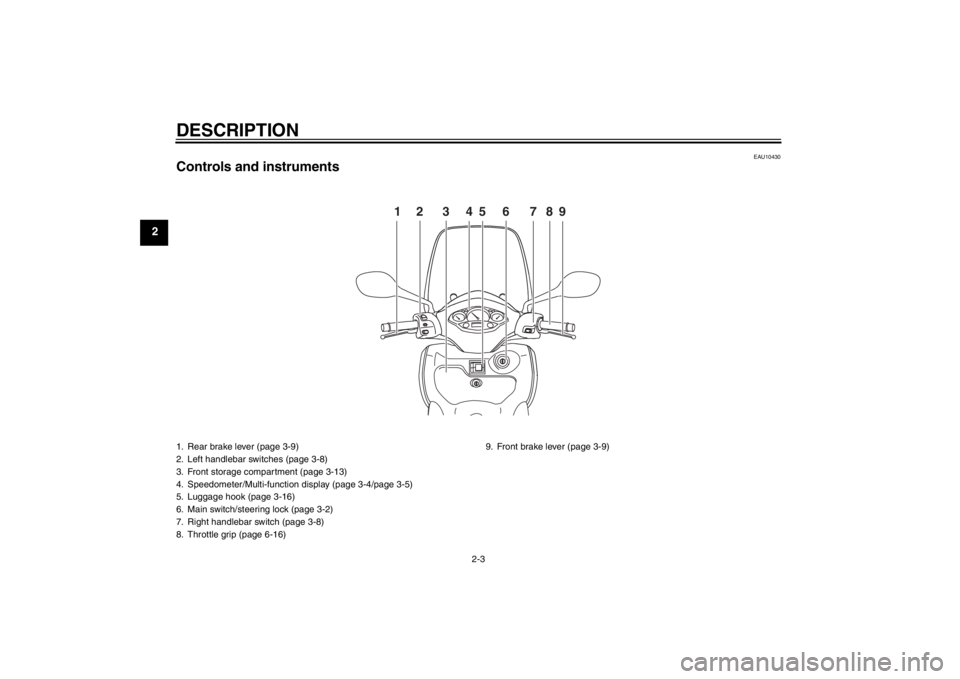
Controls and instruments
12 3456 789
1. Rear brake lever (page 3-9)
2. Left handlebar switches (page 3-8)
3. Front storage compartment (page 3-13)
4. Speedometer/Multi-function display (page 3-4/page 3-5)
5. Luggage hook (page 3-16)
6. Main switch/steering lock (page 3-2)
7. Right handlebar switch (page 3-8)
8. Throttle grip (page 6-16)9. Front brake lever (page 3-9)U16PE3E0.book Page 3 Tuesday, June 19, 2012 5:17 PM
Page 18 of 86
INSTRUMENT AND CONTROL FUNCTIONS
3-2
3
●
Keep other immobilizer system
keys away from the main switch
as they may cause signal inter-
ference.
EAU10472
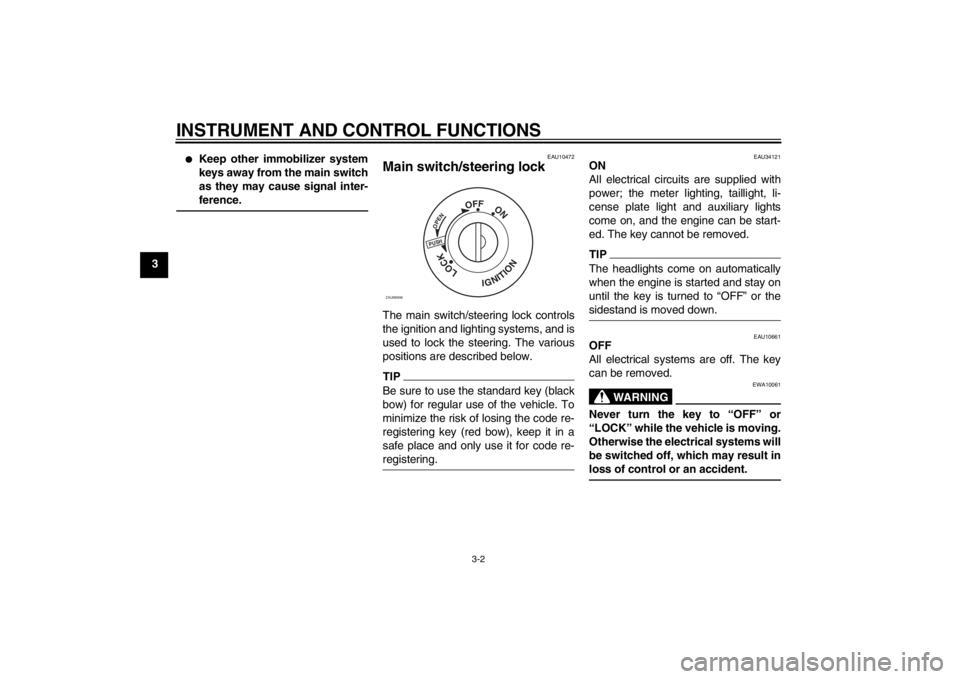
Main switch/steering lock The main switch/steering lock controls
the ignition and lighting systems, and is
used to lock the steering. The various
positions are described below.TIPBe sure to use the standard key (black
bow) for regular use of the vehicle. To
minimize the risk of losing the code re-
registering key (red bow), keep it in a
safe place and only use it for code re-
registering.
EAU34121
ON
All electrical circuits are supplied with
power; the meter lighting, taillight, li-
cense plate light and auxiliary lights
come on, and the engine can be start-
ed. The key cannot be removed.TIPThe headlights come on automatically
when the engine is started and stay on
until the key is turned to “OFF” or the
sidestand is moved down.
EAU10661
OFF
All electrical systems are off. The key
can be removed.
WARNING
EWA10061
Never turn the key to “OFF” or
“LOCK” while the vehicle is moving.
Otherwise the electrical systems will
be switched off, which may result in
loss of control or an accident.
PUSHOPEN
OFF
ON
LOCK
IGNITION
ZAUM0696
U16PE3E0.book Page 2 Tuesday, June 19, 2012 5:17 PM
Page 19 of 86
INSTRUMENT AND CONTROL FUNCTIONS
3-3
3
EAU10684
LOCK
The steering is locked, and all electrical
systems are off. The key can be re-
moved.
To lock the steering1. Turn the handlebars all the way to
the left.
2. Push the key in from the “OFF” po-
sition, and then turn it to “LOCK”
while still pushing it.
3. Remove the key.
To unlock the steeringPush the key in, and then turn it to
“OFF” while still pushing it.
EAU11006
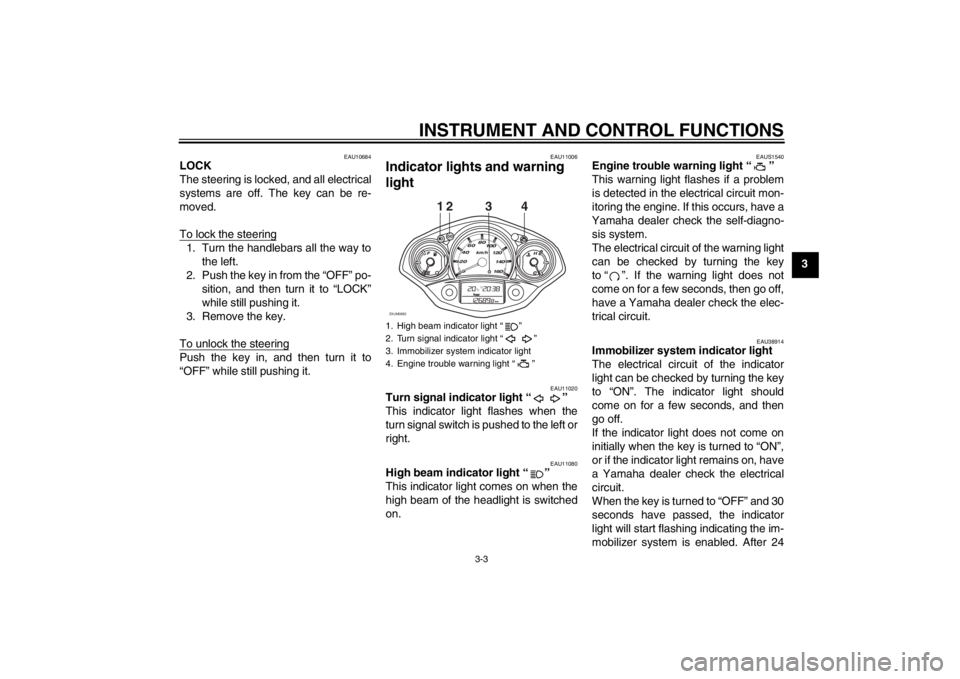
Indicator lights and warning
light
EAU11020
Turn signal indicator light “ ”
This indicator light flashes when the
turn signal switch is pushed to the left or
right.
EAU11080
High beam indicator light “ ”
This indicator light comes on when the
high beam of the headlight is switched
on.
EAUS1540
Engine trouble warning light “ ”
This warning light flashes if a problem
is detected in the electrical circuit mon-
itoring the engine. If this occurs, have a
Yamaha dealer check the self-diagno-
sis system.
The electrical circuit of the warning light
can be checked by turning the key
to “ ”. If the warning light does not
come on for a few seconds, then go off,
have a Yamaha dealer check the elec-
trical circuit.
EAU38914
Immobilizer system indicator light
The electrical circuit of the indicator
light can be checked by turning the key
to “ON”. The indicator light should
come on for a few seconds, and then
go off.
If the indicator light does not come on
initially when the key is turned to “ON”,
or if the indicator light remains on, have
a Yamaha dealer check the electrical
circuit.
When the key is turned to “OFF” and 30
seconds have passed, the indicator
light will start flashing indicating the im-
mobilizer system is enabled. After 24
1. High beam indicator light “ ”
2. Turn signal indicator light “ ”
3. Immobilizer system indicator light
4. Engine trouble warning light “ ”
12
ZAUM0882
34
U16PE3E0.book Page 3 Tuesday, June 19, 2012 5:17 PM
Page 22 of 86
INSTRUMENT AND CONTROL FUNCTIONS
3-6
3
●
two tripmeters (which show the
distance traveled since they were
last set to zero, the time passed
since the tripmeters were set to ze-
ro, and the average speed traveled
during this time)
●
a fuel reserve tripmeter (which
shows the distance traveled since
the fuel level warning light came
on)
●
a clock
●
an ambient temperature display
●
an oil change indicator (which
comes on when the engine oil
should be changed)
TIP●
For the UK, the distance traveled
is displayed in miles and the tem-
perature reading is displayed in °F.
●
For other countries, the distance
traveled is displayed in kilometers
and the temperature reading is dis-
played in °C.
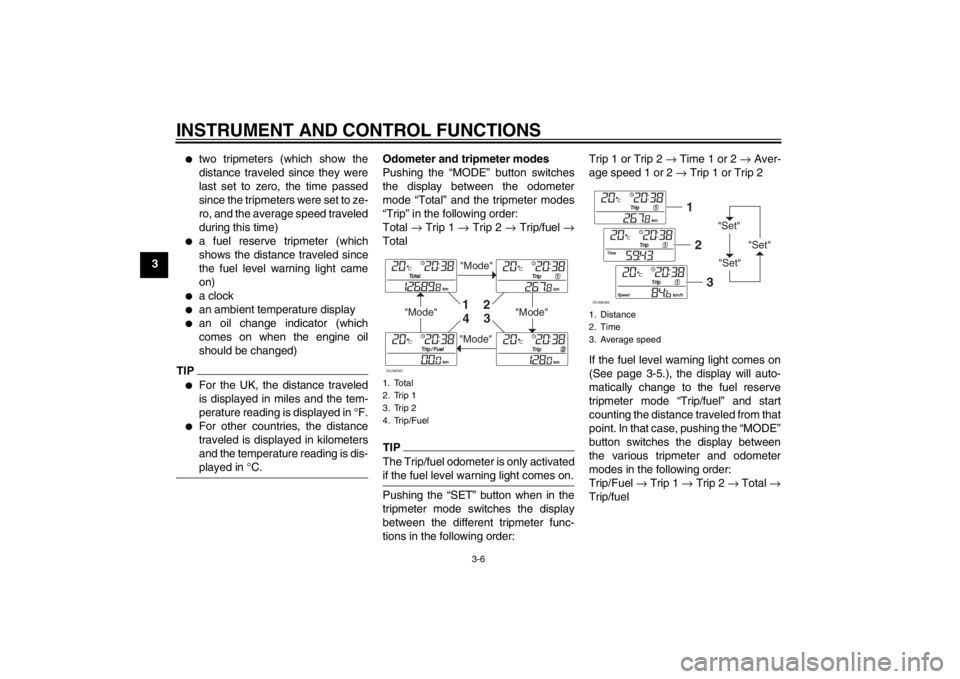
Odometer and tripmeter modes
Pushing the “MODE” button switches
the display between the odometer
mode “Total” and the tripmeter modes
“Trip” in the following order:
Total → Trip 1 → Trip 2 → Trip/fuel →
TotalTIPThe Trip/fuel odometer is only activated
if the fuel level warning light comes on.Pushing the “SET” button when in the
tripmeter mode switches the display
between the different tripmeter func-
tions in the following order:Trip 1 or Trip 2 → Time 1 or 2 → Aver-
age speed 1 or 2 → Trip 1 or Trip 2
If the fuel level warning light comes on
(See page 3-5.), the display will auto-
matically change to the fuel reserve
tripmeter mode “Trip/fuel” and start
counting the distance traveled from that
point. In that case, pushing the “MODE”
button switches the display between
the various tripmeter and odometer
modes in the following order:
Trip/Fuel → Trip 1 → Trip 2 → Total →
Trip/fuel1. Total
2. Trip 1
3. Trip 2
4. Trip/Fuel
"Mode"
"Mode"
"Mode"
"Mode"
1
2
3
4
ZAUM0391
1. Distance
2. Time
3. Average speed
"Set"
"Set""Set"
12
3
ZAUM0392
U16PE3E0.book Page 6 Tuesday, June 19, 2012 5:17 PM
Page 23 of 86
INSTRUMENT AND CONTROL FUNCTIONS
3-7
3
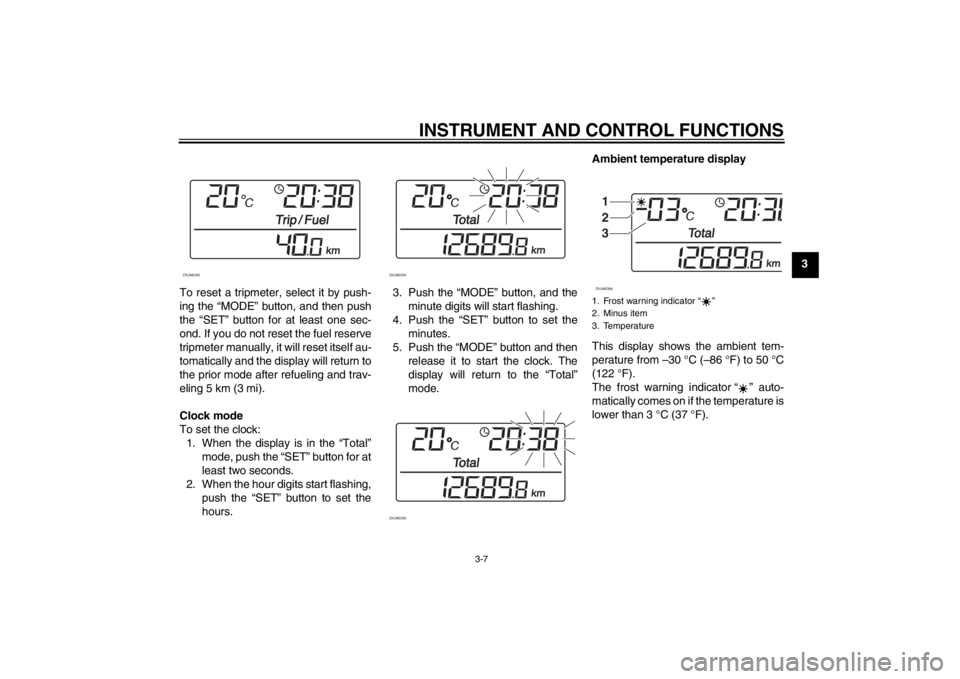
To reset a tripmeter, select it by push-
ing the “MODE” button, and then push
the “SET” button for at least one sec-
ond. If you do not reset the fuel reserve
tripmeter manually, it will reset itself au-
tomatically and the display will return to
the prior mode after refueling and trav-
eling 5 km (3 mi).
Clock mode
To set the clock:
1. When the display is in the “Total”
mode, push the “SET” button for at
least two seconds.
2. When the hour digits start flashing,
push the “SET” button to set the
hours.3. Push the “MODE” button, and the
minute digits will start flashing.
4. Push the “SET” button to set the
minutes.
5. Push the “MODE” button and then
release it to start the clock. The
display will return to the “Total”
mode.Ambient temperature display
This display shows the ambient tem-
perature from –30 °C (–86 °F) to 50 °C
(122 °F).
The frost warning indicator “ ” auto-
matically comes on if the temperature is
lower than 3 °C (37 °F).
ZAUM0393
ZAUM0394
ZAUM0395
1. Frost warning indicator ì î
2. Minus item
3. Temperature
1
2
3ZAUM0396
U16PE3E0.book Page 7 Tuesday, June 19, 2012 5:17 PM
Page 26 of 86
INSTRUMENT AND CONTROL FUNCTIONS
3-10
3
EAUM2161
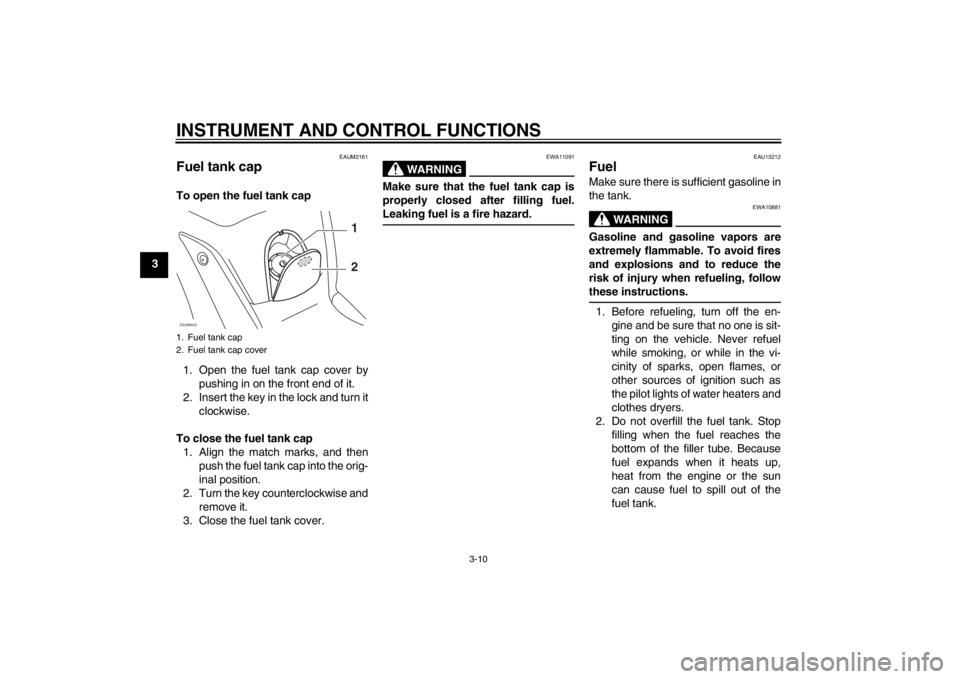
Fuel tank cap To open the fuel tank cap
1. Open the fuel tank cap cover by
pushing in on the front end of it.
2. Insert the key in the lock and turn it
clockwise.
To close the fuel tank cap
1. Align the match marks, and then
push the fuel tank cap into the orig-
inal position.
2. Turn the key counterclockwise and
remove it.
3. Close the fuel tank cover.
WARNING
EWA11091
Make sure that the fuel tank cap is
properly closed after filling fuel.
Leaking fuel is a fire hazard.
EAU13212
Fuel Make sure there is sufficient gasoline in
the tank.
WARNING
EWA10881
Gasoline and gasoline vapors are
extremely flammable. To avoid fires
and explosions and to reduce the
risk of injury when refueling, follow
these instructions.1. Before refueling, turn off the en-
gine and be sure that no one is sit-
ting on the vehicle. Never refuel
while smoking, or while in the vi-
cinity of sparks, open flames, or
other sources of ignition such as
the pilot lights of water heaters and
clothes dryers.
2. Do not overfill the fuel tank. Stop
filling when the fuel reaches the
bottom of the filler tube. Because
fuel expands when it heats up,
heat from the engine or the sun
can cause fuel to spill out of the
fuel tank.
1. Fuel tank cap
2. Fuel tank cap coverZAUM0643
1
2
U16PE3E0.book Page 10 Tuesday, June 19, 2012 5:17 PM
Page 28 of 86
INSTRUMENT AND CONTROL FUNCTIONS
3-12
3
EAU13445
Catalytic converters This vehicle is equipped with catalytic
converters in the exhaust system.
WARNING
EWA10862
The exhaust system is hot after op-
eration. To prevent a fire hazard or
burns:●
Do not park the vehicle near
possible fire hazards such as
grass or other materials that
easily burn.
●
Park the vehicle in a place
where pedestrians or children
are not likely to touch the hot
exhaust system.
●
Make sure that the exhaust sys-
tem has cooled down before do-
ing any maintenance work.
●
Do not allow the engine to idle
more than a few minutes. Long
idling can cause a build-up of
heat.
NOTICE
ECA10701
Use only unleaded gasoline. The use
of leaded gasoline will cause unre-
pairable damage to the catalytic
converter.
EAU13932
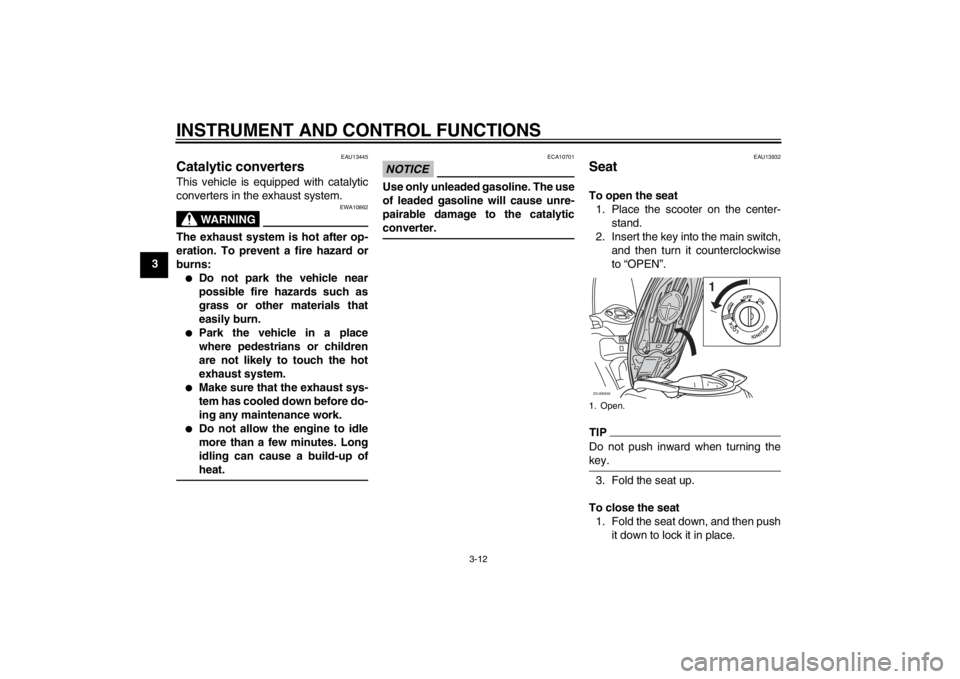
Seat To open the seat
1. Place the scooter on the center-
stand.
2. Insert the key into the main switch,
and then turn it counterclockwise
to “OPEN”.TIPDo not push inward when turning the
key.3. Fold the seat up.
To close the seat
1. Fold the seat down, and then push
it down to lock it in place.1. Open.ZAUM0698
1
PUSHOPEN
OFFON
LOCK
IGNITION
U16PE3E0.book Page 12 Tuesday, June 19, 2012 5:17 PM
Page 29 of 86
INSTRUMENT AND CONTROL FUNCTIONS
3-13
3 2. Remove the key from the main
switch if the scooter will be left un-
attended.
TIPMake sure that the seat is properly se-
cured before riding.
EAUM2522
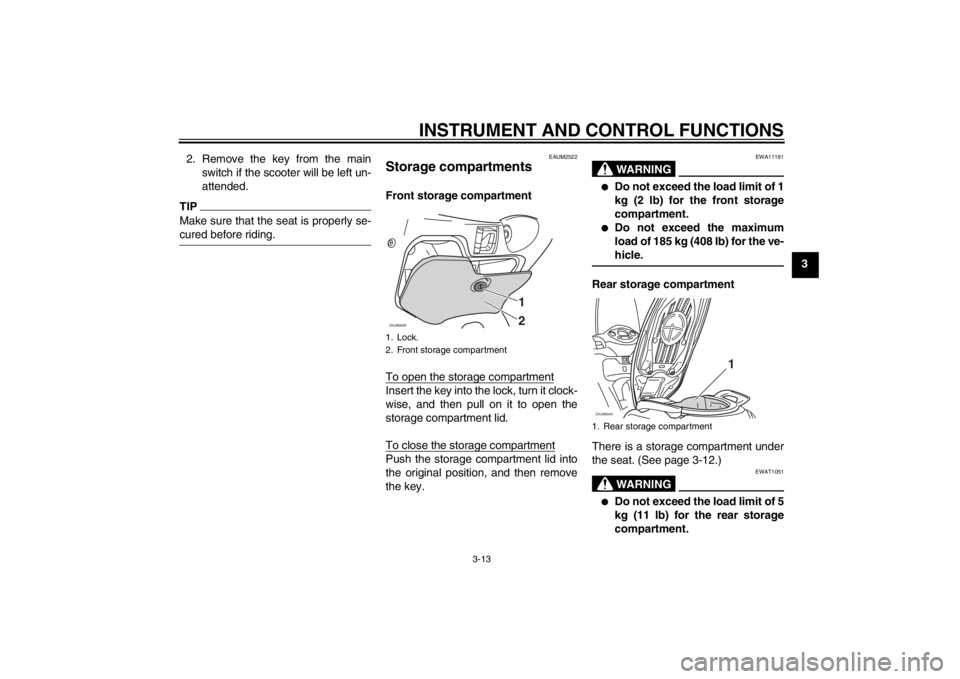
Storage compartments Front storage compartment
To open the storage compartmentInsert the key into the lock, turn it clock-
wise, and then pull on it to open the
storage compartment lid.
To close the storage compartmentPush the storage compartment lid into
the original position, and then remove
the key.
WARNING
EWA11191
●
Do not exceed the load limit of 1
kg (2 lb) for the front storage
compartment.
●
Do not exceed the maximum
load of 185 kg (408 lb) for the ve-
hicle.
Rear storage compartment
There is a storage compartment under
the seat. (See page 3-12.)
WARNING
EWAT1051
●
Do not exceed the load limit of 5
kg (11 lb) for the rear storage
compartment.
1. Lock.
2. Front storage compartment
1
2
ZAUM0699
1. Rear storage compartmentZAUM0646
1
U16PE3E0.book Page 13 Tuesday, June 19, 2012 5:17 PM
Page 62 of 86
PERIODIC MAINTENANCE AND ADJUSTMENT
6-21
6
EAU22581
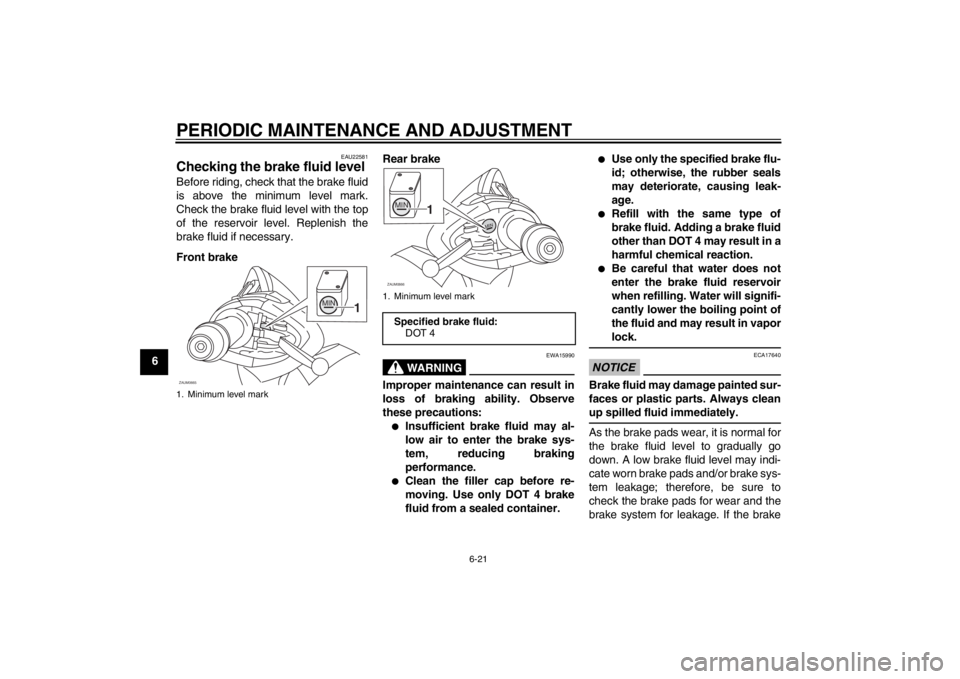
Checking the brake fluid level Before riding, check that the brake fluid
is above the minimum level mark.
Check the brake fluid level with the top
of the reservoir level. Replenish the
brake fluid if necessary.
Front brakeRear brake
WARNING
EWA15990
Improper maintenance can result in
loss of braking ability. Observe
these precautions:●
Insufficient brake fluid may al-
low air to enter the brake sys-
tem, reducing braking
performance.
●
Clean the filler cap before re-
moving. Use only DOT 4 brake
fluid from a sealed container.
●
Use only the specified brake flu-
id; otherwise, the rubber seals
may deteriorate, causing leak-
age.
●
Refill with the same type of
brake fluid. Adding a brake fluid
other than DOT 4 may result in a
harmful chemical reaction.
●
Be careful that water does not
enter the brake fluid reservoir
when refilling. Water will signifi-
cantly lower the boiling point of
the fluid and may result in vapor
lock.
NOTICE
ECA17640
Brake fluid may damage painted sur-
faces or plastic parts. Always clean
up spilled fluid immediately.As the brake pads wear, it is normal for
the brake fluid level to gradually go
down. A low brake fluid level may indi-
cate worn brake pads and/or brake sys-
tem leakage; therefore, be sure to
check the brake pads for wear and the
brake system for leakage. If the brake
1. Minimum level markZAUM0665
MIN
1
1. Minimum level markSpecified brake fluid:
DOT 4ZAUM0666MIN
1
MIN
U16PE3E0.book Page 21 Tuesday, June 19, 2012 5:17 PM