turn YAMAHA XCITY 250 2012 Owners Manual
[x] Cancel search | Manufacturer: YAMAHA, Model Year: 2012, Model line: XCITY 250, Model: YAMAHA XCITY 250 2012Pages: 82, PDF Size: 1.89 MB
Page 6 of 82

TABLE OF CONTENTSSAFETY INFORMATION ..................1-1
Further safe-riding points ................1-5
DESCRIPTION ..................................2-1
Left view ..........................................2-1
Right view ........................................2-2
Controls and instruments.................2-3
INSTRUMENT AND CONTROL
FUNCTIONS.......................................3-1
Main switch/steering lock ................3-1
Indicator lights and warning light ....3-1
Speedometer ..................................3-2
Fuel gauge ......................................3-2
Coolant temperature gauge ............3-3
Multi-function display ......................3-3
Handlebar switches ........................3-6
Front brake lever ............................3-7
Rear brake lever .............................3-7
Fuel tank cap ..................................3-7
Fuel .................................................3-8
Catalytic converters ........................3-9
Seat ..............................................3-10
Storage compartments .................3-11
Windshield ....................................3-12
Adjusting the shock absorber
assemblies ................................3-13
Carrier (if equipped).......................3-13
Luggage hook ...............................3-14
Sidestand ......................................3-14
Ignition circuit cut-off system ........3-15FOR YOUR SAFETY –
PRE-OPERATION CHECKS............. 4-1
OPERATION AND IMPORTANT
RIDING POINTS................................. 5-1
Starting the engine ......................... 5-1
Starting off ...................................... 5-2
Acceleration and deceleration ........ 5-2
Braking ........................................... 5-3
Tips for reducing fuel
consumption ............................... 5-3
Engine break-in .............................. 5-4
Parking ........................................... 5-4
PERIODIC MAINTENANCE AND
ADJUSTMENT................................... 6-1
Owner’s tool kit ............................... 6-2
Periodic maintenance chart for the
emission control system ............. 6-3
General maintenance and
lubrication chart .......................... 6-4
Removing and installing cowlings
and panels .................................. 6-7
Checking the spark plug ................. 6-8
Engine oil ....................................... 6-9
Final transmission oil .................... 6-11
Coolant ......................................... 6-12
Air filter and V-belt case air filter
elements ................................... 6-13
Checking the throttle grip free
play ........................................... 6-14Valve clearance ........................... 6-15
Tires ............................................. 6-15
Cast wheels ................................. 6-17
Front and rear brake lever free
play ........................................... 6-17
Checking the front and rear brake
pads .......................................... 6-18
Checking the brake fluid level ...... 6-19
Changing the brake fluid .............. 6-20
Checking and lubricating the
cables ....................................... 6-20
Checking and lubricating the
throttle grip and cable ............... 6-21
Lubricating the front and rear
brake levers .............................. 6-21
Checking and lubricating the
centerstand and sidestand ....... 6-21
Checking the front fork ................. 6-22
Checking the steering .................. 6-23
Checking the wheel bearings ....... 6-23
Battery ......................................... 6-23
Replacing the fuses ..................... 6-25
Replacing a headlight bulb .......... 6-26
Replacing a front turn signal light
bulb ........................................... 6-27
Replacing a tail/brake light bulb or
a rear turn signal light bulb ....... 6-28
Replacing the license plate light
bulb ........................................... 6-29
Replacing an auxiliary light
bulb ........................................... 6-29U5B2E4E0.book Page 1 Friday, June 1, 2012 9:06 AM
Page 9 of 82

SAFETY INFORMATION
1-2
1
●
Many accidents involve inexperi-
enced operators. In fact, many op-
erators who have been involved in
accidents do not even have a cur-
rent driver’s license.
Make sure that you are qualified
and that you only lend your
scooter to other qualified opera-
tors.
Know your skills and limits.
Staying within your limits may
help you to avoid an accident.
We recommend that you prac-
tice riding your scooter where
there is no traffic until you have
become thoroughly familiar with
the scooter and all of its con-
trols.
●
Many accidents have been caused
by error of the scooter operator. A
typical error made by the operator
is veering wide on a turn due to ex-
cessive speed or undercornering
(insufficient lean angle for the
speed).
Always obey the speed limit and
never travel faster than warrant-
ed by road and traffic conditions. Always signal before turning or
changing lanes. Make sure that
other motorists can see you.
●
The posture of the operator and
passenger is important for proper
control.
The operator should keep both
hands on the handlebar and
both feet on the operator foot-
rests during operation to main-
tain control of the scooter.
The passenger should always
hold onto the operator, the seat
strap or grab bar, if equipped,
with both hands and keep both
feet on the passenger footrests.
Never carry a passenger unless
he or she can firmly place both
feet on the passenger footrests.
●
Never ride under the influence of
alcohol or other drugs.
●
This scooter is designed for on-
road use only. It is not suitable for
off-road use.Protective Apparel
The majority of fatalities from scooter
accidents are the result of head inju-
ries. The use of a safety helmet is the
single most critical factor in the preven-
tion or reduction of head injuries.
●
Always wear an approved helmet.
●
Wear a face shield or goggles.
Wind in your unprotected eyes
could contribute to an impairment
of vision that could delay seeing a
hazard.
●
The use of a jacket, substantial
shoes, trousers, gloves, etc., is ef-
fective in preventing or reducing
abrasions or lacerations.
●
Never wear loose-fitting clothes,
otherwise they could catch on the
control levers or wheels and cause
injury or an accident.
●
Always wear protective clothing
that covers your legs, ankles, and
feet. The engine or exhaust sys-
tem become very hot during or af-
ter operation and can cause burns.
●
A passenger should also observe
the above precautions.
U5B2E4E0.book Page 2 Friday, June 1, 2012 9:06 AM
Page 12 of 82

SAFETY INFORMATION
1-5
1Aftermarket Tires and Rims
The tires and rims that came with your
scooter were designed to match the
performance capabilities and to provide
the best combination of handling, brak-
ing, and comfort. Other tires, rims, siz-
es, and combinations may not be
appropriate. Refer to page 6-15 for tire
specifications and more information on
replacing your tires.
Transporting the Scooter
Be sure to observe following instruc-
tions before transporting the scooter in
another vehicle.
●
Remove all loose items from the
scooter.
●
Point the front wheel straight
ahead on the trailer or in the truck
bed, and choke it in a rail to pre-
vent movement.
●
Secure the scooter with tie-downs
or suitable straps that are attached
to solid parts of the scooter, such
as the frame or upper front fork tri-
ple clamp (and not, for example, to
rubber-mounted handlebars or
turn signals, or parts that could
break). Choose the location for thestraps carefully so the straps will
not rub against painted surfaces
during transport.
●
The suspension should be com-
pressed somewhat by the tie-
downs, if possible, so that the
scooter will not bounce excessive-
ly during transport.
EAU10373
Further safe-riding points ●
Be sure to signal clearly when
making turns.
●
Braking can be extremely difficult
on a wet road. Avoid hard braking,
because the scooter could slide.
Apply the brakes slowly when
stopping on a wet surface.
●
Slow down as you approach a cor-
ner or turn. Once you have com-
pleted a turn, accelerate slowly.
●
Be careful when passing parked
cars. A driver might not see you
and open a door in your path.
●
Railroad crossings, streetcar rails,
iron plates on road construction
sites, and manhole covers be-
come extremely slippery when
wet. Slow down and cross them
with caution. Keep the scooter up-
right, otherwise it could slide out
from under you.
●
The brake pads could get wet
when you wash the scooter. After
washing the scooter, check the
brakes before riding.
U5B2E4E0.book Page 5 Friday, June 1, 2012 9:06 AM
Page 17 of 82
INSTRUMENT AND CONTROL FUNCTIONS
3-1
3
EAU10461
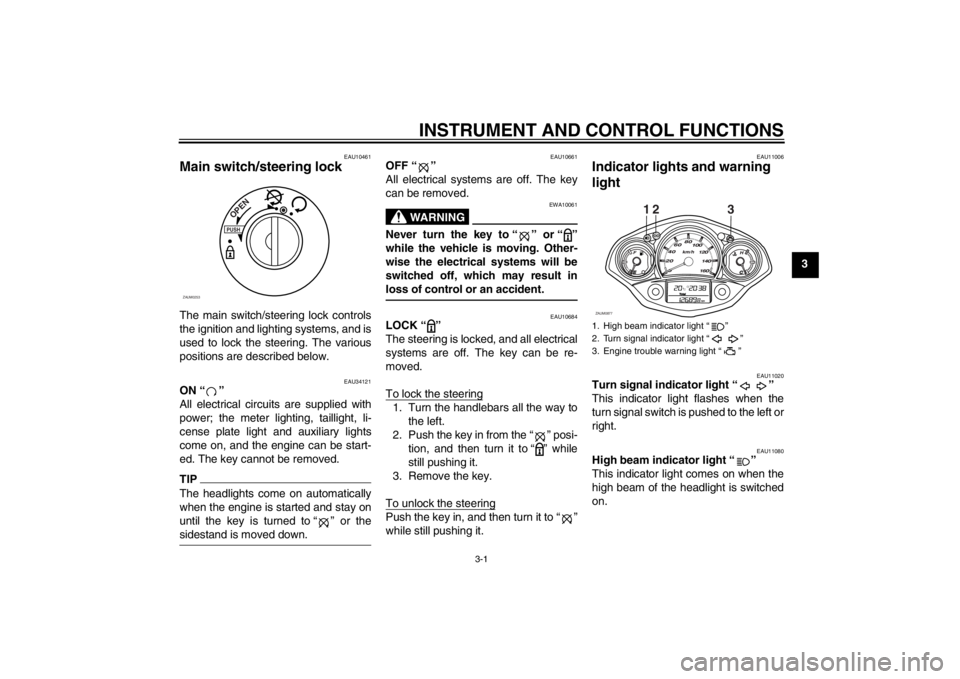
Main switch/steering lock The main switch/steering lock controls
the ignition and lighting systems, and is
used to lock the steering. The various
positions are described below.
EAU34121
ON “ ”
All electrical circuits are supplied with
power; the meter lighting, taillight, li-
cense plate light and auxiliary lights
come on, and the engine can be start-
ed. The key cannot be removed.TIPThe headlights come on automatically
when the engine is started and stay on
until the key is turned to “ ” or the
sidestand is moved down.
EAU10661
OFF “ ”
All electrical systems are off. The key
can be removed.
WARNING
EWA10061
Never turn the key to “ ” or “ ”
while the vehicle is moving. Other-
wise the electrical systems will be
switched off, which may result in
loss of control or an accident.
EAU10684
LOCK “ ”
The steering is locked, and all electrical
systems are off. The key can be re-
moved.
To lock the steering1. Turn the handlebars all the way to
the left.
2. Push the key in from the “ ” posi-
tion, and then turn it to “ ” while
still pushing it.
3. Remove the key.
To unlock the steeringPush the key in, and then turn it to “ ”
while still pushing it.
EAU11006
Indicator lights and warning
light
EAU11020
Turn signal indicator light “ ”
This indicator light flashes when the
turn signal switch is pushed to the left or
right.
EAU11080
High beam indicator light “ ”
This indicator light comes on when the
high beam of the headlight is switched
on.
PUSHOPEN
ZAUM0253
1. High beam indicator light ì î
2. Turn signal indicator light ì î
3. Engine trouble warning light ì î
12 3
ZAUM0877
U5B2E4E0.book Page 1 Friday, June 1, 2012 9:06 AM
Page 18 of 82
INSTRUMENT AND CONTROL FUNCTIONS
3-2
3
EAUS1540
Engine trouble warning light “ ”
This warning light flashes if a problem
is detected in the electrical circuit mon-
itoring the engine. If this occurs, have a
Yamaha dealer check the self-diagno-
sis system.
The electrical circuit of the warning light
can be checked by turning the key
to “ ”. If the warning light does not
come on for a few seconds, then go off,
have a Yamaha dealer check the elec-
trical circuit.
EAU11591
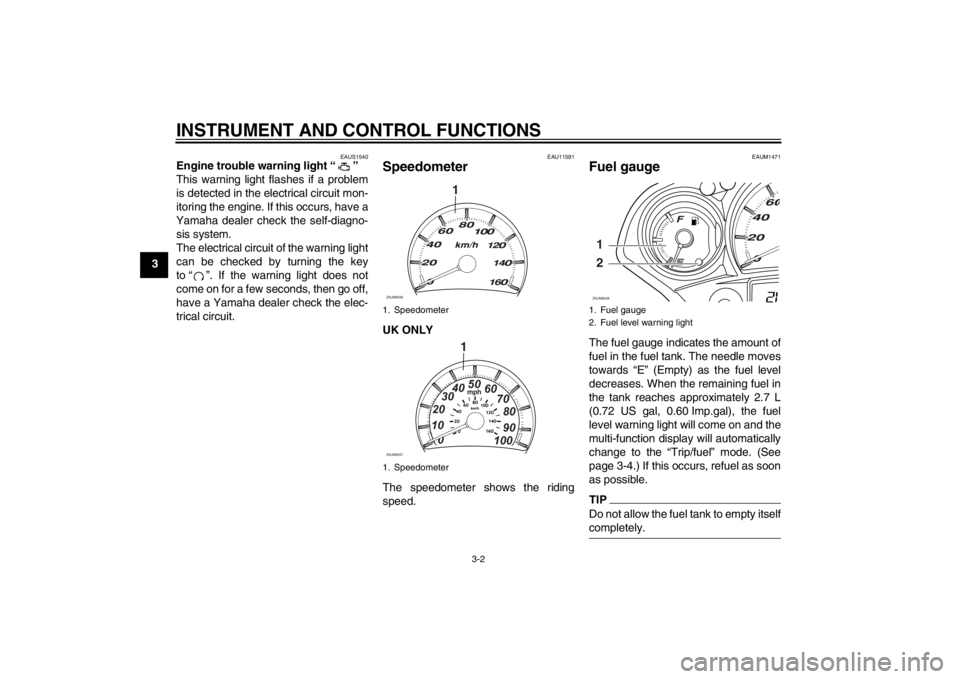
Speedometer UK ONLY
The speedometer shows the riding
speed.
EAUM1471
Fuel gauge The fuel gauge indicates the amount of
fuel in the fuel tank. The needle moves
towards “E” (Empty) as the fuel level
decreases. When the remaining fuel in
the tank reaches approximately 2.7 L
(0.72 US gal, 0.60 Imp.gal), the fuel
level warning light will come on and the
multi-function display will automatically
change to the “Trip/fuel” mode. (See
page 3-4.) If this occurs, refuel as soon
as possible.TIPDo not allow the fuel tank to empty itself
completely.
1. Speedometer
1. Speedometer
1
ZAUM0636
1mph
0 1020304050
60
70
80
90
100
ZAUM0637
1. Fuel gauge
2. Fuel level warning light1
2ZAUM0638
U5B2E4E0.book Page 2 Friday, June 1, 2012 9:06 AM
Page 20 of 82
INSTRUMENT AND CONTROL FUNCTIONS
3-4
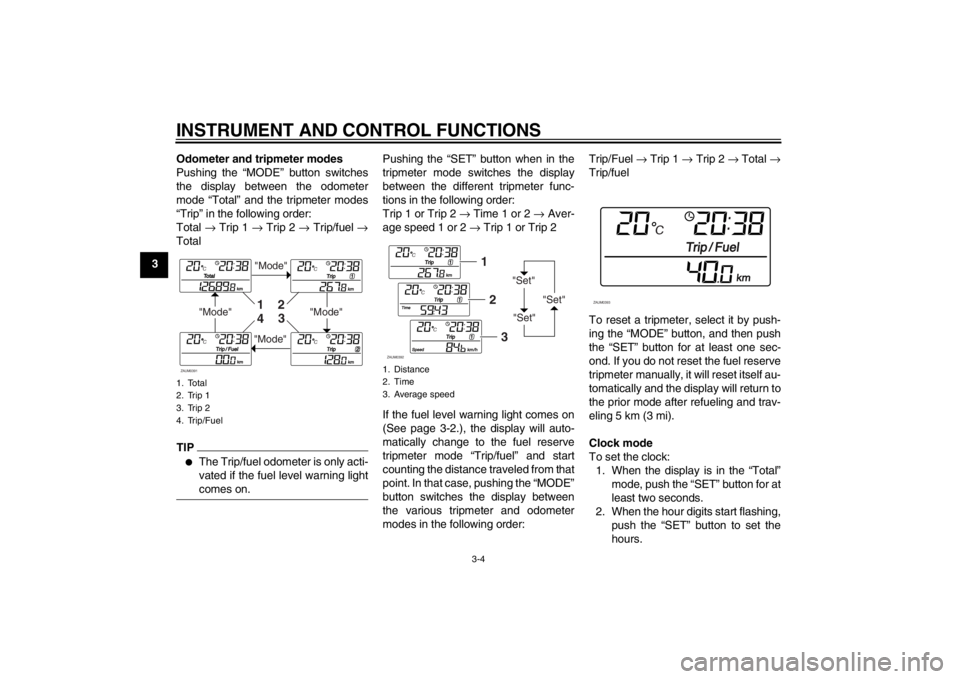
3Odometer and tripmeter modes
Pushing the “MODE” button switches
the display between the odometer
mode “Total” and the tripmeter modes
“Trip” in the following order:
Total → Trip 1 → Trip 2 → Trip/fuel →
Total
TIP●
The Trip/fuel odometer is only acti-
vated if the fuel level warning light
comes on.
Pushing the “SET” button when in the
tripmeter mode switches the display
between the different tripmeter func-
tions in the following order:
Trip 1 or Trip 2 → Time 1 or 2 → Aver-
age speed 1 or 2 → Trip 1 or Trip 2
If the fuel level warning light comes on
(See page 3-2.), the display will auto-
matically change to the fuel reserve
tripmeter mode “Trip/fuel” and start
counting the distance traveled from that
point. In that case, pushing the “MODE”
button switches the display between
the various tripmeter and odometer
modes in the following order:Trip/Fuel → Trip 1 → Trip 2 → Total →
Trip/fuel
To reset a tripmeter, select it by push-
ing the “MODE” button, and then push
the “SET” button for at least one sec-
ond. If you do not reset the fuel reserve
tripmeter manually, it will reset itself au-
tomatically and the display will return to
the prior mode after refueling and trav-
eling 5 km (3 mi).
Clock mode
To set the clock:
1. When the display is in the “Total”
mode, push the “SET” button for at
least two seconds.
2. When the hour digits start flashing,
push the “SET” button to set the
hours.
1. Total
2. Trip 1
3. Trip 2
4. Trip/Fuel
"Mode"
"Mode"
"Mode"
"Mode"1
2
3
4
ZAUM0391
1. Distance
2. Time
3. Average speed
"Set"
"Set""Set"
12
3
ZAUM0392
ZAUM0393
U5B2E4E0.book Page 4 Friday, June 1, 2012 9:06 AM
Page 21 of 82
INSTRUMENT AND CONTROL FUNCTIONS
3-5
3
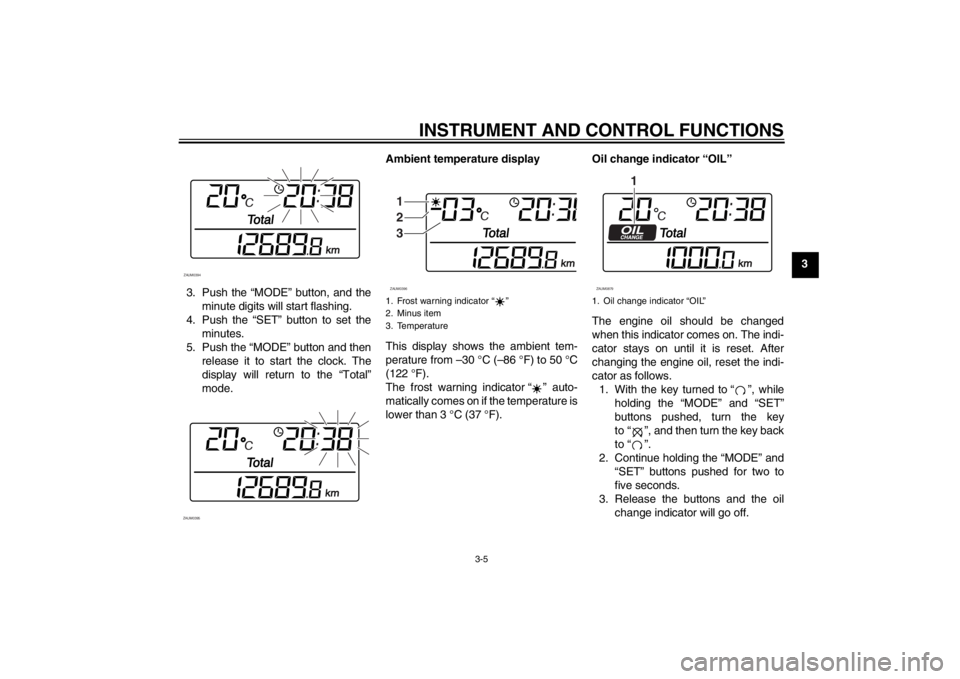
3. Push the “MODE” button, and the
minute digits will start flashing.
4. Push the “SET” button to set the
minutes.
5. Push the “MODE” button and then
release it to start the clock. The
display will return to the “Total”
mode.Ambient temperature display
This display shows the ambient tem-
perature from –30 °C (–86 °F) to 50 °C
(122 °F).
The frost warning indicator “ ” auto-
matically comes on if the temperature is
lower than 3 °C (37 °F).Oil change indicator “OIL”
The engine oil should be changed
when this indicator comes on. The indi-
cator stays on until it is reset. After
changing the engine oil, reset the indi-
cator as follows.
1. With the key turned to “ ”, while
holding the “MODE” and “SET”
buttons pushed, turn the key
to “ ”, and then turn the key back
to “ ”.
2. Continue holding the “MODE” and
“SET” buttons pushed for two to
five seconds.
3. Release the buttons and the oil
change indicator will go off.
ZAUM0394ZAUM0395
1. Frost warning indicator ì î
2. Minus item
3. Temperature1
2
3ZAUM0396
1. Oil change indicator ìOILî
1
ZAUM0879
U5B2E4E0.book Page 5 Friday, June 1, 2012 9:06 AM
Page 22 of 82
INSTRUMENT AND CONTROL FUNCTIONS
3-6
3
TIP●
The oil change indicator will come
on at the initial 1000 km (600 mi)
and every 3000 km (1800 mi)
thereafter.
●
If the engine oil is changed before
the oil change indicator comes on
(i.e. before the periodic oil change
interval has been reached), the in-
dicator must be reset after the oil
change for the next periodic oil
change to be indicated at the cor-
rect time. After resetting, the indi-
cator will come on for two seconds.
If the indicator does not come on,
repeat the procedure.
EAU1234A
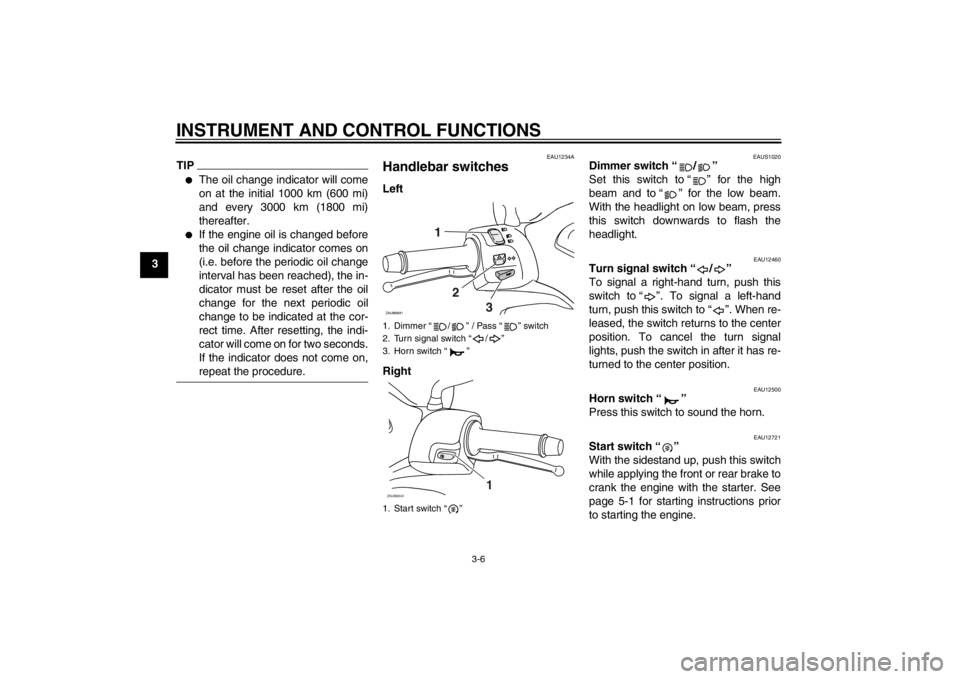
Handlebar switches Left
Right
EAUS1020
Dimmer switch “ / ”
Set this switch to “ ” for the high
beam and to “ ” for the low beam.
With the headlight on low beam, press
this switch downwards to flash the
headlight.
EAU12460
Turn signal switch “ / ”
To signal a right-hand turn, push this
switch to “ ”. To signal a left-hand
turn, push this switch to “ ”. When re-
leased, the switch returns to the center
position. To cancel the turn signal
lights, push the switch in after it has re-
turned to the center position.
EAU12500
Horn switch “ ”
Press this switch to sound the horn.
EAU12721
Start switch “ ”
With the sidestand up, push this switch
while applying the front or rear brake to
crank the engine with the starter. See
page 5-1 for starting instructions prior
to starting the engine.
1. Dimmer “ / ” / Pass “ ” switch
2. Turn signal switch “ / ”
3. Horn switch “ ”
1. Start switch “ ”ZAUM0642
1
U5B2E4E0.book Page 6 Friday, June 1, 2012 9:06 AM
Page 23 of 82
INSTRUMENT AND CONTROL FUNCTIONS
3-7
3
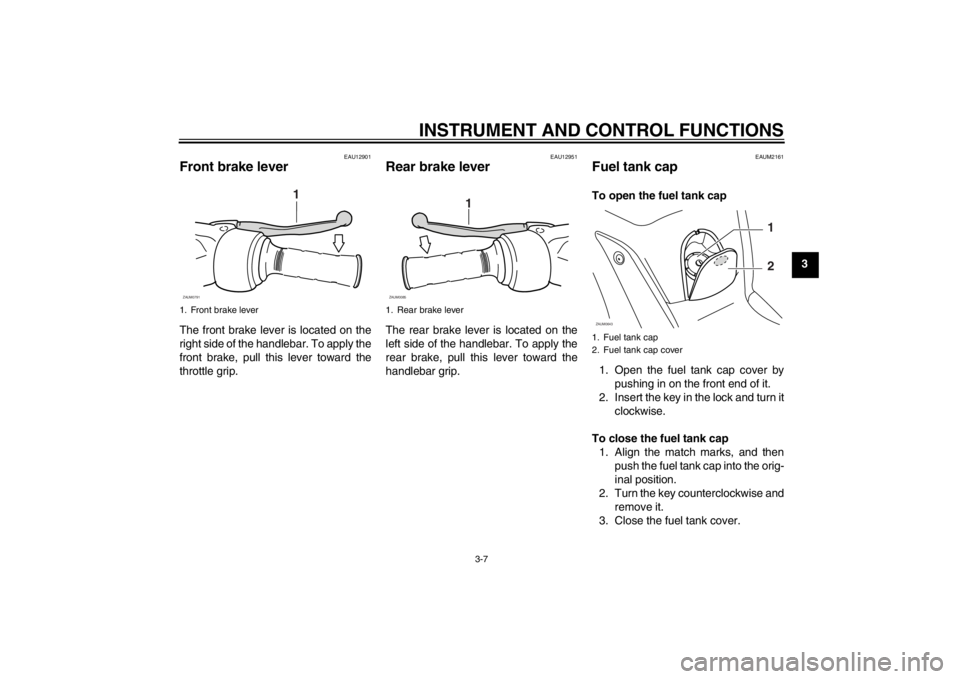
EAU12901
Front brake lever The front brake lever is located on the
right side of the handlebar. To apply the
front brake, pull this lever toward the
throttle grip.
EAU12951
Rear brake lever The rear brake lever is located on the
left side of the handlebar. To apply the
rear brake, pull this lever toward the
handlebar grip.
EAUM2161
Fuel tank cap To open the fuel tank cap
1. Open the fuel tank cap cover by
pushing in on the front end of it.
2. Insert the key in the lock and turn it
clockwise.
To close the fuel tank cap
1. Align the match marks, and then
push the fuel tank cap into the orig-
inal position.
2. Turn the key counterclockwise and
remove it.
3. Close the fuel tank cover.
1. Front brake lever
1
ZAUM0791
1. Rear brake lever
1
ZAUM0085
1. Fuel tank cap
2. Fuel tank cap coverZAUM0643
1
2
U5B2E4E0.book Page 7 Friday, June 1, 2012 9:06 AM
Page 24 of 82
INSTRUMENT AND CONTROL FUNCTIONS
3-8
3
WARNING
EWA11091
Make sure that the fuel tank cap is
properly closed after filling fuel.
Leaking fuel is a fire hazard.
EAU13212
Fuel Make sure there is sufficient gasoline in
the tank.
WARNING
EWA10881
Gasoline and gasoline vapors are
extremely flammable. To avoid fires
and explosions and to reduce the
risk of injury when refueling, follow
these instructions.1. Before refueling, turn off the en-
gine and be sure that no one is sit-
ting on the vehicle. Never refuel
while smoking, or while in the vi-
cinity of sparks, open flames, or
other sources of ignition such as
the pilot lights of water heaters and
clothes dryers.
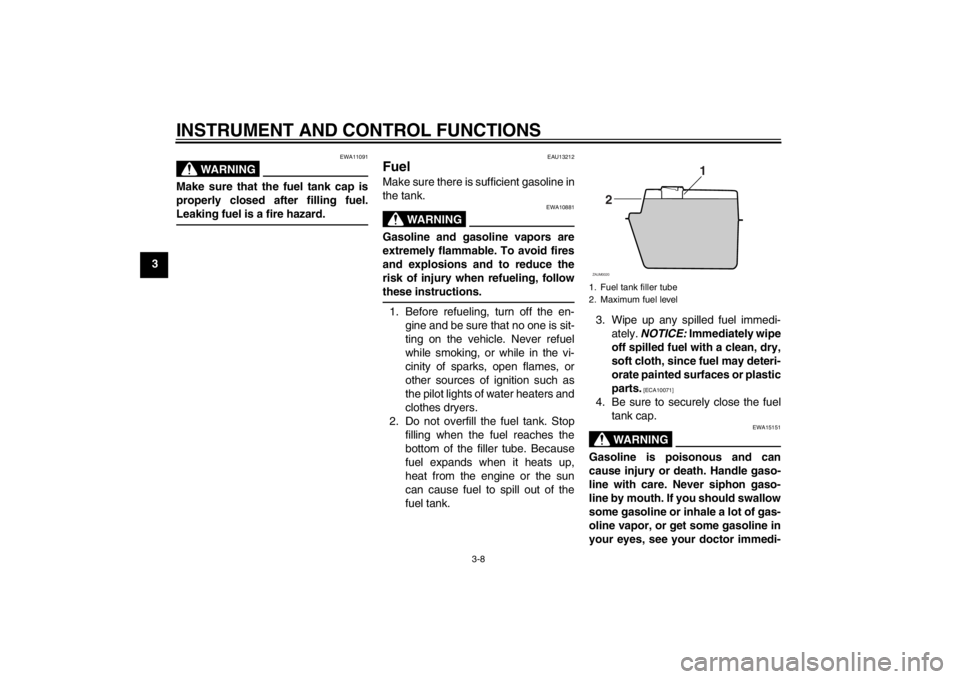
2. Do not overfill the fuel tank. Stop
filling when the fuel reaches the
bottom of the filler tube. Because
fuel expands when it heats up,
heat from the engine or the sun
can cause fuel to spill out of the
fuel tank.3. Wipe up any spilled fuel immedi-
ately. NOTICE: Immediately wipe
off spilled fuel with a clean, dry,
soft cloth, since fuel may deteri-
orate painted surfaces or plastic
parts.
[ECA10071]
4. Be sure to securely close the fuel
tank cap.
WARNING
EWA15151
Gasoline is poisonous and can
cause injury or death. Handle gaso-
line with care. Never siphon gaso-
line by mouth. If you should swallow
some gasoline or inhale a lot of gas-
oline vapor, or get some gasoline in
your eyes, see your doctor immedi-1. Fuel tank filler tube
2. Maximum fuel level
1
2
ZAUM0020
U5B2E4E0.book Page 8 Friday, June 1, 2012 9:06 AM